Chapter 2: Encoding Schemes & Number System
In the early 1960s, a company could buy two computers from two manufacturers, place them in the same room, and still not get them to exchange a single line of readable text. Each machine had its own private arrangement for turning keys into numbers. On one, the letter A might be stored as one value; on the other, as something entirely different. A tape written on the first machine, read by the second, came out as gibberish — not because the tape was damaged, but because the two machines disagreed about what the letters meant.
The problem was not electrical. It was an agreement problem. So a standards committee in the United States settled it in 1963 by publishing a single table: every letter, digit and punctuation mark on an English keyboard was assigned one fixed number, and every manufacturer was asked to use that table and no other. The idea worked so well that it is still in use today.
But that table held only the English alphabet. In the mid-1980s, India built its own standard for Indian scripts so that Devanagari and other Indian writing could be typed and stored the same way. Later, one worldwide standard was designed to hold the characters of nearly every written language on Earth — so that a document typed in Hindi in Jaipur opens correctly on a machine in Tokyo.
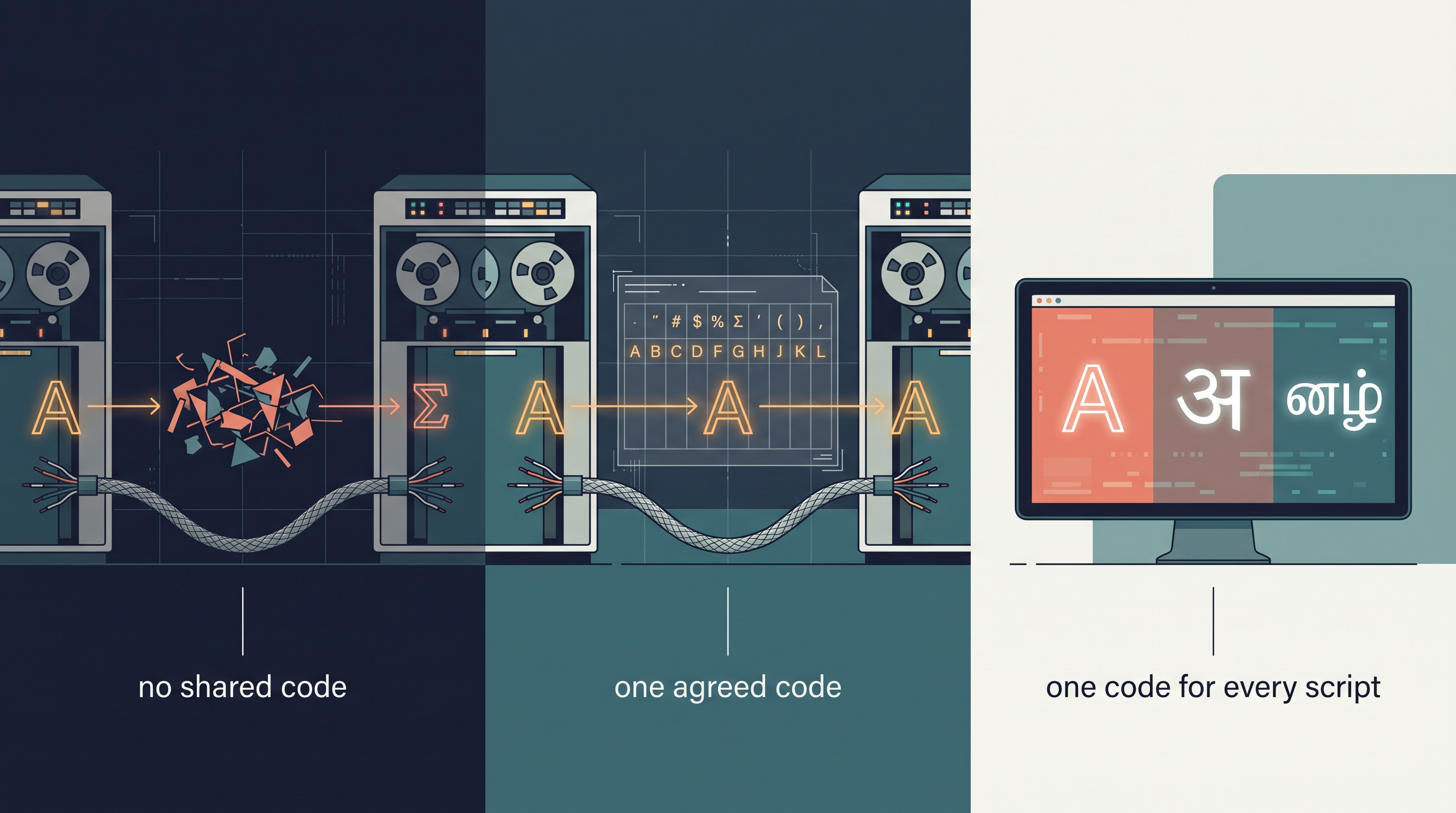
Fig. 2.0 – The evolution of encoding standards.
This chapter answers each of these questions. Work through it, and you will be able to return to this list and answer all five yourself.
2.1 Introduction to Encoding
Press the letter A on a keyboard and it appears on the screen almost instantly. Nothing about that seems remarkable until you remember what the machine underneath is actually capable of storing. A computer holds no letters, no punctuation and no words. Every cell of its memory holds one of two electrical states, and nothing else.
A bit is a single one of those two-state units, written as 0 or 1. Everything a computer keeps — a name, a marks list, a photograph, a song — is finally a long arrangement of bits. So a letter cannot be stored as a letter. It has to be turned into a number first, and that number into bits.
This raises a question the machine cannot settle by itself. Which number should stand for A? There is nothing in the shape of the letter, or in the wiring of the keyboard, that points to one number rather than another. The choice is arbitrary, and it only works if everyone makes the same arbitrary choice.
That agreed choice is what encoding provides. Encoding is the process of representing each character by a fixed numeric code value, which the computer then stores in binary. The set of characters that a scheme can represent is called its character set.
You can now follow what happens between the key and the screen. Pressing A produces a code value; the code value is converted to binary; the binary is what is stored and moved about. When the character has to be shown again, the process is read backwards, as shown in Fig. 2.1.
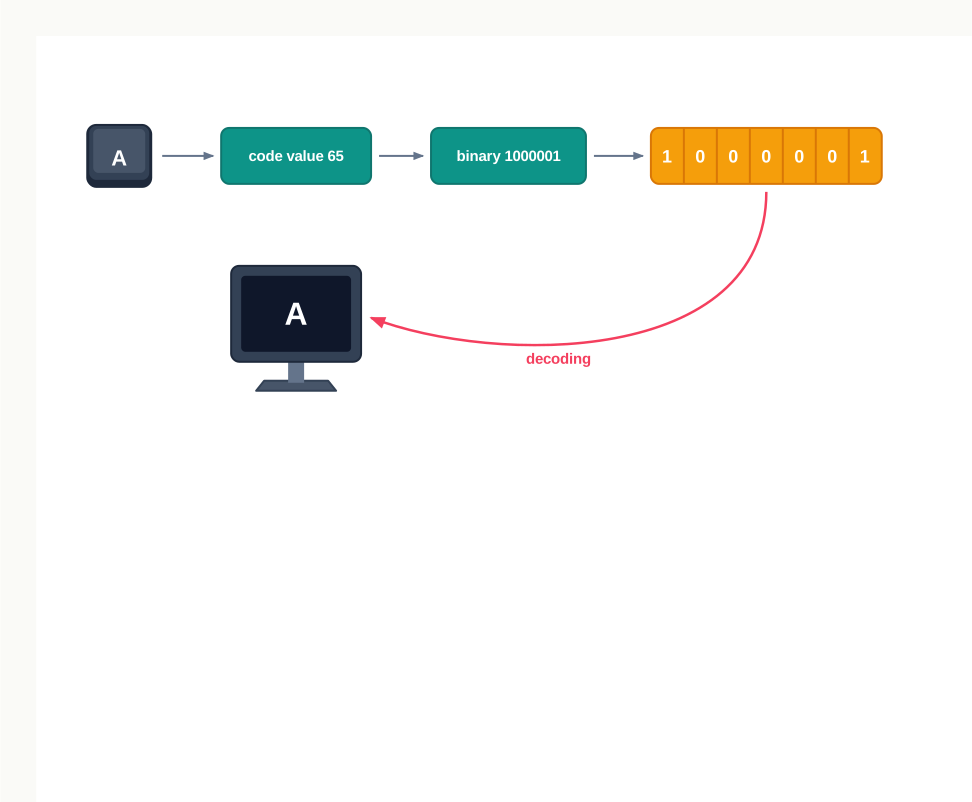
Fig. 2.1 – The character encoding and decoding process.
2.1.1 American Standard Code for Information Interchange (ASCII)
In the early 1960s the disagreement described above was a practical obstacle. Machines from different makers could not exchange readable text, because each maker had settled on its own arrangement of code values. A common table was needed, and one was published as a national standard.
The scheme is called the American Standard Code for Information Interchange (ASCII). It fixes a code value for every character on an English keyboard — capital letters, small letters, digits, punctuation marks, the space, and a set of control characters used to mark things like the end of a line. It remains the most widely used character encoding in the world.
ASCII was designed as a 7-bit code. Each of the 7 bits can independently be 0 or 1, so the number of distinct patterns available is \(2^7 = 128\). That is the exact size of the ASCII character set: code values 0 to 127, and no more.
It is worth seeing where the familiar characters sit. Table 2.1 gives the code value of a few of them, together with the 7-bit binary form that is actually stored.
Table 2.1 – code value and 7-bit binary form of some ASCII characters
| Character | Code value | 7-bit binary |
|---|---|---|
| Space | 32 | 0100000 |
| + | 43 | 0101011 |
| 0 | 48 | 0110000 |
| 9 | 57 | 0111001 |
| ? | 63 | 0111111 |
| A | 65 | 1000001 |
| M | 77 | 1001101 |
| Z | 90 | 1011010 |
| a | 97 | 1100001 |
| m | 109 | 1101101 |
| z | 122 | 1111010 |
Read down the table and a pattern appears. The capital letters run without a gap from A at 65 to Z at 90; the small letters run without a gap from a at 97 to z at 122; the digits run from 0 at 48 to 9 at 57. None of this is accidental. Because the letters are consecutive, arranging words in dictionary order becomes ordinary numerical comparison.
Notice also that every small letter is exactly 32 more than its capital: a is 97 and A is 65, m is 109 and M is 77. Changing the case of a letter is therefore a matter of adding or subtracting 32, which is why case conversion is such a cheap operation for a computer.
Encoding a word
Encoding a word means encoding each of its characters in turn and keeping them in order. Take the word CODE. Its four characters have the code values 67, 79, 68 and 69, and each of these is stored as its 7-bit binary equivalent, as set out in Table 2.2.
Table 2.2 – code values and binary form of the characters of the word CODE
| Character | C | O | D | E |
|---|---|---|---|---|
| Code value | 67 | 79 | 68 | 69 |
| 7-bit binary | 1000011 | 1001111 | 1000100 | 1000101 |
The stored form of the whole word is simply these four groups placed one after another. Nothing separates them, and nothing marks them as letters rather than numbers — the machine knows they are text only because the program using them treats them as text.
That is the strength and the limit of ASCII in one sentence. It is small, fast and universally supported, but 128 code values are barely enough for one language. There is no room in it for Devanagari, Tamil, Bangla or any other script, and that shortage is what the next two schemes address.
2.1.2 Indian Script Code for Information Interchange (ISCII)
Typing in an Indian language on a computer needs code values for the characters of Indian scripts, and ASCII has none to spare. During the mid-1980s a standard was developed in India for exactly this purpose: the Indian Script Code for Information Interchange (ISCII).
ISCII is an 8-bit code. Adding one bit to the seven of ASCII doubles the number of available patterns, since \(2^8 = 256\). That gives 256 code values in place of 128 — enough for the English character set and an Indian script alongside it.
The way those 256 values are divided is the important part. The lower 128 code values are left exactly as ASCII defined them, and the additional codes in the upper region, from 160 to 255, are assigned to the aksharas of the Indian scripts. Fig. 2.2 shows this division.
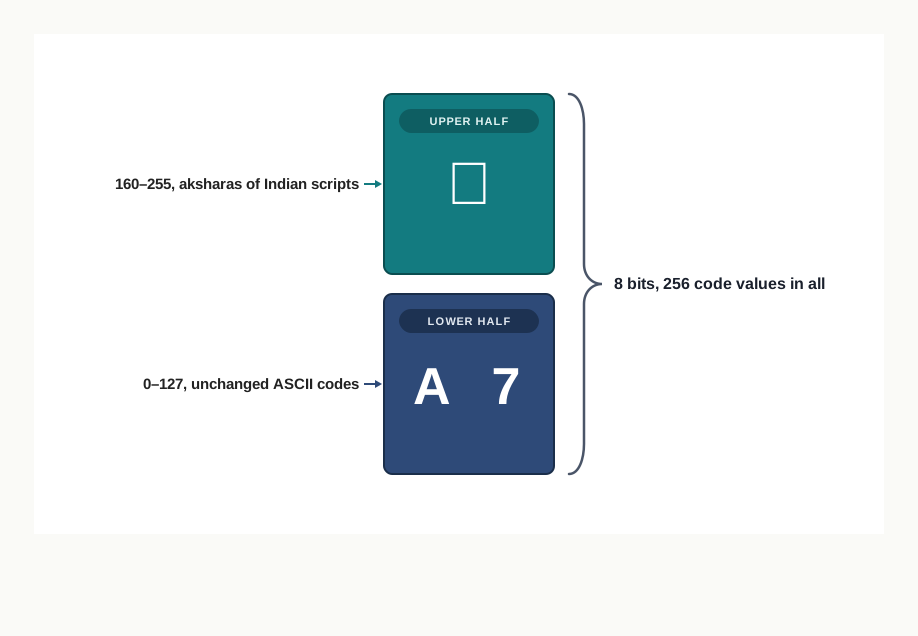
Fig. 2.2 – Division of the 256 ISCII code values.
Keeping the lower 128 unchanged was a deliberate design decision, not a convenience. Every file, every program and every device that already handled ASCII text continued to work without modification, because nothing it depended on had moved. Only the newly used upper region was unfamiliar to it.
ISCII solved the Indian case, but it did not solve the general one. Eight bits give 256 values, and the world’s writing systems together need far more than 256 characters. Different regions went on using different schemes, so text created under one scheme was still misread by a machine using another. What was needed was a single scheme large enough for all of them.
2.1.3 UNICODE
UNICODE is that scheme. It is a standard designed to include the characters of every written language of the world, giving each character one unique number that does not change from one setting to another.
The phrase “does not change” is doing real work there. The number assigned to a character is the same whatever the device — server, desktop or mobile; whatever the operating system; and whatever the software application, whether a browser or a text editor. The character is identified by its number, and the number belongs to the character alone.
The unique number assigned to a character is called its code point, and it is written in hexadecimal by convention. Table 2.3 gives the code points of a few Devanagari characters.
Table 2.3 – UNICODE code points of some Devanagari characters, in hexadecimal
| Character | अ | क | न | म | ह | । |
|---|---|---|---|---|---|---|
| Code point | 0905 | 0915 | 0928 | 092E | 0939 | 0964 |
Take the first of these. The character अ has the code point 0905, and the binary equivalent of that hexadecimal value is 0000100100000101 — sixteen bits, against the seven that were enough for A. A larger character set needs larger numbers, and larger numbers need more bits.
How those code points are actually turned into bytes for storage is a separate matter, and UNICODE allows more than one arrangement. The commonly used ones are UTF-8, UTF-16 and UTF-32. They differ in how many bytes they spend on a character, not in which character a code point stands for.
UNICODE is a superset of ASCII, and the values 0 to 127 stand for the same characters in both. So A is still 65, and an ASCII file read as UNICODE comes out correct — the same backward-compatible decision that ISCII had made, now applied worldwide.
Table 2.4 – ASCII, ISCII and UNICODE compared
| Feature | ASCII | ISCII | UNICODE |
|---|---|---|---|
| Bits used | 7 | 8 | Code points needing more than 8 bits; stored using UTF-8, UTF-16 or UTF-32 |
| Number of characters | 128 | 256 | Characters of every written language |
| Scripts covered | English only | English and Indian scripts | Nearly all scripts of the world |
| Relation to ASCII | — | Retains all 128 ASCII codes | Superset of ASCII; values 0 to 127 unchanged |
| Purpose | Standardise English character representation | Allow Indian languages on computers | One common scheme for all languages |
The three schemes are best read as one line of development rather than three rival options. ASCII fixed the disagreement for English; ISCII extended the same idea to Indian scripts without disturbing what ASCII had settled; UNICODE carried the idea to its natural conclusion by giving every character of every script a number of its own.
There is one loose end left. A code value has been described throughout this section as a number, and the stored form as binary — but converting 65 to 1000001, or reading 0905 as sixteen bits, has simply been asserted so far. The next section takes up the number systems that make those conversions possible.
2.2 Number System
Section 2.1 left one thing unexplained. The code value of A was given as 65, and its stored form as 1000001, as though moving from one to the other were obvious. It is not obvious, and it is the subject of the rest of this chapter.
The difficulty is that 65 and 1000001 are the same quantity written two different ways. Nothing has been added or removed between them; only the method of writing has changed. To see how that is possible, you have to look at what writing a number actually involves.
A number system is a method of writing numbers. Every number system has a fixed set of unique symbols, called its literals, and every number in that system is written using only those symbols. The count of the symbols is called the radix or base of the system.
Four number systems matter in the context of computers, and they are set out in Fig. 2.3 and Table 2.5. You already use one of them daily; the other three exist because of how machines are built.
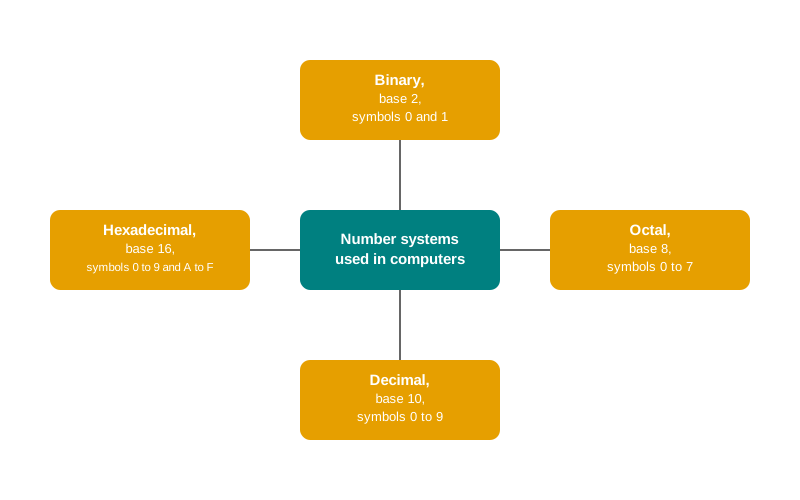
Fig. 2.3 – Number systems used in computers.
Table 2.5 – the four number systems, their bases and their symbol sets
| Number system | Base | Symbols used | Count of symbols |
|---|---|---|---|
| Binary | 2 | 0, 1 | 2 |
| Octal | 8 | 0, 1, 2, 3, 4, 5, 6, 7 | 8 |
| Decimal | 10 | 0, 1, 2, 3, 4, 5, 6, 7, 8, 9 | 10 |
| Hexadecimal | 16 | 0, 1, 2, 3, 4, 5, 6, 7, 8, 9, A, B, C, D, E, F | 16 |
Read the last column against the second and the pattern is exact: the base of a system is simply how many symbols it has. A system with two symbols has base 2, a system with sixteen symbols has base 16. Nothing deeper is being claimed than that.
2.2.1 Positional Number Systems, Base and Positional Value
Write 55 and look at the two digits. They are the same symbol, yet they do not stand for the same quantity: the left one means fifty, the right one means five. What separates them is where they sit.
All four systems in Table 2.5 work this way, and for that reason they are called positional number systems. The value a symbol contributes depends on the symbol itself and on its position within the number.
Positions are counted from a fixed reference point. In the integer part, the rightmost symbol is at position number 0, and the position number increases by 1 as you move leftwards. A number may also have a fractional part, written after the point; there the first symbol is at position number \(-1\), and the position number decreases by 1 as you move rightwards. Fig. 2.4 shows the numbering on a number of both parts.
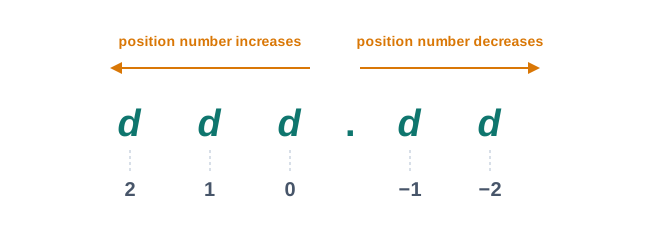
Fig. 2.4 – Numbering of positions in a positional number system.
Each position carries a weight, called its positional value. The positional value of a position is the base of the system raised to that position number. In a base-10 system the position numbered 3 has positional value \(10^3\); in a base-2 system the same position has positional value \(2^3\).
The value of the whole number then follows in one step. Multiply each symbol by the positional value of the position it occupies, and add the products.
Writing the base with the number
Because 70 is a legal way of writing a number in several of these systems, and means something different in each, the base has to be stated whenever there is any doubt. The convention is to enclose the number in brackets and write the base as a subscript.
So \((70)_8\) is the number 70 read as octal, and \((70)_{10}\) is the number 70 read as decimal. They are not equal, and the subscript is what tells you so. This notation is used throughout the rest of the chapter.
2.2.2 Decimal Number System
The decimal number system is the one used in everyday life. It is a base-10 system, because it uses ten digits, 0 to 9.
Applying the rule of the previous subsection to a decimal number gives back exactly what you already do without thinking. Take \((846.5)_{10}\) and set out its positions and positional values, as in Table 2.6.
Table 2.6 – computation of the decimal number \((846.5)_{10}\) from its positional values
| Digit | 8 | 4 | 6 | . | 5 |
|---|---|---|---|---|---|
| Position number | 2 | 1 | 0 | −1 | |
| Positional value | \(10^2\) | \(10^1\) | \(10^0\) | \(10^{-1}\) | |
| Product | \(8 \times 100 = 800\) | \(4 \times 10 = 40\) | \(6 \times 1 = 6\) | \(5 \times 0.1 = 0.5\) |
Adding the products gives \(800 + 40 + 6 + 0.5 = 846.5\), which is the number you started with. That is the point of the exercise: the rule is not a new fact about numbers, it is a statement of what decimal notation has always meant.
The value of writing it out is that the same rule now applies unchanged to the other three systems. Only the base changes, and with it the positional values.
2.2.3 Binary Number System
The binary number system is a base-2 system. It has only two symbols, 0 and 1, and no others.
The reason a computer uses this particular system is a matter of hardware. The integrated circuits inside a computer are built from very large numbers of transistors, and a transistor responds to the electronic signal it receives by being in one of two states — high, or low. The high state is represented by 1 and the low state by 0.
Two states are what the hardware reliably gives, so two symbols are what the number system gets. A circuit that had to distinguish ten voltage levels rather than two would be slower, costlier and far more easily confused by small electrical disturbances.
Some examples of binary numbers are \((110101)_2\), \((1011.11)_2\) and \((100000)_2\). Each symbol of a binary number is a bit, the unit introduced in section 2.1, so a binary number of eight symbols is eight bits long.
The positional values in binary are the powers of 2, and they are worth memorising up to a reasonable size, because almost every conversion in the next section leans on them. Table 2.7 lists them for the first eight integer positions.
Table 2.7 – positional values of the first eight integer positions in binary
| Position number | 7 | 6 | 5 | 4 | 3 | 2 | 1 | 0 |
|---|---|---|---|---|---|---|---|---|
| Positional value | \(2^7\) | \(2^6\) | \(2^5\) | \(2^4\) | \(2^3\) | \(2^2\) | \(2^1\) | \(2^0\) |
| In decimal | 128 | 64 | 32 | 16 | 8 | 4 | 2 | 1 |
Notice how quickly a binary number grows in length. The decimal number 200 takes three digits; in binary it takes eight. This is the price of having only two symbols, and it is what the next two systems were introduced to relieve.
2.2.4 Octal Number System
A binary number of any size is exact, but it is hard for a person to hold in the head or copy without error. A row of sixteen 0s and 1s is easy to misread and easy to mistype. The octal number system was devised to write binary values more compactly.
Octal is a base-8 system, with the eight digits 0 to 7, and its positional values are powers of 8.
The compactness comes from an arithmetic coincidence that is not really a coincidence. Since \(8 = 2^3\), three binary digits have exactly \(2 \times 2 \times 2 = 8\) possible combinations, which is exactly the number of octal digits. Three bits therefore correspond to one octal digit, always, with nothing left over and nothing missing.
Table 2.8 – the eight octal digits with their decimal and 3-bit binary equivalents
| Octal digit | Decimal value | 3-bit binary |
|---|---|---|
| 0 | 0 | 000 |
| 1 | 1 | 001 |
| 2 | 2 | 010 |
| 3 | 3 | 011 |
| 4 | 4 | 100 |
| 5 | 5 | 101 |
| 6 | 6 | 110 |
| 7 | 7 | 111 |
Examples of octal numbers are \((365.2)_8\), \((74)_8\) and \((1200)_8\). Because the table above is a complete correspondence in both directions, moving between binary and octal turns out to need no arithmetic at all, as section 2.3 will show.
2.2.5 Hexadecimal Number System
The hexadecimal number system compresses binary further. It is a base-16 system, so it needs sixteen distinct symbols — but the ordinary digits supply only ten. The remaining six are supplied by the letters A to F, standing for the decimal values 10 to 15.
Here \(16 = 2^4\), so four bits have exactly sixteen combinations and correspond to one hexadecimal symbol. Where octal packs three bits into one symbol, hexadecimal packs four, which is why it is the more common of the two in practice. Table 2.9 gives the full correspondence.
Table 2.9 – the sixteen hexadecimal symbols with their decimal and 4-bit binary equivalents
| Hexadecimal symbol | Decimal value | 4-bit binary |
|---|---|---|
| 0 | 0 | 0000 |
| 1 | 1 | 0001 |
| 2 | 2 | 0010 |
| 3 | 3 | 0011 |
| 4 | 4 | 0100 |
| 5 | 5 | 0101 |
| 6 | 6 | 0110 |
| 7 | 7 | 0111 |
| 8 | 8 | 1000 |
| 9 | 9 | 1001 |
| A | 10 | 1010 |
| B | 11 | 1011 |
| C | 12 | 1100 |
| D | 13 | 1101 |
| E | 14 | 1110 |
| F | 15 | 1111 |
Examples of hexadecimal numbers are \((2F9)_{16}\), \((B04.C)_{16}\) and \((1AC)_{16}\). The letters take some getting used to, but they are ordinary symbols standing for ordinary values, exactly as 7 does.
2.2.6 Applications of the Hexadecimal Number System
The hexadecimal system is not an academic curiosity. It is used wherever a person has to read, write or remember a binary value, and two such places are worth looking at.
Memory addresses
Main memory is made up of memory locations, and each location has a unique address by which it is reached. The size of a memory address is usually 16 bits or 32 bits. Written in binary, a 16-bit address is a row of sixteen 0s and 1s — accurate, but nearly impossible to read aloud or copy reliably.
Take the address \((1011001111010110)_2\). Divided into groups of four bits from the right, it becomes 1011, 0011, 1101, 0110, and each group is replaced by its hexadecimal symbol from Table 2.9 to give \((B3D6)_{16}\). Four symbols now carry what sixteen carried before, as Fig. 2.5 shows, and not one bit of information has been lost.
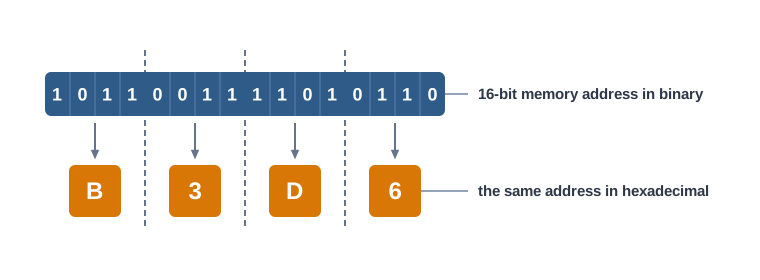
Fig. 2.5 – Compact representation of a 16-bit memory address in hexadecimal.
Table 2.10 sets out the same address in all four systems, so that the gain in compactness can be compared directly. The method for reaching the decimal form is taken up in section 2.3.
Table 2.10 – one 16-bit memory address written in four number systems
| Number system | The address | Symbols needed |
|---|---|---|
| Binary | 1011001111010110 | 16 |
| Octal | 131726 | 6 |
| Hexadecimal | B3D6 | 4 |
| Decimal | 46038 | 5 |
Colour codes
Colours on a webpage are described in the same compact way. Each colour is built from three primary colours — red, green and blue, together called RGB — and in most colour maps a colour is chosen from a palette of about 16 million.
That palette size comes from spending 8 bits on each of the three components, giving 24 bits for the colour as a whole. Since \(2^{24} = 16{,}777{,}216\), the 24 bits are exactly what “16 million colours” means.
A 24-bit binary colour code is unreadable for the same reason a 16-bit address is. So colour codes are written in hexadecimal instead, with each 8-bit component becoming two hexadecimal symbols. Table 2.11 shows a few colours in all three forms.
Table 2.11 – colour codes in decimal, binary and hexadecimal
| Colour name | Decimal (R, G, B) | Binary | Hexadecimal |
|---|---|---|---|
| Blue | (0, 0, 255) | (00000000, 00000000, 11111111) | (00, 00, FF) |
| Green | (0, 128, 0) | (00000000, 10000000, 00000000) | (00, 80, 00) |
| Magenta | (255, 0, 255) | (11111111, 00000000, 11111111) | (FF, 00, FF) |
| Orange | (255, 165, 0) | (11111111, 10100101, 00000000) | (FF, A5, 00) |
Read the last row across and the whole idea of this section is visible in one line. The three forms describe one colour; they differ only in how many symbols the writing takes and in how easily a person can handle it.
You now have four ways of writing a number and one rule that reads all of them. What remains is the reverse task: given a number in one system, produce the same value written in another. That is the work of section 2.3.
2.3 Conversion between Number Systems
Section 2.2 established that one quantity can be written in four different ways. What it did not supply is a method for moving between them. Given \((89)_{10}\), how do you produce the binary form without guessing? Given \((3C7)_{16}\), how do you find out how large it actually is?
Three methods answer every case, and they are worth naming at the outset so that you know which one you are using.
The first converts a decimal number into any other system, by repeated division. The second converts a number of any system into decimal, by positional values. The third moves between binary, octal and hexadecimal by grouping bits, and needs no arithmetic at all. Everything in this section is one of these three, applied to a particular pair of bases.
2.3.1 Conversion from Decimal to Other Number Systems
To write a decimal number in another system, you have to find out how many of each positional value it contains. Repeated division does this automatically.
Divide the number by the target base. The remainder is what is left over after every whole group of the base has been taken out, so it is the symbol at position 0. The quotient is how many whole groups there were, so dividing it again by the base gives the symbol at position 1, and so on until nothing is left.
2.3.1.1 Decimal to Binary Conversion
Since binary has base 2, the number is divided repeatedly by 2. Fig. 2.6 shows the working laid out in the usual way for \((89)_{10}\), and Table 2.12 lists the same steps.
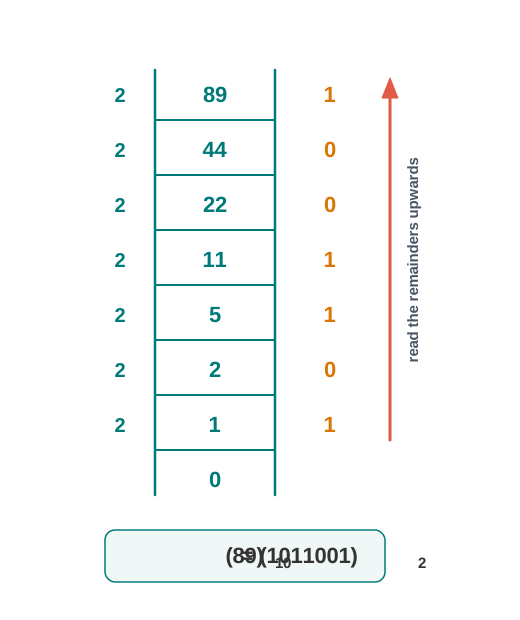
Fig. 2.6 – Decimal to binary conversion by repeated division.
Table 2.12 – repeated division of 89 by 2
| Step | Division | Quotient | Remainder |
|---|---|---|---|
| 1 | \(89 \div 2\) | 44 | 1 |
| 2 | \(44 \div 2\) | 22 | 0 |
| 3 | \(22 \div 2\) | 11 | 0 |
| 4 | \(11 \div 2\) | 5 | 1 |
| 5 | \(5 \div 2\) | 2 | 1 |
| 6 | \(2 \div 2\) | 1 | 0 |
| 7 | \(1 \div 2\) | 0 | 1 |
The quotient has reached zero, so the division stops. Reading the remainder column upwards, from step 7 to step 1, gives 1011001.
Therefore \((89)_{10} = (1011001)_2\).
It is worth checking the answer rather than trusting it. Using the positional values of Table 2.7, the binary form comes to \(64 + 16 + 8 + 1 = 89\), which is the number we started with. Every conversion in this chapter can be checked this way, and you should form the habit now.
2.3.1.2 Decimal to Octal Conversion
The method does not change; only the divisor does. Since octal has base 8, the number is divided repeatedly by 8. Table 2.13 works through \((476)_{10}\).
Table 2.13 – repeated division of 476 by 8
| Step | Division | Quotient | Remainder |
|---|---|---|---|
| 1 | \(476 \div 8\) | 59 | 4 |
| 2 | \(59 \div 8\) | 7 | 3 |
| 3 | \(7 \div 8\) | 0 | 7 |
Reading the remainders upwards gives 734, so \((476)_{10} = (734)_8\).
The check: \(7 \times 64 + 3 \times 8 + 4 = 448 + 24 + 4 = 476\). Notice also how much shorter the working is than for binary — three divisions instead of seven, because each division of a base-8 conversion removes three bits’ worth of the number at a time.
2.3.1.3 Decimal to Hexadecimal Conversion
For hexadecimal the divisor is 16. One extra step is needed here: a remainder can be as large as 15, and any remainder from 10 to 15 must be written as its hexadecimal letter from Table 2.9 before it goes into the answer.
Table 2.14 converts \((2543)_{10}\).
Table 2.14 – repeated division of 2543 by 16
| Step | Division | Quotient | Remainder | Hexadecimal symbol |
|---|---|---|---|---|
| 1 | \(2543 \div 16\) | 158 | 15 | F |
| 2 | \(158 \div 16\) | 9 | 14 | E |
| 3 | \(9 \div 16\) | 0 | 9 | 9 |
Reading upwards gives 9EF, so \((2543)_{10} = (9EF)_{16}\).
The check: \(9 \times 256 + 14 \times 16 + 15 = 2304 + 224 + 15 = 2543\). Had the remainders 15 and 14 been left as they were, the answer would have read 91415, which is not a hexadecimal number at all — it is three separate numbers written side by side.
2.3.2 Conversion from Other Number Systems to Decimal
The reverse direction needs no division. Section 2.2.1 already gave the rule: multiply each symbol by the positional value of its position, and add the products. Applying that rule to a number in any base produces its decimal value directly.
2.3.2.1 Binary to Decimal Conversion
Binary has base 2, so the positional values are powers of 2. Table 2.15 converts \((110110)_2\).
Table 2.15 – computation of the decimal value of \((110110)_2\)
| Digit | 1 | 1 | 0 | 1 | 1 | 0 |
|---|---|---|---|---|---|---|
| Position number | 5 | 4 | 3 | 2 | 1 | 0 |
| Positional value | \(2^5\) | \(2^4\) | \(2^3\) | \(2^2\) | \(2^1\) | \(2^0\) |
| Product | 32 | 16 | 0 | 4 | 2 | 0 |
Adding the products gives \(32 + 16 + 0 + 4 + 2 + 0 = 54\), so \((110110)_2 = (54)_{10}\).
In binary the arithmetic is lighter than it looks, because every symbol is 0 or 1. A product is either the positional value itself or nothing at all, so the whole conversion reduces to adding up the positional values that carry a 1.
2.3.2.2 Octal to Decimal Conversion
For octal the positional values are powers of 8. Table 2.16 converts \((452)_8\).
Table 2.16 – computation of the decimal value of \((452)_8\)
| Digit | 4 | 5 | 2 |
|---|---|---|---|
| Position number | 2 | 1 | 0 |
| Positional value | \(8^2\) | \(8^1\) | \(8^0\) |
| Product | \(4 \times 64 = 256\) | \(5 \times 8 = 40\) | \(2 \times 1 = 2\) |
The sum is \(256 + 40 + 2 = 298\), so \((452)_8 = (298)_{10}\).
2.3.2.3 Hexadecimal to Decimal Conversion
For hexadecimal the positional values are powers of 16, and any letter symbol is replaced by its decimal value from Table 2.9 before multiplying. Table 2.17 converts \((3C7)_{16}\), in which C stands for 12.
Table 2.17 – computation of the decimal value of \((3C7)_{16}\)
| Symbol | 3 | C | 7 |
|---|---|---|---|
| Decimal value of symbol | 3 | 12 | 7 |
| Position number | 2 | 1 | 0 |
| Positional value | \(16^2\) | \(16^1\) | \(16^0\) |
| Product | \(3 \times 256 = 768\) | \(12 \times 16 = 192\) | \(7 \times 1 = 7\) |
The sum is \(768 + 192 + 7 = 967\), so \((3C7)_{16} = (967)_{10}\).
2.3.3 Conversion between Binary, Octal and Hexadecimal
Converting from binary to octal by way of decimal would work, but it would be a waste of effort. There is a direct route, and it needs no arithmetic beyond reading a table.
The reason was given in sections 2.2.4 and 2.2.5. Since \(8 = 2^3\), one octal digit corresponds to exactly three bits; since \(16 = 2^4\), one hexadecimal symbol corresponds to exactly four bits. So a binary number can be divided into groups of three or four bits, and each group replaced by the single symbol that stands for it.
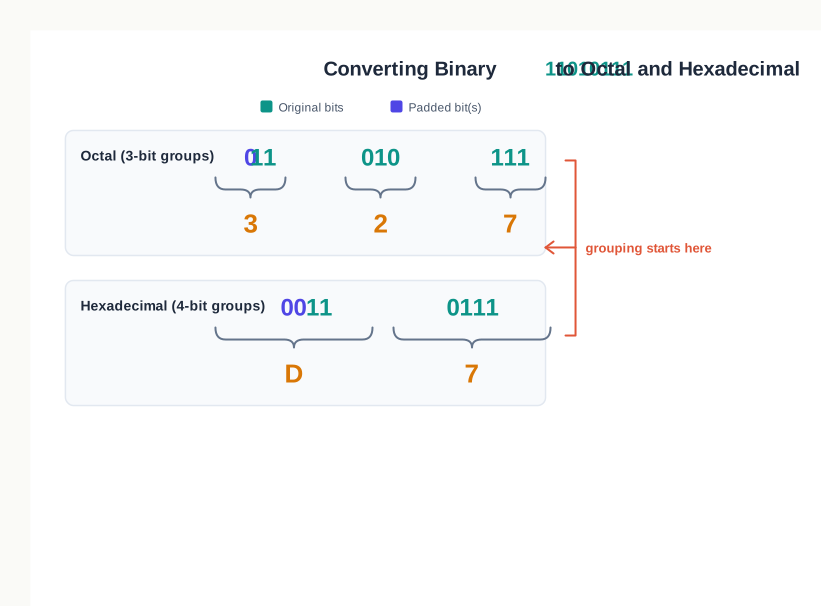
Fig. 2.7 – Grouping bits from the right to convert binary to octal and hexadecimal.
2.3.3.1 Binary to Octal Conversion
Take \((11010111)_2\). Grouping from the right in threes gives 11, 010, 111. The leftmost group has only two bits, so a 0 is added at its left to make 011.
The three groups 011, 010 and 111 stand for the octal digits 3, 2 and 7, so \((11010111)_2 = (327)_8\).
The check is worth doing once, to see that the shortcut is honest. The binary number is \(128 + 64 + 16 + 4 + 2 + 1 = 215\), and the octal number is \(3 \times 64 + 2 \times 8 + 7 = 192 + 16 + 7 = 215\).
2.3.3.2 Octal to Binary Conversion
The reverse replaces each octal digit by its three bits. Take \((526)_8\). From Table 2.8, the digit 5 is 101, the digit 2 is 010 and the digit 6 is 110.
Joining them in order gives \((526)_8 = (101010110)_2\).
Leading 0s produced this way may be dropped from the final answer if the leftmost group begins with them, since a 0 at the left of a number changes nothing. Within the number they must never be dropped, because there every bit is holding a position.
2.3.3.3 Binary to Hexadecimal Conversion
Here the groups are of four bits. Take \((1101101110)_2\). Grouping from the right gives 11, 0110, 1110, and the short leftmost group is completed with two 0s to make 0011.
From Table 2.9, the groups 0011, 0110 and 1110 stand for 3, 6 and E. So \((1101101110)_2 = (36E)_{16}\).
Checking: the binary number is \(512 + 256 + 64 + 32 + 8 + 4 + 2 = 878\), and the hexadecimal number is \(3 \times 256 + 6 \times 16 + 14 = 768 + 96 + 14 = 878\).
2.3.3.4 Hexadecimal to Binary Conversion
Each hexadecimal symbol is replaced by its four bits. Take \((7B2)_{16}\). From Table 2.9, the symbol 7 is 0111, B is 1011 and 2 is 0010.
Joining them gives \((7B2)_{16} = (011110110010)_2\), or 11110110010 with the leading 0 dropped.
There is no direct grouping between octal and hexadecimal, because 3 and 4 do not divide into each other. To convert one to the other, go through binary: expand each symbol into its bits, then regroup those bits in the other size.
Table 2.18 – the three conversion methods compared
| Feature | Repeated division | Positional values | Grouping of bits |
|---|---|---|---|
| Used for | Decimal to any other system | Any system to decimal | Binary to octal or hexadecimal, and back |
| Operation involved | Division by the target base | Multiplication and addition | None; only table look-up |
| Direction of reading | Remainders read upwards | Positions numbered from the right | Groups formed from the right |
| Result appears | After the quotient becomes zero | After the products are added | Immediately, group by group |
| Common mistake | Reading the remainders downwards | Forgetting that \(b^0 = 1\) | Grouping from the left instead of the right |
2.3.4 Conversion of a Number with a Fractional Part
Everything so far has dealt with whole numbers. A number may also have a fractional part, and each of the three methods needs a small addition to handle it. In every case the integer part and the fractional part are converted separately and then joined at the point.
2.3.4.1 Decimal Fraction to Another Number System
The integer part is converted by repeated division, as before. The fractional part is converted by repeated multiplication, which is the mirror image of the same idea.
Multiply the fractional part by the target base. The integer part of the product is the symbol at position \(-1\). Drop that integer part, keep the new fractional part, and multiply again to get the symbol at position \(-2\), and so on until the fractional part becomes 0.
Table 2.19 converts \((0.6875)_{10}\) to binary.
Table 2.19 – repeated multiplication of 0.6875 by 2
| Step | Multiplication | Product | Integer part taken | Fraction carried forward |
|---|---|---|---|---|
| 1 | \(0.6875 \times 2\) | 1.375 | 1 | 0.375 |
| 2 | \(0.375 \times 2\) | 0.75 | 0 | 0.75 |
| 3 | \(0.75 \times 2\) | 1.5 | 1 | 0.5 |
| 4 | \(0.5 \times 2\) | 1.0 | 1 | 0 |
The fractional part has become 0, so the multiplication stops. Here the integer parts are read downwards, from the first step to the last, giving 1011.
Therefore \((0.6875)_{10} = (0.1011)_2\). The check: \(0.5 + 0 + 0.125 + 0.0625 = 0.6875\).
The two directions of reading are worth pausing on, since they are opposite and both are correct. Division produces the smallest positional value first, so its remainders must be reversed. Multiplication produces the largest fractional positional value first, so its integer parts are already in order.
The same working with a different multiplier converts to the other systems. Multiplying 0.6875 by 8 gives 5.5, and 0.5 by 8 gives 4.0, so \((0.6875)_{10} = (0.54)_8\). Multiplying 0.6875 by 16 gives 11.0 in a single step, and 11 is written as B, so \((0.6875)_{10} = (0.B)_{16}\).
Joining an integer part to a fractional part needs no extra work. Since \((89)_{10} = (1011001)_2\) from section 2.3.1.1, it follows that \((89.6875)_{10} = (1011001.1011)_2\).
Fractions that do not terminate
Not every decimal fraction ends. Convert \((0.3)_{10}\) to binary and the multiplications run: 0.6, 1.2, 0.4, 0.8, 1.6, 1.2 — and 1.2 has already appeared, so the pattern 0011 will repeat for ever.
When the fractional part starts repeating, or has not become 0 after about ten multiplications, the calculation is stopped and the result is written to as many places as have been computed. What you then have is an approximation, not an equality.
2.3.4.2 Non-decimal Fraction to Decimal
Converting the other way needs nothing new. The positional values simply continue past the point, as negative powers of the base: \(b^{-1}\), \(b^{-2}\), \(b^{-3}\) and so on. Multiply each symbol by its positional value and add, exactly as before.
Table 2.20 converts \((1101.011)_2\).
Table 2.20 – computation of the decimal value of \((1101.011)_2\)
| Digit | 1 | 1 | 0 | 1 | . | 0 | 1 | 1 |
|---|---|---|---|---|---|---|---|---|
| Position number | 3 | 2 | 1 | 0 | −1 | −2 | −3 | |
| Positional value | \(2^3\) | \(2^2\) | \(2^1\) | \(2^0\) | \(2^{-1}\) | \(2^{-2}\) | \(2^{-3}\) | |
| Product | 8 | 4 | 0 | 1 | 0 | 0.25 | 0.125 |
The integer products add to \(8 + 4 + 0 + 1 = 13\) and the fractional products to \(0 + 0.25 + 0.125 = 0.375\), so \((1101.011)_2 = (13.375)_{10}\).
Octal and hexadecimal fractions work the same way with their own bases. In \((26.4)_8\) the fractional digit contributes \(4 \times 8^{-1} = 0.5\), giving \((22.5)_{10}\); in \((5A.8)_{16}\) the fractional symbol contributes \(8 \times 16^{-1} = 0.5\), giving \((90.5)_{10}\).
2.3.4.3 Binary Fraction to Octal or Hexadecimal
Grouping also extends past the point, with one change that matters. The integer part is grouped from the right, as always — but the fractional part is grouped from the left, starting at the point and working outwards. If the last group is short, 0s are added at the right-hand end to complete it.
The reason is the same in both halves: grouping must begin at the point, because that is where the positional values are anchored. Fig. 2.8 shows the two directions.
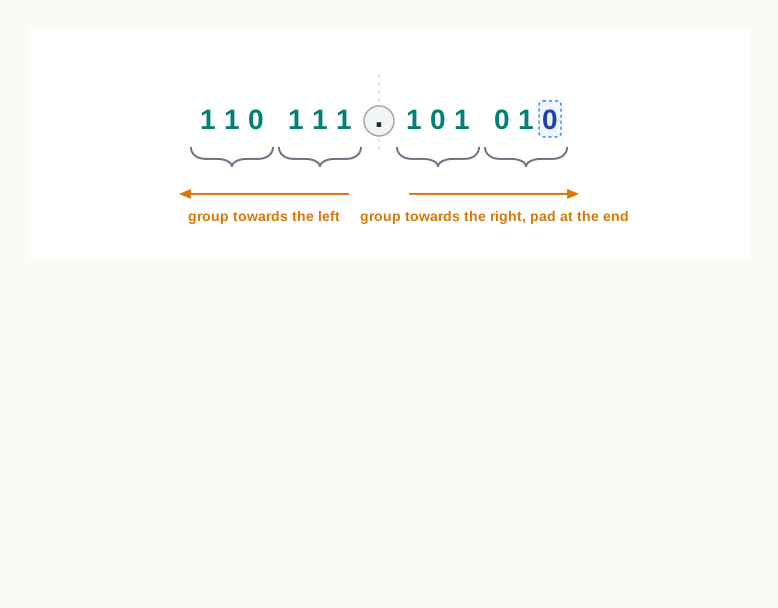
Fig. 2.8 – Grouping direction for fractional binary numbers.
Take \((110111.10101)_2\) and convert it to octal. The integer part 110111 groups as 110 and 111, giving the digits 6 and 7. The fractional part 10101 groups from the point as 101 and 01, and the short last group is completed to 010, giving the digits 5 and 2.
Therefore \((110111.10101)_2 = (67.52)_8\).
The same bits regrouped in fours give the hexadecimal form. The integer part groups as 11 and 0111, completed at the left to 0011 and 0111, giving 3 and 7. The fractional part groups from the point as 1010 and 1, completed at the right to 1010 and 1000, giving A and 8.
Therefore \((110111.10101)_2 = (37.A8)_{16}\).
Both answers describe one quantity, and both can be checked against section 2.3.4.2. The integer part is 55 in all three writings; the fractional part is \(0.5 + 0.125 + 0.03125 = 0.65625\) in binary, \(\frac{5}{8} + \frac{2}{64} = 0.65625\) in octal, and \(\frac{10}{16} + \frac{8}{256} = 0.65625\) in hexadecimal.
2.4 Summary
A computer stores nothing but bits, each holding one of two states written as 0 or 1. A character therefore cannot be stored as a character; it must first be represented by a numeric code value, which is then stored in binary.
Encoding is the representation of each character of a character set by a unique code value. The choice of code value is arbitrary in itself, so it is useful only when every machine follows the same table.
An encoding scheme is such a published table. Because the mapping carries no meaning of its own, a file read against the wrong scheme produces the wrong characters rather than an error. Encoding is not encryption: an encoding table is public and is meant to be, while encryption exists to keep content from those without a key.
Textual data is encoded using ASCII, ISCII or UNICODE.
ASCII is a 7-bit scheme, so it holds \(2^7 = 128\) code values, numbered 0 to 127. It covers the English character set only. Its letters are consecutive — A to Z at 65 to 90, a to z at 97 to 122, digits 0 to 9 at 48 to 57 — which is what allows sorting and case conversion to be done by simple arithmetic.
ISCII is an 8-bit scheme for Indian scripts, holding \(2^8 = 256\) code values. It retains all 128 ASCII codes unchanged and assigns the codes of the upper region, 160 to 255, to the aksharas of the language. Leaving the lower codes untouched is what kept existing text and programs working.
UNICODE is a character encoding standard that gives a unique number, called a code point, to every character of every written language, independent of the device, the operating system and the software application. It is a superset of ASCII, and the values 0 to 127 stand for the same characters in both. Its commonly used encodings are UTF-8, UTF-16 and UTF-32, which differ in how many bytes they spend on a character, not in which character a code point stands for.
A number system is a method of writing numbers using a fixed set of unique symbols. The count of those symbols is its base, or radix.
Four number systems are used in the context of computers: binary of base 2 with the symbols 0 and 1; octal of base 8 with the symbols 0 to 7; decimal of base 10 with the symbols 0 to 9; and hexadecimal of base 16 with the symbols 0 to 9 and A to F, where A to F stand for the decimal values 10 to 15.
All four are positional number systems: the value a symbol contributes depends on its position as well as on the symbol. In the integer part the rightmost position is numbered 0 and the numbering increases leftwards; in the fractional part the first position is numbered \(-1\) and the numbering decreases rightwards.
The positional value of a position is the base raised to that position number. A symbol of value \(d\) at position \(p\) in base \(b\) contributes \(d \times b^{p}\), and the value of the number is the sum of these contributions. The base is written as a subscript, so that \((70)_8\) and \((70)_{10}\) are distinguished.
A written form belongs to a base only if every one of its symbols belongs to that base. The largest single symbol in base \(b\) is always \(b - 1\).
Binary matches the hardware: a transistor reliably holds one of two states, high or low, written as 1 and 0. The cost of having only two symbols is length, and octal and hexadecimal exist to relieve it. Since \(8 = 2^3\), one octal digit stands for three bits; since \(16 = 2^4\), one hexadecimal symbol stands for four.
Hexadecimal is used wherever a person has to read or write a binary value — a 16-bit memory address becomes four symbols, and a 24-bit RGB colour code becomes six, with no loss of information.
Three methods cover every conversion. A decimal number is converted to another system by repeated division by the target base, the remainders being read in reverse order. A number of any system is converted to decimal by multiplying each symbol by its positional value and adding. Binary is converted to octal or hexadecimal by grouping the bits in threes or fours and replacing each group by its symbol, which needs no arithmetic at all.
Octal and hexadecimal have no direct grouping between them, because 3 and 4 do not divide into each other. Such a conversion is made through binary.
A number with a fractional part is converted in two halves that are joined at the point. The integer part uses repeated division, whose remainders are read upwards; the fractional part uses repeated multiplication by the base, whose integer parts are read downwards, in the order they appear.
For grouping, the integer part is grouped from the point leftwards and completed with 0s at the far left, while the fractional part is grouped from the point rightwards and completed with 0s at the far right. In both halves the grouping begins at the point, because that is where the positional values are anchored.
A fractional conversion may never terminate, and may begin to repeat. The calculation is then stopped after a reasonable number of steps, and the result recorded as an approximation rather than as an equality.
Every conversion can be checked by converting the answer back, or by adding its positional values, and the check is worth making a habit.
2.5 Key Terms
ASCII — American Standard Code for Information Interchange; a 7-bit encoding scheme that gives each character of the English character set a code value from 0 to 127.
Base — the count of unique symbols a number system uses; also called its radix.
Binary number system — the positional number system of base 2, using only the digits 0 and 1.
Bit — a single two-state unit of storage, written as 0 or 1, and the smallest piece of data a computer holds.
Character set — the collection of characters that an encoding scheme is able to represent.
Code point — the unique number that UNICODE assigns to a character, written in hexadecimal by convention.
Code value — the numeric value that an encoding scheme assigns to a particular character.
Decimal number system — the positional number system of base 10, using the digits 0 to 9.
Encoding — the representation of each character of a character set by a unique numeric code value, which is then stored in binary.
Encoding scheme — a published standard fixing one code value for every character of its character set, so that all machines represent text alike.
Hexadecimal number system — the positional number system of base 16, using the digits 0 to 9 and the letters A to F for the values ten to fifteen.
ISCII — Indian Script Code for Information Interchange; an 8-bit encoding scheme for Indian scripts that retains all 128 ASCII codes and assigns the codes 160 to 255 to the aksharas of the language.
Number system — a method of writing numbers using a fixed set of unique symbols.
Octal number system — the positional number system of base 8, using the digits 0 to 7.
Position number — the number identifying a symbol’s place in a number, counted as 0 at the rightmost symbol of the integer part, increasing leftwards and decreasing from \(-1\) rightwards through the fractional part.
Positional number system — a number system in which the value a symbol contributes depends on its position as well as on the symbol itself.
Positional value — the weight carried by a position, equal to the base raised to that position number.
Radix — another name for the base of a number system.
RGB — red, green, blue; the three primary colour components, each stored in 8 bits, that together describe a colour in 24 bits.
UNICODE — a character encoding standard providing a unique number for every character of every written language, independent of device, operating system and software application.
UTF — Unicode Transformation Format; the family of arrangements, UTF-8, UTF-16 and UTF-32, by which a UNICODE code point is actually stored as bytes.
2.6 Points to Ponder
The code value given to a character is arbitrary — nothing about the letter A points to 65. So a scheme could have scattered the letters across the code space in any order at all. What would that cost a program asked to arrange a list of names in dictionary order, and does that make the arrangement of ASCII an arbitrary choice or a designed one?
Both ISCII and UNICODE deliberately left the ASCII code values untouched, even though neither was obliged to. What does that tell you about how a standard grows once people are already depending on it? Is there ever a point at which a standard should break with its past rather than carry it forward?
UTF-32 spends four bytes on every character, however small its code point, while UTF-8 spends as few as one. The fixed width looks wasteful — but consider a program that has to jump straight to the two-hundredth character of a piece of text. Which arrangement makes that easy, and what has UTF-8 traded away for its compactness?
Hexadecimal packs four bits into a symbol and octal only three, so hexadecimal is the more compact of the two. Why, then, is octal still taught and still used at all? What is it about groups of three bits that might suit some purposes better?
The fraction 0.5 converts to binary in a single step and terminates, while 0.3 never terminates and begins to repeat. Both are perfectly ordinary decimal fractions. What is it about the base of a system that decides which fractions end and which do not — and does the decimal system have fractions of its own that never terminate?
Encoding gives a character a number, and the number says nothing whatever about the shape of the character — the code point of अ does not describe its curves. Where, then, does the shape come from when the character finally appears on a screen, and what does that suggest about the difference between storing text and displaying it?
2.7 Objective Questions
The base of the hexadecimal number system is: [1 mark]
- 8
- 10
- 16
- 32
The number of different characters that a 7-bit ASCII code can represent is: [1 mark]
- 64
- 128
- 256
- 512
Which of the following is not a valid octal number? [1 mark]
- 371
- 407
- 618
- 250
Assertion (A): Hexadecimal notation is used to write memory addresses compactly. Reason (R): One hexadecimal symbol stands for exactly four binary digits. [1 mark]
- Both A and R are true, and R is the correct explanation of A.
- Both A and R are true, but R is not the correct explanation of A.
- A is true, but R is false.
- A is false, but R is true.
Assertion (A): An octal number cannot contain the digit 8. Reason (R): The octal number system was devised to represent binary numbers compactly. [1 mark]
- Both A and R are true, and R is the correct explanation of A.
- Both A and R are true, but R is not the correct explanation of A.
- A is true, but R is false.
- A is false, but R is true.
Fill in the blank: The positional value of a symbol standing at position number 3 in a base-8 number is __________. [1 mark]
State whether true or false: While converting a binary number to octal, the bits of the fractional part are grouped starting from the point and moving towards the right. [1 mark]
Match each encoding scheme in Column A with its description in Column B. [1 mark]
| Column A | Column B |
|---|---|
| a. ASCII | i. Gives a unique number to the characters of every written language |
| b. ISCII | ii. A 7-bit scheme covering the English character set |
| c. UNICODE | iii. Spends a varying number of bytes on a character |
| d. UTF-8 | iv. An 8-bit scheme that adds Indian scripts above the ASCII codes |
- Write the full form of ASCII and of ISCII. [1 mark]
2.8 Check Your Concepts
Define encoding. State in one line why an encoding scheme has to be published as a common standard rather than chosen by each manufacturer. [2 marks]
Write the base and the complete set of symbols used by the octal number system and by the hexadecimal number system. [2 marks]
What is meant by a positional number system? Give one example of a number in which the same symbol contributes two different values, and state what each contributes. [2 marks]
Differentiate between ASCII and ISCII on any three points. [3 marks]
Convert \((345)_{10}\) into its binary and hexadecimal forms. Show the working of both conversions. [3 marks]
A computer works only in binary, yet octal and hexadecimal are still taught and used. Give reasons, supporting your answer with one short illustration. [3 marks]
Explain the method of converting a decimal number into any other number system, stating each step of the method. Then apply it to convert \((613)_{10}\) into its octal form. [4 marks]
Convert \((11011.101)_2\) into its decimal, octal and hexadecimal forms. State clearly how the fractional part is handled in each case. [4 marks]
A student writes \((0.7)_{10} = (0.1011)_2\). Carry out the conversion yourself, taking the multiplication to at least six places. State whether the claim is correct, and explain the general reason why some decimal fractions cannot be written exactly in binary however far the calculation is taken. [5 marks]
ASCII and ISCII both existed before UNICODE was developed. Explain what shortcoming remained even with both of them in use, what UNICODE provides that neither could, and how UNICODE still allows an ASCII file to be read correctly. [5 marks]
2.9 Output & Debugging
A student converts \((58)_{10}\) to binary by repeated division and obtains the remainders 0, 1, 0, 1, 1 and 1 in that order. The answer is written as \((010111)_2\). Identify the single mistake made, and write the correct binary form. [2 marks]
Examine the following and state which of them are not valid numbers in the base claimed, giving the reason in each case. [3 marks]
- \((1021)_2\)
- \((456)_8\)
- \((9AF)_{16}\)
- \((78)_8\)
- \((2G)_{16}\)
To convert \((1011110)_2\) to hexadecimal, a student forms the groups starting from the left — 1011 and 110 — completes the second group to 1100, and writes the answer as \((BC)_{16}\). State what is wrong with this working, and give the correct hexadecimal value. [3 marks]
To convert \((0.11)_2\) to hexadecimal, a student completes the fractional group by adding two 0s to give 0011, and writes the answer as \((0.3)_{16}\). State where the 0s should have been added and why, and give the correct hexadecimal value. [2 marks]
2.10 Case-Based Questions
- The computer club of a school prepares notices for the school notice board in both English and Hindi, and saves them as text files that must open correctly on the library computer, on a teacher’s laptop and on a mobile phone. [4 marks]
- Which encoding scheme should the club use for these files, and why would ASCII alone not be sufficient? [2 marks]
- One notice contains only English text. Explain why its characters would still be represented by the same values that ASCII would have used. [1 mark]
- The Devanagari character क has the code point 0915. Write its equivalent binary value. [1 mark]
- A student is choosing colours for the sports-day page of the school website. The two colours selected are listed below with their red, green and blue components in decimal. [4 marks]
Table 2.21 – colour components chosen for the sports-day page
| Colour | Red | Green | Blue |
|---|---|---|---|
| Colour 1 | 255 | 128 | 64 |
| Colour 2 | 16 | 200 | 96 |
a. Write the hexadecimal colour code for each of the two colours. [2 marks]
b. State how many bits are needed to store one such colour, and show how that number is arrived at. [1 mark]
c. Give one reason why colour codes are written in hexadecimal rather than in their full binary form. [1 mark]- A laboratory worksheet lists 16-bit memory addresses in hexadecimal. Two of the addresses on it are \((A2F0)_{16}\) and \((0B7C)_{16}\). [5 marks]
- Write the full 16-bit binary form of \((A2F0)_{16}\). [2 marks]
- Without converting either address to decimal, state which of the two addresses is the larger, and explain how you can tell. [2 marks]
- State how many symbols the hexadecimal form saves against the binary form for one such address, and explain why nothing is lost by writing it the shorter way. [1 mark]