Chapter 6: Flow of Control
In March 1968, the journal Communications of the ACM carried a short letter from the Dutch computer scientist Edsger W. Dijkstra. It ran to barely two pages, and its argument was blunt: the goto statement, which let a program jump from any line to any other line, was doing more harm than good. Programs written that way ran correctly often enough, but nobody — not even the person who wrote them — could look at such a program and say with confidence what would happen next.
Dijkstra was not asking for a small tidy-up. Two years earlier, Corrado Böhm and Giuseppe Jacopini had proved something remarkable: any computation that can be expressed as a program at all can be built out of just three ways of arranging statements. Run them one after another. Choose between them. Repeat them. Nothing else is needed.
That result is why this chapter has the shape it has. You have already written programs in which every statement runs once, top to bottom. Now you will learn the other two arrangements — choosing and repeating — and you will find that a handful of keywords (if, else, elif, for, while, break, continue) is enough to express any decision or any repetition a program will ever need. The difficulty is never the keyword. It is deciding what should be repeated, and when the repeating should stop.
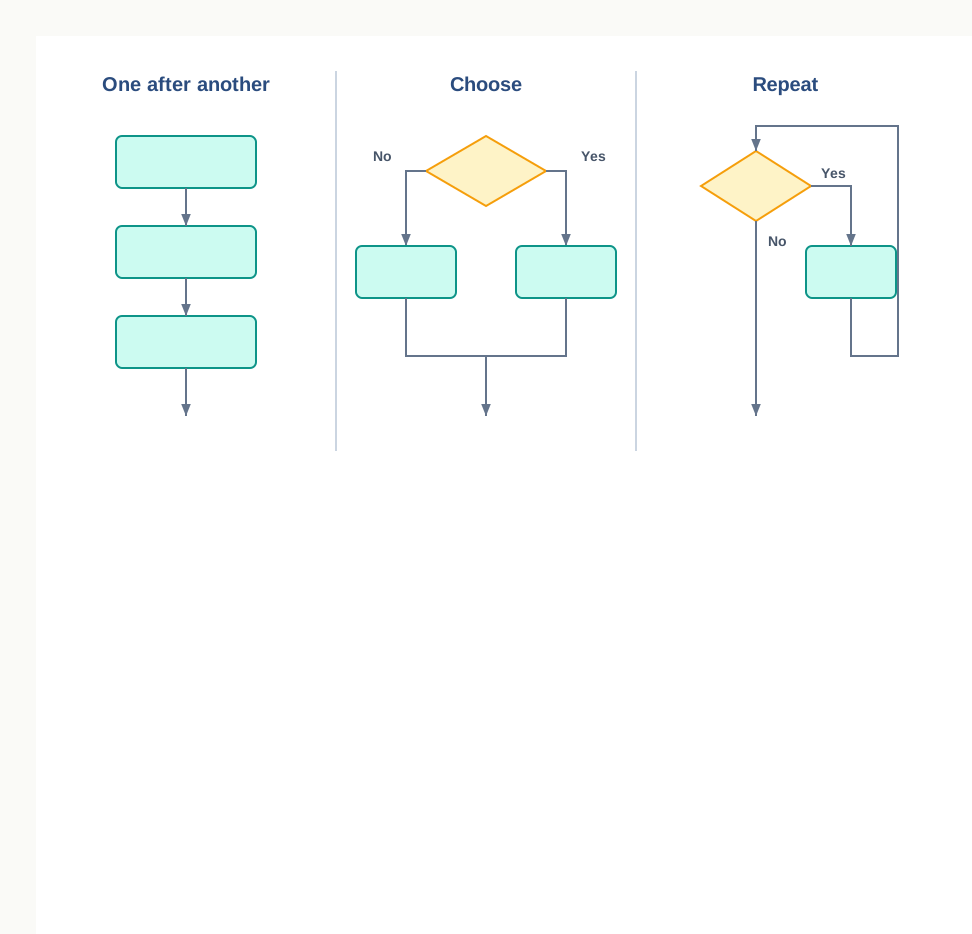
Fig. 6.0 – The three fundamental control structures.
Each of these questions is answered somewhere in this chapter. Watch for them as you read.
6.1 Introduction to Flow of Control
Every program you have written so far has had a single, fixed path through it. The interpreter began at the first line, finished it, moved to the second, and carried on until there was nothing left to run. That path was never in doubt, because you fixed it yourself the moment you decided the order in which to type the statements.
Real tasks are rarely so obedient. A fare table charges one amount for a student and another for an adult. A stock register has to be checked item by item until the last item is reached. A message must be printed only when the quantity in hand falls below a limit. In each of these, what happens next depends on something the program discovers while it is running.
The order in which the statements of a program are executed is called the flow of control. Learning to control that order — to make the program choose and to make it repeat — is what this chapter is about.
Notice the word actually. The order in which statements are written and the order in which they run are two different things, and once this chapter is over they will often differ.
6.1.1 Sequence as the Default Order
When nothing tells Python otherwise, it executes statements one after another, from the top of the program to the bottom, running each exactly once. This arrangement is called sequence, and it is the default flow of control in every program.
Sequence is easy to overlook precisely because it is so plain, but it carries a real guarantee: a statement can safely use a value that an earlier statement produced, because the earlier statement has certainly finished by then. A program that calculates before it reads its input is not a slow program; it is a wrong one.
A straight-line program
Consider a small task at a school stationery counter. A student buys some notebooks, all of the same kind. Given the number of notebooks and the rate of one notebook, print the amount payable.
There is nothing to decide here and nothing to repeat. The method is three steps in a fixed order: read the two inputs, multiply them, print the result. Because the order never varies, sequence alone is enough.
The three working lines of this program can be laid side by side with what the interpreter holds after each one. Reading such a table is a habit worth forming now, because from the next section onwards the order of the rows will stop being obvious.
Result: the output is Total amount payable is 100.0. The trace shows that each statement ran once, in the order written, and that amount had no value at all until step 3 gave it one.
Where sequence runs out
Now change the task slightly. Suppose notebooks are sold at a lower rate when ten or more are bought. The program can no longer be a straight line, because two different calculations are possible and only one of them should run. Change it again: suppose the counter must print a bill for every student in a queue, and nobody knows in advance how long the queue is. Now a group of statements has to run an unknown number of times.
Neither of these can be written as a sequence, however cleverly the statements are arranged. Sequence can only say do this, then this, then this. It has no way to say do this only if or do this again.
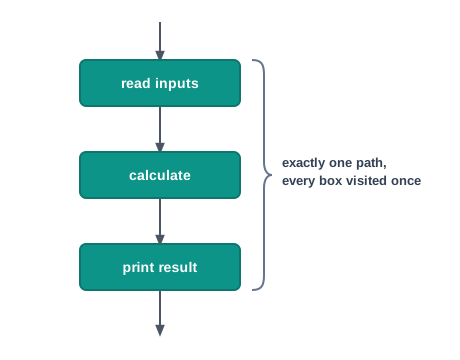
Fig. 6.1 – Sequence flow of control.
6.1.2 Control Structures in Python
To go beyond a straight line, a language must provide constructs that let a program alter its own order of execution. Such a construct is called a control structure. Python supports two types of control structures — selection and repetition.
Selection lets a program choose. It tests a condition and, on the strength of the result, executes one block of statements and skips another. The bill that charges a lower rate for ten or more notebooks needs selection: the condition is count is at least ten, and exactly one of the two calculations must follow from it.
Repetition lets a program repeat. It executes the same block again and again while a condition continues to hold. The queue of students at the counter needs repetition: the same read-calculate-print block runs once per student, and the number of students is not known when the program is written.
Table 6.2 – selection compared with repetition
| Feature | Selection | Repetition |
|---|---|---|
| What it decides | Whether a block runs at all | How many times a block runs |
| Number of times a chosen block runs | Once, at most | Zero, one or many times |
| Effect of the condition being false | The block is skipped and control moves on | The loop ends and control moves on |
| Is the condition tested again? | No, it is tested once | Yes, before or after each round |
| Typical use | Charging a concessional fare to a student | Printing a fare receipt for every passenger |
| Keywords used in Python | if, else, elif |
for, while |
The two are not rivals, and a serious program uses both at once — a loop that runs over every item in a stock register, with a test inside it that reports only the items running low. Sections 6.2 and 6.4 take them one at a time; section 6.6 puts them together.
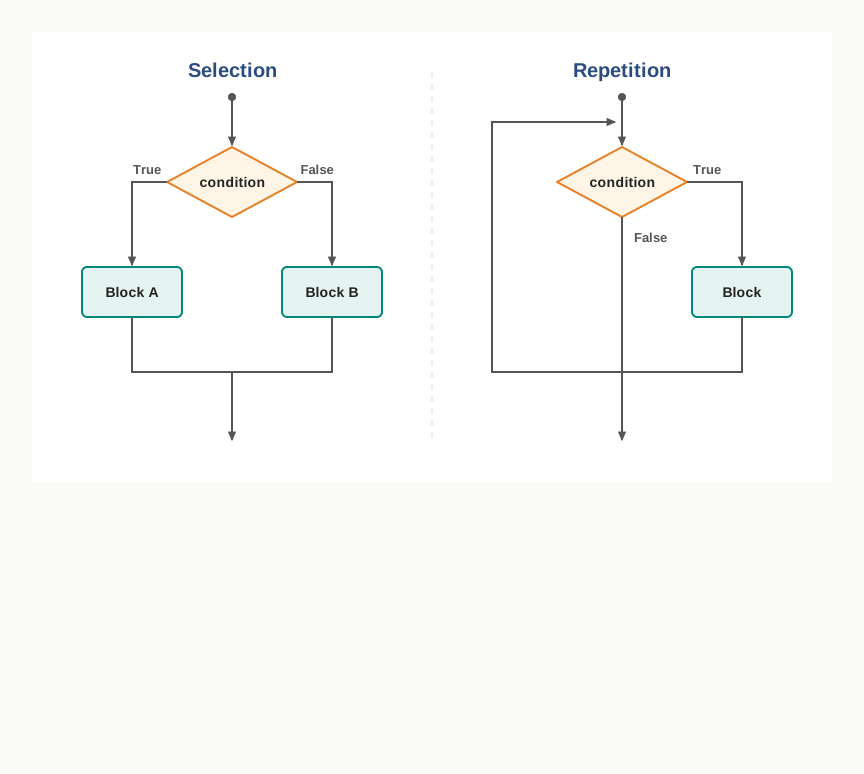
Fig. 6.2 – Selection compared with repetition.
There is one more thing Python needs before either structure can work. Both of them act on a block — a group of statements that is chosen or repeated as a single unit — so the language must have some way of marking where a block begins and ends. Python’s way of doing this is unusual enough to deserve a section of its own, and it is taken up in section 6.3.
6.2 Selection
Think of the counter at a school library. A book comes back, and the person at the counter looks at the date. If the book has been kept beyond the allowed period, a late entry is made; if not, the book is simply shelved. The same person, the same counter, the same register — but two different actions, and which one happens is decided on the spot, by the date.
A program that must behave this way needs a way of asking a question whose answer is either true or false, and of acting on the answer. In Python that question is written as a condition, and the statements that depend on it are grouped into a block.
You have met conditions already, in Class XI, as expressions built with the relational operators >, <, >=, <=, == and !=, and joined where necessary with and, or and not. Nothing new is needed here. What is new is that the value of such an expression will now decide which part of your program runs.
6.2.1 The if Statement
The simplest form of selection has only one block, and only one question to ask: should this block run, or should it be skipped? Python writes it with the keyword if.
Return to the library counter. Suppose a book may be kept for fourteen days. The program should note a late return, and in every case record the entry.
days = int(input("Enter number of days the book was kept: "))
if days > 14:
    print("Book returned late")
print("Entry recorded in the register")
For an input of 18, the output is:
Enter number of days the book was kept: 18
Book returned late
Entry recorded in the register
For an input of 9, only the last line appears. The print() that reports the late return was skipped entirely — not run with a different result, but not run at all.
Look closely at the two print() calls. The first is indented and the second is not, and that difference is the whole reason they behave differently. The indented statement belongs to the if; the unindented one does not, so it runs whatever the condition turns out to be. There is no limit on how many statements may sit inside the block, as long as they are all indented alike.
Two details of the header line are easy to lose and hard to do without: the colon at the end, and the indentation of the line below it. Both are compulsory.
6.2.2 The if..else Statement
An if on its own can only skip. Very often, though, the two outcomes are equally real: a jump either qualifies for the final round or it does not, and something must be said in both cases. Writing a second if with the opposite condition would work, but it makes the reader check twice what is really one question.
The if..else statement gives the question two branches. If the condition is True, the first block runs; otherwise the second block runs. Exactly one of the two always runs, never both and never neither.
distance = float(input("Enter the jump distance in metres: "))
if distance >= 4.5:
    print("Qualified for the final round")
else:
    print("Not qualified")
For an input of 4.2, the output is:
Enter the jump distance in metres: 4.2
Not qualified
Note that else takes no condition of its own. It is not asking a second question; it is catching everything the first question left out. That is why it ends with a bare colon.
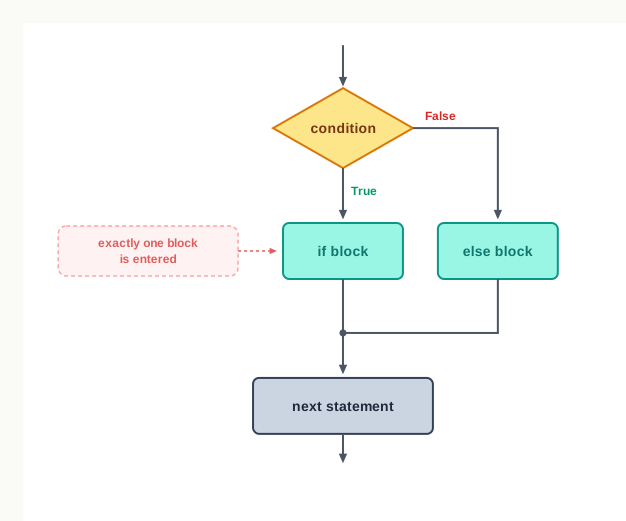
Fig. 6.3 – Execution flow of an if..else statement.
6.2.3 The if..elif..else Chain
Two branches are not always enough. City bus fares, for instance, are usually charged in slabs: one fare up to five kilometres, a higher one up to fifteen, a higher one still up to thirty, and a flat maximum beyond that. Here a single condition cannot sort the passenger into the right slab, because there are four possible answers and only one of them is correct for any journey.
For such cases Python allows the conditions to be chained with elif, which is short for else if. The conditions are tested in the order written. The first one that turns out to be True has its block executed, and the whole chain then ends — the remaining conditions are not even looked at. If none is true, the else block runs.
Before writing the fare program, it is worth setting out the method, because the ordering of the tests is the whole problem here.
Result: the output is Fare for 12.0 km is 20 rupees. The trace shows the point of a chain — once a condition succeeds, the rest are not tested at all.
Why not simply write four ifs
A reasonable question at this stage is why the elif keyword is needed, when four separate if statements would also assign a fare. They would, but they would not mean the same thing, and the difference shows up as soon as the conditions overlap.
Table 6.4 – a chain of elif compared with separate if statements
| Feature | if..elif..else chain |
Separate if statements |
|---|---|---|
| Number of blocks that can run | At most one | Any number, including all of them |
| Conditions tested after one succeeds | None; the chain ends | All of them, every time |
| Behaviour when conditions overlap | The first match wins | Every match runs, so a later one overwrites an earlier one |
| Work done for a value in the first slab | One test | Four tests |
| Suits | Alternatives that exclude one another | Independent checks that may all apply |
For the fare slabs the alternatives exclude one another — a journey belongs to exactly one slab — so the chain is the honest way to write it. A stock report that must flag an item as low, as expiring soon and as priced above the limit is the opposite case: those three checks are independent, all three may apply to the same item, and three separate if statements are then correct.
6.2.4 Nested if Statements
The block belonging to an if may contain any statements at all — including another if. An if statement written inside the block of another if statement is called a nested if, and it is how a program asks a follow-up question that only makes sense once the first has been answered.
A stock check at a store makes the point. The first question is whether the item is in stock at all. Only if it is does a second question arise: is the quantity low enough to reorder? Asking about the reorder level for an item that has run out entirely would be pointless, and the nesting says so.
The indentation is doing real work here. The inner if and its else are indented one level in from the outer if, and the outer else is aligned with the outer if. Move the outer else in by four more spaces and Python will read it as belonging to the inner if instead, which changes the meaning of the program completely — an item with zero in hand would then produce no message at all.
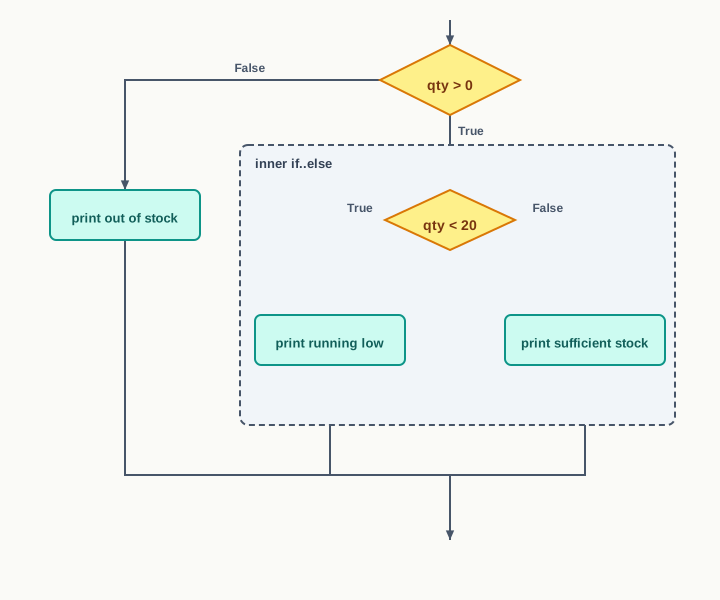
Fig. 6.4 – Execution flow of a nested if statement.
There is no restriction on how deep the nesting may go, and a chain of elif may sit inside another if just as easily. Depth, though, costs clarity: three or four levels of nesting are hard to read and harder to check. Where a chain of elif will say the same thing flatly, prefer it.
6.3 Indentation
In most programming languages, the statements of a block are enclosed in curly brackets. The brackets tell the compiler where the block begins and ends, and the way the code is laid out on the page is left entirely to the programmer’s taste. Neat programmers indent their blocks; careless ones do not; the language does not care either way.
Python took a different decision. It has no brackets around a block. Instead, the leading blank space at the beginning of a line — spaces or tabs — is itself part of the syntax. This leading whitespace is called indentation, and statements written with the same indentation belong to the same block.
The consequence is worth stating plainly: in Python, the layout of a program is not decoration. Change the indentation of a line and you have changed the program.
Where a block begins and ends
A header line that introduces a block — an if, an elif, an else, and later a for or a while — always ends in a colon. The block belonging to it is everything written below it at a deeper level of indentation. The block ends at the first line that returns to the header’s own level, and that line is no longer part of it.
Nothing else marks the boundary. There is no closing bracket, no end keyword, nothing at the bottom of the block at all — the return to the earlier level is the only signal, which is why an accidental space matters so much.
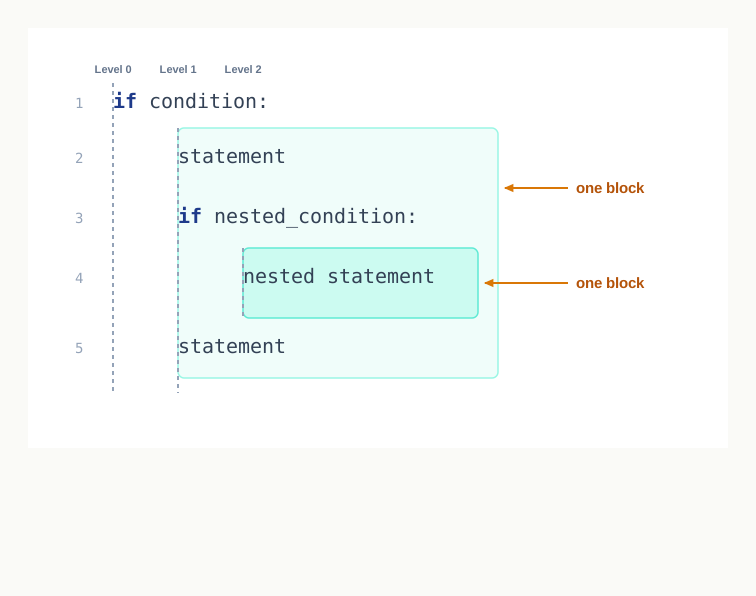
Fig. 6.5 – Defining blocks through indentation.
Run the same program with 34 days present and all three lines appear, because 85.0 clears the limit. Run it with 28 and only the last line appears. The two indented print() calls are a single block, chosen or skipped together; the third is not part of the block at all.
When the interpreter refuses
The mis-indentation above was legal Python that meant the wrong thing. Some indentation mistakes are not legal at all, and those the interpreter catches for you.
If a header line ending in a colon is not followed by an indented line, there is no block for it to control, and Python reports an IndentationError saying that an indented block was expected. If a line is indented for no reason — no header above it asking for a block — the error reports an unexpected indent instead.
count = 5
    print(count)
The second line here is indented although nothing invited it to be, and the program stops before running with an IndentationError.
A third mistake is harder to see, because the page looks correct. If some lines of a block are indented with tab characters and others with spaces, the two may line up on screen and still not match as far as the interpreter is concerned. Python reports this as a TabError, saying that tabs and spaces have been used inconsistently. The cure is simple and worth adopting from the start: pick one, use it everywhere, and let the editor insert it.
Indentation is often described as Python’s most controversial design decision, and beginners meeting it after a language with brackets do resent it at first. But it removes a whole category of bug that other languages live with — the program whose layout says one thing and whose brackets say another. In Python, what the block looks like is what the block is.
6.4 Repetition
An electricity bill is paid every month. A butterfly lays eggs, the eggs become caterpillars, the caterpillars become pupae, the pupae become butterflies, and the cycle begins again. A bus runs the same route, stop after stop, twice a day for years. Repetition is so ordinary in the world that we rarely notice how much of what we do is the same action done again on new material.
Programs are no different, and the repetition in them is called iteration. The construct that carries it out is a loop — a block of statements that the interpreter is willing to execute more than once.
Python provides two looping constructs: for and while. They differ in how they decide when to stop, and choosing correctly between them is most of what this section is about.
6.4.1 From Repeated Statements to a Loop
Suppose a class has five subjects and you want to print a heading line for each, so that marks can be written under it. Without a loop, the program is five statements that differ only in a name:
print("Marks entered for English")
print("Marks entered for Physics")
print("Marks entered for Chemistry")
print("Marks entered for Mathematics")
print("Marks entered for Computer Science")
This works. It is also the last size at which it works. Ask for the same heading for every one of 500 students in the school and no one is going to type 500 statements, and no one who did would be able to check them. Worse, the program is stuck at the size it was written for: add a subject, and the program has to be edited.
What is really wanted is one statement and a rule for how often to run it. Set out in words, the method for the marks headings is:
1. Take the first subject in the list.
2. Print the heading for it.
3. Move to the next subject.
4. Repeat steps 2 and 3 until there are no subjects left.
The interesting part of that method is step 4. Something has to decide when the repetition stops. Here the answer is when the list runs out, and the number of headings is therefore fixed the moment the list is fixed. In other problems the answer is when some running total is large enough, or when the user says so, and the number of rounds is not known in advance at all. That difference is exactly the difference between Python’s two loops.
6.4.2 The for Loop
The for statement is used to iterate over the items of a sequence — the elements of a list or a tuple, the characters of a string, or a range of numbers. It takes the items one at a time, in order, and runs its block once for each. When the items are exhausted, the loop ends and control passes to the statement after it.
The five headings above become three lines:
subjects = ["English", "Physics", "Chemistry"]
for name in subjects:
    print("Marks entered for", name)
Marks entered for English
Marks entered for Physics
Marks entered for ChemistryThe name name here is the loop control variable. You do not assign anything to it yourself; the for statement assigns it, before each round, the next item of the sequence. In the first round it holds "English", in the second "Physics", in the third "Chemistry" — and then there is nothing left to assign, so the loop stops.
A string is a sequence too, and a for loop walks it one character at a time:
for ch in "PIN":
print(ch, end="-")P-I-N-The end parameter of print() says what to write after the value instead of moving to a new line, so here the three characters appear on one line, each followed by a hyphen — including the last, which is why the output ends with a hyphen too.
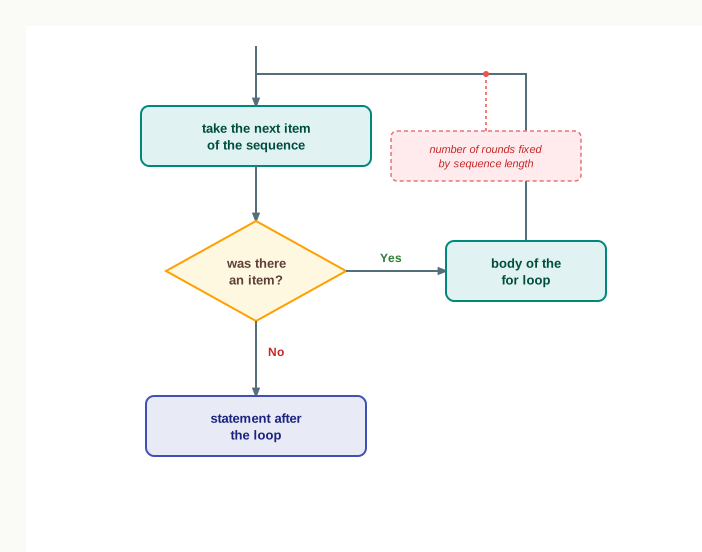
Fig. 6.6 – Execution flow of a for loop.
6.4.2.1 Syntax of the for Loop
As with if, the header ends in a colon and the body is marked out by its indentation, exactly as section 6.3 described.
6.4.2.2 The range() Function
Very often the items to be iterated over are not stored anywhere; they are simply the numbers 1 to 10, or 0 to 99, or 5 down to 1. Writing them out as a list would defeat the purpose. For these, Python supplies the built-in function range(), which produces a sequence of integers from a start value up to — but not including — a stop value, in steps of a given size.
range() does not build a list of those numbers in memory. It returns a range object, which hands over the next integer whenever one is asked for. That is exactly what a for loop needs, and it costs the same whether the range covers ten numbers or ten crore. To see the numbers, wrap the range in list().
>>> list(range(6))
[0, 1, 2, 3, 4, 5]
>>> list(range(3, 9))
[3, 4, 5, 6, 7, 8]
>>> list(range(4, 25, 6))
[4, 10, 16, 22]
>>> list(range(10, 0, -2))
[10, 8, 6, 4, 2]
Read those four lines carefully, because they contain everything range() does. With one argument, counting starts at 0 and steps by 1. With two, the first is the start and the second the stop. With three, the last is the step, which may be negative to count downwards. All the arguments must be integers, and the step may not be zero — a step of zero would never move towards the stop value, and Python refuses it with an error rather than running forever.
A loop that reads a list
The two ideas so far — a for loop and a condition inside it — combine into something genuinely useful: a loop that visits every item of a collection and treats some of them differently.
Result: the output is Total rainfall: 216 mm followed by Days of heavy rain: 2. The trace shows the two accumulators growing independently — total on every round, heavy only on the rounds where the condition held.
6.4.3 The while Loop
The for loop is the right tool when the items are known in advance. Many problems are not like that. A student putting aside ₹500 a week towards an excursion fee wants to know how many weeks it will take to reach ₹2500 — and the number of weeks is the answer, not something that can be written into the loop beforehand.
For such problems Python provides the while loop. It has no sequence to walk through. Instead it tests a condition before each round: while the condition is True, the body runs again; the moment it is False, the loop ends. If the condition is false the very first time it is tested, the body does not run even once.
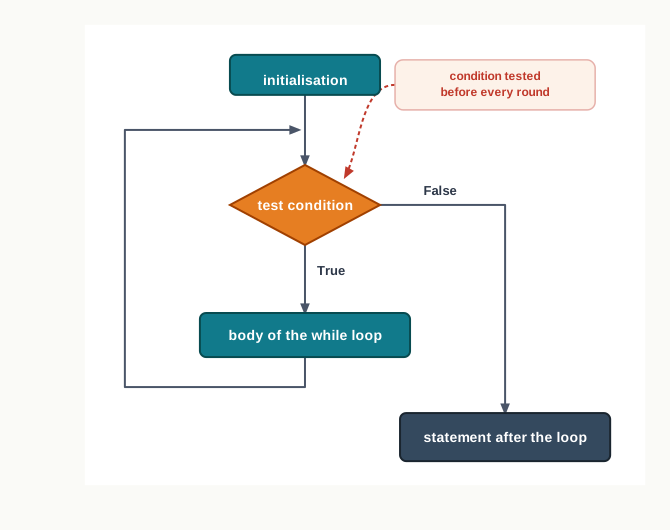
Fig. 6.7 – Execution flow of a while loop.
Result: the loop runs five times and the final line reports 5 weeks. The trace shows the condition being tested six times for five rounds — the last test is the one that ends the loop.
Choosing between for and while
Both loops repeat a block, and many problems can be forced into either. The question to ask is not which one you know better, but whether the number of rounds is settled before the loop starts.
Table 6.9 – the for loop compared with the while loop
| Feature | for loop |
while loop |
|---|---|---|
| What it repeats over | The items of a sequence or range | Any condition that stays True |
| Number of rounds | Known before the loop begins | Not known; discovered as the loop runs |
| Control variable | Set automatically to the next item each round | Created and updated by the programmer |
| Where the update happens | Built into the statement | Must be written inside the body |
| If there is nothing to do | Empty sequence, body runs zero times | Condition false at the start, body runs zero times |
| Risk of never stopping | Practically none, the sequence is finite | Real, if the body never makes the condition false |
| Suits | Visiting every mark in a list, counting 1 to 50 | Saving until a target is met, reading until the user stops |
6.4.4 Infinite Loops and the Exit Condition
A while loop stops only when its condition becomes false, and nothing in the language guarantees that it ever will. If the body does not change anything the condition depends on, the condition will be just as true on the thousandth test as it was on the first. Such a loop is called an infinite loop, and it does not end until the program is stopped from outside.
The commonest cause is a forgotten update.
Those three things are worth naming, because checking for them is a reliable way to know whether a loop you have written will stop. The starting value is set before the loop. The condition is the test in the header. The update happens inside the body, and it must move in the right direction — a loop that counts down while testing count <= 5 will run away just as surely as one that never counts at all.
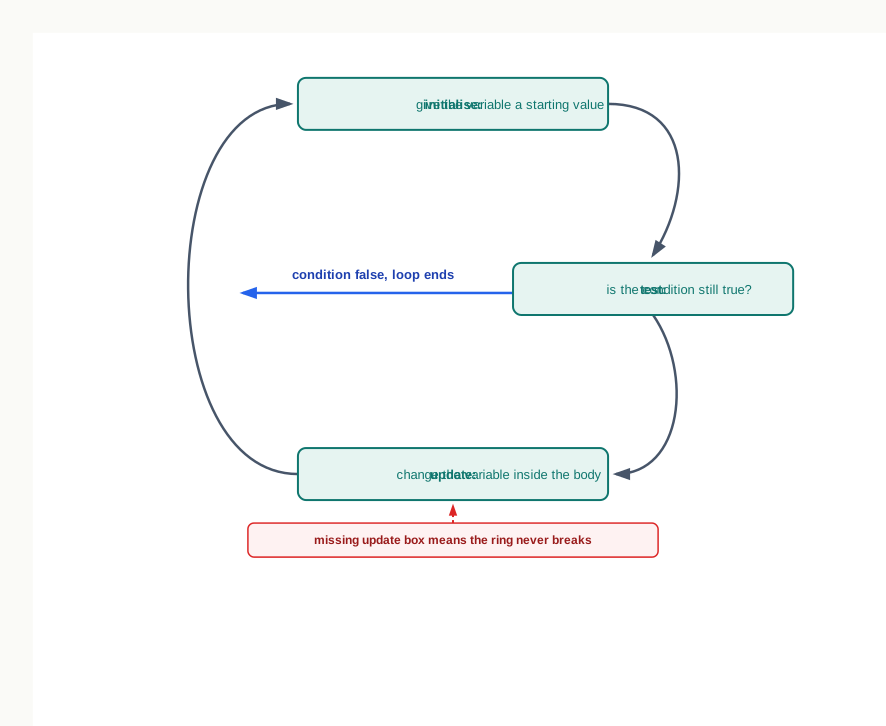
Fig. 6.8 – The three components of a while loop.
Not every infinite loop is a mistake. A program running a display board or waiting for input may be written deliberately to loop for ever, and section 6.5 introduces the break statement, which gives such a loop a way out from the inside. What must never happen by accident is a loop that was meant to stop and cannot.
6.5 Break and Continue Statements
A loop, as section 6.4 left it, is an all-or-nothing arrangement. A for loop visits every item of its sequence; a while loop runs until its condition fails. Neither has any way of reacting to something discovered halfway through.
Yet that is often exactly what is needed. A librarian searching an issue register for one accession number stops the moment it is found — reading the remaining pages would tell her nothing she does not already know. A teacher totalling a set of answer scripts skips the ones marked absent and carries on with the next, without abandoning the totalling.
The two situations are different, and Python gives them two different statements. break leaves the loop altogether. continue abandons only the current round and goes back for the next one.
6.5.1 The break Statement
The break statement terminates the loop in which it occurs. Execution does not go back to the top, and the remaining items or rounds are not processed at all; control passes straight to the first statement after the loop body.
Searching is the natural setting for it. Suppose a list holds the accession numbers of the books currently issued from a school library, and you want to know whether a particular book is among them.
Result: the output is Accession number 1203 is issued. The trace shows the saving that break buys — two of the five numbers were never examined, because by then the answer was already known.
That saving is the point. On a list of five it is trivial; on an issue register of fifty thousand entries, a search that stops at the match does a fraction of the work of one that ploughs on to the end. And the result is identical either way, which is what makes the shortcut safe.
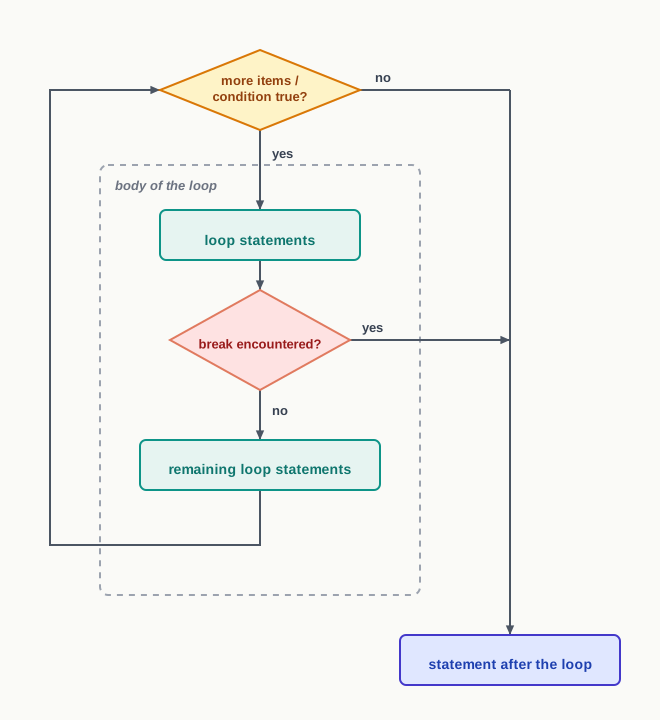
Fig. 6.9 – Effect of the break statement.
break works the same way in a while loop, and there it has a second use. A loop written as while True has a condition that can never fail, so on its own it would run for ever; a break inside the body gives it a controlled way out, taken when the program decides the work is done rather than when a counter runs out. That is a legitimate design, and quite different from the accidental infinite loop of section 6.4.4 — here the exit exists, it is simply written inside the body instead of in the header.
6.5.2 The continue Statement
Sometimes the round is unwanted but the loop is not. The continue statement skips the rest of the loop body for the current round and goes back to the top of the loop for the next one. The loop itself is untouched: for a for loop, the next item is taken as usual; for a while loop, the condition is tested again and the loop carries on if it still holds.
Consider a set of answer scripts in which an absent candidate has been recorded as -1 instead of a mark. Those entries must not be added into the total, and they must not be counted as papers evaluated — but the remaining scripts must still be processed.
Result: the output is Papers evaluated: 4 followed by Total marks: 289. The trace shows the loop completing all six rounds — continue cost two rounds their work, but not their existence.
Table 6.12 – the break statement compared with the continue statement
| Feature | break |
continue |
|---|---|---|
| Effect on the current round | Abandons it | Abandons it |
| Effect on the loop | Ends the loop entirely | Loop carries on with the next round |
| Rounds still to come | None; they are skipped | All of them run as usual |
| Where control goes next | First statement after the loop | Top of the loop, for the next round |
In a for loop |
Remaining items are never taken | The next item is taken normally |
In a while loop |
The condition is not tested again | The condition is tested again |
| Typical use | Stopping a search at the first match | Skipping an entry that should not be processed |
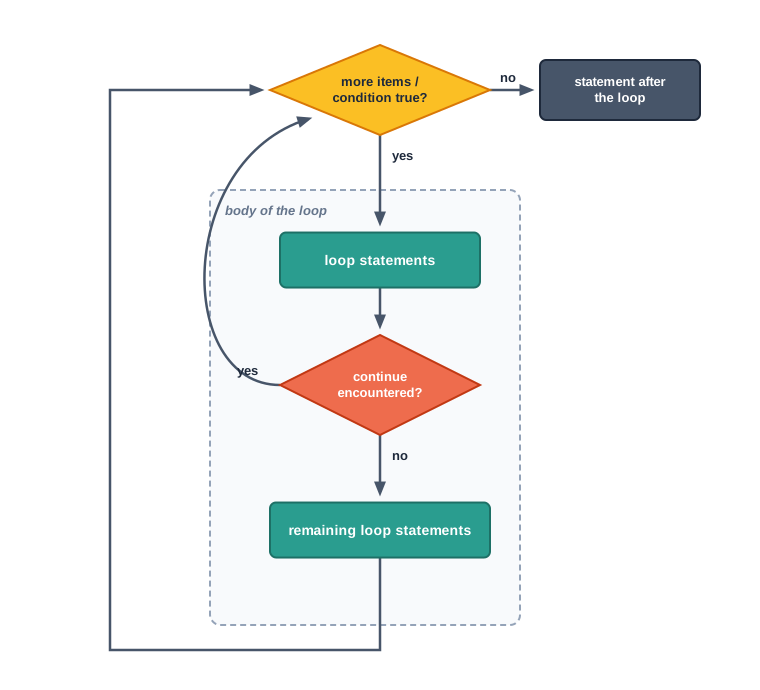
Fig. 6.10 – Effect of the continue statement.
One restriction applies to both statements, and it matters as soon as loops are put inside loops: break and continue act only on the loop that immediately encloses them. A break written inside an inner loop ends that inner loop, and the outer loop carries on with its next round exactly as though the inner loop had finished normally. Section 6.6 takes up such arrangements.
6.6 Nested Loops
The body of a loop may contain any statements at all, and that includes another loop. A loop written inside the body of another loop is called a nested loop. The one on the outside is the outer loop; the one written inside its body is the inner loop.
The reason such an arrangement is needed is that a great many things come in two dimensions. A bus has rows, and each row has seats. A week has days, and each day has periods. A pattern on the page has lines, and each line has characters on it. In every case the description contains the phrase for each … for each, and that phrase is a nested loop in words.
How the rounds interleave
Take the seat labels of a small bus with three rows and two seats in each row.
for row in range(1, 4):
    for seat in "AB":
        print(row, seat)
1 A
1 B
2 A
2 B
3 A
3 BRead the output down the page and the pattern of control is plain. The outer loop set row to 1 and then handed over to the inner loop, which ran to completion — both its rounds — before the outer loop was allowed to move on. Then row became 2 and the inner loop started again from the beginning, with seat back at "A".
That restarting is the part worth fixing in your mind. The inner loop does not carry on from where it stopped; it begins afresh on every round of the outer loop. Here the inner loop ran three separate times, of two rounds each, so its body was executed six times in all. In general, an inner loop of \(n\) rounds inside an outer loop of \(m\) rounds executes its body \(m \times n\) times, where \(m\) is the number of rounds of the outer loop and \(n\) the number of rounds of the inner loop.
Result: six lines are printed. The trace shows seat returning to A at the start of every outer round, while row changes only once per pair of lines.
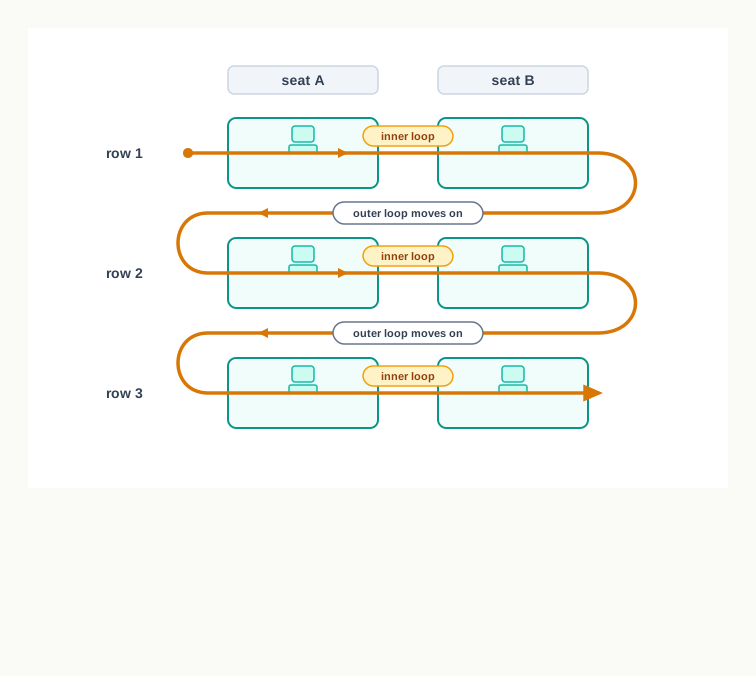
Fig. 6.11 – Execution order in a nested loop.
When the inner loop depends on the outer
So far the inner loop has done the same number of rounds every time. It need not. The inner loop’s range may be written in terms of the outer loop’s control variable, and then each outer round gets an inner loop of a different length. This is what makes patterns possible.
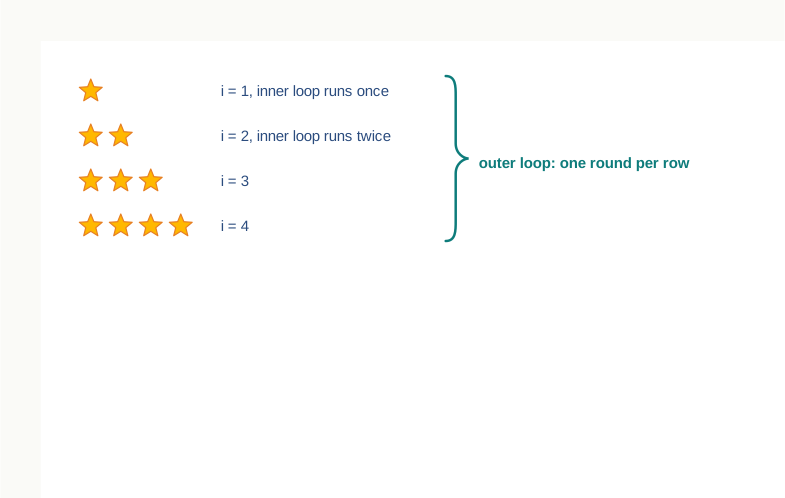
Fig. 6.12 – Inner loop depending on the outer loop.
Combining and interrupting nested loops
Python places no restriction on how many loops may be nested or how deep the nesting goes, and the two kinds may be mixed freely — a while inside a for, a for inside a while, or either inside itself. The choice at each level is made on the same ground as before: a for where the number of rounds is settled in advance, a while where it is not.
Section 6.5 noted that break and continue act only on the loop immediately enclosing them. Nesting is where that matters.
for i in range(1, 4):
    for j in range(1, 4):
        if j == 2:
            break
        print(i, j)
1 1
2 1
3 1The break ends the inner loop each time j reaches 2, so only one line is printed per outer round. But it does not touch the outer loop at all — that carries on to its next value of i exactly as though the inner loop had run out of items in the ordinary way. To leave both loops, a program must either arrange for the outer loop’s own condition to fail as well, or be restructured so that only one loop is needed.
6.7 Summary
The flow of control of a program is the order in which its statements are actually executed. That order is not always the order in which they are written.
When nothing directs otherwise, statements execute in sequence — one after another, from top to bottom, each exactly once. Sequence guarantees that a statement may safely use a value produced by an earlier one.
Python supports two types of control structures: selection and repetition. Selection decides whether a block runs at all; repetition decides how many times it runs.
A condition is an expression evaluating to
TrueorFalse. A block is a group of statements executed or skipped together as one unit.The
ifstatement executes its block when the condition is true and skips it otherwise. Theif..elsestatement gives the condition two branches, exactly one of which runs on any execution.Conditions may be chained with
elif. The conditions are tested in the order written; the first true one has its block executed and the rest are not tested at all. The optionalelseat the end catches everything that no condition matched. Because a chain stops at the first match, overlapping conditions must be written narrowest first.An
ifstatement written inside the block of anotherifstatement is a nested if. It is used for a follow-up question that arises only after the first has been answered.Python has no brackets around a block. Indentation — the leading spaces or tabs at the start of a statement — is part of the syntax. Statements at the same level of indentation form one block, and a block ends at the first line that returns to the level of its header. Changing the indentation of a line changes the program.
A header line that introduces a block always ends in a colon. Missing or inconsistent indentation is reported as an
IndentationError, and mixing tabs with spaces as aTabError.Iteration is the repeated execution of a set of statements, carried out by a loop. Python provides two looping constructs,
forandwhile, which differ in how they decide when to stop.The
forloop iterates over the items of a sequence — a list, a tuple, a string or a range — assigning each item in turn to the loop control variable and running the body once for each. It ends when the items are exhausted, so the number of rounds is fixed before the loop begins. An empty sequence means the body runs zero times.The built-in function
range()produces a sequence of integers from a start value up to, but not including, a stop value, in steps of a given size. The start defaults to 0 and the step to 1; the step may be negative but may not be zero, and all arguments must be integers. It returns a range object rather than a list, solist()is needed to display the values.The
whileloop tests its condition before every round, including the first, and repeats its body for as long as the condition holds. The number of rounds is not known in advance. If the condition is false at the first test, the body never runs.Every
whileloop needs three things: a starting value set before the loop, a condition in the header, and an update inside the body that moves towards making the condition false. A loop whose condition never becomes false is an infinite loop and does not terminate on its own.The
breakstatement immediately terminates the loop containing it and transfers control to the statement following that loop. Its usual purpose is to stop a search once the answer is known.The
continuestatement abandons only the remaining statements of the current round and returns control to the top of the loop for the next one. The loop itself carries on. In awhileloop it must not be allowed to skip the update, or the loop will never end.A loop contained within another loop is a nested loop. The inner loop completes all its rounds afresh for every single round of the outer loop, so an inner loop of n rounds inside an outer loop of m rounds executes its body m times n times in all.
The inner loop’s range may be written in terms of the outer loop’s control variable, giving each outer round an inner loop of a different length. Any type of loop may be nested inside any other, to any depth.
Both
breakandcontinueact only on the loop that immediately encloses them. Abreakinside an inner loop ends that inner loop only; the outer loop continues with its next round.
6.8 Key Terms
ACM — Association for Computing Machinery, the professional body whose journal carried the 1968 letter mentioned at the start of this chapter.
Block — a group of statements treated as a single unit, executed or skipped together; in Python it is marked out by its indentation.
breakstatement — a statement that immediately terminates the loop containing it and passes control to the statement after that loop.Condition — an expression that evaluates to either
TrueorFalse, used to decide whether a block runs or whether a loop continues.continuestatement — a statement that skips the remaining statements of the current round of a loop and returns control to the top of the loop for the next round.Control structure — a programming construct that determines the flow of control of a program; Python supports two types, selection and repetition.
Flow of control — the order in which the statements of a program are actually executed when it runs.
Indentation — the leading whitespace, that is, the spaces or tabs, at the beginning of a statement; in Python it marks which statements belong to which block.
Infinite loop — a loop whose condition never becomes false, so that it never terminates on its own.
Inner loop — the loop written inside the body of another loop; it completes all its rounds afresh for every round of the outer loop.
Iteration — the repeated execution of a set of statements in a program.
Loop — a construct that carries out iteration, executing its block of statements again and again while a stated condition holds.
Loop control variable — the variable whose value decides how a loop proceeds; in a
forloop it receives each item of the sequence in turn, and in awhileloop it is set and updated by the programmer.Nested if — an
ifstatement written inside the block of anotherifstatement, used to ask a question that arises only after the first has been answered.Nested loop — a loop contained within the body of another loop.
Outer loop — the enclosing loop of a nested arrangement, one round of which contains a complete run of the inner loop.
Repetition — the control structure that executes a block of statements more than once, deciding how many times it runs.
Selection — the control structure that tests a condition and, on the strength of the result, decides whether a block of statements is executed at all.
Sequence — the default flow of control, in which statements are executed one after another from top to bottom, each exactly once.
6.9 Points to Ponder
Sequence, selection and repetition are enough to express any computation that can be programmed at all. If that is so, why does Python bother to offer two different looping constructs rather than one?
Most languages let the programmer indent as carelessly as they like, and Python does not. What does a language gain by making layout part of its syntax, and what does it give up?
A
whileloop that never ends is usually a bug, and yet the interpreter runs it without a word of warning. Could a language reasonably be expected to detect such a loop before running the program, or is there a reason no language does this?Every use of
breakcan be rewritten as a loop with a more elaborate condition and nobreakat all. If the language does not need the statement, what is it really for?An
if..elif..elsechain and a set of separateifstatements can produce identical output on the data you happen to test them with, and differ completely on data you have not tried. What does this suggest about how a program should be tested before you trust it?Three nested loops of a hundred rounds each mean a million executions of the innermost statement. At what point does a correct program stop being a usable one, and is that a question about the program or about the machine it runs on?
6.10 Objective Questions
Which of the following is not a looping construct in Python? [1 mark]
forwhiledo..while- a
forloop nested inside anotherforloop
How many times will the body of the loop
for i in range(3, 12, 3):be executed? [1 mark]- 2
- 3
- 4
- 9
What is the value of
list(range(8, 3, -2))? [1 mark][8, 6, 4][8, 6, 4, 3][8, 5][]
Fill in the blank: The leading whitespace at the beginning of a statement is called ______, and in Python it decides which statements belong to the same ______. [1 mark]
State the output of the following fragment. [1 mark]
for i in range(4):
    if i == 2:
        continue
print(i, end=" ")- Assertion (A): A
forloop that iterates over a list can never become an infinite loop. Reason (R): The number of rounds of aforloop is fixed by the length of the sequence before the first round begins. [1 mark]- Both A and R are true, and R is the correct explanation of A.
- Both A and R are true, but R is not the correct explanation of A.
- A is true, but R is false.
- A is false, but R is true.
- Assertion (A): A
breakstatement written inside an inner loop terminates both the inner and the outer loop. Reason (R): Abreakstatement terminates the loop that immediately encloses it. [1 mark]- Both A and R are true, and R is the correct explanation of A.
- Both A and R are true, but R is not the correct explanation of A.
- A is true, but R is false.
- A is false, but R is true.
- Match each keyword in Column A with its effect in Column B. [1 mark]
| Column A | Column B |
|---|---|
a. elif |
i. Ends the current round of the loop and starts the next one |
b. else |
ii. Ends the loop entirely |
c. break |
iii. Tests a further condition when the earlier ones have failed |
d. continue |
iv. Runs when no condition in the chain was true |
- Write the full form of ACM. [1 mark]
6.11 Check Your Concepts
Define the flow of control of a program, and name the two types of control structures that Python supports. [2 marks]
What is an infinite loop? State one reason why a
whileloop may become one. [2 marks]State the purpose of the
range()function, and give one example in which the step value is negative. [2 marks]Differentiate between the
breakand thecontinuestatements, giving a short example of each. [3 marks]Explain, with a short example of your own, why indentation in Python is described as part of the syntax rather than as a matter of neatness. [3 marks]
Explain how an
if..elif..elsechain is executed. A chain tests whether a mark is below 33, then below 60, then below 80. Explain what would go wrong if these three conditions were written in the reverse order, and state the general rule this illustrates. [4 marks]A
forloop that walks a list stops on its own; awhileloop need not. Give reasons for this difference, and state the three things everywhileloop must have if it is to terminate. [4 marks]Write a complete program that reads ten integers from the keyboard and prints how many of them were positive, how many negative and how many zero. Along with the program, explain in three or four sentences why a single loop containing one
if..elif..elsechain is a better solution than three separate loops that each read the numbers again. [5 marks]
6.12 Output & Debugging
- Predict the output of the following fragment, and state the value of
nwhen the loop ends. [2 marks]
n = 15
while n > 0:
    print(n, end=" ")
n = n - 4- Predict the output of the following fragment, and state how many times the statement inside the
ifis executed. [2 marks]
total = 0
for k in range(1, 6):
    if k % 2 == 0:
        total = total + k
print(total)- Predict the output of the following fragment, and state how many times the body of the inner loop is executed in all. [3 marks]
for i in range(1, 4):
    for j in range(1, 3):
        print(i * j, end=" ")
print()- The following fragment is meant to print four lines, but it does not. Identify the error, state exactly what the fragment does when it is run, and rewrite it correctly. [3 marks]
count = 1
while count <= 4:
    print("Row", count)
count = count + 1- The following program will not run at all. Identify the error, name the kind of error it is, and rewrite the faulty line correctly. [2 marks]
marks = int(input("Enter marks: "))
if marks >= 90:
    print("Grade A")
elif marks >= 75
    print("Grade B")
else:
print("Grade C")- Predict the output of the following fragment, and state in one sentence what it computes in general for any string given to it. [3 marks]
word = "LOOP"
count = 0
for ch in word:
    if ch == "O":
        continue
    count = count + 1
    print(ch, end="")
print()
print(count)
6.13 Case-Based Questions
- A school library charges a fine on books returned late. There is no fine for a book kept up to 14 days. Beyond 14 days and up to 30 days, the fine is ₹2 for each day past the fourteenth. Beyond 30 days, the fine is ₹5 for each day past the thirtieth, in addition to the fine already due for days 15 to 30. The librarian has recorded, for five returned books, the number of days each was kept:
days_kept = [8, 21, 14, 30, 47]a. Name the control structure needed to work out the fine for a single book from the number of days it was kept, and say how many branches it must have. [1 mark]
b. Write the statements that compute and store the fine for one book, given that the number of days is in a variable `days`. [2 marks]
c. Write the loop that uses your answer to part (b) to print the fine for every book in the list and, after the loop, the total fine collected. [2 marks]- A bus depot records the number of passengers carried on one route on each day of a week:
passengers = [42, 58, 61, 39, 74, 55, 48]a. Write the statements that find and print the highest number of passengers carried on any single day. Your solution must use a loop and must not use any built-in function that finds the largest value for you. [2 marks]
b. Write a loop that counts and prints how many days carried more than 50 passengers. [1 mark]
c. The depot manager asks what your program from part (a) would do on a day when the list is empty because the route did not run at all. State what happens, and explain why. [1 mark]6.14 Programming Practice
Write a complete program that reads a word from the keyboard and prints how many of its characters are vowels. Treat both upper case and lower case letters as vowels. Submit the program and a sample run for the input
Repetition. [3 marks]Write a complete program that reads a whole number n from the keyboard and prints the sum of all the even numbers from 1 to n, both inclusive. The program must print a suitable message if n is less than 2. Submit the program and its output for n = 12. [3 marks]
A weather station has recorded the maximum temperature, in degrees Celsius, on each of seven days. Write a complete program that reads the seven readings from the keyboard using a single loop and prints the highest reading and the number of days on which the reading was above 35. Submit the program together with an identifier description table. [4 marks]
Write a complete program that uses nested loops to print a multiplication grid of five rows and five columns, in which the entry in row i and column j is the product i × j. The entries of a row must appear on one line, separated by spaces. Submit the program and its output. [4 marks]
The Fibonacci sequence begins 0, 1, and every term after that is the sum of the two terms before it: 0, 1, 1, 2, 3, 5, 8 and so on. Write a complete program that reads a whole number n from the keyboard and prints the first n terms of the sequence, using a
whileloop. Submit the program, an identifier description table, and a note of two or three lines explaining how your loop produces each new term. Test your program with n = 7, and also with n = 1, and make sure it behaves sensibly in both cases. [5 marks]