Chapter 11: Societal Impact
In the early 1980s a programmer named Richard Stallman worked in a university computer laboratory that had just received a new laser printer. The machine was fast, but it jammed often, and a jam could go unnoticed for an hour while people waited at their desks for pages that were never coming. Stallman had solved this problem once before. On the laboratory’s older printer he had opened up the program that drove it and added a few lines so that anyone waiting for a printout was told when the paper had stuck.
This time he could not. The new printer came with its program supplied only as a finished, unreadable file. The instructions inside it — the source code — were not given out, and the company that made the machine would not release them. A repair he knew how to make, and that would have helped everyone in the building, was simply out of his reach.
That refusal stayed with him. In 1983 Stallman announced the GNU Project, and the movement that grew from it argued that the people who use a program should be free to read it, change it and pass it on. The licences written for that purpose are still in use today, and you have almost certainly run software released under one.
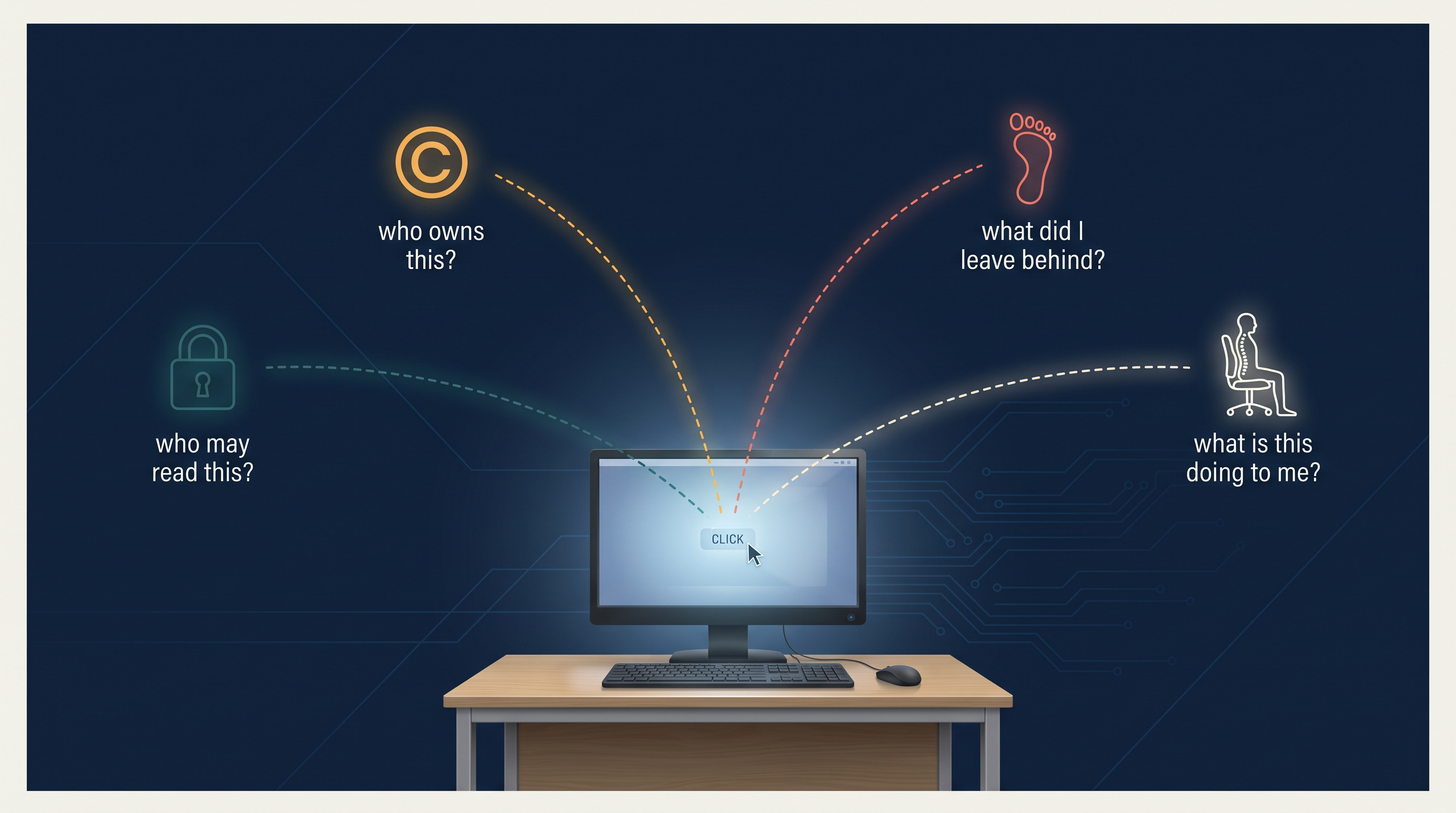
Fig. 11.0 – The hidden questions of an ordinary click.
Stallman’s printer raises a question that runs through everything in this chapter: when a technology sits between people, who is allowed to do what with it, and what does each of us owe the others? The same question turns up when you copy a paragraph into a project, when you forward a friend’s photograph, when you delete a post and assume it is gone, and when a message arrives that looks exactly like it came from your bank.
Keep these five questions in mind as you read. By the end of the chapter you will be able to answer each of them.
11.1 Introduction
Think of an ordinary week in your house. A bill is paid without anyone going to a counter. A bus ticket is booked from a phone. A cousin in another state joins a birthday over a video call. A teacher shares notes with forty students in a single message. None of this was possible for most families a generation ago, and none of it feels remarkable to you now.
What made the difference is a family of tools we call digital technology — computers, smartphones, tablets, the networks that join them, and the software that runs on all of these. The word digital is the clue. These machines do not handle information as a smooth, continuously varying physical signal, the way a spool of magnetic tape once held music. They break information into digits, store it as numbers, and work on those numbers.
That one design choice explains most of what follows in this chapter. A number can be copied a thousand times without wearing out. It can be sent across the world in a moment. It can be searched, sorted, matched against other numbers, and stored on a machine you have never seen. Every convenience you enjoy and every risk you face in this chapter grows out of the same property.
Why they spread so fast
Digital technology existed for decades before it reached ordinary homes. Early computers were large, expensive and kept in institutions. Three changes brought them to everyone.
The personal computer put a machine on a single desk at a price a household or a small shop could consider. The Internet then joined those separate machines, so that a computer was no longer a private tool but a doorway to millions of others. Finally the smartphone folded both into an object that fits in a pocket, costs less than a computer, needs no training to switch on, and works in any language its owner reads.
You can see the result in Fig. 11.1. Activity after activity that once needed a physical queue, a paper form or a face-to-face visit now happens through a screen.
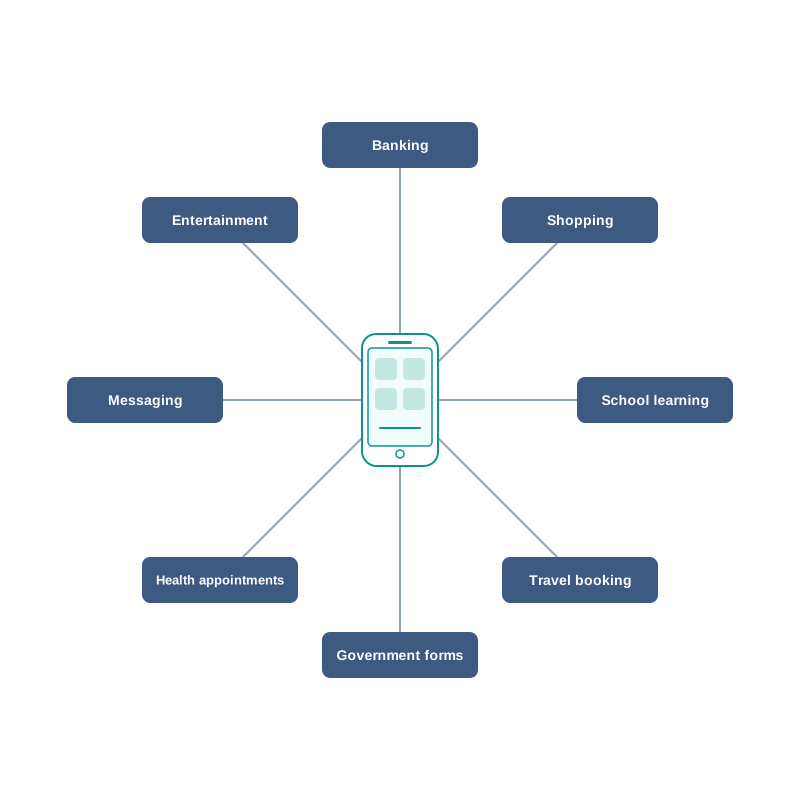
Fig. 11.1 – Everyday activities shifted online.
The same tool, turned around
Every one of these gains carries a matching risk, and the risk is not an accident of poor design. It is the same property seen from the other side.
Because data copies perfectly, a photograph you shared with one friend can reach a thousand strangers. Because data travels instantly, a fraudulent message can reach a lakh of people before lunch. Because data is stored on machines belonging to somebody else, deleting a file from your own phone does not delete it from the world. Because software is only numbers, it can be copied without the maker’s permission — and equally, a program written to steal can be spread as easily as one written to help.
There is a second kind of cost, quieter and easier to ignore. A tool that is always available tends to be always used. Hours at a screen, in a chair that was never designed for it, leave marks on eyes, wrists, back and sleep.
What this chapter does
None of this argues for switching the machines off. It argues for using them knowingly. That is the whole purpose of the chapter ahead.
You will look first at the trail of data your ordinary activity leaves behind, and who can read it. You will then take up the conduct expected of someone who lives part of their life online — in general behaviour, in communication and on social platforms. From there the chapter turns to ownership: what it means for an idea, a program or an image to belong to someone, how that ownership is protected, how it is violated, and why some creators deliberately give parts of it away. Next come the offences committed through digital means, how they work and how a careful user avoids them, followed by the Indian law written to deal with them. The chapter closes with the effect of all this on your own body and mind.
The thread running through every one of these is the same. A digital tool acts far beyond the room you are sitting in, and so the ordinary questions of right conduct — what is mine, what is yours, what am I responsible for — need to be asked again in a setting where the answers are less obvious.
11.2 Digital Footprints
Walk across wet sand and you leave footprints. You do not intend to, you do not notice yourself doing it, and anyone who comes along afterwards can read from them how many people passed, which way they went and roughly how heavy they were. The tide usually clears them within hours.
Your online activity leaves a similar trail, with one important difference: there is no tide. Every search you type, every page you open, every form you fill and every message you send is recorded somewhere — on your own device, on the network that carried it, and on the machines that run the service you used. Taken together, that record is your digital footprint.
Some of what the trail contains is obvious. It includes the emails you write, the photographs you upload, the reviews you post and the details you type into an application form. But it also includes things you never typed at all: the internet protocol address (IP address) that identifies the connection your device is using, the approximate location that address suggests, the make and model of your device, the browser you opened, the pages you looked at, how long you stayed on each one, and what you clicked next.
Two kinds of trail
It helps to separate the trail into two parts, because you have very different degrees of control over them.
An active digital footprint is made of data you deliberately put online. Posting a photograph, sending an email, writing a comment, filling in a registration form, uploading an assignment — in each case you knew you were handing something over, even if you did not think hard about where it would end up.
A passive digital footprint is made of data collected about you while you were doing something else. You did not submit it; it was generated by the act of connecting. Visiting a page records the visit. Opening an app records that the app was opened, from where, and for how long. Scrolling past an item records that you paused on it.
The distinction matters because the second kind is invisible while it is happening, so it is the kind students routinely forget exists. Fig. 11.2 sets the two side by side.
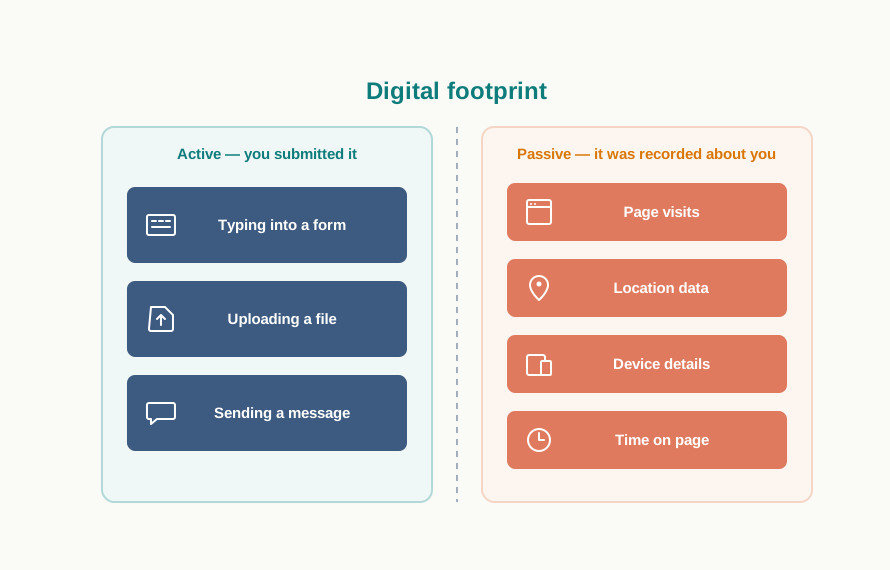
Fig. 11.2 – Active and passive digital footprints.
Table 11.1 – Active vs passive digital footprint
| Feature | Active digital footprint | Passive digital footprint |
|---|---|---|
| How it is created | You deliberately submit data | Data is recorded while you browse or use an app |
| Are you aware at the time | Usually yes | Usually no |
| Typical contents | Posts, emails, comments, uploads, form entries | Pages visited, IP address, location, device details, time spent |
| Degree of control | You choose what to submit | Little control once you connect |
| Example | Uploading a photograph to a profile | The site recording that your device opened that profile |
Where the trail is stored
Part of your footprint sits on the device in front of you. A browser keeps a history of the pages you opened, small data files called cookies that let a site recognise your device on a later visit, saved passwords, and the entries it offers to auto-fill into forms. You can inspect all of this in the browser’s own settings, and you can clear most of it.
The larger part is not on your device at all. It is on the servers that host the services you used, as shown in Fig. 11.3. Those machines belong to somebody else. You generally cannot see what they hold about you, you cannot erase it, and you have no say in how long it is kept or what it is used for.
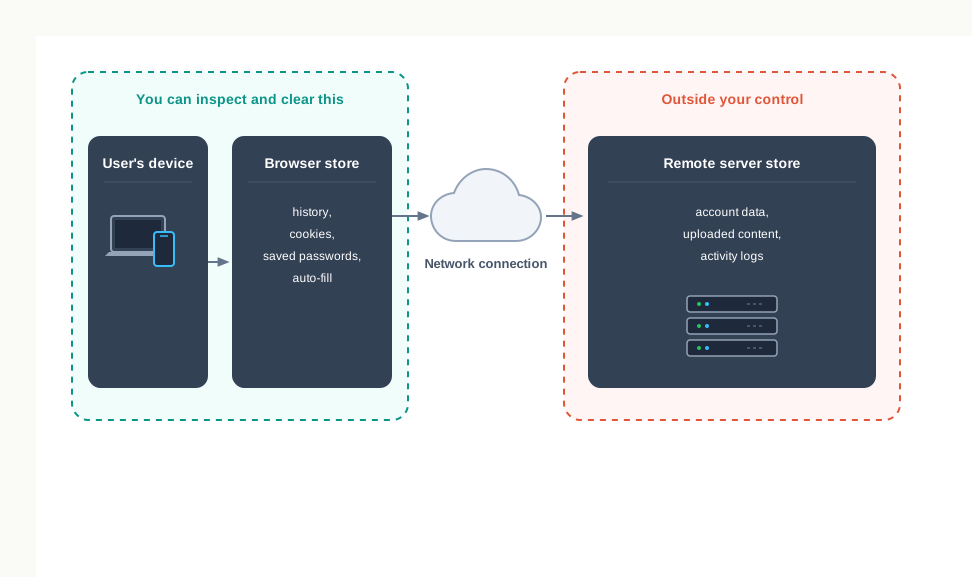
Fig. 11.3 – Storage locations of a digital footprint.
This is why “deleting” is a weaker word online than it is on paper. Removing a post removes it from public view on that service. It does not follow the copies that other users have already saved or forwarded, and it does not reach into every backup and log the service keeps. There is no guarantee that anything you have put online can be fully withdrawn from the Internet.
What a footprint can be used for
Most of the time the trail is put to commercial use. A record of what you looked at is what allows an advertisement for exactly that item to follow you to the next site. Many people find this useful; many find it uncomfortable. Either way it is worth knowing that it is your own passive footprint being read back to you.
The trail also has a serious protective use. Because online actions can be traced back to a device and a connection, people who spread hatred, threaten others or commit fraud online can be, and regularly are, identified. Anonymity on the Internet is much thinner than it feels.
And the trail can be misused. A detailed record of where a person goes, what they buy, whom they talk to and what they worry about is valuable to anyone who wants to impersonate, target or pressure them. That is the point at which a footprint stops being a curiosity and becomes a matter of your own safety.
Nothing in this section asks you to stop using the Internet. It asks you to use it with one question in the back of your mind: if this action were read back to me, in full, a year from now, would I be content with what it shows? That single habit — pausing before you write, upload, download or agree — is the most reliable protection available to you, and it costs nothing.
11.3 Digital Society and Netizen
A society is not only a collection of people; it is a set of understandings about how those people will behave towards one another. You already carry a great many of these understandings without thinking about them. You do not walk into a classroom shouting. You do not read a letter addressed to someone else. You wait your turn at a counter. Nobody teaches these rules formally, and yet almost everyone follows them.
Today a large part of daily life — communication, banking, shopping, learning, entertainment, travel, government paperwork — is carried out through online transactions rather than face to face. That shift is what is meant by a digital society: a society in which digital technologies are used across all spheres of human activity.
The trouble is that the old understandings do not transfer automatically. A person who would never shout at a stranger in a queue may write something cruel under a stranger’s photograph. A person who would never open somebody’s letter may forward a private message to a group. The setting has changed faster than the habits, and the habits have to be rebuilt deliberately.
Anyone who uses digital technology together with the Internet is a digital citizen, or a netizen. The word joins net and citizen, and the second half is the important one — citizenship implies duties, not only access.
Those three words are worth separating. Safe concerns your own protection and that of the people you deal with. Ethical concerns what is right, including things no law compels. Legal concerns what the law of the land actually requires — the subject of Section 11.6. A netizen who satisfies only the third of these is a poor netizen.
The expected conduct is usually grouped under three headings, and the rest of this section takes them in turn: net etiquettes, communication etiquettes and social media etiquettes.
11.3.1 Net Etiquettes
You adjust your behaviour to a setting without being told. You speak differently in a library, a playground and an interview. Net etiquettes are the same adjustment made for the Internet as a whole — the manners expected of you wherever you are online, whether you are reading a forum, downloading a file or replying to a stranger.
They fall under three headings, shown in Fig. 11.4: be ethical, be respectful and be responsible.
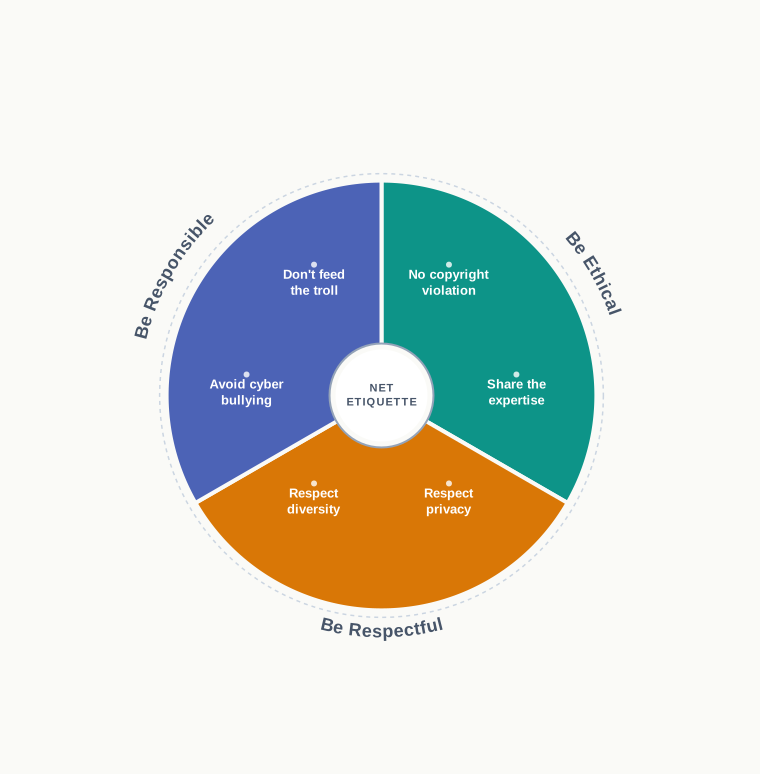
Fig. 11.4 – The net etiquettes.
11.3.1.1 Be Ethical
No copyright violation. Material created by someone else — a song, a photograph, a video, an article, a piece of software — belongs to its creator, and using it without permission is not made acceptable by the fact that it downloaded easily. This applies to streaming audio and video, to saving images, and to lifting text into your own work. The legal machinery behind this ownership is taken up in Section 11.4; here it is enough to say that an ethical netizen checks before using, not after being caught.
Share the expertise. The Internet works because people put knowledge into it freely. Adding what you know is a genuine good, and you should do it. But sharing carries two obligations. First, be sure you actually know the topic — a confident wrong answer online spreads much further than a quiet correct one. Second, make sure what you write is true and unambiguous, and check whether it is already available in a better form, so that you are adding to the pool rather than crowding it with repetition.
11.3.1.2 Be Respectful
Respect privacy. You have a right to privacy and to express yourself; so does everyone you deal with, and the two rights are the same right. Photographs, documents, screenshots of conversations and files that a person shares with you are shared with you, not released to the world. Passing them on to a third person without the sender’s consent is a breach of that trust, and it is one of the most common ways in which ordinary students cause real harm to a classmate without intending any.
Respect diversity. A public forum brings together people who differ in knowledge, experience, language, region, ability and culture. A beginner asking an obvious question is not a nuisance. Someone writing in their second language is not careless. Treat difference as the normal condition of a public space, because that is what it is.
11.3.1.3 Be Responsible
Avoid cyber bullying. Any insulting, degrading or intimidating online behaviour aimed at a person — repeatedly posting rumours, issuing threats, publishing someone’s personal details, sexual harassment, or comments designed to humiliate them publicly — is cyber bullying. The word repeatedly matters: bullying is a pattern of targeting someone with the intention of hurting or embarrassing them.
New users sometimes assume that what happens online is not quite real and therefore does not quite count. It does. The distress caused is exactly as real as it would be in a corridor, and it is worse in one respect: a corridor empties at four o’clock, while a post stays up. Remember also that your own digital footprint makes such actions traceable back to you.
Don’t feed the troll. An internet troll is a person who deliberately sows discord online — starting quarrels, upsetting people, posting inflammatory or off-topic messages in a community — purely for the amusement of provoking a reaction. Trolls live on attention. Arguing with one supplies exactly the reward being sought, which is why the standard advice is to give the comments no attention at all, and to use the platform’s reporting facility where the behaviour crosses into abuse.
11.3.2 Communication Etiquettes
Digital communication covers email, texting, instant messaging, phone calls, audio and video conferencing, and posts on forums and social networking sites. All of these connect you with people in order to exchange ideas, data and knowledge, and each of them replaces a conversation that would once have happened in person, where tone of voice and a face did half the work.
Online, that half is missing. The reader has only your words. Communication etiquettes exist to make up the difference, and they group under three headings shown in Fig. 11.5: be precise, be polite and be credible.
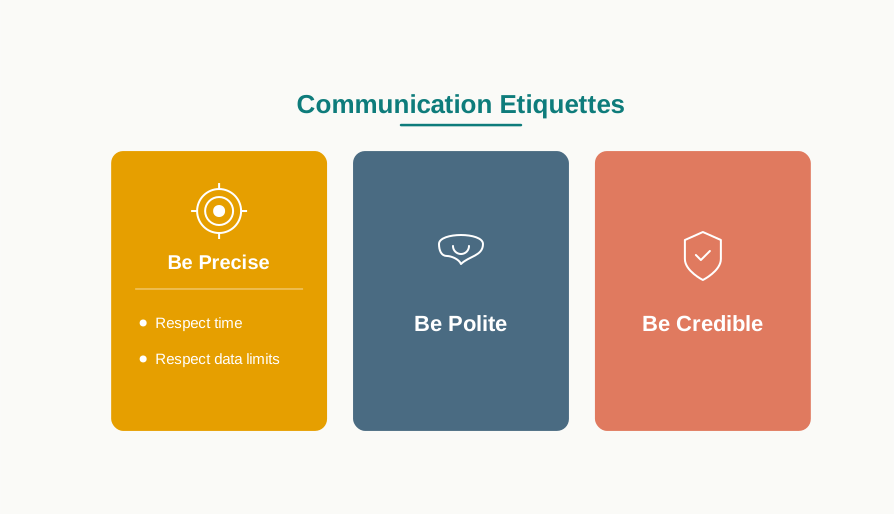
Fig. 11.5 – The communication etiquettes.
11.3.2.1 Be Precise
Respect time. Every message you send spends somebody else’s attention. Do not send or forward what has no relevance to the recipient, and do not reply at length to what needs a line. The same courtesy runs the other way: do not expect an instant response, since the person at the other end has priorities you cannot see.
Respect data limits. A very large attachment costs the recipient storage, data charges and time, and it may simply fail to arrive. Where a file is large, send a compressed version, or place it in shared cloud storage and send the link instead. This is a small habit that matters a great deal to a classmate on a limited data plan.
11.3.2.2 Be Polite
Digital communication comes in two forms, and the distinction is worth naming. Synchronous communication happens in real time, with both parties present — a chat, an audio or video call. Asynchronous communication does not — an email, a forum post, a comment read hours later.
Table 11.2 – Synchronous vs asynchronous communication
| Feature | Synchronous | Asynchronous |
|---|---|---|
| Timing | Both parties present at the same time | Sender and reader are present at different times |
| Examples | Chat, audio call, video conference | Email, forum post, comment, message left for later |
| Chance to reconsider | Very little — the reply goes out at once | Considerable — you may re-read before sending |
| How misunderstanding arises | Interrupting, tone of voice, talking over | Missing tone, missing context, delayed reply read as indifference |
| Expected response time | Immediate | Whenever the reader is free |
Whichever form you are using, be polite and non-aggressive. Disagreement is normal and often useful; abuse is neither. The asynchronous case deserves a special note, because it hands you an advantage the spoken word never offers — you can read your message once more before you send it. A sentence written in irritation and sent after a pause is very often a different sentence.
11.3.2.3 Be Credible
Credibility is built slowly and spent quickly. Over time, the comments you make, the replies you write and the claims you post decide whether people take you seriously. This is exactly how you yourself judge others online: before relying on a stranger’s advice on a discussion forum, you glance at what else they have written and form a view.
So be careful with what you assert. State what you know as knowledge and what you suspect as opinion, correct yourself openly when you are wrong, and do not pass on a claim you have not checked. A reputation for accuracy is the most useful thing you can own in a public forum, and it cannot be bought back once spent.
11.4 Data Protection
Not all data is equally serious. If someone learns that you prefer mangoes to bananas, nothing follows. If someone obtains your bank credentials, your medical record or your fingerprint, a great deal follows, and none of it can be undone by an apology.
Data whose breach can cause substantial harm, embarrassment, inconvenience or unfairness to an individual is called sensitive data. Biometric information such as fingerprints or an iris scan, health records, financial details, and personal documents, images, audio or video all fall into this class.
Data protection is the work of keeping such data private — making sure it is available only to an authorised person and only for a legitimate purpose. Two technical measures do most of the work. Encryption scrambles data by a rule that can be reversed only with the correct key, so that a stolen copy is useless to whoever stole it. Authentication checks that a person requesting access really is who they claim to be, before any data is handed over. You meet both of these every time a padlock appears in a browser’s address bar and every time an application asks you to confirm your identity.
Technical measures alone are not enough, because the organisations holding your data must also be obliged to behave properly. Countries therefore write data protection laws — legal documents that lay down how sensitive information must be processed, stored and transmitted, so that it is protected from unauthorised modification or disclosure. India’s law on electronic records and offences is taken up in Section 11.6.
There is a second kind of ownership that needs protecting, and it is less obvious than a bank balance. It is the ownership of ideas, and it is the subject of the rest of this section.
11.4.1 Intellectual Property Right (IPR)
When a person buys a motorcycle, we say the motorcycle is their property. Nobody finds this puzzling: it is a physical object, and if you take it, the owner no longer has it.
Now suppose a person invents a better braking mechanism, writes a novel, composes a song or designs a logo. What they have made is not an object but an idea given a definite form. This is called intellectual property, and it covers inventions, literary and artistic expressions, designs, symbols, names and logos. The ownership lies with the creator or with whoever holds the rights, and the point of recognising that ownership is to let the creator earn recognition or a financial return from what they made.
Intellectual property is awkward precisely because it does not behave like a motorcycle. If you copy someone’s song, the creator still has the song — nothing has visibly been taken. What has been taken is the ability to decide who may use it and on what terms, which is exactly the thing the creator was relying on to be paid or credited. That is why the protection has to be created by law rather than by a lock.
Intellectual property is protected legally through copyrights, patents and trademarks. The three are not alternatives; a single product usually needs all three at once, each protecting a different part of it, as Fig. 11.7 shows for a piece of software.
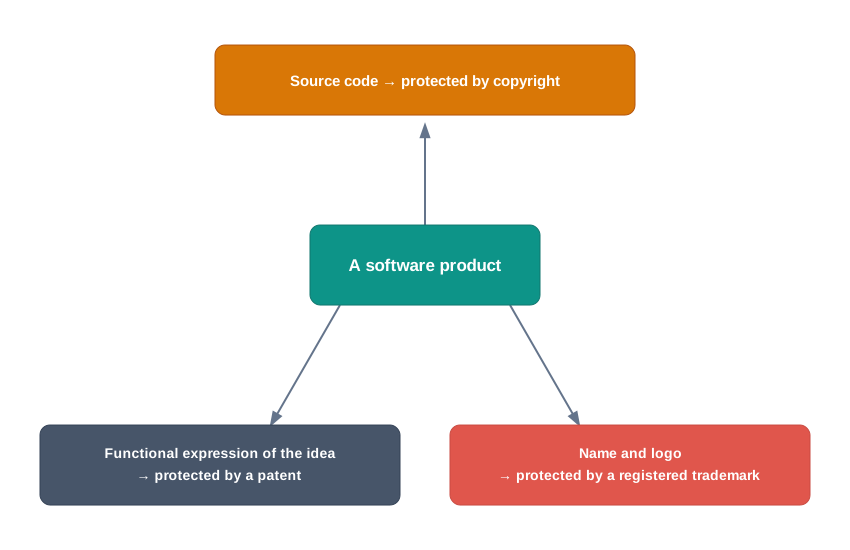
Fig. 11.7 – Three intellectual property protections for one product.
11.4.1.1 Copyright
Copyright grants legal rights to a creator over their original work — writing, photographs, audio recordings, video, sculpture, architectural works, computer software and other literary and artistic work.
Two features of copyright are worth fixing in mind. First, it is granted automatically. The moment you write an original poem or take a photograph, you hold its copyright; no form has to be filled and no fee paid. Second, it gives the holder a set of rights that only they may exercise: the right to copy the work, the right to create derivative works based on it, the right to distribute copies to the public, and the right to display or perform it publicly. Anyone else doing these things needs the holder’s permission, usually in the form of a licence.
Consider a photograph taken by a student for the school magazine. She holds its copyright from the moment she presses the shutter. If a coaching centre prints that photograph on a poster without asking her, it has infringed her copyright — and the fact that the photograph was easy to download changes nothing about her rights over it.
11.4.1.2 Patent
A patent is usually granted for an invention. Unlike copyright, it is not automatic: the inventor must apply, and the application is examined before a patent is granted.
Once granted, a patent gives the patentee the exclusive right to prevent others from using, selling or distributing the invention, and full control over whether and how others may use it. In India a patent protects an invention for 20 years, after which anyone may freely use it.
That expiry is not a flaw in the design; it is the whole bargain. In exchange for exclusive rights for a limited period, the inventor must publish how the invention works. Everyone can therefore read the method immediately and build on it, and can use it outright once the period ends. A system with no patents would push inventors towards secrecy; a system with permanent patents would freeze improvement. Twenty years is the compromise.
11.4.1.3 Trademark
A trademark includes any visual symbol, word, name, design, slogan or label that distinguishes one brand or commercial enterprise from another.
Suppose a shoe manufacturer registers the name Zenda and its wave-shaped symbol. No other company may then sell shoes under that name or symbol. Protection also extends to marks that are confusingly similar, so a rival may not sell shoes as Zendaa either — the test is whether an ordinary buyer would be misled. Interestingly, the same word may sometimes be registered by a different company for entirely unrelated goods, such as notebooks, because no buyer would confuse the two.
Notice whom a trademark ultimately protects. It protects the company’s reputation, certainly — but it does so by protecting the buyer’s ability to know what they are actually buying.
Table 11.3 – Copyright vs patent vs trademark
| Feature | Copyright | Patent | Trademark |
|---|---|---|---|
| What it protects | Original literary, artistic and software works | Inventions — a new product or process | Marks that identify a brand: names, logos, symbols, slogans |
| How it is obtained | Automatically, on creation | By applying and being granted | By registration |
| What the holder controls | Copying, adapting, distributing, displaying the work | Making, using, selling, distributing the invention | Use of the mark on goods and services |
| Duration | A long fixed term set by law | 20 years in India | Renewable, so it may continue indefinitely |
| Example | The code of a program, a photograph, a song | A new braking mechanism | A brand name and its logo |
11.4.2 Violation of IPR
An intellectual property right is violated when someone uses protected material in a way the holder never permitted. This happens in three main ways, and students frequently confuse the first two, so read them side by side.
11.4.2.1 Plagiarism
Presenting someone else’s idea or work as your own is plagiarism.
The commonest form is copying text, pictures or video from the Internet into your own project without naming where they came from. A subtler form catches students out more often: taking an existing idea or product, dressing it in new words, and presenting the result as a new idea of your own. Restating someone’s argument in your own sentences is legitimate — as long as you say whose argument it is. Restating it silently is not.
Plagiarism is a serious ethical offence and is sometimes treated as an act of fraud, because what is stolen is credit for thinking. Note carefully that it applies even to material that is open for public use. Free to use does not mean free to claim; you must still cite the author or the source.
11.4.2.2 Copyright Infringement
Copyright infringement is using another person’s copyrighted work without obtaining their permission, or without paying for it where it is being sold.
Suppose you download an image from a web page and place it in your project. If the copyright holder has not permitted free use, then using that image infringes their copyright — and it still infringes it even if you name the source in your project. Citing the source addresses plagiarism; it does not create permission. The two are separate obligations, and satisfying one does not satisfy the other.
Table 11.4 – Plagiarism vs copyright infringement
| Feature | Plagiarism | Copyright infringement |
|---|---|---|
| What goes wrong | Credit is taken for someone else’s work or idea | Protected work is used without permission |
| Nature of the offence | Primarily ethical and academic | Primarily legal |
| Applies to | Ideas and expression, including freely usable material | Works protected by copyright |
| What fixes it | Citing the original source honestly | Obtaining permission, a licence, or paying where required |
| Can one occur without the other | Yes — copying a public-domain text without citing it | Yes — using a copyrighted image while citing the source |
11.4.2.3 Trademark Infringement
Trademark infringement means the unauthorised use of another party’s trademark on goods or services. The owner of a registered trademark may begin legal proceedings against anyone who infringes it. The harm here is a double one: the owner loses control of a reputation they built, and buyers are misled into paying for something other than what they believe they are buying.
11.4.3 Public Access and Open Source Software
Everything so far has described how creators keep control. There is an equally important tradition of creators deliberately giving some of it away.
Copyright, by default, restricts what anyone else may do with a work. That default suits a novelist. It suits a programmer much less, because software improves fastest when many people can read it, correct it and extend it. If others are allowed to use and build upon existing work, collaboration follows and so do new innovations in the same direction.
The mechanism for this is a licence. A licence states the rules and guidelines under which others may use the work. When authors share their copyrighted work under a public licence, others are permitted to use and even modify the content without seeking individual permission each time. Note that the author has not abandoned copyright — they are using it to grant freedoms rather than to withhold them.
Two categories of public licence are widely used. The creative commons (CC) licences are used for creative works of all kinds — websites, music, film, literature — and enable the free distribution of a work that would otherwise be restricted by copyright; they are chosen by an author who wants people to share, use and build upon what they created, while the author decides the exact conditions. The GNU general public license (GPL) is designed mainly for licensing software; it gives end users the freedom to run, study, share and modify the software, and to receive updates.
An important consequence follows for money. A person or company distributing work under the GPL may charge a fee for copies or may give them away free. This is what separates the GPL from freeware, which is software supplied free of cost and allowed to be copied for personal use, but whose commercial distribution is prohibited and whose source code is not supplied. It separates it more sharply from proprietary software, which is sold commercially, whose program code is not shared or distributed, and where copying is prohibited by copyright law.
Software whose source code is open for anyone to access, modify, correct and improve is free and open source software (FOSS). Such software is maintained by large communities of users and developers who continuously add features or improve existing ones. Operating systems built on an openly licensed kernel, office packages and web browsers are all available in this form and are in daily use in schools and offices, including in many computer laboratories in India.
Table 11.5 – Proprietary software vs freeware vs free and open source software
| Feature | Proprietary software | Freeware | Free and open source software |
|---|---|---|---|
| Cost to the user | Usually paid | Free of cost | May be free or charged for by a distributor |
| Source code available | No | No | Yes |
| Permission to modify | No | No | Yes |
| Permission to redistribute | Prohibited by copyright | Personal copying allowed; commercial distribution prohibited | Allowed, usually on the same terms |
| Who improves it | Only the owning developer | Only the owning developer | Any user or developer in the community |
When copying becomes piracy
Software piracy is the unauthorised use or distribution of software. Buying a licence for one copy does not give you the right to make further copies without the copyright owner’s permission, and doing so amounts to copyright infringement whether the copies are sold, given away or kept for your own use.
The consequences are practical as well as legal. Pirated software commonly carries modifications you cannot inspect and does not receive security updates, so it degrades the performance and safety of the system it runs on. It also damages the software industry, and through it the wider economy, by removing the revenue that pays for the next version. Where cost is the obstacle, FOSS is a legitimate answer and piracy is not.
11.5 Cyber Crime
A theft is a theft whether the thief climbs through a window or logs in from another country. What changes online is the reach. A pickpocket can work one street at a time; a fraudulent message can be delivered to a lakh of people before breakfast, at almost no cost, from a place beyond the reach of the local police station.
Criminal activities or offences carried out in a digital environment are called cyber crime. In such crimes either the computer itself is the target, or the computer is used as a tool to commit the crime.
Cyber crimes are committed against individuals, groups, organisations and even countries, with the intent of causing physical harm, financial loss or mental harassment, directly or indirectly. A cyber criminal may attack one computer or network in order to reach others, disabling or damaging data and services. They may also spread harmful programs in order to steal private and confidential data, which is then used for blackmail and extortion.
Two words recur in this discussion and are often used loosely, so fix them now. A computer virus is malicious code that can copy itself and damage a computer by destroying data or corrupting the system. Malware is the wider term: software written specifically to gain unauthorised access to computer systems. Every virus is malware; not all malware copies itself.
The list of reported offences keeps growing, and it includes hacking, ransomware attacks, denial-of-service attacks, phishing, email fraud, banking fraud and identity theft. This section takes up the ones you are most likely to meet, and closes with what actually protects you.
A word on how this section is written. You will find here what each offence is, how to recognise it and how to defend against it. You will not find instructions for carrying any of it out. That distinction is not squeamishness; it is the difference between studying disease and spreading it.
11.5.1 Hacking
Hacking is the act of gaining unauthorised access to a computer, a computer network or any digital system.
People who do this usually possess real technical expertise in hardware and software, and they work by looking for bugs — faults in a system — that can be exploited to break into it. The skill itself is neutral. What separates one hacker from another is permission and intent.
Hacking done with a positive intent is called ethical hacking, and those who practise it are known as white hat hackers. They are specialists in finding vulnerabilities and loopholes during the testing of software. Working with the owner’s consent, an ethical hacker probes a system in order to discover its security weaknesses, and then reports the findings to the owner so that they can be repaired. Ethical hacking is, in effect, preparing the owner against an attack before a real one arrives.
A non-ethical hacker is one who tries to gain unauthorised access to computers or networks in order to steal sensitive data, with the intent to damage systems or bring them down. Such people are called black hat hackers, or crackers. Their focus is on breaking security and stealing data, and they use their skill for illegal or malicious purposes — identity theft, monetary gain, bringing down a rival’s site, or leaking sensitive information.
Table 11.6 – Ethical hacking vs non-ethical hacking
| Feature | Ethical hacking (white hat) | Non-ethical hacking (black hat) |
|---|---|---|
| Permission from the owner | Taken in advance | None |
| Intent | To find weaknesses so they can be fixed | To steal, damage or disrupt |
| What follows the discovery of a flaw | It is reported to the owner | It is exploited or sold |
| Legality | Lawful, being authorised testing | A criminal offence |
| Outcome for the system | Becomes more secure | Is compromised |
The decisive word in that table is permission. Testing a system you have been asked to test is a profession. Testing a system you have not been asked to test — including your own school’s network — is an offence, however good your intentions and however much you learn from it.
11.5.2 Phishing and Fraud Emails
Most break-ins do not defeat a system’s defences at all. They persuade an authorised user to open the door.
Phishing is an unlawful activity in which fake websites or emails that look original and authentic are presented to a user in order to fraudulently collect sensitive personal details — particularly usernames, passwords, and banking and credit card details.
The commonest method is email spoofing, in which a fake or forged sender address is used so that the recipient presumes the message came from an authentic source. You might receive a message that appears to be from your bank or your school, asking you to confirm your details or renew your password urgently. The logos are copied from the original, the wording is careful, and the link looks nearly right — but the address it actually leads to is not the organisation’s own. Attempts of the same kind now arrive equally often by phone call and by text message.
Fig. 11.8 traces the sequence, and Fig. 11.9 labels the signs that give such a message away.
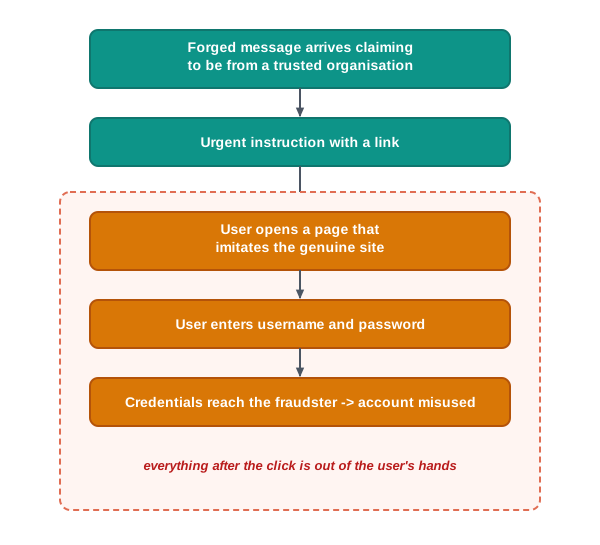
Fig. 11.8 – The sequence of a phishing attack.
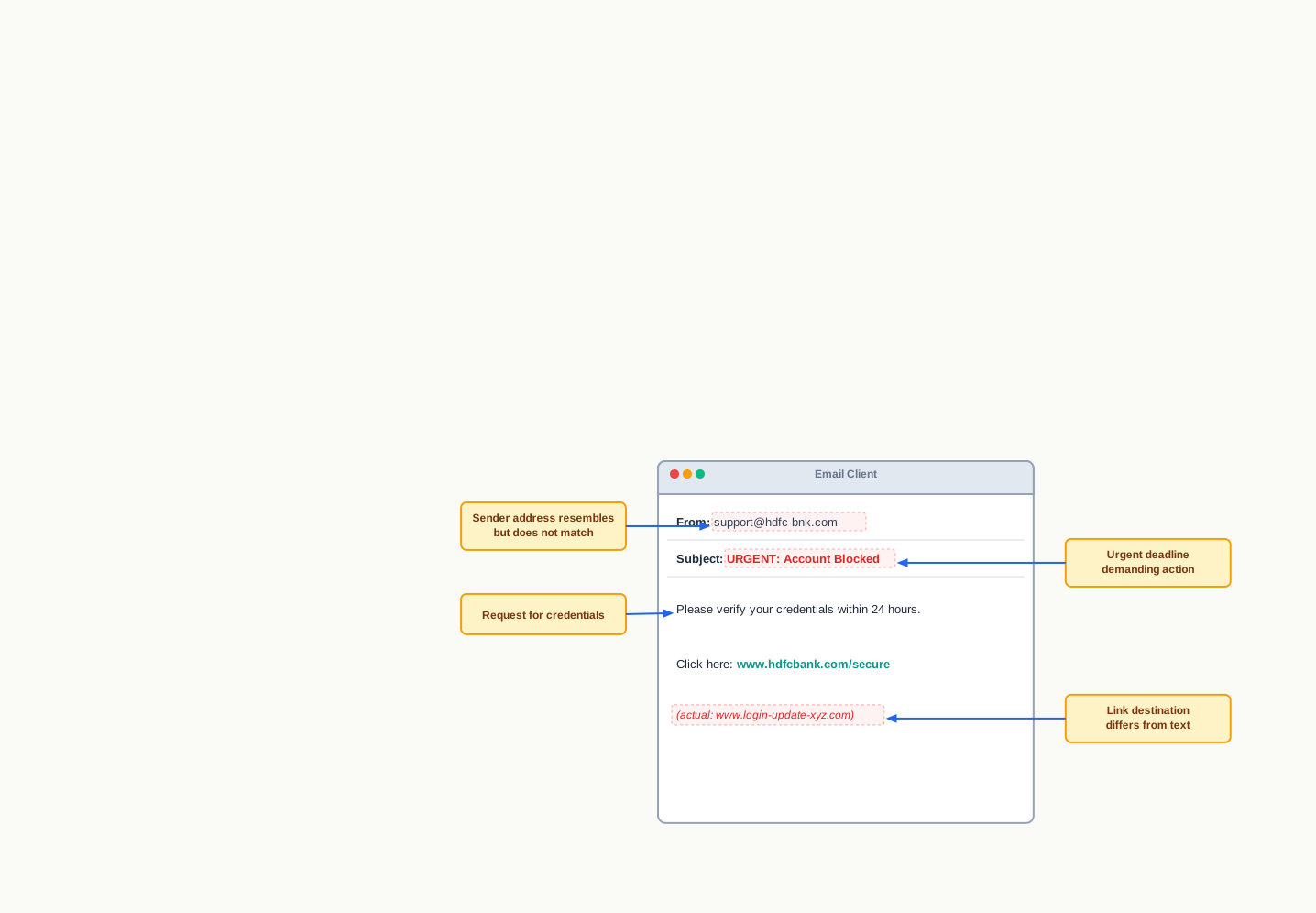
Fig. 11.9 – Warning signs in a phishing message.
Two habits defeat almost every attempt of this kind. First, treat urgency itself as a warning sign — a genuine organisation does not give you twenty-four hours to save your own account. Second, never reach an organisation through a link in a message that asks you for details; go to the site or the helpline number you already know, and check from there.
11.5.2.1 Identity Theft
The purpose behind much phishing is identity theft. Identity thieves use personal information stolen from computers or networks to commit fraud, using the data gained unlawfully as though they were the person it belongs to. Demographic details, email identity, banking credentials and identity document numbers are all taken and misused on the victim’s behalf. This is a type of phishing attack in which the intention is largely monetary gain.
A stolen identity can be turned to several uses:
- Financial identity theft: the stolen identity is used for financial gain.
- Criminal identity theft: criminals use a victim’s stolen identity to avoid detection of their own true identity.
- Medical identity theft: criminals obtain medical drugs or treatment using a stolen identity.
What makes identity theft particularly damaging is that the harm surfaces late and lands on the victim. The fraudulent transaction, the criminal record or the medical file carries their name, and undoing it costs them months of effort for a theft they never witnessed.
11.5.3 Ransomware
Ransomware is a form of cyber crime in which the attacker gains access to a computer and blocks the user from using it, usually by encrypting the data. The victim is then blackmailed into paying for access to their own files, and is sometimes additionally threatened with the publication of personal and sensitive information or photographs unless a ransom is paid.
Notice the cruelty of the design. Nothing has been carried away; the files are still on the machine, in front of the owner, and completely unreadable. Encryption, which Section 11.4 described as a protection, has simply been turned around and used against the person it should have protected.
Ransomware typically reaches a system when a user visits a malicious or insecure website, or downloads software from a doubtful repository. It also arrives as an attachment in spam mail — spam being unsolicited junk email sent in bulk — and can be delivered by clicking a malicious advertisement.
The single most effective defence is unglamorous: a recent backup kept separately from the machine. If your data exists elsewhere, the threat loses its force entirely, because there is nothing left to buy back.
11.5.4 Combatting and Preventing Cyber Crime
The challenges of cyber crime are met by a twin approach — being alert, and taking legal help when something goes wrong. In many Indian states, cyber cells have been set up in police stations where a cyber crime can be reported, and the Government of India operates a national portal for reporting such offences online.
Most of the defence, though, lies in ordinary daily habits. The following measures reduce the risk substantially:
- Take a regular backup of important data, and keep at least one copy separate from the computer.
- Use antivirus software and keep it updated at all times.
- Avoid installing pirated software, and download software only from known and secure sites.
- Keep the system software updated, including the browser and other application software.
- Do not visit or download anything from untrusted websites.
- Heed the browser’s warning when a site’s security certificate cannot be verified, and avoid such sites.
- Use a strong password for every web login and change it periodically; do not use the same password for all sites; combine letters, digits and special characters, and avoid common words and names.
- On someone else’s computer, do not let the browser save passwords or auto-fill data, and use a private browsing window.
- On an unknown site, do not agree to the use of cookies when asked.
- Carry out online transactions such as shopping and ticketing only through well-known and secure sites.
- Secure the wireless network at home with a strong password and change it regularly.
Read that list once more and notice what it has in common. Almost every item removes an opportunity rather than defeating an attack: an updated system has fewer holes to find, a unique password limits what one leak can reach, a backup makes extortion pointless, and a moment’s hesitation before clicking defeats the entire phishing sequence in Fig. 11.8. Security in practice is far less about cleverness than about consistency.
One habit deserves separate mention because students often get it wrong. If you believe you have been targeted, tell someone immediately — a parent, a teacher, the bank, the cyber cell. Victims of online fraud and harassment very often delay out of embarrassment, and the delay is precisely what the offender is relying on.
11.6 Indian Information Technology Act (IT Act)
Everything in Section 11.5 assumed something worth stopping over: that these acts are crimes at all. That is not automatic. A law written for paper does not necessarily reach a wrong committed through a screen. If an offence is defined as forging a signature on a document, what is the position of a person who alters a file that was never printed? If a contract must be signed, is a message typed into a form a contract?
Until such questions are answered by law, two things fail together. The wrongdoer cannot be punished, because no offence is defined. And the honest user cannot act with confidence, because an electronic record has no standing that a court will recognise.
With the growth of the Internet, cases of cyber crime, fraud, cyber attacks and cyber bullying began to be reported in large numbers, and the nature of these offences kept changing. Many countries responded with legal measures to protect sensitive personal data and to safeguard the rights of Internet users. India’s response is the Government of India’s Information Technology Act, 2000, commonly called the IT Act, which was amended in 2008.
What the Act does
The Act works on several fronts at once, summarised in Table 11.7.
Table 11.7 – The main provisions of the IT Act and what each means in practice
| Provision of the Act | What it means in practice |
|---|---|
| Legal recognition of electronic records | A document stored and sent electronically has the same standing as one on paper |
| Legal recognition of digital signatures | A document can be signed electronically in a way the law accepts as authentic |
| Framework for electronic governance | Government departments may accept the filing, creation and storage of official documents in digital form |
| Guidelines on sensitive information | Rules on how sensitive personal data is to be processed, stored and transmitted |
| Definition of cyber offences and penalties | Acts such as tampering with computer source documents, hacking a system, using another person’s password, and publishing another person’s sensitive personal data without consent are identified as offences and carry penalties |
| Appellate machinery | The Act provides for a Cyber Appellate Tribunal to resolve disputes arising under it |
Two consequences of this framework touch ordinary life directly. The first is commercial: people can carry out transactions over the Internet, including payment by card, with legal protection against misuse rather than merely hoping for the best. The second is administrative: because departments may accept and store official documents digitally, a citizen can apply for a certificate, receive it and use it elsewhere without a single sheet of paper crossing a counter.
Enforcement also has a local face. Cyber cells in police stations in many Indian states are where an ordinary citizen actually reports a cyber crime, and Section 11.5 asked you to find yours.
The digital signature
One idea in the Act deserves explaining on its own, because the whole structure of electronic governance rests on it.
A signature on paper does two jobs. It identifies who agreed to the document, and it makes later denial difficult. Neither job is done by typing a name at the bottom of a file, since anybody can type anybody’s name. A digital signature is the electronic arrangement that does both jobs properly.
A digital signature works on a unique digital identity issued to the user by a certifying authority (CA) — an organisation licensed under the IT Act to issue such identities. Signing a document digitally means attaching that user’s identity to it, and the recipient can then use that attachment to authenticate who signed. Fig. 11.10 shows the sequence.
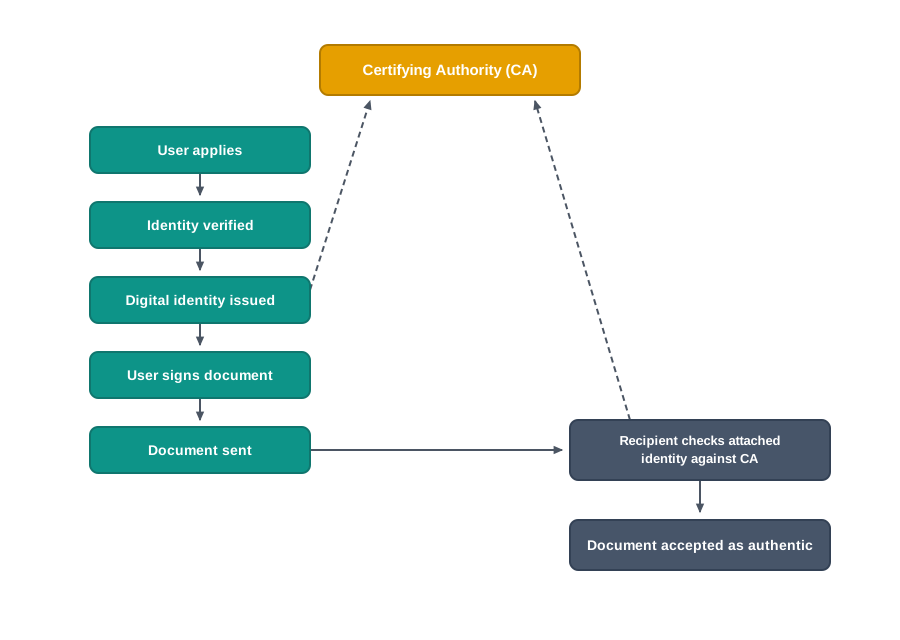
Fig. 11.10 – Obtaining and verifying a digital signature.
Look at where the trust in that diagram actually sits. The recipient does not trust the sender, whom they may never have met. They trust the certifying authority, which verified the sender’s identity before issuing the digital identity and which is licensed for exactly that purpose. This is the same arrangement that makes a passport useful: the person examining it is not trusting you, but the office that issued it.
Why the Act needed amending
The Act was passed in 2000 and amended in 2008, and that gap tells you something important about law and technology. Offences that were rare or unknown when the Act was drafted — organised phishing, large-scale data theft, harassment through social platforms — had become common within a few years, and the law had to be extended to reach them.
This will keep happening. A new technology arrives before the rules that govern it, and the rules follow behind, learning from harm that has already occurred. That is a reason to read the law as it stands rather than assume it. It is also a reason why the ethical habits of Section 11.3 matter independently of the law: a good deal of conduct that is plainly wrong may not yet be plainly illegal, and only one of the two is enforced.
11.7 Impact on Health
Everything so far in this chapter has concerned other people — what you owe them, what they may do to you, and what the law says about both. This last section concerns the one person the chapter has not yet mentioned: you, sitting in a chair, looking at a screen.
Digital technologies have reached into every field, and the result is that we spend far more of the day in front of a display than any earlier generation did — a phone, a laptop, a desktop, a television, a gaming console, a music or sound device. None of these is harmful in itself. What causes trouble is the combination of long hours, a body held in a position it was never designed to hold, and eyes locked at one distance.
There is a second effect that is easier to miss because it leaves no ache. Spending too much time on the Internet can become addictive, and it can have a negative impact on physical as well as psychological well-being. A device that always has something more to show you does not produce a natural stopping point; you have to supply that yourself.
The encouraging part is that most of the physical damage is preventable, and the prevention is mechanical rather than medical. It is largely a matter of how the device is placed and how you are seated.
Arranging the workspace: ergonomics
Ergonomics is the branch of science that deals with designing or arranging workplaces — including furniture, equipment and systems — so that they are safe and comfortable for the person using them.
The word matters because of the direction it points. Ergonomics does not ask how a person can adjust to a chair; it asks how the chair, the desk, the screen and the keyboard should be arranged to suit the person. Applied properly, it reduces the strain on the body, including the fatigue and injuries that come from prolonged use.
Fig. 11.11 shows the arrangement usually recommended for working at a computer.
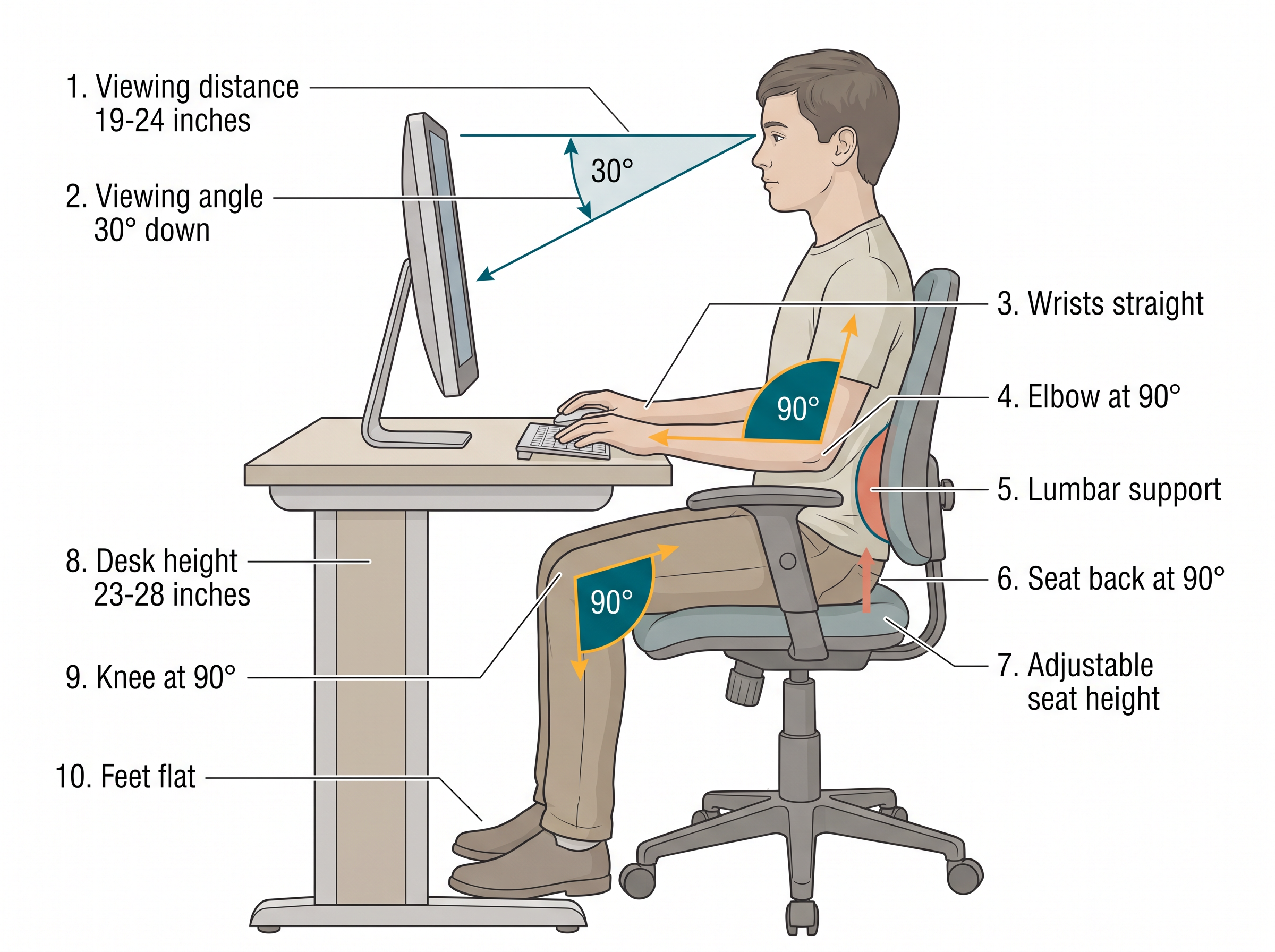
Fig. 11.11 – Ergonomic arrangement of a computer workstation.
Read the figure as a single idea rather than eight separate numbers. Every one of those angles keeps a joint close to its resting position, so that no muscle is holding a load for hours together. The screen sits slightly below eye level so the neck is not tilted back; the wrists stay straight so the tendons running through them are not bent under pressure; the feet are supported so the weight of the legs does not hang from the thighs.
What goes wrong, and what helps
When we look continuously at a screen — watching, typing, chatting or playing — the eyes are exposed constantly to the glare coming from it, and small handheld devices make this worse because they are held closer and are harder to read. Eye strain is the symptom users of digital devices complain of most often.
Maintaining the viewing distance and angle of Fig. 11.11 helps. But eyes also need to change focus, which no screen at a fixed distance ever asks them to do. A widely recommended habit is to look up periodically at something far away and hold the gaze for a few seconds, and to take a proper break outdoors — the distant focus and the daylight both do work that no adjustment of the desk can do for you.
Bad posture, backache, and neck and shoulder pain are prevented largely by arranging the workspace as ergonomics recommends. Overuse of a keyboard that is not aligned ergonomically — whether a physical keyboard or a touchscreen one — can produce a painful condition of the wrists and fingers that may need medical help in the long run. Stress, physical fatigue and obesity are further effects reported when very long hours are spent on digital devices.
Table 11.8 – Common complaints from prolonged device use, their usual cause and the usual remedy
| Complaint | Usual cause | What helps |
|---|---|---|
| Dry, watering or itchy eyes | Continuous focus at one distance, glare, reduced blinking | Correct viewing distance and angle, periodic distant focus, breaks outdoors |
| Neck and shoulder pain | Screen too low or too high, head held forward | Screen at the angle shown in Fig. 11.11, seat back supported |
| Backache | Unsupported lower back, slouched sitting | Lumbar support, seat back at 90 degrees, feet flat on the floor |
| Pain in wrists and fingers | Bent wrists, prolonged keyboard or touchscreen use | Wrists kept straight, keyboard at elbow height, regular pauses |
| Fatigue, stress, disturbed sleep | Very long unbroken sessions, late-night use | Deliberate limits on session length, time away from all screens |
None of this replaces a doctor. If pain in the wrists, back or eyes persists after the workspace has been corrected, it should be examined by a medical professional rather than endured.
Looking after the machine as well
The same care extends to the device, and a well-kept machine lasts longer and fails less:
- Clean it regularly to keep dust off, using a liquid solution meant specifically for electronic screens.
- Wipe the monitor’s screen often with a soft microfibre cloth of the kind used for spectacles.
- Keep it away from direct heat and sunlight, in a room with enough ventilation for air to circulate.
- Do not eat or drink over the keyboard — crumbs falling between the keys and spilt liquid both damage the device.
Keeping a balance
The last point is the hardest to reduce to a rule, and it is the one most worth taking seriously. Digital devices are genuinely enjoyable, and there is no reason to treat them as a danger to be rationed grimly. But time is finite, and hours spent on a screen are hours not spent on sport, on a hobby, or with the people around you. Online friendships are real; they are not a replacement for sitting with someone.
If you take one habit from this section, make it the ability to stop. A device will never suggest that you have had enough. That decision has to be yours, and making it deliberately — a fixed end to the evening, a meal without a screen, a walk after study — is what keeps a tool a tool.
11.8 Summary
The digital setting
- Digital technology represents, stores, processes and transmits information as discrete numeric values rather than as a continuously varying physical quantity. Because information becomes numbers, it can be copied exactly, sent instantly and stored on machines belonging to others — and every convenience and every risk in this chapter follows from that one property.
- Personal computers, the Internet and smartphones together brought these tools from institutions into ordinary homes, so that banking, shopping, learning, travel, government work, communication and entertainment are now carried out through online transactions.
Digital footprints
- A digital footprint is the trail of data left behind by a person’s online activity — the sites visited, the messages and forms submitted, and the device and connection details recorded alongside them, including the IP address and location.
- An active digital footprint is data you deliberately submit, such as posts, emails, comments and uploads. A passive digital footprint is data recorded about you while you were doing something else, such as pages visited, device details and time spent.
- Part of the trail sits on your own device, in the browser’s history, cookies, saved passwords and auto-fill entries, and you can inspect and clear it. The larger part sits on servers you do not control, cannot inspect and cannot erase.
- Deleting a post removes it from public view; it does not recall the copies others already hold, and it does not clear the records the service keeps. There is no guarantee that a digital footprint can be fully removed from the Internet.
- Footprints are used commercially for targeted advertisement, protectively to trace those who commit offences online, and harmfully by anyone who wishes to impersonate, target or pressure a person.
Digital society and the netizen
- A digital society is one in which digital technologies are used across all spheres of human activity. Anyone using digital technology along with the Internet is a netizen, and being a good netizen means using that technology in a safe, ethical and legal manner.
- Net etiquettes are grouped as: be ethical — no copyright violation, share the expertise; be respectful — respect privacy, respect diversity; be responsible — avoid cyber bullying, don’t feed the troll.
- Cyber bullying is repeatedly targeting a person online with insulting, degrading, threatening or humiliating behaviour intended to hurt or embarrass them. An internet troll deliberately sows discord by posting inflammatory or off-topic messages for amusement, and thrives on the attention a reply provides.
- Communication etiquettes are grouped as: be precise — respect time, respect data limits; be polite; be credible. Communication is synchronous when both parties are present at the same time, and asynchronous when the reader comes to it later.
- Social media are websites and applications that let users take part in social networking by creating and sharing content. Their etiquettes are grouped as: be secure — choose password wisely, know who you befriend, beware of fake information; be reliable — think before you upload.
Data protection and intellectual property
- Sensitive data is data whose breach can cause substantial harm, embarrassment, inconvenience or unfairness to an individual — biometric, health and financial information, and personal documents, images, audio and video. It is protected technically by encryption and authentication, and legally by each country’s data protection laws.
- Intellectual property covers inventions, literary and artistic expressions, designs, symbols, names and logos. An intellectual property right lets the creator decide how the creation may be used, and so earn recognition or a financial return from it.
- Copyright arises automatically on creation and covers copying, adapting, distributing and publicly displaying an original work. A patent must be applied for, is granted for an invention, and protects it for 20 years in India, after which anyone may use it. A trademark is a mark that distinguishes one enterprise’s goods or services from another’s, and protection extends to confusingly similar marks.
- Violation of intellectual property right takes three forms: plagiarism — presenting another’s work or idea as one’s own without acknowledging the source; copyright infringement — using protected work without permission or payment; and trademark infringement — unauthorised use of another’s trademark on goods or services.
- Plagiarism and copyright infringement are separate obligations. Citing a source answers plagiarism but does not create permission, and material free for public use must still be cited.
- A public licence lets an author keep copyright while granting standing permission for others to use and modify the work. Creative Commons licences are used for creative works of every kind; the GNU General Public License is used mainly for software, giving users the freedom to run, study, share and modify it.
- Proprietary software is sold commercially with its source code withheld and copying prohibited. Freeware is supplied free of cost for personal copying, with commercial distribution prohibited and source code withheld. Free and open source software makes the source code available for anyone to access, modify, correct and improve, and may be distributed free or for a fee.
- Software piracy is the unauthorised use or distribution of software. It amounts to copyright infringement whether done for sale, for free distribution or for the copier’s own use, and pirated software also degrades the performance and security of the system it runs on.
Cyber crime and the law
- Cyber crime is criminal activity in which the computer is either the target of the offence or the tool used to commit it. A computer virus is malicious code that copies itself and damages data or the system; malware is the wider class of software written to gain unauthorised access.
- Hacking is unauthorised access to a computer, network or digital system. Ethical hacking, carried out by white hat hackers with the owner’s permission, finds vulnerabilities and reports them so they can be fixed. Black hat hackers, or crackers, break in without permission to steal data, damage systems or profit from the intrusion. Permission is what separates the two.
- Phishing presents fake websites or emails that look authentic in order to collect usernames, passwords and banking details. Its commonest method is email spoofing, in which a forged sender address makes the message appear genuine. The reliable warning signs are a request for credentials, an artificial deadline, a sender address that resembles without matching, and a link whose destination differs from its visible text.
- Identity theft is the fraudulent use of stolen personal information in the victim’s name. It appears as financial identity theft, criminal identity theft and medical identity theft.
- Ransomware blocks a user’s access to their own data, usually by encrypting it, and demands payment to restore access. A recent backup kept separate from the machine removes most of its force.
- Cyber crime is countered by alertness and by legal help. The practical measures are regular backups, updated antivirus and system software, avoiding pirated software and untrusted sites, heeding certificate warnings, using strong and distinct passwords, avoiding saved passwords on shared machines, refusing cookies on unknown sites, transacting only on well-known secure sites, and securing the home wireless network.
- The Information Technology Act, 2000, amended in 2008, gives legal recognition to electronic records and digital signatures, provides a framework for electronic governance and digital filing, and defines cyber offences and their penalties. A digital signature attaches the signer’s identity, issued by a licensed certifying authority, to an electronic document so that both can be authenticated later; unlike a handwritten signature, it fails verification if the document is altered afterwards.
- Cyber cells in police stations receive complaints of cyber crime, and an appellate body established under the Act hears disputes arising from it. The law marks the outer boundary of acceptable conduct; the etiquettes of Section 11.3 occupy the much larger space inside it, where nothing compels you and your choices still affect others.
Impact on health
- Long hours at a screen, in a position the body was not designed to hold, cause eye strain, neck and shoulder pain, backache, and painful conditions of the wrists and fingers from keyboard overuse. Stress, physical fatigue and obesity are further reported effects, and excessive Internet use can become addictive, affecting physical and psychological well-being.
- Ergonomics is the science of arranging a workplace, its furniture and its equipment to fit the person using it. Applied to a computer desk it fixes the viewing distance and angle, the seat and desk height, lumbar support, and the position of wrists, knees and feet, keeping every joint near its neutral position.
- Periodically focusing on distant objects and taking breaks outdoors relieve the eyes in a way no desk adjustment can. Persistent pain should be examined medically rather than endured.
- The device itself lasts longer when kept clean and dust-free, wiped with a soft microfibre cloth, kept away from direct heat and sunlight in a ventilated space, and protected from food and drink near the keyboard.
- A digital tool never suggests that you have had enough. Setting a deliberate end to a session, and keeping time for sport, hobbies and the people around you, is what keeps the tool a tool.
11.9 Key Terms
- Active digital footprint — the part of a person’s online trail made up of data they deliberately submitted, such as posts, emails, comments, uploads and form entries.
- Asynchronous communication — communication in which the sender and the reader are present at different times, such as email, a forum post or a comment.
- Authentication — checking that a person requesting access really is who they claim to be, before any data is released to them.
- Black hat hacker — a person who gains unauthorised access to computers or networks in order to steal data, damage systems or profit from the intrusion; also called a cracker.
- CA — certifying authority — the licensed body that issues the unique digital identity on which a digital signature is based.
- CC — Creative Commons — a category of public licence used for creative works of all kinds, enabling free distribution of a work that copyright would otherwise restrict.
- Communication etiquettes — the manners expected in digital communication, grouped as being precise, being polite and being credible.
- Computer virus — malicious code that can copy itself and harm a computer by destroying data or corrupting the system.
- Cookie — a small data file stored by a website on a user’s device so that the site can recognise that device on a later visit.
- Copyright — the automatic legal right of the creator of an original work to control its copying, adaptation, distribution and public display or performance.
- Copyright infringement — using someone’s copyrighted work without their permission, or without paying for it where it is being sold.
- Cyber Appellate Tribunal — the appellate body established under the IT Act to resolve disputes arising from cyber crime.
- Cyber bullying — repeatedly targeting a person online with insulting, degrading, threatening or humiliating behaviour, intended to hurt or embarrass them.
- Cyber crime — a criminal activity in which a computer or network is either the target of the offence or the tool used to commit it.
- Data protection — keeping data private, so that it is available only to an authorised person and only for a legitimate purpose.
- Digital footprint — the trail of data left behind by a person’s online activity, including sites visited, data submitted, and device and connection details.
- Digital signature — the electronic equivalent of a signed paper certificate, attaching the signer’s issued identity to a document so that both can later be authenticated.
- Digital society — a society in which digital technologies are used across all spheres of human activity.
- Digital technology — technology that represents, stores, processes and transmits information as discrete numeric values rather than as a continuously varying physical quantity.
- Email spoofing — using a fake or forged sender address so that a message appears to come from an authentic source.
- Encryption — scrambling data by a rule that can be reversed only with the correct key, so that a stolen copy is unreadable.
- Ergonomics — the science of designing and arranging a workspace, its furniture and equipment to fit the person using it, so as to reduce strain, fatigue and injury.
- Ethical hacking — testing a system for vulnerabilities with the owner’s permission and reporting the findings so that they can be fixed.
- Eye strain — discomfort of the eyes, such as dryness, watering or itching, caused by prolonged focus on a screen and exposure to its glare.
- FOSS — free and open source software — software whose source code is open for anyone to access, modify, correct, improve and redistribute.
- Freeware — software supplied free of cost and permitted to be copied for personal use, but whose source code is withheld and whose commercial distribution is prohibited.
- GPL — GNU General Public License — a public licence used mainly for software, giving users the freedom to run, study, share and modify it.
- Hacking — gaining unauthorised access to a computer, computer network or digital system by exploiting weaknesses in it.
- Identity theft — the fraudulent use of another person’s stolen personal information to act, transact or obtain benefits in that person’s name.
- Intellectual property — an original creation of the mind given definite form, covering inventions, literary and artistic expressions, designs, symbols, names and logos.
- Internet troll — a person who deliberately sows discord online by posting inflammatory or off-topic messages, purely to provoke a reaction.
- IP address — Internet Protocol address — the address identifying the connection a device is using on a network, recorded along with much of a person’s online activity.
- IPR — intellectual property right — the legal right of a creator or owner to decide how their intellectual property may be used by others.
- IT Act — Information Technology Act, 2000 — the Indian law, amended in 2008, that recognises electronic records and digital signatures and defines cyber offences and their penalties.
- Malware — software written specifically to gain unauthorised access to computer systems.
- Net etiquettes — the manners expected of a user anywhere on the Internet, grouped as being ethical, being respectful and being responsible.
- Netizen — a digital citizen; anyone who uses digital technology along with the Internet, and who is expected to use it safely, ethically and legally.
- Passive digital footprint — the part of a person’s online trail collected about them while they were doing something else, such as pages visited, location, device details and time spent.
- Patent — a right granted to an inventor on application, giving exclusive control over the use, sale and distribution of an invention for a fixed period, being 20 years in India.
- Phishing — using messages or websites that imitate a genuine organisation in order to trick a user into revealing sensitive personal information.
- Plagiarism — presenting another person’s work or idea as one’s own, without acknowledging the original source or creator.
- Proprietary software — software sold commercially whose source code is not shared, and whose copying is prohibited by copyright law.
- Public licence — a grant made in advance and to everyone, by which an author who keeps copyright permits others to use and often modify the work.
- Ransomware — malicious software that blocks a user’s access to their own data, usually by encrypting it, and demands payment to restore access.
- Sensitive data — data whose disclosure, loss or misuse can cause substantial harm, embarrassment, inconvenience or unfairness to the individual it belongs to.
- Social media — websites and applications that let users take part in social networking by creating and sharing content with a community.
- Social media etiquettes — the conduct expected on social platforms, grouped as being secure and being reliable.
- Software piracy — the unauthorised use or distribution of software, amounting to copyright infringement whether done for sale, for free distribution or for personal use.
- Spam — unsolicited junk email sent in bulk, which may carry malicious attachments or links.
- Synchronous communication — communication in which both parties are present at the same time, such as a chat or an audio or video call.
- Trademark — a visual symbol, word, name, design, slogan or label that identifies one enterprise’s goods or services and distinguishes them from another’s.
- Trademark infringement — the unauthorised use of another party’s trademark on goods or services.
- White hat hacker — a specialist who practises ethical hacking, finding vulnerabilities in a system with permission and reporting them to its owner.
11.10 Points to Ponder
Copyright arises the moment a work is created, while a patent must be applied for and examined, and it expires after twenty years. Both protect something a person thought of. What is it about an invention, as against a poem or a photograph, that makes the law demand an application and then set a deadline on the protection?
A passive digital footprint is generated about you without your submitting anything. In what sense, if any, does that data belong to you rather than to the organisation whose machines recorded it — and what would it take, technically, for a service to honour a request to erase it completely?
The advice on trolls is to withhold attention, because attention is what they are seeking. But ignoring a post leaves it standing where everyone else can read it. Where is the line between refusing to feed a troll and abandoning the person the troll is targeting?
Free and open source software is improved continuously by people who are not paid for the improvement, and it has produced some of the most widely used software in the world. Why does this arrangement work so well for programs, and so rarely for novels, films or songs?
A digital signature breaks if a single character of the signed document is altered afterwards; a handwritten signature notices nothing. Given that paper contracts have been relied on for centuries, what did paper systems use in place of this property — and what did that substitute cost?
A digital device gives no natural signal that you have had enough, and the responsibility for stopping is left entirely to the user. Could a device be designed to supply that signal instead? If it could, would designing it in be a kindness or an intrusion — and who should decide?
11.11 Objective Questions
- Which of the following is an example of a passive digital footprint? [1 mark]
- Uploading a photograph to a social networking site
- Filling in an online admission form
- A website recording the pages your device opened and how long it stayed
- Writing a comment under a video
- A student copies three paragraphs from a web page into her project and writes the address of the page in her list of sources. She has not obtained permission from the page’s owner. Which of the following is true? [1 mark]
- She has committed plagiarism but not copyright infringement
- She has committed copyright infringement but not plagiarism
- She has committed both
- She has committed neither
- Which protection is granted automatically, without any application being made? [1 mark]
- Patent
- Copyright
- Trademark
- A public licence
- A message arrives that appears to be from a bank, using a forged sender address, and asks the reader to confirm their password on a linked page. This is an example of: [1 mark]
- Ransomware delivered by email
- Phishing through email spoofing
- Ethical hacking
- Trademark infringement
- Which one of the following is a feature of free and open source software but not of freeware? [1 mark]
- It can be obtained without paying
- Its source code is available for anyone to study and modify
- It is protected by copyright
- It can be installed on more than one computer
- Assertion (A): An ethical hacker who breaks into a company’s website is not committing an offence. Reason (R): Ethical hacking is carried out with the owner’s prior permission and the findings are reported to the owner. [1 mark]
- Both A and R are true, and R is the correct explanation of A
- Both A and R are true, but R is not the correct explanation of A
- A is true but R is false
- A is false but R is true
- Assertion (A): Clearing the browser’s history and cookies removes a user’s digital footprint from the Internet. Reason (R): Most of a user’s digital footprint is stored on servers hosting the applications, which the user can neither inspect nor erase. [1 mark]
- Both A and R are true, and R is the correct explanation of A
- Both A and R are true, but R is not the correct explanation of A
- A is true but R is false
- A is false but R is true
- Match each item in Column A with the description in Column B that fits it. [1 mark]
Table 11.9 – Match the following: terms and their descriptions
| Column A | Column B |
|---|---|
| a. Ransomware | i. Repeatedly targeting a person online in order to hurt or embarrass them |
| b. Cyber bullying | ii. Unauthorised use or distribution of software |
| c. Software piracy | iii. Blocking a user from their own data, usually by encrypting it, and demanding payment |
| d. Internet troll | iv. Posting inflammatory or off-topic messages purely to provoke a reaction |
- Fill in the blanks. [1 mark]
- Scrambling data by a rule that can be reversed only with the correct key is called ____________.
- A patent protects an invention in India for a period of ____________ years.
- Write the full form of each of the following abbreviations: IPR, FOSS, GPL, CC, IT Act. [1 mark]
11.12 Check Your Concepts
Define sensitive data and give two examples of it. [2 marks]
What is meant by a netizen? State the three qualities expected of a good netizen’s use of digital technology. [2 marks]
Differentiate between synchronous and asynchronous communication, giving one example of each. [2 marks]
State what ergonomics is, and give two ways in which it is applied while arranging a computer workstation. [2 marks]
Differentiate between plagiarism and copyright infringement with the help of one example each. [3 marks]
Explain what a digital footprint is, and distinguish its active and passive kinds with an example of each. [3 marks]
A trademark protects a name and logo, a copyright protects a program’s source code, and a patent protects the functional expression of an idea. Explain, with reference to a single piece of software, why all three protections may be needed at the same time. [3 marks]
A patent is granted only on application and expires after a fixed period, while copyright arises automatically and lasts far longer. Give reasons for these two differences. [4 marks]
A school is choosing between proprietary software and free and open source software for its computer laboratory. Compare the two on four points, and state which you would recommend, with justification. [4 marks]
A student’s account on a social platform has been used by someone else to post messages in her name. [5 marks]
- Name two etiquettes from this chapter that, if followed, would most likely have prevented this.
- State what she should do immediately, and where such an offence may be reported.
- Name the law under which such misuse is dealt with in India, and state two things that law provides for.
11.13 Output & Debugging
Classify each of the following as an active digital footprint or a passive digital footprint, and give a one-line reason for each. [2 marks]
- Submitting an online form for a library membership
- A shopping site recording which items a visitor scrolled past
- Sending a reply on a class discussion forum
- The IP address recorded when a device opens a news page
A student writes: “I downloaded a song from the Internet and used it in my school video. Since I mentioned the singer’s name in the credits, I have done nothing wrong.” Identify the mistake in this reasoning and state the correct position in two lines. [2 marks]
Copy the following table into your answer book and complete the four empty cells. [3 marks]
Table 11.10 – Complete the comparison: white hat and black hat hackers
| Feature | White hat hacker | Black hat hacker |
|---|---|---|
| Permission from the owner | ____________ | None |
| Intent | To find weaknesses so they can be fixed | ____________ |
| Action taken after finding a flaw | ____________ | Exploits it or sells it |
| Legality | Lawful, being authorised testing | ____________ |
- A message reaches a student’s phone reading: “Your bank account will be blocked in 12 hours. Confirm your PIN at the link below to keep it active.” [3 marks]
- Name the offence this message is attempting.
- List three features of the message that identify it as fraudulent.
- State what the student should do instead of clicking the link.
11.14 Case-Based Questions
- The library of a school keeps a digital issue register. Each time a book is issued, the record shown below is created. Students access the register through the school’s website, using a login given to them at the start of the year. [5 marks]
Table 11.11 – Extract from the school library’s digital issue register
| Issue no. | Book title | Class | Issue date | Due date |
|---|---|---|---|---|
| 1041 | Introduction to Astronomy | XII | 2026-07-02 | 2026-07-16 |
| 1042 | Modern Indian Poetry | XI | 2026-07-03 | 2026-07-17 |
| 1043 | Atlas of World Geography | XII | 2026-07-05 | 2026-07-19 |
a. A student shares her library login with a friend so that he can check a due date. Name two things that could go wrong, and identify which social media etiquette this ignores.
b. The librarian wants to add a column storing each borrower's home address and phone number. State, with reasons, whether this data would count as sensitive data, and what protection it would then require.
c. The school notices that the register's web page can be opened without logging in. A senior student discovers this and, without telling anyone, uses it to view other students' records. State whether this is ethical hacking or not, and justify your answer.- A student is preparing a project on water conservation. He does the following four things.
- He reads an article on a conservation website and rewrites its argument in his own sentences, without naming the article.
- He downloads a photograph from a news page and places it in his project, mentioning the page address beneath it.
- He finds a diagram released under a Creative Commons licence, uses it, and credits the creator as the licence requires.
- He copies the logo of a bottled water company onto his cover page. [5 marks]
a. For each of the four actions, state whether it amounts to plagiarism, copyright infringement, trademark infringement, or none of these.
b. Explain why citing a source does not, by itself, make the use of a copyrighted image lawful.
c. Describe what he should have done in action (i) and in action (ii) to keep the project both honest and lawful.
A small stationery shop keeps its billing and stock records on one computer. The owner uses a single password for the shop’s computer, her email and the shop’s online payment account, and has never taken a backup. One morning the computer displays a message saying that all the shop’s files have been locked and will be released only on payment. [4 marks]
- Name the type of cyber crime that has occurred, and explain in two lines how it works.
- Identify two habits of the owner that made the shop vulnerable, and state what each should be replaced with.
- State the single precaution that would have made the demand for payment pointless, and explain why.
11.3.3 Social Media Etiquettes
Social media are websites and applications that let their users take part in social networking by creating and sharing content with others in a community. They encourage people to post thoughts, experiences and pictures, and to interact with everyone else doing the same. That design is why their reach has grown so quickly, and why they now influence politics, business, culture and education.
The scale changes the arithmetic of a mistake. A remark made to four friends reaches four people; the same remark posted reaches everyone who follows you, and then everyone who follows them. Social media etiquettes are therefore mostly about caution before the fact, and they group under two headings shown in Fig. 11.6: be secure and be reliable.
Fig. 11.6 – The social media etiquettes.
11.3.3.1 Be Secure
Choose password wisely. Your password is the only thing standing between a stranger and everything your account can do in your name. Reports of user data leaking from social platforms appear regularly, which means the sensible assumption is that a weak password will eventually be tried. Use a long password that mixes letters, digits and other characters, avoid ordinary words and personal names that anyone who knows you could guess, use a different password for different accounts, and change it from time to time. Never share your username and password with anyone, however close.
Know who you befriend. Social networks push you constantly towards connecting with more people, including people you have never met. A connection is not a neutral act: it usually grants access to your posts, your photographs, your friends list and details of your daily routine. Be cautious about accepting requests from strangers, since you have no way of knowing whose account it really is or what it is for.
Beware of fake information. False news, forwarded messages and fabricated posts circulate constantly, and they are written to be believed and shared quickly. Do not accept something merely because it appeared on your screen or because several people you know have already passed it on. Check who is claiming it, whether any reliable source reports the same thing, and whether the item is recent or an old one revived. With practice you will find that fabricated posts share recognisable features — extreme claims, urgent instructions to forward, and no identifiable source.
Q. Is it safe to keep the same password for all your accounts if the password itself is a strong one?
A. No. Strength protects you against someone guessing it; it does nothing once the password has leaked from one of the services that stored it. If every account shares that password, a single leak anywhere opens all of them at once. Reusing a password converts one small failure into a total one.
11.3.3.2 Be Reliable
Think before you upload. You can put almost anything on a social platform in a few seconds, and that ease is exactly the danger. Once uploaded, the file exists on a remote server and in the hands of everyone who saw it, and deleting your copy changes neither of these — as Section 11.2 established. Be especially careful with anything sensitive or confidential, your own or anyone else’s: personal photographs, documents, identity details, screenshots of private conversations, or images in which other people appear without their consent.
The test that works is simple and slightly uncomfortable. Before you upload, ask whether you would be content for this to be seen, years from now, by a stranger, by your family, and by the person it concerns most. If the answer is no for any of the three, the moment to stop is now, because there is no reliable way to stop later.
Take the weak password
tecnologyand explain in two or three lines why it is weak, listing each specific fault. Then, on paper, write down three rules you would use to build a stronger one — without writing the password itself anywhere.