Chapter 10: Tuples and Dictionaries
Every programming language has to answer one very plain question: when a program mentions a name, how does the language find the thing that name stands for? A list would be the obvious answer — keep the names in order and search through them. But searching means looking at one name, then the next, then the next, and a large program has thousands of names.
Python, first released by Guido van Rossum in 1991, answered differently. It kept names and the values they stand for as pairs, in a structure that is looked up by the name itself rather than by position. That structure is the dictionary, and Python leans on it so heavily that the language uses it to build itself: a module keeps its names in a dictionary, and so does a class, and so does almost every object you make.
There was a second problem to solve as well. A list is easy to change, and that is usually what you want — but not always. The three coordinates of a point, the day-month-year of a date, a record lifted out of a register: these are collections that should stay exactly as they were made. For these, Python provided a sequence that closes once it is built. It is called the tuple.
This chapter is about both of them — the sequence that cannot be changed, and the collection that is found by name.
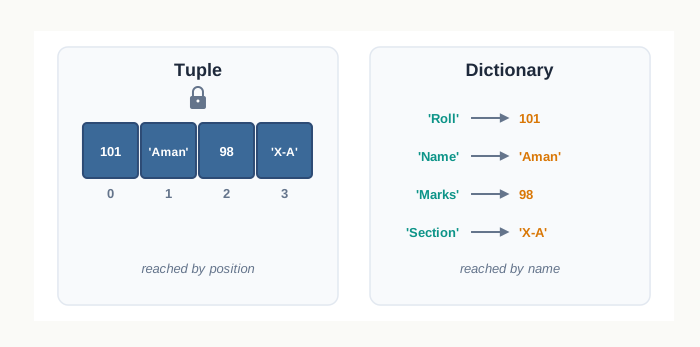
Fig. 10.0 – Tuple and dictionary storage mechanisms.
Keep these five questions in mind as you read. Each one is answered somewhere in this chapter, at the point where the idea behind it is explained.
10.1 Introduction to Tuples
Suppose you are noting down one bus stop from a timetable: its name, and the platform it leaves from. Those two facts belong together, they have a definite order, and neither of them is going to change while your program runs. What you want is a small container that holds several values in a fixed order and then stays as it is.
Python gives you exactly that container. A tuple is an ordered sequence of values, written inside round brackets with the values separated by commas. Each value stored in it is called an element, and the elements need not be of the same type — a tuple can hold an integer, a floating-point number, a string, a list, or even another tuple, all at once.
Because a tuple is ordered, every element sits at a fixed numbered position. That position number is called the index, and, as with a string or a list, counting starts at 0 and not at 1. So the first element of a tuple is at index 0, the second at index 1, and so on.
You have already met two ordered sequences in Python — the string and the list. The tuple is the third, and it borrows almost all its behaviour from them. What sets it apart is the last clause of that definition, and the rest of this section builds up to it.
10.1.1 Creating a Tuple
A tuple is created by writing its elements inside round brackets, separated by commas, and assigning the whole thing to a variable.
>>> marks = (72, 65, 88, 91, 54)
>>> marks
(72, 65, 88, 91, 54)
All five elements here are integers, but nothing forces that. The next tuple records one book in a school library register — its title, the year it was bought, its price and whether it is currently on the shelf.
>>> book = ('Ganit Prakash', 2019, 245.75, True)
>>> book
('Ganit Prakash', 2019, 245.75, True)
An element may itself be a whole collection. Below, the third element is a list, and in the tuple after it the second element is another tuple.
>>> reading = (101, 'Mon', [12, 15])
>>> reading
(101, 'Mon', [12, 15])
>>> stop = ('Sanganer', (26, 75))
>>> stop
('Sanganer', (26, 75))Two edge cases in this syntax deserve care, because both of them trip students up.
The empty tuple and the one-element tuple
An empty tuple is written as a pair of brackets with nothing inside, and Python prints it back the same way.
>>> empty = ()
>>> empty
()
>>> type(empty)
<class 'tuple'>
A tuple of one element, however, is not written the way you would expect. Round brackets in Python already have an older job — they group an expression, as in (3 + 4) * 2. So when Python sees a single value inside brackets, it reads the brackets as grouping and hands back the value itself, unchanged.
>>> fare = (45)
>>> fare
45
>>> type(fare)
<class 'int'>
The name fare is now an ordinary integer. What actually makes a tuple is not the brackets at all — it is the comma. Put a comma after the single element and Python has no choice but to read the whole thing as a sequence.
>>> fare = (45,)
>>> fare
(45,)
>>> type(fare)
<class 'tuple'>
Notice how Python prints it: (45,), with the comma kept in. That trailing comma in the output is Python’s way of telling you, unmistakably, that this is a one-element tuple and not a plain number.
A tuple without brackets
Since the comma is what does the work, the brackets can often be dropped altogether. A plain list of comma-separated values is treated as a tuple by default.
>>> point = 26, 75
>>> point
(26, 75)
>>> type(point)
<class 'tuple'>
Python has read 26, 75 as a tuple and, when asked to display it, printed it back with the brackets restored. Writing a tuple this way is common and perfectly correct, but in a program that others will read, the brackets are worth keeping — they make the intention visible at a glance.
10.1.2 Accessing Elements in a Tuple
Once a tuple exists, you reach a single element by writing its index in square brackets after the tuple’s name — the same notation you already use for strings and lists. The tuple below records the maximum temperature recorded on six consecutive days.
>>> temp = (31, 34, 29, 27, 33, 30)
>>> temp[0]
31
>>> temp[4]
33
The first element is at index 0, so temp[4] is the fifth reading, 33, and not the fourth. This off-by-one relationship between position and index is worth fixing firmly in mind, because almost every indexing mistake in Python comes from forgetting it. Fig. 10.1 shows the two index scales that run along this tuple.
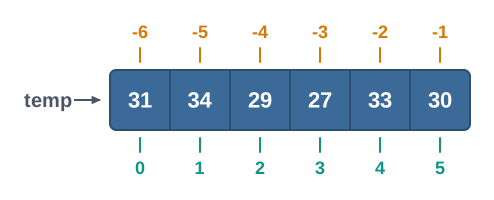
Fig. 10.1 – Positive and negative indices of a tuple.
The second scale in the figure is the negative one. An index of -1 means the last element, -2 the second last, and so on backwards to -6 for the first. This saves you from having to know the length of a tuple in order to reach its final element.
>>> temp[-1]
30
>>> temp[-6]
31
The index need not be typed as a plain number. Anything that evaluates to an integer will serve, so an expression works just as well — Python evaluates it first and then uses the result as the index.
>>> temp[2 + 3]
30
If the index falls outside the range the tuple actually has, Python stops with an error rather than guessing. A tuple of six elements has valid indices 0 to 5 going forward, and -1 to -6 going backward; anything else is out of range.
>>> temp[6]
IndexError: tuple index out of range10.1.3 Tuple is Immutable
Everything so far has been shared with the list. Here the two part company. A tuple is immutable — once it has been built, its elements cannot be replaced, removed or added to. Any attempt to assign a new value to one of its positions is refused.
>>> temp = (31, 34, 29, 27, 33, 30)
>>> temp[2] = 35
TypeError: 'tuple' object does not support item assignment
Read the message carefully: it does not say the value 35 is wrong, or the index 2 is wrong. It says the tuple does not support item assignment at all. A list would have accepted that same line without complaint, because a list is mutable — its contents can be changed in place after it is created.
That last clause explains what happens when you seem to “change” a tuple anyway:
>>> temp = (31, 34, 35, 27, 33, 30)
>>> temp
(31, 34, 35, 27, 33, 30)
Nothing was modified here. A brand-new tuple was built from the six values written on the right, and the name temp was then made to refer to that new tuple instead of the old one. The original tuple was not edited; it was replaced, and the name was pointed elsewhere.
Table 10.1 – List vs tuple
| Feature | List | Tuple |
|---|---|---|
| How it is written | Elements inside square brackets, e.g. [31, 34, 29] |
Elements inside round brackets, e.g. (31, 34, 29) |
| Changing an element | Allowed; data[2] = 35 replaces the element in place |
Refused; raises TypeError |
| Adding or removing elements | Allowed after creation | Not possible; a new tuple must be built |
| Effect of assigning to the name | The same object may be modified | A different object is created and the name is repointed |
| Suits data that | is expected to change as the program runs | must stay exactly as it was recorded |
So why keep a type that refuses to be edited? Because refusal is the point. When a set of values genuinely must not change — a fixed set of coordinates, the columns of one record read out of a register, a table of month names — storing it in a tuple means no later line of the program can quietly damage it. An accidental assignment becomes an error you see immediately, instead of a wrong value you discover much later. Immutability also lets Python handle a tuple more simply than a list, which is why stepping through a tuple is generally quicker than stepping through a list of the same size.
Immutable, but not always frozen
There is one situation that looks like a contradiction until you see what is really being protected. A tuple may hold a mutable element — a list, for instance. The tuple will not let you replace that element, but nothing stops you from changing what is inside it.
>>> reading = (101, 'Mon', [12, 15])
>>> reading[2][0] = 18
>>> reading
(101, 'Mon', [18, 15])
The tuple still has exactly three elements, and its third element is still the same list object it always was. What changed is the contents of that list, and the list itself is perfectly willing to be changed. Try instead to swap the list for a different one, and the tuple refuses as firmly as before:
>>> reading[2] = [18, 15]
TypeError: 'tuple' object does not support item assignment
The rule, then, is precise: a tuple fixes which objects it holds, not what those objects contain. Fig. 10.2 makes the distinction visible.
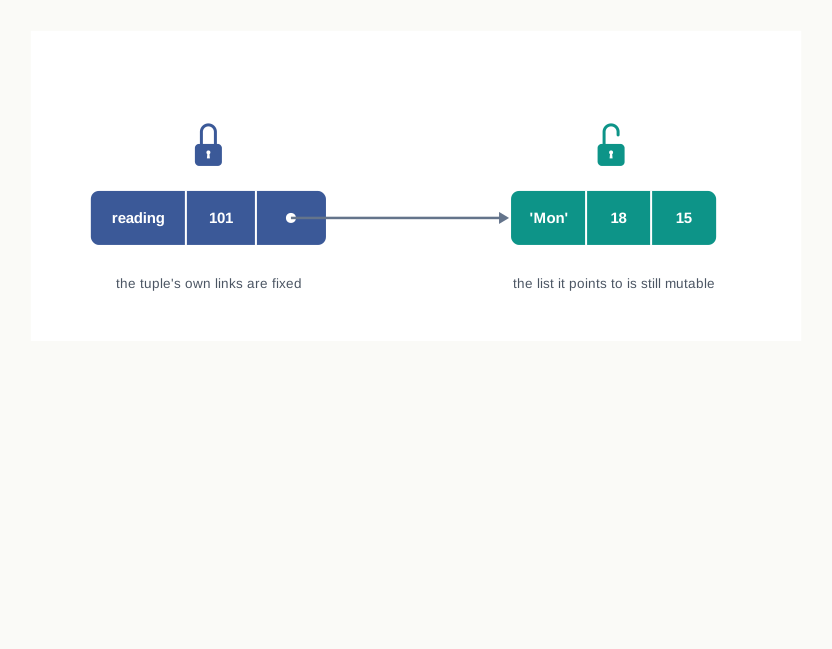
Fig. 10.2 – A tuple holding a mutable list.
10.2 Tuple Operations
A tuple cannot be edited, but that does not leave you helpless with one. Python provides a small set of operations that build new tuples out of existing ones, test what a tuple holds, and pull out a portion of it. There are four such operations, and each of them is written with a symbol you have already used on strings and lists — which is the point. The same operator behaves in the same spirit on every ordered sequence in Python.
Keep the rule of Section 10.1.3 in view while reading this section. None of these operations alters the tuple you start with. Where an operation appears to grow or shorten a tuple, what has really happened is that a fresh tuple was built and handed back to you.
10.2.1 Concatenation
Two tuples are joined end to end with the + operator. This is called concatenation, and the result is a new tuple containing the elements of the first followed by the elements of the second, in that order.
>>> morning = (6, 7, 8)
>>> evening = (17, 18, 19)
>>> morning + evening
(6, 7, 8, 17, 18, 19)
The order matters, because a tuple is an ordered sequence. Writing evening + morning would give (17, 18, 19, 6, 7, 8) — the same six values, but a different tuple.
Neither morning nor evening has been touched by that line. The joined result was simply displayed and then discarded, because nothing was done with it. To keep it, give it a name:
>>> departures = morning + evening
>>> departures
(6, 7, 8, 17, 18, 19)
>>> morning
(6, 7, 8)
Extending a tuple
Since a tuple cannot grow in place, concatenation is also how you add an element to one. The trick is to write the new element as a tuple of its own — which, from Section 10.1.1, means remembering the comma.
>>> routes = ('A1', 'A2', 'A3')
>>> routes = routes + ('A4',)
>>> routes
('A1', 'A2', 'A3', 'A4')
More than one element can be added in the same way, and there the comma comes naturally:
>>> routes = routes + ('A5', 'A6')
>>> routes
('A1', 'A2', 'A3', 'A4', 'A5', 'A6')
Nothing here contradicts immutability. The original three-element tuple was never modified. A four-element tuple was built from it, the name routes was made to refer to that new tuple, and the old one — now unreachable — was left behind. This is exactly the pattern you saw when a tuple appeared to be “changed” in Section 10.1.3.
10.2.2 Repetition
The * operator repeats a tuple a stated number of times. This is called repetition, and it needs a tuple on one side and an integer on the other.
>>> pair = (0, 1)
>>> pair * 3
(0, 1, 0, 1, 0, 1)
Read the result carefully. The whole tuple is repeated three times, one full copy after another — you do not get each element repeated three times in place. Repetition is most useful for setting up a sequence of identical starting values, such as a row of empty seats:
>>> slot = ('Free',)
>>> slot * 4
('Free', 'Free', 'Free', 'Free')
The second operand must be an integer. A float, however round it looks, is refused, because there is no sensible meaning for repeating a sequence two-and-a-half times.
>>> pair * 2.0
TypeError: can't multiply sequence by non-int of type 'float'10.2.3 Membership
To find out whether a value is present in a tuple, use the in operator. It is called the membership operator, and it gives back True if the value is one of the tuple’s elements and False otherwise.
>>> subjects = ('Physics', 'Chemistry', 'Maths', 'Biology')
>>> 'Maths' in subjects
True
>>> 'Hindi' in subjects
False
Its partner, not in, reverses the answer. It is True exactly when the value is absent.
>>> 'Hindi' not in subjects
True
>>> 'Maths' not in subjects
False
This is a genuine convenience. Without it you would have to walk through the tuple index by index, comparing each element yourself, and stop when you found a match. The in operator does that search for you and reports only the verdict.
What it compares are whole elements, never parts of them. A tuple of strings is not searched for a fragment of a string:
>>> 'Math' in subjects
False
The same holds when the elements are themselves tuples. Below, the readings tuple has two elements, each a tuple of two values, so a match must be one of those complete pairs:
>>> readings = ((1, 24), (2, 26))
>>> (2, 26) in readings
True
>>> 2 in readings
False
The value 2 does appear inside the tuple (2, 26), but in does not go looking one level down. It compares against the elements of readings itself, and neither of those two elements is the number 2.
10.2.4 Slicing
Indexing gives you one element. Slicing gives you a run of them. You write two indices separated by a colon inside the square brackets, and Python hands back a new tuple containing the elements from the first index up to — but not including — the second.
>>> fares = (10, 15, 20, 25, 30, 35, 40, 45)
>>> fares[2:5]
(20, 25, 30)
The slice began at index 2 and stopped just before index 5, so it collected the elements at indices 2, 3 and 4. The element at index 5 was left out. This “up to but not including” rule is the single thing to get right about slicing, and Fig. 10.3 shows why it is natural once you think of the indices as marking the cuts between elements rather than the elements themselves.
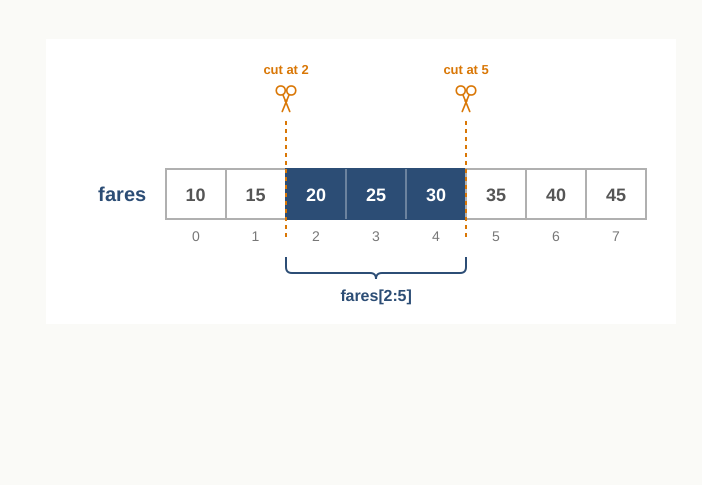
Fig. 10.3 – Tuple slicing between elements.
Either index may be left out. Omit the first and the slice starts at the beginning; omit the second and it runs to the end; omit both and you get the whole tuple.
>>> fares[:4]
(10, 15, 20, 25)
>>> fares[5:]
(35, 40, 45)
>>> fares[:]
(10, 15, 20, 25, 30, 35, 40, 45)A third number, the step, controls how far the slice jumps each time. With a step of 2 the slice takes every second element.
Result: the slice gives (15, 25, 35, 45). The trace shows that the step is added to the index each time and the slice ends as soon as the index reaches or passes stop, which is why index 8 is never even considered.
Negative indices work in a slice exactly as they do in indexing, counting from the right-hand end:
>>> fares[-3:-1]
(35, 40)
A negative step reverses the direction of travel, and this gives a compact way of reading a tuple backwards:
>>> fares[::-1]
(45, 40, 35, 30, 25, 20, 15, 10)That difference is worth setting out fully, because indexing and slicing are written so similarly that students often expect them to behave the same way.
Table 10.2 – Indexing vs slicing
| Feature | Indexing | Slicing |
|---|---|---|
| How it is written | One index, fares[2] |
Two or three values separated by colons, fares[2:5] |
| What comes back | A single element, of whatever type it is | A new tuple, even if it holds only one element |
| Out-of-range value | Raises IndexError |
No error; the range is trimmed to what exists |
| Result when nothing matches | Not possible — it either finds the element or fails | Returns the empty tuple () |
| Effect on the original tuple | None | None |
10.3 Tuple Methods and Built-in Functions
The operators of Section 10.2 handle joining, repeating, testing and slicing. Everything else you are likely to want from a tuple — its length, the largest value in it, how many times some value occurs, the same values in sorted order — is provided by ready-made functions that come with Python. You do not have to write a loop for any of them.
These come in two kinds, and the difference shows up in how they are written. A built-in function is available to the whole language and is called by name, with the tuple handed to it inside brackets, as in len(fares). A method belongs to the tuple itself and is called by writing the tuple’s name, a full stop, and then the method, as in sizes.count('M'). Tuples have only two methods of their own; everything else in this section is a built-in function.
Table 10.3 – Built-in function vs method
| Feature | Built-in function | Method |
|---|---|---|
| How it is written | len(sizes) — the tuple goes inside the brackets |
sizes.count('M') — the tuple comes before the full stop |
| What it belongs to | The Python language as a whole | The tuple object itself |
| Works on | Many different types — strings, lists, tuples and more | Only the type it belongs to |
| Examples for tuples | len(), tuple(), sorted(), min(), max(), sum() |
count(), index() |
Getting this wrong is the commonest small error in this area. Writing sizes.len() fails, because len is not something a tuple owns; writing count(sizes, 'M') fails, because count is not a name the language knows on its own.
Finding the length
len() returns the number of elements in the tuple given to it — not the number of characters, and not the number of values buried inside nested elements. It counts elements at the top level only.
>>> weights = (48, 52, 47, 55, 50)
>>> len(weights)
5
This is the function that tells you the range of valid indices. A tuple of length 5 has indices 0 to 4, so len(weights) - 1 is always the index of the last element.
Building a tuple from another sequence
tuple() creates a tuple. Called with nothing inside the brackets it gives an empty tuple; called with a sequence inside, it takes the elements of that sequence in order and packs them into a new tuple. Fig. 10.4 shows the three sequences you are most likely to convert.
>>> blank = tuple()
>>> blank
()
>>> tuple('bus')
('b', 'u', 's')
>>> tuple([21, 22, 23])
(21, 22, 23)
>>> tuple(range(4))
(0, 1, 2, 3)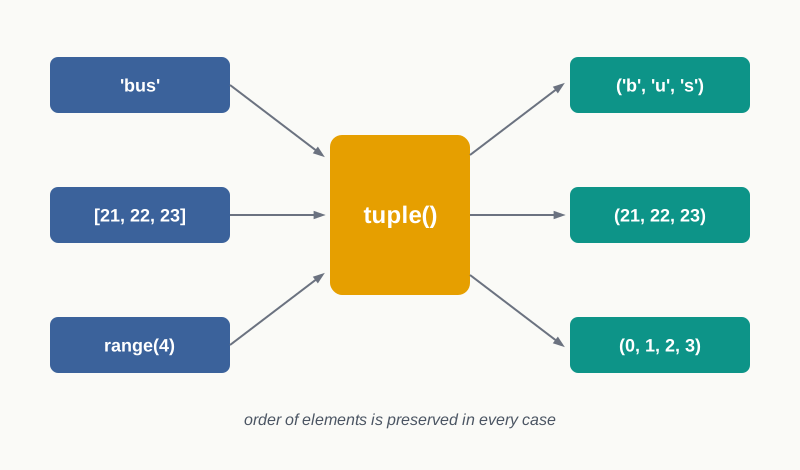
Fig. 10.4 – Tuple construction from different sequence types.
A string is a sequence of characters, so converting one gives a tuple with one character per element — a useful reminder that Python treats a string as a sequence in its own right.
Counting and locating an element
count() and index() are the tuple’s own two methods. count() reports how many times a given value occurs, and returns 0 if it does not occur at all. index() reports the position of its first occurrence.
>>> sizes = ('S', 'M', 'L', 'M', 'M', 'XL')
>>> sizes.count('M')
3
>>> sizes.count('XXL')
0
>>> sizes.index('L')
2
>>> sizes.index('M')
1
Notice that sizes.index('M') gives 1 even though 'M' occurs three times. The method stops at the first match and reports that index; the later occurrences are ignored.
The two methods differ sharply in what they do when the value is absent. count() answers calmly with 0, because “none at all” is a perfectly good count. index() cannot answer at all — there is no position to report — so it stops the program with an error.
>>> sizes.index('XXL')
ValueError: tuple.index(x): x not in tupleSorting the values
sorted() takes the elements of a tuple and returns them in ascending order. Two things about it need attention, and both are easy to miss.
>>> runs = (38, 91, 12, 67, 45)
>>> sorted(runs)
[12, 38, 45, 67, 91]
The first is that the original is untouched — which must be so, since a tuple cannot be altered:
>>> runs
(38, 91, 12, 67, 45)
The second is that the result is not a tuple. Look at the brackets in the output above: sorted() always hands back a list, whatever kind of sequence it was given. If you need a tuple back, convert the result with tuple().
Sorting is not limited to numbers. Strings sort into dictionary order, comparing character by character from the left:
>>> stops = ('Tonk', 'Ajmer', 'Kota', 'Alwar')
>>> sorted(stops)
['Ajmer', 'Alwar', 'Kota', 'Tonk']
Smallest, largest and total
min() and max() return the smallest and the largest element of a tuple, and sum() returns the total of its elements.
>>> runs = (38, 91, 12, 67, 45)
>>> min(runs)
12
>>> max(runs)
91
>>> sum(runs)
253
min() and max() also work on a tuple of strings, where “smallest” means first in dictionary order and “largest” means last. sum(), however, is arithmetic through and through, and refuses anything it cannot add:
>>> sum(stops)
TypeError: unsupported operand type(s) for +: 'int' and 'str'
All three need elements that can be compared or added with one another. A tuple mixing numbers and strings will therefore defeat min() and max() as well, because Python has no rule for deciding whether 10 comes before or after 'Kota'.
Table 10.4 – Built-in functions and methods for tuples, with what each one returns
| Name | Kind | What it does | Returns |
|---|---|---|---|
len() |
Built-in function | Counts the elements of the tuple at the top level | An integer |
tuple() |
Built-in function | Builds a tuple, empty or from a given sequence | A tuple |
count() |
Method | Counts how many times a value occurs in the tuple | An integer, 0 if absent |
index() |
Method | Finds the position of the first occurrence of a value | An integer; raises ValueError if absent |
sorted() |
Built-in function | Arranges the elements in ascending order | A new list, leaving the tuple unchanged |
min() |
Built-in function | Finds the smallest element | One element of the tuple |
max() |
Built-in function | Finds the largest element | One element of the tuple |
sum() |
Built-in function | Adds all the elements | A number |
Putting them to work
A single problem is enough to show how these fit together. The task below is a real one from any class register: given a week’s attendance for one student, report the totals and say when the first absence happened.
10.4 Tuple Assignment
A library register keeps three facts about every book that goes out: an accession code, a title, and the number of days it may be kept. Those three facts belong together, so a tuple is the natural place to hold them. But the moment you want to work with them separately, you need each fact under its own name — and copying them out one index at a time is tedious:
>>> issue = ('L-207', 'Bhugol Darshan', 14)
>>> code = issue[0]
>>> title = issue[1]
>>> days = issue[2]
Python offers a shorter route. Write a tuple of variable names on the left of the assignment operator and a tuple of values on the right, and each name takes the value standing in the matching position. This is called tuple assignment.
>>> (code, title, days) = ('L-207', 'Bhugol Darshan', 14)
>>> code
'L-207'
>>> title
'Bhugol Darshan'
>>> days
14
One line has done the work of three, and it reads far closer to the intention: these three names describe one record. The matching is strictly by position, as Fig. 10.5 shows — the first name takes the first value, the second name the second, and so on. Names are never matched by meaning or by type.
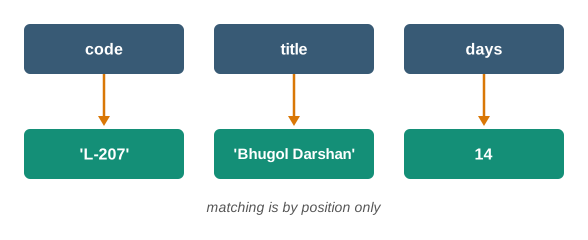
Fig. 10.5 – Tuple assignment matching by position.
The brackets on either side may be dropped, because — as Section 10.1.1 established — it is the comma that makes a tuple. The following line does exactly the same work as the one above:
>>> code, title, days = 'L-207', 'Bhugol Darshan', 14Packing and unpacking
Two things are really happening in that statement, and it helps to see them as separate steps. First the values on the right are gathered into a single tuple; this is called packing. Then that tuple is opened out and its elements handed to the names on the left; this is called unpacking.
>>> record = 'L-311', 'Ganit ke Prashna', 7
>>> record
('L-311', 'Ganit ke Prashna', 7)
Here only packing took place — one name on the left, so the tuple stayed whole. Unpacking is what happens when the left side carries several names.
Table 10.6 – Packing vs unpacking
| Feature | Packing | Unpacking |
|---|---|---|
| Where it happens | On the right of the assignment | On the left of the assignment |
| What it does | Gathers several values into one tuple | Distributes the elements of a tuple among several names |
| Written as | record = 'L-311', 'Ganit ke Prashna', 7 |
code, title, days = record |
| Number of names involved | One | As many as the tuple has elements |
| Result | A single tuple object | Several ordinary variables |
Because unpacking works on any sequence of the right length, the value on the right need not have been written as a tuple at all. A list unpacks just as readily:
>>> p, q = [3, 7]
>>> p
3
>>> q
7
The counts must match
Unpacking has one strict condition: there must be exactly as many names on the left as there are elements on the right. Python will not silently drop a value or leave a name empty, so a mismatch in either direction stops the program.
>>> (a, b, c) = (12, 18)
ValueError: not enough values to unpack (expected 3, got 2)
>>> (a, b) = (12, 18, 24)
ValueError: too many values to unpack (expected 2)
The two messages are worth reading rather than glancing at. The first says the left side asked for three and only two arrived; the second says two names could not absorb three values. Between them they tell you which side to correct.
The right side is evaluated first
The values on the right need not be plain literals. Any expression may appear there, and Python evaluates every one of them, builds the resulting tuple, and only then assigns.
>>> length, breadth = 8, 5
>>> area, perimeter = length * breadth, 2 * (length + breadth)
>>> area
40
>>> perimeter
26Result: area holds 40 and perimeter holds 26. The trace shows that no name on the left receives anything until every expression on the right has already been worked out.
That ordering is not a detail — it has a consequence you will use in Section 10.6. Since the whole right side is built before any name on the left is touched, an assignment may safely mention the very names it is about to overwrite. Whatever those names held is captured into the tuple first, and the old values are still available at the moment they are read.
10.5 Nested Tuples
A single tuple holds one record neatly — a route code, a destination and a fare, kept together and safe from change. But a bus depot does not have one route; it has a chart of them. What is needed now is a container holding several records at once, each record still whole and still in order.
The answer requires nothing new. An element of a tuple may itself be a tuple, so a chart of four routes is simply a tuple with four elements, each of which is a three-element tuple. A tuple written inside another tuple in this way is called a nested tuple.
Consider the fare chart in Table 10.7. Each row is one route, and the three columns are the same three facts for every route — which is exactly the shape a nested tuple stores.
Table 10.7 – Fare chart of four bus routes, holding the route code, the destination and the fare in rupees
| Route code | Destination | Fare |
|---|---|---|
| R1 | Amer | 25 |
| R2 | Bagru | 30 |
| R3 | Chomu | 45 |
| R4 | Dausa | 40 |
Written as a nested tuple, that chart becomes:
>>> routes = (('R1', 'Amer', 25), ('R2', 'Bagru', 30), ('R3', 'Chomu', 45))
>>> len(routes)
3
The length is 3, not 9. Section 10.3 said that len() counts elements at the top level only, and here the top level holds three things — three tuples. The nine individual values sit one level down and are not counted.
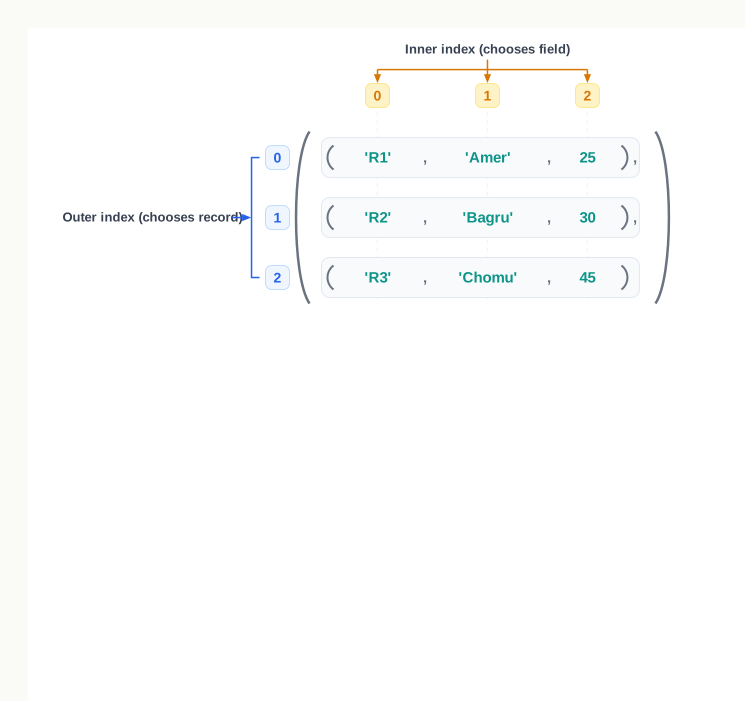
Fig. 10.6 – Indexing a nested tuple.
Reaching a value inside a nested tuple
A single index picks out a whole record, because that record is one element of the outer tuple:
>>> routes[1]
('R2', 'Bagru', 30)
To go further in, add a second index. The first index chooses the record; the second chooses the field within that record. Python applies them from left to right, so routes[1][1] means “take element 1 of routes, then take element 1 of whatever that gave”.
>>> routes[1][1]
'Bagru'
>>> routes[2][2]
45
>>> routes[0][-1]
25
Negative indices, slicing and the membership operator all continue to work at either level, because each level is an ordinary tuple in its own right.
Traversing a nested tuple
To work through every record, use a for loop. There are two ways to write it, and both are worth knowing.
The first runs over the index positions, using range() with the length of the tuple, and reaches each field by double indexing:
>>> for i in range(len(routes)):
        print(routes[i][0], routes[i][1])

R1 Amer
R2 Bagru
R3 Chomu
The second takes each record directly and unpacks it into named variables as it goes — precisely the tuple assignment of Section 10.4, done once per turn of the loop:
>>> for code, place, fare in routes:
        print(code, place)

R1 Amer
R2 Bagru
R3 Chomu
Both produce the same output. The second is usually the better program, because code, place and fare say what each value means, whereas routes[i][2] leaves the reader counting positions. Its one requirement is that every record must have exactly the number of fields being unpacked — a record with a missing field would raise the ValueError you met in Section 10.4.
Table 10.8 – Traversing a nested tuple by index vs by unpacking
| Feature | By index | By unpacking |
|---|---|---|
| Loop written as | for i in range(len(routes)): |
for code, place, fare in routes: |
| Reaching a field | routes[i][2] |
fare |
| Readability | The reader must remember what position 2 holds | The name states what the value is |
| Requirement | None beyond a valid index | Every record must have the same number of fields |
| Also gives you | The position number i, useful for serial numbering |
No position number unless one is counted separately |
A fare chart in practice
The problem below uses both ideas — unpacking to display the chart, and double indexing to compare one field across records.
Result: the loop ends holding ('R3', 'Chomu', 45), and the program prints Highest fare: 45 on route R3. The trace shows why the last record examined is not the answer — the running maximum survives every later comparison it wins.
10.6 Tuple Handling
Everything the tuple can do has now been laid out — how it is built, how it is read, what it refuses, and what the built-in functions will do for you. This section puts those pieces to work on three complete problems. Each one is a task that a tuple solves more neatly than any other type would, and each is worked the same way: the problem first, then the method, then the program, and only then the code running.
Exchanging two values
Swapping the contents of two variables is one of the oldest small problems in programming, and the usual solution needs a third variable to hold one value while the other is moved. Tuple assignment removes that need entirely, for the reason established at the end of Section 10.4 — the whole right-hand side is packed into a tuple before any name on the left is touched, so both old values are safely captured before either is overwritten.
Returning more than one value from a function
A function returns one value. That sounds like a restriction until you notice that the one value returned may be a tuple holding as many results as you like — and the caller can unpack it straight into separate names.
The problem below needs two results from one calculation: a duration given in minutes has to be reported as whole hours plus the minutes left over.
Collecting user input into a tuple
The last problem builds a tuple whose contents are not known in advance. Since a tuple cannot grow in place, each new value is added by concatenation, exactly as in Section 10.2.1 — a longer tuple is built each time and the name is repointed to it.
Result: the loop ends with readings holding (31, 28, 35, 30, 26). The trace also shows that no tuple is ever modified — a longer tuple is built on each turn and the name readings is made to refer to it, which is why every row of the last column shows a different object.
10.7 Introduction to Dictionaries
Store a class’s marks in a tuple and a difficulty appears at once. The tuple (78, 91, 66, 84) records four marks perfectly well, but it says nothing about whose they are. You would have to keep a second tuple of names alongside it, find the name first, note its index, and then use that index on the marks. Two containers, kept in step by hand, and a search before every lookup.
What you actually want is to look up a mark the way you look up a word in a dictionary — by the thing that names it, not by its position on the page. Python provides a type built for exactly this. A dictionary stores data as pairs: a key that identifies, and a value that is identified.
>>> scores = {'Meera': 78, 'Arun': 91, 'Kavya': 66, 'Devraj': 84}
>>> scores['Arun']
91
One container, no second tuple, and no search written by you. The pairs are held inside curly braces, a colon joins each key to its value, and commas separate one pair from the next. A key together with its value is called an item.
Because a value is reached through its key rather than through a position, a dictionary is called a mapping — it maps each key to one value. This is a different idea from the sequences of the first half of this chapter, and Fig. 10.7 contrasts the two.
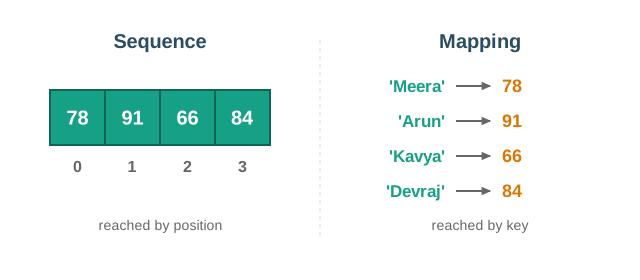
Fig. 10.7 – Sequence vs Mapping.
10.7.1 Creating a Dictionary
An empty dictionary is written as a pair of curly braces with nothing inside, or built by the dict() function.
>>> stock = {}
>>> stock
{}
>>> type(stock)
<class 'dict'>
>>> stock = dict()
>>> stock
{}
Note that curly braces, unlike round brackets, have no other job in this position, so there is no comma trap here — {} really is an empty dictionary.
A dictionary with items in it is written by listing the pairs, each as key: value:
>>> book = {'title': 'Vigyan Prayog', 'copies': 3, 'price': 245.75}
>>> book['price']
245.75
This second example is worth pausing on. In scores the keys were student names and every value was a mark, so all the values were of one kind. In book the keys are field names and the values are of three different types — a string, an integer and a float. Both uses are perfectly ordinary: a dictionary can hold many records of the same kind, or all the fields of a single record.
What a key may be, and what it may not
A key must be of an immutable type — a number, a string or a tuple. This is the rule the Theory Snapshot explained: the storage position is computed from the key, so a key that could change from underneath would strand its own item. A list, being mutable, is refused outright.
>>> location = {(26, 75): 'Amer'}
>>> location[(26, 75)]
'Amer'
>>> location = {[26, 75]: 'Amer'}
TypeError: unhashable type: 'list'
The tuple works as a key precisely because it cannot be altered — one more use for the immutability of Section 10.1.3.
Keys must also be unique. If the same key is written twice while a dictionary is being created, no error is reported; the later value simply replaces the earlier one, and only one item survives.
>>> scores = {'Meera': 78, 'Arun': 91, 'Meera': 82}
>>> scores
{'Meera': 82, 'Arun': 91}
Values are under no such restrictions. They may repeat freely, and may be of any type at all — including a list, a tuple, or another dictionary.
>>> fee = {'Meera': 1200, 'Arun': 1200, 'Kavya': 1200}
>>> len(fee)
3
Three students, one fee amount, three separate items. It is the keys that must differ, never the values.
10.7.2 Accessing Items in a Dictionary
To read a value, write the key inside square brackets after the dictionary’s name. The notation is borrowed from indexing, but what goes inside the brackets is the key, not a position.
>>> scores = {'Meera': 78, 'Arun': 91, 'Kavya': 66, 'Devraj': 84}
>>> scores['Kavya']
66
>>> scores['Devraj']
84
Where the item sits in the dictionary makes no difference whatever. 'Kavya' maps to 66 and will go on doing so however the dictionary is later rearranged or added to. This is the real gain over the two-tuple arrangement described at the start of this section: a name and its mark are bound together, and cannot drift apart.
If the key is not present, Python cannot invent a value, so it stops with an error naming the key that failed:
>>> scores['Suhani']
KeyError: 'Suhani'
The same happens if you forget that a dictionary is not a sequence and try to use a position:
>>> scores[0]
KeyError: 0
Read that message closely. Python has not complained that 0 is out of range, as a tuple would. It has taken 0 as a perfectly acceptable key, looked for it, and reported that no item has that key. Had the dictionary genuinely been built with integer keys — {0: 'Sun', 1: 'Mon'}, say — then scores[0] would have returned a value. In a dictionary, an integer inside the brackets is a key like any other.
Table 10.13 – Accessing a tuple vs accessing a dictionary
| Feature | Tuple | Dictionary |
|---|---|---|
| Written as | temp[2] |
scores['Kavya'] |
| What goes in the brackets | A position, counted from 0 | A key |
| What identifies an element | Where it sits in the sequence | The key stored with it |
| Effect of rearranging the collection | Every element’s index changes | Nothing changes; keys still map to the same values |
| When what is asked for does not exist | IndexError |
KeyError |
| Duplicates allowed | Elements may repeat freely | Keys must be unique; values may repeat |
10.8 Dictionaries are Mutable
A stock register is not written once and closed. Items are sold, fresh stock arrives, a line is struck off when a product is discontinued. Data of this kind has to be editable, and here the dictionary differs completely from the tuple: a dictionary is mutable, so items can be added to it, changed in it and removed from it after it has been created.
The difference goes deeper than convenience. When a tuple appeared to change in Section 10.1.3, a new tuple was built and the name repointed. A dictionary genuinely changes in place — it is the same dictionary object throughout, with different contents.
>>> stock = {'pen': 40, 'pencil': 25, 'eraser': 60}
>>> stock['pencil'] = 30
>>> stock
{'pen': 40, 'pencil': 30, 'eraser': 60}
Fig. 10.8 shows the three edits this section covers, each acting on that same dictionary.
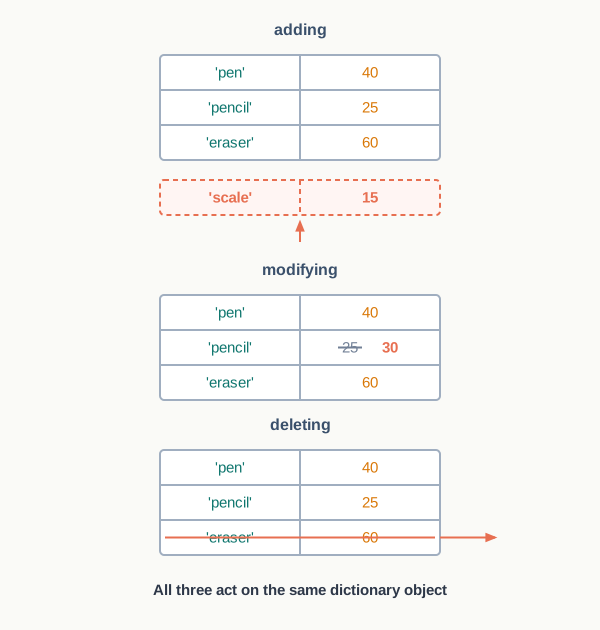
Fig. 10.8 – Adding, modifying and deleting dictionary items.
10.8.1 Adding a New Item
To add an item, write the new key inside square brackets and assign a value to it. The dictionary grows by one item.
>>> stock = {'pen': 40, 'pencil': 25, 'eraser': 60}
>>> stock['scale'] = 15
>>> stock
{'pen': 40, 'pencil': 25, 'eraser': 60, 'scale': 15}
>>> len(stock)
4
There is no method to call and no position to specify. Because items are reached by key and not by position, “where” the new item goes is not a question that needs answering — the key alone is enough to find it again.
10.8.2 Modifying an Existing Item
To change the value of an item, write its existing key inside square brackets and assign the new value. The old value is overwritten and the dictionary’s length does not change.
>>> stock['pencil'] = 30
>>> stock
{'pen': 40, 'pencil': 30, 'eraser': 60, 'scale': 15}
>>> len(stock)
4
The new value is often worked out from the old one. Selling five pens means reading the current count, subtracting from it, and storing the result back under the same key:
>>> stock['pen'] = stock['pen'] - 5
>>> stock['pen']
35
Notice that adding and modifying are written identically. The same statement does one or the other depending on a single fact: whether the key already exists. If it does, the value is replaced; if it does not, a new item is created. Python does not ask which you intended.
Table 10.14 – Adding, modifying and deleting an item
| Feature | Adding | Modifying | Deleting |
|---|---|---|---|
| Written as | stock['scale'] = 15 |
stock['pencil'] = 30 |
del stock['eraser'] |
| Condition on the key | Must not already be present | Must already be present | Must already be present |
| Effect on the length | Increases by one | Unchanged | Decreases by one |
| If the key is absent | This is the normal case | The item is created instead, with no warning | Raises KeyError |
| Effect on the dictionary object | Changed in place | Changed in place | Changed in place |
That third row is where trouble hides. A deletion of a key that is not there fails loudly, but a modification of a key that is not there fails silently — it quietly becomes an addition.
10.8.3 Deleting an Existing Item
To remove an item, use the del statement with the key of the item to be removed. Both the key and its value go, and the dictionary shrinks by one.
>>> stock = {'pen': 35, 'pencil': 30, 'eraser': 60, 'scale': 15}
>>> del stock['eraser']
>>> stock
{'pen': 35, 'pencil': 30, 'scale': 15}
del is not a method of the dictionary. It is a statement of the Python language, which is why it is written before the item rather than after a full stop — there are no brackets to call, and nothing is returned.
A key that is not present cannot be removed, and Python says so:
>>> del stock['marker']
KeyError: 'marker'
The same statement, given the dictionary’s name with no key after it, removes the whole dictionary from memory. The name itself ceases to exist, so any later use of it is an error of a different kind:
>>> del stock
>>> stock
NameError: name 'stock' is not defined
The distinction between these two forms matters. del stock['eraser'] empties one line of the register; del stock throws the register away. The error messages tell them apart afterwards — a KeyError means the dictionary is there but the key is not, while a NameError means there is no dictionary any more.
10.9 Dictionary Operations
The operators that worked on tuples do not all carry across. Joining two dictionaries with + is meaningless, because there are no positions to lay end to end, and repeating a dictionary with * is meaningless too, since keys must stay unique. Slicing needs a range of positions, and a dictionary has none.
One operator does carry across, and it is the one that matters most in everyday use: the membership operator.
10.9.1 Membership
The in operator tells you whether a dictionary contains a given key, returning True if it does and False if it does not. Its partner not in reverses the answer. The register below records which student currently holds each library book.
>>> issued = {'L-207': 'Meera', 'L-311': 'Arun', 'L-405': 'Kavya'}
>>> 'L-311' in issued
True
>>> 'L-500' in issued
False
>>> 'L-500' not in issued
True
The whole point of the operator lies in what it examines. It looks at the keys and only at the keys — the values are never compared at all. So a student’s name, which appears in this dictionary as plainly as any book code does, is not found:
>>> 'Meera' in issued
False
That answer is correct, not a quirk. 'Meera' is a value here, and in is asking whether any item is identified by 'Meera'. None is. Fig. 10.9 shows which column of the register the operator actually reads.
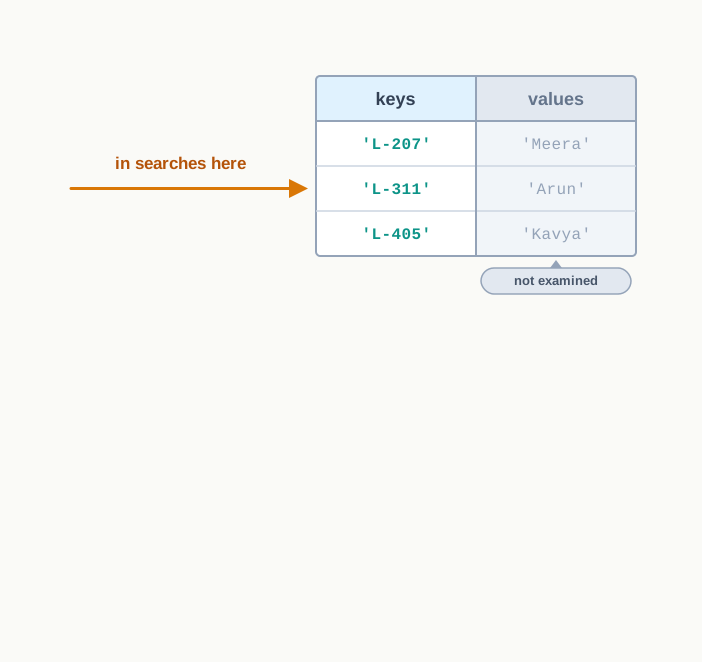
Fig. 10.9 – The in operator on a dictionary.
Table 10.15 – The in operator on a tuple and on a dictionary
| Feature | On a tuple | On a dictionary |
|---|---|---|
| What is compared | The elements of the tuple | The keys only |
| Written as | 'Maths' in subjects |
'L-311' in issued |
| What it returns | True or False |
True or False |
| How the answer is found | The elements are examined one after another | The key is looked up directly |
| Searching by anything else | Not applicable — a tuple has only elements | A value cannot be found with in |
The fourth row explains why membership is worth using on a dictionary even when speed seems irrelevant. On a tuple the operator has to work through the elements until it finds a match or runs out; on a dictionary it computes the location from the key, exactly as a lookup does, so the size of the dictionary makes almost no difference to how long the test takes.
Testing before looking up
The commonest use of in is not to answer a question for its own sake but to make a lookup safe. Section 10.7.2 showed that asking for a key that does not exist raises a KeyError and stops the program. Testing first turns that crash into an ordinary message.
>>> code = 'L-500'
>>> if code in issued:
        print("Issued to", issued[code])
    else:
        print("Book", code, "is not on issue")

Book L-500 is not on issue
Read the structure rather than the output. The lookup issued[code] appears only inside the branch that runs when the key is known to be present, so it can never be reached with a missing key. This pattern — test, then look up — is worth making a habit, and it is the same habit that Section 10.3 recommended before calling index() on a tuple.
10.10 Traversing a Dictionary
Looking up one value is what a dictionary is built for. But plenty of work needs every item — printing the whole register, adding up all the quantities, picking out the items that fall below a limit. Visiting every item of a collection in turn is called traversing it, and for a dictionary the for loop does the job.
There are two ways to write the loop, and the difference between them is what the loop variable receives on each turn.
Traversing by key
Write a for loop over the dictionary itself and the loop variable takes each key in turn. The value is then fetched with an ordinary lookup.
>>> sales = {'samosa': 42, 'idli': 18, 'poha': 27}
>>> for item in sales:
        print(item, sales[item])

samosa 42
idli 18
poha 27
Read the first line of that loop carefully, because it is the point students most often get wrong. The loop is written over sales, yet item holds 'samosa', not 42. Iterating a dictionary hands you its keys — never its values, and never the pairs. If the value is wanted, the loop body must ask for it, which is what sales[item] does.
Traversing by item
Often you want both parts of an item, and writing a lookup inside every loop body becomes tiresome. The items() method hands over each key-value pair together, and tuple assignment splits the pair into two names as the loop runs — exactly the unpacking of Section 10.4, performed once per turn.
>>> for item, quantity in sales.items():
        print(item, quantity)

samosa 42
idli 18
poha 27
Now item holds the key and quantity holds the value, and the body reads like the register it is printing. Fig. 10.10 shows what each of the two loops receives on a single turn.
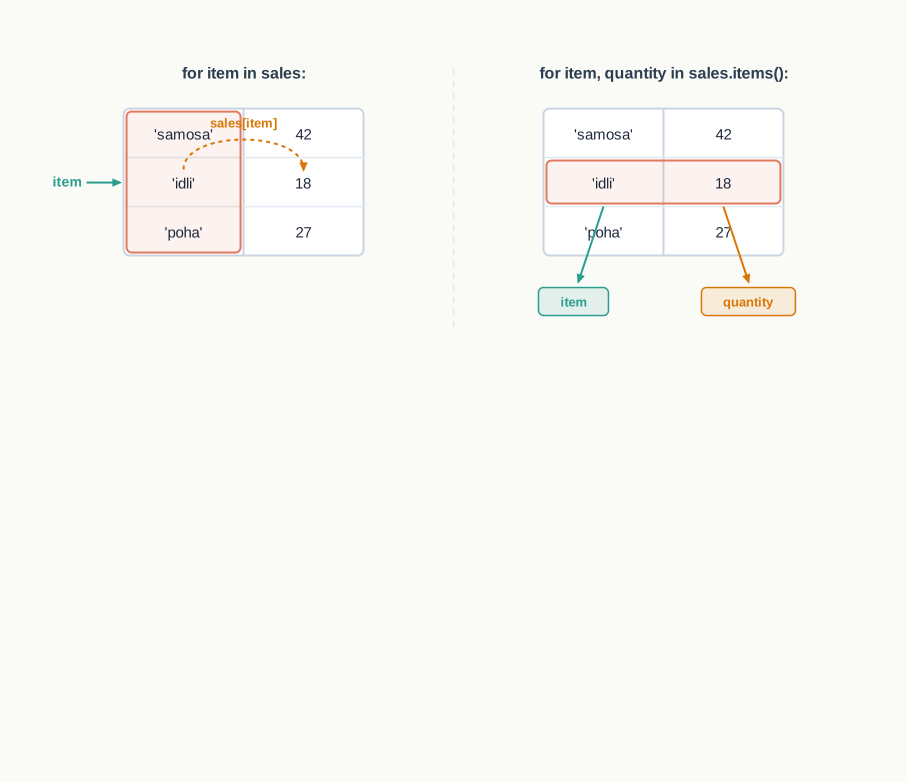
Fig. 10.10 – Dictionary traversal by key vs by item.
Table 10.16 – Traversing by key vs traversing by item
| Feature | By key | By item |
|---|---|---|
| Loop written as | for item in sales: |
for item, quantity in sales.items(): |
| Loop variable holds | One key | One key and one value, unpacked into two names |
| Getting the value | A lookup in the body, sales[item] |
Already in a named variable |
| Suits a body that | uses the key mostly, or needs the value only sometimes | uses both parts of every item |
| Number of loop variables | One | Two, matching the two parts of an item |
Neither method is better in general. Where the body needs only the keys — deleting by a rule, listing item names — the first is simpler. Where it needs both, the second says more clearly what is going on.
The order of traversal
A traversal visits the items in the order in which they were inserted, so a dictionary built by reading a register from the top down prints back in that same order. This is a convenience of Python 3.7 onwards, as Section 10.7.1 noted, and it does not turn the items into a numbered sequence — there is still no way to ask for “the second item”. If a particular order is required, sort the keys yourself rather than depending on how the dictionary was built.
A traversal in practice
The problem below needs both kinds of loop, which makes it a fair test of the distinction.
Result: the loop ends with total holding 96, which the next line displays. The trace shows the running total carrying forward from one turn to the next — the reason it must be created before the loop begins.
10.11 Dictionary Methods and Built-in Functions
Section 10.3 drew a line between a built-in function, called by name with the collection inside the brackets, and a method, which belongs to the object and is written after a full stop. The same line runs through this section. Dictionaries own a good many methods, and the built-in functions you already know work on them as well.
The dictionary below records how many periods a week each subject is taught.
>>> periods = {'Hindi': 3, 'English': 3, 'Maths': 4, 'Science': 5}
>>> len(periods)
4
len() counts items — that is, key-value pairs. Four subjects, four items. It never counts keys and values separately.
Building a dictionary from pairs
dict() with nothing inside the brackets gives an empty dictionary, as Section 10.7.1 showed. Given a sequence of pairs, it builds a dictionary from them, taking the first part of each pair as the key and the second as the value.
>>> pairs = [('Hindi', 3), ('English', 3)]
>>> dict(pairs)
{'Hindi': 3, 'English': 3}
This is how data that arrives as a list of records — from a file, or from another part of a program — is turned into something that can be looked up by key.
Getting the keys, the values and the items
Three methods hand back the contents of a dictionary in bulk. keys() gives its keys, values() gives its values, and items() gives the complete pairs — the method you already used for traversal in Section 10.10.
>>> periods.keys()
dict_keys(['Hindi', 'English', 'Maths', 'Science'])
>>> periods.values()
dict_values([3, 3, 4, 5])
>>> periods.items()
dict_items([('Hindi', 3), ('English', 3), ('Maths', 4), ('Science', 5)])
Look at how Python labels each result. What comes back is not a list but a view — an object that shows you the dictionary’s keys, values or items as they currently stand. A view can be looped over and tested with in, which covers nearly everything you will want to do with it. Where a genuine list is needed, convert it:
>>> list(periods.values())
[3, 3, 4, 5]
Notice that values() returned two 3s. Values may repeat, as Section 10.7.1 said, and the view reports every one of them. Keys, being unique, never repeat in a keys() view.
Because a view can be looped over, the built-in functions of Section 10.3 apply to it directly. This is the neatest way to get totals and extremes out of a dictionary:
>>> load = {'Hindi': 3, 'English': 3, 'Maths': 4, 'Science': 5}
>>> sum(load.values())
15
>>> max(load.values())
5
>>> sorted(load.keys())
['English', 'Hindi', 'Maths', 'Science']
The last line is how you impose an order of your own on a dictionary. Sorting the keys gives a list you can loop over in alphabetical order, without disturbing the dictionary itself.
Looking up without the risk
get() looks up a key and returns its value, just as square brackets do — but on a missing key it does not raise KeyError. It returns None, Python’s way of saying “no value at all”.
>>> periods.get('Maths')
4
>>> periods.get('Music')
>>> print(periods.get('Music'))
None
The second line displayed nothing, because the shell does not echo None; printing it makes the result visible. A second argument may be given to say what should come back instead, which is often more useful than None:
>>> periods.get('Music', 0)
0
Now a subject not on the timetable reports zero periods, which is exactly right, and the calling program has no special case to handle.
Table 10.18 – Looking up with square brackets vs with get()
| Feature | periods['Music'] |
periods.get('Music') |
|---|---|---|
| When the key is present | Returns the value | Returns the value |
| When the key is absent | Raises KeyError and stops the program |
Returns None, or the default you supply |
| Suits a situation where | the key must be there, and its absence is a real fault | the key may legitimately be missing |
| Needs a guard before it | Yes, a membership test | No |
| Can be used to assign | Yes — periods['Music'] = 2 creates or updates |
No — it only reads |
Neither form is the safer choice in every case. Square brackets are right when a missing key means something has gone wrong and you want to know at once; get() is right when absence is an ordinary possibility, as it is when counting things that may not have appeared yet.
Merging and emptying
update() takes another dictionary and folds its items into the one the method was called on. Keys not already present are added; keys already present have their values replaced.
>>> extra = {'Music': 2, 'Maths': 5}
>>> periods.update(extra)
>>> periods
{'Hindi': 3, 'English': 3, 'Maths': 5, 'Science': 5, 'Music': 2}
Both effects are visible there. 'Music' was new, so it joined at the end. 'Maths' already existed, so its 4 was replaced by 5 — the two values were not added together, and the item stayed where it was. The dictionary passed as the argument is left unchanged by all this:
>>> extra
{'Music': 2, 'Maths': 5}
clear() removes every item, leaving an empty dictionary. The dictionary itself survives; only its contents go.
>>> extra.clear()
>>> extra
{}
This is worth setting beside del from Section 10.8.3. extra.clear() leaves you with an empty dictionary you can go on using; del extra removes the name altogether, and using it afterwards raises NameError.
Table 10.19 – Methods and built-in functions for dictionaries, with what each one returns
| Name | Kind | What it does | Returns |
|---|---|---|---|
len() |
Built-in function | Counts the items — the key-value pairs | An integer |
dict() |
Built-in function | Builds a dictionary, empty or from a sequence of pairs | A dictionary |
keys() |
Method | Gives all the keys | A view of the keys |
values() |
Method | Gives all the values, repeats included | A view of the values |
items() |
Method | Gives all the key-value pairs | A view of the items, each pair a tuple |
get() |
Method | Looks up a key without risking an error | The value; None or a supplied default if the key is absent |
update() |
Method | Folds another dictionary’s items in, replacing existing keys | Nothing; the dictionary is changed in place |
clear() |
Method | Removes every item | Nothing; the dictionary is left empty |
The methods at work
A stock register is the natural place to see three of these methods together — one to merge in a consignment, one to display the result, one to answer a query safely.
10.12 Manipulating Dictionaries
Every piece of the dictionary has now been introduced separately — creating, looking up, adding, changing, deleting, traversing and the methods. This section puts them to work on three problems of the kind that dictionaries were made for: building a table from data the user types in, counting how often things occur, and holding records that must be found by an identifier.
Building a dictionary from input
A dictionary built at the keyboard is built one item at a time, and the statement that does it is the ordinary assignment of Section 10.8.1. Since the key is read fresh each time, that statement adds a new item on every turn of the loop.
Counting with a dictionary
Counting how often each thing occurs is the problem dictionaries handle better than any other structure, because the thing being counted can serve as the key. The count for each distinct word, letter, item code or grade lives under its own key, and no separate list of what has been seen so far is needed.
The difficulty is only at the start: the first time a word appears there is no count to add to. Two branches handle it — if the word is already a key, increase its value; if not, start it at 1.
Result: the dictionary ends holding four items, with 'the' counted twice. The trace shows that turn 4 changed a value without adding an item — the key 'the' was already there, so the dictionary’s length did not grow.
The two branches of that if can be collapsed into one line using get() from Section 10.11, with 0 as the substitute for a word not yet seen:
freq[word] = freq.get(word, 0) + 1A word already counted has its value read and increased; a word met for the first time reads as 0 and becomes 1. Both cases are handled by the same statement, and the special case disappears.
Records held in a dictionary of tuples
The last problem draws the two halves of this chapter together. A student record has several fields that belong to one another and should not be altered piecemeal — a tuple. The records must be found by roll number rather than by position — a dictionary. Put one inside the other and you get a register that is both safe and quick to search, as Fig. 10.11 shows.
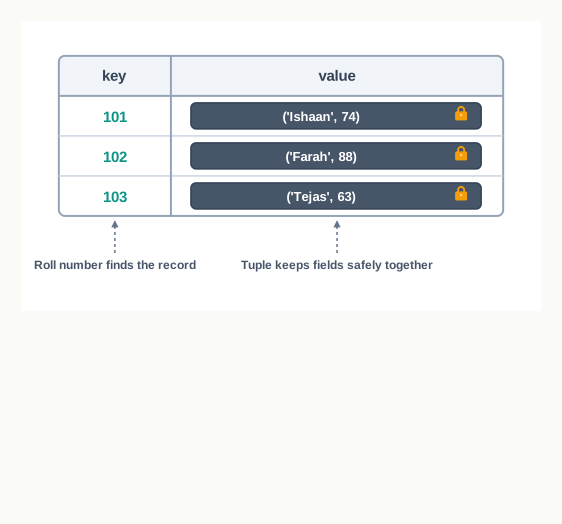
Fig. 10.11 – Student records as a dictionary of tuples.
10.13 Summary
A tuple is an ordered sequence of elements written inside round brackets and separated by commas. Its elements may be of different types, and each element sits at a fixed index counted from 0.
What makes a tuple is the comma, not the brackets. A single value inside brackets is just that value; a trailing comma is what turns it into a one-element tuple, and a bare comma-separated sequence is treated as a tuple even without brackets.
Elements are reached by index, forwards from 0 or backwards from -1. An index outside the range the tuple actually has raises
IndexError.A tuple is immutable: once created, its elements cannot be replaced, removed or added to. An assignment that appears to change a tuple in fact builds a new tuple and repoints the name to it.
Immutability fixes which objects a tuple holds, not what those objects contain. A mutable element inside a tuple, such as a list, can still be changed from within.
Four operations work on tuples.
+concatenates two tuples into a new one;*repeats a tuple a whole number of times;inandnot intest whether a value is one of the elements; and slicing extracts a run of elements as a new tuple.A slice runs from the start index up to but not including the stop index, with an optional step. An out-of-range slice is trimmed rather than refused, which is why slicing does not raise the error that indexing does.
The functions and methods for tuples are
len(),tuple(),count(),index(),sorted(),min(),max()andsum(). Of these,count()andindex()are methods of the tuple; the rest are built-in functions.sorted()returns a new list, leaving the tuple unchanged.count()returns 0 for a value that is absent, butindex()raisesValueError, so a membership test before it makes the lookup safe.Tuple assignment gives a tuple of values to a tuple of variables in one statement, matching them strictly by position. The counts on the two sides must be equal, or unpacking raises
ValueError.Gathering values into a tuple is called packing and distributing them among several names is called unpacking. The whole right-hand side is evaluated and packed before any name on the left is assigned, which is what allows two variables to be exchanged in a single line and a function to return more than one value at once.
A tuple whose elements are themselves tuples is a nested tuple. The outer index chooses a record and the inner index chooses a field within it, so a value is reached by two indices written one after the other.
A dictionary is a collection of key-value pairs written inside curly braces, each pair joined by a colon. A key together with its value is called an item, and the value is reached through the key rather than through a position.
Keys must be unique and of an immutable type — a number, a string or a tuple — because the storage location of an item is computed from its key. Values are under no such restriction and may repeat.
Looking up an absent key with square brackets raises
KeyError. A dictionary has no positions, so an integer written inside the brackets is treated as a key like any other.A dictionary is mutable and changes in place. Assigning to a key adds an item if the key is new and replaces the value if the key already exists — the same statement doing either, which is why a misspelt key silently creates an item instead of updating one.
The
delstatement removes one item when given a key, and removes the whole dictionary when given only its name. The first leaves the dictionary shorter; the second leaves the name undefined.The membership operators
inandnot intest the keys of a dictionary and never its values. Testing before looking up is the standard way of avoidingKeyError.A dictionary is traversed with a
forloop. Looping over the dictionary itself gives its keys one at a time; looping overitems()gives each key and value together, to be unpacked into two names.The functions and methods for dictionaries are
len(),dict(),sorted(),keys(),values(),items(),get(),update()andclear().keys(),values()anditems()return views, which can be traversed and tested but not indexed until converted to a list.get()returns the value for a key without raising an error when the key is absent, givingNoneor a substitute value supplied by the caller.update()merges another dictionary in, adding new keys and replacing existing ones.clear()empties a dictionary but leaves it in existence.Counting occurrences is the pattern a dictionary suits best: each distinct value becomes a key, a value met for the first time starts its count at 1, and every later occurrence adds 1 to the count already stored.
The choice between the two types rests on how the data will be reached later. Data reached by position, and data that must not change, belongs in a tuple; data reached by a name or code, and data that will be added to and edited, belongs in a dictionary.
10.14 Key Terms
Built-in function — a function provided by the Python language itself, called by name with the value it works on written inside the brackets, as in
len(),sorted()ordict().Concatenation — joining two sequences end to end with the
+operator, producing a new sequence that holds the elements of the first followed by those of the second.Dictionary — a collection of key-value pairs written inside curly braces, in which each value is reached through its key rather than through a position.
Element — one of the values stored in a sequence such as a tuple.
Immutable — describing an object whose value cannot be changed after it has been created; any operation that appears to change it builds a new object instead.
Index — the position number of an element in a sequence, counted forwards from 0 or backwards from -1.
Item — one key together with the value it maps to, forming a single entry of a dictionary.
Key — the part of a dictionary item that identifies it; keys must be unique within a dictionary and must be of an immutable type.
List — a mutable ordered sequence written inside square brackets, whose elements can be changed, added or removed after it is created.
Mapping — a collection that stores pairs of a key and a value and retrieves a value directly from its key; the dictionary is Python’s mapping type.
Membership operator — the operator
in, which reports whether a value is an element of a sequence or a key of a dictionary;not ingives the opposite answer.Method — a function belonging to a particular object, called by writing the object’s name, a full stop and the method, as in
count(),index(),get()oritems().Mutable — describing an object whose contents can be changed in place after it has been created, as a list or a dictionary can.
Nested tuple — a tuple in which one or more elements are themselves tuples, so that a value is reached by an outer index followed by an inner one.
Packing — gathering several values into a single tuple, as happens on the right-hand side of a tuple assignment.
Repetition — repeating a sequence a whole number of times with the
*operator, producing a new sequence made of that many copies.Slicing — extracting a run of elements from a sequence by giving a start index, a stop index and optionally a step, the stop index itself being left out of the result.
Traversing — visiting every element or item of a collection in turn, usually with a
forloop.Tuple — an ordered, immutable sequence of elements written inside round brackets and separated by commas, whose elements are reached by index.
Tuple assignment — assigning a tuple of values to a tuple of variables in one statement, matching them by position, with equal numbers on both sides.
Unpacking — distributing the elements of a tuple among several variables, as happens on the left-hand side of a tuple assignment.
Value — the part of a dictionary item that is identified by the key; values may be of any type and may repeat within a dictionary.
View — the object returned by
keys(),values()oritems(), which reports on the dictionary as it currently stands and can be traversed or tested but not indexed.
10.15 Points to Ponder
A tuple refuses to let you change it, and a list does not. Refusing to do something is usually a weakness in a tool. Why is it counted as a strength here — and can you describe a situation where using a list instead of a tuple would let a bug survive undetected for a long time?
Python decided that the comma, and not the round bracket, is what makes a tuple. That decision is the reason
(45)is a number while(45,)is a tuple. What does the language gain from this choice, and what would have to change elsewhere in Python if brackets alone had been made to do the job?A tuple can hold a list, and that list can be changed even though the tuple cannot. Is it fair, then, to call the tuple immutable? Try to state precisely what it is that immutability actually protects.
Assigning to a key adds an item when the key is new and replaces a value when the key already exists, with no way to tell from the statement which will happen. Python could have provided two separate operations instead. What is gained by having one, and what is the cost of it?
A dictionary can find a value from its key almost instantly, but finding which key holds a particular value means examining every item. Why should the two directions be so unequal, given that every item stores both parts?
Keys must be immutable, and a tuple therefore qualifies as a key while a list does not. Suppose Python had allowed lists as keys. Describe, step by step, what would go wrong the moment such a key was modified after being stored.
10.16 Objective Questions
- Which of the following statements creates a tuple holding exactly one element? [1 mark]
t = (7)t = (7,)t = [7]t = 7
- After the statement
x = 4, 9, 16is executed, the type ofxis [1 mark]intlisttupledict
- A tuple has been created as
t = (1, 2, 3). Which one of the following statements will raise an error? [1 mark]print(t[-1])print(t[1:5])t[0] = 5print(t * 2)
- Looking up a key that is not present in a dictionary using square brackets raises [1 mark]
IndexErrorKeyErrorValueErrorTypeError
- Assertion (A): A tuple may hold a list as one of its elements, and the contents of that list can be changed after the tuple has been created. Reason (R): A tuple is a mutable data type. [1 mark]
- Both A and R are true, and R is the correct explanation of A.
- Both A and R are true, but R is not the correct explanation of A.
- A is true but R is false.
- A is false but R is true.
- Assertion (A): The keys of a dictionary must be of an immutable type. Reason (R): The place where an item is stored is computed from its key, so a key that could change would no longer lead back to its own item. [1 mark]
- Both A and R are true, and R is the correct explanation of A.
- Both A and R are true, but R is not the correct explanation of A.
- A is true but R is false.
- A is false but R is true.
- Match each name in Column I with what it returns, from Column II. [1 mark]
| Column I | Column II |
|---|---|
a. count() |
i. The value stored under a key, or None when the key is absent |
b. index() |
ii. A view of the key-value pairs, each pair as a tuple |
c. get() |
iii. The number of times a value occurs in a tuple |
d. items() |
iv. The position of the first occurrence of a value in a tuple |
Fill in the blank: the ______ operator is used to test whether a given value is a key of a dictionary. [1 mark]
State whether true or false:
sorted()applied to a tuple returns a new tuple with the elements in ascending order. [1 mark]Write the output of the following statement. [1 mark]
print(('P',) * 3)10.17 Check Your Concepts
Define a nested tuple, and give one example of data that is naturally stored in one. [2 marks]
The statement
size = (12)does not create a tuple. Explain why, and write the corrected statement. [2 marks]count()andindex()behave differently when the value being searched for is not present in the tuple. State the difference in two points. [2 marks]Differentiate between a tuple and a dictionary on any three points, giving one short example of each. [3 marks]
A function in Python returns a single object. Explain, with a short example, how a function can nevertheless supply two results to its caller. [3 marks]
A dictionary named
stockholds item names as keys and quantities in hand as values. Write a single Python statement for each of the following. [4 marks]- Add a new item
'marker'with quantity 18. - Increase the quantity of
'pen'by 10. - Remove the item
'eraser'from the dictionary. - Display the number of items the dictionary currently holds.
- Add a new item
In a dictionary the keys must be immutable, while the values are under no such restriction. Explain the reason behind this rule, and state what would go wrong if a mutable key were allowed and were then modified. [4 marks]
Write a function
highest(readings)that accepts a tuple of numbers and returns both the largest number in it and the position at which that number first occurs, counting positions from 1. Explain in two or three lines why your method is correct, and state what your function should do if the tuple passed to it is empty. [5 marks]
10.18 Output & Debugging
- Write the output of the following code. [3 marks]
t = (5, 10, 15, 20, 25, 30)
print(t[1:5:2])
print(t[-2:])
print(len(t[2:2]))- Write the output of the following code. [2 marks]
d = {'a': 1, 'b': 2}
d['c'] = 3
d['a'] = d['a'] + 5
print(len(d), d['a'])- Write the output of the following code, and state in one line what the code computes in general. [3 marks]
data = ('red', 'blue', 'red', 'green', 'red')
count = {}
for c in data:
    count[c] = count.get(c, 0) + 1
print(count)- The following code is intended to display each student’s name along with the marks. It stops with an error instead. Identify the error, name the line responsible, and rewrite that line correctly. [3 marks]
marks = {'Ravi': 61, 'Sita': 78}
for name, score in marks:
print(name, score)- The following code is meant to correct the middle reading and then display the total. Identify the error and state the message Python reports. Then rewrite the code so that the middle reading becomes 20 and the total is displayed, keeping the readings in a tuple. [3 marks]
readings = (12, 18, 24)
readings[1] = 20
print(sum(readings))
10.19 Case-Based Questions
- A school science laboratory keeps a record of its equipment. Each record holds an equipment code, the name of the item and the number of pieces available, and the whole record set is stored in the nested tuple below. [5 marks]
lab = (('EQ1', 'Beaker', 24),
       ('EQ2', 'Tripod stand', 8),
       ('EQ3', 'Test tube', 60),
       ('EQ4', 'Thermometer', 6))
a. Write a statement that displays the name of the item in the second record. [1 mark]
b. Write a loop that displays the code and name of every item of which fewer than 10 pieces are available. [2 marks]
c. The laboratory in-charge argues that this record set should have been kept in a list rather than a tuple, because stock changes as equipment breaks. Give one argument in favour of the tuple and one in favour of the list. [2 marks]- A school library keeps the outstanding fine of each member in the dictionary below, with the member’s name as the key and the fine in rupees as the value. [5 marks]
fines = {'Rohit': 20, 'Naina': 0, 'Farhan': 35, 'Divya': 10}a. Write a statement to record a new member `'Sameer'` with a fine of 25 rupees. [1 mark]
b. Write statements to increase Farhan's fine by 15 rupees and to remove Naina's entry from the register. [2 marks]
c. Write a loop that displays the name of every member whose fine is more than 12 rupees, along with the amount. [2 marks]10.20 Programming Practice
Write a complete program that accepts a count from the user, then reads that many whole numbers and stores them in a tuple. The program should display the tuple, the total of its elements, and how many of the elements are greater than the average. Submit the complete program. Sample input: a count of 5, followed by the values 40, 55, 30, 70 and 55. [3 marks]
Write a function
to_dictionary(records)that accepts a nested tuple in which every record holds an item code, an item name and a quantity, and returns a dictionary that maps each item code to its quantity. Submit the function together with an identifier description table. [4 marks]Write a complete program that accepts a line of text from the user and displays each distinct word in it along with the number of times that word occurs, with the words shown in alphabetical order. Words are separated by spaces. Submit the complete program. Sample input:
the bus left the stop and the bus returned[4 marks]A small shop keeps its rate list in a dictionary, with the item name as the key and the price per unit as the value. Write a complete program that sets up such a rate list for at least four items, then repeatedly accepts an item name and a quantity from the customer until the user enters
DONE, and finally displays the total amount payable. An item name that is not in the rate list must be reported without stopping the program. Submit the complete program, an identifier description table, and one sample run showing an unknown item being entered. [5 marks]