Chapter 5: Getting Started with Python
Around Christmas of 1989, a researcher named Guido van Rossum found his office at a mathematics and computer science institute in Amsterdam closed for the holidays. Looking for something to occupy the week, he began work on a small language of his own. He had spent years on an earlier teaching language called ABC, and he had watched beginners struggle with it — not because the ideas were hard, but because the language got in their way. He kept what he thought ABC had got right and rebuilt the rest. In February 1991 he released the result to the world. He called it Python, after a television comedy series he was fond of, and not after the snake.
One decision from ABC he refused to give up: the layout of the program on the page would carry meaning. In most languages of the time, the spaces at the start of a line were decoration for human eyes only. In Python, they tell the computer where a block of instructions begins and ends. A language, he was arguing, is read by people far more often than it is run by machines.
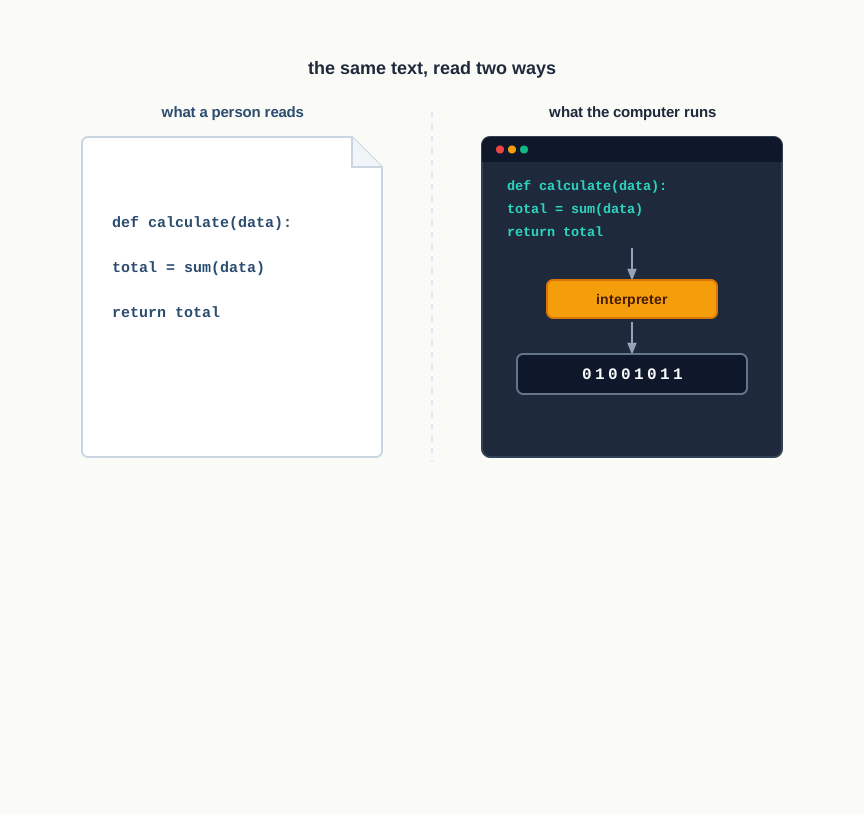
Fig. 5.0 – Source code read by a person and by the machine.
Keep these five questions in mind as you work through the chapter — each of them is answered somewhere in the pages that follow.
5.1 Introduction to Python
In the previous chapter you wrote algorithms — careful, step-by-step descriptions of how a problem is to be solved. An algorithm, however, is written for a human reader. It can say “repeat until the list is finished” and trust you to understand. A computer trusts nothing and understands nothing that has not been spelt out in a form it was built to accept. To get an algorithm actually executed, you must rewrite it in a language the machine can be made to follow.
An ordered set of instructions that a computer carries out to complete a particular task is called a program. The language in which those instructions are written is called a programming language. The algorithm is the plan; the program is the plan expressed in a language that can be run.
From your words to the machine’s
A computer, at the level of its circuits, deals only in two states, written as 0 and 1. The instruction set built into the hardware is expressed entirely in these two digits, and this is called machine language, or low level language. Machine language is what the processor obeys directly, and nothing else is.
Writing anything substantial in 0s and 1s is slow, error-prone and almost impossible to read afterwards. This is why high-level languages were developed — Python, C++, Visual Basic, PHP, Java and many others. They use words, symbols and layout that a person can follow. The cost is that the machine cannot follow them at all.
A program written in a high-level language is called source code. Between source code and the machine sits a language translator, which you met in Chapter 1. Two kinds of translator are in common use, and the difference between them shapes the way you will work.
A compiler takes the entire source code at once and translates the whole of it into machine-level object code. Only after the complete program has been scanned does it report the errors it found, and only then can the translated code be run. An interpreter works differently: it takes one statement, translates it, executes it, then moves to the next. Translation and execution are interleaved rather than separated.
Python uses an interpreter. Notice what follows from that. Because a statement is executed as soon as it is translated, everything before the point of failure has already had its effect — anything printed stays printed. Execution stops when the interpreter meets an error it cannot get past, or when it reaches the end of the program; in both cases the run is over. The arrangement in Fig. 5.1 sets the two routes side by side.
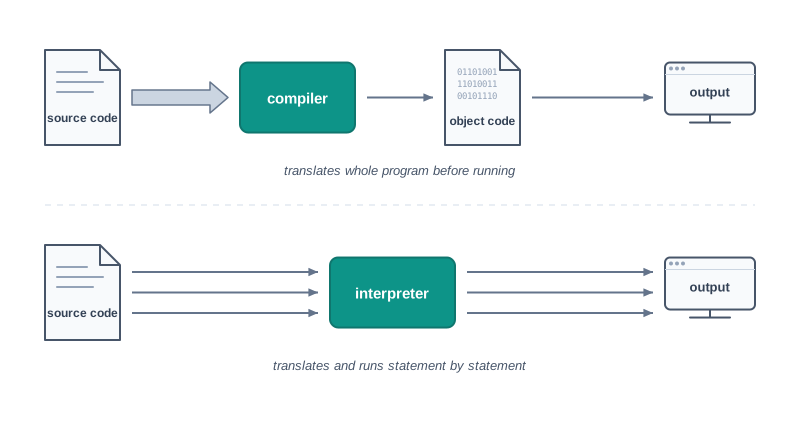
Fig. 5.1 – Compiler vs interpreter execution routes.
Table 5.1 – Interpreter vs Compiler
| Feature | Interpreter | Compiler |
|---|---|---|
| Unit of translation | One statement at a time | The entire source code in one pass |
| Order of work | Translates a statement, executes it, then moves on | Finishes all translation first, then the translated code is run |
| Reporting of errors | Reported as each statement is reached during the run | Reported together after the whole program has been scanned |
| Separate translated file | Does not hand you an object-code file you can run on its own | Produces object code that can be run without the source |
| Translator needed at run time | Needed every time the program is run | Not needed once the object code exists |
| Speed of execution | Generally slower, since translation happens during the run | Generally faster, since translation is already over |
5.1.1 Features of Python
Python is described in a fairly standard set of terms, and each of them tells you something about how the language will behave in practice.
- Python is a high level language. It is free and open source, so the interpreter costs nothing and its own source code is open for anyone to read.
- It is an interpreted language, since Python programs are executed by an interpreter.
- Python programs are easy to understand, because the syntax is clearly defined and the structure is relatively simple.
- Python is case-sensitive. Upper case and lower case are different characters to it, so
NUMBERandnumberare two different names. - Python is portable and platform independent, meaning the same program can run on various operating systems and hardware platforms.
- Python has a rich library of predefined functions, so a great deal of common work is already written for you.
- Python is also useful in web development, and many popular web services and applications are built with it.
- Python uses indentation to mark blocks and nested blocks — the spaces at the start of a line are part of the language, not decoration.
Two of these deserve a second look, because they cause most of the early trouble. Case-sensitivity means the language will not quietly forgive a capital letter in the wrong place; a name that differs by one letter’s case is simply a different name. Indentation means that moving a line four spaces to the right can change which block it belongs to, and therefore change what the program does.
5.1.2 Working with Python
To write and run a Python program you need a Python interpreter installed on the computer, or an online Python interpreter reached through a browser. The interpreter is also called the Python shell. It is the program that reads your instructions and carries them out.
When the shell opens, it prints a few lines identifying the version it is running and then shows the symbol >>> — the Python prompt, as in Fig. 5.2. The prompt means the interpreter is idle and ready for an instruction. Anything you type after it is taken as something to be executed the moment you press Enter.
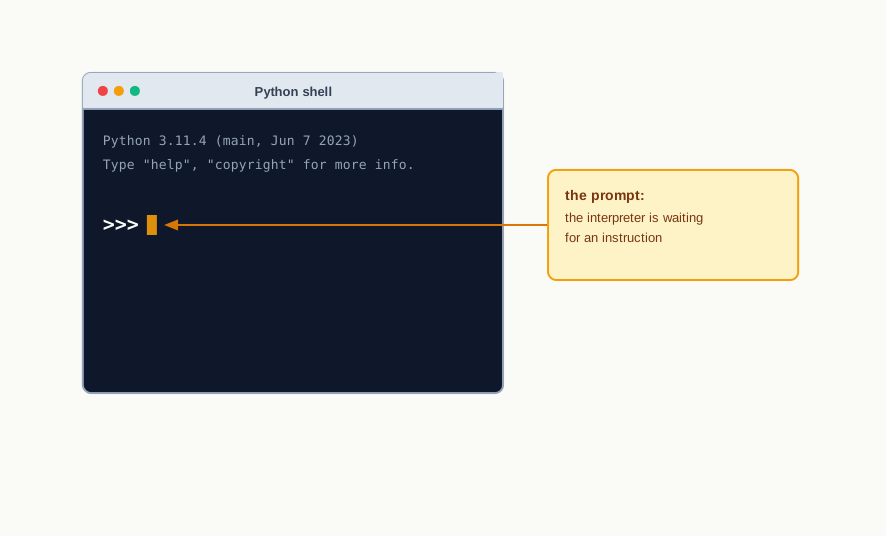
Fig. 5.2 – The Python shell prompt.
5.1.3 Execution Modes
There are two ways to use the Python interpreter:
- Interactive mode
- Script mode
Interactive mode allows a single statement to be executed instantly, one at a time. Script mode allows you to write more than one instruction in a file, called a Python source code file, and execute the whole file. The two are not rivals; experienced programmers use both, and for different purposes.
5.1.3.1 Interactive Mode
To work in interactive mode you type a Python statement directly at the >>> prompt. As soon as you press Enter the interpreter executes it and displays the result, as in Fig. 5.3.
>>> 15 + 27
42
>>> 7 * 6 - 2
40
>>> "Bhopal" + " " + "Junction"
'Bhopal Junction'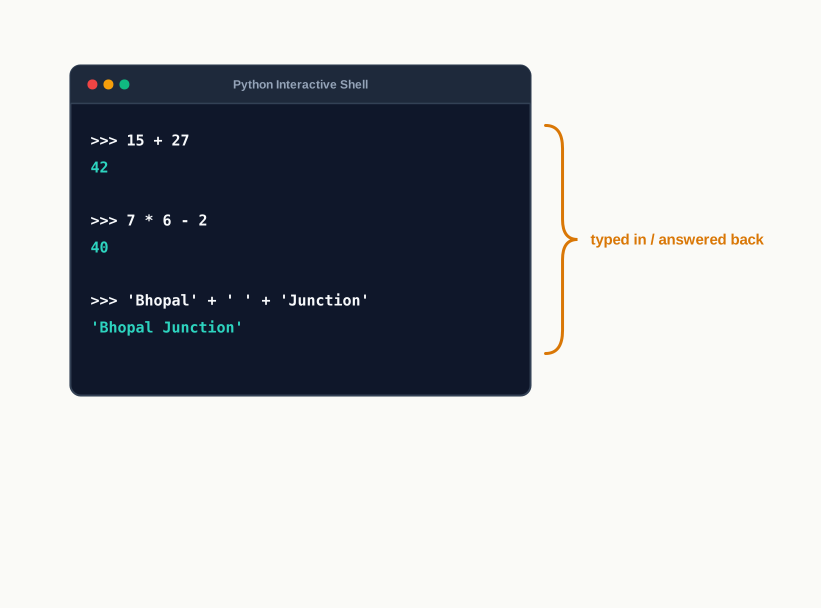
Fig. 5.3 – Interactive mode execution.
Notice that you did not ask for any of these answers to be displayed. In interactive mode, when a statement is just an expression, the interpreter works out its value and echoes it back automatically. This is a convenience of the mode, not a property of the language, and it is worth remembering because it does not happen in script mode.
Interactive mode is convenient for testing a single line of code and seeing the result at once. Its limitation is equally plain: nothing you type is saved. Close the window and the work is gone, and to run those statements again you must type them again.
5.1.3.2 Script Mode
In script mode you write a Python program in a file, save it, and then have the interpreter execute the file. Python source code files are saved with the extension .py. Suppose a file named bus_fare.py holds these three lines:
print("Distance covered: 18 km")
print("Fare per km: Rs 12")
print("Total fare: Rs", 18 * 12)
Running the file produces:
Distance covered: 18 km
Fare per km: Rs 12
Total fare: Rs 216
There are two usual ways to execute such a script. The first is to give the file name, along with its path, at the operating system’s command prompt. The second is to open the file in IDLE — the integrated development and learning environment (IDLE) that comes with Python — and choose Run, then Run Module, from the menu. The output then appears in the shell window, as Fig. 5.4 shows.
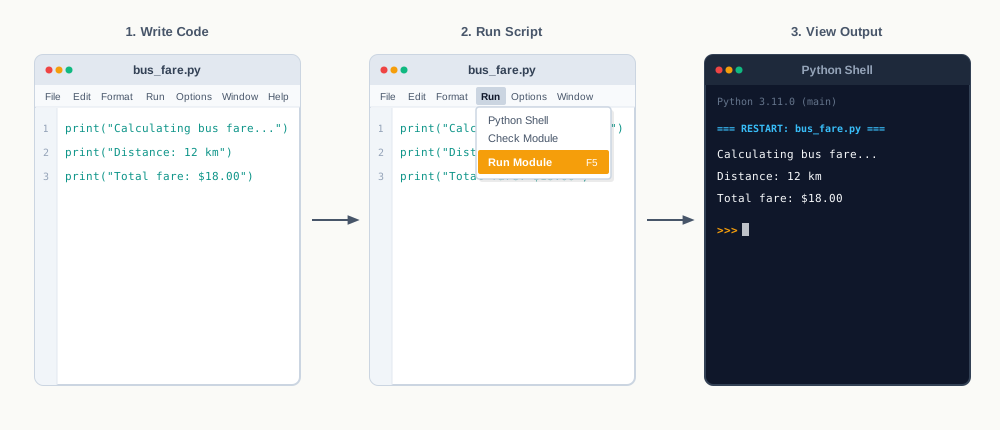
Fig. 5.4 – Executing a Python file in script mode.
Now compare this with interactive mode. If the file had contained the single line 18 * 12, running it would display nothing at all. The multiplication would be carried out and the answer thrown away, because in script mode results are not echoed — a value reaches the screen only if you ask for it with print(). Beginners lose a good deal of time to this one difference.
5.2 Python Keywords
Every language keeps a few words for itself. In Python these are called keywords, or reserved words. Each one carries a fixed meaning for the interpreter, and it may be used only for the purpose it was defined for. You cannot borrow one of them as a name for something of your own.
There are 33 such words in the version of Python you are working with. They are listed in Table 5.2. Because Python is case-sensitive, each must be typed exactly as shown — three of them begin with a capital letter and the rest are entirely in lower case.
Table 5.2 – Python keywords, listed alphabetically
False |
None |
True |
and |
as |
assert |
break |
class |
continue |
def |
del |
elif |
else |
except |
finally |
for |
from |
global |
if |
import |
in |
is |
lambda |
nonlocal |
not |
or |
pass |
raise |
return |
try |
while |
with |
yield |
Reading the list without memorising it
Thirty-three words look like a great deal until you notice that they fall into a small number of jobs, and that you have met several of them already.
Three of them — True, False and None — are values in their own right rather than instructions. Another small group builds decisions and repetition: if, elif, else, for, while, break, continue, pass. A third group belongs to functions and modules: def, return, lambda, import, from, as, global, nonlocal. The operators you will meet in section 5.8 supply four more, spelt as words rather than symbols: and, or, not, in, is. The rest deal with situations covered in later work.
You are not expected to learn this table by heart. What matters is that you recognise a keyword when you see one, so that when the interpreter refuses a name you can tell why it refused.
5.3 Identifiers
A program keeps track of many things at once — a distance, a fare, a count of books, a student’s name. Each of them needs a label, so that a later statement can refer to the same thing again. In programming languages, the names used to identify a variable, a function or any other entity in a program are called identifiers.
The rules Python enforces
You may not name a thing anything you please. The rules for naming an identifier in Python are as follows:
- The name must begin with an uppercase or a lowercase alphabet, or an underscore sign (
_). After that first character it may contain any combination ofa–z,A–Z,0–9or the underscore. An identifier therefore cannot start with a digit. - It can be of any length, though a short and meaningful name is preferred.
- It must not be a keyword or reserved word from Table 5.2.
- Special symbols such as
!,@,#,$and%cannot be used in identifiers.
One consequence of the first rule is worth stating on its own, because it accounts for a great many early errors: a space is not one of the permitted characters, so an identifier can never contain a space. total marks is not a long name — it is two names, and Python will treat it as such.
Case-sensitivity applies here as it does everywhere else. Fare, fare and FARE are three different identifiers, and a value stored under one of them cannot be read back through another.
Table 5.3 – Some identifiers, valid and invalid, with the reason
| Identifier | Valid | Reason |
|---|---|---|
total_fare |
Yes | Begins with a letter; contains only letters and underscores |
_count |
Yes | An underscore is allowed as the first character |
rainfall2024 |
Yes | Digits are allowed after the first character |
2nd_test |
No | Begins with a digit |
net price |
No | Contains a space |
roll# |
No | Contains a special symbol |
pass |
No | pass is a keyword |
Marks and marks |
Yes | Both are valid, but they are two different identifiers |
Names that carry meaning
The rules tell you what Python will accept. They say nothing about what a reader will understand, and that is the harder requirement. Suppose a program works out the total charge for a journey. Written as a, b and c, the statement is legal and unreadable:
c = a * bWritten with names that say what the quantities are, the same statement explains itself:
total_fare = distance * fare_per_kmBoth run identically. The second one can be checked, corrected and reused six months later, and the first cannot. Throughout this book, identifiers made of more than one word are written in lower case with underscores between the words — fare_per_km, books_issued, average_marks. This style is called snake case, and using one style consistently throughout a program is part of writing it well.
5.4 Variables
A program has to remember things while it runs — the number of copies of a book still on the shelf, the distance a bus has covered, the marks of the paper being totalled. Each of these is stored in memory, and each is reached through a name. A variable is such a stored value together with the name that identifies it.
The name is an identifier, and it follows every rule of section 5.3. The value can be a piece of text such as 'M' or 'Global Citizen', a number such as 345, or a mixture of letters and digits such as CD67. What a variable refers to is a value held somewhere in memory; section 5.6 will make precise what kind of thing that stored value actually is.
Creating a variable
In Python you create a variable and give it a value in one stroke, with an assignment statement. The name goes on the left, the assignment operator = in the middle, and the value on the right.
gender = 'M'
message = "Keep Smiling"
price = 987.9
A value that is text is written inside quotation marks — double quotes " " or single quotes ' ', either will do. A numeric value is written without quotes, because it is a number and not a piece of text. That distinction is not a formality; it decides what the value can be used for, as you will see in section 5.12.
The order in which an assignment happens is worth fixing in your mind now, because a great deal later depends on it. Python first works out the whole of the right-hand side, and only then attaches the name on the left to the result. Fig. 5.5 shows the two steps.
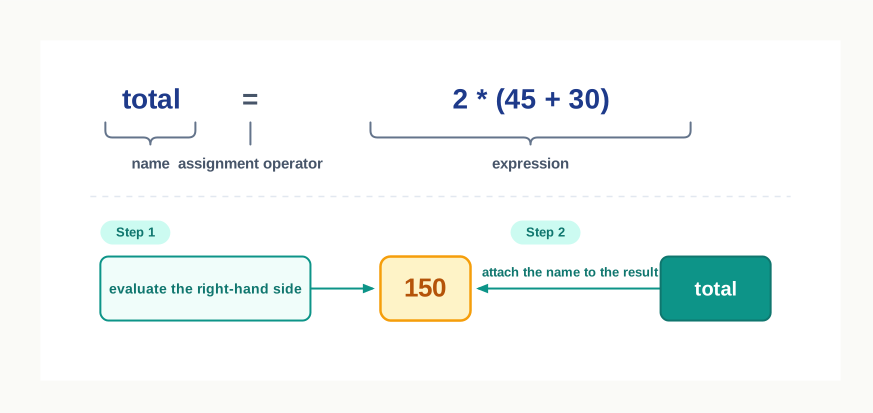
Fig. 5.5 – Anatomy of an assignment statement.
Declaration is implicit
In many languages you must announce a variable before using it, stating in advance what kind of value it will hold. In Python you do not. Variable declaration is implicit: a variable is automatically created and defined the first time it is assigned a value.
The convenience comes with a condition. A variable must always be assigned a value before it is used in an expression, or the program stops with an error. Wherever a variable name appears in an expression, the interpreter replaces it with the value that name currently refers to — and if the name refers to nothing, there is nothing to put in its place.
The name is replaced by its value, at that moment
When a variable appears in an expression, what is used is the value it refers to at the instant the expression is evaluated — not the value it may be given later. This single fact settles many puzzling results.
>>> price = 40
>>> total = price * 3
>>> price = 100
>>> total
120
The third line changes what price refers to. It does not reach back and alter total, because total was worked out when price was still 40, and the multiplication was over long before. A variable is not a live link to another variable; it holds the result that was computed.
Assigning to several names at once
Python also allows more than one variable to be given a value in a single statement, with the names on the left and the matching values on the right, separated by commas.
>>> length, breadth = 45, 30
>>> print(length, breadth)
45 30
The names are matched with the values by position: the first name takes the first value, the second the second. The number of names must equal the number of values.
5.6 Everything is an Object
So far a variable has been described as a name attached to a value stored in memory. It is time to be more precise about what that stored thing is, because Python is unusually consistent on the point.
Python treats every value or data item — a number, a piece of text, or any of the other types coming in section 5.7 — as an object. Saying that a value is an object means it can be assigned to a variable and it can be passed to a function as an argument. Nothing in the language is a special case: 7 is an object in exactly the same sense that a long piece of text is.
An object’s identity
Every object created in Python is given a unique identity (ID), and that identity stays the same for as long as the object exists. It is akin to the address of the object in memory: it tells you not what the value is, but which particular object in memory you are looking at. The built-in function id() returns the identity of an object.
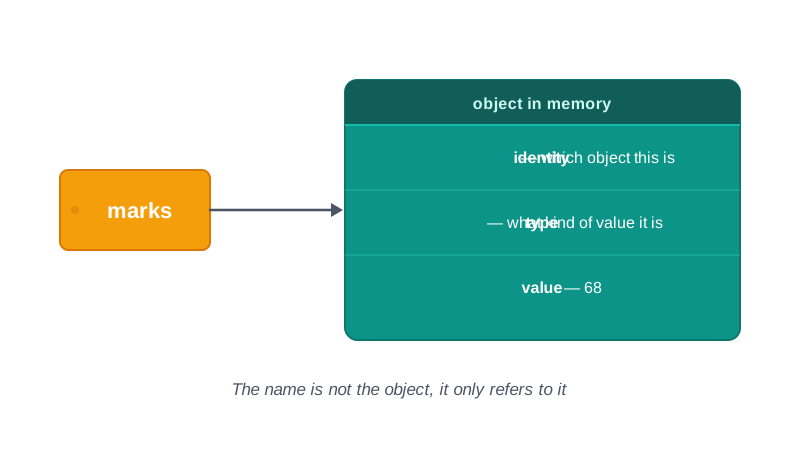
Fig. 5.6 – An object in memory.
Try this at the prompt. Remember that the actual numbers you see will not match the ones printed here, and will not even match themselves the next time you run it.
>>> num1 = 20
>>> id(num1)
140717325849928
>>> num2 = 30 - 10
>>> id(num2)
140717325849928
The second identity is the same as the first. The expression 30 - 10 was worked out and produced the value 20, and rather than build a fresh object for it, Python attached num2 to the object already holding 20. Two names, one object. This is worth noticing now, because section 5.7.6 depends on it entirely.
5.7 Data Types
Every value in Python belongs to a specific data type. The data type identifies the kind of value a variable can hold and, just as importantly, the operations that can be performed on that value. Two numbers can be subtracted; two pieces of text cannot. The reason lies not in the names you gave them but in the type of the objects those names refer to.
Fig. 5.7 sets out the data types available in Python.
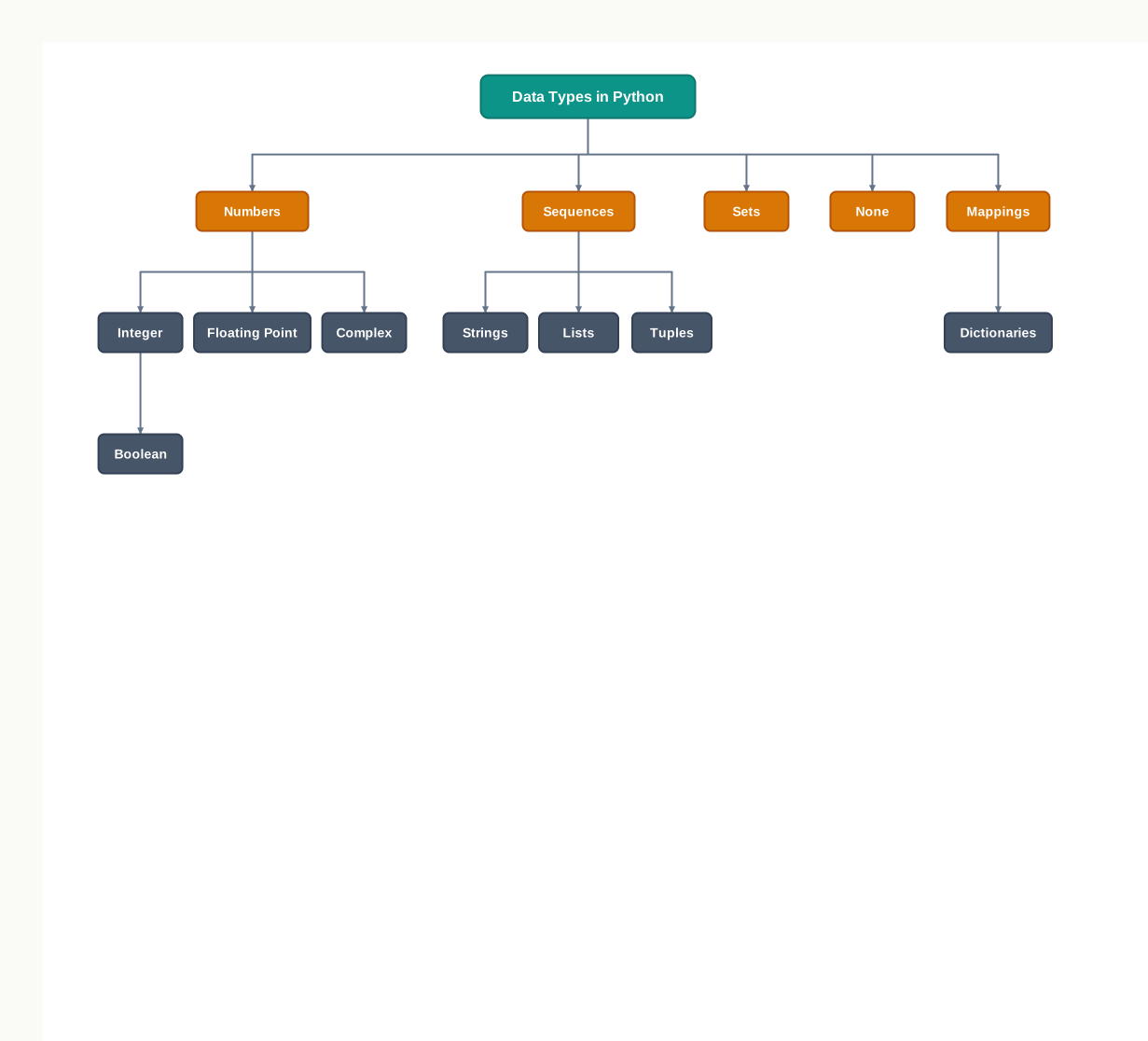
Fig. 5.7 – Data types in Python.
Asking an object what it is
Since the type belongs to the object and not to the name, you can always ask. The built-in function type() reports the type of whatever you hand it.
>>> distance = 240
>>> type(distance)
<class 'int'>
>>> station = "Sawai Madhopur"
>>> type(station)
<class 'str'>
>>> distance = "240 km"
>>> type(distance)
<class 'str'>
Look at the last pair of lines. The name distance began by referring to a number and ended by referring to a piece of text, and Python raised no objection. The name never had a type of its own to contradict.
5.7.1 Number
The Number data type stores numerical values only. It is further classified into three different types: int, float and complex.
Table 5.7 – Numeric data types in Python
| Type / Class | Description | Examples |
|---|---|---|
int |
Integer numbers, whole values with no fractional part | -45, 0, 7, 132 |
float |
Real or floating point numbers, carrying a fractional part | -3.5, 6.0, 12.75 |
complex |
Complex numbers, written with j marking the imaginary part |
4 - 3j, 2 + 5j |
Boolean data type (bool) is a subtype of integer. It is a unique data type consisting of two constants, True and False. Boolean True value is non-zero, non-null and non-empty; Boolean False is the value zero.
Try the four of them at the prompt:
>>> rainfall = 12.75
>>> type(rainfall)
<class 'float'>
>>> library_open = True
>>> type(library_open)
<class 'bool'>
>>> point = 4 - 3j
>>> print(point, type(point))
(4-3j) <class 'complex'>
Notice that Python displays the complex number inside parentheses. That is how it chooses to write such a value; the parentheses are not something you typed.
5.7.2 Sequence
A Python sequence is an ordered collection of items, where each item is indexed by an integer. Ordered means the items have positions, and the positions are fixed until you change the collection. The three types of sequence data types available in Python are Strings, Lists and Tuples. Each is studied in detail in later chapters; a brief introduction follows.
5.7.2.1 String
A string is a group of characters. These characters may be alphabets, digits or special characters, including spaces. String values are enclosed either in single quotation marks or in double quotation marks. The quotes are not a part of the string; they exist to mark where the string begins and ends for the interpreter.
>>> name = 'Meera Nair'
>>> code = "452"
Numerical operations cannot be performed on a string, even when the string contains something that looks like a number, as in code. What that name refers to is four characters, not the quantity four hundred and fifty-two, and section 5.12 deals with what to do about it.
5.7.2.2 List
A list is a sequence of items separated by commas, with the items enclosed in square brackets [ ]. A list may hold items of different types together.
>>> readings = [12, 7.5, "Kota", "Ajmer", 30]
>>> print(readings)
[12, 7.5, 'Kota', 'Ajmer', 30]
Python displays the text items in single quotes whichever kind of quote you typed. It has one standard way of writing a value back to you, and it uses it consistently.
5.7.2.3 Tuple
A tuple is a sequence of items separated by commas, with the items enclosed in parentheses ( ). This is unlike a list, where the items are enclosed in square brackets. Once created, a tuple cannot be changed.
>>> stop = (14, "Sanganer", 6.5, 'B')
>>> print(stop)
(14, 'Sanganer', 6.5, 'B')
5.7.3 Set
A set is an unordered collection of items separated by commas, with the items enclosed in curly brackets { }. A set is similar to a list, except that it cannot hold duplicate entries. Give it the same value twice and it keeps one copy.
>>> marks = {45, 60, 45, 72}
>>> type(marks)
<class 'set'>
>>> len(marks)
3
Four values went in and three remain, because the repeated 45 was not stored a second time. The count is shown here rather than the set itself for a reason: a set has no order, so the items may be displayed in any arrangement, and that arrangement is not something a program should depend on.
Items may be added to a set or removed from it after it is created — a set is not frozen. What you cannot do is reach inside and alter an item that is already there. Section 5.7.6 returns to this distinction, which is easy to state loosely and get wrong.
5.7.4 None
None is a special data type with a single value. It is used to signify the absence of a value in a situation — a result not yet computed, an answer that does not exist. None supports no special operations, and it is neither the same as False nor the same as 0.
>>> result = None
>>> print(type(result))
<class 'NoneType'>
>>> print(result)
None
The distinction matters in practice. A fine of 0 means the fine was calculated and came to nothing; a fine of None means no fine has been worked out at all. Collapsing the two loses information a program may badly need.
5.7.5 Mapping
Mapping is an unordered data type in Python. Currently there is only one standard mapping data type in Python, called dictionary.
5.7.5.1 Dictionary
A dictionary in Python holds data items in key-value pairs. Items in a dictionary are enclosed in curly brackets { }. Every key is separated from its value using a colon : sign, and the pairs are separated from one another by commas. The keys are usually strings and their values can be of any data type. To access a value in the dictionary, its key is specified in square brackets [ ].
>>> bus = {'route': 'Jaipur-Ajmer', 'distance': 132, 'fare': 165}
>>> print(bus)
{'route': 'Jaipur-Ajmer', 'distance': 132, 'fare': 165}
>>> print(bus['fare'])
165
A dictionary permits faster access to data than searching a list item by item, because the key leads straight to the value. Where a list asks “what is at position 2?”, a dictionary asks “what is stored under 'fare'?”, and the second question is usually the one you actually have.
5.7.6 Mutable and Immutable Data Types
Sometimes a program needs to change or update the value of a variable it is using. For certain data types, Python does not allow the value to be changed once it has been created and assigned.
Values that can be changed after they are created and assigned are called mutable. Values that cannot be changed after they are created and assigned are called immutable. When an attempt is made to update an immutable value, the old object is not altered — a new object is built, and the name is made to refer to that instead.
Python’s data types are classified into mutable and immutable as shown in Fig. 5.8.
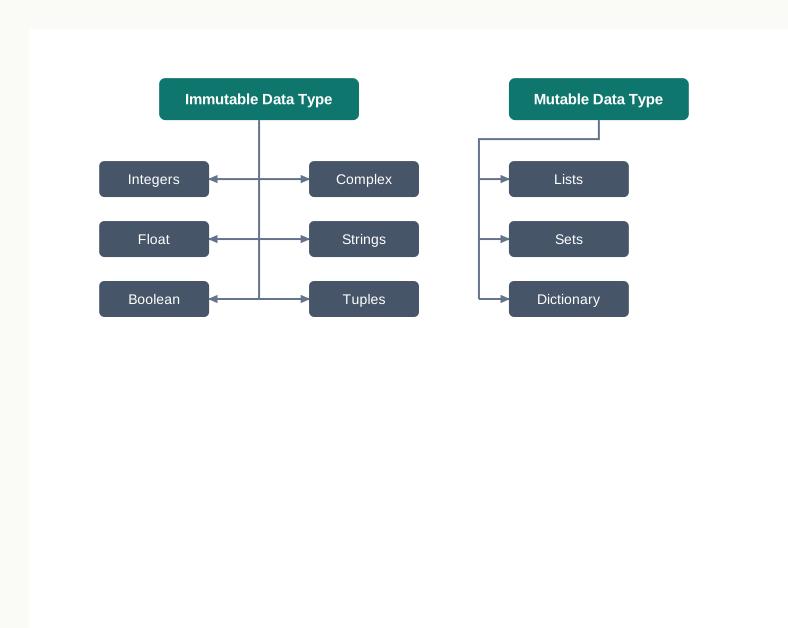
Fig. 5.8 – Mutable and immutable data types.
Watching an immutable value being rebuilt
Take three statements and follow what happens in memory.
>>> count = 300
>>> total = count
>>> count = total + 100
The first statement creates an object holding 300 somewhere in memory and attaches the name count to it. The second statement does not copy the value. It makes total refer to the same object, so that two names now lead to one object, as in Fig. 5.9. Python makes an assignment effective by copying the reference, not the data.
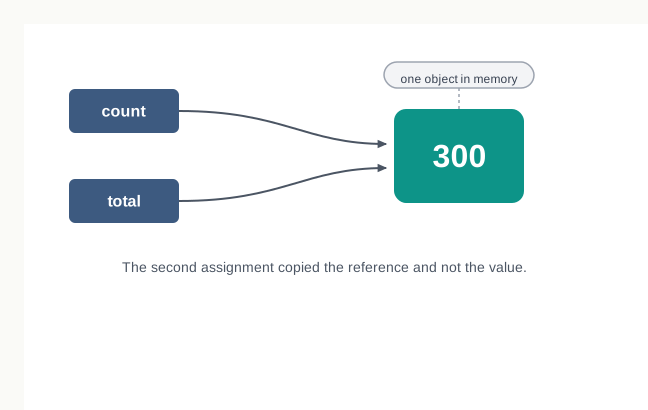
Fig. 5.9 – Two names referring to a single object in memory.
The third statement works out total + 100, which is 400. Since integers are immutable, the object holding 300 cannot be turned into an object holding 400. A fresh object is built for 400 and count is attached to it. The object holding 300 is untouched, and total still refers to it, as Fig. 5.10 shows.
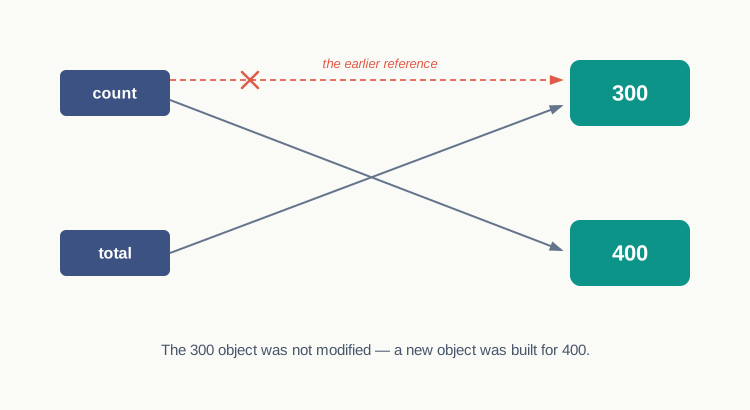
Fig. 5.10 – Updating an immutable value builds a new object.
Table 5.8 – Mutable vs Immutable objects
| Feature | Mutable | Immutable |
|---|---|---|
| Change after creation | The value can be modified in place | The value cannot be modified at all |
| Effect of an update | The same object now holds a different value | A new object is built and the name is attached to it |
| Identity after an update | Unchanged, since it is the same object | Changed, since it is a different object |
| Effect on another name referring to it | The other name sees the change | The other name is unaffected |
| Types in this group | Lists, Sets, Dictionary | Integers, Float, Boolean, Complex, Strings, Tuples |
The fourth row is the one that catches people out. If two names refer to the same list and the list is changed, both names show the change, because there is only one list. If two names refer to the same number and one of them is used in a calculation, the other is untouched, because the calculation could not have altered the number in place even if it had wanted to.
5.7.7 Deciding Usage of Python Data Types
Knowing what the collection types are is not the same as knowing which to reach for. The choice follows from the question you will be asking of the data.
Use a list when you need a simple collection that can be gone through item by item and that is likely to be modified often. A record of daily attendance counts for a month is a good example: figures are corrected, and days are added as the month goes on.
Use a tuple when the data must not change. The names of the days of the week, or the fixed sequence of stops on a bus route, belong in a tuple — and putting them there means an accidental attempt to alter them will fail rather than quietly succeed.
Use a set when the items must be unique and duplicates are to be dropped without your having to check for them. The distinct subjects offered across a school’s sections is such a case; each subject should appear once, however many sections teach it.
Use a dictionary when the data is constantly being modified, or when you need fast lookup by a key of your own choosing, or when there is a logical association between a key and a value. A marks sheet is a natural fit — the subject is the key and the marks are the value, and no program should have to remember that marks in mathematics happen to be at position 3.
Table 5.9 – Choosing between the four collection types
| Feature | List | Tuple | Set | Dictionary |
|---|---|---|---|---|
| Written with | Square brackets [ ] |
Parentheses ( ) |
Curly brackets { } |
Curly brackets { } with key: value pairs |
| Ordered | Yes | Yes | No | Accessed by key, not by position |
| Changeable after creation | Yes | No | Items may be added or removed | Yes |
| Duplicates allowed | Yes | Yes | No | Keys must be unique |
| Reach an item by | Its position | Its position | Not by position | Its key |
| Choose it when | The collection will be modified | The data must stay fixed | Only distinct items are wanted | A value is looked up by a name you choose |
5.8 Operators
An operator is a symbol used to perform a specific mathematical or logical operation on values. The values that an operator works on are called operands. In the expression 10 + num, the value 10 and the variable num are the operands, and the + sign is the operator.
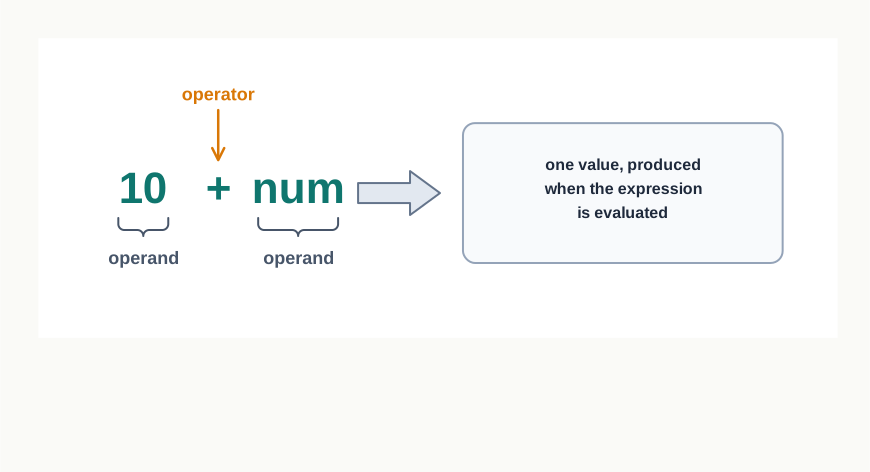
Fig. 5.11 – Parts of a simple expression.
Python supports several kinds of operators, and this section takes them in turn. Keep one thing in view throughout: an operator does not act on the names, it acts on the objects those names refer to, and what it is allowed to do depends on the type of those objects.
5.8.1 Arithmetic Operators
Python supports arithmetic operators for the four basic arithmetic operations, and also for modular division, floor division and exponentiation.
Table 5.10 – Arithmetic operators in Python
| Operator | Operation | Description | Example → Result |
|---|---|---|---|
+ |
Addition | Adds the two numeric values on either side of the operator; also joins two strings placed on either side of it | 15 + 8 → 23"Jai" + "pur" → 'Jaipur' |
- |
Subtraction | Subtracts the operand on the right from the operand on the left | 15 - 8 → 7 |
* |
Multiplication | Multiplies the two values on either side; if one operand is a string and the other an integer, it repeats the string that many times | 15 * 8 → 120"Ha" * 3 → 'HaHaHa' |
/ |
Division | Divides the operand on the left by the operand on the right and returns the quotient | 9 / 4 → 2.25 |
% |
Modulus | Divides the operand on the left by the operand on the right and returns the remainder | 17 % 5 → 2 |
// |
Floor Division | Divides the operand on the left by the operand on the right and returns the quotient rounded down to a whole number; also called integer division | 17 // 5 → 3 |
** |
Exponent | Raises the operand on the left to the power of the operand on the right | 2 ** 5 → 32 |
Three of these deserve a closer look, because each hides a result students find surprising the first time.
The / operator always produces a float in Python 3, even when the division is exact. 8 / 4 is 2.0 and not 2. If a whole number is what you want, // is the operator to use.
The // operator rounds the quotient down, towards the smaller number, rather than simply chopping off the part after the decimal point. For positive numbers the two descriptions agree — 17 // 5 is 3 either way. For negative numbers they do not: -17 // 5 is -4, not -3, because -4 is the whole number below -3.4.
The % operator gives what is left over after a whole-number division, which makes it far more useful than its name suggests. It answers “how many are left over?”, and comparing its result with zero answers “does this divide exactly?”.
>>> 9 / 4
2.25
>>> 8 / 4
2.0
>>> 17 // 5
3
>>> -17 // 5
-4
>>> 17 % 5
25.8.2 Relational Operators
A relational operator compares the values of the operands on either side of it and determines the relationship between them. The result is always True or False, never a number.
The examples below assume marks1 = 78 and marks2 = 91.
Table 5.12 – Relational operators in Python
| Operator | Operation | Description | Example → Result |
|---|---|---|---|
== |
Equals to | True if the values of the two operands are equal, False otherwise |
marks1 == marks2 → False |
!= |
Not equal to | True if the values of the two operands are not equal, False otherwise |
marks1 != marks2 → True |
> |
Greater than | True if the left-side operand is greater than the right-side operand |
marks2 > marks1 → True |
< |
Less than | True if the left-side operand is less than the right-side operand |
marks1 < marks2 → True |
>= |
Greater than or equal to | True if the left-side operand is greater than or equal to the right-side operand |
marks1 >= 78 → True |
<= |
Less than or equal to | True if the left-side operand is less than or equal to the right-side operand |
marks2 <= marks1 → False |
Strings can be compared too. Python compares them lexicographically, character by character, using the character codes: if the first characters are the same, the second characters are compared, and so on. This is why "Ajmer" < "Alwar" is True — the first characters match, and j comes before l.
>>> "Ajmer" < "Alwar"
True
>>> "Bus" == "bus"
False
The second result is case-sensitivity again, met once more in a new place. Upper case and lower case letters have different codes, so the two strings are simply not equal.
Python also allows comparisons to be chained. 35 < marks1 < 90 is read as “marks1 is greater than 35 and less than 90”, exactly as it would be in mathematics, and it produces a single True or False.
5.8.3 Assignment Operators
An assignment operator assigns or changes the value of the variable on its left. You have used = since section 5.4. The rest are shorthands: each performs an operation between the two operands and assigns the result back to the variable on the left.
Table 5.13 – Assignment operators in Python
| Operator | Description | Example → Result |
|---|---|---|
= |
Assigns the value on the right to the variable on the left | total = 12 → total is 12 |
+= |
Adds the right operand to the left operand and assigns the result to the left operand; x += y is the same as x = x + y |
total = 12; total += 8 → total is 20 |
-= |
Subtracts the right operand from the left operand and assigns the result to the left operand | total = 12; total -= 8 → total is 4 |
*= |
Multiplies the left operand by the right operand and assigns the result to the left operand | total = 12; total *= 3 → total is 36 |
/= |
Divides the left operand by the right operand and assigns the result to the left operand | total = 12; total /= 4 → total is 3.0 |
%= |
Performs modulus on the two operands and assigns the result to the left operand | total = 12; total %= 5 → total is 2 |
//= |
Performs floor division on the two operands and assigns the result to the left operand | total = 12; total //= 5 → total is 2 |
**= |
Raises the left operand to the power of the right operand and assigns the result to the left operand | total = 2; total **= 5 → total is 32 |
Two points follow from the table rather than being stated in it. The variable on the left must already have a value, since the shorthand reads that value before writing a new one — count += 1 on a name that does not yet exist fails exactly as count = count + 1 would. And /= leaves a float behind even when the division is exact, because it is / that is doing the work.
5.8.4 Logical Operators
There are three logical operators in Python: and, or and not. They are written in lower case only, since they are keywords. A logical operator evaluates to True or False based on the logical operands on either side of it.
Before the table, one idea has to be settled: every value in Python is logically either True or False, not only the two Boolean constants. By default all values are True except None, False, 0, the empty collections "", (), [], {}, and a few other special values. So if num1 = 10 and num2 = -20, both num1 and num2 are logically True — being negative has nothing to do with it.
Table 5.14 – Logical operators in Python
| Operator | Operation | Description | Example → Result |
|---|---|---|---|
and |
Logical AND | The condition is True if both the operands are True |
(78 > 50) and (78 < 90) → True |
or |
Logical OR | The condition is True if any one of the two operands is True |
(78 > 90) or (78 == 78) → True |
not |
Logical NOT | Reverses the logical state of its operand | not (78 > 50) → False |
>>> attendance = 82
>>> marks = 45
>>> attendance >= 75 and marks >= 33
True
>>> attendance >= 90 or marks >= 33
True
>>> not (marks >= 33)
False
Read the first of these as a school would: a student qualifies only if attendance is sufficient and the paper is passed. and demands both; or is satisfied by either; not turns the answer round. Conditions of exactly this shape drive every decision you will write in the next chapter.
5.8.5 Identity Operators
Identity operators determine whether two names refer to the same object in memory. They can also be used to check whether a value is of a certain type. There are two of them.
Table 5.15 – Identity operators in Python
| Operator | Description | Example → Result |
|---|---|---|
is |
Evaluates to True if the variables on either side of the operator refer to the same object in memory, and False otherwise. var1 is var2 is True when id(var1) equals id(var2) |
type(78) is int → True |
is not |
Evaluates to False if the variables on either side of the operator refer to the same object in memory, and True otherwise |
type(78) is not float → True |
Everything from section 5.6 now pays off. is asks about identity — the same object — while == asks about value — the same contents. Two objects can hold identical contents and still be two objects.
>>> stops1 = ["Ajmer", "Beawar"]
>>> stops2 = stops1
>>> stops3 = ["Ajmer", "Beawar"]
>>> stops1 is stops2
True
>>> stops1 is stops3
False
>>> stops1 == stops3
True
stops2 was made to refer to the very object stops1 refers to, so is says True. stops3 was built separately from the same two items, so it is a second list that happens to match — == says True and is says False. Fig. 5.12 shows the arrangement.
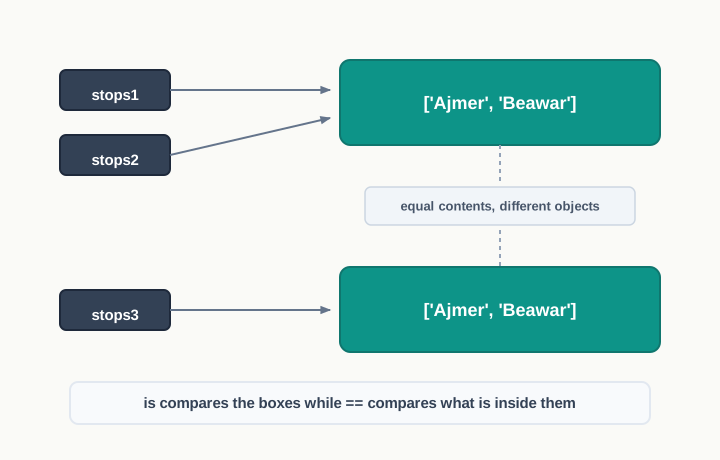
Fig. 5.12 – Equal contents versus identical objects.
Table 5.16 – is vs ==
| Feature | is |
== |
|---|---|---|
| Question asked | Are these the same object? | Do these have the same value? |
| What is compared | The identities of the two objects | The contents of the two objects |
| Two separately built lists with identical items | False |
True |
Two names after b = a |
True |
True |
| Typical use | Checking whether two names lead to one object; testing a type | Checking whether two values are equal |
5.8.6 Membership Operators
Membership operators check whether a value is a member of a given sequence.
Table 5.17 – Membership operators in Python
| Operator | Description | Example → Result |
|---|---|---|
in |
Returns True if the value is found in the specified sequence, and False otherwise |
"Beawar" in ["Ajmer", "Beawar"] → True |
not in |
Returns True if the value is not found in the specified sequence, and False otherwise |
"Kota" not in ["Ajmer", "Beawar"] → True |
>>> stops = ["Ajmer", "Kishangarh", "Beawar"]
>>> "Beawar" in stops
True
>>> "Kota" in stops
False
>>> "Kota" not in stops
True
>>> "jme" in "Ajmer"
True
The last line shows that a string is a sequence too, and that in on a string asks whether one string occurs inside another. This single operator saves a great deal of work: without it, checking whether a stop is on a route means walking through the whole list yourself and comparing item by item.
5.9 Expressions
An expression is a combination of constants, variables and operators. An expression always evaluates to a value. A value on its own, or a standalone variable, is also counted as an expression; a standalone operator is not, because there is nothing for it to work on.
Some valid expressions:
100farefare - 20.43.0 + 3.1423 / 3 - 5 * (14 - 2)"Global" + "Citizen"
The first two look too simple to deserve the name, but they qualify on the only test that matters: hand either of them to the interpreter and a value comes back. That is also why an expression can be written wherever a value is expected — inside print(), on the right of an assignment, or as an operand of a larger expression. The whole of 23 / 3 - 5 * (14 - 2) collapses to one number before anything else happens to it.
5.9.1 Precedence of Operators
Evaluation of an expression is based on the precedence of its operators. When an expression contains different kinds of operators, precedence determines which operator is applied first: the higher precedence operator is evaluated before the lower precedence one.
Most of the operators studied so far are binary operators — operators with two operands. A unary operator needs only one operand, and unary operators have a higher precedence than binary ones. The minus - and plus + signs can act as both unary and binary operators, while not is a unary logical operator.
depth = 12
value = -depth        # here - is a unary operator, acting on one operand
print(not True)       # not is a unary operator, reversing one value
Table 5.18 lists the precedence of all the operators, from highest to lowest.
Table 5.18 – Precedence of operators in Python, highest first
| Order of Precedence | Operators | Description |
|---|---|---|
| 1 | ** |
Exponentiation (raise to the power) |
| 2 | ~, +, - |
Complement, unary plus and unary minus (~ is a bitwise operator, not used in this chapter) |
| 3 | *, /, %, // |
Multiply, divide, modulo and floor division |
| 4 | +, - |
Addition and subtraction |
| 5 | <=, <, >, >=, ==, != |
Relational and comparison operators |
| 6 | =, %=, /=, //=, -=, +=, *=, **= |
Assignment operators |
| 7 | is, is not |
Identity operators |
| 8 | in, not in |
Membership operators |
| 9 | not |
Logical operator |
| 10 | and |
Logical operator |
| 11 | or |
Logical operator |
Two rules govern the use of the table:
- Parentheses can be used to override the precedence of operators. Whatever is written within
( )is evaluated first. - For operators of equal precedence, the expression is evaluated from left to right.
Rule (b) has one exception worth fixing in your memory now, because it is a favourite of output questions. Exponentiation groups from the right, not the left. So 2 ** 3 ** 2 is 2 ** 9, which is 512, and not 8 ** 2, which would be 64. Everything else at a shared level does run left to right, as rule (b) says.
There is a second small trap in the same neighbourhood. Since ** outranks unary minus, -2 ** 2 is read as -(2 ** 2), giving -4. If you meant the square of minus two, the parentheses are not optional: (-2) ** 2 gives 4.
Assignment appears low in the table for a reason you already know from section 5.4: the entire right-hand side is worked out first, and only then is the name attached to the result. The low precedence of = is simply another way of stating that fact.
Working an expression out, step by step
Take 12 + 5 * 4. Multiplication outranks addition, so 5 * 4 is applied first, and the addition works on the result, as Fig. 5.13 shows.
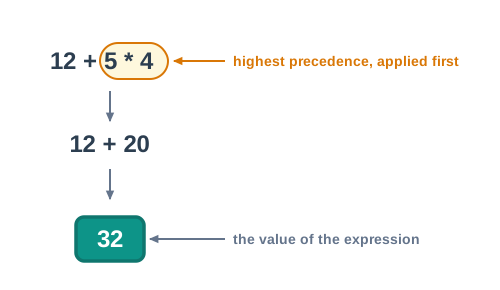
Fig. 5.13 – Step-by-step evaluation based on operator precedence.
Now compare four expressions built from nearly the same pieces. Follow each one line by line rather than looking at the answers.
>>> 12 + 5 * 4
32
>>> (12 + 5) * 4
68
>>> 40 - 12 - 5
23
>>> 18.0 / 4 + (3 + 2.0)
9.5
The first two differ only by a pair of brackets, and the answers differ by 36. The third shows rule (b) at work: subtraction is left-associative, so it is (40 - 12) - 5 and not 40 - (12 - 5). The fourth mixes types as well as operators — the bracket is evaluated first and gives 5.0, the division gives 4.5, and the sum of two floats is a float.
Result: the expression evaluates to False. The trace shows why reading such an expression left to right in the order it is written gives the wrong answer — not looks as though it applies to the whole condition, when in fact it applies only to 8 > 5.
5.10 Statement
In Python, a statement is a unit of code that the Python interpreter can execute. An expression produces a value; a statement gets something done.
You have been writing statements since section 5.4 without the name being used. Each line below is one.
>>> side = 4
>>> volume = side ** 3
>>> print(side, volume)
4 64
The first two are assignment statements: each stores the value of an expression under a name. The third is a call to print(), which puts something on the screen. Notice that the third line displays 4 64 — the two values separated by a single space — because print() was given two arguments rather than one joined value.
An expression and a statement are not the same thing
The distinction is easy to state and easy to lose. side ** 3 is an expression: it produces 64 and does nothing else. volume = side ** 3 is a statement: it contains that expression, and it acts, by attaching the name volume to the result. Take away the name and the assignment operator and nothing is preserved — the 64 is computed and discarded.
Table 5.19 – Expression vs Statement
| Feature | Expression | Statement |
|---|---|---|
| What it is | A combination of constants, variables and operators | A unit of code the interpreter can execute |
| What it produces | A value, always | An effect — something stored, displayed or brought in |
| Can be used inside the other | Yes, an expression sits inside a statement | No, a statement cannot be an operand |
| Example | side ** 3 |
volume = side ** 3 |
| Written alone on a line | Its value is computed and, in script mode, lost | It carries out its work |
The last row explains a puzzle from section 5.1.3. Writing 18 * 12 alone in a script is legal — it is an expression forming a complete line — but the value is never stored or displayed, so the line achieves nothing. The interactive prompt disguises this by echoing the value back.
One statement, one line
A statement normally occupies one line, and ends where the line ends. Python does allow several statements to be written on a single line, separated by semicolons:
length = 45; breadth = 30; print(length * breadth)This runs, and it produces 1350. It is still poor practice, and this book never uses it: three instructions crowded onto a line are harder to read, harder to comment and harder to correct. Write one statement per line.
5.11 Input and Output
Every program written so far has had its data built into it. Change the number of students and you must edit the program. That is acceptable for an illustration and useless for anything else — a fare calculator is worth having only if the person using it can supply the distance.
A program therefore needs two doors: one to take data in from the person using it, and one to send results back out. In Python, the input() function takes the data in and the print() function sends the results out. Fig. 5.14 shows the cycle every program of this kind follows.
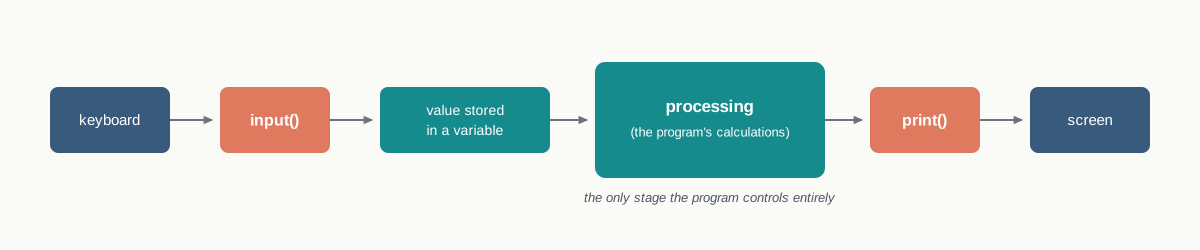
Fig. 5.14 – The standard input, processing, and output cycle.
Taking data in
The input() function prompts the user to enter data. It accepts all user input as a string: the user may type a number or a piece of text, but input() treats whatever is typed as text and nothing else.
When a prompt is specified it is displayed first, and the user types the data after it, on the same line. The input() function takes exactly what was typed at the keyboard, converts it into a string, and assigns that string to the variable on the left of the assignment operator. Entering the data is terminated by pressing the Enter key.
>>> city = input("Enter your city: ")
Enter your city: Jaipur
>>> age = input("Enter your age: ")
Enter your age: 17
>>> type(age)
<class 'str'>
Look at the last reply. The variable age holds the string '17', not the number 17, even though nothing but digits was typed. This is not a small technicality; it is the single most common source of confusion in a beginner’s first programs, and section 5.12 is devoted to what follows from it.
The string can be converted to a number where a number is what you need. Wrapping the call in int() does exactly that, and the conversion happens the moment the data is read.
>>> age = int(input("Enter your age: "))
Enter your age: 17
>>> type(age)
<class 'int'>
Read the inner call first: input() collects the text, and int() then converts it. If the user enters anything that is not a whole number, this line stops the program with an error.
Sending results out
Python uses the print() function to output data to the standard output device — the screen. print() evaluates the expression it is given before displaying it, so print(12 * 2.5) shows the answer and not the sum. It outputs a complete line and then moves to the next line for whatever is printed after.
Table 5.20 – Some print() statements and what each displays
| Statement | Output |
|---|---|
print("Namaste") |
Namaste |
print(12 * 2.5) |
30.0 |
print("Bus" + "Stand") |
BusStand |
print("Route", 27, "starts at 6 am") |
Route 27 starts at 6 am |
The third and fourth rows look similar and work quite differently. The third joins two strings with +, and + adds nothing between them, which is why the words run together. The fourth passes several values to print() separated by commas — these are its arguments, the values handed to a function when it is called — and print() places its separator, a single space, between them. That is also why the fourth row can mix an integer with two strings: print() accepts arguments of different types, whereas + between a string and an integer produces an error, as section 5.12 shows.
Both defaults can be replaced when they do not suit.
print("Jaipur", "Ajmer", "Kota", sep=" -> ")
print("Total:", end=" ")
print(140)
Output:
Jaipur -> Ajmer -> Kota
Total: 140
The first line replaced the separator, so the arrow appears between the stops instead of a space. The second replaced the ending: instead of moving to a new line, print() left a space, so the next print() continued on the same line.
5.12 Type Conversion
Consider a short program that asks for a number and offers to double it.
num1 = input("Enter a number and I'll double it: ")
num1 = num1 * 2
print(num1)
Enter 2, expecting 4, and this is what appears:
Enter a number and I'll double it: 2
22
Nothing has gone wrong with the multiplication. The value returned by input() is a string, "2", so in the statement num1 = num1 * 2 the * operator is working on a string and an integer — and you saw in section 5.8.1 that * in that situation repeats the string. Two copies of the character 2, written side by side, come out as 22. Fig. 5.15 shows the two objects that are being confused with one another.
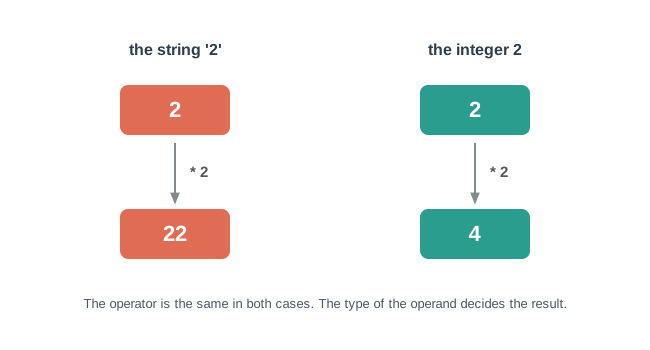
Fig. 5.15 – Operator behaviour depends on the operand’s data type.
To get 4, the data type of the value entered by the user must be converted to an integer. The program then reads:
num1 = input("Enter a number and I'll double it: ")
num1 = int(num1)          # convert the string input to an integer
num1 = num1 * 2
print(num1)
Enter a number and I'll double it: 2
4The data type of a value can be changed from one type to another as and when required. Such type conversion happens in two ways: explicitly, when the programmer instructs the interpreter to convert one data type to another; or implicitly, when the interpreter recognises the need itself and does the conversion automatically.
5.12.1 Explicit Conversion
Explicit conversion, also called type casting, happens when the data type conversion takes place because the programmer forced it in the program. The general form is the name of the required data type, followed by the value to be converted in parentheses:
new_data_type(expression)With explicit type conversion there is a risk of loss of information, since an expression is being forced into a type that may not be able to hold all of it. Converting a floating point value of x = 20.67 into an integer with int(x) discards the fractional part .67 — and discards it for good, because nothing anywhere is keeping a copy.
Table 5.22 lists the functions used to convert an expression or a variable explicitly to a different type.
Table 5.22 – Explicit type conversion functions in Python
| Function | Description |
|---|---|
int(x) |
Converts x to an integer |
float(x) |
Converts x to a floating-point number |
str(x) |
Converts x to a string representation |
chr(x) |
Returns the character whose ASCII code is x |
ord(x) |
Returns the ASCII code of the character x |
The last two are a pair, each undoing the other. Every character a computer stores is held as a number, and these two functions cross between the character and its code in either direction.
>>> chr(65)
'A'
>>> ord('A')
65
>>> chr(97)
'a'5.12.2 Implicit Conversion
Implicit conversion, also known as coercion, happens when the data type conversion is done automatically by Python and is not instructed by the programmer.
>>> total = 12 + 8.5
>>> print(total, type(total))
20.5 <class 'float'>
An integer and a float were added, and the result came back as a float. Nobody asked for a conversion. The interpreter converted the integer 12 to 12.0 before adding, because the two operands had to be of one type for the addition to proceed.
Why was the float converted to an integer instead? Because that would have thrown information away. Implicit conversion follows type promotion: wherever possible, the operation is performed by converting the data to the wider data type, so that no information is lost. An integer fits inside a float without damage; a float squeezed into an integer loses its fractional part. Python takes the safe direction, every time.
This also explains why implicit conversion stops where it does. The interpreter converts freely between numeric types, where the wider type can hold everything the narrower one held. It refuses to convert between a number and a string, because there is no wider type that safely contains both, and because the programmer’s intention cannot be guessed. That refusal is what produced the TypeError above, and Python provides explicit conversion precisely so that one can state the desired outcome clearly.
Table 5.24 – Explicit vs Implicit type conversion
| Feature | Explicit conversion | Implicit conversion |
|---|---|---|
| Also called | Type casting | Coercion |
| Who orders it | The programmer, in the program | The interpreter, on its own |
| Written in the code | Yes, as int(), float(), str() and so on |
No, nothing appears in the code |
| Direction of conversion | Any direction the programmer asks for | Towards the wider type only, by type promotion |
| Risk of losing information | Yes, since a value may be forced into a narrower type | No, since nothing is converted to a narrower type |
| Example | int("25") gives 25 |
12 + 8.5 gives 20.5 |
5.13 Debugging
A programmer can make mistakes while writing a program, and so the program may not execute at all, or may execute and produce a wrong output. Such mistakes are known as bugs or errors, and the process of identifying and removing them from a program is called debugging.
Debugging is not an admission of failure. Every working program in the world passed through a stage of not working, and the skill of finding out why is as much a part of programming as writing the code in the first place. The first step is to know what kind of error you are looking at, because each kind announces itself differently. Errors occurring in programs can be categorised as:
- Syntax errors
- Logical errors
- Runtime errors
Fig. 5.16 shows how the behaviour of the program itself tells you which of the three you are dealing with.
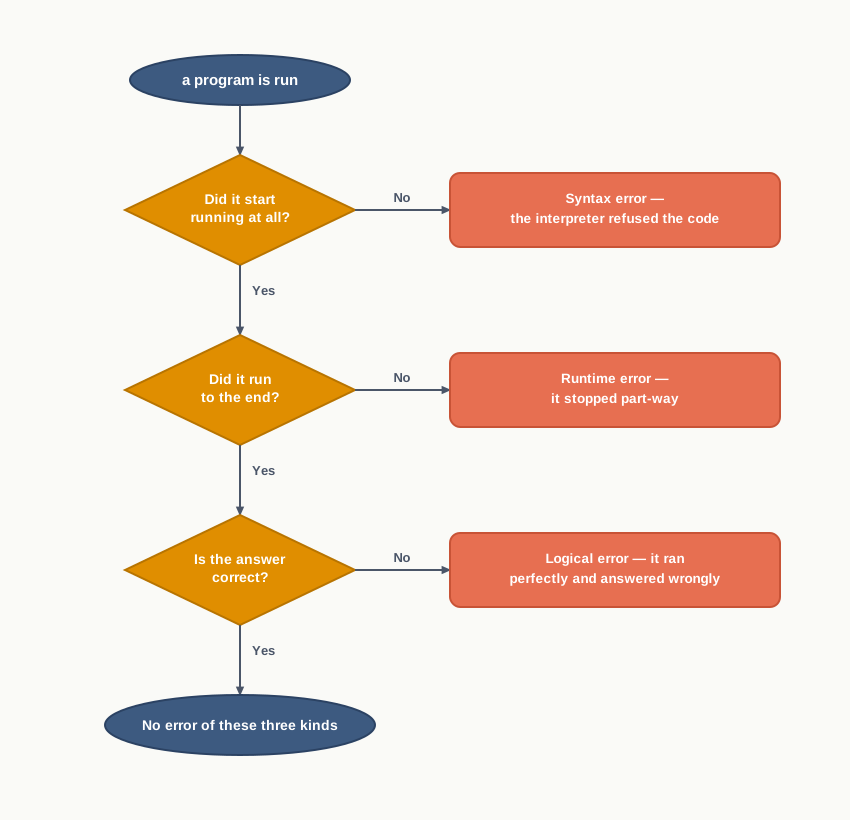
Fig. 5.16 – Identifying the three categories of errors.
5.13.1 Syntax Errors
Like other programming languages, Python has its own rules that determine its syntax — the form a statement must take to be a statement at all. The interpreter carries out a statement only if it is syntactically correct. If any syntax error is present, the interpreter shows an error message and stops the execution there. Such errors must be removed before the program can be executed.
Parentheses, for instance, must be in pairs. The expression (10 + 12) is syntactically correct, whereas (7 + 11 is not, because the right parenthesis is missing.
>>> print(7 + 11
  File "<stdin>", line 1
    print(7 + 11
         ^
SyntaxError: '(' was never closed
The exact wording of the message varies between versions of Python, and it is worth reading rather than skipping. Two parts of it are always useful: the line it points to, and the small marker showing where on that line the interpreter gave up. The marker often sits slightly after the real mistake, because the interpreter carries on hopefully until the statement becomes impossible — so when the indicated spot looks innocent, examine what came just before it.
You have already met several errors of this kind: a keyword used as a name in section 5.2, a hyphen inside an identifier in section 5.3, = written where == was meant in section 5.8.2, and an unwanted indent in section 5.10. All of them share one feature. Nothing at all was executed.
5.13.2 Logical Errors
A logical error is a bug in the program that causes it to behave incorrectly. It produces an undesired output, but without any abrupt termination of the execution. Since the program is interpreted successfully even when logical errors are present in it, these errors are sometimes difficult to identify. The only evidence of a logical error is the wrong output, and by working backwards from that output one can identify what went wrong.
Suppose a canteen sells idli at 30 rupees a plate and juice at 45 rupees a glass, and two of each are ordered. A student writes:
price_idli = 30
price_juice = 45
total = price_idli + price_juice * 2
print("Total in rupees:", total)
Total in rupees: 120The program ran to the end, reported nothing amiss, and gave an answer that is wrong. The correct total is 150. The intention was to double the sum of the two prices, but * outranks +, so only the juice was doubled. The correct statement is:
total = (price_idli + price_juice) * 2Logical errors are also called semantic errors, since they occur when the meaning of the program — its semantics — is not what the programmer intended. The interpreter has no view on the matter. It did exactly what was written, and what was written was not what was meant.
5.13.3 Runtime Error
A runtime error causes abnormal termination of a program while it is executing. The statement is correct syntactically, but the interpreter cannot execute it. Runtime errors do not appear until after the program has started running.
The standard example is a division whose denominator turns out to be zero. There is nothing wrong with the form of the statement — division is a perfectly ordinary operation — but no value can be produced, so the program stops where it stands.
Run it again and type a word where a number is expected:
Total marks of the section: 1560
Number of students: twenty
ValueError: invalid literal for int() with base 10: 'twenty'
The int() function was handed characters it cannot read as a whole number. Now run it once more and enter zero:
Total marks of the section: 1560
Number of students: 0
ZeroDivisionError: division by zero
Both runs got as far as they could and then stopped. Notice what this means for the first case: the first prompt appeared, the first value was read and stored, and only then did the program fail. Everything before the failing statement had already happened, exactly as section 5.1 said it would.
The name of the error, printed on the last line, is the most useful thing on the screen. ValueError says a value of the right type was unusable; ZeroDivisionError says what it says. Read the last line of the report first, and the line number second.
Telling the three apart
Table 5.26 – Syntax vs Logical vs Runtime errors
| Feature | Syntax error | Logical error | Runtime error |
|---|---|---|---|
| What is wrong | The form of the statement breaks the rules of the language | The meaning of the program is not what was intended | The statement is valid but cannot be carried out on this data |
| When it is detected | Before the program starts running | Never, by the interpreter | While the program is running |
| Does the program run | No | Yes, from start to finish | Yes, until the failing statement |
| What you see | An error message naming the line and the position | A wrong answer, delivered with no warning | The program stops part-way, with the error named |
| Example | A missing closing parenthesis | Marks totalled and divided by the wrong count | Division by a denominator that turned out to be zero |
| How it is found | The interpreter points at it | By checking the output against a result worked out by hand | The interpreter names it when execution stops |
The middle column is the dangerous one. A program that refuses to run is an inconvenience; a program that runs and lies is a hazard, and this is why testing a program on values whose answer you already know is not an optional extra.
5.14 Summary
A program is an ordered set of instructions carried out by a computer to complete a task, and a programming language is the language in which those instructions are written. An algorithm is the plan; a program is that plan expressed in a language that can be run.
A computer obeys only machine language, written in 0s and 1s. High-level languages such as Python are written for people, and a program written in one is called source code.
A language translator converts source code into machine language. A compiler translates the entire source code in one pass and reports its errors together, producing object code that can then be run. An interpreter takes one statement at a time, translating and executing each before moving to the next. Python uses an interpreter, which is why a result can be obtained from a single typed line and why execution stops at the statement where an error is met.
Python is a high level, free and open source language; it is interpreted; its programs are easy to understand; it is case-sensitive; it is portable and platform independent; it has a rich library of predefined functions; it is useful in web development; and it uses indentation to mark blocks and nested blocks.
The Python interpreter is also called the Python shell, and its prompt indicates that it is ready to take an instruction.
There are two execution modes. Interactive mode executes a single statement at once and echoes the value of an expression automatically, but saves nothing. Script mode executes a whole file saved with a
.pyextension, and displays a value only when asked to.Keywords are reserved words, each carrying a fixed meaning for the interpreter, and none of them may be used as a name. There are 33 of them, and they must be typed in the exact case shown.
An identifier is a name given to a variable, a function or another entity. It must begin with a letter or an underscore, may then contain letters, digits or underscores, may be of any length, must not be a keyword, and must not contain a special symbol or a space. Names that describe what they hold are worth far more than short ones.
A variable is a named reference to a value in memory, created by an assignment statement. Declaration is implicit: a variable comes into existence when it is first assigned, and using a name before it has been assigned is an error.
In an assignment the whole of the right-hand side is evaluated first, and only then is the name attached to the result. Wherever a variable appears in an expression, the interpreter substitutes the value that name refers to at that moment.
Comments are notes for a human reader, beginning with a hash sign and running to the end of the line. The interpreter ignores them entirely, so they cost nothing while the program runs. They should record the purpose, the input, the output and the reasons behind a choice, not restate what the code already says.
Every value in Python is an object, which can be assigned to a variable and passed to a function as an argument. Every object has an identity, a type and a value. The identity distinguishes one object from every other existing at the same time and stays fixed for its lifetime; the
id()function reports it.A data type identifies the kind of value an object holds and the operations that may be performed on it. The type belongs to the object, not to the name, which is why a name may refer to a number at one moment and to text at the next.
The data types available in Python are Numbers, Sequences, Sets, None and Mappings. Numbers are of three kinds — integer, floating point and complex — and the Boolean type, with its two constants, is a subtype of integer. The three sequence types are strings, lists and tuples. The single standard mapping type is the dictionary.
A sequence is an ordered collection whose items are indexed by integers. A set is unordered and holds no duplicates. A dictionary holds key-value pairs and reaches a value through its key rather than through a position.
Noneis a distinct type with a single value, signifying the absence of a value, and it is neither the same as zero nor the same as false.Values whose contents can be changed after creation are mutable; those whose contents cannot are immutable. The immutable types are integers, float, Boolean, complex, strings and tuples; the mutable types are lists, sets and dictionary. Assigning one name to another copies the reference and not the data, so a change made to a mutable object is visible through every name that refers to it, while an apparent change to an immutable object builds a new object and leaves the old one untouched.
An operator performs a mathematical or logical operation on its operands. Python’s operators are arithmetic, relational, assignment, logical, identity and membership.
Among the arithmetic operators, division always produces a floating point value, floor division rounds the quotient down to a whole number, and the modulus operator gives the remainder. The addition operator also joins two strings, and the multiplication operator repeats a string when one operand is a string and the other an integer.
Relational operators compare two values and produce true or false; strings are compared lexicographically, character by character. Logical operators are written in lower case, and every value is logically true except zero, false, none, the empty collections and a few other special values. Identity operators ask whether two names refer to the same object, which is a different question from whether two values are equal. Membership operators ask whether a value occurs in a sequence.
An expression is a combination of constants, variables and operators, and it always evaluates to a single value. A statement is a unit of code the interpreter can execute; it contains expressions and is carried out for its effect.
Precedence decides which operator in an expression is applied first, and parentheses override it. Operators of equal precedence are applied from left to right, with exponentiation as the exception, since it groups from the right.
The input function takes data from the user and returns it as a string, whatever was typed. The print function displays values on the screen, evaluating each expression before displaying it, separating the values with a space and ending with a new line unless the separator and the ending are replaced.
Type conversion changes a value from one data type to another. Explicit conversion, also called type casting, is written by the programmer, may go in any direction, and risks losing information. Implicit conversion, also called coercion, is done by the interpreter without being asked, and only towards the wider type, so that nothing is lost. This is why an integer added to a float gives a float, and why a number joined to a string with the addition operator gives an error instead.
Debugging is the process of identifying and removing errors from a program. A syntax error breaks the rules of the language and is caught before anything runs. A runtime error is valid in form but cannot be carried out on the data supplied, and stops the program part-way. A logical error, also called a semantic error, is never detected by the interpreter at all — the program runs to the end and delivers a wrong answer, and only a result checked against one worked out independently will reveal it.
5.15 Key Terms
- Argument — a value handed to a function when it is called.
- ASCII — American Standard Code for Information Interchange, the scheme that assigns a numeric code to each character.
- Assignment operator — an operator that assigns or changes the value of the variable on its left.
- Assignment statement — a statement that evaluates an expression and attaches a name to the result.
- Binary operator — an operator that works on two operands.
- Case-sensitive — treating upper case and lower case letters as different characters, so that two names differing only in case are two different names.
- Coercion — another name for implicit type conversion, done by the interpreter without being asked.
- Comment — a note written in the source code for a human reader, which the interpreter ignores.
- Compiler — a translator that converts the entire source code into object code in one pass before any of it is executed.
- Data type — the kind of value an object holds, together with the operations that may be performed on it.
- Debugging — the process of identifying and removing errors from a program.
- Dictionary — the standard mapping type, holding key-value pairs written in curly brackets, in which a value is reached through its key.
- Error — a mistake in a program, also called a bug, which prevents it from running or makes it produce a wrong result.
- Expression — a combination of constants, variables and operators that evaluates to a single value.
- High-level language — a programming language written in words and symbols meant for people, which must be translated before a machine can run it.
- ID — identity, the number that uniquely distinguishes one object from every other existing at the same time.
- Identifier — a name given to a variable, a function or another entity in a program.
- Identity — the property of an object that distinguishes it from all other objects and stays fixed for its lifetime.
- Identity operator — an operator that tests whether two names refer to the same object in memory.
- IDLE — integrated development and learning environment, the editor and shell supplied with Python.
- Immutable — describing a type whose value cannot be changed after it is created, so that any apparent change builds a new object.
- Indentation — the spaces at the start of a line, which in Python mark blocks and nested blocks and are part of the language.
- Interactive mode — the way of using the interpreter in which a single statement typed at the prompt is executed at once and its value echoed back.
- Interpreter — a translator that takes the source code one statement at a time, translating and executing each before moving to the next.
- Keyword — a word reserved by the language, carrying a fixed meaning, which cannot be used as a name.
- List — a sequence of items separated by commas and enclosed in square brackets, which can be changed after it is created.
- Logical error — an error that lets a program run to the end and produce a wrong result, because the meaning of the code is not what was intended.
- Logical operator — an operator that combines or reverses logical values, written in lower case as a keyword.
- Machine language — the language of 0s and 1s that a computer’s hardware obeys directly; also called low level language.
- Mapping — a data type in which each item is reached by a key rather than by a position.
- Membership operator — an operator that tests whether a value occurs in a given sequence.
- Mutable — describing a type whose value can be changed in place after it is created.
- Object — any value or data item in Python, which can be assigned to a variable and passed to a function as an argument.
- Object code — the machine-level code a compiler produces from source code.
- Operand — a value that an operator works on.
- Operator — a symbol that performs a mathematical or logical operation on its operands.
- Portable — able to run on different operating systems and hardware platforms without being rewritten.
- Precedence — the order in which operators of different kinds are applied when an expression is evaluated.
- Program — an ordered set of instructions carried out by a computer to complete a specific task.
- Programming language — a language with a fixed vocabulary and fixed rules, used to write instructions a computer can execute.
- Prompt — the symbol shown by the shell to indicate that the interpreter is ready to take an instruction.
- Python shell — the interpreter, which reads instructions typed at the prompt and carries them out.
- Relational operator — an operator that compares two values and produces a result that is either true or false.
- Runtime error — an error in a statement that is valid in form but cannot be carried out on the data supplied, stopping the program part-way.
- Script mode — the way of using the interpreter in which a program saved in a file is executed as a whole.
- Semantic error — another name for a logical error, since the meaning of the program is not what was intended.
- Sequence — an ordered collection of items in which each item is indexed by an integer.
- Set — an unordered collection of items enclosed in curly brackets, which holds no duplicate entries.
- Source code — a program as written by the programmer in a high-level language, before translation.
- Source code file — a file holding a Python program, saved with the extension
.py. - Statement — a unit of code that the interpreter can execute as a complete instruction.
- String — a group of characters enclosed in single or double quotation marks.
- Syntax — the rules that fix the form a statement must take to be valid in a language.
- Syntax error — an error that breaks the rules of the language and is reported before the program starts running.
- Tuple — a sequence of items separated by commas and enclosed in parentheses, which cannot be changed once created.
- Type casting — another name for explicit type conversion, written by the programmer in the code.
- Type conversion — the changing of a value from one data type to another.
- Type promotion — the rule by which an implicit conversion moves data to the wider type, so that no information is lost.
- Unary operator — an operator that works on a single operand.
- Variable — a named reference to a value stored in memory.
5.16 Points to Ponder
Python could easily have converted a number to text on its own when you tried to join one to a string, and it refuses. Where else in the chapter does the language decline to guess what you meant, and what would be lost if it guessed correctly nine times out of ten?
input()returns text even when nothing but digits was typed, and every program then has to convert it back. Would a language be better ifinput()inspected what was typed and returned a number when it could? What new kind of bug would that create?A tuple can do less than a list: it cannot be changed. Why would anyone deliberately choose the type that allows fewer operations, and what does that suggest about the purpose of a data type in the first place?
Noneis neither zero nor false, and a program can be written without ever using it. What information does a program lose when “no value has been recorded” and “the value recorded is zero” are stored the same way, and where in a school’s records would that loss actually matter?Indentation in most languages is a courtesy to the reader; in Python it changes the meaning of the program. What does the language gain by making the layout binding, and what does it cost a programmer who edits code carelessly?
A syntax error stops a program before it starts, and a logical error lets it finish and lie to you. Which of the two is more expensive to a school that uses the program to prepare its result sheets, and what would you do while writing such a program to reduce the risk of the second kind?
5.17 Objective Questions
Which of the following is not a valid identifier in Python? [1 mark]
_totaltotal_22_totalTotal
The data type of the value returned by
input()is [1 mark]intfloatstr- decided by what the user types
The value of
17 // 4is [1 mark]44.254.01
Which of the following is a mutable data type? [1 mark]
- Tuple
- String
- List
- Integer
Assertion (A): The statement
count = count + 1fails ifcounthas not been assigned a value earlier in the program. Reason (R): In an assignment statement, the entire right-hand side is evaluated before the name on the left is attached to the result. [1 mark]- Both A and R are true, and R is the correct explanation of A.
- Both A and R are true, but R is not the correct explanation of A.
- A is true but R is false.
- A is false but R is true.
Assertion (A): The expression
"25" + 5produces30. Reason (R): Implicit type conversion in Python moves data only towards the wider data type, so that no information is lost. [1 mark]- Both A and R are true, and R is the correct explanation of A.
- Both A and R are true, but R is not the correct explanation of A.
- A is true but R is false.
- A is false but R is true.
Fill in the blank: The ______ operator divides the left operand by the right operand and returns the remainder. [1 mark]
State whether the following is true or false: A set may hold the same value more than once. [1 mark]
Match each operator in the first list with what it does, from the second list. [1 mark]
| Column A | Column B |
|---|---|
a. // |
i. Tests whether a value occurs in a sequence |
b. is |
ii. Raises the left operand to the power of the right operand |
c. in |
iii. Tests whether two names refer to the same object |
d. ** |
iv. Divides and returns the quotient rounded down to a whole number |
- Write the full form of each of the following abbreviations used in this chapter: ASCII, IDLE. [1 mark]
5.18 Check Your Concepts
Define a keyword, and give one reason why a keyword cannot be used as an identifier. [2 marks]
Name the two execution modes of the Python interpreter and state one difference between them. [2 marks]
What does the value
Nonesignify? State one situation in a school record where storingNoneconveys something that storing0would not. [2 marks]State any two rules that a valid identifier in Python must follow, and give one example of a name that breaks each rule. [2 marks]
Differentiate between a compiler and an interpreter, and explain how the difference between them shows itself when a program contains an error. [3 marks]
Explain, with one example of your own, why
/and//can give different results for the same pair of operands. State also which of the two always returns a floating point value. [3 marks]What is a logical error? Write one statement containing a logical error, state the wrong result it would give, and write the corrected statement. [3 marks]
Explain the difference between a mutable and an immutable data type. Use an example in which two names refer to the same object to show what happens in each case when a change is attempted. [4 marks]
Explain what
isand==each test. Give a short example in which the two operators give different results for the same pair of names, and explain the reason for the difference. [4 marks]A student writes a program that reads two numbers from the user and displays their sum. On entering
12and7, the program displays127. Explain the cause of this result, write the corrected statements, and state the general principle aboutinput()that the student had overlooked. [5 marks]Compare explicit and implicit type conversion on four points. Then explain, with reasons, why Python converts an integer to a float on its own but refuses to convert a string to a number on its own. [5 marks]
5.19 Output & Debugging
- State the output of the following, and explain in one line why
totaldoes not change after the third statement. [2 marks]
price = 30
total = price * 2
price = 50
print(price, total)- Write the output of the following two statements, and name the rule of precedence that decides each answer. [2 marks]
print(2 ** 3 ** 2)
print(-3 ** 2)- Write the output of the following, and state the data type of the value displayed. [2 marks]
a = "12"
b = 3
print(a * b)- Write the output of the following, and state the data type of
countat the end. [3 marks]
count = 12
count += 8
count //= 5
count **= 2
print(count, type(count))- Write the output of the following. [2 marks]
values = {7, 3, 7, 9, 3}
print(len(values))- The following fragment does not run. Identify the error, name its category, and rewrite the fragment correctly. [3 marks]
total = 0
 total = total + 5
print(total)- The following program stops while it is running. Name the error, explain why it occurs, and rewrite the program so that it works as intended. [3 marks]
marks = input("Marks obtained in three tests: ")
average = marks / 3
print("Average:", average)
5.20 Case-Based Questions
- A school library counter charges a fine on every book returned after its due date. A fixed amount is charged for each day of delay. The clerk wants a program that reads the borrower’s name, the number of days of delay and the daily rate, and displays the fine payable. [4 marks]
- State the data type in which each of the three input values should be stored, giving a one-line reason for each. [2]
- Write the single statement that reads the number of days of delay from the clerk and stores it as a whole number. [1]
- The clerk types
fivewhen the number of days is asked for. Name the error that results, and state whether it is a syntax, logical or runtime error. [1]
- A bus depot charges the same fare for every passenger, and gives a flat discount of 50 rupees on a booking made for a whole family. A student writes the following program for a booking of three adults and two children, with a fare of 120 rupees per passenger. [5 marks]
adults = 3
children = 2
fare = 120
total = adults + children * fare - 50
print("Total fare:", total)
a. Write the output the program actually produces. [1]
b. Explain why this is not the intended total, naming the rule of the language that decides the order of evaluation here. [2]
c. Rewrite the statement that computes `total` so that the program gives the intended answer, and state that answer. [1]
d. Name the category of error the student has made. [1]- A science laboratory keeps a register of the temperature readings taken during an experiment. The register also holds the names of the experiments performed during the year, which are fixed once the syllabus is issued. On two occasions the apparatus failed and no reading could be taken at all, and these occasions must remain distinguishable from a reading of zero degrees. [5 marks]
- State the data type you would choose to store the temperature readings, and give one reason for the choice. [1]
- State the data type you would choose for the names of the experiments, and give one reason why this choice is better than the one in part (a). [2]
- State what you would store in place of a reading on the two occasions when the apparatus failed, and explain why storing
0there would be wrong. [2]
5.21 Programming Practice
Write a program that reads the length and the breadth of a rectangular room in metres and displays its area with a suitable label. Submit the complete program, with a comment at the top stating its purpose, its input and its output. [3 marks]
Write a program that reads a duration given as a whole number of minutes and displays it as a number of complete hours together with the minutes left over. For an input of
200, the output should report 3 hours and 20 minutes. Submit the complete program and an identifier description table listing every identifier used, its type and its purpose. [4 marks]Write a program that reads a single character from the user and displays its ASCII code, and then reads an ASCII code from the user and displays the corresponding character. Submit the complete program, and state which of the two inputs needs to be converted before use and why. [4 marks]
Write a program that reads the marks obtained by a student in three unit tests and displays the total marks and the average marks, the average being shown as a floating point value. Submit the complete program, together with a note of not more than two lines naming the statements in which explicit type conversion was necessary and stating why it was necessary there. [5 marks]
Write a single
print()statement that displays the names of three bus stops on one line, separated from one another by an arrow made of a hyphen and a greater-than sign, with no other spacing changes. Submit the statement and the output it produces. [2 marks]
5.5 Comments
Not everything written in a source code file is meant for the machine. A comment is a remark or note placed in the source code for a human reader. The interpreter does not execute it; it skips over it entirely and carries on with the next instruction.
A comment is a note written inside the source code for a human reader, which the interpreter ignores while executing the program.
In Python, a comment starts with
#, the hash sign. Everything following the#up to the end of that line is treated as a comment, and the interpreter simply ignores it. The next line is read normally again.Both forms are in use. A comment can occupy a whole line, sitting above the code it explains, or it can follow a statement on the same line, explaining that one statement. In the second case the code before the
#runs as usual — only the tail of the line is discarded.Why a program needs them
A program that runs correctly is not finished. It also has to be understood — by you, months later, and by whoever maintains it after you. Large software is written by teams, and a program written by one person is regularly read, corrected and extended by another. Comments are how the intention behind the code survives the moment it was written.
The useful thing to record is what the code is for and why it does what it does — the purpose of the program at the top, what the input is expected to be, what the output means, and the reason behind any choice that would otherwise look arbitrary. What is not useful is a running translation of statements that already speak for themselves. A line reading
fine = rate_per_day * days_lategains nothing from a comment saying “multiply rate by days”. Over-commenting buries the few remarks that matter.fine payable on an overdue library book Problem: A school library charges a fixed fine for every day a book is returned after its due date. Given the daily rate and the number of days of delay, compute and display the fine payable.
Sample output:
Identifier description:
Table 5.6 – Identifiers used in the library fine program
rate_per_daydays_latefineNotes: The three comment lines at the top state the purpose, the input and the output, which is the minimum a reader needs before looking at a single statement. The two trailing comments record what the numbers mean — that the rate is in rupees, and that the delay is measured from the due date — and neither of those facts can be read off the code itself.
Q. If
#begins a comment, what happens to a#that appears inside a piece of text?A. Nothing at all — it stays part of the text. Python looks for
#only in ordinary code, not inside quotation marks, soprint("Enter roll no #")displaysEnter roll no #in full. The quotes tell the interpreter that everything between them is a value, and a value is never read as a comment.writing a note without the hash sign What students write:
What happens: the interpreter reports a syntax error on the first line and nothing runs. Read as code,
This program finds the fineis a sequence of names with no operator between them, which is not a statement Python can make sense of. The fix: begin the line with#. A remark is invisible to the interpreter only if it is marked as one.Comments cost nothing while the program runs. The interpreter discards them as it reads the file, so a heavily commented program executes exactly as fast as the same program stripped bare. The only price is the space they take on the page, and a comment that earns its place is worth that.
Take the playground perimeter program from section 5.4 and add comments to it: one line at the top stating its purpose, and a trailing comment on each of the first two statements saying what the measurement is and in what unit. Run it again and confirm the output has not changed. Then add a line reading
print("Perimeter in metres:", perimeter)preceded by#, run it once more, and say what the output tells you about how the interpreter treated that line.