Chapter 7: Functions
In 1949, a small team at the University of Cambridge switched on EDSAC, one of the earliest computers able to hold its own program in memory. Maurice Wilkes led the project. Within days of the machine running, the team ran into something that surprises nobody who has written code since: making the machine do arithmetic was the easy part, and getting a long list of instructions correct was the hard part.
Every program they wrote needed the same small jobs done again and again — read in a number, print a result, work out a square root. Copying out those instructions afresh each time was slow, and every fresh copy was a fresh chance to make a mistake.
David Wheeler, a research student on the team, worked out a way round it. Write the instructions for one job once, keep them in memory under a name, and let any program jump to them and — this was the clever part — jump back to exactly the place it had left. The team then built a whole library of such ready-made pieces, punched on paper tape, that any programmer could take off the shelf and use.
In 1951 Wilkes, Wheeler and Gill published a book describing this way of working, widely regarded as the first textbook on programming. The named, reusable block of instructions they described is what Python calls a function. Fig. 7.0 contrasts the two ways of laying out the same piece of work.
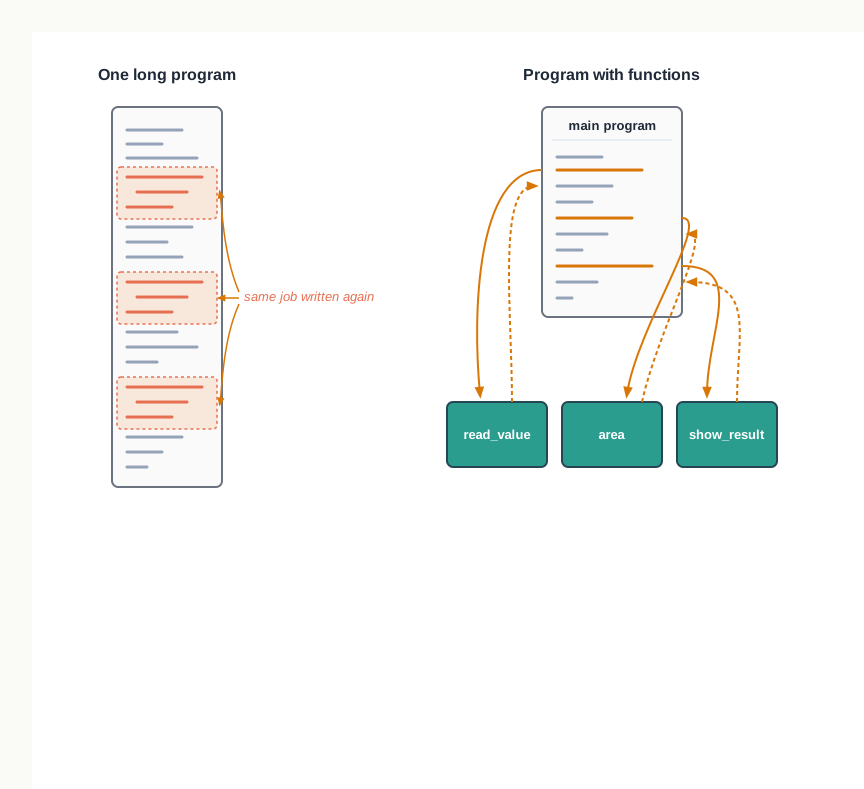
Fig. 7.0 – One long program versus a program with functions.
Each of these questions is answered somewhere in this chapter; watch for them as you read.
7.1 From One Long Program to Many Small Blocks
Every program you have written so far has probably been short enough to read from the first line to the last in one sitting. Real tasks are rarely that small. As the problem grows, the number of statements grows with it, and a program that once fitted on half a screen begins to run into several pages.
Length by itself is not the difficulty. The difficulty is that a long program written as one unbroken block is hard to read, hard to test in pieces, and hard to change safely. A small edit in the middle can quietly break something forty lines away.
A billing task at a counter
Consider a stationery counter in a school. A customer buys three items. For each item the clerk needs the quantity and the rate, and the amount for that item is the quantity multiplied by the rate. The shop offers a five per cent discount on any single item whose amount crosses 500. At the end, the three amounts are added to give the total payable.
Before writing anything, set out the method in plain words. The input is a name, a quantity and a rate for each of three items. The output is the amount for each item after discount, and the total. The method is: read the three values for an item, multiply quantity by rate, reduce the amount by five per cent if it exceeds 500, and repeat this for all three items before adding.
Written straight down, without breaking the work up, the program looks like this.
The same instructions, written three times
Look at what the program is actually doing. Three groups of six lines are identical except for the digit at the end of each name. The rule for computing an amount, and the rule for applying a discount, have each been written out three separate times.
That repetition is not merely untidy — it is a maintenance trap. Suppose the shop raises the discount from five per cent to eight, or lowers the limit from 500 to 400. You now have to make the same edit in three places, and if you miss one, the program still runs and still prints a total. It simply prints a wrong total, silently.
Now extend the situation. If the counter had to bill twelve items instead of three, the program would carry twelve copies of the same rule, and a single missed edit would be that much easier to make and that much harder to find.
Dividing the work into named blocks
The alternative is to stop thinking of the program as one list of instructions and start thinking of it as a small set of jobs. In the billing task there are three distinct jobs: read the details of one item, compute the amount for one item after discount, and print a line of the bill. Each job can be written once, given a name, and used whenever it is needed.
This way of building a program has a name. Modular programming is the practice of dividing a program into separate, independent blocks of code, each with its own name and its own specific task. The blocks are written and tested one at a time, and the main program does little more than call them in the right order.
Fig. 7.1 shows the billing task laid out this way, with the discount rule written once and reached from three places.
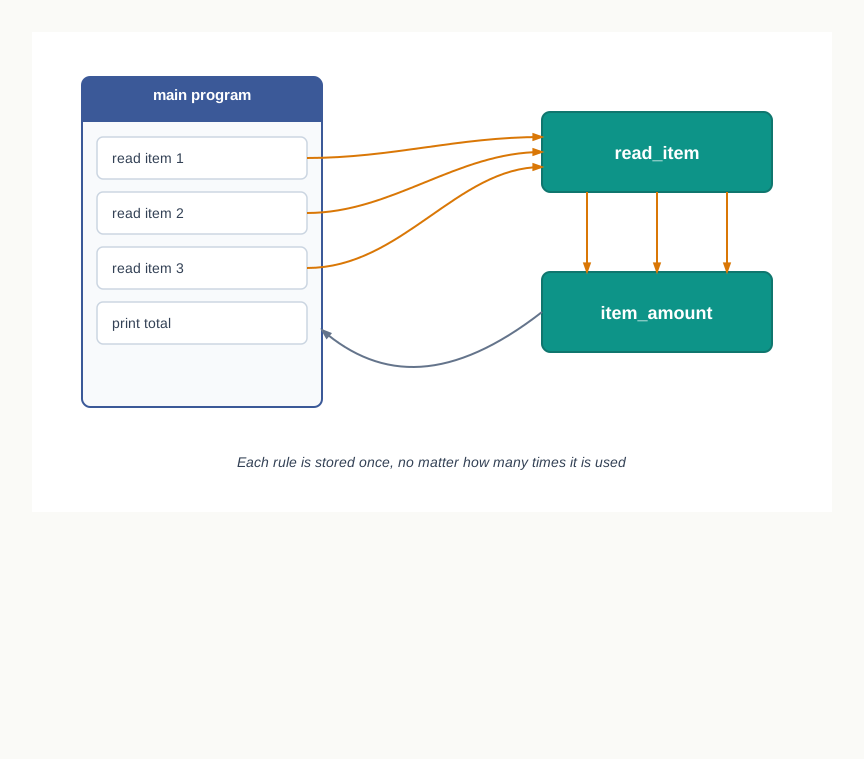
Fig. 7.1 – Modular layout of the billing task.
Table 7.2 – one long block versus a modular program
| Feature | Program written as one block | Program built from named blocks |
|---|---|---|
| Repeated rule | Written out once for every place it is needed | Written once, used from many places |
| Changing that rule | Every copy must be edited, and a missed copy fails silently | One edit, and every use changes with it |
| Reading the program | The whole listing must be read to follow one idea | The main part reads as a summary; details sit in the named blocks |
| Testing | Only the finished program can be run and checked | Each block can be checked on its own before the rest is written |
| Reuse in another program | The lines must be copied across | The block can be taken across as it stands |
| Dividing work in a team | Hard, since everyone edits the same listing | Straightforward, since each member takes different blocks |
The gain is not that the program becomes shorter. Often the modular version is a few lines longer. The gain is that each idea in it now lives in exactly one place, which is what makes the program safe to change.
Python’s name for such a named, reusable block is introduced in the next section, along with the way one is written and used.
7.2 Functions
Modularity is an idea; Python needs a construct to carry it. That construct is the function, and it is the single most used tool for keeping a program organised.
7.2.1 What a Function Is
A function is a group of instructions that has been given a name, so that the whole group can be run by writing that name. The instructions are written once, at one place in the program. Everywhere else, the name stands in for them.
Running a function is called invoking or calling it. When a function is called, control leaves the line that called it, the instructions inside the function run, and control returns to the point where the call was made so that the rest of the program can carry on.
You have been using functions since your first program. print() is a function, and so are input(), int() and len(). In each case somebody else wrote the instructions, gave the group a name, and you have simply been calling that name and letting the work happen.
The useful way to picture a function is as a sealed box, as in Fig. 7.2. Values go in at one end, the work happens inside, and a result comes out at the other. To use the box you need to know only what it expects and what it gives back — not how it does the job internally.
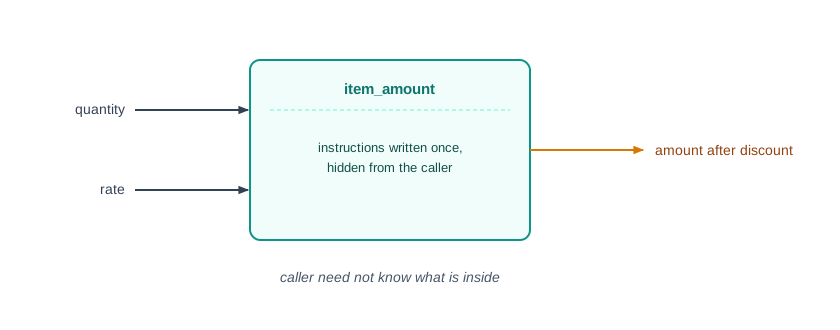
Fig. 7.2 – A function as a sealed box.
That sealed quality is what makes a function worth having. A block of instructions buried in the middle of a long program can only be understood by reading everything around it. The same block, named and closed off, can be understood on its own, tested on its own, and trusted afterwards.
Once a function exists, it can be called as many times as needed, from as many places as needed. It can also be called from inside another function, which is how larger jobs get assembled out of smaller ones.
7.2.2 Advantages of Using Functions
Return to the stationery counter of the previous section, where the rule for discounting a single item was written out three times. Written as a function, that rule sits in one place. If the shop changes the discount, exactly one line changes, and every use of the rule changes with it.
Now suppose the same shop later needs a program for the annual stock sale, which uses the same discount rule. The function can be carried across as it stands, without being re-derived or retyped. This is the property that makes functions valuable well beyond the program they were first written for.
The gains can be set out plainly.
- Readability improves, because the main part of the program reads as a short summary of what happens, and the detail of each step is kept out of the way until you want it.
- Code length falls, because a rule needed in several places is stored once instead of being copied. Shorter code with each idea in one place is also easier to debug.
- Reusability rises, because a function can be called from another function, and can be used again in a different program without change.
- Work can be divided among a team, since different members can write different functions at the same time, provided they agree in advance on what each function takes and what it gives back.
There is a fifth gain that matters most while a program is being built. A function can be tested on its own, before the rest of the program exists. You can call it with a few chosen values, check the results by hand, and only then use it. A fault found this way is found in five lines, not in five pages.
7.2.3 Types of Functions in Python
The functions available to a Python program come from two sources, shown in Fig. 7.3. Some are supplied with Python itself, as part of its standard library. The rest are written by the programmer, and are called user defined functions.
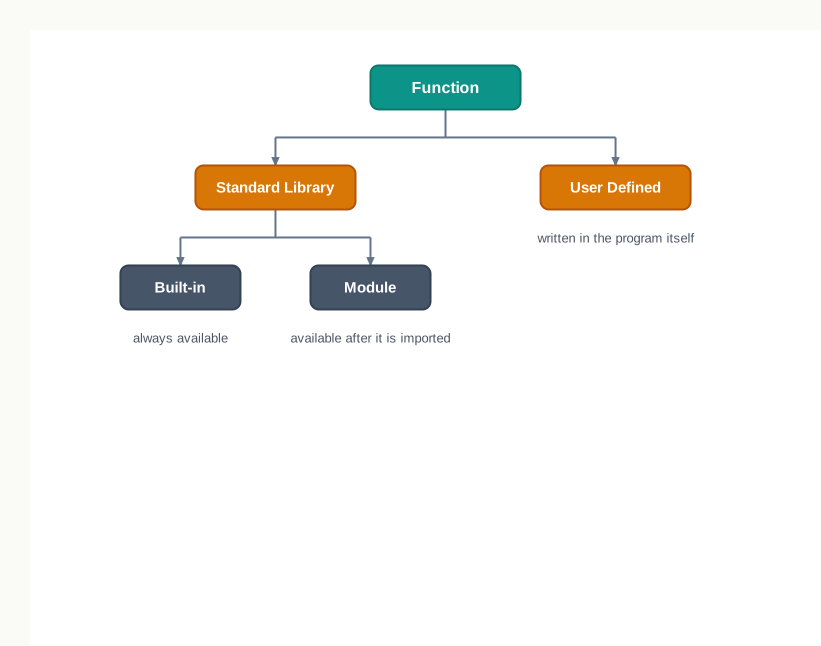
Fig. 7.3 – Types of functions in Python.
The standard library part divides again. Built-in functions are always present and can be called at any time without any preparation; print() and input() are of this kind. The rest of the library is organised into modules, which are collections of related functions kept separately and brought into a program only when they are needed.
Table 7.3 – the three kinds of function a Python program can use, with their source and how each is made available
| Kind | Where it comes from | How it becomes available | Example |
|---|---|---|---|
| Built-in function | The Python interpreter itself | Already available; call it directly | print(), len() |
| Function in a module | The Python standard library | The module must be imported first | math.sqrt() |
| User defined function | Written by the programmer in the program | Defined with def before it is called |
a function you write to apply a discount |
This chapter takes these in a deliberate order. Section 7.3 deals with user defined functions, because writing one teaches you what every function is made of. Section 7.4 examines what happens to the variables inside a function once it finishes. Section 7.5 returns to the standard library and to modules.
7.3 User Defined Functions
A function you write yourself, to do a job your program happens to need, is a user defined function. Nothing about it is special or different from the functions Python supplies — it is defined once, given a name, and called by that name.
7.3.1 Defining and Calling a Function
Writing a function is always two separate acts. First you define it, which tells Python what the function is called and what instructions belong to it. Later you call it, which makes those instructions actually run. Defining a function does not run it; a definition on its own produces no output at all.
A definition begins with the keyword def, short for define. The first line of the definition is the function header: it carries the keyword, the name you have chosen, a pair of parentheses, and a colon. Everything indented below the header is the function body — the instructions that will run when the function is called.
The indentation is not decoration. In Python, indentation is what marks the body off from the rest of the program, exactly as it does in a for loop or an if statement. A statement written at the left margin after the header is outside the function, and Python will treat it as part of the main program.
The naming rules are worth stating plainly, because they are easy to trip over. A function name must follow the rules for identifiers — letters, digits and underscores, not beginning with a digit, and not a Python keyword. It should also be unique within the program, since defining a second function under an existing name silently replaces the first.
Fig. 7.4 labels the parts of a definition on a real example.
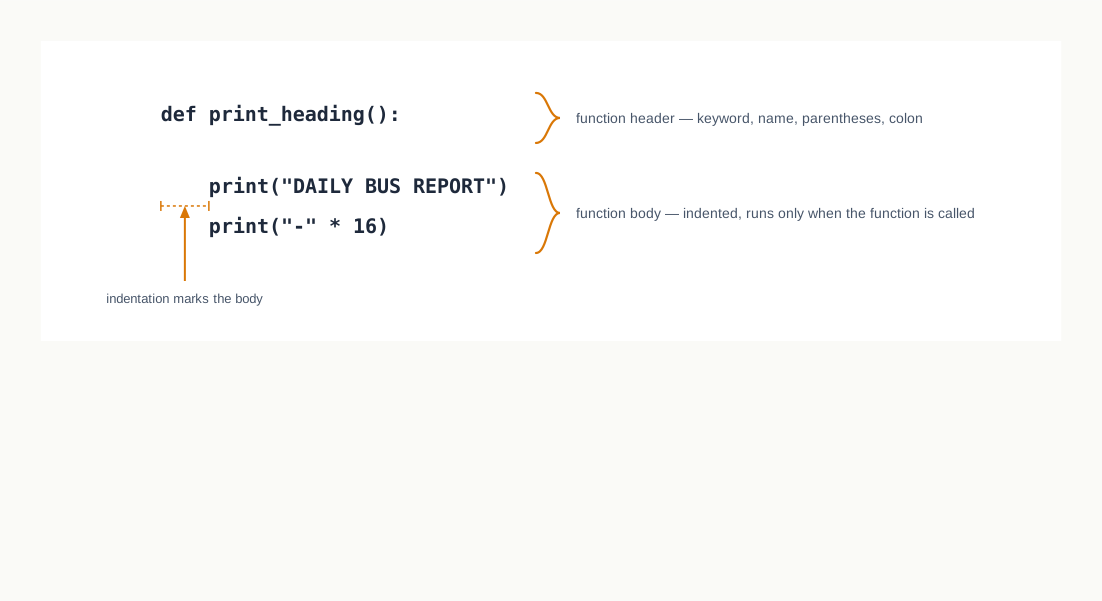
Fig. 7.4 – Parts of a function definition.
7.3.2 Arguments and Parameters
The function in the previous program does the same thing every time it is called, because it is given nothing to work with. Most functions are more useful than that: they are handed values at the moment they are called, and they work on whatever they are handed.
A parameter is a name written inside the parentheses of the function header. It stands for a value the function expects to receive. An argument is the actual value supplied inside the parentheses of the call. When the call happens, the argument is handed over and the parameter starts referring to it.
The two words describe the same value seen from two sides — the caller’s side and the function’s side. Keeping them apart matters, because a parameter exists only inside the function while an argument exists in the code that made the call.
Table 7.4 – parameter versus argument
| Feature | Parameter | Argument |
|---|---|---|
| Where it is written | In the function header, inside the parentheses | In the function call, inside the parentheses |
| What it is | A name waiting to receive a value | An actual value being sent in |
| When it comes into being | When the function is called | Before the call is made |
| Where it can be used | Only inside the function body | In the part of the program that makes the call |
Example in print_multiples(value) |
num, as written in the header |
value, as written in the call |
Here is a function that is given a number and prints the first five multiples of whatever it is given.
One value, two names
When print_multiples(value) is called, Python does not make a copy of the number and hand the copy over. It hands over the object itself, and for the duration of the call two names refer to that one object — value outside and num inside. You can confirm this with the built-in id() function, which gives the identity of the object a name refers to.
def object_of(marks):
    return id(marks)

number = 60
print("Argument and parameter refer to one object:", object_of(number) == id(number))
Argument and parameter refer to one object: TrueWhat then happens if the function changes the parameter? Numbers, strings and tuples in Python cannot be altered in place, so an assignment such as marks = marks + 5 cannot modify the existing object. Python builds a new object holding the new value and makes the parameter refer to that instead. The argument outside is left pointing where it always pointed.
def add_bonus(marks):
    marks = marks + 5
    print("Inside the function, marks =", marks)

number = 60
add_bonus(number)
print("Outside the function, number =", number)
Inside the function, marks = 65
Outside the function, number = 60Fig. 7.5 shows the two moments side by side.
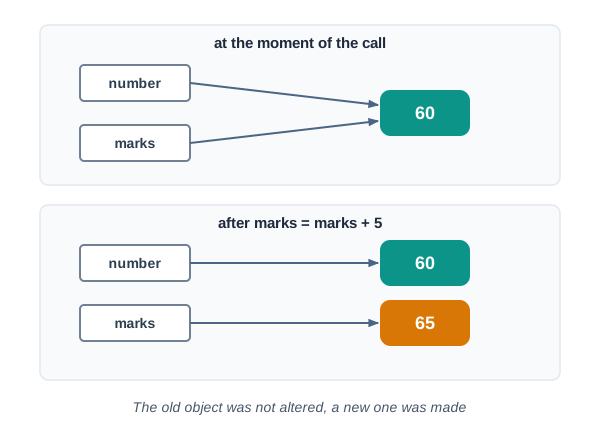
Fig. 7.5 – Assignment to a parameter creates a new object.
7.3.3 Passing Strings as Arguments
Nothing in the mechanism above depends on the value being a number. A parameter simply receives whatever object is handed to it, so a function can just as easily be given text to work on.
The function below takes two strings — a student’s name and the name of a house at the school sports meet — and prints them as a single label. The + operator joins strings end to end, so any spacing that is wanted has to be supplied deliberately.
7.3.4 Default Parameters
Some values a function needs are nearly always the same. A library’s fine per late day, a bill’s tax rate, a report’s page width — these change rarely, and repeating them at every call is tedious and invites mistakes.
Python lets a parameter carry a default value: a value fixed in the header, which the parameter takes whenever the call does not supply an argument for it. If the call does supply one, the supplied value is used and the default is simply ignored for that call.
There is one firm rule about where such parameters may sit. Default parameters must be the trailing parameters in the header: once a parameter has a default value, every parameter to its right must have one too.
The reason is not arbitrary. Arguments are matched to parameters by position. If a parameter without a default sat to the right of one with a default, a call supplying a single argument would leave Python unable to decide which parameter that argument was meant for.
7.3.5 Functions that Return a Value
Every function so far has printed its result. That is convenient in a small program and limiting in a large one, because a printed value is gone — the program cannot add it to anything, compare it, or store it in a file.
A function sends a value back to its caller with the return statement. When return is reached, two things happen at once: the function stops immediately, and the value written after return is handed back to the point where the call was made. That value can then be stored in a variable or used inside a larger expression.
A function that returns no value is called a void function. Its calls cannot sensibly be placed on the right of an assignment, because what comes back is None — Python’s way of saying no value at all.
def show_welcome():
    print("Welcome to the depot")

value = show_welcome()
print("The call gave back:", value)
Welcome to the depot
The call gave back: NoneThe distinction between printing and returning is worth stating carefully, because the two look similar on screen and behave quite differently. Printing puts characters on the display for a human to read. Returning hands a value back to the program so that the program can go on using it.
Now consider a fare rule that a program will need in several places: a city bus charges ₹10 for the first three kilometres and ₹5 for every kilometre after that. Written as a function that returns the fare, it can be used to print a fare, to total several fares, or to compare two routes.
Taking parameters and returning values as two independent choices gives four possible shapes for a function, all of them legitimate.
Table 7.9 – the four forms a Python function can take
| Form | Header looks like | Typical use |
|---|---|---|
| No parameter, no return value | def show_heading(): |
Printing something fixed, such as a report heading |
| No parameter, returns a value | def next_token(): |
Producing a value that needs no input, such as a random draw |
| Takes parameters, no return value | def make_label(name, house): |
Displaying something worked out from supplied values |
| Takes parameters, returns a value | def fare(km): |
Computing a result the rest of the program will use |
7.3.6 Returning More Than One Value
A return statement hands back one object. That sounds like a restriction until you remember that one object can hold several values. A tuple — a sequence of values written inside parentheses — is exactly such an object, and it is how a Python function returns more than one result.
Suppose a class teacher needs both the highest and the lowest mark in a list. Two separate functions would each scan the list once, doing the same walk twice. One function can find both in a single pass and return the pair.
7.3.7 Flow of Execution
Flow of execution is the order in which the statements of a program actually run. Reading a program from the first line to the last tells you what is written; following the flow of execution tells you what happens.
Python begins at the first statement and works downward, one statement at a time. When it meets a function definition, it stores the function and does not run the body. When it later meets a call, the order breaks: control jumps into the function, runs its body, and then returns to the statement immediately after the call.
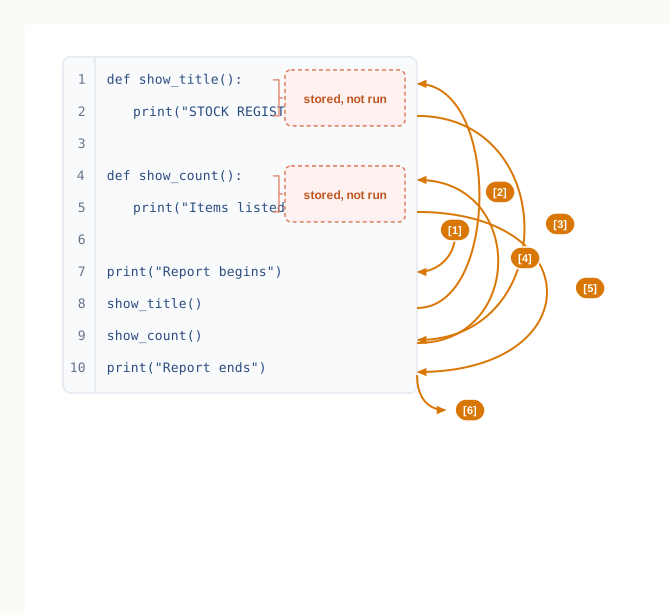
Fig. 7.6 – Flow of execution with function calls.
def show_title():
    print("STOCK REGISTER")

def show_count():
    print("Items listed: 3")

print("Report begins")
show_title()
show_count()
print("Report ends")
Report begins
STOCK REGISTER
Items listed: 3
Report endsWhy a call cannot come before its definition
Because a definition is what stores the function under its name, the definition must have been executed before any call to it. A call written above the definition reaches Python at a moment when the name does not yet exist.
show_total()

def show_total():
    print("Total = 250")
Running this stops with an error whose last line reads:
NameError: name 'show_total' is not definedThe message is easy to misread. It does not say the function was never defined — the definition is plainly there, three lines below. It says the name did not exist at the moment the call was made, which is the truth.
7.4 Scope of a Variable
A function keeps its instructions to itself. It turns out that it keeps its variables to itself as well, and this is not an accident of the language but a deliberate protection.
Every variable in a Python program is usable in some part of the program and unusable in the rest. That usable region is called the variable’s scope. Knowing where a name can be reached, and where it cannot, is what lets you write two functions without worrying whether their variable names clash.
A variable has one of two scopes. A variable with global scope is reachable throughout the program and is called a global variable. A variable with local scope is reachable only inside the function or block where it was created, and is called a local variable. Fig. 7.7 shows the two regions as nested areas.
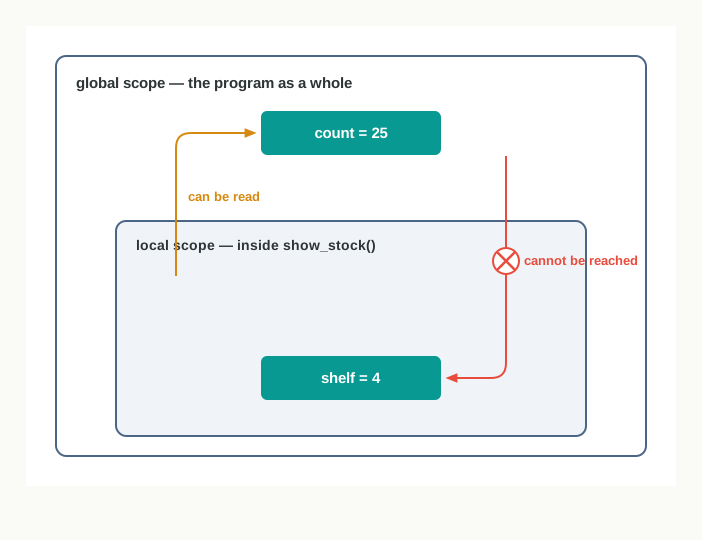
Fig. 7.7 – Global and local scopes.
7.4.1 Global Variables
A global variable is one created outside every function, at the level of the program itself. It exists from the statement that creates it until the program ends.
Because it lives outside all functions, a global variable can be read inside any function defined after it. This is convenient for a value that genuinely belongs to the whole program — a tax rate, a file name, a limit that several functions must agree on.
Convenience, though, is not the same as good design. A global variable that several functions read and change becomes a hidden channel between them: a fault introduced in one function shows up as wrong behaviour in another, and nothing in either function’s text explains the connection. The safer habit is to pass values in as arguments and send results back with return, keeping each function’s dealings visible in its header.
7.4.2 Local Variables
A local variable is one created inside a function — either by assignment in the body, or as a parameter in the header. It comes into being when the function is called and disappears when the function finishes.
The program below has one of each. The name count is created at the program level, and shelf is created inside the function.
count = 25

def show_stock():
    shelf = 4
    print("Inside the function, count =", count)
    print("Inside the function, shelf =", shelf)

show_stock()
print("Outside the function, count =", count)
print("Outside the function, shelf =", shelf)
The first three statements after the definition run without trouble:
Inside the function, count = 25
Inside the function, shelf = 4
Outside the function, count = 25
The last statement then stops the program, with an error whose final line reads:
NameError: name 'shelf' is not definedRead that message alongside the one from section 7.3.7 and the pattern becomes clear. Python is not saying shelf was never created; it is saying that at the point where you asked for it, no such name existed. The name existed while show_stock() was running and was discarded when the call finished.
When the same name is used in both places
Suppose a global variable and a local variable are given the same name. Python treats the assignment inside the function as creating a new local name, and that local name hides the global one for as long as the function is running. The global variable itself is untouched.
rate = 12

def show_rate():
    rate = 20
    print("Rate seen inside =", rate)

show_rate()
print("Rate seen outside =", rate)
Rate seen inside = 20
Rate seen outside = 12This is worth pausing over, because the two lines look contradictory until you accept that there are two separate variables here that happen to share a spelling. Inside the function, rate refers to the local one. Everywhere else, it refers to the global one.
Table 7.11 – global variable versus local variable
| Feature | Global variable | Local variable |
|---|---|---|
| Where it is created | Outside every function, at program level | Inside a function, by assignment or as a parameter |
| Where it can be read | Anywhere in the program, including inside functions defined later | Only inside the function that created it |
| How long it exists | From its creation until the program ends | From the call until the function finishes |
| Effect of a change | Lasts, and is seen by every part of the program that reads it | Lost when the function ends |
| Name clash with the other kind | Hidden inside any function that assigns the same name | Hides the global name of the same spelling while it runs |
7.4.3 The global Keyword
Reading a global inside a function is allowed. Changing one is not — at least, not by default. The moment a function assigns to a name, Python treats that name as local to the function for the whole of the body, and the global variable of the same name is left alone.
Occasionally a function genuinely needs to update a value that outlives it — a running total kept while several entries are added, for instance. The keyword global, written before the name inside the function, tells Python that this name is not to be treated as local: assignments to it are to affect the global variable itself.
7.5 The Python Standard Library
Not every function you use has to be written by you. Python arrives with a large collection of ready-made functions, tested and documented, covering work that programmers need again and again — arithmetic beyond the ordinary operators, random selection, simple statistics, and much else.
This collection is the standard library, and it is part of what makes Python quick to work in. The habit worth forming is to look for an existing function before writing your own, because a library function has already been checked by far more people than your program ever will be.
7.5.1 Built-in Functions
Some library functions are so commonly needed that Python keeps them permanently available. These are the built-in functions, and they can be called at any point in any program without preparation of any kind. You have used several already: print(), input(), int() and len() are all built-in.
The built-in functions fall into a few broad groups. There are the input and output functions, input() and print(). There are the type-conversion functions, which take a value of one type and give back the corresponding value of another — int(), float(), str(), bool(), list(), tuple(), set(), dict(), chr() and ord(). There are the mathematical functions abs(), divmod(), max(), min(), pow() and sum(). And there are general-purpose functions such as len(), range() and type().
Table 7.13 sets out the ones most often needed in a Class XII program, with what each expects and what each gives back.
Table 7.13 – commonly used built-in functions, with the arguments each takes and the value each returns
| Function | Arguments | Returns |
|---|---|---|
abs(x) |
An integer or a floating point number | The value of x without its sign |
divmod(x, y) |
Two numbers | A tuple holding the quotient and the remainder of x divided by y |
max(sequence) or max(x, y, ...) |
A sequence, or two or more values | The largest of the values |
min(sequence) or min(x, y, ...) |
A sequence, or two or more values | The smallest of the values |
pow(x, y) or pow(x, y, z) |
Two or three numbers | x raised to the power y; with a third argument, that result modulo z |
sum(x) or sum(x, start) |
A sequence of numbers, and optionally a starting value | The total of the elements, added to the starting value if one is given |
len(x) |
A sequence or a dictionary | The count of items in x |
Seeing them work at the interactive shell fixes the behaviour better than a description does.
>>> abs(-14)
14
>>> divmod(17, 5)
(3, 2)
>>> max([12, 45, 7])
45
>>> min("delta")
'a'
>>> pow(2, 10, 7)
2
>>> sum([4, 9, 2], 10)
25
>>> len("Python")
6
Two of those results repay a second look. min("delta") returns 'a' because a string is a sequence of characters and the comparison used is the ordering of their character codes, in which the letters run from 'a' upward. And pow(2, 10, 7) gives 2 because \(2^{10} = 1024\), and the remainder when 1024 is divided by 7 is 2 — the third argument asks for that remainder rather than the power itself.
7.5.2 Modules and the import Statement
The library holds far more functions than could sensibly be kept available at all times. The rest are grouped by subject into modules, and a program brings in only the modules it needs.
If a function is a grouping of instructions, a module is a grouping of functions. Physically, a module is simply a Python file — a file with the extension .py — holding a set of function definitions. The math module holds mathematical functions, random holds functions that produce random values, statistics holds functions that summarise data.
A module is brought into a program with the import statement. Until a module is imported, its functions are not available and referring to them raises an error.
The dot is not decoration. It says which module the function belongs to, and it is what keeps two modules from quarrelling when both happen to contain a function of the same name.
Three practical points are worth remembering. An import statement may be written anywhere in a program, though placing all imports at the top is the usual convention and makes a program’s dependencies visible at a glance. A module is read only once, however many times it is imported. And module names are case sensitive, like every other name in Python — Math is not math.
7.5.2.1 The math Module
The math module supplies mathematical functions that go beyond the ordinary arithmetic operators. Most of its functions return a floating point value, which is worth noting when you compare results or print them.
Table 7.14 – commonly used functions of the math module
| Function | Arguments | Returns |
|---|---|---|
math.ceil(x) |
An integer or a floating point number | The smallest whole number that is not less than x |
math.floor(x) |
An integer or a floating point number | The largest whole number that is not greater than x |
math.fabs(x) |
An integer or a floating point number | The value of x without its sign, as a float |
math.factorial(x) |
A non-negative integer | The factorial of x |
math.fmod(x, y) |
Two numbers | The remainder of x divided by y, carrying the sign of x |
math.gcd(x, y) |
Two integers | The greatest common divisor of x and y |
math.pow(x, y) |
Two numbers | x raised to the power y, as a float |
math.sqrt(x) |
A non-negative number | The square root of x |
math.sin(x) |
An angle in radians | The sine of that angle |
>>> import math
>>> math.ceil(4.2)
5
>>> math.ceil(-4.2)
-4
>>> math.floor(-4.8)
-5
>>> math.factorial(6)
720
>>> math.gcd(48, 18)
6
>>> math.sqrt(2.25)
1.5
>>> math.pow(2, 5)
32.0
The pair of results for -4.2 and -4.8 catches students out regularly. Ceiling and floor are not “round up” and “round down” in the sense of moving away from zero; they move toward larger and smaller values on the number line. For a negative number, the ceiling is therefore the value nearer zero.
There is one more distinction here that the table hides. The built-in pow() and math.pow() do not behave identically: pow(2, 5) gives the integer 32, while math.pow(2, 5) gives the float 32.0, and only the built-in one accepts a third argument for the modulus.
7.5.2.2 The random Module
The random module produces values that cannot be predicted in advance. It is what a program uses to draw a lucky number, shuffle a quiz, or pick a sample.
Table 7.15 – commonly used functions of the random module
| Function | Arguments | Returns |
|---|---|---|
random.random() |
None | A floating point number that is at least 0.0 and less than 1.0 |
random.randint(x, y) |
Two integers, with x not greater than y |
A random integer from x to y, both included |
random.randrange(y) |
One positive integer | A random integer from 0 up to but not including y |
random.randrange(x, y) |
Two integers | A random integer from x up to but not including y |
>>> import random
>>> random.randint(1, 6)
4
>>> random.randrange(10)
7
>>> random.randrange(2, 8)
5
The three answers shown above are only what one particular run produced. Run the same three lines again and you will almost certainly see different values — that is the entire purpose of the module.
The difference between the two functions is where the upper end sits, and it is the most common source of quiet mistakes. random.randint(1, 6) can return 6, so it models a die correctly. random.randrange(1, 6) never returns 6; its highest possible value is 5.
7.5.2.3 The statistics Module
The statistics module summarises a collection of numbers with the three measures of central tendency you already know from mathematics.
Table 7.16 – commonly used functions of the statistics module
| Function | Arguments | Returns |
|---|---|---|
statistics.mean(x) |
A sequence of numbers | The arithmetic mean of the values |
statistics.median(x) |
A sequence of numbers | The middle value when the data are arranged in order |
statistics.mode(x) |
A sequence | The value that occurs most often |
>>> import statistics
>>> statistics.mean([12, 15, 21, 24, 20])
18.4
>>> statistics.median([12, 15, 21, 24, 20])
20
>>> statistics.median([10, 20, 30, 40])
25.0
>>> statistics.mode([12, 15, 12, 21, 12])
12
Notice the third result. With an even count of values there is no single middle one, so median() returns the mean of the two middle values — here 20 and 30 — which is why a float appears where the data were all whole numbers.
mode() is not restricted to numbers. Given a sequence of strings it returns the string that appears most often, which makes it useful for finding, say, the most frequently borrowed category in a library register.
7.5.3 Importing Selected Functions with from
Sometimes a program needs one or two functions from a module and nothing else. The from form of the import statement makes exactly those names available directly, without the module name in front.
That example prints 9.0. It also shows a pattern worth naming: the result of one function call has been used directly as the argument of another. A statement in which functions or expressions depend on one another’s results in this way is called composition, and you have been writing it since your first program — int(input("Enter: ")) is composition, with the value returned by input() handed straight to int().
Table 7.17 – import module versus from module import name
| Feature | import math |
from math import sqrt |
|---|---|---|
| What becomes usable | The module, under its own name | Only the names listed after import |
| How a function is called | math.sqrt(64) |
sqrt(64) |
| Where the function came from | Visible at every call | Not visible at the call; the reader must look at the import line |
| Risk of a name clash | Low, since the module name keeps names apart | Higher, since an imported name can hide one of your own |
| Suits | Programs using several functions from the module | Programs using one or two functions repeatedly |
Neither form is better in general. The dotted form documents itself and is the safer default; the from form keeps a long expression readable when the same function appears in it many times.
7.5.4 Creating Your Own Module
Nothing about a module is privileged. A module is a .py file containing function definitions, so any file of functions you write is a module, and any other program can import it.
This is how a useful function outlives the program it was written for. Collect the functions that keep recurring in your work, save them in a file with a sensible name, and import that file wherever it is needed.
The file below could be saved as metric.py. Its first line is a docstring — a string in triple quotes, placed at the top of a module or a function, describing what it contains. A docstring is not a comment: Python keeps it, and any program can read it back through the module’s __doc__ name.
"""Simple conversions between units of length and mass."""

def km_to_metre(km):
    return km * 1000

def metre_to_km(m):
    return m / 1000

def gram_to_kg(g):
    return g / 1000
Save that file in the same folder as the program that will use it, and it can be imported like any library module.
>>> import metric
>>> print(metric.__doc__)
Simple conversions between units of length and mass.
>>> metric.km_to_metre(2.5)
2500.0
>>> metric.gram_to_kg(750)
0.75
Note that the module itself contains no calls and prints nothing. That is deliberate: a module is a supply of functions, and the decision about when to use them belongs to the program that imports it. A module that starts doing work the moment it is imported is a nuisance to everyone who imports it.
7.6 Summary
A long program written as one unbroken block is hard to read, hard to test and unsafe to change, because a rule needed in several places has to be written out several times. Modular programming is the practice of dividing a program into separate, independent, named blocks, each responsible for one specific task.
A function is a named group of instructions that performs a specific task and runs when the function is invoked by its name. Defining a function stores it; calling it is what makes the instructions run.
Functions increase readability, reduce code length and make debugging easier, increase reusability across programs, and allow work to be divided among the members of a team. They also allow each block to be tested on its own before the rest of the program exists.
The functions available to a program come from two sources: the Python standard library, and the programmer. Library functions are either built-in, and always available, or held in modules, which must be imported. Functions written by the programmer are user defined functions.
A definition begins with the keyword
def. The first line is the function header, which carries the name, the parentheses and a closing colon; the indented lines below it form the function body. Statements written outside that indentation are not part of the function.A parameter is a name in the function header that receives a value; an argument is the value supplied in the call. Arguments are matched to parameters by position, and a parameter exists only inside the function.
At the moment of a call, the argument and the parameter refer to the same object. Assigning a new value to a parameter of an immutable type creates a new object and leaves the caller’s value unchanged.
A parameter may be given a default value in the header, which it takes when the call supplies no argument for it. Every parameter that has a default must be a trailing parameter, because arguments are matched by position.
The
returnstatement ends a function immediately and hands a value back to the point of call. A function with noreturn, called a void function, hands backNone.Taking parameters and returning a value are independent choices, so a function may have no parameters and no return value, no parameters and a return value, parameters and no return value, or parameters and a return value.
A function returns one object, but that object may be a tuple, which is how more than one value is returned. The returned tuple can be unpacked into separate names, in the order the values were returned.
Flow of execution is the order in which the statements of a program are executed. A definition is stored rather than run; a call transfers control into the body and back to the statement after the call. A function must therefore be defined before any call to it, or the name will not yet exist.
The scope of a variable is the part of the program in which it is accessible. A global variable is created outside every function and lasts until the program ends; a local variable is created inside a function, or as its parameter, and is discarded when the function finishes.
A function may read a global variable freely. Assigning to a name inside a function makes that name local for the whole body and hides any global of the same spelling, unless the name is first declared with the keyword
global.The standard library is a large collection of ready-made functions supplied with Python. The built-in functions, among them those for input and output, type conversion, common arithmetic and counting, need no preparation before use.
A module is a Python file holding a collection of function definitions, and the
importstatement makes one available. A function of an imported module is called by writing the module name and the function name joined by a dot. A module is read only once, however many times it is imported.The
mathmodule supplies mathematical functions such as ceiling, floor, factorial, greatest common divisor and square root, most of which return a float. Therandommodule supplies functions that produce unpredictable values, differing in whether the upper limit is included. Thestatisticsmodule supplies the mean, the median and the mode of a collection of values.The
fromform of the import statement makes selected names usable directly, without the module name before them. It shortens long expressions but hides where each function came from.Composition is the use of the result of one function or expression directly as part of another, so that the outer call depends on the value the inner one produced.
Any file of function definitions is itself a module and can be imported by another program in the same folder. A docstring placed at the top of such a file describes it, is kept by Python, and can be read back through the module’s
__doc__name.
7.7 Key Terms
Argument — the actual value written inside the parentheses of a function call, which is passed to the function.
Built-in function — a function of the Python standard library that is always available and can be called without importing anything.
Calling a function — writing a function’s name followed by parentheses so that the instructions stored under that name are executed; also described as invoking the function.
Composition — the use of the result of one function or expression directly as part of another, so that the outer call depends on the value the inner one produced.
Default value — a value written against a parameter in the function header, which that parameter takes when the call supplies no argument for it.
Defining a function — writing the
defheader and the indented body that store a group of instructions under a chosen name, without running them.Docstring — a string in triple quotes placed at the top of a module or a function to describe it, which Python keeps and which can be read back through
__doc__.Flow of execution — the order in which the statements of a program are actually executed.
Function — a named group of instructions that performs a specific task and is executed when invoked by its name.
Function body — the indented statements written below a function header, which run when the function is called.
Function header — the first line of a definition, carrying the keyword
def, the function’s name, the parentheses holding any parameters, and a closing colon.Global scope — accessibility throughout the whole program, belonging to a variable created outside every function.
Global variable — a variable created outside every function, which exists until the program ends and can be read inside functions defined after it.
Local scope — accessibility only within the function or block in which a variable was created.
Local variable — a variable created inside a function, or received as its parameter, which is discarded when the function finishes.
Modular programming — the practice of splitting a program into separate, independent, named blocks of code, each responsible for one specific task.
Module — a Python file holding a collection of function definitions, which another program makes available with the
importstatement.Parameter — a name written inside the parentheses of a function header, which receives a value when the function is called.
returnstatement — the statement that ends a function’s execution at once and passes a value back to the point where the function was called.Scope — the part of a program in which a particular variable is accessible.
Standard library — the collection of ready-made functions and modules supplied along with Python itself.
Tuple — a sequence of values written inside parentheses, used in this chapter as the single object through which a function returns more than one value.
User defined function — a function written by the programmer within a program, to perform a task that program requires.
Void function — a function that returns no value of its own, so that a call to it yields
None.
7.8 Points to Ponder
A function may be called from inside another function. What would happen to the flow of execution if a function contained a call to itself, and what would have to be true of that function for the program to ever finish?
Python discards a function’s local variables the moment the function ends, yet a global variable survives for the whole run. If surviving is useful, why is passing values in as arguments and sending them back with
returnstill considered the better design?A program in which every function prints its own result works perfectly well while it is small. At what point in a program’s growth does printing inside a function stop being adequate, and what exactly is it that the program can no longer do?
Default parameters are required to be the trailing parameters because arguments are matched by position. Could a language be designed in which a default parameter could sit anywhere in the header? What would a call have to look like for such a language to know which value belonged to which parameter?
The built-in
pow()and themathmodule’spow()appear to do the same job, yet they return values of different types and only one of them accepts a third argument. Why would a language keep two functions that overlap so nearly, instead of merging them into one?A module is only a file of function definitions, but Python reads it once and remembers it, however many times it is imported. What could go wrong in a program if a module were instead re-read from the file at every import?
7.9 Objective Questions
Which keyword begins the definition of a user defined function in Python? [1 mark]
definedeffunctionfunc
A function completes without meeting any
returnstatement. What does the call to it give back? [1 mark]0- An empty string
None- Nothing at all; an error is raised
What is the value of
math.floor(-4.2)? [1 mark]-5-445
Which of the following calls can return the value 6? [1 mark]
random.randrange(6)random.randrange(1, 6)random.randint(1, 6)random.random()
Assertion (A): In a function header, a parameter carrying a default value cannot be followed by a parameter without one. Reason (R): Arguments in a call are matched to parameters by their position. [1 mark]
- Both A and R are true, and R is the correct explanation of A
- Both A and R are true, but R is not the correct explanation of A
- A is true but R is false
- A is false but R is true
Fill in the blank: The part of a program in which a particular variable is accessible is called its ____________. [1 mark]
State whether true or false: however many times a module is imported in a program, it is read only once. [1 mark]
Match each item in column A with what it produces or permits in column B. [1 mark]
| Column A | Column B |
|---|---|
a. len() |
i. a tuple holding a quotient and a remainder |
b. divmod() |
ii. the middle value of data arranged in order |
c. statistics.median() |
iii. the count of items in a sequence |
d. global |
iv. permission for a function to change a variable of the whole program |
7.10 Check Your Concepts
Define a function, and state any one advantage of building a program from functions. [2 marks]
Differentiate between a parameter and an argument in two points. [2 marks]
What is a void function? State what a call to such a function gives back. [2 marks]
Differentiate between a global variable and a local variable, with a short example of each. [3 marks]
Explain, with a short illustration, what a default value is, and state the rule governing where such a parameter may be placed in the header. [3 marks]
Describe the flow of execution when a program meets a function definition and, later, a call to that function. Give reasons why a function must be defined before it is called. [4 marks]
Write a user defined function
count_even(numbers)that receives a list of whole numbers and returns how many of them are even. Explain in one line why the function returns the count instead of printing it. [4 marks]A student’s program has one function that prints its result and another that returns it. Explain the difference between printing a value and returning one, state which of the two the rest of a program can go on using, and write a short function of your own that returns the larger of two numbers passed to it. [5 marks]
7.11 Output & Debugging
- Write the output produced by the following program, and state in one line why the last line prints what it does. [3 marks]
def change(n):
    n = n * 2
    print("Inside:", n)

num = 5
change(num)
print("Outside:", num)- Give the output of the first two
printstatements below. State what happens when the third one is reached, and why. [3 marks]
def total_cost(qty, rate = 10):
    cost = qty * rate
    return cost

print(total_cost(3))
print(total_cost(3, 20))
print(cost)- The program below runs without stopping, but does not display the average. Identify the single fault, state what is printed as it stands, and write the corrected version. [3 marks]
def show_average(a, b):
    avg = (a + b) / 2

result = show_average(10, 20)
print("Average =", result)- State the output of the following program, and describe in one line what the function computes for any positive value of
n. [3 marks]
def mystery(n):
    total = 0
    for i in range(1, n + 1):
        if i % 3 == 0:
            total = total + i
    return total

print(mystery(10))- The following program does not run at all. Identify the error, name the reason for it, and rewrite the header correctly. [2 marks]
def bill(rate = 5, units):
    return rate * units

print(bill(100))
7.12 Case-Based Questions
- A school physics laboratory keeps a count of the microscopes that are in working order. A program is being written in which a variable
workingis created at program level and holds this count. A functionrepair(n)is to addnrepaired microscopes to the count and display the new total, and the increased count must still be correct after the function ends. [5 marks]- Write the function
repair(n)so that the change toworkingsurvives the call. [2 marks] - State the error the program raises if the first line of the function body is omitted, and explain in one line why it occurs. [1 mark]
- Rewrite the design so that no such declaration is needed, stating clearly what the function then receives and what it returns. [2 marks]
- Write the function
- At a school sports meet, every student takes part in three events. A student’s total is the sum of the points scored in the three events, and a student whose total reaches a cut-off is awarded a merit certificate. The cut-off is 20 points for most age groups, but the organisers want to be able to state a different cut-off when they need to. [5 marks]
- Write a function
event_total(p1, p2, p3)that receives the three event points and returns their total. [2 marks] - Write a function
grade(total, cutoff = 20)that returns"Merit"when the total is not below the cut-off and"Participation"otherwise. State which of its two parameters is optional in a call, and why the header has been written in this order. [3 marks]
- Write a function
7.13 Programming Practice
Write a user defined function
count_vowels(text)that receives a string and returns the number of vowels in it, counting both capital and small letters. Submit the function definition and one call that displays the result for the string"Modular Programming". [3 marks]Write a complete program with a user defined function
average(readings)that receives a list of daily temperatures and returns their average, rounded to two decimal places. The main program is to hold the list[31.5, 33.0, 29.5, 34.0, 30.0], call the function, and print the average with a suitable message. Submit the program and an identifier description table. [4 marks]A school office wants a lucky-draw token to be picked for its annual day. Write a user defined function
draw_token()that returns a random whole number from 1 to 600, both included, and a main program that displays the number drawn. Submit the program, and state in one line which function of therandommodule you used and why the other functions of that module would not have been suitable. [4 marks]Create a module saved as
fee_tools.pycontaining a one-line docstring and two functions:late_fee(days, rate = 3), which returns the fee payable for a given number of late days, andtotal_due(fee, late), which returns the sum of a regular fee and a late fee. Then write a separate program that imports the module, reads the number of late days and the regular fee from the user, and displays the total due. Submit both files, and show one run in which the default rate is used and one in which a rate of 5 is supplied. [5 marks]