Chapter 8: Strings
For most of the twentieth century, a computer could store text only if someone had first decided which characters were worth a number. The oldest of these agreements, the American Standard Code for Information Interchange (ASCII), fixed 128 codes — enough for the English alphabet, the ten digits and a handful of punctuation marks, and nothing more. Every language that did not fit had to invent its own scheme, and hundreds of incompatible schemes appeared. A file typed in one system and opened in another came out as a stream of nonsense, because the second machine read the same numbers off a different list. Text that could not travel was barely text at all.
In the late 1980s a different idea took shape: one list for every writing system on earth, with room to spare. The Unicode Consortium was formed in 1991, and the first version of the Unicode Standard appeared the same year. Devanagari, Tamil, Bengali, Greek, Arabic and Han characters were given codes in the same space as the Latin letters, so that a single document could carry all of them without ambiguity.
Python 3 was built on that decision. Every string you create in Python is a sequence of Unicode characters, which is why the same variable can hold a name written in English and a name written in Hindi, and treat both the same way.
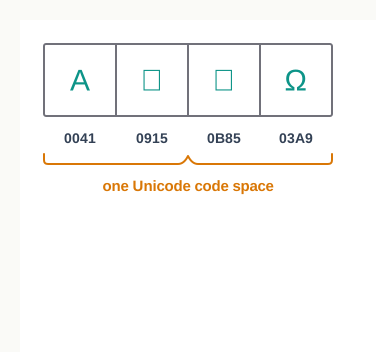
Fig. 8.0 – A Python string holding characters from different Unicode scripts.
This chapter will answer each of these questions as you work through it.
8.1 Introduction
Almost every program you write ends up handling text. A marks sheet carries the names of students, a bus timetable carries the names of stops, a library register carries the title of a book and the date it was issued. Numbers can be added and averaged, but text has to be read, compared, searched, cut into pieces and joined back together. Python keeps a separate data type for exactly this work, and that data type is the string.
A string is simply a run of characters kept in order — the letters of a name, the digits of a postal code, the spaces and commas of an address. The order matters: 'Meera' and 'raMee' contain the same five characters, yet they are not the same string, because the positions differ. That single idea, that the items sit in a fixed order and each one has a position, is what makes a string a sequence.
Where strings sit among data types
You met sequences in Class XI while studying Python’s data types. A sequence is an ordered collection of items in which each item is identified by an integer position. Python has three built-in sequence types, and you have already seen all three by name.
The three sequence types differ in what they may hold and in how they are written, as Table 8.1 shows. A string holds characters and nothing else; a list and a tuple may hold values of any type, including other strings.
Table 8.1 – the three sequence types of Python, showing how each is written and what it holds
| Sequence type | Written using | Holds | Example |
|---|---|---|---|
| String | single, double or triple quotes | characters only | 'Bus Depot' |
| List | square brackets | values of any type | [12, 25, 8] |
| Tuple | round brackets | values of any type | ('Jaipur', 'Kota') |
Alongside these sits the dictionary, which stores each value against a name of your choosing rather than against a position. Because the item is reached through that name and not through an integer position, a dictionary is not a sequence at all; it belongs to a category called mapping. Lists are studied in the next chapter, and tuples and dictionaries in the one after that. This chapter stays with strings.
Why text needs its own tools
Picture a string as a row of boxes, one character to a box, laid out from left to right, as in Fig. 8.1. The row is fixed once it is made, and every box has a number. Nearly everything in this chapter follows from that picture: reaching one box, reaching a stretch of boxes, walking along the whole row, or building a fresh row out of an old one.
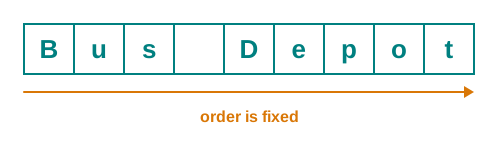
Fig. 8.1 – The string ‘Bus Depot’ as an ordered sequence of characters.
In the sections that follow you will build up strings from quotes, reach individual characters by their position, join and repeat and slice them, walk through them character by character, use the ready-made methods Python supplies for common jobs, and finally write your own functions to solve problems that no single method solves.
8.2 Strings
A string is a sequence made up of one or more characters. The characters may be letters, digits, whitespace such as a blank space or a tab, or any other symbol — a comma, a hyphen, a rupee sign. Python makes no distinction between them. As far as the language is concerned, a string is a row of characters in a fixed order, and every one of those characters counts.
The characters themselves are Unicode characters. Unicode is the international standard that gives a unique code to every character of every major writing system, so that Devanagari, Tamil, Latin and Greek letters can all sit in the same document without clashing. Because Python 3 builds its strings on Unicode, a string can hold a name written in English and a name written in Hindi with equal ease, and the same operations work on both.
8.2.1 Creating a String
A string is created by enclosing characters in quotes. Python accepts three kinds of quote marks for this — single quotes, double quotes and triple quotes — and the resulting string is the same in each case. The quotes are only a boundary; they mark where the text begins and ends, and they are not part of the string’s contents.
>>> name1 = 'Ananya'
>>> name2 = "Ananya"
>>> name3 = '''Ananya'''
>>> name1 == name2 == name3
True
All three variables hold exactly the same six characters. So why does Python offer three forms at all? Because the choice of quote decides which characters can appear inside the text without confusing the interpreter.
Choosing between the quote marks
Suppose a string must itself contain an apostrophe. If the string is bounded by single quotes, Python reads the apostrophe as the closing quote and the rest of the line becomes nonsense. Bounding the string with double quotes solves the problem at once, because the apostrophe is then just an ordinary character.
>>> line = "Reader's card issued"
>>> print(line)
Reader's card issued
Triple quotes do something the other two cannot: they allow a string to run across more than one line. Everything typed until the closing triple quote belongs to the string, including the line breaks.
>>> notice = """Library closed on Monday
Reopens on Tuesday"""
>>> print(notice)
Library closed on Monday
Reopens on Tuesday
Notice that print() shows the two lines one below the other. The line break you typed became a character inside the string, and printing it moved the output to a fresh line.
Strings of one character and of none
Many languages keep a separate data type for a single character. Python does not. A string of length one is simply a string that happens to hold one character, and it behaves like every other string.
>>> grade = 'A'
>>> type(grade)
<class 'str'>
At the other extreme, a string may hold nothing at all. Writing two quote marks with nothing between them creates the empty string, whose length is zero. It is a perfectly valid string, and it is the natural starting point whenever a program builds text up piece by piece.
>>> blank = ''
>>> len(blank)
08.2.2 Accessing Characters in a String
A string is useful only if you can reach into it. Because the characters sit in a fixed order, each one can be picked out by its position number. This technique is called indexing, and the position number is called the index. The index is written in square brackets after the string.
Counting begins at zero, not at one. The first character of a string is at index 0, the second at index 1, and the last at index \(n-1\), where \(n\) is the number of characters in the string. This takes some getting used to, but it is consistent across the whole of Python.
Take the string msg = 'Library Card' as a working example for the rest of this section. It holds twelve characters, and the blank between the two words is one of them — it sits at index 7 and is as real a character as the letters around it.
>>> msg = 'Library Card'
>>> msg[0]
'L'
>>> msg[7]
' '
>>> msg[11]
'd'When the index is wrong
Ask for a position that does not exist and Python refuses, rather than returning something misleading. The valid indices for this string run from 0 to 11, so index 12 is out of range and the interpreter reports an error whose last line reads:
IndexError: string index out of rangeThe index must also be a whole number. A fractional index such as 2.0 makes no sense — there is no character halfway between two boxes — and Python raises a TypeError for it. The exact wording of that message has changed slightly between Python versions, but the error type is the same in all of them.
The index need not be written as a plain number. Any expression that evaluates to an integer will do, and Python works the expression out first.
>>> msg[2*4]
'C'
Counting from the right
Sometimes the interesting character is at the end of a string whose length you do not know — the last letter of a name, or the final digit of a code. Python allows a negative index for exactly this. The last character has index -1, the one before it -2, and the first character has index \(-n\).
Table 8.2 sets out both ways of numbering the same string side by side. Read a column downwards and you see one character with its two indices; the character C, for instance, can be reached as msg[8] or as msg[-4].
Table 8.2 – positive and negative indices of every character in the string ‘Library Card’
| Positive index | 0 | 1 | 2 | 3 | 4 | 5 | 6 | 7 | 8 | 9 | 10 | 11 |
|---|---|---|---|---|---|---|---|---|---|---|---|---|
| Character | L | i | b | r | a | r | y | (space) | C | a | r | d |
| Negative index | -12 | -11 | -10 | -9 | -8 | -7 | -6 | -5 | -4 | -3 | -2 | -1 |
>>> msg[-1]
'd'
>>> msg[-12]
'L'
The two schemes shown in Fig. 8.2 describe the same row of characters. Neither is more correct than the other; positive indices are natural when you are counting forward from the start, and negative indices when you are reaching backward from the end.
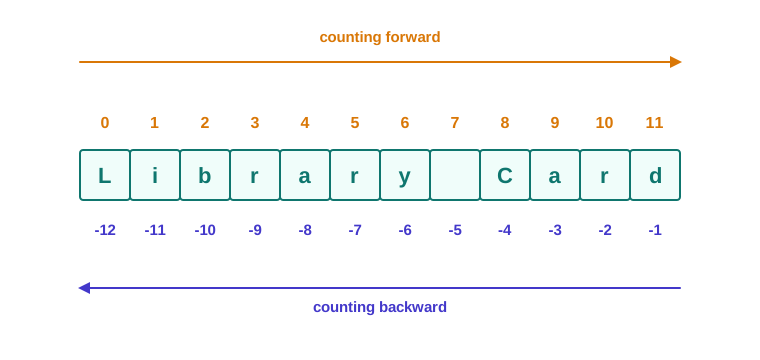
Fig. 8.2 – Positive and negative indices for a string.
Finding the length of a string
The built-in function len() returns the number of characters in the string passed to it. Since indexing stops at \(n-1\), len() is what tells you where a string ends.
>>> msg = 'Library Card'
>>> len(msg)
12
>>> n = len(msg)
>>> msg[n-1]
'd'
>>> msg[-n]
'L'8.2.3 String is Immutable
Indexing lets you read a character. It does not let you change one. A string in Python is immutable, which means its contents are fixed at the moment it is created and cannot be altered afterwards. An attempt to assign a new character to a position is rejected.
>>> word = 'card'
>>> word[0] = 'C'
The last line of the error is:
TypeError: 'str' object does not support item assignmentThis sounds like a restriction, and in one sense it is. But look at what is still perfectly allowed:
>>> word = 'card'
>>> word = 'Card'
>>> word
'Card'
Nothing was modified here. The second statement built a brand-new string 'Card' and made the name word refer to that new object instead. The original 'card' was not edited; it was simply abandoned, and Python eventually clears it away. The distinction is worth holding on to: the variable can be made to point somewhere else at any time, while the string it points to can never be edited in place.
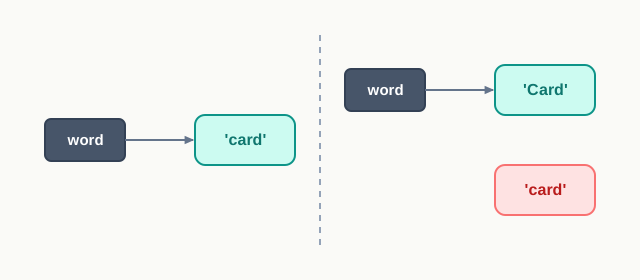
Fig. 8.3 – Reassigning a string variable.
So how does a program ever “change” text? By building a new string out of the old one and giving the result a name. Every operation you meet in the next sections — joining, repeating, cutting out a portion, replacing a character — works this way. It reads the original, produces a fresh string, and leaves the original exactly as it was.
8.3 String Operations
A string is not much use if all you can do is read one character at a time. Real work with text means joining two pieces together, repeating a pattern, asking whether one piece of text occurs inside another, and pulling out a portion of a string. Python provides four such operations — concatenation, repetition, membership and slicing — and each one is written with an operator you already know from arithmetic or from logic.
Keep the previous section’s lesson in mind while reading this one. Strings are immutable, so not one of these operations edits the string it is given. Each of them reads the original and hands back a new string.
8.3.1 Concatenation
To concatenate means to join end to end, and the operation is called concatenation. Python joins two strings with the plus operator +, placing the second string immediately after the first, with nothing inserted between them.
>>> first = 'Kabir'
>>> second = 'Nath'
>>> first + second
'KabirNath'
The result runs together because no space was asked for. A blank between the two names is itself a character, and if you want it you must supply it — as a string of one space.
>>> first + ' ' + second
'Kabir Nath'
>>> first
'Kabir'
The last two lines are the important ones. After all that joining, first still holds 'Kabir'. The operation built a new string and returned it; the originals were never touched. This is what Fig. 8.4 shows.
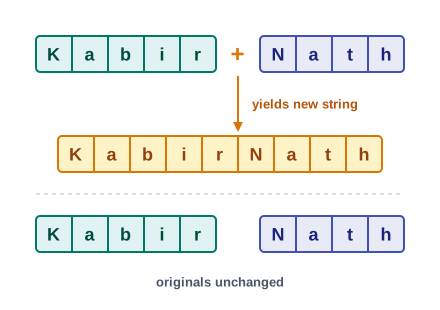
Fig. 8.4 – String concatenation builds a new string.
Both operands of + must be strings. A string and a number cannot be joined, because + would have no way of deciding whether you meant to add or to join.
8.3.2 Repetition
Repetition is the second whole-string operation, and the asterisk * performs it, repeating a string a stated number of times. One operand is the string, the other is an integer saying how many copies to run together.
>>> tune = 'Ha'
>>> tune * 3
'HaHaHa'
The commonest use of this is not for words but for drawing. A single character repeated becomes a separating line across the output of a report, and one short statement replaces twenty typed hyphens.
>>> line = '-' * 20
>>> print(line)
***The order of the two operands does not matter — 3 * tune gives the same result as tune * 3. What does matter is that exactly one of them is an integer. Two strings cannot be multiplied together, and a repetition count of zero or less produces the empty string rather than an error.
>>> 'ab' * 0
''
>>> 'ab' * -2
''
That second result is worth pausing over. Asking for minus two copies of something is meaningless, and Python treats every count below one as a request for nothing at all. It is quietly consistent, but it also means a wrong count will not announce itself; you will simply get an empty line where a row of hyphens was expected.
8.3.3 Membership
Often the question is not what a string contains at a particular position, but simply whether it contains something at all. Does this address include the word Nagar? Does this line of a file include a comma? Python answers such questions with the two membership operators, in and not in.
The in operator takes two strings. It returns True if the first appears as a substring of the second — that is, as a run of consecutive characters somewhere inside it — and False otherwise.
>>> title = 'Bus Fare Chart'
>>> 'Fare' in title
True
>>> 'Chart' in title
True
>>> 'Depot' in title
FalseThe word consecutive is doing real work in that definition. The characters must appear together and in order, so a search for 'BusChart' fails even though every one of its characters occurs somewhere in title.
>>> 'BusChart' in title
False
Two further points catch students out. First, the comparison is case-sensitive, because an uppercase letter and a lowercase letter are different Unicode characters. Second, spaces count as characters here as everywhere else.
>>> 'fare' in title
False
>>> 'Bus Fare' in title
True
The not in operator does the opposite: it returns True when the first string does not occur inside the second.
>>> 'Depot' not in title
True
>>> 'Fare' not in title
False8.3.4 Slicing
Indexing gives you one character. Slicing gives you a stretch of them. You state where the stretch begins and where it ends, separated by a colon inside the square brackets, and Python returns that portion as a new string.
The rule for the two numbers is not symmetrical, and it must be learnt exactly. In str1[n:m], the character at index n is included and the character at index m is not. The slice therefore runs from str1[n] up to str1[m-1], and the number of characters it contains is \(m-n\).
Take stop = 'Jaipur Junction' for the whole of this subsection. Its fifteen characters occupy indices 0 to 14, with the blank at index 6.
>>> stop = 'Jaipur Junction'
>>> stop[0:6]
'Jaipur'
>>> stop[7:15]
'Junction'The first slice stopped at index 5 and so left the blank behind; the second began at index 7 and so skipped it. Fig. 8.5 shows why it is helpful to think of the two numbers as cuts made between characters rather than as characters themselves.
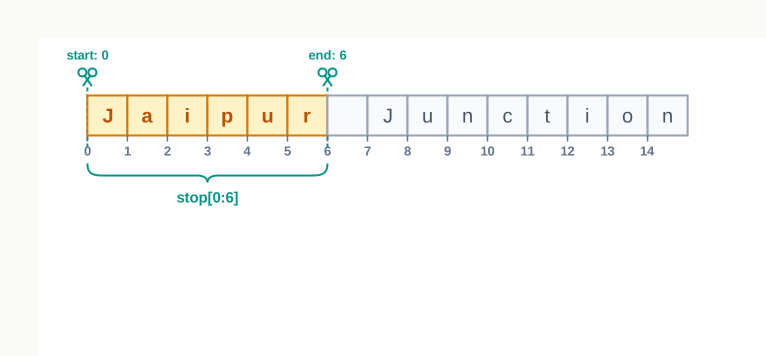
Fig. 8.5 – Slicing a string extracts characters between index boundaries.
Leaving out the numbers
Either number may be omitted, and Python fills in the obvious value. Leave out the start and the slice begins at index 0; leave out the end and it runs to the end of the string. Leave out both and you get the whole string copied.
>>> stop[:6]
'Jaipur'
>>> stop[7:]
'Junction'
>>> stop[:]
'Jaipur Junction'
Slicing is also forgiving in a way that indexing is not. An end index beyond the string is quietly cut back to the end of the string rather than raising an error, and a range that runs backwards simply yields the empty string.
>>> stop[7:40]
'Junction'
>>> stop[9:3]
''
That second result is not a failure. It is Python saying, correctly, that there are no characters at or after index 9 and before index 3.
Table 8.3 – indexing compared with slicing
| Feature | Indexing | Slicing |
|---|---|---|
| How it is written | str1[n] — one integer |
str1[n:m] — a range, with a colon |
| What comes back | a string of exactly one character | a new string of \(m-n\) characters, possibly empty |
| Index out of range | raises IndexError |
no error; the range is trimmed to fit the string |
| Reversed or equal limits | not applicable | returns the empty string '' |
| Effect on the original | none — the string is only read | none — a new string is built |
The last row of Table 8.3 is a reminder rather than a new fact. Because strings are immutable, neither operation could alter the original even if you wanted it to.
Slicing with a step
A third number may be added, again after a colon. It is the step size, and it says how many positions to move forward after each character taken. The default step is 1, which is why every character appears in an ordinary slice.
>>> stop[0:15:2]
'Jiu ucin'
>>> stop[::3]
'Jp ni'Result: the slice evaluates to 'Jiu ucin'. The trace shows that the step controls which indices are visited, while the start and end still decide where the visiting begins and stops — index 16 would come next, but 15 is the limit, so the slice ends.
Negative indices and reversal
Everything said about negative indices in Section 8.2.2 applies to slicing too. A negative start or end is counted from the right-hand end of the string.
>>> stop[-8:]
'Junction'
>>> stop[-15:-9]
'Jaipur'
A negative step is different in kind: it makes the slice run from right to left. With both limits left out and a step of -1, the whole string is produced in reverse order.
>>> stop[::-1]
'noitcnuJ rupiaJ'
This is the shortest way to reverse a string in Python, and it is worth remembering. It also fits neatly with immutability: stop itself has not been reversed, and still reads 'Jaipur Junction'. What you have been handed is a new string that happens to hold the same characters in the opposite order.
8.4 Traversing a String
The operations of the previous section treat a string as a single object: join it, repeat it, cut a piece out of it. Many problems, though, cannot be solved that way. Counting how many words a line contains, or checking whether every character in a code is a digit, or copying a string while changing certain characters — each of these needs the program to look at the characters one at a time, from the first to the last, and do something with each one.
Visiting every character of a string in order, exactly once, is called traversal. Since a string is a sequence of known length whose characters sit at consecutive positions, traversal is a natural fit for a loop, and Python offers two ways of writing it: a for loop, which walks over the characters themselves, and a while loop, which walks over the indices.
8.4.1 Traversal Using a for Loop
You met the for loop in Chapter 6 as a way of repeating a block once for each item of a collection. A string is such a collection, so a for loop can be written directly over it. On each pass, the loop variable is given the next character of the string, and the loop ends by itself once the last character has been handed over. No index appears anywhere.
word = 'Fare'
for ch in word:
    print(ch)
F
a
r
eHere ch is an ordinary variable, named by you. On the first pass it holds 'F', on the second 'a', and so on until 'e'. Fig. 8.6 shows the movement: the loop starts at the left end of the string and steps rightwards one cell at a time.
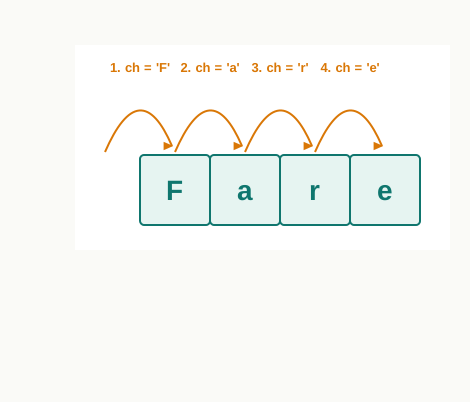
Fig. 8.6 – Traversal of a string using a for loop.
Each pass through the loop can do anything you like with the character. Printing them on one line, separated by a symbol, is a small change:
word = 'Fare'
for ch in word:
print(ch, end='-')F-a-r-e-Look carefully at the output. There is a hyphen after the final e as well, because end='-' applies to every call of print(), including the last. This is a small thing, but it is the kind of detail that decides whether a program’s output is right or nearly right.
Traversal that accumulates a result
Printing each character is only the simplest use. More often the loop keeps a running total, or builds up an answer, and the result is used after the loop has finished. Consider a practical question: how many words are there in a line of text?
There is no need to know anything about words as such. If the words are separated by single blanks, then a line with two blanks has three words, and a line with five blanks has six. Counting blanks is enough.
Table 8.4 – how the blank count changes while the line ‘Kota Junction Road’ is traversed
| Character reached | ch |
Is it a blank? | blanks after the pass |
|---|---|---|---|
| 4th | a |
no | 0 |
| 5th | (space) | yes | 1 |
| 6th | J |
no | 1 |
| 13th | (space) | yes | 2 |
| 18th | d |
no | 2 |
Table 8.4 shows only the passes where something interesting happens. The counter changes at exactly two points, and it is the value 2 that survives to the last line of the program, where 1 is added to it.
8.4.2 Traversal Using a while Loop
The for loop hides the index, which is convenient when you only care about the characters. Sometimes you care about the positions as well — you may want to report where something was found, or to compare a character with the one beside it. A while loop traverses by counting indices explicitly, and so keeps the position in plain view.
Three parts have to be got right, and all three are your responsibility: the index must be given a starting value before the loop, the condition must stop the loop before the index runs past the end of the string, and the index must be increased inside the loop.
word = 'Bus'
i = 0
while i < len(word):
    print(i, word[i])
    i += 1
0 B
1 u
2 sThe condition is i < len(word), not i <= len(word). The highest valid index is one less than the length, so the loop must end the moment i reaches the length. Fig. 8.7 shows the index as a pointer moving along the string and stepping off the right-hand end when the condition fails.
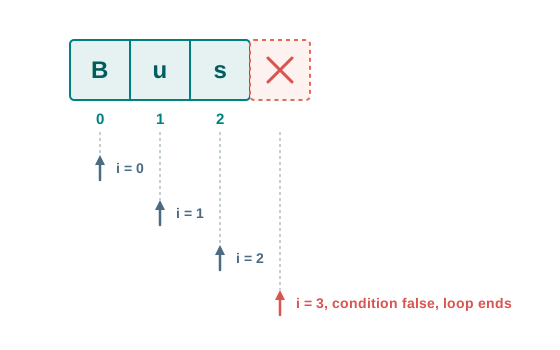
Fig. 8.7 – Traversal of a string using a while loop over indices.
Stopping early
There is one thing a while loop can do that a plain for loop over a string cannot: it can stop before reaching the end. Since the condition is tested afresh on every pass, you may add a second requirement to it, and the loop will end as soon as either requirement fails.
Suppose you need the position of the first blank in a route name, so that the town can be separated from the road. Once the blank has been found, there is no reason to look at the rest of the string.
route = 'Ajmer Road'
i = 0
while i < len(route) and route[i] != ' ':
    i += 1
print("First blank at index:", i)
First blank at index: 5Result: the program prints First blank at index: 5. The trace shows that the loop stopped after examining six characters out of ten, and that i holds the answer precisely because it was not increased on the final test.
The order of the two conditions matters. i < len(route) is written first so that, in a route name containing no blank at all, the index check fails before route[i] is ever evaluated on an out-of-range index. Python stops testing an and as soon as one side is false, and that is what protects the program here.
Table 8.5 – traversal with a for loop compared with traversal with a while loop
| Feature | for loop over the string |
while loop over indices |
|---|---|---|
| What the loop variable holds | the character itself | the position of the character |
| Reaching a character | directly, as the loop variable | as str1[i], using the index |
| Starting, testing and advancing | handled automatically by Python | written by you, in three separate places |
| Ending early | not possible without a break |
possible, by adding a condition |
| Risk of an endless loop | present, if the index is never advanced | present, if the index is never advanced |
| Best suited to | acting on every character | working with positions, or stopping partway |
Neither loop is better in general. Choose the for loop when the task is “do this to every character”, which covers most string work, and the while loop when the position matters or when the traversal may end early.
8.5 String Methods and Built-in Functions
Counting the words in a line took a loop of four statements in the last section, and that was a simple job. Converting a name to capitals, finding where a word occurs, trimming stray spaces off an entry — writing a loop for each of these, every time, would be wasteful. These are jobs every programmer needs, so Python supplies them ready-made.
They come in two shapes, and the difference in how they are written is worth getting straight at the start. A built-in function such as len() is written on its own, with the string handed to it inside the brackets. A method is written after the string, joined to it by a dot, because the method belongs to the string type itself.
That last sentence of the snapshot is the single most important fact in this whole section, and it follows from immutability. Not one string method modifies the string it is called on. Each of them computes an answer and hands it back, and if you do not store or print that answer, it is lost.
8.5.1 Length and Case Conversion
The built-in function len() returns the number of characters in the string given to it, counting spaces and punctuation. You have already used it to control a while loop.
>>> label = 'annual sports MEET'
>>> len(label)
18
Three methods change the case of the letters. upper() returns a copy with every lowercase letter turned to uppercase, lower() does the reverse, and title() returns a copy in which the first letter of every word is uppercase and the rest lowercase.
>>> label.upper()
'ANNUAL SPORTS MEET'
>>> label.lower()
'annual sports meet'
>>> label.title()
'Annual Sports Meet'
>>> label
'annual sports MEET'
The final line is the proof of what was said above. Three methods were called, three new strings were produced and displayed, and label still holds exactly what it held at the start.
Table 8.6 – the length function and the case-conversion methods
| Function or method | How it is written | What it returns |
|---|---|---|
len() |
len(str1) |
the number of characters in str1, as an integer |
upper() |
str1.upper() |
a copy of str1 with every lowercase letter converted to uppercase |
lower() |
str1.lower() |
a copy of str1 with every uppercase letter converted to lowercase |
title() |
str1.title() |
a copy of str1 with the first letter of each word in uppercase and the rest in lowercase |
Case conversion has a practical use beyond tidy display. Comparison in Python is case-sensitive, so a search for a town name typed by a user will fail on 'kota' when the stored record says 'Kota'. Converting both to the same case before comparing removes the problem entirely.
8.5.2 Searching and Counting
The in operator of Section 8.3.3 answers whether a substring occurs. It does not say where, or how often. Four methods fill that gap, and a fifth pair answers questions about the two ends of a string.
Take one string for all the examples that follow.
>>> room = 'science lab and science room'The method count() returns how many times a given substring occurs, counting non-overlapping occurrences from left to right.
>>> room.count('science')
2
>>> room.count('c')
4
The method find() returns the index at which the substring first occurs. If the substring is not present at all, it returns -1, which is a value no real index can ever take.
>>> room.find('science')
0
>>> room.find('room')
24
>>> room.find('library')
-1
Both methods accept two further arguments, a start and an end, which limit the search to a portion of the string exactly as a slice would. Give only a start and the search runs from there to the end of the string.
>>> room.count('science', 5)
1
>>> room.find('science', 5)
16
The second result is the more instructive one. find() still reports the index within the whole string, not within the searched portion, so the answer is 16 and not 11.
Two methods for one job
The method index() searches exactly as find() does and returns exactly the same index when the substring is present. The two differ only when it is absent.
>>> room.index('science')
0
>>> room.index('library')
That last call does not return a value at all. It raises an error whose final line reads:
ValueError: substring not foundThis looks like a needless duplication, but the two behaviours suit two different situations, as Table 8.7 sets out.
Table 8.7 – find() compared with index()
| Feature | find() |
index() |
|---|---|---|
| Substring present | returns the index of the first occurrence | returns the index of the first occurrence |
| Substring absent | returns -1 | raises ValueError |
| Effect on the program | continues normally; you must test the result | stops, unless the error is handled |
| Suits the situation where | absence is expected and must be handled quietly | absence means the data is wrong and work should not continue |
Think of a program reading a line from a register. If the line may or may not contain a comma, find() lets you check the returned value and take either path. If every line is supposed to contain a comma, index() refusing to carry on is a service: it stops the program at the bad line rather than letting a wrong answer travel silently through the rest of the calculation.
Testing the two ends
Two further methods ask about the beginning and the end of a string. startswith() returns True if the string begins with the given substring, and endswith() returns True if it ends with it. Both return False otherwise, and both are case-sensitive.
>>> room.startswith('sci')
True
>>> room.endswith('room')
True
>>> room.endswith('Room')
False
These matter more than they look. Deciding whether a file name ends in a particular extension, or whether a vehicle code begins with a state prefix, is a startswith() or endswith() test written in one line.
Table 8.8 – the searching and counting methods
| Method | How it is written | What it returns |
|---|---|---|
count() |
str1.count(sub, start, end) |
the number of non-overlapping occurrences of sub; start and end are optional |
find() |
str1.find(sub, start, end) |
the index of the first occurrence of sub, or -1 if it does not occur |
index() |
str1.index(sub, start, end) |
the index of the first occurrence of sub; raises ValueError if it does not occur |
startswith() |
str1.startswith(sub) |
True if str1 begins with sub, otherwise False |
endswith() |
str1.endswith(sub) |
True if str1 ends with sub, otherwise False |
8.5.3 Testing the Contents of a String
A program that reads text typed by a person cannot assume the person typed what was asked for. A field meant for a vehicle code may come back with a space in it; a field meant to be filled may come back empty. Python provides a family of methods whose names all begin with is, each of which examines the whole string and returns True or False.
isalnum() returns True when every character is either a letter or a digit. A space or a symbol anywhere in the string makes it False.
>>> 'RJ14CD2087'.isalnum()
True
>>> 'RJ 14'.isalnum()
False
islower() returns True when the string contains at least one letter and every letter in it is lowercase. Digits and symbols are ignored by the test, but a string with no letters at all cannot pass it. isupper() works the same way for uppercase letters.
>>> 'fare chart'.islower()
True
>>> 'fare 2026'.islower()
True
>>> '2026'.islower()
False
>>> 'FARE CHART'.isupper()
True
The second and third results together explain the rule. 'fare 2026' passes because it has lowercase letters and nothing that contradicts them; '2026' fails because there is no letter for the test to be true of.
isspace() returns True when the string is not empty and every character in it is whitespace — a blank, a tab, a newline or a carriage return. istitle() returns True when the string is in title case, that is, when the first letter of every word is uppercase and the rest lowercase.
>>> '   '.isspace()
True
>>> 'Fare Chart'.istitle()
True
>>> 'Fare chart'.istitle()
False
One rule runs through the whole family: every one of these methods returns False for the empty string. There is no character in it to satisfy any of the conditions. That makes them safe to use on text a user has typed, because an entry left blank is rejected rather than quietly passing.
Table 8.9 – the content-testing methods, all of which return False for the empty string
| Method | Returns True when |
|---|---|
isalnum() |
every character is a letter or a digit, with no space or symbol |
islower() |
there is at least one letter and every letter is lowercase |
isupper() |
there is at least one letter and every letter is uppercase |
isspace() |
every character is whitespace — blank, tab, newline or carriage return |
istitle() |
the first letter of every word is uppercase and the rest are lowercase |
8.5.4 Removing Spaces and Replacing Text
Text that arrives from a person or from a file often carries spaces that nobody wanted — a blank typed before a name, or a trailing blank left after it. Such spaces are invisible on the screen and yet they defeat every comparison, because 'Kota' and 'Kota ' are different strings.
Three methods remove them. lstrip() removes the whitespace at the left of the string, rstrip() at the right, and strip() at both ends. None of them touches whitespace inside the string, as Fig. 8.8 shows.
>>> entry = '   Ajmer Road   '
>>> entry.lstrip()
'Ajmer Road   '
>>> entry.rstrip()
'   Ajmer Road'
>>> entry.strip()
'Ajmer Road'
>>> entry
'   Ajmer Road   '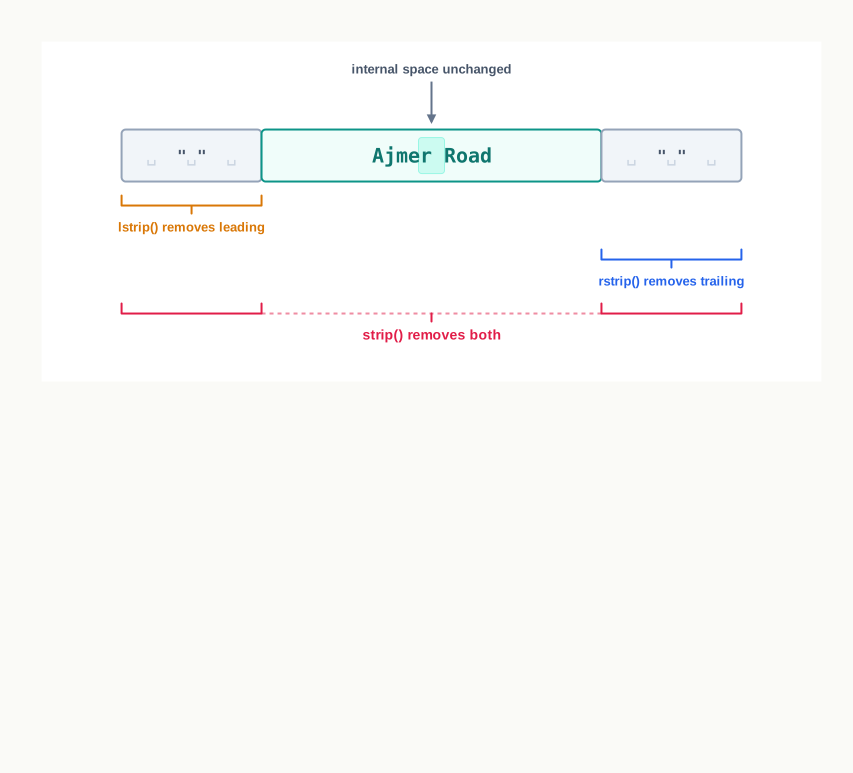
Fig. 8.8 – Removing whitespace with the strip methods.
The method replace() takes two arguments, the text to look for and the text to put in its place, and returns a copy in which every occurrence has been replaced, not just the first.
>>> line = 'Fare: 40, Fare: 60'
>>> line.replace('Fare', 'Rate')
'Rate: 40, Rate: 60'
>>> line
'Fare: 40, Fare: 60'
Replacing text with the empty string deletes it, which is the neatest way to strip out separators.
>>> '12-34-56'.replace('-', '')
'123456'8.5.5 Joining, Partitioning and Splitting
The last group of methods moves between a single string and its pieces. Two of them break a string apart and one puts pieces together.
split() breaks a string wherever a given separator occurs and returns the pieces as a list. Called with no argument at all, it splits on whitespace and discards the empty pieces, which is exactly what is wanted when separating a sentence into words.
>>> record = 'Kota Depot, Fare 45, Seats 32'
>>> record.split(',')
['Kota Depot', ' Fare 45', ' Seats 32']
>>> 'Kota Depot Fare 45'.split()
['Kota', 'Depot', 'Fare', '45']
Look closely at the first result. Each piece after the first begins with a blank, because the separator asked for was the comma alone and the blank after it belongs to the text. Splitting rarely gives clean pieces by itself, which is why split() and strip() are so often used one after the other.
partition() also breaks a string at a separator, but only at its first occurrence, and it returns three pieces: what came before the separator, the separator itself, and everything after it. Fig. 8.9 shows the three parts.
>>> record.partition(',')
('Kota Depot', ',', ' Fare 45, Seats 32')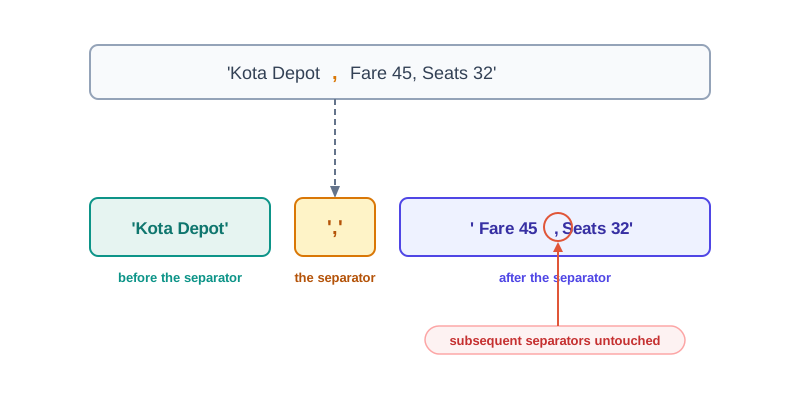
Fig. 8.9 – Breaking a string into three parts with partition().
If the separator is not present at all, partition() still returns three pieces: the whole string, and two empty strings.
>>> record.partition(';')
('Kota Depot, Fare 45, Seats 32', '', '')
join() works in the opposite direction. It is called on the separator, not on the pieces, and its argument is the collection of pieces to be joined. That reversal surprises everybody the first time.
>>> parts = ['Jaipur', 'Kota', 'Ajmer']
>>> ', '.join(parts)
'Jaipur, Kota, Ajmer'
The pieces may also be the characters of a string, since a string is itself a sequence of one-character strings.
>>> '-'.join('2026')
'2-0-2-6'
Table 8.10 – the methods that split a string apart and join pieces together
| Method | How it is written | What it returns |
|---|---|---|
split() |
str1.split(sep) |
a list of the pieces of str1 separated by sep; with no argument, splits on whitespace |
partition() |
str1.partition(sep) |
three parts — before the first sep, sep itself, and after it; if sep is absent, the whole string and two empty strings |
join() |
sep.join(pieces) |
a single string made of the pieces with sep placed between consecutive pieces |
The separator of join() sits between the pieces and not after each of them, so joining three pieces inserts the separator twice. Every item to be joined must already be a string; a number among the pieces raises a TypeError, and must be converted with str() first.
8.6 Handling Strings
The methods of Section 8.5 cover the jobs that arise most often, but they are general tools and your problems are particular. No method extracts the initials from a name, or picks the longest word out of a sentence, or hides all but the last four characters of a code. For work of that kind you write a user-defined function — a block of statements, given a name of your own, that takes a string in and hands an answer back.
You met functions in Chapter 7. Recall the three parts that matter here. The def line names the function and lists its parameters; the parameter receives the value supplied by the caller; and the return statement sends a value back to wherever the function was called from. Nothing else is new — what is new is the material being worked on.
One property of strings shapes every function in this section. Strings are immutable, so a function can never alter the string it is given. It reads that string, builds a fresh one or computes a number, and returns the result. If the caller wants to keep the answer, the caller must store it.
Extracting the initials of a name
Start with a small, real job. A school register holds full names in whatever case they were typed, and a summary sheet needs the initials — M.K.S. in place of meena kumari sharma. The method for this is worth stating before any code is written.
Fig. 8.10 traces what happens when the call is made: the value in full travels into the parameter name, the function works, and the returned string travels back to take the place of the call.

Fig. 8.10 – Data flow when a string is passed to a user-defined function.
Returning a value or printing it
A beginner’s instinct is to put the print() inside the function, since printing is what finally happens. It works, once. It stops working the moment the answer is needed for anything else.
Table 8.12 – a function that returns its answer compared with one that prints it
| Feature | Function that returns | Function that prints |
|---|---|---|
| What the caller receives | the computed value | nothing — the value None |
| Storing the answer | possible, as x = initials(full) |
not possible; the answer is gone once shown |
| Using the answer further | can be joined, compared or passed on | must be recomputed |
| Where the output format is decided | in the calling program | inside the function, for every caller |
| Testing the function | easy — compare the returned value | awkward — you can only read the screen |
The rule that follows is simple, and it holds well beyond this chapter: a function should compute, and the program that called it should display.
Hiding part of a code
Here is a second job, and one that a program has a duty to get right. A seat-booking slip should show enough of a booking code for the passenger to recognise it, and not so much that a stranger reading the slip could quote it. The usual treatment is to show the last four characters and hide the rest behind stars.
Slicing does the work directly. code[-4:] gives the last four characters whatever the length of the code, and the repetition operator produces exactly as many stars as there are characters left over. A code of four characters or fewer has nothing that could safely be shown and is returned unchanged, so that the function never produces a nonsensical string of no stars and no hidden part.
Finding the longest word
The third job needs the program to compare each piece with the best one found so far — a pattern you will use again and again, on marks, on prices and on distances as well as on words.
Result: the function returns 'reaches'. Pass 2 is the one to study: bus is exactly as long as the, and because the test demands a strictly greater length, the earlier word survives. Change > to >= and the program would report the last of the equally long words instead.
8.7 Summary
A string is a sequence of zero or more Unicode characters held in a fixed order. Because Unicode covers the writing systems of the world, a Python string can hold letters of Indian scripts as readily as Latin letters.
A string is created by enclosing characters in single, double or triple quotes. The three forms produce the same string; double quotes allow an apostrophe inside the text, and triple quotes allow the text to run over more than one line. The quotes mark the boundary and are not part of the contents.
Python has no separate data type for a single character. A string of length one is an ordinary string, and a pair of quotes with nothing between them is the empty string, whose length is zero.
Indexing accesses one character by its position, written in square brackets. The first character is at index 0 and the last at index n-1, where n is the length of the string. An index outside this range raises an
IndexError, and a fractional index raises aTypeError.Negative indices count from the right-hand end: -1 is the last character and -n the first. They reach the end of a string without the length being known.
The built-in function
len()returns the number of characters in a string, counting spaces and punctuation. The highest valid index is always one less than the length.A string is immutable: its contents cannot be altered after it is created, and assigning to a position raises a
TypeError. A variable may be made to refer to a different string at any time, but no string is ever edited in place. Every operation that appears to change text in fact builds a new string.Four operations act on whole strings. Concatenation with
+joins two strings end to end; repetition with*joins a string to itself a stated number of times; the membership operatorsinandnot inreport whether one string occurs as a run of consecutive characters inside another; and slicing extracts a portion.In a slice written
str1[n:m], the start index is included and the end index excluded, so the slice holds m-n characters. Either limit may be omitted, an end index beyond the string is trimmed to fit rather than causing an error, and limits that run backwards give the empty string.A third value in a slice is the step size, which states how many positions to move after each character taken. A step of -1 with both limits omitted returns the whole string in reverse order.
Traversal means visiting every character of a string once, in order. A
forloop walks over the characters themselves and ends automatically; awhileloop walks over the indices, which must be started, tested and advanced by the programmer. The index loop is the one to choose when positions matter or when the traversal should stop partway.A built-in function such as
len()is written with the string inside its brackets, while a method is written after the string and joined to it by a dot. No string method changes the string it is called on; each returns a new value, which is lost unless it is stored or printed.Methods exist for converting case, for searching and counting, for testing what a string is made of, for removing whitespace at the ends, for replacing text, and for splitting a string into pieces or joining pieces together.
find()andindex()search identically but part company when the substring is absent:find()returns -1 and lets the program continue, whileindex()raises aValueErrorand halts it. Which is right depends on whether absence is expected or is a fault in the data.Every method whose name begins with
isreturnsFalsefor the empty string, which makes this family safe for checking entries that a user may have left blank.Where no single method solves a problem, a user-defined function is written. Such a function receives a string through its parameter, computes an answer, and returns it. It cannot alter the string it was given, so the answer must be handed back and stored by the caller; a function that prints instead of returning gives the caller nothing to work with.
8.8 Key Terms
ASCII — American Standard Code for Information Interchange; an early character-coding scheme that fixed 128 codes, enough for English letters, digits and common punctuation.
Concatenation — the operation that joins two strings end to end using the
+operator, returning a new string and leaving both originals unchanged.Empty string — a string containing no characters at all, written as a pair of quotes with nothing between them, and having a length of zero.
Immutable — describing a value whose contents cannot be altered after it has been created; every operation that seems to change a string in fact produces a new one.
Indexing — accessing a single character of a string by its position, written in square brackets, with 0 for the first character and n-1 for the last.
Mapping — a category of data type in which a value is reached through a name of the programmer’s choosing rather than through an integer position; the dictionary is Python’s mapping type.
Membership operators —
inandnot in, which report whether one string occurs as a run of consecutive characters inside another, returningTrueorFalse.Method — a function that belongs to a data type and is called on a value of that type using dot notation, as in
str1.upper().Repetition — the operation that joins a string to itself a stated number of times using the
*operator, with a count of zero or less giving the empty string.Sequence — an ordered collection of items in which every item is identified by an integer position; strings, lists and tuples are Python’s sequence types.
Slicing — extracting a portion of a string by giving an index range,
str1[n:m], in which the start index is included and the end index excluded.Step size — the optional third value in a slice, stating how many positions to move after each character is taken; the default is 1, and -1 works backwards through the string.
String — a sequence of zero or more Unicode characters in a fixed order, created by enclosing characters in single, double or triple quotes.
Substring — any run of consecutive characters taken from a string, including the whole string itself and the empty string.
Traversal — visiting each character of a string once, in order, usually with a
forloop over the characters or awhileloop over the indices.Unicode — the international standard that assigns a unique code to every character of every major writing system, and on which Python 3 strings are built.
User-defined function — a named block of statements written by the programmer, which receives values through its parameters and sends a result back with
return.
8.9 Points to Ponder
Python lets you change a list after it is built, but not a string. If both are sequences, why should one of them be fixed for life? What would a program gain, and what would it lose, if strings could be edited character by character?
The end index of a slice is excluded, which is the rule students most often get wrong. Suppose the language had been designed the other way, so that
str1[n:m]included the character atm. Which of the conveniences you now rely on would disappear?find()returns -1 when the substring is absent, whileindex()stops the program. A language could have offered only one of them. Which single behaviour would you keep, and what kind of mistake would become easier to make once the other was gone?Python has no separate data type for a single character, and treats one letter as a string of length one. Is anything actually lost by that decision? Think about what a program can no longer say about the difference between one character and many.
Splitting a string returns a list, not a string. Could a language have made
split()return a string with the pieces separated by some special character instead? What would go wrong the first time the text itself contained that character?An index beyond the end of a string raises an error, but a slice that runs beyond the end is quietly trimmed to fit. Is that silence a convenience for the programmer, or a place where a wrong program can go on looking right?
8.10 Objective Questions
- What is the value of
len('Bus Stand')? [1 mark]- 8
- 9
- 10
- The expression raises an error
- Which one of the following expressions raises an error, given
town = 'Kota'? [1 mark]town[-4]town[0:9]town[4]town[::-1]
- The value of the expression
'Ha' * 0is [1 mark]'Ha'0''None
- Which method returns -1 when the substring being looked for is not present? [1 mark]
index()find()count()partition()
- Assertion (A): A string method never alters the string it is called on. Reason (R): Strings in Python are immutable. [1 mark]
- Both A and R are true, and R is the correct explanation of A.
- Both A and R are true, but R is not the correct explanation of A.
- A is true, but R is false.
- A is false, but R is true.
- Assertion (A): The expression
'2026'.islower()evaluates toTrue. Reason (R):islower()returnsTrueonly when the string contains at least one letter and every letter in it is lowercase. [1 mark]- Both A and R are true, and R is the correct explanation of A.
- Both A and R are true, but R is not the correct explanation of A.
- A is true, but R is false.
- A is false, but R is true.
- Match each method in Column I with what it returns in Column II. [1 mark]
| Column I | Column II |
|---|---|
a. strip() |
i. three parts — before the separator, the separator, and after it |
b. split() |
ii. a copy with the whitespace removed from both ends |
c. count() |
iii. a list of the pieces lying between the separators |
d. partition() |
iv. the number of non-overlapping occurrences of a substring |
Fill in the blank: in a string of length n, the index of the last character is ______ and the negative index of the first character is ______. [1 mark]
State whether the following statement is true or false: a slice whose start index is greater than its end index raises an
IndexError. [1 mark]Write the output of the following statement. [1 mark]
print('Fare Chart'[::2])- Write the full form of ASCII. [1 mark]
8.11 Check Your Concepts
Define a substring. Give one example of a substring of
'Sikar Road'and one run of characters taken from it that is not a substring. [2 marks]State what the built-in function
len()returns, and explain why the largest valid index of a string is always one less than that value. [2 marks]Differentiate, in two points, between the
inoperator and thefind()method. [2 marks]Write a single expression that reverses the string stored in
title, and state whattitleitself holds after the expression is evaluated. [2 marks]Explain, with a short example, why calling
entry.strip()on its own leavesentryunchanged, and give the correct way to keep the trimmed text. [3 marks]Differentiate between
find()andindex(), and describe one situation in which each of them is the better choice. [3 marks]Write a user-defined function
count_upper(text)that returns the number of uppercase letters in the string passed to it. [3 marks]Explain the three responsibilities a programmer takes on when traversing a string with a
whileloop, and state what goes wrong if each one is neglected. [4 marks]Write a user-defined function
last_word(line)that returns the last word of a line of text whose words are separated by blanks. State what your function returns for a line that is empty, and justify that behaviour. [4 marks]Write a user-defined function
digit_sum(text)that returns the sum of the digits appearing anywhere in the string passed to it. Explain how your function decides that a character is a digit, and state what it returns for a string containing no digit at all. [5 marks]
8.12 Output & Debugging
- Predict the output of the following fragment. [2 marks]
s = 'Depot'
print(s[1:4], s[-2:], sep='|')- Predict the output of the following fragment, and account for the number of items in the result. [2 marks]
line = 'a-b--c'
print(line.split('-'))- State what the following fragment prints, and say in one sentence what it computes for any string. [3 marks]
word = 'Sikar'
count = 0
for ch in word:
    if ch in 'aeiouAEIOU':
        count += 1
print(count)- The following fragment is intended to print every character of the code on a separate line, but it fails. Identify the error, name the exception raised, and rewrite the faulty line correctly. [3 marks]
code = 'RJ2087'
i = 0
while i <= len(code):
    print(code[i])
i += 1- State what the following fragment prints, and explain why the output is not what the writer of the code seems to have expected. [2 marks]
name = 'meena'
name.title()
print(name)- Write the output of the following fragment, and explain why the second value differs from the first. [3 marks]
text = 'bus stand'
print(text.find('s'), text.find('s', 3), text.count('s'))
8.13 Case-Based Questions
- A school library keeps each issue record as a single line of text, with three fields separated by a vertical bar. One such line is stored in the variable
record: [4 marks]
record = 'B1042|Bird Watching Guide|14-07-2026'a. Write a single expression that gives the book code `B1042` from `record`, using slicing only. [1 mark]
b. Write a single expression that gives the date of issue, without assuming the length of the book title. [1 mark]
c. Write one statement that separates `record` into its three fields in a single step, and state what your statement would give if a line contained no vertical bar at all. [2 marks]- A bus depot collects passenger destinations through a form. Entries reach the program exactly as they were typed, so they may carry stray spaces and inconsistent case, as in: [5 marks]
entry = ' sikar road 'a. Write the statements that turn `entry` into `'Sikar Road'`, and explain why the result of each method call must be assigned to a variable. [2 marks]
b. Write a user-defined function `is_blank(entry)` that returns `True` when the entry is empty or consists only of whitespace, and `False` otherwise. Take care that your function handles an entry of zero length correctly. [2 marks]
c. Give one reason why a cleaned entry should be converted to a common case before it is compared with the destinations already stored. [1 mark]8.14 Programming Practice
Write a user-defined function
only_digits(text)that returns a new string holding just the digits oftext, in the order in which they appear. Submit the function together with a calling program that reads a line from the user, and show the output for the inputRJ 14 CD 2087. [3 marks]Write a complete program that reads one line of text from the user and prints three things: the total number of characters in the line, the number of characters that are not blanks, and the line converted to title case. Submit the program and an identifier description table. [4 marks]
Write a user-defined function
same_ends(word)that returnsTruewhen a word begins and ends with the same letter, ignoring the difference between uppercase and lowercase, andFalseotherwise. Submit the function, and state clearly what your function returns for a word of a single letter and why. [4 marks]A notice board can show only short words. Write a user-defined function
short_form(line)that returns a new line in which every word longer than four characters is replaced by its first four characters followed by a full stop, while shorter words are left unchanged. Submit the function, an identifier description table, and one sample input with the output it produces. [5 marks]