Chapter 9: Lists
In 1958, at the Massachusetts Institute of Technology, John McCarthy began work on a programming language for problems that had no fixed size — symbolic reasoning, algebra, the kind of task where you do not know in advance how many things you will end up holding. Every language of the time made you declare that number in advance. McCarthy’s answer was to build the entire language around a single structure: an ordered collection of items that could grow, shrink and be rearranged while the program ran. He called the language LISP, from list processing, and the structure it processed became one of the oldest surviving ideas in computing.
More than thirty years later, when Guido van Rossum designed Python, the same idea appeared again — this time as an everyday data type any beginner could use on the first day. You have already met one ordered sequence in Python: the string. It is ordered and it can be sliced, but it holds only characters, and once created it cannot be altered. Real data is rarely so obliging. A student record carries a name, a roll number, five marks and a percentage — different types, and marks that may need correcting after the paper is rechecked.
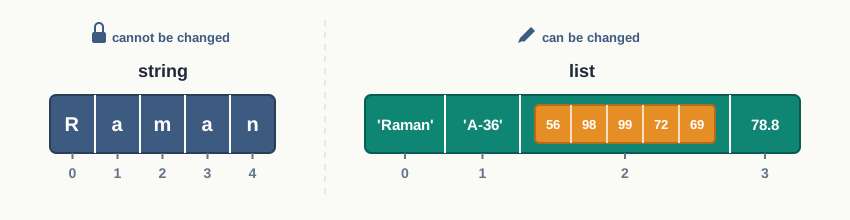
Fig. 9.0 – Comparing an immutable string and a mutable list.
This chapter will answer each of these questions.
9.1 Introduction to List
Suppose the class teacher asks you to write a program that reads the marks of forty students and prints the highest. With what you already know, you would need forty variables — m1, m2, m3, and so on down to m40 — and forty separate comparisons. Change the class strength to forty-five and the whole program has to be rewritten.
The difficulty is not the arithmetic. It is that the data is naturally one thing — a set of marks belonging together — while the program is forced to treat it as forty unrelated things. What is needed is a way to hold many values under a single name, and to reach any one of them by saying which position it occupies.
Python provides exactly this in the list. A list holds any number of values in a definite order, under one name. Each value stored in it is called an element, and the elements are written inside square brackets, separated by commas.
>>> marks = [72, 65, 88, 91, 54]
>>> print(marks)
[72, 65, 88, 91, 54]
One name, marks, now refers to all five values. The class strength no longer decides how many variables you write.
Ordered, but not sorted
A list is a sequence, which means its elements have positions and those positions are fixed until you change them. The word ordered here is a common source of confusion: it does not mean sorted. The list above is ordered because 72 is first and 54 is last, and it will stay that way; it is certainly not in increasing order. Order in this sense means only that every element has a place, and that the place is remembered.
You have already worked with one ordered sequence — the string. A string is ordered and can be indexed and sliced, but every element in it is a character, and once a string is created it cannot be altered. Real data is rarely so uniform, which is where the list earns its place.
9.1.1 Creating a List
A list is created by writing its elements inside square brackets. The values may be typed in directly, or they may be the results of expressions.
The elements need not be of one type. A single list can hold an integer, a floating-point number, a string and a Boolean value together, because a list stores whatever it is given without insisting that all the items match.
>>> record = ['Notebook', 45, 12.5, True]
>>> print(record)
['Notebook', 45, 12.5, True]
This is what makes a list suitable for a record — a stationery item with its name, quantity in stock, unit price, and whether it is currently available. A string could hold the name; it could not hold the price as a number.
Lists that hold nothing, or one thing
A list with no elements at all is written as a pair of empty square brackets, and it is perfectly legal. Programs often begin with an empty list and fill it as data arrives.
>>> waiting = []
>>> print(waiting)
[]
>>> len(waiting)
0
A list with a single element still needs its brackets, and it is not the same thing as the element itself. The brackets are what make it a list, and type() will confirm this.
>>> single = [99]
>>> type(single)
<class 'list'>
>>> type(99)
<class 'int'>
9.1.2 Accessing Elements in a List
Holding five values under one name is only half of what is needed. You must also be able to reach one particular value. This is done exactly as it is done with a string: by writing the position, called the index, inside square brackets after the list name.
Indices begin at 0, not at 1. The first element of a list of six fares sits at index 0 and the last at index 5, as shown in Fig. 9.1. Python also allows counting backwards from the right using negative indices, where \(-1\) is the last element and \(-6\) the first.
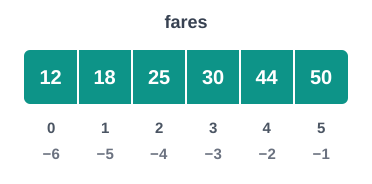
Fig. 9.1 – Positive and negative indices of a list.
>>> fares = [12, 18, 25, 30, 44, 50]
>>> fares[0]
12
>>> fares[4]
44
>>> fares[-1]
50
>>> fares[-6]
12
The index need not be written as a plain number. Anything that evaluates to an integer will do, which is what allows a list to be used inside a loop.
>>> fares[2 + 1]
30
The built-in function len() returns the number of elements in a list. Since counting starts at 0, the last valid index is always one less than the length, and this is a relationship worth fixing in your mind early.
>>> len(fares)
6
>>> fares[len(fares) - 1]
50An index that is too large in the negative direction fails in the same way. For a list of six elements, fares[-7] raises IndexError as well, because there is no seventh position to count back to.
9.1.3 Lists are Mutable
A string, once created, cannot be altered. If you try to replace one of its characters, Python refuses.
>>> name = 'Meera'
>>> name[0] = 'V'
TypeError: 'str' object does not support item assignment
A list behaves quite differently. Writing an assignment with an index on the left replaces the element at that position, and the list itself carries on existing with its new contents. This property is called mutability, and a list is said to be mutable; a string, which does not allow it, is immutable.
>>> stock = ['pen', 'pencil', 'eraser', 'ruler']
>>> stock[2] = 'sharpener'
>>> stock
['pen', 'pencil', 'sharpener', 'ruler']The phrase without creating a new object is the whole point, and Fig. 9.2 makes it visible. When stock[2] is assigned, no second list appears. The same list is edited where it stands, and the name stock goes on referring to it. This is why a list is the natural structure for data that gets corrected, extended or reordered while a program runs — a stock register, a marks sheet, a queue of pending tasks.
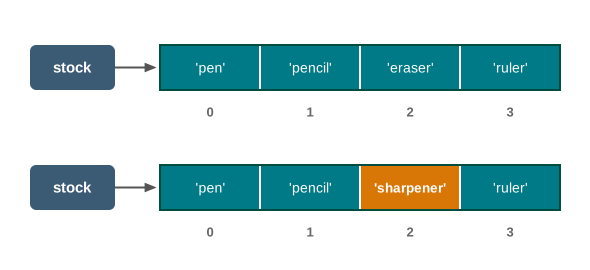
Fig. 9.2 – Modifying a list element in place.
The difference between a string and a list is worth setting out plainly, because almost every mistake in this chapter comes from expecting one to behave like the other.
Table 9.1 – String vs List
| Feature | String | List |
|---|---|---|
| Written as | Characters inside quotes, 'Meera' |
Elements inside square brackets, [72, 65, 88] |
| Type of elements | Characters only | Any type, and the types may differ within one list |
| Order of elements | Ordered, indices from 0 | Ordered, indices from 0 |
| Changing an element | Not allowed; raises TypeError |
Allowed; the element is replaced in place |
| Effect of a change | A new string must be built instead | The same object is altered, no new object is made |
| Suitable for | Text that stays fixed once formed | Data that is corrected, extended or reordered |
Correcting a value in place
A marks sheet is the everyday example of data that must be editable. When a paper is re-evaluated, one mark changes and the rest stay untouched — precisely the operation a list supports.
9.2 List Operations
Section 9.1 dealt with one element at a time — reading it, replacing it. Python also lets you work with a list as a whole: join two lists, repeat one, ask whether a value is present in it, or pull out a part of it. Four operations do this work, and they are written with operators you have already used on strings, which is a deliberate design decision: a sequence is a sequence, and Python tries to make sequences behave alike.
Three of these four produce a new list and leave the original untouched. Keeping that in mind will save a great deal of confusion later, because it is the opposite of what index assignment did in Section 9.1.3.
9.2.1 Concatenation
Joining two lists end to end is called concatenation, and it is written with the + operator. The elements of the left list come first, followed by the elements of the right list, in their original order.
>>> morning = [12, 18, 25]
>>> evening = [30, 44]
>>> morning + evening
[12, 18, 25, 30, 44]
The result is a third list. Neither morning nor evening has changed, as Fig. 9.3 shows, and if you want to keep the joined list you must assign it to a name.
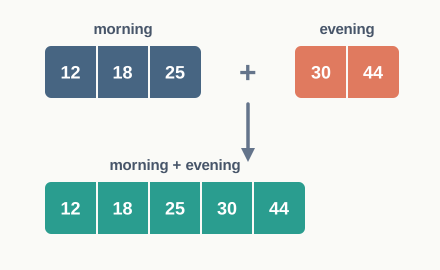
Fig. 9.3 – Concatenating two lists.
>>> morning
[12, 18, 25]
>>> full_day = morning + evening
>>> full_day
[12, 18, 25, 30, 44]
Both operands of + must be lists. Python will not quietly convert something else for you, because it has no way of knowing whether you meant to add one element or to spread a value out across several.
9.2.2 Repetition
The * operator repeats a list a given number of times, producing a new list. This operation is called repetition, and one operand must be a list while the other must be an integer.
>>> ['-'] * 5
['-', '-', '-', '-', '-']
The obvious use is drawing separator lines, but the useful one is setting up a list of counters that all start at the same value. If six buses run on a route and you want to count the passengers on each, a list of six zeros is exactly the starting point you need.
>>> passengers = [0] * 6
>>> passengers
[0, 0, 0, 0, 0, 0]
Without repetition you would have to type the six zeros yourself, which is tedious for six and impossible when the number is decided while the program runs. Written as [0] * n, the same statement builds a list of whatever size n happens to hold.
9.2.3 Membership
To find out whether a value is present in a list, Python offers the membership operator in. It returns True if the value occurs as an element of the list and False otherwise. Its partner not in returns the opposite.
>>> stops = ['Ajmeri Gate', 'Sindhi Camp', 'Chandpole']
>>> 'Sindhi Camp' in stops
True
>>> 'Amer' in stops
False
>>> 'Amer' not in stops
True
This is a great deal shorter than writing a loop that compares each element in turn, and it is the natural way to ask a question such as is this book code in the catalogue? before doing anything with it.
There is one trap. When in is applied to a string it looks for a part of the string, but when it is applied to a list it looks for a whole element. A part of an element will not do.
Table 9.3 – the in operator on a string and on a list
| Feature | On a string | On a list |
|---|---|---|
| What is searched for | Any run of consecutive characters | One complete element |
'Sindhi' in 'Sindhi Camp' |
True, because it is a part of the text |
Not applicable |
'Sindhi' in ['Sindhi Camp'] |
Not applicable | False, because the only element is 'Sindhi Camp', not 'Sindhi' |
| Matching rule | Character by character, case-sensitive | Element by element, and the whole element must be equal |
| Value returned | True or False |
True or False |
9.2.4 Slicing
Sometimes only a part of a list is wanted: the first three fares, the last two stops, every alternate reading. Extracting a part of a list is called slicing, and the part extracted is called a slice. As with strings, two indices separated by a colon give the range.
The end index being excluded is the one rule students most often get wrong, so it is worth picturing the indices not as labels on the boxes but as the cuts between them, as drawn in Fig. 9.4. A slice takes everything between the cut at start and the cut at end.
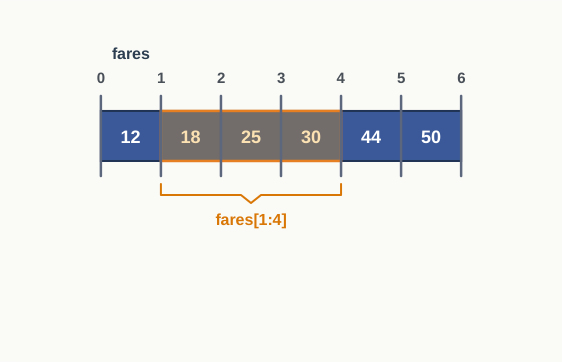
Fig. 9.4 – Slicing a list between index cuts.
A count follows from this picture: the number of elements in list_name[start:end] is \(end - start\), provided both indices lie within the list. The slice fares[1:4] therefore holds \(4 - 1 = 3\) elements.
Leaving out the indices
If start is omitted, the slice begins at the first element. If end is omitted, it runs to the last element. Omitting both gives a slice containing everything — a point Section 9.6 will put to serious use.
>>> fares[:3]
[12, 18, 25]
>>> fares[3:]
[30, 44, 50]
>>> fares[:]
[12, 18, 25, 30, 44, 50]
Negative indices may be used inside a slice as well, and they mean what they meant in Section 9.1.2 — positions counted from the right.
>>> fares[-4:-1]
[25, 30, 44]
Indices that do not fit
Indexing and slicing part company when an index is too large. A single index beyond the end of the list is an error; a slice beyond the end of the list is not.
>>> fares[4:20]
[44, 50]
>>> fares[5:2]
[]Slicing with a step
A third number after a second colon says how far to move each time. A step of 2 picks alternate elements, and a step of \(-1\) walks the list from right to left, which is the shortest way in Python to obtain a reversed copy.
>>> fares[0:6:2]
[12, 25, 44]
>>> fares[::2]
[12, 25, 44]
>>> fares[::-1]
[50, 44, 30, 25, 18, 12]Putting the operations together
The four operations are rarely used alone. A short program that maintains a library catalogue uses three of them in a row — concatenation to combine two shelves, membership to answer a query, and slicing to display only the opening entries.
9.3 Traversing a List
Reaching one element by its index answers a question about one element. Most real questions are about all of them. How many days did the library issue more than twenty books? What is the highest reading of the week? What is the total fare along the route? None of these can be answered without visiting every element in turn.
Visiting each element of a list, one after another, is called traversal. Each visit is one iteration of the loop that performs it, and the loop is what turns a list from a store of values into something a program can reason about. Fig. 9.5 shows the idea: a marker moves along the list from the first element to the last, and at each stop the program does whatever the task requires.
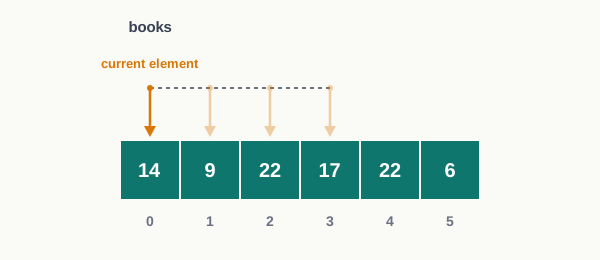
Fig. 9.5 – Traversing a list element by element.
Python offers two loops for the job — for and while — and the choice between them is not a matter of taste. Each fits a different shape of problem.
9.3.1 Traversal Using a for Loop
The simplest traversal asks Python to hand you the elements themselves. The for loop takes the list, gives its first element to a variable, runs the body, then gives it the second element, and so on until the list is exhausted.
>>> stops = ['Ajmeri Gate', 'Sindhi Camp', 'Chandpole']
>>> for stop in stops:
        print(stop)

Ajmeri Gate
Sindhi Camp
Chandpole
Here stop is the loop variable. On the first iteration it refers to the first element, on the second to the second, and so on. Nothing in the loop mentions an index at all, which is exactly why this form is preferred whenever the position of an element does not matter — the shortest correct loop is also the hardest one to get wrong.
Traversal when the position matters
Some tasks need the index as well as the element: reporting which day had the highest issue, or comparing an element with the one before it. For these, the loop is run over the indices instead, using range() together with len().
The expression range(len(books)) produces the whole set of valid indices, from 0 up to one less than the length — precisely the positions that exist in the list. The element at each position is then reached with books[i].
>>> books = [14, 9, 22, 17, 22, 6]
>>> for i in range(len(books)):
        print(i, books[i])

0 14
1 9
2 22
3 17
4 22
5 6
Notice that len() is called on the list, not typed as a fixed number. Write range(6) and the loop breaks the moment the list grows or shrinks; write range(len(books)) and it adjusts itself.
Scanning for the largest value
A classic traversal problem is finding the largest element. There is a built-in function that does this, and Section 9.4 will introduce it, but the method behind it is worth building yourself, because the same pattern — remember the best seen so far, and improve it — solves a great many problems that no built-in function covers.
The trace below follows the two remembered values through the whole loop. Watch what happens at index 4, where the second 22 appears.
Result: the program prints 22 and position 2. The trace shows why the answer is position 2 and not position 4: at index 4 the test asks whether 22 is greater than 22, which it is not, so the earlier position survives. Replacing > with >= would report the later day instead — a one-character change with a visible effect on the answer.
9.3.2 Traversal Using a while Loop
The same traversal can be written with a while loop, but nothing is handed to you automatically. You create the index yourself, test it yourself, and increase it yourself.
>>> books = [14, 9, 22, 17, 22, 6]
>>> i = 0
>>> while i < len(books):
        print(books[i])
        i = i + 1

14
9
22
17
22
6
Three statements do the work of the for header: i = 0 starts the count, i < len(books) decides whether another element remains, and i = i + 1 moves to the next one. Fig. 9.6 shows the cycle they form.
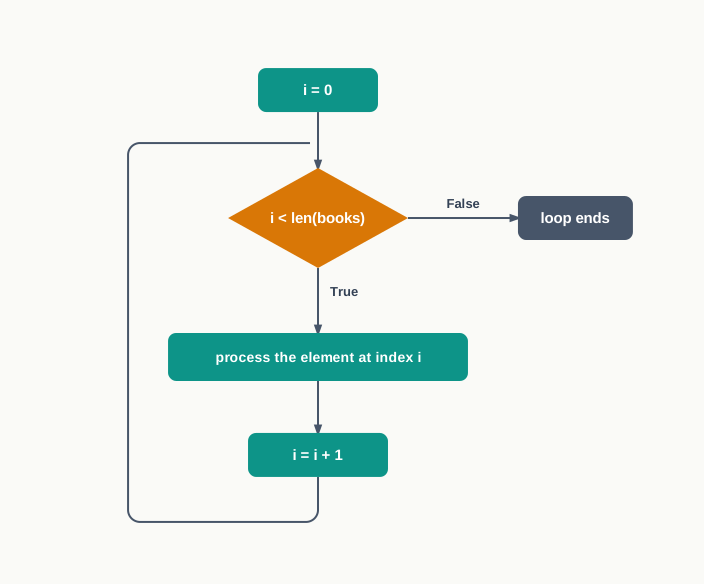
Fig. 9.6 – Execution flow of a while loop traversing a list.
When a while loop is the better tool
If a while loop is more work, why use it at all? Because a for loop over a list runs to the end, while a while loop can stop the moment its condition fails. When the question is where does something first happen, there is no reason to examine the rest of the list.
>>> books = [14, 9, 22, 17, 22, 6]
>>> i = 0
>>> while i < len(books) and books[i] <= 20:
        i = i + 1

>>> i
2
The condition has two parts. The first keeps the index inside the list; the second keeps the loop going only while the readings are small. The loop stops at index 2, the first day on which more than twenty books were issued, without ever looking at the last three days. Note the order of the two tests — the index check must come first, because if it did not, the loop would try to read books[i] at a position that does not exist once the list ran out.
Table 9.6 – three ways of traversing a list
| Feature | for over elements |
for over range(len(...)) |
while with a counter |
|---|---|---|---|
| What the loop variable holds | The element itself | The index of the element | The index, maintained by you |
| Index available in the body | No | Yes | Yes |
| Who advances the loop | Python | Python | You, with an update statement |
| Can it stop before the end | Not on its own | Not on its own | Yes, through its condition |
| Risk of an endless loop | None | None | Real, if the counter is not updated |
| Best suited to | Doing the same thing to every element | Tasks needing the position, or comparing neighbours | Searching for the first element that satisfies a condition |
9.4 List Methods and Built-in Functions
So far, everything done to a list has been done with operators, indices and loops. Python also supplies a set of ready-made operations for the jobs that come up again and again — adding an element, removing one, counting occurrences, sorting. These arrive in two forms, and telling them apart matters, because they are written differently and they behave differently.
A built-in function such as len() is written with the list inside its brackets: len(books). A method such as append() is written after the list, joined to it by a dot: books.append(30). The dot is not decoration. It says that the operation belongs to the list and is being asked to work on that particular list.
The second difference is subtler and causes more trouble. Most list methods change the list in place — they alter the existing list and hand back nothing at all. Built-in functions such as len() and sum() do the opposite: they leave the list alone and hand back a value. Keep asking yourself which of the two a given operation is, and half the errors in this section disappear.
9.4.1 Built-in Functions Used with Lists
Four of the built-in functions you already know work directly on a list of numbers, and one more builds a list out of some other sequence. All of them read the list and return a value; none of them changes it.
>>> readings = [31, 27, 35, 29]
>>> len(readings)
4
>>> min(readings)
27
>>> max(readings)
35
>>> sum(readings)
122
Together these answer a surprising number of questions in one line each. The average of the readings, for instance, needs no loop at all.
>>> sum(readings) / len(readings)
30.5
The function list() goes the other way: given a sequence, it produces a list of that sequence’s elements. Given nothing, it produces an empty list.
>>> list('aeiou')
['a', 'e', 'i', 'o', 'u']
>>> list(range(1, 6))
[1, 2, 3, 4, 5]
>>> list()
[]
The second of these is worth remembering. range() by itself does not produce a list you can index or slice; wrapping it in list() does.
Table 9.7 – built-in functions commonly used with lists
| Function | What it returns | Effect on the list |
|---|---|---|
len() |
The number of elements in the list | None; the list is only read |
min() |
The smallest element | None |
max() |
The largest element | None |
sum() |
The total of all elements | None |
list() |
A new list built from the sequence passed to it | Builds a new list |
9.4.2 Adding Elements to a List
Three methods put new elements into a list. They differ in where the element goes and in how many elements arrive.
The method append() takes exactly one element and puts it at the end.
>>> stock = ['pen', 'pencil']
>>> stock.append('eraser')
>>> stock
['pen', 'pencil', 'eraser']
The word one is exact. If the argument handed to append() happens to be a list, that entire list becomes a single element of the outer list — one box holding four items rather than four boxes.
>>> stock.append(['ruler', 'sharpener'])
>>> stock
['pen', 'pencil', 'eraser', ['ruler', 'sharpener']]
>>> len(stock)
4
When the intention is to add the items separately, the method needed is extend(). It expects a list, opens it up, and adds each of its elements to the end of the original.
>>> stock = ['pen', 'pencil']
>>> stock.extend(['ruler', 'sharpener'])
>>> stock
['pen', 'pencil', 'ruler', 'sharpener']
>>> len(stock)
4
The contrast is drawn in Fig. 9.7, and it is the single most common confusion in list handling.
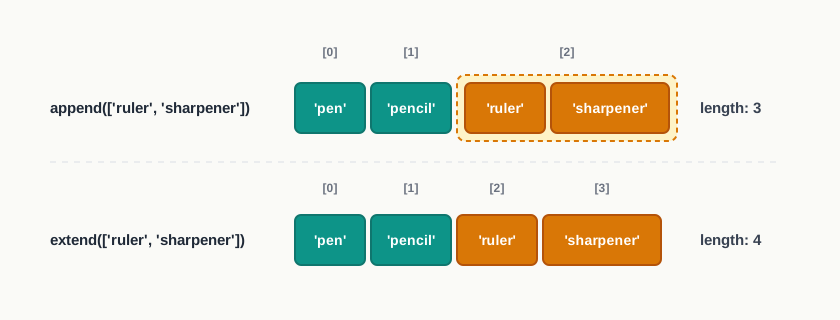
Fig. 9.7 – Difference between append() and extend().
To place an element somewhere other than the end, insert() is used. It takes two arguments — the index at which the new element should sit, and the element itself. Everything from that position onwards shifts one place to the right, as Fig. 9.8 shows.
>>> queue = ['Meera', 'Arjun', 'Kabir']
>>> queue.insert(1, 'Farida')
>>> queue
['Meera', 'Farida', 'Arjun', 'Kabir']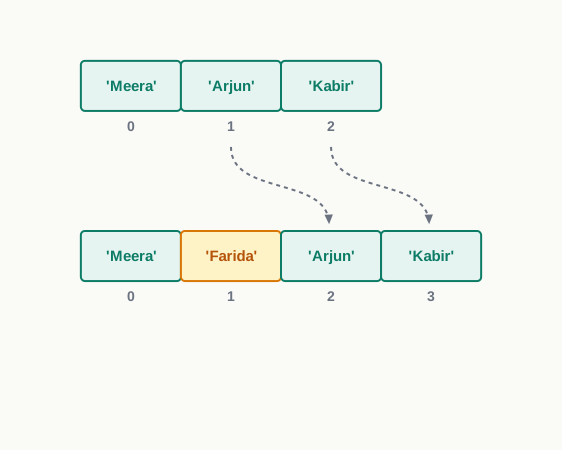
Fig. 9.8 – Inserting an element into a list.
An index larger than the list simply places the element at the end rather than raising an error, and a negative index counts from the right. Both are conveniences you should use sparingly, since a reader of the program cannot tell at a glance where the element landed.
Table 9.8 – append(), extend() and insert()
| Feature | append() |
extend() |
insert() |
|---|---|---|---|
| Arguments taken | One element | One list | An index and one element |
| Where the element goes | At the end | At the end | At the given index |
| Increase in length | Always 1 | The length of the list supplied | Always 1 |
| Effect on other elements | None | None | Those at and after the index shift right |
| If given a list as the element | It becomes one nested element | Its elements are added separately | It becomes one nested element |
9.4.3 Removing Elements from a List
Two methods take elements out. They differ in what you tell them: pop() is told where, and remove() is told what.
The method pop() removes the element at a given index and returns it, so the value is not lost — it can be printed or stored. Called with no argument at all, it removes and returns the last element.
>>> tokens = [21, 34, 47, 52, 60]
>>> tokens.pop()
60
>>> tokens
[21, 34, 47, 52]
>>> tokens.pop(1)
34
>>> tokens
[21, 47, 52]
This return value is what makes pop() the natural tool for handling items one at a time — a token called at a counter, a task taken off a pending list. The item is both removed and delivered.
The method remove() is given a value instead. It searches the list from the left and takes out the first element equal to that value. Later copies of the same value stay where they are.
>>> colours = ['red', 'green', 'blue', 'green']
>>> colours.remove('green')
>>> colours
['red', 'blue', 'green']
remove() returns nothing, and it is unforgiving if the value is not there.
>>> colours.remove('black')
ValueError: list.remove(x): x not in list
Similarly, pop() on an empty list raises IndexError: pop from empty list, and pop() with an index beyond the end raises IndexError: pop index out of range. In a program that keeps removing items, the safe habit is to check first — if colours: before popping, or if 'black' in colours: before removing.
9.4.4 Searching and Counting in a List
Section 9.2.3 showed how in answers is this value present? Two methods go further and answer where and how many.
The method index() returns the index of the first occurrence of a value. The method count() returns the number of times a value occurs.
>>> votes = ['A', 'B', 'A', 'C', 'A', 'B']
>>> votes.index('B')
1
>>> votes.count('A')
3
>>> votes.count('D')
0
The two behave quite differently when the value is missing.
>>> votes.index('D')
ValueError: 'D' is not in listCounting distinct values
Put count(), in and append() together and a genuinely useful task becomes short: reporting each distinct value in a list along with how often it occurs.
9.4.5 Rearranging a List
Two methods change the order of the elements already present, without adding or removing anything.
The method reverse() turns the list end for end, in place.
>>> heights = [148, 162, 155, 170]
>>> heights.reverse()
>>> heights
[170, 155, 162, 148]
The method sort() arranges the elements in increasing order, also in place. Given the argument reverse = True, it arranges them in decreasing order instead.
>>> heights.sort()
>>> heights
[148, 155, 162, 170]
>>> heights.sort(reverse = True)
>>> heights
[170, 162, 155, 148]
Sorting requires that the elements can be compared with one another. A list of numbers or a list of strings sorts without difficulty; a list mixing the two raises TypeError, because Python has no rule for deciding whether a number comes before a word.
Alongside the method sort() there is the built-in function sorted(). It does the same arranging but leaves the original list exactly as it was, returning a new sorted list instead.
>>> readings = [31, 27, 35, 29]
>>> ordered = sorted(readings)
>>> ordered
[27, 29, 31, 35]
>>> readings
[31, 27, 35, 29]
The choice between them is a real decision, not a preference. If the original order carries information — readings in the order they were taken, students in roll number order — then destroying it to answer one question is a mistake, and sorted() is the correct tool.
Table 9.10 – sort() and sorted()
| Feature | sort() |
sorted() |
|---|---|---|
| Kind of operation | A method, written after the list with a dot | A built-in function, written with the list inside brackets |
| Effect on the original list | Rearranged in place | Left completely unchanged |
| What it returns | Nothing | A new list holding the sorted elements |
| Usual way of writing it | heights.sort() |
ordered = sorted(heights) |
| When to prefer it | The original order is not needed again | The original order must be preserved |
9.4.6 Deleting Elements Using del
There is a third way to take elements out of a list, and it is neither a method nor a function. del is a statement of the Python language, written before what is to be deleted.
Given an index, it removes that one element. Given a slice, it removes the whole range in one stroke — something neither pop() nor remove() can do.
>>> slots = [10, 20, 30, 40, 50, 60]
>>> del slots[2]
>>> slots
[10, 20, 40, 50, 60]
>>> del slots[1:3]
>>> slots
[10, 50, 60]
The second statement deleted the elements at indices 1 and 2 of the shortened list — 20 and 40 — leaving three elements behind. As always with slicing, the element at the end index is not included.
Given a list name with no index at all, del removes the name itself. The list is not emptied; the name simply ceases to exist, and using it afterwards is an error.
>>> del slots
>>> slots
NameError: name 'slots' is not defined
Table 9.11 – three ways of removing elements from a list
| Feature | del |
pop() |
remove() |
|---|---|---|---|
| Kind of operation | A statement of the language | A method | A method |
| What you specify | An index, a slice, or the whole name | An index, or nothing for the last element | The value to be removed |
| Number removed at once | One element, or a whole slice | One element | One element, the first match only |
| Value handed back | None | The element removed | None |
| Error when it fails | IndexError for a bad index |
IndexError on an empty list or bad index |
ValueError if the value is absent |
| Typical use | Clearing a range of elements | Taking an item out to work with it | Deleting a known value whose position is unknown |
9.5 Nested Lists
Section 9.1 established that a list may hold elements of different types, and Section 9.4.2 showed what happens when append() is handed a list: the whole list settles into a single position. That was presented there as a trap. It is also a feature, and this section puts it to work.
When a list appears as an element of another list, it is called a nested list. The outer list still has its own elements and its own indices; it is only that one or more of those elements happen to be lists themselves.
>>> entry = ['Physics', 'PH-101', [18, 20, 17]]
>>> len(entry)
3
The length is 3, not 5. The three unit test marks occupy one position between them, as Fig. 9.9 shows.
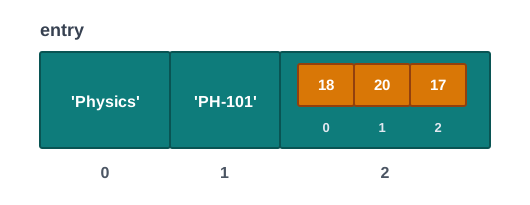
Fig. 9.9 – A nested list as a single element.
This is the natural shape for a record whose parts are not all single values. A subject has one name, one code, and several marks; forcing the marks into separate positions would mean the outer list changes length whenever the number of tests changes, and no position would mean anything on its own.
Reaching an element inside a nested list
One index takes you to the nested list. A second index, written immediately after the first, takes you to an element within it.
>>> entry[2]
[18, 20, 17]
>>> entry[2][1]
20
>>> len(entry[2])
3
Read entry[2][1] from left to right, as two steps rather than one strange operation. entry[2] produces the list [18, 20, 17]; the [1] that follows is then applied to that list and produces its second element. The general form is list_name[i][j], where i chooses the nested list and j chooses an element inside it.
A nested list as a table
The more powerful use of nesting is a list in which every element is a list of the same length. Such a structure is a table: each nested list is one row, and each position within a row is one column. The unit test scores of four students in three tests are set out in Table 9.12.
Table 9.12 – unit test scores of four students, out of 50 in each test
| Student | Test 1 | Test 2 | Test 3 |
|---|---|---|---|
| 1 | 35 | 42 | 38 |
| 2 | 28 | 31 | 40 |
| 3 | 45 | 39 | 44 |
| 4 | 30 | 36 | 33 |
In Python this table becomes a list of four nested lists. Writing each row on its own line is a habit worth forming — Python allows a list to run across several lines as long as the brackets are not closed, and the layout makes the table visible in the program text.
>>> scores = [[35, 42, 38],
              [28, 31, 40],
              [45, 39, 44],
              [30, 36, 33]]
>>> scores[2]
[45, 39, 44]
>>> scores[2][1]
39
The first index is the row, the second is the column, and Fig. 9.10 shows the pair meeting at one value.
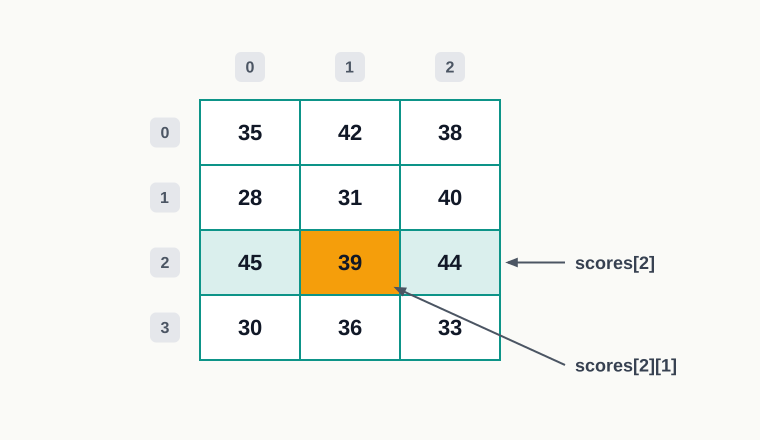
Fig. 9.10 – Reaching an element in a table.
Traversing a table
A single loop over a table visits rows, not values. To reach every value, the loop over rows must contain a second loop over the positions within a row — one loop for each level of nesting.
The trace below follows the outer loop, showing the three values the inner loop adds during each pass.
Result: the four totals are printed as they are computed, and 441 is printed at the end. The trace shows the two loops working at different speeds — the inner loop completes three additions for every single step the outer loop takes, which is why a table of four rows and three columns costs twelve additions altogether.
9.6 Copying Lists
Programs often need a second version of a list — the original readings kept safe while a sorted arrangement is examined, a backup taken before a risky series of deletions. The obvious way to make one is to assign the list to a second name. It is also the wrong way, and this section explains why.
Everything here rests on one idea already met in Section 9.1.3: a name does not contain a list. A name refers to a list that exists somewhere in memory. Two names can perfectly well refer to the same list, and assignment is exactly what arranges that.
9.6.1 Assignment Creates an Alias
When one list name is assigned to another, no new list is built. Python simply makes the second name point at the list the first name already points at. The second name is then an alias — another name for the same object, as drawn in Fig. 9.11.
>>> list1 = [11, 22, 33]
>>> list2 = list1
>>> list2
[11, 22, 33]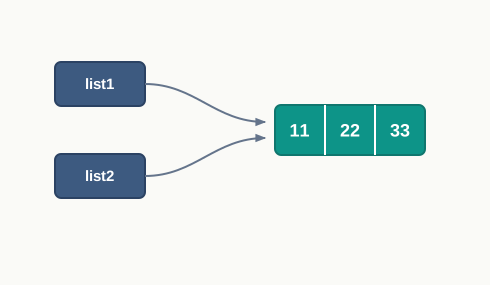
Fig. 9.11 – Assignment creates an alias to the same list.
Python can be asked directly whether two names refer to the same object, using the is operator.
>>> list2 is list1
True
The consequence appears the moment either list is changed. Appending through list1 alters the one list that exists, and list2 — which was never touched — reports the change.
>>> list1.append(44)
>>> list2
[11, 22, 33, 44]
It works in the other direction too, because neither name is the original in any meaningful sense.
>>> list2.remove(11)
>>> list1
[22, 33, 44]Aliasing is not a defect. It is what makes it possible to hand a large list to a function without duplicating it, which Section 9.7 takes up. It only becomes a problem when a copy was intended and not made.
9.6.2 Making a Distinct Copy
To obtain a list that is separate from the original, Python offers three ways. All three produce a new list object holding the same elements, so a change to one leaves the other alone, as Fig. 9.12 shows.
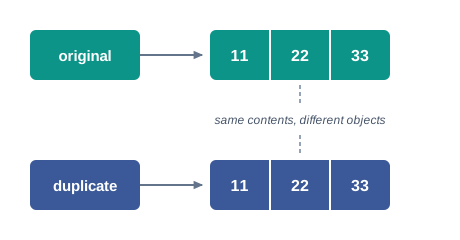
Fig. 9.12 – Copying creates a distinct list object.
The first way uses a slice with both indices left out, which Section 9.2.4 showed produces a slice containing every element. Since slicing always builds a new list, the result is a copy.
>>> original = [11, 22, 33]
>>> duplicate = original[:]
>>> duplicate is original
False
>>> duplicate.append(44)
>>> original
[11, 22, 33]
The second way uses the built-in function list(), which builds a list from any sequence handed to it — including another list.
>>> duplicate = list(original)
>>> duplicate is original
False
The third way uses the copy() function of the standard library module copy, which must be imported before use.
>>> import copy
>>> duplicate = copy.copy(original)
>>> duplicate
[11, 22, 33]
>>> duplicate is original
False
Table 9.14 – three ways of making a distinct copy of a list
| Way | How it is written | Needs an import |
|---|---|---|
| Slicing | duplicate = original[:] |
No |
The list() function |
duplicate = list(original) |
No |
The copy() function |
duplicate = copy.copy(original) |
Yes — import copy |
For an ordinary list of numbers or strings the three are interchangeable, and the slice form is the shortest. The copy module earns its keep on structures more elaborate than a plain list, where the extra facilities it provides matter.
Same contents, different objects
Two lists can hold equal elements without being the same object, and Python has separate tests for the two questions. The operator == compares contents; the operator is compares identity.
>>> duplicate = list(original)
>>> duplicate == original
True
>>> duplicate is original
False
Table 9.15 – assignment and copying compared
| Feature | Assignment, list2 = list1 |
Copying, list2 = list1[:] |
|---|---|---|
| Number of list objects afterwards | One | Two |
| What the second name refers to | The same list as the first name | A new list of its own |
Result of list2 is list1 |
True |
False |
Result of list2 == list1 |
True |
True, until one of them is changed |
Effect of list2.append(50) on list1 |
list1 shows the new element too |
list1 is unaffected |
| When to use it | Referring to one list under another name | Keeping the original safe from changes |
Using a copy in practice
Marks entered in roll number order carry information in that order, and sorting them destroys it. A copy lets both arrangements exist at once.
9.7 List as Argument to a Function
A function is written once and called wherever its work is needed. The values it works on are handed to it at the call: the value written in the call is the argument, and the name it arrives under inside the function is the parameter. For a number or a string this exchange holds no surprises — the function receives the value, uses it, and the caller’s variable is unaffected by anything the function does.
A list behaves differently, and the reason is already familiar. Section 9.6.1 showed that assigning a list to a second name creates an alias rather than a copy. Passing a list to a function does exactly the same thing: the parameter becomes another name for the caller’s list. What travels into the function is a reference to the one existing list, not a duplicate of it, as Fig. 9.13 shows.
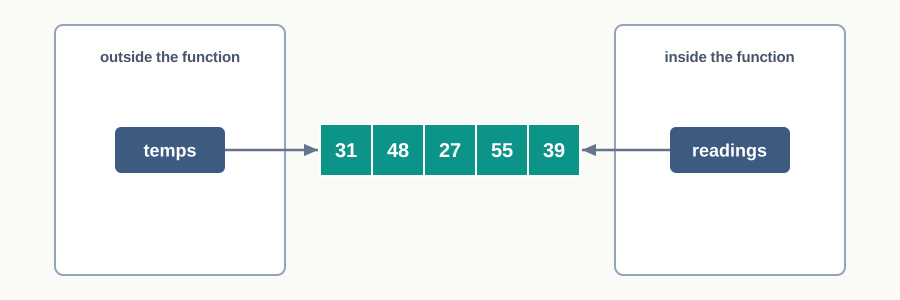
Fig. 9.13 – A list parameter refers to the caller’s list.
This one fact explains everything in this section, including the apparent contradiction that a function can sometimes change the caller’s list and sometimes cannot.
9.7.1 Changing the Elements of the Original List
If the function alters the elements of the list — assigning through an index, appending, removing, sorting — it is altering the one list that exists. The caller sees the change, because the caller’s name refers to that same list.
Consider a set of readings that must be trimmed to an upper limit before being used further. The work is a natural candidate for a function, since it will be needed for several sets of readings.
Result: the caller’s list ends as [31, 45, 27, 45, 39]. The trace shows the change happening inside the function on a list the function never created — after iteration 2 the second element is already 45, and temps outside would report the same thing if it could be printed at that moment.
9.7.2 Reassigning the List Inside the Function
Now consider a function that does not change the elements but assigns a whole new list to the parameter.
>>> def replace(readings):
        readings = [0, 0, 0]
        print("Inside the function:", readings)

>>> temps = [31, 48, 27]
>>> replace(temps)
Inside the function: [0, 0, 0]
>>> temps
[31, 48, 27]
Nothing outside the function has changed. The assignment did not alter the list that readings referred to; it made readings refer to a different list, one newly built inside the function. The caller’s name temps was never involved and still points where it always did, as Fig. 9.14 shows.
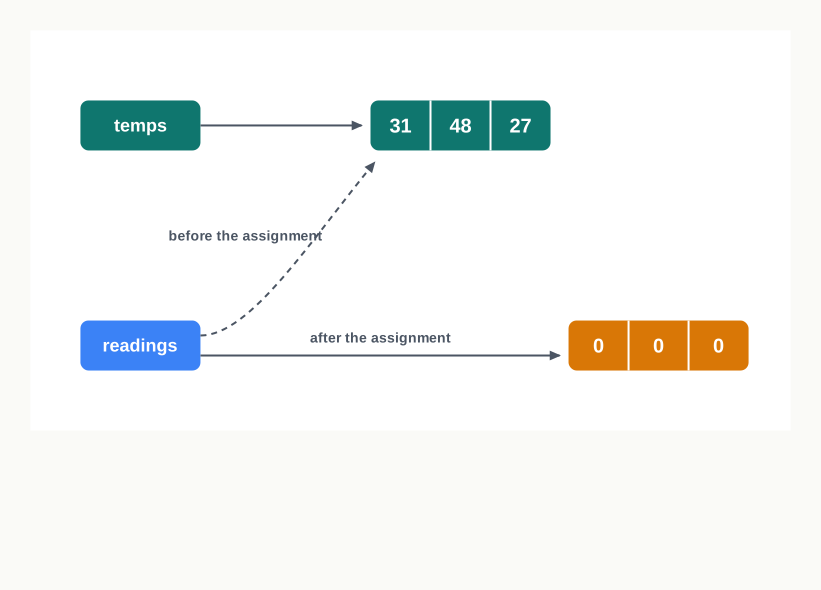
Fig. 9.14 – Reassigning the parameter inside the function.
The distinction is not about which statement looks more drastic. It is about whether the statement changes the contents of an object or changes what a name refers to.
Table 9.18 – changing the elements and reassigning the parameter
| Feature | Changing the elements | Reassigning the parameter |
|---|---|---|
| Typical statement inside the function | readings[i] = 45, readings.append(50), readings.sort() |
readings = [0, 0, 0], readings = readings + [50] |
| What the statement acts on | The list object itself | The parameter name only |
| Number of list objects involved | One | Two — the caller’s, and a new one |
| Effect on the caller’s list | The change is visible outside | No effect at all |
| How the result reaches the caller | Automatically, through the shared list | Only by return, and assignment at the call |
Returning a new list instead
Changing the caller’s list is sometimes exactly what is wanted, and sometimes a hazard — a function that quietly reorders data its caller still needs is hard to debug. The alternative is to leave the argument alone and build a fresh list to return.
>>> def doubled(readings):
        result = []
        for r in readings:
            result.append(r * 2)
        return result

>>> temps = [31, 48, 27]
>>> new = doubled(temps)
>>> new
[62, 96, 54]
>>> temps
[31, 48, 27]
Here result is created inside the function and belongs to it alone, so nothing the loop does can reach the caller’s data. The value comes back through return, and the caller decides what to do with it. Between the two designs, prefer this one unless changing the original is the stated purpose of the function — and when it is the stated purpose, say so in the function’s opening comment, so that a reader of the call is not taken by surprise.
9.8 List Manipulation
Every operation this chapter has introduced was shown on its own, on a list that was already there. Real programs are not like that. They build the list from data that arrives while they run, ask questions of it, change it in response to what the user wants, and go on doing so until the user stops them.
This section puts the pieces together in two complete programs. Nothing new is introduced; what is new is the shape of the whole, and the reasoning that decides which operation belongs where.
Building a list from data as it arrives
A list does not have to be typed into the program. The usual pattern is to start with an empty list and use append() once for each value read, so the list ends up exactly as long as the data requires.
Once the list exists, questions about it can be answered. A common one — how many values lie above the average — needs two passes over the data: the average cannot be known until every value has been seen, and the comparison cannot be made until the average is known.
A program that keeps working until told to stop
The second pattern is the menu-driven program. The list is displayed, a menu of operations is offered, the user chooses one, the program carries it out — and then the whole cycle begins again. Only an explicit choice to exit ends it. Fig. 9.15 shows the cycle.
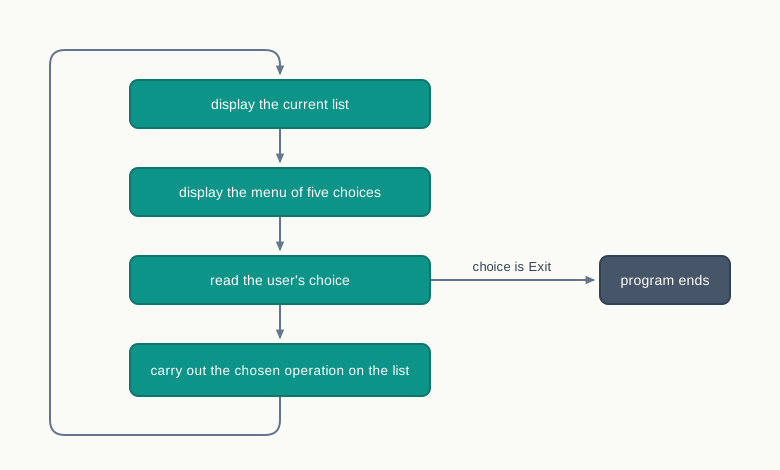
Fig. 9.15 – Execution flow of a menu-driven program.
The loop that drives this is written as while True, which never becomes false by itself, together with a break that leaves it when the exit option is chosen. Writing a condition at the top would be awkward here, because at the moment the loop begins there is nothing yet to test.
9.9 Summary
What a list is
A list is an ordered sequence of elements written inside square brackets and separated by commas. It holds many values under one name, so the amount of data a program handles no longer decides how many variables it must declare.
Ordered means that every element has a fixed position that is remembered; it does not mean sorted.
The elements of one list may be of different data types, because a list is defined by the order it keeps and not by what its elements are. This is the difference from a string, whose elements can only be characters.
Positions are numbered from 0 for the first element, and from −1 for the last element counting backwards. The highest forward index is therefore always one less than the length.
Asking for an element at a position that does not exist raises
IndexError.A list is mutable: an element can be replaced through its index, and the same list object is altered where it stands, without a new list being created. A string is immutable, and refuses such an assignment.
Operations on a whole list
Concatenation with
+joins two lists into a new list, leaving both originals unchanged. Both operands must be lists.Repetition with
*produces a new list in which the elements are repeated a stated number of times, which is the usual way of setting up a list of counters that all start alike.The membership operators
inandnot inreport whether a value occurs in a list, returningTrueorFalse. On a list the match must be against a whole element, unlike on a string, where a part of the text is enough.Slicing extracts a part of a list into a new list. The starting index is included and the ending index is excluded, so the number of elements taken is the difference between them.
Omitting an index in a slice means “from the beginning” or “to the end”; a third number gives the step, and a step of −1 produces the list in reverse order.
A single index beyond the end of a list is an error, but a slice beyond the end is not — a slice returns whatever lies between its two boundaries, which may be a shorter list or an empty one.
Traversing a list
Traversal is the visiting of every element exactly once, in order. It is what allows a question to be asked about all the data rather than one element of it.
A
forloop written over the list itself gives the elements directly and is the safest choice when the position does not matter.A
forloop written overrange(len(...))gives the indices instead, and is needed when the position matters or when neighbouring elements must be compared. Taking the length from the list rather than typing a fixed number keeps the loop correct when the list changes size.A
whileloop requires the counter to be created, tested and increased by the programmer, and an omitted increase produces an endless loop. In exchange, it can stop as soon as its condition fails, which suits searches for the first element satisfying a condition.
Methods and built-in functions
A built-in function is written with the list inside its brackets; a method is written after the list, joined by a dot, and acts on that list. The built-in functions used with lists are
len(),min(),max(),sum(),list()andsorted().Most list methods change the list in place and return nothing. Assigning the result of such a method to a name destroys the list and stores
Noneinstead.append()adds one element at the end, and a list given to it becomes a single nested element.extend()adds each element of the list given to it separately.insert()places an element at a stated index, shifting the rest to the right.pop()removes an element by its position and returns it, so the value can still be used; called without an argument it removes the last element.remove()removes the first element equal to a stated value and returns nothing, raisingValueErrorif the value is absent.index()gives the position of the first occurrence of a value and raisesValueErrorif there is none;count()gives the number of occurrences and simply reports 0 when there are none.reverse()andsort()rearrange the list in place,sort()accepting an argument that reverses the order. The built-in functionsorted()does the same arranging but returns a new list and leaves the original untouched, which is the right choice when the original order carries information.delis a statement, not a method. It removes an element by index, a whole range by slice, or the name itself, after which using that name is an error.
Nested lists
A list appearing as an element of another list is a nested list. It occupies one position in the outer list however many elements it holds, so the length of the outer list counts it once.
Two indices are used to reach inside it: the first selects the nested list and the second selects an element within it. Applying more indices than there are levels of nesting raises
TypeError.A list in which every element is a nested list of equal length behaves as a table, the first index naming the row and the second the column. Traversing such a table needs one loop for each level of nesting.
Copying, and passing to a function
Assigning one list name to another does not copy the list. It creates an alias — a second name for the same object — so a change made through either name is visible through both. The
isoperator reveals this, since it compares identity rather than contents.A distinct copy is made by taking a full slice, by passing the list to
list(), or by usingcopy()from thecopymodule. All three build a new list, so the two can then be changed independently. All three copy the outer list only, leaving nested lists shared.When a list is passed to a function, the parameter becomes an alias of the argument; no copy is made. Changing the elements through the parameter therefore changes the caller’s list, and the change survives the call.
Assigning a whole new list to the parameter does the opposite: it breaks the link, leaves the caller’s list untouched, and discards the new list unless it is returned and assigned by the caller.
The choice between changing a list in place and returning a new one is a design decision. Changing in place is economical but invisible at the point of call; returning a new list is explicit and safe but costs a second list in memory.
9.10 Key Terms
alias — a second name that refers to the same list object as an existing name, so that a change made through either name is seen through both.
argument — the value actually supplied to a function when it is called.
concatenation — joining two lists end to end with the
+operator, producing a new list and leaving both originals unchanged.element — one of the values stored in a list.
immutable — describing an object whose contents cannot be changed after it has been created, as a string cannot.
in place — describing an operation that alters an existing object instead of building a new one.
index — the position of an element in a list, counted from 0 at the left or from −1 at the right.
iteration — one pass of a loop, during which one element is dealt with.
LISP — list processing, the name of the early programming language built around the list as its central structure.
list — an ordered sequence of elements, written in square brackets and separated by commas, whose elements may be of different types and may be changed after the list is created.
membership operator — the operator
in, and its partnernot in, which report whether a value occurs as an element of a list.method — a function belonging to an object, called by writing the object, a dot, and the method name with its arguments.
mutable — describing an object whose contents can be changed after it has been created, as a list can.
nested list — a list that appears as an element of another list, occupying a single position in the outer list.
parameter — the variable named in a function header, which receives the argument when the function is called.
repetition — producing a new list in which the elements of an existing list appear a stated number of times, using the
*operator.sequence — a collection whose elements have fixed positions, so that any element can be reached by its position.
slice — the new list produced by a slicing operation.
slicing — extracting a part of a list by giving a starting index, an ending index that is not included, and optionally a step.
traversal — visiting every element of a list exactly once, in order, so that some operation can be carried out on each.
9.11 Points to Ponder
A string and a list are both ordered sequences that can be indexed and sliced, yet one refuses to be altered and the other invites it. If mutability is so useful, what does a language gain by keeping an immutable sequence type at all?
Counting positions from 0, and excluding the end index of a slice, both feel unnatural when you first meet them. Taken together, what do these two choices make simpler that counting from 1 would make harder?
Assignment gives an alias, while a full slice gives a copy. Python could have made every assignment copy the list and spared students a great deal of confusion. What would that decision have cost, and would the confusion really have disappeared?
Asked for a value that is not there,
count()answers 0 whileindex()stops the program. Both are refusals to invent an answer, but one is quiet and one is loud. When is a loud failure the more helpful behaviour?A function that changes the elements of the list passed to it leaves no sign of having done so at the point where it is called. Is that a weakness of the language, or a responsibility of the programmer who names the function?
append()treats the list given to it as one thing, andextend()treats it as many. Could a single method have worked out which was meant from the argument itself, and what would a programmer lose if it did?
9.12 Objective Questions
- What is the output of the following statement? [1 mark]
print(len([10, [20, 30], 40]))a. 3
b. 4
c. 5
d. An error is reported- Which one of the following leaves the original list completely unchanged? [1 mark]
sort()reverse()sorted()append()
- For
values = [5, 10, 15, 20, 25], what doesvalues[1:4:2]produce? [1 mark][10, 15][10, 20][5, 15][10, 15, 20]
- For
values = [1, 2, 3], which statement raisesIndexError? [1 mark]values[-3]values[2]values[3]values[1:9]
- Assertion (A): A single list can hold an integer, a string and a floating-point number at the same time. Reason (R): A list stores its elements in the order in which they are written. [1 mark]
- Both A and R are true, and R is the correct explanation of A.
- Both A and R are true, but R is not the correct explanation of A.
- A is true but R is false.
- A is false but R is true.
- Assertion (A): After
list2 = list1, appending an element tolist1also changeslist2. Reason (R): The statementlist2 = list1builds a new list holding the same elements. [1 mark]- Both A and R are true, and R is the correct explanation of A.
- Both A and R are true, but R is not the correct explanation of A.
- A is true but R is false.
- A is false but R is true.
- Match each method in Column A with what it does, in Column B. [1 mark]
| Column A | Column B |
|---|---|
a. append() |
i. Adds each element of a given list at the end |
b. extend() |
ii. Returns the number of occurrences of a value |
c. insert() |
iii. Adds one element at the end |
d. pop() |
iv. Removes the element at a given position and returns it |
e. count() |
v. Adds one element at a stated position |
Fill in the blank: The built-in function ____________ returns a new sorted list and leaves the list given to it unchanged. [1 mark]
State whether the following is true or false:
delcan remove more than one element of a list in a single statement. [1 mark]What is the output of the following fragment? [1 mark]
values = [3, 6, 9]
values.append([12, 15])
print(len(values))
9.13 Check Your Concepts
Define a mutable object. Name one mutable and one immutable data type in Python. [2 marks]
What is an alias? State one situation in which making an alias instead of a copy makes a program give a wrong answer. [2 marks]
Write a single statement that creates a list of eight zeros, and state which operator you have used. [2 marks]
Differentiate between
append()andextend(), giving one example of each. [3 marks]Differentiate between
pop()andremove()in three points. [3 marks]Write a function that receives a list of numbers and returns how many of them are greater than 100. [3 marks]
A list holds the finishing times of runners arranged in order of lane number. Explain why sorting this list to find the fastest time destroys information the program may still need, and describe how the difficulty is avoided. [4 marks]
Write a function that receives a nested list in which each element is a list of numbers, and returns a new list holding the total of each inner list. [4 marks]
Write a function that receives a list and a value, and removes every occurrence of that value from the list it was given, without building a new list. Explain why the change is visible to the calling program, and state what your function returns. [5 marks]
9.14 Output & Debugging
- Predict the output of the following fragment. [2 marks]
data = [4, 8, 12, 16, 20]
print(data[1:4])
print(data[::-2])
print(data[4:1])- Predict the output of the following fragment. [2 marks]
items = ['a', 'b', 'a', 'c', 'a']
print(items.count('a'), items.index('c'))
items.remove('a')
print(items)- Predict the output of the following fragment, and give a one-line reason for the difference between the two printed lists. [3 marks]
nums = [10, 20, 30]
copy1 = nums
copy2 = nums[:]
nums.append(40)
print(copy1)
print(copy2)- The following fragment does not run. Name the error it reports, explain in one line why it occurs, and rewrite the fragment correctly. [3 marks]
marks = [45, 62, 38, 71]
marks = marks.sort()
print(marks[0])- State the output of the following fragment, and then say in one sentence what it computes for any list of numbers. [3 marks]
values = [7, 3, 9, 2, 8]
count = 0
for i in range(len(values)):
    if values[i] > values[count]:
        count = i
print(count, values[count])
9.15 Case-Based Questions
- A school library records the code of every book issued during a day, in the order in which it was issued. A code appears once for each issue, so a popular book appears more than once. At the end of one day the list holds: [4 marks]
issued = ['L-14', 'L-09', 'L-14', 'L-27', 'L-09', 'L-14']a. Write a statement that displays how many times the book `'L-14'` was issued that day. [1]
b. Write a statement that displays the position at which `'L-27'` first appears in the list. [1]
c. A late entry for the book `'L-33'` has to be placed at the very beginning of the record, and one issue of `'L-09'` was recorded by mistake and must be removed. Write the statements that do both, and then display the corrected list. [2]- A bus depot records the number of passengers carried by each of its three buses on each of the five working days of a week. The record is kept as a nested list with one inner list per bus, the days being in order within each inner list. [5 marks]
counts = [[48, 52, 45, 60, 55],
          [30, 28, 35, 33, 31],
          [72, 68, 75, 70, 66]]
a. Write a statement that displays the number of passengers carried by the third bus on the second day. [1]
b. Write the statements that display the total number of passengers carried by the first bus during the whole week. [2]
c. A fourth bus joins the depot, having carried 40, 44, 41, 39 and 43 passengers on the five days. Write the statement that adds this record to `counts` as a further row, and state what `len(counts)` will return afterwards. [2]9.16 Programming Practice
Write a complete program that reads a stated number of distinct integers into a list and displays the second largest of them. The program must display the list before giving the answer. Submit the program and an identifier description table. [3 marks]
Write a function that receives a list and returns a new list holding only the elements that stand at even indices, leaving the original list untouched. Submit the function together with a few statements that call it and display both lists. [4 marks]
A shop keeps the stock quantity of each item in a list, the position in the list identifying the item. Write a complete program that reads the quantities and a reorder level from the user, and displays the position of every item whose stock is at or below that level. If no item needs reordering, the program must say so instead of printing nothing. Submit the program and one sample run. [4 marks]
Write a function that reverses the list passed to it in place, without using
reverse(), without slicing, and without creating a second list. Write a program that reads a list of numbers, calls the function, and displays the list before and after the call. Submit the function, the program, an identifier description table, and one line stating what the function returns. [5 marks]