Chapter 1: Exception Handling in Python
On 4 June 1996, a new European launch vehicle, Ariane 5, rose from its pad at Kourou in French Guiana on its first flight. Thirty-seven seconds later it broke up and was destroyed. It carried no crew, only satellites, but it carried a lesson that every programmer has been taught from ever since.
The engines were fine. The failure was in software. A navigation routine inherited from the earlier and slower Ariane 4 was still running after lift-off, although it was no longer needed. That routine converted a number describing the vehicle’s sideways motion from a large numeric format into a much smaller one. On the faster Ariane 5 the value was too big for the smaller format, and the conversion could not be done.
The program had no instructions for that situation. It stopped, and passed on a diagnostic pattern that the flight computer read as if it were steering data. The nozzles swung hard over, the vehicle turned across the airflow, and it tore itself apart. The backup computer, running the very same code, had already failed in the very same way.
Nothing here was a typing mistake. The code ran. It simply had no plan for a situation its authors believed could never arise — the two possible endings sketched in Fig. 1.0.
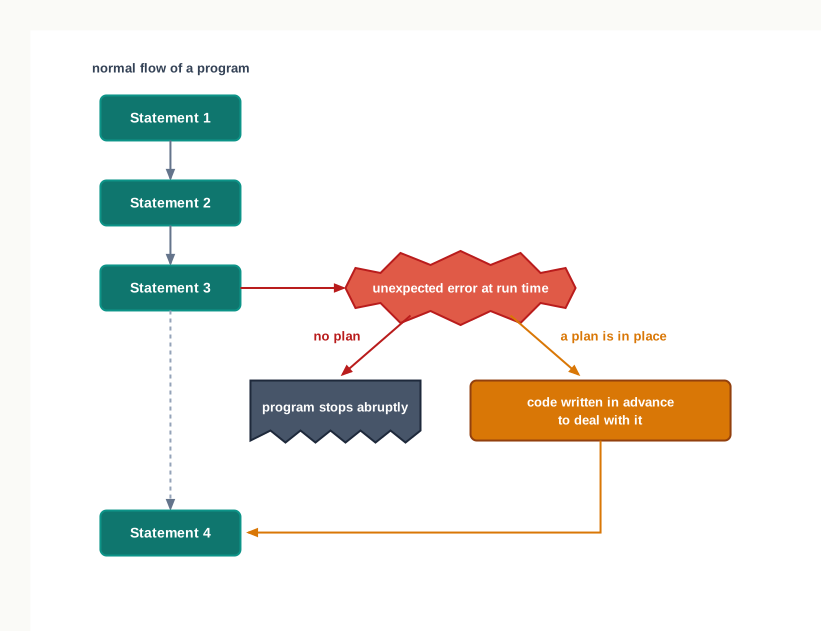
Fig. 1.0 – Program flow with and without a plan for errors.
This chapter answers all five.
1.1 Introduction
You have written enough programs by now to know that a program can disappoint you in more than one way. Sometimes it refuses to start at all. Sometimes it starts, prints two or three lines, and then stops in the middle with a block of red text. And sometimes — the worst case — it runs quietly from beginning to end, prints an answer, and the answer is wrong.
These are three different kinds of trouble, not three moods of the same one. They are caught at different moments, they are reported differently, and each is repaired in a different way. Before you can protect a program against failure, you have to know which of the three you are looking at.
Errors caught before anything runs
The first kind is a syntax error. Every programming language has rules about how a statement may be written — where a colon goes, where brackets must close, how a string is quoted, how a block is indented. Break one of those rules and Python cannot even work out what you are asking it to do.
marks = 78
if marks > 60
    print("Passed")
The colon after the condition is missing. Nothing in this fragment is impossible for the computer to carry out; it is simply not written in Python. Python examines the whole file before executing anything, finds the offending line, and refuses to begin. Notice what this means: the first line, marks = 78, is perfectly correct, but it never runs either. A syntax error is not a partial failure. The program does not start.
Errors that appear only while running
The second kind appears in code that obeys every rule of the language. Python reads it, accepts it, begins executing it — and then meets an operation it cannot actually perform on the values it has been given. This is a run-time error.
n = int(input("Enter a number: "))
print(100 / n)
Read those two lines carefully. There is nothing wrong with them. Division is a legal operation, int() is a legal function, and both statements are correctly written. Whether this program survives depends entirely on what the user types. Type 4 and it prints 25.0. Type 0 and division becomes impossible, because no number multiplied by zero gives 100. Type four and int() is handed something it cannot convert to a whole number. In either of those two cases Python stops at that statement and prints a report naming what went wrong.
The important point is that the error lives in the meeting of the code and the data, not in the code alone. The same two lines are correct for one input and fatal for another. This is why run-time errors cannot be found merely by reading a program, and why they are the errors a program has to be built to survive.
Errors nothing can catch for you
The third kind is a logical error. Here the program is legal, every operation it attempts succeeds, it runs to the last line and prints an answer — and the answer is not the answer to the problem you were solving. Python has no way of knowing this. It was asked to compute something, and it computed exactly that; only you know it was the wrong something.
The three kinds are worth setting side by side, because the question “when is it caught?” separates them cleanly.
The order in Fig. 1.1 makes the same point as a sequence: a program has to pass one gate before it can fail at the next.
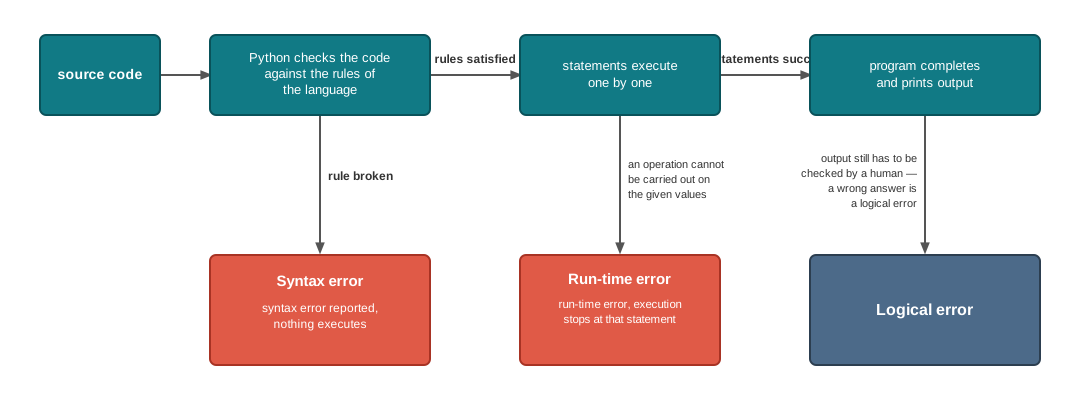
Fig. 1.1 – Execution flow and the three kinds of programming errors.
Of the three kinds, a syntax error is repaired once and is gone, and a logical error is a matter of rethinking your method. Run-time errors are different in kind: many of them cannot be argued away, because they depend on what a user types, on whether a file exists, or on data that arrives from outside the program. A program that must keep working in the real world has to expect them and be ready.
This chapter is about exactly that readiness — how Python signals a run-time problem, what those signals are called, how a programmer can deliberately trigger one, and how a program can catch a problem, deal with it, and carry on instead of collapsing. Section 1.2 begins with the errors Python catches first, so that the boundary between the two is clear.
1.2 Syntax Errors
Before Python can carry out a single instruction, it has to understand what you have written. It reads the source file, breaks each line into its parts, and checks that those parts are arranged in a way the language allows: a colon where a colon is required, brackets that close, quotation marks in pairs, a block indented consistently under its header. This reading and checking is called parsing, and the part of Python that does it is the parser.
If the parser meets an arrangement it cannot make sense of, it reports a syntax error. Because the fault is found while the code is being parsed, syntax errors are also known as parsing errors — the two names describe the same thing from two angles: what rule was broken, and when it was noticed.
Two consequences follow, and both are worth stating plainly.
The first is that a syntax error is never partial. Python parses the whole file before it runs any of it, so a mistake on line 40 stops line 1 from running as well. You will not see the first half of the output followed by an error; you will see no output at all.
The second is that the program does not repair itself. You must find the offending line, correct it, save the file, and run the program again. If a second syntax error is waiting further down, the same cycle repeats — Python reports the first one it meets, not all of them at once.
What the error report looks like depends a little on how you are working — typing statements one at a time at the prompt, or running a saved file.
1.2.1 Syntax Errors in Interactive Mode
When you work interactively, at the >>> prompt of the Python shell — commonly called shell mode — each statement is parsed the moment you finish typing it. A mistake is therefore reported immediately, before you can type anything else.
>>> count = 5
>>> while count > 0
  File "<stdin>", line 1
    while count > 0
                   ^
SyntaxError: expected ':'
The assignment on the first line was accepted; count now holds 5. The second line was rejected, and Python printed a small report instead of waiting for the body of the loop. Read the report from the bottom upwards, because the last line is the most informative.
The last line always has the same two parts: the name of the error, SyntaxError, and a short description of what the parser expected but did not find. Above it, Python repeats the line it was reading and marks the position with a caret. "<stdin>" simply means that the line came from what you typed rather than from a file. The labelled parts are collected in Fig. 1.2.
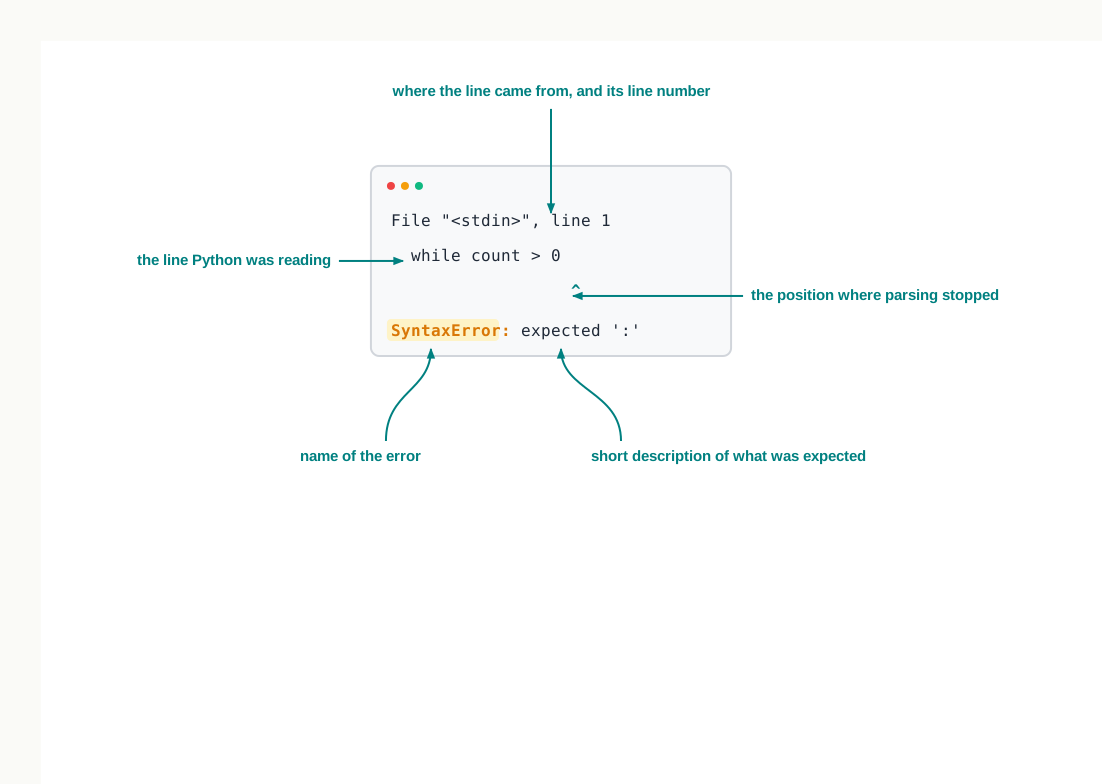
Fig. 1.2 – Anatomy of a syntax error report in the shell.
The description is Python’s attempt to be helpful, and it has grown more helpful over the years. From Python 3.10 onwards a missing colon is reported as shown above; older versions print the vaguer SyntaxError: invalid syntax for the same mistake. The name of the error and the position are the parts you can rely on across versions; the wording of the description is not.
1.2.2 Syntax Errors in Script Mode
Most of your work is done in script mode: the statements are typed into an editor, saved as a .py file, and run as a whole. Here the effect of a syntax error is easier to see, because you can watch a program that has real work to do produce nothing whatever.
Suppose the file greet.py contains these three lines.
name = input("Enter your name: ")
print("Welcome, " + name)
print("Have a good day)
The third line opens a string with a quotation mark and never closes it. Run the file and this is what appears.
  File "/home/student/greet.py", line 3
    print("Have a good day)
          ^
SyntaxError: unterminated string literal (detected at line 3)
The report carries the same parts as before, with the file’s name and path in place of "<stdin>". What matters most, though, is what is missing from the output. The prompt Enter your name: never appeared. The parser rejected the third line before the first line was executed, so the program never asked for anything and never greeted anybody. Correct the line, save the file, and run it again; only then does anything happen.
Different tools present the same information in different ways. Run the file from a command window and you see the plain text above. Run it from an editing environment such as the integrated development and learning environment (IDLE) that comes with Python, and the error is announced in a dialog box carrying the error name in its title and the description inside, while the editor moves the cursor to the offending place in the file, as shown in Fig. 1.3. The presentation differs; the diagnosis does not.
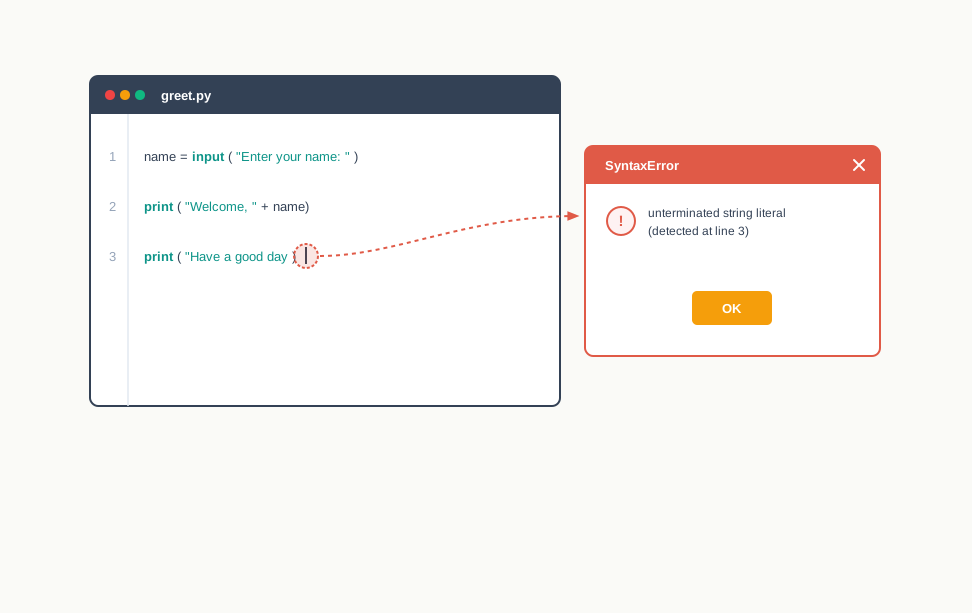
Fig. 1.3 – A syntax error reported in an editor and dialog box.
As with shell mode, the exact wording varies with the version of Python: before 3.10 the same unterminated string is reported as SyntaxError: EOL while scanning string literal, where EOL stands for end of line.
Everything in this section has one thing in common — the mistake is in the writing, and it is caught before the program runs. Once a file parses cleanly, that whole category of trouble is behind you. What lies ahead is the second category from Section 1.1: statements that are written perfectly and still cannot be carried out. Those are the subject of Section 1.3.
1.3 Exceptions
A statement can obey every rule of Python and still be impossible to carry out. 100 / n is a perfectly formed expression, but if n holds 0 there is no number it can produce. open("marks.txt") is a perfectly formed call, but if no file of that name exists there is nothing to open. int(reply) is a perfectly formed conversion, but if reply holds "four" there is no whole number to convert it to.
In each case the fault is not in the writing. It is in the situation the statement meets when it actually runs. Python calls such a situation an exception.
The word is well chosen. These are the exceptional cases — the ones outside the ordinary run of things the program was designed for. A billing program is designed to divide a total by a count; it is not designed for the day the count is zero. An exception is what happens when reality steps outside the design.
What Python does at that moment
When Python meets an operation it cannot complete, it does not simply stop. It builds an object that describes what went wrong — the kind of error, the message that explains it, and the place in the program where it happened. That object is the exception. Creating it and handing it over is described by saying that an exception has been raised.
Once an exception has been raised, the normal flow of the program is interrupted at that exact statement. Python then looks for code written to deal with this kind of error. If it finds such code, the program recovers and carries on. If it finds none, execution stops and Python prints the description for you to read.
Reading an unhandled exception
Consider a small program saved as cost.py. It is written correctly throughout, and the fourth line is the one that will not survive.
print("Bill for the day")
price = 250
quantity = 0
print("Average cost per item:", price / quantity)
print("Thank you")
Running it produces this.
Bill for the day
Traceback (most recent call last):
  File "/home/student/cost.py", line 4, in <module>
    print("Average cost per item:", price / quantity)
ZeroDivisionError: division by zero
Two things in that output deserve attention, and the second is the more surprising.
First, Bill for the day was printed. Unlike a syntax error, an exception does not prevent the program from starting. Everything before the offending statement ran normally. Everything after it — including Thank you — did not run at all, because the flow was interrupted and never resumed. The program stopped in the middle, which is exactly the behaviour the opening story of this chapter began with.
Second, the words Average cost per item: were never printed either, even though they sit in the same statement. Python works out the values to be printed before it prints anything, and the division failed while those values were being worked out. The call to print() was never made at all.
The block of text beginning Traceback is Python’s report on a raised exception, and it is called the traceback. Its parts are labelled in Fig. 1.4.
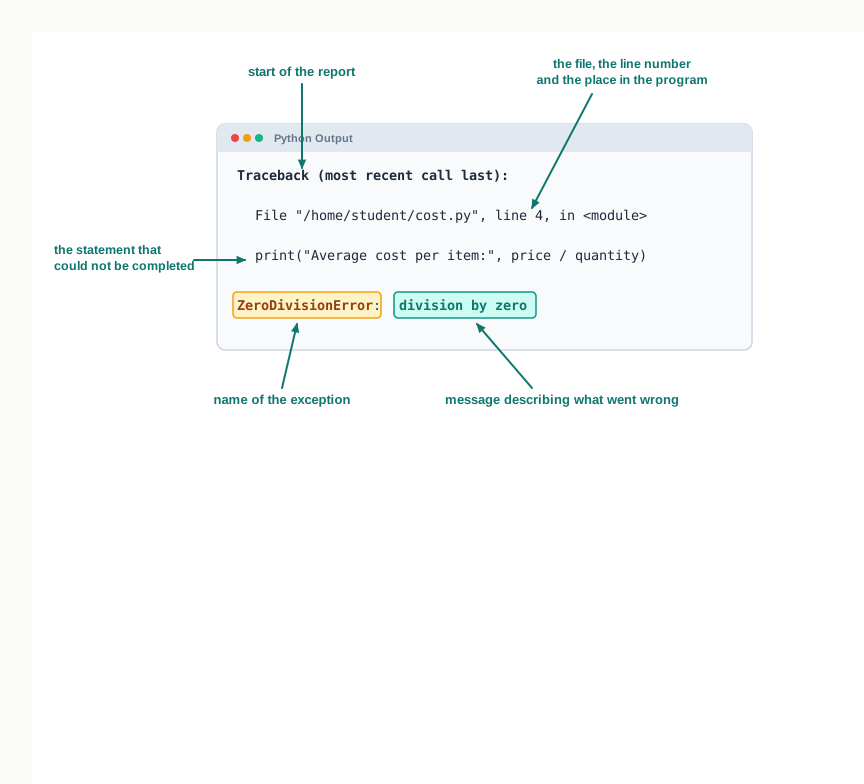
Fig. 1.4 – Anatomy of a Python runtime error traceback.
Read a traceback from the bottom up. The last line is the diagnosis: the name of the exception, ZeroDivisionError, and the message, division by zero. Above it, Python shows where the trouble happened. Here the position is given as <module>, meaning the statement sat in the main body of the file and not inside any function.
Recent versions of Python add a line of marks under the echoed statement, pointing at the exact part of it that failed. The information is the same; only the presentation has been improved.
Whose fault is an exception?
It is tempting to read a traceback as a scolding, but many exceptions are nobody’s mistake. A file may be missing because a user moved it. A conversion may fail because someone typed a word where a number was expected. A division may be by zero because the day’s stock register genuinely recorded no items.
This is why exceptions are handled rather than merely avoided. A programmer designing a program is expected to think ahead about the erroneous situations that may arise during its execution and to include code that addresses them, so that the program does not terminate abnormally in front of its user. Sections 1.6 and 1.7 build exactly that code. Before then, two questions have to be settled: what these errors are called, and how a programmer can raise one deliberately.
1.3.1 Syntax Errors and Exceptions Compared
A student meeting both terms in the same week usually assumes they are opposites — that a syntax error is one thing and an exception is another. The truth is slightly more interesting, and it is worth getting right.
SyntaxError is itself one of Python’s named error types, exactly like ZeroDivisionError. Look again at the report in Section 1.2 and you will see the same shape as the last line of a traceback: a name, a colon, a description. So a syntax error is an exception. What is special about it is when it arises. It is raised by the parser, while the program is being read, rather than during execution.
Every other exception is raised only after the parser has been satisfied. In other words, all the exceptions in the rest of this chapter arise in programs that are syntactically correct. This gives the statement often quoted about the two: every syntax error is an exception, but every exception is not a syntax error.
The last row carries a practical consequence that students sometimes learn the hard way. You cannot protect a program against its own syntax errors. The code you would write to catch such an error sits inside the very file Python is refusing to run, so it never gets the chance to act. A missing colon has to be repaired by you, in the editor, before the program exists at all.
Everything from here on assumes a file that parses cleanly. The remaining question is what can still go wrong inside it — and Python has already given those situations names.
1.4 Built-in Exceptions
Some things go wrong so often that it would be wasteful for every programmer to describe them afresh. Dividing by zero, asking for the eleventh item of a list that holds three, using a name that was never defined, opening a file that is not there — these are not exotic accidents. They happen in every language, in every kind of program, to everybody.
Python therefore comes with a ready-made set of error types for them. These are the built-in exceptions: exceptions that are already defined in Python itself, each with a name and a standard message, so that a program can name the trouble precisely instead of merely announcing that something failed.
The value of a fixed name is easy to miss. Because the name is standard, it means the same thing in every Python program ever written. ZeroDivisionError never means a missing file, and IndexError never means bad data typed by a user. When you write code to respond to failure — as you will from Section 1.6 onwards — you will name the exception you are prepared for, and that response will be applied to that failure and to no other.
The exceptions you will meet most often
Table 1.3 lists the built-in exceptions that occur most commonly in the kind of programs you write. Read the middle column as the general rule and the last column as the sort of statement that triggers it.
Three entries in that table repay a closer look, because Python 3 treats them a little differently from the way their names suggest.
IOError is retained in Python 3 as another name for the more general OSError, which covers failures reported by the operating system. When the particular trouble is a missing file, Python reports it by the more precise name FileNotFoundError, which is a kind of OSError. Since the general name covers the specific one, code written to respond to IOError still responds when a file is not found.
IndentationError is not a separate species either. It is a kind of SyntaxError, which is why a badly indented file is rejected before it runs, exactly like a missing colon.
OverflowError is the entry most often misread. Whole numbers in Python are not limited to a fixed size — an integer simply grows as large as the memory allows, so 2 ** 10000 is computed without complaint. The overflow you can actually meet comes from floating-point arithmetic, where the range is fixed.
>>> import math
>>> math.exp(1000)
Traceback (most recent call last):
  File "<stdin>", line 1, in <module>
OverflowError: math range error
Seeing them raised
The quickest way to become familiar with these names is to provoke them at the >>> prompt and read what comes back. Each of the sessions below is a single statement and its report.
>>> print(total + 40)
Traceback (most recent call last):
  File "<stdin>", line 1, in <module>
NameError: name 'total' is not defined
>>> print("Total: " + 250)
Traceback (most recent call last):
File "<stdin>", line 1, in <module>
TypeError: can only concatenate str (not "int") to str>>> fares = [12, 15, 20]
>>> print(fares[3])
Traceback (most recent call last):
File "<stdin>", line 1, in <module>
IndexError: list index out of rangeThe third session is worth pausing on. The list fares was created successfully on the first line; the exception came only on the second. Positions in a list are counted from 0, so a list of three fares has positions 0, 1 and 2. Asking for position 3 asks for a fare that is not there, and Python will not silently return nothing in its place.
Notice also how much the message tells you. It does not merely say that something is wrong with the list — it says the index is out of range. A traceback is not a rebuke; it is a diagnosis, and reading it carefully usually saves you from guessing.
Two names that are easily swapped
ValueError and TypeError are the pair students confuse most, because both arise when a function is unhappy about what it was given. The distinction is precise, and it is worth fixing now.
>>> int("twelve")
Traceback (most recent call last):
  File "<stdin>", line 1, in <module>
ValueError: invalid literal for int() with base 10: 'twelve'
Here int() was given a string, and a string is exactly what int() expects to convert. The type was right. What was wrong was the particular value: "twelve" spells a number in English, not in digits. Give int() a list instead — a type it cannot convert at all — and the complaint changes.
Exceptions a programmer defines
The built-in set covers the errors the language itself can recognise, but it cannot cover the errors that belong to your problem. Python has no idea that a bus fare should never be negative, that an admission number must have six digits, or that a stock quantity below zero means the register was filled in wrongly. Nothing in those statements is impossible to compute; they are simply wrong for the situation.
For such cases a programmer may create an error type of their own. These are called user-defined exceptions, and they are raised deliberately by the program rather than automatically by the interpreter. The tools for raising them, and for raising built-in exceptions on purpose, are the subject of Section 1.5.
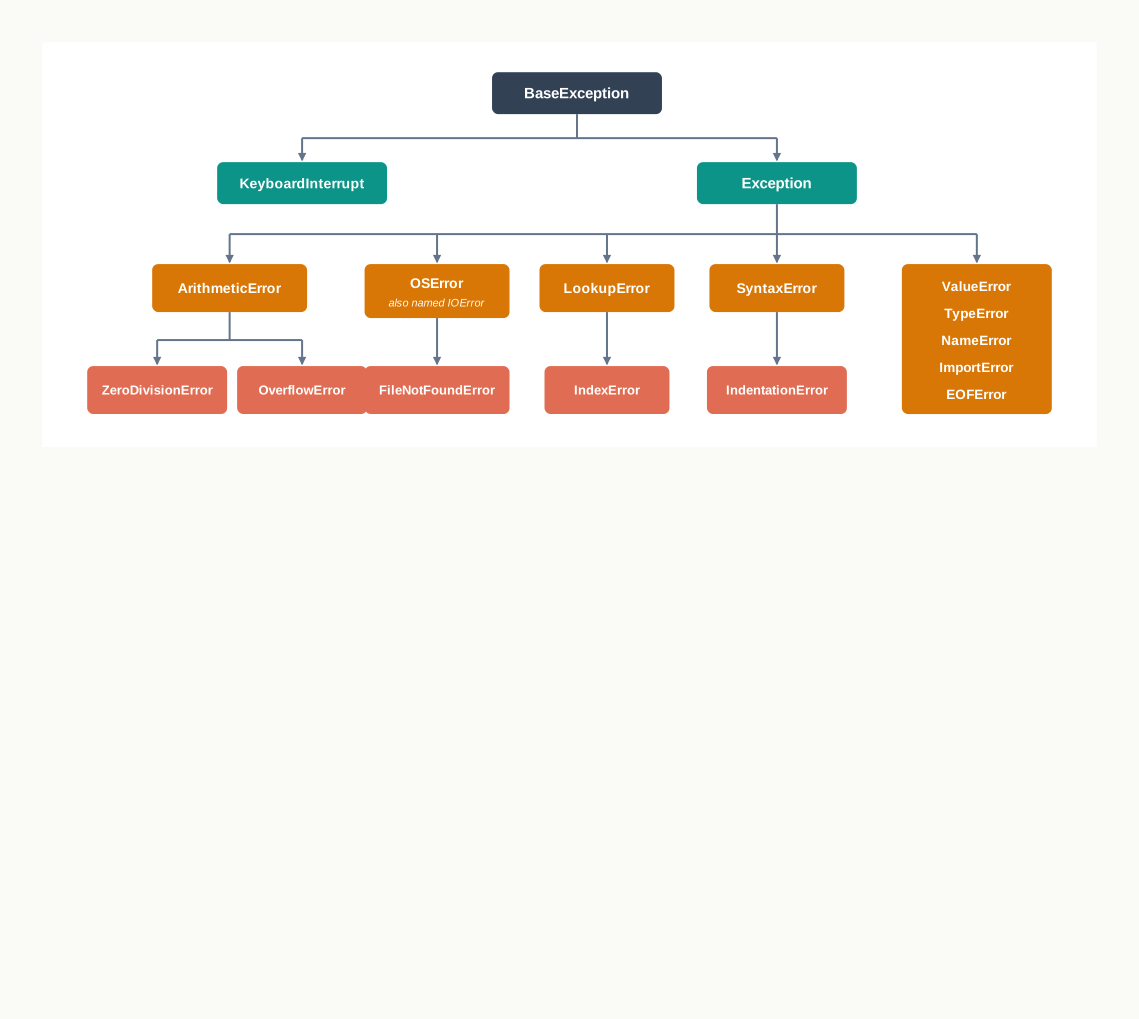
Fig. 1.5 – Hierarchy of common built-in Python exceptions.
Fig. 1.5 shows why the names are not a flat list. ZeroDivisionError is a special kind of arithmetic error, IndexError a special kind of lookup failure, FileNotFoundError a special kind of operating-system failure. This arrangement will matter in Section 1.6, where naming a general error type turns out to cover all the particular ones beneath it.
1.5 Raising Exceptions
Every exception you have seen so far arrived by itself. Python attempted an operation, found it impossible, created the exception object and interrupted the program — all without being asked. That is the interpreter doing what it can: it knows what Python cannot do.
But the interpreter does not know what your problem forbids. A mark of 130 out of 100 is an ordinary integer. A stock quantity of −5 is an ordinary integer. A requested loan of 15 books from a shelf holding 12 is arithmetic that works perfectly well. Python will compute with all three without a murmur, because nothing in the language has been broken. Only you know that these values are impossible in the situation you are modelling.
So Python allows the programmer to raise an exception deliberately, at a moment of their own choosing, using the raise and assert statements. Raising an exception means creating the exception object and interrupting the normal flow of the program so that the situation can be dealt with.
The interruption is the whole point, and it is worth being exact about it. Once an exception is raised, no further statement in the current block of code is executed. Control leaves that block at once and goes looking for code written to handle the exception. If such code exists — Section 1.6 shows how to write it — the program carries on from there. If it does not, the program stops and prints a traceback. Fig. 1.6 shows both endings.
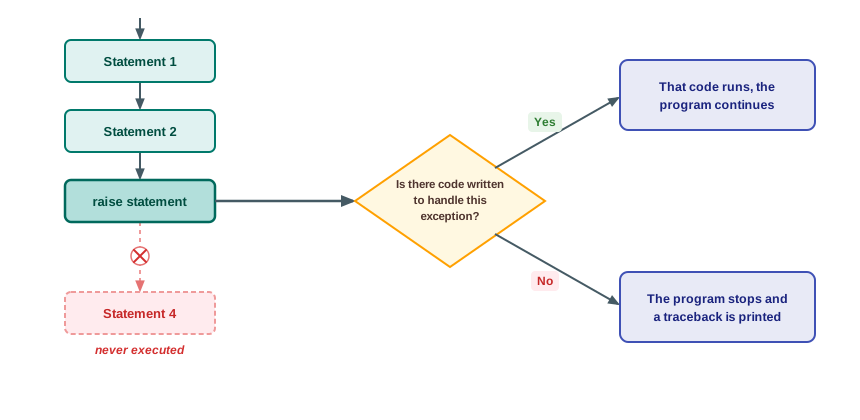
Fig. 1.6 – Execution flow when an exception is raised.
1.5.1 The raise Statement
The raise statement names the exception you want raised, and optionally supplies a message to go with it.
Compare that traceback with the ones in Section 1.4 and you will see that it has exactly the same shape as an exception raised by the interpreter itself. The last line carries the name you asked for, then the message you supplied. A raised exception is not a lesser kind of exception; it is the same mechanism, started by hand.
The message is optional. Leaving it out gives a bare name and nothing after the colon — indeed, no colon at all.
>>> raise IndexError
Traceback (most recent call last):
  File "<stdin>", line 1, in <module>
IndexError
That is legal, but rarely a kindness. The name alone tells the reader which category of trouble occurred; the message tells them which particular case, and in whose terms. ValueError: Mark must lie between 0 and 100 explains itself to a person who has never read your code.
Why raise an exception when the program stops anyway?
At this stage raise may look like an elaborate way of crashing. Two answers, and the second is the important one.
The first is that a program which stops at the fault is far easier to repair than one that carries on. Without the check, the program above would happily record an issue of 15 copies from a shelf of 12 and leave the stock at −3. That wrong number would then be written to a file, printed on a report, and discovered a week later by somebody who has no idea where it came from. Failing early and loudly is a service to whoever reads the program next.
The second is that raising is not the same as stopping. An exception is a signal, and a signal needs a listener. Section 1.6 shows how the code that calls this program’s logic can catch that ValueError, print a polite message to the person at the counter and ask them to enter the request again. The raise states the rule; it does not decide the consequence.
1.5.2 The assert Statement
Some conditions are not really rules about the user’s data at all; they are assumptions the programmer is making. A function that computes an average assumes the list handed to it is not empty. A function that converts a temperature assumes the reading is a physically possible one. If such an assumption is false, the fault lies in the program, not in the world, and the sooner it is discovered the better.
The assert statement exists for exactly this. It tests an expression that ought to be true, and raises AssertionError if it turns out to be false.
An assertion placed at the top of a function is a compact way of stating what that function requires of whoever calls it — and of making sure the requirement is actually met rather than merely hoped for.
Reading a traceback that crosses a function
This traceback carries two File lines where earlier ones carried one, and the extra line is informative. Read from the top: execution was at line 6 of the file, in the main body of the program, which is what <module> means; that statement called to_fahrenheit, and inside it, at line 2, the assertion failed. The File lines therefore list the sequence of calls that led to the failure, in the order they were made, with the place where the trouble actually occurred at the bottom — which is what the words “most recent call last” in the header promise. In a program with functions calling functions, that list is often the quickest route to the real cause.
Two cautions belong with assert. First, an assertion says “this must be true, and if it is not, my program is broken” — it is a self-check, not a way of validating what a user types. A user typing 150 when asked for a mark has not broken your program; they have done something you should expect and handle. Second, assertions can be switched off when Python is run with the -O option, and switched-off assertions test nothing at all. For anything that must be checked in a finished program, use an explicit if and a raise.
1.6 Handling Exceptions
Everything so far has been diagnosis. An exception is raised, the program stops, a traceback appears, and you read it to find out what went wrong. That is fine while you are developing a program at your own desk. It is useless once somebody else is using it.
Think of the person at a school library counter with twenty students in a queue. If the issue program collapses because a student’s roll number was typed with a stray letter, that person is left staring at a traceback about ValueError and has no idea what to do next. What they needed was a line saying “roll number must be digits only — please type it again”, and a program still running.
Writing the code that produces such a response is called exception handling.
1.6.1 Need for Exception Handling
Exception handling is not a Python invention. C++, Java, Ruby and most other modern languages provide the same facility, in much the same shape, because every one of them ran into the same problem: a program that meets an unexpected situation has to do something better than stop.
Consider what the alternative would look like. You could try to test for every bad possibility before it happens.
months = int(input("Number of months: "))
if months == 0:
    print("Number of months cannot be zero")
else:
    print(6000 / months)
For division that works. But look at the very first line, which is the one most likely to fail: if the user types four, the conversion fails before any if of yours gets a chance to run. And you cannot easily test in advance whether a string can be converted to an integer — to find out for certain, you would have to examine it character by character, which means writing the work of int() all over again. Some failures simply cannot be detected until the operation is attempted.
There is a second difficulty, and it is about readability. A program guarded by tests for every possible mishap buries its actual purpose. Ten lines of real work end up wrapped in thirty lines of checking, and a reader can no longer see what the program is for.
Exception handling answers both difficulties, and the reasons are worth stating plainly:
- The risky operation is simply attempted. If it succeeds, nothing is lost; if it fails, the failure is caught. No advance test is needed for situations that can only be discovered by trying.
- Python sorts failures into distinct types, so a separate handler can be written for each one — a different message for a missing file, a bad number and an impossible division.
- The main logic of the program stays in one block and the error-handling code sits in another. The purpose of the program remains readable, because the checking is no longer tangled through it.
- Python keeps track of exactly where the error occurred, so the handler knows which operation failed without your having to record it.
- The same mechanism serves both built-in exceptions and the user-defined ones a programmer creates, so there is one way of dealing with errors rather than two.
1.6.2 Process of Handling Exception
Before writing a handler it helps to know what Python is actually doing when an exception is raised, because the machinery explains several rules that would otherwise look arbitrary.
When an error occurs, the interpreter creates an exception object. This object holds the information about the failure: what type of error it is, a description of it, the name of the file and the position in the program where it happened. Creating this object and handing it over so that it can be dealt with is called throwing an exception.
The object is handed to the runtime system — the machinery of interpreter and operating system that comes into action when a program is put to run and keeps it running. Its job now is to find code that can deal with this particular exception. Such a block of code is called an exception handler.
The search is not random. The runtime system first looks in the function where the exception was raised. If that function contains no handler for this type, it looks in the function that called it; if that has none, it looks in the function which called that, and so on backwards along the chain of calls. This chain — the list of functions that are part-way through executing, each waiting for the one it called to finish — is the call stack. You met it in Section 1.5.2 without the name: the several File lines of a traceback are the call stack, printed out.
When a suitable handler is found, it is executed. This is called catching the exception, and the program continues from there. If the search reaches the bottom of the call stack without finding a handler anywhere, there is nothing more to be done: the program stops and the traceback is printed. Fig. 1.7 sets out the whole sequence.
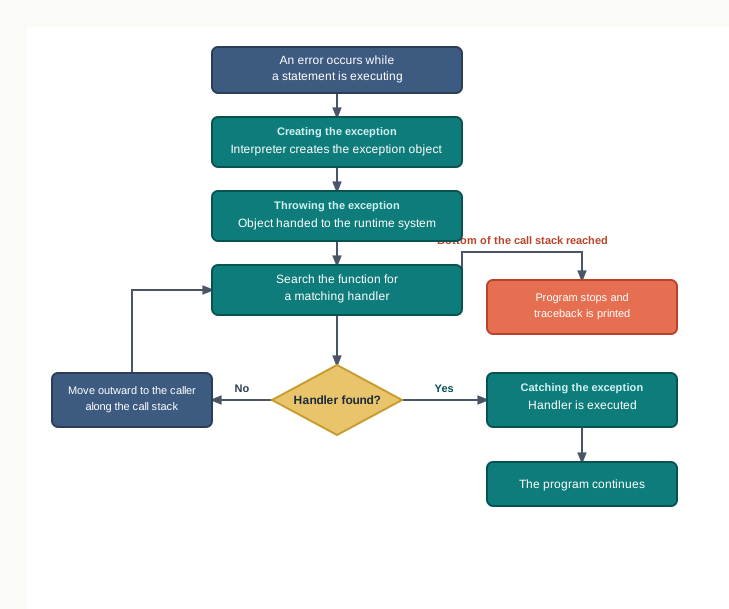
Fig. 1.7 – Exception handling mechanism across the call stack.
1.6.3 Catching Exceptions
An exception is caught by putting the statements that might fail inside a try block, and the code to deal with the failure inside an except block that follows it.
Read the effect once more, because the two halves of it carry the whole idea. The except block is not part of the ordinary flow of the program — it runs only when something has gone wrong. And the try block is not resumed after the handler finishes; the statements it did not reach stay unreached.
1.6.4 Handling More Than One Exception
A single stretch of code can usually fail in more than one way, and the different failures deserve different replies. Python allows a try block to be followed by several except blocks, one for each type.
When an exception is raised, the runtime system compares its type with the name on the first except clause, then the second, and so on, until one matches. The first matching handler runs, and the remaining except blocks are ignored. If none of them matches, the exception is not caught here at all, and the program stops with a traceback exactly as though no handler had been written. Fig. 1.8 shows the search.
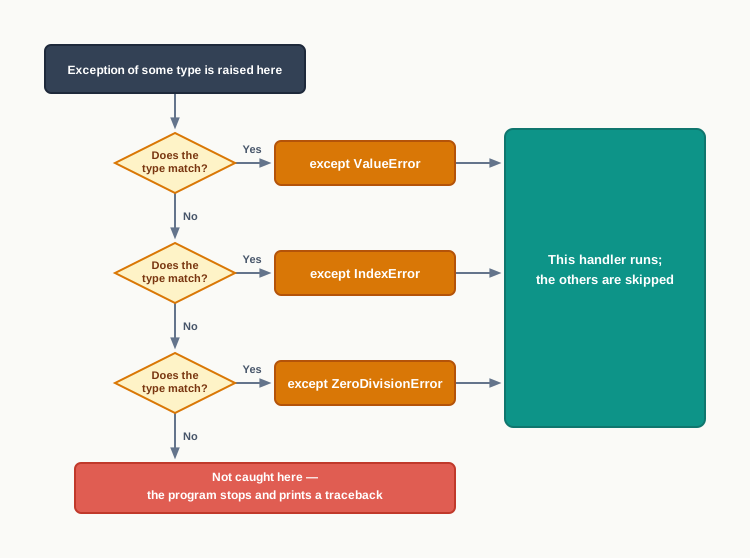
Fig. 1.8 – Sequential matching of multiple except clauses.
An except clause with no name
Even four handlers cannot anticipate everything. Python therefore allows an except clause with no exception name at all, which catches anything that reaches it.
except ZeroDivisionError:
    print("That item has no price recorded")
except:
    print("Something unexpected went wrong")
Because it matches every type, such a clause must be written as the last one. Putting it earlier would make every clause after it unreachable, and Python refuses the arrangement outright.
1.6.5 The try…except…else Clause
There is often work that should be done only if the risky part succeeded — printing the result, writing the record, preparing the receipt. You could put those statements at the end of the try block, and many programs do. Python offers something better: an optional else block, written after all the except blocks, which runs only when the try block completed without raising any exception.
1.7 Finally Clause
Some work has to be done whatever else happens. A shopkeeper closes the cash register at the end of the day whether the day’s takings balanced or not. A student who signs out equipment from the laboratory signs the register back in whether the experiment worked or not. The task is not part of the success; it is part of leaving things tidy.
Programs have such work too, and Section 1.6.2 warned about it. When an exception is raised, the statements between the point of failure and the handler are skipped. If one of those skipped statements was closing a file, saving a total or releasing something the program had taken hold of, that job silently goes undone — and the program leaves a mess behind it.
Python’s answer is a fourth kind of block. A finally clause may be added to a try statement, and the statements inside it are executed in every case: whether an exception was raised or not, and whether it was caught or not. Code of this kind, which puts things back in order regardless of what happened, is called clean-up code.
If it is used, finally is written at the end of the try statement — after all the except blocks and after the else block. That position matches its meaning: everything else has had its chance, and this runs last.
At this stage a fair question arises: the class average program in Section 1.6.3 printed Calculation over at the end without any finally clause at all, simply by putting the statement after the try construct. Why is a whole new kind of block needed?
The answer is that a statement written after the try construct runs only if execution actually reaches it. When an exception is caught, it does. When an exception is not caught, execution never gets that far — and that is exactly the case Section 1.7.1 examines.
1.7.1 Recovering and Continuing with the finally Clause
Suppose the try block raises an exception for which no except clause has been written. From Section 1.6.4 you know what happens to the exception: it is not caught here, so the search moves outwards along the call stack, and if nothing anywhere handles it the program stops with a traceback.
What happens to the finally block in that case? It still runs — and it runs first, before the exception continues on its way.
So finally does not catch the exception and does not cancel it. Once the clean-up has been carried out, the exception continues to be raised, and Python looks for a handler further out: in an enclosing try statement, if the failure happened inside one, or otherwise in the default handler, which prints the traceback and ends the program. This is the difference between except and finally stated exactly — an except clause deals with an exception and the program carries on afterwards, while a finally clause merely gets some work done on the way past.
That behaviour is what makes finally trustworthy. If it could swallow an exception, you would have to think about what it might be hiding every time you used one. Because it cannot, you can put clean-up in it freely, knowing that the error will still be reported to whoever needs to see it.
There is a matching case worth stating for completeness. When the exception is caught by one of the except clauses, the finally block runs after that handler, and execution then continues with the statement after the whole construct in the ordinary way. In the sales program of Section 1.7, that is precisely what happened in the second run.
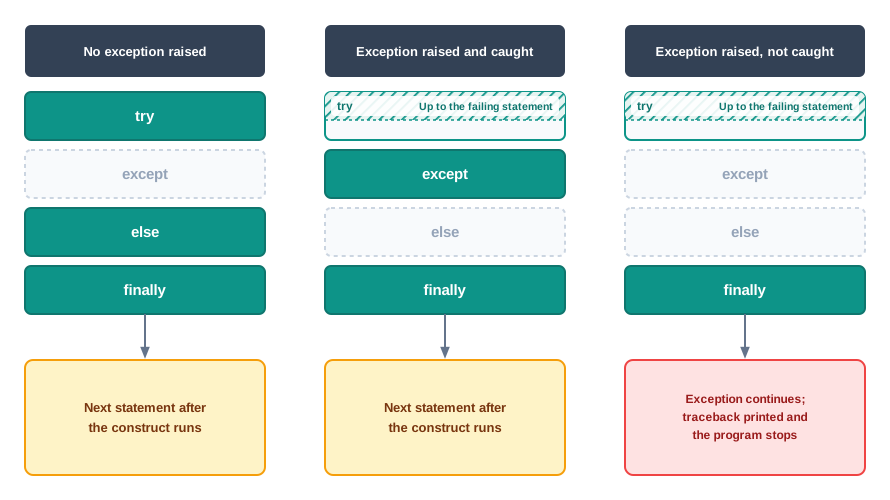
Fig. 1.9 – Execution paths in a complete try statement.
1.8 Summary
A program can fail in three distinct ways. A syntax error is a statement not written according to the rules of Python, and is detected before execution begins. A run-time error occurs in a correctly written statement that cannot be carried out on the values it meets. A logical error runs to completion and prints a wrong answer, and only a human can detect it.
Syntax errors are also called parsing errors, because they are found while Python is parsing the code — working out its structure — and parsing finishes before execution starts. Python reports the file and line, marks the place where it lost track, and names the error on the last line.
In interactive mode each statement is checked and run on its own, so a faulty line does not disturb the statements already entered. In script mode the whole file is parsed first, so a syntax error anywhere in the file prevents every statement in it from running.
Indentation is part of Python’s grammar, so wrong indentation is reported as
IndentationError, which is a particular kind ofSyntaxError.An exception is an error that occurs during the execution of a syntactically correct program and disrupts its normal flow. In Python an exception is an object representing the error, carrying its type and a description of it. When such an object is created and the normal flow is interrupted, the exception is said to have been raised.
When an exception is raised and nothing deals with it, Python prints a traceback. It is read from the bottom upwards: the last line gives the exception name and a description, and the lines above give the file, the line number and the statement being executed. Where functions are involved, those lines list the sequence of calls that led to the failure, most recent last.
An unhandled exception abandons the rest of the program. Every statement already executed has taken effect, and everything the program still had to do is left undone.
SyntaxErroris itself an exception, so every syntax error is an exception; but most exceptions are not syntax errors, because they are raised by programs whose code has already been accepted as correctly written. A syntax error cannot be handled inside its own program, since the program never begins; a run-time exception can be, because the program is alive when it occurs.Built-in exceptions are the exception types already defined in Python for commonly occurring errors. The ones met most often are
SyntaxError,ValueError,IOError,KeyboardInterrupt,ImportError,EOFError,ZeroDivisionError,IndexError,NameError,IndentationError,TypeErrorandOverflowError.Some exception names denote a particular kind of a broader one:
IndentationErroris a kind ofSyntaxError,FileNotFoundErroris a kind ofOSError— for whichIOErroris another name — andModuleNotFoundErroris a kind ofImportError.A programmer may also define exception types of their own to represent situations that are wrong for the problem though perfectly legal in Python. These are called user-defined exceptions.
Raising an exception means signalling an error condition so that the normal flow is interrupted at that point. Once an exception is raised, no further statement in the current block is executed. Programmers raise exceptions deliberately with the
raiseandassertstatements.The
raisestatement names the exception type to be raised and may carry a message, generally a string, which appears after the colon in the traceback. What is raised must be an exception object; a bare string cannot be raised.The
assertstatement tests a condition that the programmer believes must be true. If the condition is true nothing happens; if it is false,AssertionErroris raised with the optional message attached. Assertions state a program’s assumptions and are usually written at the top of a function, but they can be switched off when Python is run with the-Ooption, so they are not a substitute for validating what a user types.Exception handling is the writing of code that deals with an exception when it is raised, so that the program produces a suitable message or action and continues in a controlled way instead of terminating abnormally. It is needed because some failures cannot be tested for in advance, and because handling keeps the error-handling code separate from the main logic of the program.
When an error occurs, the interpreter creates an exception object holding the type, the description and the position of the error, and hands it to the runtime system; this is called throwing the exception. The runtime system searches for an exception handler, starting in the function where the exception was raised and moving outwards along the call stack — the chain of functions waiting for the ones they called. Executing a matching handler is called catching the exception. If the search reaches the bottom of the call stack without a match, the program stops and the traceback is printed.
Statements that might fail are placed in a
tryblock, and the response in anexceptblock. If no exception is raised, the wholetryblock runs and theexceptblock is skipped. If the named exception is raised, the rest of thetryblock is abandoned at once and theexceptblock runs instead. A handler protects only the statements inside its owntryblock.One
tryblock may be followed by severalexceptblocks. The type raised is compared with each in turn and the first match runs, the rest being skipped; if none matches, the exception is not caught there. Where one exception type is a particular kind of another, the specific one must be written first.An
exceptclause written with no exception name catches every type, and must therefore be the last clause. It is a last resort, because it also swallows the programmer’s own mistakes and tells the user nothing useful.An optional
elseblock, written after all theexceptblocks, runs only when thetryblock raised no exception. It holds the work that belongs to the successful case, which keeps thetryblock down to the statements actually under suspicion.An optional
finallyblock, written last of all, runs in every case — after a successfultryblock, after a handler has run, and even when no handler was found. It holds clean-up code, most commonly the closing of a file that was opened.A
finallyblock does not catch or cancel an exception. When nothing has handled the exception, the clean-up is carried out first and the exception then continues to be raised, so the traceback appears afterwards and the statements following the whole construct are never reached.
1.9 Key Terms
assertstatement — a statement that tests a condition the programmer believes must be true, and raisesAssertionErrorif it turns out to be false.built-in exception — an exception type already defined in Python for a commonly occurring kind of failure, raised automatically by the interpreter.
call stack — the chain of functions that are part-way through executing, each waiting for the one it called to finish; the runtime system searches it outwards when looking for a handler.
catching an exception — finding a handler that matches the raised exception and executing it, so that the program can continue in a controlled way.
clean-up code — statements that put things back in order whatever the outcome, such as closing a file; in Python they are placed in a
finallyblock.elseclause — the optional block of atrystatement that runs only when thetryblock raised no exception.EOL — end of line; the point at which a line of source code finishes, named in some older syntax error messages.
exceptblock — the block holding the code that deals with a particular type of exception raised in thetryblock before it.exception — an error that occurs during the execution of a syntactically correct program and disrupts its normal flow; in Python it is an object carrying the error’s type and description.
exception handler — a block of code written to deal with a particular type of exception when it is raised.
exception handling — the process of writing code that deals with an exception, so that the program produces a suitable message or action instead of terminating abnormally.
exception object — the object the interpreter creates when an error occurs, holding the type of the error, a description of it and the position at which it happened.
finallyclause — the optional block of atrystatement, written last of all, whose statements are executed in every case, whether or not an exception was raised and whether or not it was handled.IDLE — integrated development and learning environment; the editing and shell environment supplied with Python.
logical error — an error in which the program runs to completion without complaint but computes the wrong thing, detectable only by a human checking the output.
parsing — the reading and checking of source code to work out its structure, carried out by Python before execution begins.
parsing error — another name for a syntax error, so called because it is found while the code is being parsed.
raisestatement — a statement that deliberately raises an exception of a named type, optionally carrying a message.raising an exception — signalling an error condition so that the normal flow of execution is interrupted at that point and control passes to code written to deal with it.
run-time error — an error in a correctly written statement that cannot be carried out on the values it meets while the program is running.
runtime system — the machinery of interpreter and operating system that comes into action when a program is put to run, and which searches for a handler when an exception is thrown.
script mode — working by saving statements in a
.pyfile and running the file, so that the whole file is parsed before any statement executes.shell mode — working statement by statement at the
>>>prompt of the Python shell, each statement being checked and run as it is entered; also called interactive mode.syntax error — an error caused by writing a statement that does not follow the rules of the Python language, detected before execution begins.
throwing an exception — creating the exception object and handing it to the runtime system so that a handler can be found for it.
traceback — the block of text Python prints when an exception goes unhandled, read from the bottom upwards, giving the exception name and description and the sequence of calls that led to the failure.
tryblock — the block holding the statements that are suspected of being able to raise an exception, and which the handlers after it protect.user-defined exception — an exception type created by the programmer to represent a situation that is wrong for the problem being solved although perfectly legal in Python.
1.10 Points to Ponder
A syntax error and an unhandled exception both stop a program, yet only one of them can be dealt with from inside the program itself. What is it about the moment at which each is detected that gives a program the power to defend itself against one and not the other?
Python could have chosen to report a failed operation by returning a special value — say −1 from a division that could not be done — instead of raising an exception and interrupting the program. Some older languages did exactly that. What would a programmer gain from such a design, and what would be lost?
A
finallyblock cannot cancel the exception it cleans up after. Is that a restriction on whatfinallycan do, or is it the very reasonfinallycan be trusted?An
exceptclause with no name catches every kind of exception, and Python allows it while also giving you good reasons never to reach for it first. When is a language right to permit something it expects you to use sparingly, rather than forbidding it outright?Handling an exception lets a program carry on after a failure. But consider a program that was half-way through writing a record when the failure occurred. Is a program that continues always better than one that stops, and how would you decide which of the two a particular situation calls for?
An assertion states something the programmer believes can never be false, and it can be switched off when the program is run with the
-Ooption. If a check is worth writing at all, does it ever make sense to write it in a form that someone can turn off later?
1.11 Objective Questions
- Which of the following is detected before a program begins to execute? [1 mark]
ZeroDivisionErrorIndentationErrorNameErrorValueError
- Which block of a
trystatement is executed only when no exception has been raised? [1 mark]exceptelsefinallyassert
- An
exceptclause written without any exception name must be placed [1 mark]- immediately after the
tryblock - before all the named
exceptclauses - after all the named
exceptclauses - after the
finallyblock
- immediately after the
- Which exception is raised when the statement
age = int("12.5")is executed? [1 mark]TypeErrorValueErrorSyntaxErrorIndexError
- Assertion (A): The statements in a
finallyblock are executed even when the exception raised in thetryblock is not handled by anyexceptclause. [1 mark] Reason (R): Afinallyblock catches every exception that no other clause of thetrystatement has caught.- Both A and R are true, and R is the correct explanation of A.
- Both A and R are true, but R is not the correct explanation of A.
- A is true, but R is false.
- A is false, but R is true.
- Assertion (A): An error in the indentation of a program is reported before any statement of that program is executed. [1 mark] Reason (R): Indentation is part of the grammar of Python, so wrong indentation is found while the code is being parsed.
- Both A and R are true, and R is the correct explanation of A.
- Both A and R are true, but R is not the correct explanation of A.
- A is true, but R is false.
- A is false, but R is true.
- Match each exception in Column A with the situation in Column B that raises it. [1 mark]
| Column A | Column B |
|---|---|
a. EOFError |
i. A module named in an import statement cannot be brought in. |
b. IndexError |
ii. A position used on a sequence lies outside its valid range. |
c. NameError |
iii. input() reaches the end of the input with nothing to read. |
d. ImportError |
iv. A name is used before any value has been given to it. |
Fill in the blank: the block of text Python prints when an exception is left unhandled, which is read from the bottom upwards, is called a ____________. [1 mark]
State whether the following is true or false: the statements written after a complete
try…except…finallyconstruct are executed even when the exception raised was matched by none of theexceptclauses. [1 mark]Write the full form of each of the following abbreviations: (a) EOL (b) IDLE. [1 mark]
1.12 Check Your Concepts
Define an exception, and give one example of a situation in a correctly written program that raises one. [2 marks]
Name any four built-in exceptions of Python and state, in one line each, when they are raised. [2 marks]
Differentiate, in two points, between throwing an exception and catching an exception. [2 marks]
Differentiate between a syntax error and a logical error, giving one short example of each. [3 marks]
Write the general syntax of the
try…except…elsestatement, and state in one line what each of its three blocks is for. [3 marks]A single
tryblock is followed by threeexceptclauses. Explain how Python decides which of the three is executed, and state what happens when the exception raised matches none of them. [3 marks]Give reasons why clean-up work such as closing a file is placed in a
finallyblock rather than written after the wholetryconstruct. Support your answer by describing what happens in each of the two arrangements when an exception is raised for which no handler has been written. [4 marks]Write a function
safe_divide(a, b)that returns the quotient ofaandb, and returns the string"Division not possible"whenbis zero. Use exception handling rather than anifstatement, and explain in one line why the function still works whenais zero. [4 marks]A program reads a mark and must reject any value that does not lie between 0 and 100. Explain how this rejection can be written using a
raisestatement, and how it can be written using anassertstatement. Then give two reasons for preferringraisein a program that will be used by somebody other than its author. [5 marks]
1.13 Output & Debugging
- Write the output produced by the following code. [2 marks]
print("Start")
try:
    values = [4, 8, 15]
    print(values[3])
except IndexError:
    print("Out of range")
finally:
    print("Done")
print("Stop")- Write the output produced by the following code, and state which of the four blocks was skipped. [2 marks]
try:
    n = int("50")
    print(100 / n)
except ValueError:
    print("Bad number")
else:
    print("Computed")
finally:
print("Closed")- The following code does not run at all. Identify the single fault, state the message Python reports, and rewrite the code correctly. [2 marks]
try:
    total = int(input("Enter total: "))
    print(1000 // total)
except:
    print("Invalid entry")
except ValueError:
print("Enter a whole number")- Consider the following code. [3 marks]
marks = [55, 62, 70]
i = 0
while i <= len(marks):
    print(marks[i])
    i = i + 1
a. Name the exception it raises.
b. State how many values are printed before the exception is raised.
c. Correct the code so that it prints all three marks and raises nothing.- Consider the following function. [2 marks]
def middle(data):
    return data[len(data) // 2]
a. State in one line what the function returns in general.
b. Name the exception raised by the call `middle([])`.1.14 Case-Based Questions
- The counter clerk of a school library uses the program below to work out the fine on a book returned late. The fine is ₹2 for each day. [4 marks]
print("Library counter")
try:
    roll = int(input("Roll number: "))
    days = int(input("Days late: "))
    fine = days * 2
    print("Fine for roll", roll, "is", fine)
except ValueError:
    print("Entries must be whole numbers")
finally:
    print("Entry recorded")
a. Write the complete output produced when the clerk types `12A` at the first prompt. (2 marks)
b. The clerk wants the two statements that work out and print the fine to be executed only when both entries were accepted. Name the clause into which they should be moved, and give one reason for moving them. (1 mark)
c. The program accepts a negative number of days late, which is impossible. Name the statement you would use to reject such a value, and state where in the program it would be placed. (1 mark)- A bus depot keeps the fare of each of its four routes in a list, in which a fare of 0 means that the fare for that route has not yet been fixed. A clerk enters a route number and the amount a passenger is carrying, and the program prints how many whole tickets can be bought. [5 marks]
fares = [15, 22, 0, 30]
route = int(input("Route number: "))
money = int(input("Amount: "))
print("Tickets:", money // fares[route])
a. Name the exception raised when the clerk enters route number 4, and the exception raised when the clerk enters route number 2. (2 marks)
b. Rewrite the program so that each of these two situations produces a message of its own, and so that the line `Counter closed` is printed in every case, including a run in which nothing goes wrong. (3 marks)1.15 Programming Practice
Write a complete program that reads a percentage entered by a user and prints
Valid entryonly when the value lies between 0 and 100. Use anassertstatement to carry out the check. Submit the complete program and state the exception name that appears when 145 is entered. [2 marks]Write a complete program that reads a number and prints its square root, using the
mathmodule. A negative number must not stop the program; it must produce the messageSquare root of a negative number is not definedand the program must then printCalculation attemptedbefore it ends. Submit the complete program, and show the output for the inputs 49 and −9. [3 marks]Write a function
average(values)that returns the average of a list of numbers, and raisesValueErrorwith a suitable message when the list handed to it is empty. Then write a short program that calls the function twice — once with the list[40, 55, 70]and once with an empty list — and handles the second call so that the program prints a message and finishes normally. Submit the function, the calling program and an identifier description table. [4 marks]A small shop wants a program that reads the name of an item, its opening stock and the quantity sold during the day, and prints the closing stock. The program must reject an entry that is not a whole number with one message, and reject a quantity sold that is larger than the opening stock with a different message, and must print
Stock register updatedin every case, whether the entries were accepted or not. Submit the complete program together with an identifier description table, and state one input you tested it with that is not mentioned in this question. [5 marks]