In 1970, a mathematician working at IBM’s San Jose Research Laboratory published a paper with a plain title: A Relational Model of Data for Large Shared Data Banks. Its author, Edgar F. Codd, was not complaining about storage space or about slow machines. He was complaining about something quieter. In the systems of that time, a program had to know exactly how the data sat on the disk — in what order, in what layout, in which file. Change the layout, and every program that touched it broke. Ask a question nobody had planned for, and somebody had to write a fresh program to answer it.
Codd’s proposal was almost too simple to sound serious. Store the data as plain tables of rows and columns. Let each row stand for one real thing. Let the values themselves — not the positions on the disk — say how one table connects to another. Then a person could ask a question of the data without knowing anything about how it was stored.
It took years for anyone to build it, and Codd’s own employer was slow to be convinced. Today almost every school record, bank ledger, railway reservation and shop bill in the country rests on that idea. This chapter is about how it works, and about what it replaced.
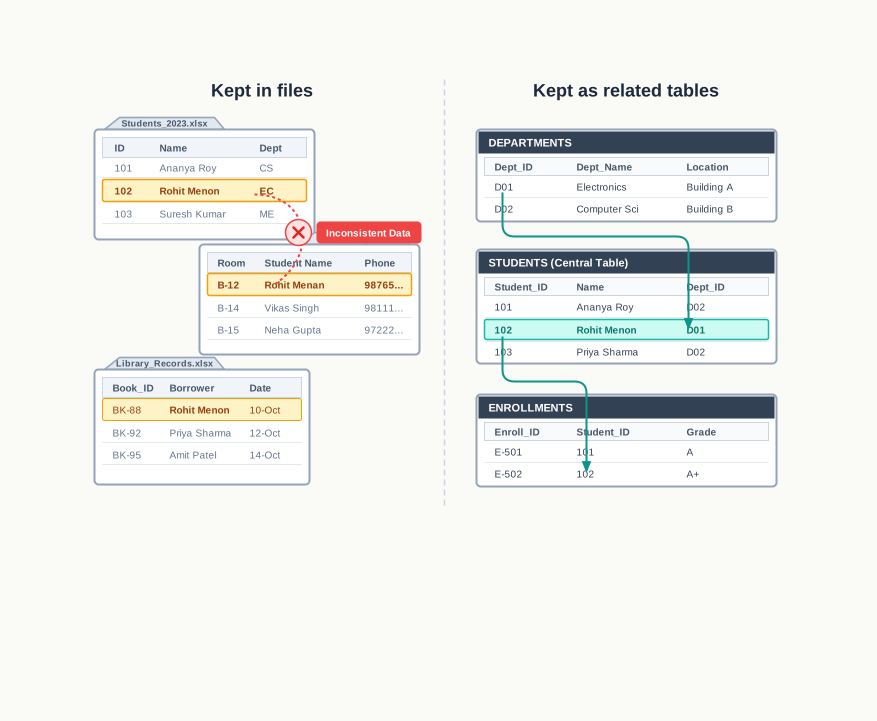
Q1. A school already keeps its records as files on a computer. What is still missing? Q2. The same guardian’s name appears in two different registers. Why is that a real problem, and not just extra writing? Q3. What decides whether a column can be trusted to pick out one row and no other? Q4. Can two columns together do the job that no single column can do alone? Q5. How does one table know that a value stored in it refers to a row sitting in another table?
You cannot answer these yet. By the end of this chapter, you will be able to answer all five.
8.1 Data, Records and the Need to Manage Them
Every school office runs on paper that nobody outside the office ever sees. Somewhere in a cupboard there is a register of admission numbers, another of fee receipts, another of library books, another of bus routes. None of it is glamorous, and all of it matters: the moment one page is missing, a real student cannot be given a bus pass or a leaving certificate.
Take the transport office of a school that runs twelve bus routes for about eight hundred students. Three separate things have to be written down and kept. First, who each student is — admission number, name, class and section. Second, where each student gets on — the stop, the route it belongs to, and the time the bus reaches it. Third, what actually happened each morning — which students boarded and which did not.
These are facts about the real world, and facts of this kind are what we call data. A single fact on its own — the number 4207, or the word Rohit — tells you very little. Data becomes useful only when related facts are kept together and given names, so that you can tell which fact belongs to whom.
How a register is organised
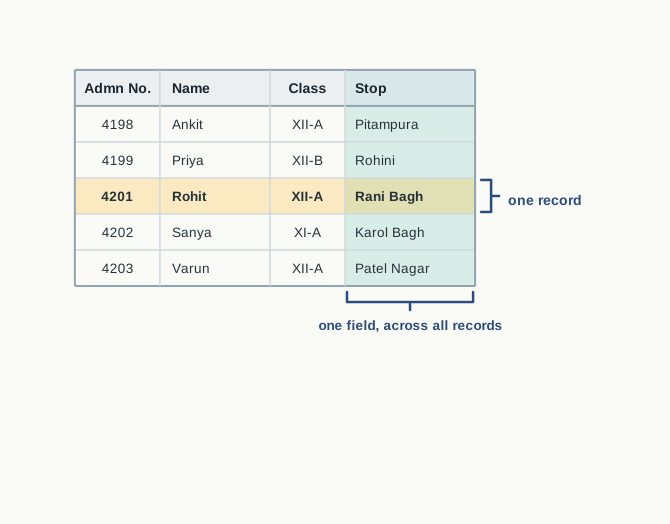
Open any well-kept register and you will find the same arrangement. The page is ruled into columns, and each column has a heading written once at the top: Admn No., Name, Class, Stop. Each line below holds the details of one student, one line per student.
Each such line is a record — the complete set of facts about one person or one thing. Each column of that line is a field — one named item of data within the record. The record for a student is the whole line; the Stop field is one entry on it.
A record is the complete collection of related data items about a single person, object or event. Each individual data item within a record is called a field, and every record in a register or file has the same set of fields.
This is a genuinely good design, and it was invented long before computers. Naming the columns once at the top means the meaning of a value is fixed by its position, so nobody has to write “class” against every entry. Reading down a column compares one field across all students; reading across a row gives one student completely.
8.1.1 Limitations of Manual Record Keeping
Written registers work well for a small number of records maintained by one careful person. They begin to fail as soon as the volume grows or the number of registers increases. Consider the transport office again. If the bus attendant marks each of the 800 students as boarded or not boarded on every one of the 24 working days in a month, that is \(800 \times 24 = 19200\) entries to be written by hand every month, in one register.
Five weaknesses show up, and all five are about the method, not about the person doing the work.
Repeated entry of the same data. When the academic year changes, every student’s admission number, name and stop must be copied afresh into the new register. Nothing about the student has changed; the writing is pure duplication of effort.
Errors that creep in while copying. A name copied by hand from one register to another may be spelt differently, a line may be skipped, a stop code may be misread. The two registers now disagree, and neither of them announces the fact.
Loss and damage. A register is a single physical object. If it is lost, soaked or eaten by insects, the data is gone. There is no second copy unless somebody wrote one out by hand.
Mistakes in manual calculation. Counting how many mornings a particular student actually boarded means running a finger down 24 pages and keeping a tally in your head. It is slow, and it is easy to get wrong.
Slow and rigid searching. A register can be searched conveniently only in the order it was written. If the boarding register is arranged by date, a question such as “on which days did the student with admission number 4207 miss the bus?” forces you to read the whole register.
The last point is the one worth pausing on, because it is the deepest. The order in which data is stored silently decides which questions are cheap to answer and which are expensive. A register arranged by date answers date questions in seconds and student questions in an hour.
Visit the office of your school, or a small shop near your home, where some record is still kept on paper — a stock register, a delivery book, an issue register. Note down its column headings, and write two questions about that data which the register can answer quickly and two which it cannot.
8.1.2 Moving the Records on to a Computer
The obvious response is to stop writing and start typing. Instead of registers, the transport office keeps its data on a computer: one store of student details, another of stop and route details, another of the daily boarding record.
Doing this removes the first four weaknesses almost at once. Details need not be copied out by hand each year, so copying errors do not arise. A backup copy costs nothing but disk space, so a single accident no longer destroys the data. Counting is done by a program, so the arithmetic is exact.
What a computerised store must allow
Whatever form the data is finally stored in, the transport office needs five ordinary operations, and any arrangement that cannot do all five is not fit for the job.
- Add the details of a student who has newly joined the bus service.
- Find the details of any student, stop or day, without reading everything else.
- Modify a stored value when a student changes stop or a bus timing is revised.
- Delete the details of a student who has left the school.
- Carry forward existing details into the next year’s records without retyping them.
Notice that the fifth weakness — searching — has not been listed as solved. Putting data on a computer does not by itself decide how it will be organised or how it will be reached. That question has more than one answer, and the answers differ enormously in what they cost.
The rest of this chapter follows the two main answers in the order in which computing actually discovered them. The first is to keep the data in ordinary files, one file for each register, and to write programs to read them. The second is to hand the whole job to a piece of software built for it. We begin with files, because their difficulties are what made the second answer necessary.
8.2 File System
The simplest way to move a register on to a computer is to keep it as a file. A file is a named container of data held on a storage device — a hard disk, a solid state drive, a pen drive — and it survives after the computer is switched off. That last property is what makes it useful for records: what you wrote last July is still there this July.
Files hold all sorts of contents. A file may contain plain text, comma separated values, the source code of a program, a picture, an audio recording or a web page. What decides the kind of file is not where it is stored but how its contents are arranged and what software understands that arrangement.
The part of the operating system that creates files, gives them names, arranges them in folders and keeps track of where their contents actually sit on the disk is called the file system. When a school decides to keep its registers “on the computer” without any further software, what it is really using is the file system.
A file is a named collection of data stored on a storage device, which continues to exist after the program that created it has ended. The file system is the part of the operating system that stores files, names them, organises them into folders and locates their contents on the storage device.
A file system will store your data faithfully and give it back to you byte for byte. What it will not do is answer questions about the data. A file does not know that its third column holds a pickup time, and it has no mechanism of its own for finding all the records with a particular value in that column. Anything of that sort has to be done by an application program — a program written specially to open the file, read it, and extract or arrange whatever is wanted. If the transport office wants a monthly boarding report, somebody has to write the program that produces it.
8.2.2 Limitations of a File System
A file system copes well while there are two or three files and one or two people using them. It becomes progressively harder to manage as the number of files grows and the volume of data increases. Six limitations account for most of the trouble, and the two tables above show all six.
Difficulty in access
Files provide no mechanism of their own for retrieving data. Every question has to be turned into an application program that opens the file and works through it. Worse, the programs have to be written in advance, and the person writing them cannot anticipate every question that will ever be asked. The day the principal asks for a list of students on route R1 who missed the bus more than once in July, there is no such program, and one has to be written before the question can be answered.
Data redundancy
Data redundancy means that the same data is stored in more than one place. Table 8.1 and Table 8.2 both store SName, so every student’s name is held twice over. There is a second, subtler duplication inside Table 8.1 alone: the students with admission numbers 4201 and 4204 board at the same stop, so Rani Bagh, 06:50 and R3 are written twice; the same happens for Model Town. In a file system this is very hard to avoid, because the alternative is to leave the data out of a file that genuinely needs it.
Redundancy wastes storage, but that is the least of it. Its real cost is that it creates several copies of one fact, and copies can disagree.
Data inconsistency
Data inconsistency occurs when the same fact, stored in more than one place, does not match across those places. Suppose the office corrects the spelling of a student’s name in the STUDENT file. Unless the same correction is made in the BOARDING file, the two files now hold two different names for admission number 4203. A program that reports boarding data will print one spelling and a program that prints bus passes will print the other, and neither program can tell that anything is wrong.
The same danger applies to deletion. When a student leaves the school, the record must be removed from both files. Remove it from one only, and the remaining file carries a boarding record for a student the school no longer has.
Redundancy and inconsistency are closely linked but they are not the same thing, and it is worth being exact about the difference.
Table 8.3 – Data redundancy vs data inconsistency | Feature | Data redundancy | Data inconsistency | |—|—|—| | What it means | The same data is stored in more than one place | Copies of the same data do not match one another | | When it arises | At the time the files are designed and filled | At the time the data is modified or deleted | | Immediate cost | Extra storage space and extra data entry | Wrong answers from programs, with no warning | | Relationship | Can exist without causing inconsistency, if every copy is always updated | Cannot arise unless redundancy is present first | | Detected by | Inspecting the design of the files | Comparing the files against each other |
Data isolation
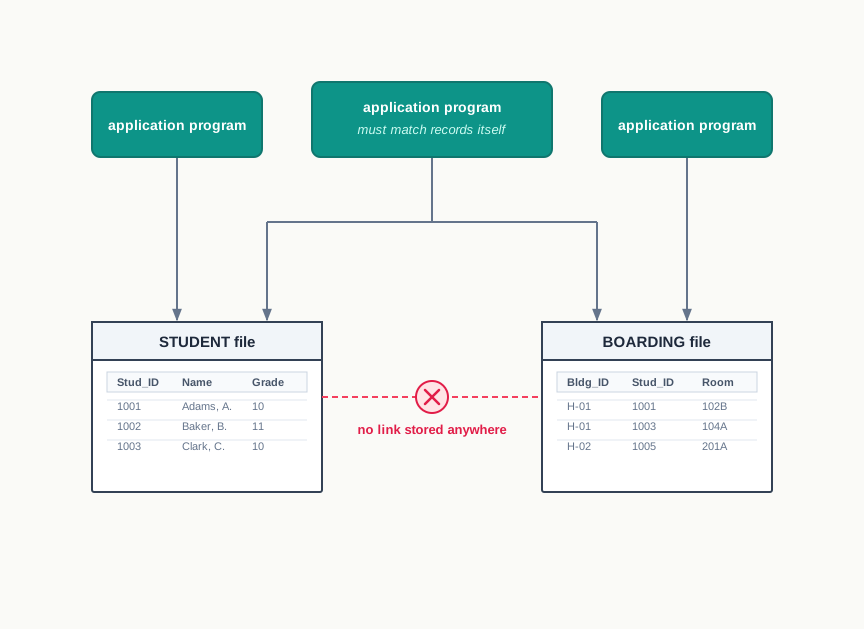
Both files are about the same students, yet as far as the computer is concerned they are two unrelated heaps of text. There is no link or mapping between them: nothing in the BOARDING file says that its AdmnNo refers to a record in the STUDENT file. This is data isolation, and it is a limitation of the file system itself, which supports no notion of one file referring to another.
The consequence is felt in every program. To print the route of every student who missed the bus on a given date, a program must open both files, read one of them into memory, and match records by admission number itself. And because files created by different people at different times may be laid out in entirely different formats, whoever writes that program must first understand the internal structure of each file separately.
Data dependence
Data in a file is stored in a particular format — a fixed order of fields, a fixed separator, a fixed width. Every application program that reads the file is written to expect exactly that format. If the format is changed, every one of those programs must be changed too, or it will read the wrong values without complaining. This is data dependence: the programs depend on the physical arrangement of the data.
Suppose the transport office decides to record the bus number as well, and inserts a new field in the middle of each STUDENT record. Every program that read the fourth field as the stop name is now reading something else. The data has not become wrong; the programs have.
Controlled data sharing
Different people need different amounts of access to the same data. The bus attendant must be able to add and change boarding records. The office staff should be able to read them, so that a parent’s query can be answered, but should not be able to alter them. A student should be able to see nothing but his or her own record. This selective permission is called controlled data sharing.
A file system offers permissions on whole files, not on the data inside them. It can allow or forbid a user to open the BOARDING file, but it cannot allow that user to read one student’s rows and not another’s, or to read a row but not change it, once an application program has the file open. Enforcing rules of that fineness through application programs is difficult and easily bypassed.
Q1. A school already keeps its records as files on a computer. What is still missing?
A. The data is safe and readable, but nothing is managing it. The files provide no way of retrieving data except through programs written in advance; the same fact sits in several files at once and the copies can drift apart; no file records that it is related to another; every program depends on the exact layout of the file it reads; and access cannot be controlled at the level of individual records. What is missing is a layer of software that holds the data, knows how it is related, and answers questions about it.
Q2. The same guardian’s name appears in two different registers. Why is that a real problem, and not just extra writing?
A. Because a duplicated fact is a fact that can be corrected in one place and left uncorrected in the other. The extra writing is redundancy, and by itself it only wastes space. The real damage is inconsistency: after one register is updated and the other is not, the two disagree, and no program reading either one can tell which copy is the true one.
Look again at Table 8.1 and Table 8.2 and list every value that has been stored more than once across the two tables. For each one, write down what would go wrong if it were changed in one place and not the other.
None of these six limitations is caused by carelessness, and none can be fixed by being more careful. They follow from the fact that a file is only a container. The next section takes up the software that was built to replace it.
8.3 Database Management System
The limitations of the previous section all have one root: the data is stored, but nothing is looking after it. The remedy is to stop keeping data as loose files and to keep it instead in a database — a collection of related data, organised so that it can be stored, retrieved and modified in a controlled way. The word related is doing real work there. The three registers of the transport office are related, because they are all about the same students and the same buses, and a database is expected to hold that relationship rather than leave it in somebody’s head.
Databases are not managed by hand. The software that creates them and looks after them is a database management system (DBMS) — a program through which a database is created, data is stored in it, and data is retrieved, modified or removed from it, whether by a person sitting at a terminal or by another program. MySQL, Oracle, PostgreSQL, SQL Server, Microsoft Access and MongoDB are all examples of database management systems, some freely available and some sold commercially.
A database is a collection of logically related data, organised so that it can be efficiently stored, retrieved and managed. A database management system is the software used to create a database and to store, retrieve, update and delete the data held in it.
It is worth separating the two words carefully, because they are often used as though they were the same. The database is the data. The DBMS is the software. Your school’s bus records are a database; the program that holds them and answers questions about them is a DBMS. One DBMS can manage many databases at the same time.
8.3.1 What a DBMS Does
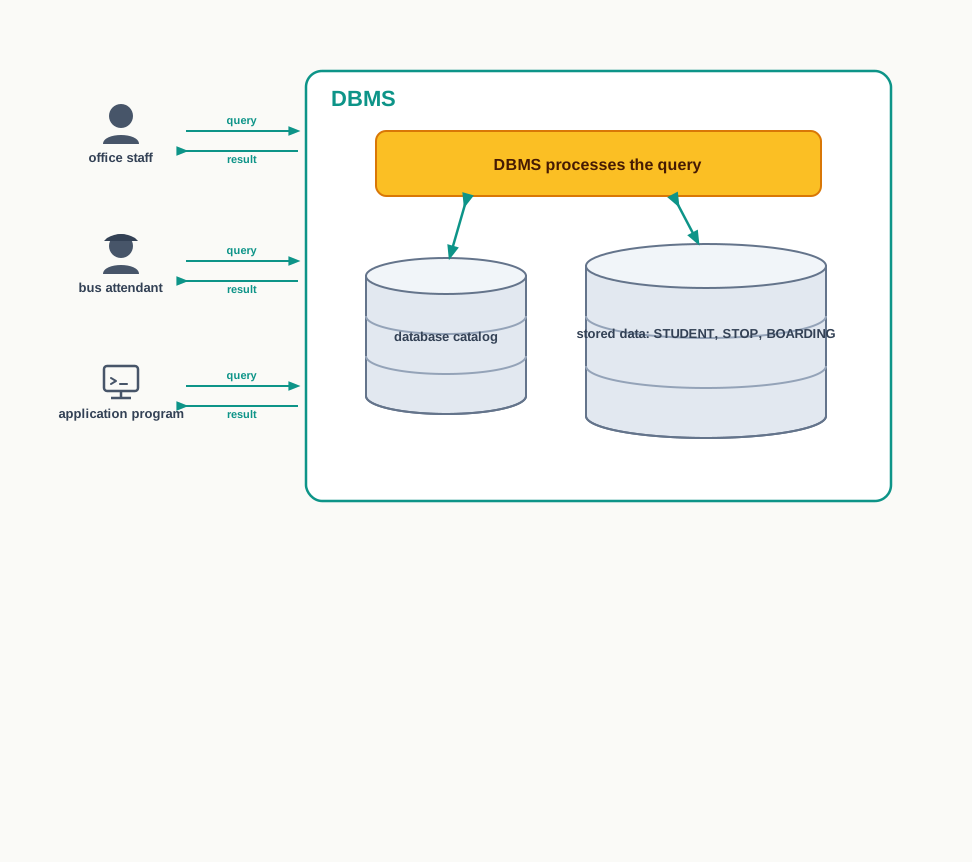
A DBMS sits between the stored data and everyone who wants to use it. Nobody — neither a user nor an application program — reaches into the stored data directly. Every request goes through the DBMS, which locates the data, checks that the request is permitted, and sends back the result.
An abstract view of the data
Because everything passes through it, the DBMS can hide the details of how data is actually stored: which disk file the rows live in, in what order they sit, and how they are indexed for speed. The user is given an abstract view of the data — a view in terms of tables, rows and columns, with nothing said about the arrangement underneath.
This is exactly what cures data dependence. If the DBMS later changes how it physically stores a table, the tables the user sees are unchanged, and the programs that use them keep working.
Asking questions instead of writing programs
To get data out of a file, you write a program. To get data out of a database, you write a query — a request to the database for information in a required form. Retrieving data from a database in this way is called querying the database.
A query states what is wanted, not how to find it: “the names of all students on route R1 who did not board on 8 July 2024” is a complete query, and the DBMS works out how to answer it. Queries are written in a language meant for the purpose, and the standard one is taken up in a later chapter. The same interface also lets a user change the structure of the database itself — add a table, add a column to a table, or place a new restriction on a column.
Where databases are used
Almost every organisation that keeps records of any size runs on a database. Table 8.4 lists a few ordinary settings and the data each keeps.
Table 8.4 – some everyday uses of databases, with the kind of data each application maintains | Application | Data maintained about | |—|—| | Banking | account holders, account balances, deposits and withdrawals, loan repayments | | Railway reservation | trains, routes and timings, seat availability, passenger bookings, fares | | School administration | admissions, class allotment, attendance, examination marks, fee collection | | Hospital records | patients, appointments, treatment history, bed allotment, billing | | Shop inventory | items and prices, stock in hand, purchase orders, sales bills | | Online shopping | product descriptions, seller details, orders placed, delivery status |
8.3.2 From a File System to a DBMS
Moving the transport office’s data into a database is not simply a matter of importing the two files. The files have to be redesigned first, because a database is able to store relationships and a file is not — and once relationships can be stored, most of the duplication becomes unnecessary.
Recall Table 8.1 (the STUDENT file) and Table 8.2 (the BOARDING file). Three changes turn them into a workable database design.
Remove SName from the boarding records. The student’s name is already held once, in the STUDENT file, and AdmnNo appears in both files. Since a database can relate two tables through a common column, the name can be looked up from STUDENT whenever it is needed. Storing it a second time buys nothing and risks disagreement.
Take the stop details out of the STUDENT file. StopName, PickupTime and RouteNo describe a stop, not a student. Because many students board at the same stop, keeping these three columns in STUDENT repeats the same three values once for every student at that stop. They belong in a separate table, with one row per stop, so that each stop’s details are stored exactly once.
Give every stop a short unique code. Once the stops sit in a table of their own, the STUDENT table needs some way of saying which stop a student uses. A new column, StopCode, is created; it takes a distinct value for every stop and is kept in both tables, so that the two can be linked.
The third change deserves a second look, because the stop’s name is already unique — no two stops in the list are called the same thing. Why invent a code at all? Because a name is a description, and descriptions change. A locality can be renamed, a spelling can be corrected, and every table that stored the old name would then have to be found and edited. A code is chosen once and never needs to mean anything, so it can safely be used as the link. The general rule is worth remembering: a value that identifies something should not be a value that anyone might want to change.
The result is three tables instead of two, related to one another as shown in Fig. 8.4. Together they form a database, which we shall call SCHOOLBUS and use for the rest of this chapter.
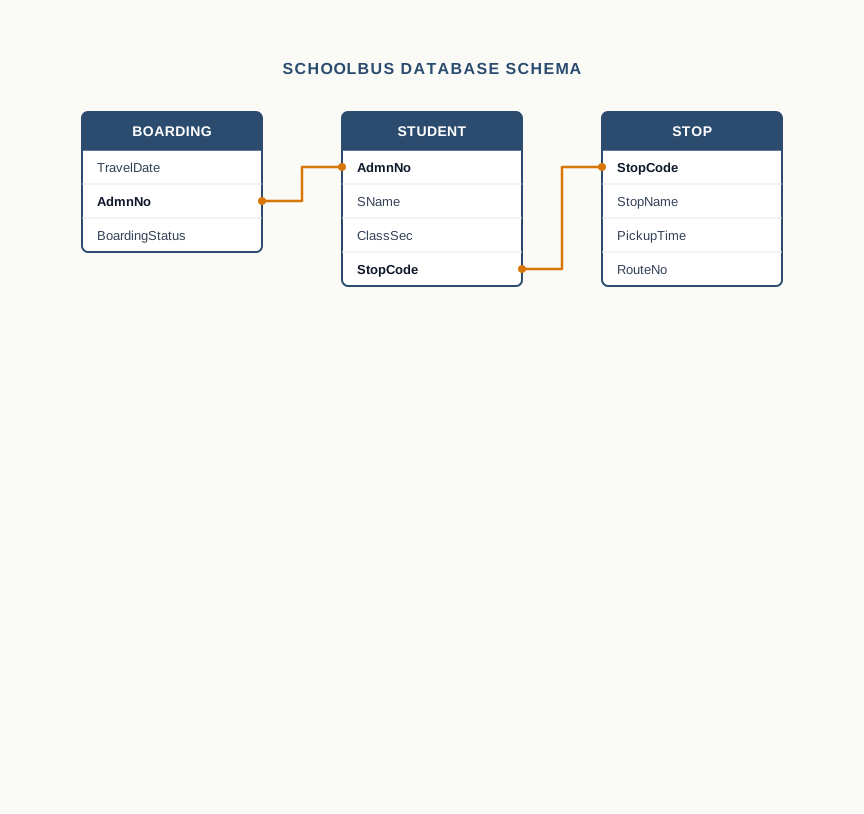
Table 8.5, Table 8.6 and Table 8.7 show these three tables filled with data. They are the sample database for the whole chapter, and every later example and question in this chapter refers back to them.
Table 8.5 – the STUDENT table of the SCHOOLBUS database, holding one row per student with the admission number, name, class and section, and the code of the stop allotted to the student | AdmnNo | SName | ClassSec | StopCode | |—|—|—|—| | 4201 | Rohit Menon | XII-A | ST01 | | 4202 | Ayesha Khan | XI-B | ST02 | | 4203 | Simran Kaur | XII-A | ST03 | | 4204 | Devika Rao | XI-B | ST01 | | 4205 | Imran Sheikh | XII-C | ST04 | | 4206 | Neha Patil | XI-A | ST02 | | 4207 | Kabir Joshi | XI-A | NULL |
Table 8.6 – the STOP table of the SCHOOLBUS database, holding one row per bus stop with its code, its name, the time the bus reaches it and the route it lies on | StopCode | StopName | PickupTime | RouteNo | |—|—|—|—| | ST01 | Rani Bagh | 06:50 | R3 | | ST02 | Model Town | 07:05 | R1 | | ST03 | Civil Lines | 07:20 | R1 | | ST04 | Green Park | 06:40 | R2 | | ST05 | Nehru Nagar | 07:10 | R2 |
Table 8.7 – the BOARDING table of the SCHOOLBUS database, holding one row for each student on each travel date, with B marking boarded and N marking not boarded | TravelDate | AdmnNo | BoardingStatus | |—|—|—| | 2024-07-08 | 4201 | B | | 2024-07-08 | 4202 | B | | 2024-07-08 | 4203 | N | | 2024-07-08 | 4204 | B | | 2024-07-08 | 4205 | B | | 2024-07-08 | 4206 | N | | 2024-07-09 | 4201 | B | | 2024-07-09 | 4202 | N | | 2024-07-09 | 4203 | B | | 2024-07-09 | 4204 | B | | 2024-07-09 | 4205 | B | | 2024-07-09 | 4206 | B |
Two rows in this data are there deliberately. In Table 8.5, the student with admission number 4207 has just joined and has not yet been allotted a stop, so StopCode holds the special value NULL, which stands for a value that is unknown or not applicable. In Table 8.6, the stop ST05 has no student against it at present; a stop exists whether or not anyone boards there. Both situations arise constantly in real records, and Section 8.4 explains how a relational database treats them.
8.3.3 Key Concepts in a DBMS
Working with a DBMS means using a small vocabulary precisely. Seven terms account for most of it.
Database schema
The database schema is the design of the database: the names of its tables, the columns in each table, the type of data each column may hold, the restrictions placed on those columns, and the relationships among the tables. It is the skeleton on which the data hangs, and it is settled before any data is entered. Fig. 8.4 is a picture of part of the SCHOOLBUS schema.
A database schema is the overall design or logical structure of a database — the tables it contains, the columns of each table, the type and permitted values of each column, and the relationships among the tables. The schema describes the database; it holds no data itself.
Data constraint
A data constraint is a restriction placed on the data that may be entered in a column, stated as part of the schema. Because the restriction is stored with the design, the DBMS enforces it on every entry, whoever makes it and whichever program makes it.
In the SCHOOLBUS database, AdmnNo in STUDENT can be required to be present in every row and to be different in every row. BoardingStatus can be restricted to the two values B and N. PickupTime can be required to be a valid time. Once such a constraint is in place, a wrong entry is not merely discouraged — it is rejected.
A data constraint is a restriction specified on a column, or on a combination of columns, limiting the values that may be stored there. Constraints are enforced by the DBMS to protect the accuracy and reliability of the data.
Database instance
When a schema is first defined, the database has structure but no contents. Data is then loaded, and thereafter it keeps changing as rows are added, altered and removed. The database instance is the data held in the database at one particular moment — a snapshot of its contents.
Tables 8.5 to 8.7 are one instance of the SCHOOLBUS database. Tomorrow, after another day’s boarding is recorded, the schema will be exactly the same and the instance will be different. A single schema therefore has many instances over its lifetime.
Table 8.8 – Database schema vs database instance | Feature | Database schema | Database instance | |—|—|—| | What it is | The design of the database | The data held in it at a given moment | | What it describes | Tables, columns, data types, constraints, relationships | The actual rows present in each table | | How often it changes | Rarely, and only by a deliberate design decision | Constantly, with every insertion, update and deletion | | Where it is stored | In the database catalog, as meta-data | In the tables themselves | | Number of them | One at a time for a given database | Many over the lifetime of one schema |
Query
A query is a request made to the database for information, or for a change to the data. A query may draw on a single table or combine data from several tables at once. “List the class and section of every student who boards at Model Town” is a query that needs both STUDENT and STOP; the DBMS matches the two on StopCode and produces the answer.
A query is a request submitted to a database for retrieving data in a required form, or for inserting, modifying or deleting data. Queries are written in a query language and are carried out by the DBMS.
Data manipulation
Data manipulation is the general name for changing the contents of a database, and it consists of three operations. Insertion adds new data: when a student joins the bus service, a row is added to STUDENT. Deletion removes data: when a student leaves the school, the rows concerning that student are removed. Update changes data already present: when a student shifts to a different stop, the StopCode in that student’s row is changed.
Note what has become easier. In the file design, changing a student’s stop meant editing the stop’s name, pickup time and route in that student’s record. Here it means changing one code in one row, and the new stop’s details come from the STOP table automatically.
Database engine
The database engine is the underlying component of a DBMS — the set of programs that actually creates the database, stores the data, and carries out the queries for retrieval and manipulation. The interface a user sees, whether a command line or a set of screens, sits on top of the engine and passes work down to it.
Write down the schema of a small database of two tables that a school library might use, listing the tables, their columns and one sensible constraint on each table. Then write down two rows for each table — that is one instance of your schema.
8.3.4 Advantages and Limitations of a DBMS
It is now possible to line up what has been gained against the six limitations of Section 8.2.2.
- Access is no longer difficult. Data is retrieved by writing a query, and a query can be composed at the moment the question is asked. No new program has to be written for an unforeseen question.
- Redundancy is reduced. Each fact is stored in one place — a student’s name once in STUDENT, a stop’s timing once in STOP — and fetched from there whenever it is needed.
- Inconsistency is largely prevented. Where a fact is stored once, there is no second copy to disagree with it. Where some duplication is unavoidable, constraints can be used to keep the copies in step.
- Data is no longer isolated. The relationships between tables are part of the schema, so the DBMS itself knows that
AdmnNo in BOARDING refers to a student in STUDENT.
- Data independence is achieved. Programs work with tables and columns, not with disk layouts, so a change in how the data is stored does not break them.
- Sharing can be controlled. Permissions can be granted at the level of individual tables and operations, so one user may read the boarding data while another may also change it.
None of this is free, and a DBMS brings costs of its own that an honest account has to state.
- Increased complexity. A DBMS is a large piece of software with a great deal of behaviour to understand. Someone must design the schema properly, choose the constraints, and maintain the system; a badly designed database can be worse than the files it replaced.
- Increased data vulnerability. All the data now sits in one place. That is what makes it consistent, and it is also what makes it a single point of failure: one hardware or software failure can stop every user of the system at once, which is why regular backup is essential rather than optional.
- High cost of shifting. Moving from files to a DBMS means buying or licensing the software, often running it on more capable hardware, training staff to use it, and paying the recurring cost of backup and recovery.
For a shopkeeper with fifty items in a notebook, these costs outweigh the benefits. For a school with eight hundred students, or a bank with eight lakh customers, the balance tips the other way long before the volume becomes unmanageable.
8.4 Relational Data Model
Database management systems differ from one another, and they are classified by the data model on which they are built. A data model describes how the data in a database is organised — how it is defined and represented, how one piece of data is related to another, and what constraints may be placed on it. Choosing a data model is the most fundamental design decision a DBMS makes, because everything the user can and cannot do follows from it.
Several data models exist: the object-oriented data model, the entity-relationship data model, the document model and the hierarchical data model among them. The one in widest use, and the one this book deals with, is the relational data model.
Its central idea is the one Codd proposed: hold all the data in tables, and let the values in the tables — not any stored pointer or physical arrangement — express how one table is connected to another. In this model a table is called a relation, and a database built on the relational data model is called a relational database. A DBMS that manages relational databases is called a relational database management system (RDBMS).
The three tables of the SCHOOLBUS database — STUDENT, STOP and BOARDING — are relations, and the whole of Section 8.4 uses them.
The relational data model Statement: All data in a database is represented as relations — two-dimensional tables of rows and columns — and the relationships between relations are expressed only through the data values they hold in common. In words: Everything is a table, and tables are joined by matching values, not by links stored inside the data. Why it holds: If a relationship is nothing more than two columns holding the same value, then the database needs no knowledge of how the rows are physically stored in order to connect them. Relationships survive any change in storage arrangement, and a new relationship can be used the moment someone thinks of it. Used for: Storing related data with each fact in one place, and retrieving it in combinations that nobody planned for in advance. Watch out: The model requires every value in a table to be single and indivisible. Data that is naturally nested or repeating — a student with three phone numbers — cannot be squeezed into one cell and must be modelled as a separate relation.
8.4.1 Relation, Attribute and Tuple
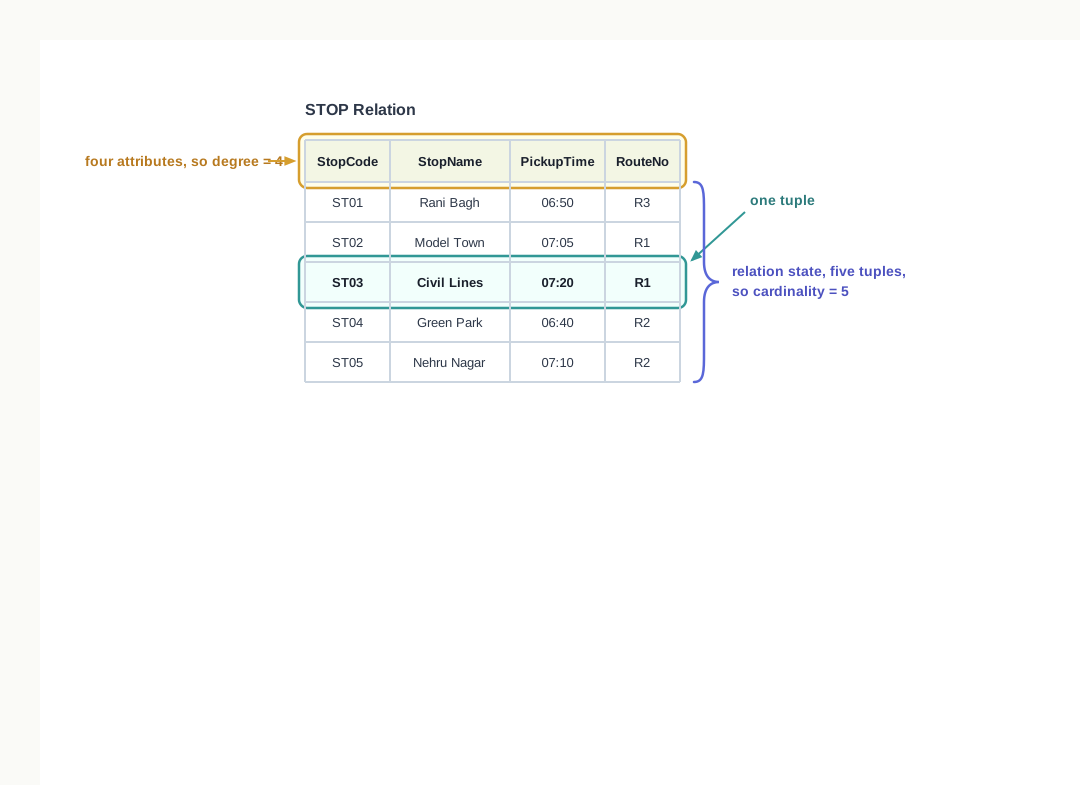
A relation looks exactly like the tables you have been reading, and it is described using its own vocabulary. Fig. 8.5 names the parts on the STOP relation.
Attribute
Each column of a relation is an attribute. An attribute is a named characteristic for which data is stored in that relation, and it is also called a field. StopCode, StopName, PickupTime and RouteNo are the attributes of STOP. Every attribute in a relation carries a name, and that name is what tells you how to read the values beneath it.
An attribute is a named column of a relation, representing one characteristic for which data is stored about every tuple of that relation.
Tuple
Each row of a relation is a tuple. A tuple holds one value for each attribute of the relation, and those values belong together — they are facts about one and the same thing. The third tuple of STOP tells you everything the school records about the Civil Lines stop, and each of its four values means something only because of the attribute it sits under.
A tuple is a single row of a relation, made up of one value for each attribute of that relation. Every tuple of a relation describes one entity or one event of the kind the relation is about.
Each tuple in a relation corresponds to something in the real world — a student in STUDENT, a bus stop in STOP, one student’s boarding on one morning in BOARDING. This is why the choice of what a relation is about has to be made before its attributes are chosen.
The vocabulary maps neatly on to the file-system words of Section 8.2, and it is useful to hold the three pairs together.
Table 8.9 – File system terms and their relational counterparts | In a file system | In the relational model | What it holds | |—|—|—| | File | Relation | All the data about one kind of thing | | Record | Tuple | The complete data about one such thing | | Field | Attribute | One named item of data, in every record | | No equivalent | Relationship through a common attribute | The link between two relations |
The last line is the point of the whole model. A file system has containers, records and fields, and stops there. The relational model adds one thing more, and everything that a database can do beyond a file follows from it.
8.4.2 Domain, Degree and Cardinality
Three more terms describe a relation quantitatively.
Domain
The domain of an attribute is the set of values that the attribute is allowed to take. In the STUDENT relation, AdmnNo takes whole numbers, so its domain is a set of integers; SName takes strings of characters, so its domain is a set of character strings. In practice, a domain is usually specified by choosing a data type for the attribute, sometimes narrowed further by a constraint — BoardingStatus has a domain of just two values, B and N.
The domain of an attribute is the set of permitted values from which that attribute may take a value in any tuple of the relation.
A domain is a property of the attribute, not of any one row. It stays fixed even when the data changes, and it is what makes a value like Green Park obviously wrong under PickupTime.
Degree
The degree of a relation is the number of attributes in it. STOP has four attributes, so STOP is a relation of degree 4. BOARDING has three, so its degree is 3.
The degree of a relation is the number of attributes (columns) it has.
Cardinality
The cardinality of a relation is the number of tuples in it. STOP holds five tuples, so its cardinality is 5. Note that cardinality depends on the current instance of the database: as students join and leave, the cardinality of STUDENT changes, while its degree does not.
The cardinality of a relation is the number of tuples (rows) it currently holds.
Table 8.10 states both figures for the three relations of the SCHOOLBUS database as they stand in Tables 8.5 to 8.7.
Table 8.10 – degree and cardinality of the three relations of the SCHOOLBUS database | Relation | Attributes | Degree | Tuples | Cardinality | |—|—|—|—|—| | STUDENT | AdmnNo, SName, ClassSec, StopCode | 4 | 7 | 7 | | STOP | StopCode, StopName, PickupTime, RouteNo | 4 | 5 | 5 | | BOARDING | TravelDate, AdmnNo, BoardingStatus | 3 | 12 | 12 |
8.4.3 Three Important Properties of a Relation
A relation is more disciplined than an ordinary table drawn on paper. Three properties are observed in the relational data model, and together they are what separate a relation from a mere data file. The first governs its attributes, the second its tuples, and the third the state of the relation — the set of tuples it holds at a given moment, which is also called its relation state.
Property 1: rules on the attributes
- Each attribute in a relation has a unique name. No relation may have two attributes called
RouteNo, because a value under that heading would then be ambiguous.
- The sequence of attributes in a relation is immaterial. Writing STOP with
RouteNo before StopName produces the same relation, holding the same facts. Nothing in the model attaches meaning to the left-to-right order, because attributes are identified by name.
Property 2: rules on the tuples
- Each tuple in a relation is distinct. No two tuples may hold identical values for all attributes. In BOARDING, two tuples cannot agree on the travel date, the admission number and the boarding status all at once, because that would be the same fact recorded twice. Every tuple must therefore be identifiable by its own contents.
- The sequence of tuples in a relation is immaterial. The tuples are not regarded as ordered, even though they must be printed in some order on paper. Listing the stops of STOP in the reverse order does not change the relation; the same five facts are present.
These two ordering rules are easy to read past, and they carry a large consequence. Because neither the row order nor the column order means anything, no query may depend on them. You cannot ask for “the third row” of a relation; you can only ask for the row whose values satisfy some condition. It is the values, not the positions, that carry all the meaning.
Property 3: rules on the state of the relation
- All values in an attribute come from the same domain. Every entry under
PickupTime is a time; there is no row in which it is a route number.
- Each value is atomic — it cannot be divided into meaningful smaller parts that the database would need separately. A stop code is atomic. A cell holding
Rani Bagh, R3 is not, because it is two facts pushed into one place.
- No attribute may hold several values in one tuple. A student cannot have two stop codes entered in
StopCode. If a student genuinely boards at one stop in the morning and another in the afternoon, the answer is a change in design, not two values in one cell.
- A special value,
NULL, is used for data that is unknown or not applicable. In Table 8.5, the student with admission number 4207 has NULL under StopCode because no stop has yet been allotted.
The last of these needs care, because a null value is not an ordinary value at all. It is a marker meaning “no value recorded here”. It is not zero, which is a number; it is not a blank space or an empty string, which are characters; and it is not FALSE. Two nulls are not equal to each other either, because nothing is known about either of them, and unknown quantities cannot be declared the same.
Taken together, the three properties describe a relation as a flat, unordered set of distinct rows, every column named, every cell holding exactly one indivisible value drawn from a fixed domain. It is a narrow definition, and deliberately so. Property 2 in particular leaves an obvious question hanging: if every tuple must be distinct, what in the relation makes it so? That is what the next section is about.
Take Table 8.7, the BOARDING relation, and write down its degree and cardinality. Then say which of the three properties would be violated if the bus attendant recorded a student’s status for one date as B, N in a single cell, and which would be violated by entering the same date and admission number twice with the same status.
8.5 Keys in a Relational Database
Property 2 of Section 8.4.3 requires every tuple of a relation to be distinct, and says that a tuple must be identifiable by its own contents. That requirement is easy to state and useless unless something enforces it. In practice, a relation must contain at least one attribute — or one group of attributes taken together — whose values are different in every tuple and never left unknown. Only then can any tuple be picked out with certainty.
Attributes used in this way are called keys. Keys are declared when the database is designed, and they do two jobs: they let the DBMS refuse a tuple that would duplicate an existing one, and they let one relation refer to a tuple in another. The four kinds of key that follow are the vocabulary of that design.
8.5.1 Candidate Key
A relation may contain more than one attribute whose values are distinct in every tuple. Any of them could be used to identify tuples, and each is therefore called a candidate key — a candidate for the job of identifying the relation’s tuples.
Look at STOP in Table 8.6. Two of its four attributes take a different value in every row. StopCode does, because the school assigns a fresh code to each stop. StopName does too, because no two stops on the school’s routes carry the same name. Either one, given a value, picks out exactly one tuple. Both are candidate keys of STOP.
The other two attributes are not candidates. PickupTime repeats — a bus can reach two stops on different routes at the same time — and RouteNo repeats by design, since a route is made of several stops.
A candidate key is an attribute, or a smallest possible group of attributes, whose value is unique in every tuple of a relation and is never null, so that it can be used to identify each tuple of that relation.
Two conditions in that definition are worth pressing on. The first is never null: an attribute that may be left unknown cannot identify anything, so StopCode in STUDENT, which is NULL for admission number 4207, is not a candidate key of STUDENT. The second is smallest possible group: the pair {StopCode, StopName} also takes a unique value in every tuple of STOP, but it is carrying an attribute it does not need, since StopCode alone already does the work. Such a combination is not counted as a candidate key.
Q3. What decides whether a column can be trusted to pick out one row and no other?
A. Not the rows that are in the table at present, but the rule that governs the data. A column can be trusted only if the values it holds are guaranteed unique by the way they are issued — an admission number, a stop code — and are guaranteed never to be left unknown. A column that merely happens to have no repeats today is not a key; it is a coincidence waiting to be broken.
8.5.2 Primary Key and Alternate Key
A relation may have several candidate keys, but the DBMS needs one of them nominated for regular use — the one it will check on every insertion and the one other relations will refer to. The candidate key chosen by the database designer for this purpose is the primary key of the relation. The candidate keys that remain unchosen are called alternate keys.
In STOP, the designer chooses StopCode as the primary key. StopName then becomes the alternate key: still unique, still usable to look a stop up, but not the attribute the database treats as the official identifier. In STUDENT, AdmnNo is the only candidate key, so it is the primary key and there is no alternate key at all.
The primary key of a relation is the candidate key chosen by the database designer to identify the tuples of that relation. Its value must be unique in every tuple and can never be null. The remaining candidate keys of the relation are called alternate keys.
Why StopCode rather than StopName, when both are equally unique? For the reason given in Section 8.3.2: a name is a description, and descriptions get corrected, translated and renamed. A code is short, is fixed for the life of the stop, and means nothing outside the database, so nobody will ever ask for it to be edited. A primary key should be should be the attribute least likely to change.
A relation has at most one primary key, though that key may be built from more than one attribute, as the next subsection shows. The DBMS enforces the primary key on every insertion: a tuple whose primary key value repeats an existing one, or whose primary key value is missing, is refused outright. This is why a database can promise that its tuples are distinct while a file system can only hope so.
Table 8.11 – Candidate key, primary key and alternate key | Feature | Candidate key | Primary key | Alternate key | |—|—|—|—| | What it is | Any attribute or minimal group of attributes that could identify tuples | The candidate key chosen to identify tuples | A candidate key that was not chosen | | How many per relation | One or more | At most one | Zero or more | | Chosen by | Determined by the meaning of the data | Decided by the database designer | Whatever candidate keys are left over | | Values unique | Yes | Yes | Yes | | May be null | No | No | No | | Enforced by the DBMS | Only if declared | Always | Only if declared | | Example in SCHOOLBUS | StopCode and StopName in STOP | StopCode in STOP | StopName in STOP |
8.5.3 Composite Primary Key
Some relations have no single attribute that can identify a tuple. BOARDING in Table 8.7 is one of them, and it is worth working through carefully.
Can AdmnNo be the primary key? No. Admission number 4201 appears against 8 July and again against 9 July, and will appear on every travel date of the year.
Can TravelDate? No. The date 2024-07-08 appears six times over, once for each student whose boarding was recorded that morning.
Can BoardingStatus? Certainly not — it holds only two values across twelve tuples.
Yet the relation clearly has no duplicate tuples, so something identifies them. Take TravelDate and AdmnNo together. On any one travel date, a given student’s boarding is recorded exactly once, so no pair of values is repeated: the pair (2024-07-08, 4201) occurs in one tuple and one only. A primary key formed from more than one attribute in this way is called a composite primary key, and the composite primary key of BOARDING is {TravelDate, AdmnNo}.
A composite primary key is a primary key made up of two or more attributes taken together, used when no single attribute of the relation takes a unique value in every tuple. The combination must be unique in every tuple, and none of its attributes may be null.
Notice that the uniqueness comes from a rule about the real world — a student’s boarding is recorded once per morning — and not from the twelve rows that happen to be in the table. If the school later decided to record both the morning and the afternoon trip, the pair would repeat, and the key would have to grow to include the trip.
Q4. Can two columns together do the job that no single column can do alone?
A. Yes, and that is exactly what a composite primary key is. In the BOARDING relation, the travel date repeats for every student and the admission number repeats for every date, so neither identifies a tuple by itself. The pair {TravelDate, AdmnNo} is unique in every tuple, because a student’s boarding is recorded only once on a given date, and the pair therefore serves as the relation’s primary key.
8.5.4 Foreign Key
The keys so far identify tuples inside one relation. The last kind of key does something different: it connects two relations, and it is what turns a set of separate tables into a database.
Look at StopCode in STUDENT. It is not a candidate key there — it repeats, since two students board at Rani Bagh, and it is null for one student. Its purpose is not to identify a student but to point at a stop: the value ST01 in a student’s tuple means “the stop whose StopCode is ST01 in the STOP relation”. An attribute used in this way is a foreign key.
A foreign key is an attribute, or group of attributes, in one relation whose values are drawn from the primary key of another relation, and which is used to represent the relationship between the two relations. Its value in any tuple must either match a value of that primary key or be null.
The two relations are named according to their roles. The relation containing the foreign key is the referencing relation, also called the foreign relation — here, STUDENT. The relation whose primary key is being referred to is the referenced relation, also called the primary relation or master relation — here, STOP.
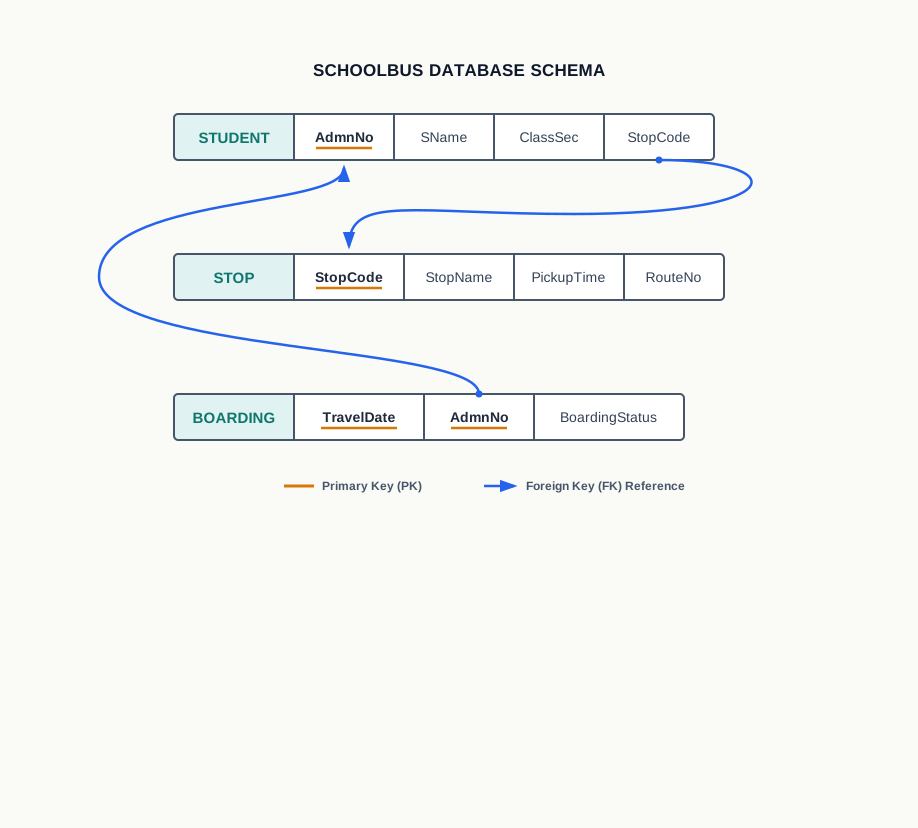
The SCHOOLBUS database has two foreign keys, shown in Fig. 8.6.
StopCode in STUDENT refers to StopCode, the primary key of STOP.AdmnNo in BOARDING refers to AdmnNo, the primary key of STUDENT.
What the foreign key protects
Declaring a foreign key does more than document the connection: it makes the DBMS police it. If someone tries to enter a student with StopCode ST09, the DBMS checks STOP, finds no such stop, and rejects the entry. If someone tries to record a boarding for admission number 4299, the DBMS checks STUDENT and refuses. The database cannot be left holding a reference to something that does not exist.
This is the answer to a question that has been open since Section 8.2. Data isolation existed because a file could not say that it referred to another file. A foreign key says exactly that, and says it in a form the software can check.
When a foreign key may be null
A foreign key may hold a null value, provided it is not part of the primary key of its own relation. In STUDENT, StopCode is a foreign key and is not part of the primary key AdmnNo, so it may be left null — and it is, for admission number 4207, the student who has joined but has not yet been allotted a stop. The null does not break any reference; it records that there is no reference yet.
Contrast this with AdmnNo in BOARDING. It is a foreign key referring to STUDENT, but it is also half of that relation’s composite primary key, so it can never be null. A boarding record with no student attached to it would be meaningless in any case.
One more point about Table 8.6 fits here. The stop ST05, Nehru Nagar, is not referred to by any student’s tuple, and that is perfectly legal. A foreign key requires that every value it holds exists in the referenced relation; it does not require that every tuple of the referenced relation be pointed at. Stops may exist before anyone boards at them.
Q5. How does one table know that a value stored in it refers to a row sitting in another table?
A. Because the attribute holding that value has been declared a foreign key, referring to the primary key of the other relation. The declaration is part of the schema, so the DBMS knows the connection and enforces it: a value entered in the foreign key must already exist as a primary key value in the referenced relation, or else be null. The link lives in the data and in the schema, not in any program.
Table 8.12 – Primary key vs foreign key | Feature | Primary key | Foreign key | |—|—|—| | Purpose | Identifies each tuple of its own relation | Refers to a tuple of another relation | | Uniqueness of values | Must be unique in every tuple | May repeat freely | | Null values | Never permitted | Permitted, unless it is part of the primary key | | Number per relation | At most one | Any number, one for each relation referred to | | What it is checked against | The other tuples of the same relation | The primary key values of the referenced relation | | Example in SCHOOLBUS | AdmnNo in STUDENT | StopCode in STUDENT, AdmnNo in BOARDING |
Table 8.13 collects the keys of the whole sample database in one place.
Table 8.13 – the keys declared in the three relations of the SCHOOLBUS database | Relation | Candidate keys | Primary key | Alternate key | Foreign key | |—|—|—|—|—| | STUDENT | AdmnNo | AdmnNo | none | StopCode, referring to STOP | | STOP | StopCode, StopName | StopCode | StopName | none | | BOARDING | {TravelDate, AdmnNo} | {TravelDate, AdmnNo} | none | AdmnNo, referring to STUDENT |
Reading the table across is a good check on the whole chapter. Every relation has exactly one primary key. Every relationship drawn in Fig. 8.4 has become a foreign key. And the duplication that Section 8.2.2 could not remove has gone, because each fact — a student’s name, a stop’s timing — is now stored in exactly one relation and reached from anywhere else through a key.
A school library keeps two relations: BOOK(AccNo, Title, Author, ShelfNo) and ISSUE(AccNo, MemberNo, IssueDate). Write down a candidate key for each relation, name the primary key you would choose and why, and identify any foreign key. State clearly what real-world rule makes your choice of primary key for ISSUE safe.
8.6 Summary
Records, files and their limits
- Data is a collection of facts about the real world. A record is the complete set of related data items about one person, object or event, and each named item within a record is a field.
- Manual record keeping fails as volume grows: the same details must be copied afresh, copying introduces errors, a single physical register can be lost or damaged, manual calculation is error-prone, and searching is confined to the order in which the register was written.
- A file is a named collection of data held on a storage device, which continues to exist after the program that created it ends. The file system is the part of the operating system that stores, names, organises and locates files.
- A file is only a container. It provides no mechanism of its own for retrieving data, so every question must be turned into an application program written in advance.
Why a file system is not enough
- A file system suffers from six limitations: difficulty in access, data redundancy, data inconsistency, data isolation, data dependence, and the difficulty of controlled data sharing.
- Data redundancy means the same data is stored in more than one place. Data inconsistency means those copies no longer match. Redundancy is a fault of design and costs storage; inconsistency arises later, when one copy is changed and another is not, and costs correctness. Inconsistency cannot occur without redundancy first.
- Data isolation means the file system stores no link between related files, so a program must match records itself. Data dependence means every program depends on the physical layout of the file it reads, so a change in that layout breaks the programs rather than the data.
- Controlled data sharing is hard in a file system because permissions apply to whole files, not to individual records or operations.
Databases and the DBMS
- A database is a collection of logically related data organised for efficient storage and retrieval. A database management system is the software that creates a database and stores, retrieves, updates and deletes the data in it. The database is the data; the DBMS is the software.
- Because every request passes through it, a DBMS can hide how data is physically stored and present an abstract view of it in terms of tables, rows and columns. This is what gives data independence.
- Data is retrieved from a database by writing a query — a request stating what is wanted, not how to find it — instead of by writing a program.
- Converting files into a database means removing data that is duplicated across files, moving data that describes a different kind of thing into a relation of its own, and creating a short, stable code by which the relations can be linked.
- Seven terms describe how a DBMS works. The database schema is the design of the database — its tables, columns, data types, constraints and relationships. A data constraint is a restriction on the values a column may hold, enforced by the DBMS. The schema and constraints are stored in the database catalog, or data dictionary, as meta-data, which is data about data. A database instance is the data present at one particular moment, so one schema has many instances over time. A query is a request for data or for a change to it. Data manipulation is the changing of data, and consists of insertion, deletion and update. The database engine is the underlying set of programs that stores the data and carries out the queries.
- A DBMS answers all six limitations of the file system, but it brings increased complexity, increased data vulnerability from holding everything in one place, and the cost of software, hardware, training and regular backup.
The relational data model
- A data model describes how data in a database is organised, represented, related and constrained. The relational data model is the most widely used; other models include the object-oriented, entity-relationship, document and hierarchical models.
- In the relational model all data is held in tables called relations, and relationships between relations are expressed only through the data values they hold in common. A database built on this model is a relational database, and the software managing it is a relational database management system.
- A column of a relation is an attribute; a row is a tuple. The domain of an attribute is the set of values it may take. The degree of a relation is its number of attributes; the cardinality is its number of tuples. Degree is fixed by the design, cardinality changes with the data.
- Three properties distinguish a relation from an ordinary table. Property 1: every attribute has a unique name, and the sequence of attributes is immaterial. Property 2: every tuple is distinct, and the sequence of tuples is immaterial. Property 3: all values of an attribute come from the same domain, every value is atomic, no attribute holds several values in one tuple, and the special value NULL is used where data is unknown or not applicable.
- Because neither row order nor column order carries meaning, no query may depend on position; only values identify data.
- A null value is a marker for missing or inapplicable data. It is not zero, not an empty string and not false, and two nulls are not equal to each other.
Keys
- A candidate key is an attribute, or a smallest possible group of attributes, whose value is unique in every tuple and never null, so that it can identify each tuple. A relation may have more than one.
- The primary key is the candidate key chosen by the designer to identify tuples; the candidate keys left unchosen are alternate keys. A relation has at most one primary key, its value can never repeat and never be null, and the DBMS enforces this on every insertion.
- A composite primary key is a primary key formed of two or more attributes together, used where no single attribute is unique in every tuple. None of its attributes may be null.
- Whether an attribute can serve as a key is decided by the rule that governs the data in the real world, not by the rows that happen to be present at the moment.
- A foreign key is an attribute in one relation whose values are drawn from the primary key of another relation, and it represents the relationship between them. The relation containing it is the referencing or foreign relation; the relation whose primary key is referred to is the referenced, primary or master relation.
- A foreign key value must either match an existing primary key value in the referenced relation or be null; a null is permitted only when the foreign key is not part of its own relation’s primary key. A foreign key may repeat, and a tuple in the referenced relation need not be referred to by anyone.
8.7 Key Terms
- Abstract view – the picture of the data that a DBMS presents to its users, in terms of tables, rows and columns, with the details of physical storage hidden.
- Alternate key – a candidate key of a relation that was not chosen as the primary key.
- Application program – a program written specially to open a file, read it and extract or arrange the data it holds.
- Atomic – describing a data value that cannot be divided into smaller parts that the database would need separately.
- Attribute – a named column of a relation, representing one characteristic stored about every tuple.
- Candidate key – an attribute, or smallest possible group of attributes, whose value is unique in every tuple and never null, so that it can identify each tuple of a relation.
- Cardinality – the number of tuples currently held in a relation.
- Composite primary key – a primary key made up of two or more attributes taken together, used where no single attribute is unique in every tuple.
- Controlled data sharing – granting different users different levels of access to the same data, such as permission to read but not to modify.
- Data – facts about the real world, recorded so that they can be stored and used.
- Data constraint – a restriction specified on a column, or a combination of columns, limiting the values that may be stored there.
- Data dependence – the dependence of application programs on the physical layout of a file, so that a change in the layout forces a change in every such program.
- Data dictionary – another name for the database catalog, the store of the schema and constraints.
- Data independence – the property that programs work with tables and columns rather than storage layouts, so a change in storage does not break them.
- Data inconsistency – the state in which copies of the same fact, stored in more than one place, do not match.
- Data isolation – the absence of any stored link between related files, so that programs must match their records themselves.
- Data manipulation – changing the contents of a database, consisting of insertion, deletion and update.
- Data model – a description of how the data in a database is organised, represented, related and constrained.
- Data redundancy – the storing of the same data in more than one place.
- Database – a collection of logically related data, organised so that it can be efficiently stored, retrieved and managed.
- Database catalog – the part of a database in which the schema and the constraints are stored as meta-data.
- Database engine – the underlying set of programs used by a DBMS to create the database, store the data and carry out queries.
- Database instance – the data held in a database at one particular moment; a snapshot of its contents.
- Database management system – the software used to create a database and to store, retrieve, update and delete the data held in it.
- Database schema – the design or logical structure of a database: its tables, their columns, the data types and constraints on those columns, and the relationships among the tables.
- DBMS – database management system.
- Degree – the number of attributes in a relation.
- Domain – the set of permitted values from which an attribute may take a value in any tuple.
- Field – one named item of data within a record.
- File – a named collection of data stored on a storage device, which continues to exist after the program that created it has ended.
- File system – the part of the operating system that stores files, names them, organises them into folders and locates their contents on the storage device.
- Foreign key – an attribute, or group of attributes, in one relation whose values are drawn from the primary key of another relation, used to represent the relationship between them.
- Foreign relation – the relation that contains the foreign key; also called the referencing relation.
- Key – an attribute, or group of attributes, declared in the schema and used to identify tuples of a relation or to refer to tuples of another relation.
- Meta-data – data that describes other data, such as the names of tables, their columns and the constraints on them.
NULL – the special value used in a relation for data that is unknown or not applicable; it is not zero, not an empty string and not false, and two nulls are not equal to each other.- Primary key – the candidate key chosen by the database designer to identify the tuples of a relation; its value is unique in every tuple and never null.
- Primary relation – the relation whose primary key is referred to by a foreign key; also called the referenced or master relation.
- Query – a request submitted to a database for retrieving data in a required form, or for inserting, modifying or deleting data.
- RDBMS – relational database management system.
- Record – the complete collection of related data items about a single person, object or event.
- Relation – a table in the relational data model, made up of named attributes and distinct tuples.
- Relation state – the set of tuples a relation holds at a given moment.
- Relational data model – the data model in which all data is held in relations and relationships are expressed only through common data values.
- Relational database – a database built on the relational data model.
- Relational database management system – a DBMS that manages relational databases.
- Tuple – a single row of a relation, holding one value for each of its attributes.
8.8 Points to Ponder
A relation is defined as an unordered set of tuples, yet every table you have ever seen is printed in some order, and a database is stored on a disk where something must come before something else. If order always exists physically, what is gained by declaring that it means nothing?
Removing redundancy meant that a student’s name is now stored once and fetched by matching admission numbers whenever a boarding list is printed. That matching costs the computer work every single time the list is asked for. When, if ever, would it be reasonable to store the name twice on purpose and accept the risk of inconsistency?
NULL was introduced for values that are unknown or not applicable, and those are two rather different situations — a stop whose timing has not yet been decided, and a stop that will never have one. The relational model uses the same marker for both. What is lost by not distinguishing them, and how might a designer record the difference without inventing a new kind of value?
A candidate key is decided by the rule that governs the data rather than by the rows currently present. But rules about the real world change: a school may one day admit a student under a transfer scheme with no admission number of its own. Whose responsibility is it to notice that a primary key has stopped being safe, and what happens to a database in which nobody notices?
A foreign key insists that every value it holds already exists in the referenced relation, but places no requirement in the other direction — a stop with no students is perfectly legal. Would a database be better or worse if it could also insist that every stop be used by at least one student?
Codd’s proposal was that the connection between two tables should live in the data values and nowhere else. An alternative design, used before his model and still used in places, stores an actual pointer from one record to another, which is much faster to follow. What does the relational model buy with the speed it gives up?
8.9 Objective Questions
Which one of the following is stored in the database catalog?
- The tuples of every relation
- The names of the tables, their columns and the constraints on them
- The queries most recently run by each user
- The backup copy of the database [1 mark]
A relation has 6 attributes and 9 tuples. Three more tuples are inserted and one attribute is removed. The degree and cardinality of the relation are now
- 6 and 12
- 5 and 12
- 12 and 5
- 5 and 9 [1 mark]
Which of the following can never hold a null value?
- An alternate key
- A foreign key
- An attribute forming part of a composite primary key
- Any attribute of a relation [1 mark]
Assertion (A): Data inconsistency cannot occur in a database in which every fact is stored in exactly one place. Reason (R): Inconsistency arises when two stored copies of the same fact are updated differently.
- Both A and R are true, and R is the correct explanation of A.
- Both A and R are true, but R is not the correct explanation of A.
- A is true but R is false.
- A is false but R is true. [1 mark]
Assertion (A): In a relation, the attribute written first is the primary key. Reason (R): The sequence of attributes in a relation is immaterial.
- Both A and R are true, and R is the correct explanation of A.
- Both A and R are true, but R is not the correct explanation of A.
- A is true but R is false.
- A is false but R is true. [1 mark]
Fill in the blank: A candidate key that has not been chosen as the primary key of a relation is called the ______________ key of that relation. [1 mark]
State whether the following is true or false, giving no explanation: every tuple of a referenced relation must be pointed at by at least one foreign key value. [1 mark]
Match each term in Column I with its meaning in Column II.
| a. Degree |
i. The data present in a database at one moment |
| b. Domain |
ii. The number of attributes in a relation |
| c. Database instance |
iii. The design of a database |
| d. Database schema |
iv. The set of values an attribute may take |
[1 mark]
- Write the full form of DBMS and of RDBMS. [1 mark]
8.10 Check Your Concepts
Define a database instance. State one way in which it differs from a database schema. [2 marks]
A relation stores the code, name and price of the items sold in a school canteen. Give one example of an attribute of this relation and state its likely domain. [2 marks]
Differentiate between data redundancy and data inconsistency, giving one example of each drawn from a school record of your choice. [3 marks]
A relation storing the daily reading taken by each of six weather monitors has no single attribute that is unique in every tuple. Explain, with reference to this relation, what kind of primary key would be required and why. [3 marks]
Explain why a foreign key is allowed to hold a null value in some relations but not in others. Support your answer with one example of each case. [4 marks]
A school keeps its examination records in two separate files, one holding student details and one holding marks. List the limitations of a file system that this arrangement suffers from, and state for each one how a DBMS removes it. [4 marks]
A hospital wishes to store, for each patient, the patient’s registration number, name, and the ward in which the patient is admitted, together with the ward’s number, name and floor. Explain why storing all of this in a single relation is a poor design, describe the design you would use instead, and identify the primary key of each relation and the foreign key that links them. Justify each choice of primary key by reference to a rule about the data rather than to the rows presently stored. [5 marks]
8.11 Output & Debugging
- The relation LABITEM is given below.
| L01 |
Beaker |
40 |
2 |
| L02 |
Tripod Stand |
15 |
2 |
| L03 |
Bunsen Burner |
12 |
1 |
| L04 |
Thermometer |
25 |
3 |
| L05 |
Measuring Cylinder |
30 |
1 |
State the degree and the cardinality of LABITEM. Then state what each becomes after the attribute LabNo is removed and two new items are added. [2 marks]
- A class representative has prepared the following table of club memberships.
| 11 |
Farhan Qureshi |
Kabaddi |
| 12 |
Anjali Nair |
Cricket, Kho-Kho |
| 13 |
Vikram Sethi |
Cricket |
| 13 |
Vikram Sethi |
Cricket |
| 14 |
Meenal Joshi |
Chess |
This table is not a relation. Identify the two properties of a relation that it violates, naming the row responsible in each case. [3 marks]
- A database has the following two relations, in which
ClubCode is the primary key of CLUB and MemberNo is the primary key of MEMBER.
CLUB(ClubCode, ClubName) MEMBER(MemberNo, MName, ClubCode)
ClubName may not be null. ClubCode in MEMBER is a foreign key referring to CLUB. CLUB currently holds the rows (C1, Chess), (C2, Music) and (C3, Debate); MEMBER currently holds (21, Ritu Sharma, C2) and (22, Aman Verma, C1).
For each of the following insertions, state whether the DBMS would accept it or reject it, and give the reason in one line. a. Into MEMBER: (23, Sneha Iyer, NULL) b. Into MEMBER: (21, Kunal Das, C3) c. Into MEMBER: (24, Zoya Ali, C7) d. Into CLUB: (C4, NULL) [4 marks]
- Copy the following comparison and fill in the four blank cells.
| Values may repeat |
______________ |
______________ |
| Number permitted in one relation |
______________ |
______________ |
| Checked against |
The other tuples of the same relation |
The primary key values of the referenced relation |
[2 marks]
8.12 Case-Based Questions
- A school canteen keeps its records in a database of two relations.
ITEM
| I01 |
Vegetable Sandwich |
30 |
| I02 |
Idli Plate |
25 |
| I03 |
Lemon Sherbet |
15 |
| I04 |
Poha |
20 |
SALE
| 501 |
I01 |
2 |
| 501 |
I03 |
3 |
| 502 |
I02 |
1 |
| 503 |
I01 |
1 |
| 503 |
I04 |
2 |
a. Name the primary key of ITEM, and state the rule about the data that makes your choice safe. [1 mark]
b. Explain why `BillNo` alone cannot be the primary key of SALE, and name a key that can be. [2 marks]
c. Identify the foreign key in this database, name the referencing and the referenced relation, and state what the DBMS would do if a sale were entered for `ItemCode` `I09`. [2 marks] [5 marks]
- A sports teacher keeps the record of an inter-house athletics meet in a single file, shown below. Each event has one coach, and a coach may take more than one event.
| 71 |
Tara Menon |
Neelgiri |
Long Jump |
S. Raghavan |
9000000001 |
| 72 |
Harsh Bedi |
Aravalli |
Relay |
P. Kulkarni |
9000000002 |
| 73 |
Ipsita Das |
Neelgiri |
Long Jump |
S. Raghavan |
9000000001 |
| 74 |
Nomit Barua |
Shivalik |
Shot Put |
P. Kulkarni |
9000000002 |
a. Identify two values in this file that are stored more than once, and state what would go wrong if one occurrence of such a value were corrected and the other were not. [2 marks]
b. Redesign this file as two relations so that each coach's details are stored only once. Give the relation names and their attributes, and underline the primary key of each. [2 marks]
c. Name the foreign key in your design, and state which limitation of a file system it removes. [1 mark] [5 marks]