Chapter 13: Project Based Learning
In the 1960s, a group of engineers at the Massachusetts Institute of Technology was handed a problem that no single person could hold in their head: write the software that would guide a spacecraft to the Moon and back. The computer they were writing for had less memory than a modern pocket calculator, the deadline was fixed by the mission itself, and nobody had ever done the job before.
The team, whose software effort was led by Margaret Hamilton, did not begin by writing code. They began by cutting the problem apart. Navigation was one piece of work, engine control another, the display and keyboard a third. Each piece was given to a small group, each group knew exactly what its piece had to accept and what it had to produce, and the pieces were tested separately before they were joined. The team also decided in advance what the computer should do if it was ever asked to do too much at once: drop the least important work and keep the landing going.
That decision mattered. During the final descent of Apollo 11, alarms appeared on the astronauts’ display because the computer was overloaded — and it kept flying. The landing succeeded because a large problem had been turned into small, well-understood, well-monitored pieces by a team that worked as one.
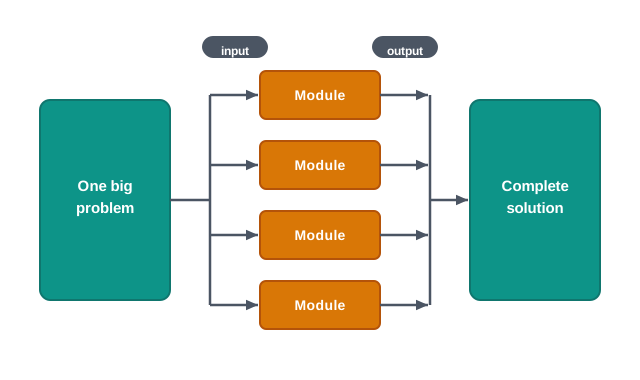
Fig. 13.0 – Splitting a large problem into testable modules.
Your own project this year is smaller, but the method is the same one.
This chapter will answer each of these questions as it goes.
13.1 Introduction
Most of what you have done in Computer Science so far has been set for you. A question named the input, named the output, and often hinted at the method. You wrote a function, ran it on the sample data, and moved on. A project is different in one important way: nobody hands you the specification in a neat paragraph. You are given a situation — a library that cannot say which books are overdue, a canteen that adds up bills by hand — and the first real work is to decide what the program should do at all.
That shift is the point of this chapter. Working on a project asks you to look at an untidy real situation, decide what part of it a computer can handle, break that part into pieces small enough to build, build them, join them, and then show that the whole thing works. Along the way you will almost certainly be working with three or four classmates, which brings its own set of skills.
This chapter has no new Python in it. Everything you need — functions, files, a stack, SQL, connectivity — you already have. What it adds is a way of using those tools on a problem that is bigger than one sitting.
13.1.1 What Project Based Learning Means
A project is a piece of work with a stated purpose, a beginning and an end, and something to show at the end of it. That last part matters. Reading about billing systems is study; building a billing program that a canteen could actually use is a project.
Project based learning is learning that happens through building such a thing. You do not study a topic first and apply it afterwards. You take on a problem, and the topics you need come up because the problem needs them — you learn about file handling because your records must survive after the program closes, and about primary keys because two bills came out with the same number.
Two things about this deserve to be said plainly, because students often expect the opposite.
First, a project is normally done by a team, not alone. This is not a convenience for the teacher. Real software of any size is built by groups, and the reason is arithmetic: a system with six substantial parts and one builder takes six times as long as a system with six substantial parts and six builders who have agreed on how the parts fit. Working in a group also forces you to explain your design to somebody who did not think of it, and a design that cannot be explained is usually a design that is not yet finished.
Second, a project has a deadline that does not move much. Your marks list program is not finished when it is elegant; it is finished when it works on the day it was due.
What a project actually teaches
Because you are building something, the learning is wider than the syllabus topic that started it. In the course of one project you will find yourself working together in a group, solving problems that the question paper never asked, taking decisions where two designs both look reasonable, and investigating — reading, searching, testing — to find out something nobody has told you.
13.1.2 From Problem to Reported Result
Whatever the project, the path from a vague situation to a finished, demonstrable result runs through the same five stages, shown in Fig. 13.1.

Fig. 13.1 – Stages of project based learning.
Analysing the problem means finding out what is really being asked. The canteen owner says “I want a computer for billing”. Analysis turns that into statements you can build against: an item has a code, a name and a rate; an order is a set of item codes with quantities; a bill is the priced total of an order plus a number that no other bill has.
Formulating the problem into modules means splitting the analysed problem into parts, each of which does one job. A module is one such part: a piece of the solution with a defined task, a defined set of inputs and a defined set of outputs. In Python a module usually turns out to be a function or a small group of related functions, and one of the reasons functions exist in the language at all is to make this splitting possible.
Applying the method to each module is the part that looks most like ordinary programming. For each module you decide how the job will be done — a linear search through a list of items, a pickle file for the day’s orders, a SELECT with a WHERE clause on the item table — and then write and test that piece by itself, on data you make up for the purpose.
Integrating the solutions means joining the finished modules so that the output of one becomes the input of the next. This step fails more often than beginners expect, and almost always for the same reason: two members built to two different assumptions about what a module hands over. Deciding those hand-over details in writing, before any code is written, is what makes integration a joining job rather than a rewriting job.
Collecting and processing the data
A project is not only a program; it needs data to run on. That data has to be collected to a format decided in advance, and the whole team has to use the same format. If one member records a date as 2026-04-15 and another as 15/4/26, the two sets of records cannot be merged, and someone will spend an evening repairing them by hand.
Suppose your project is a small stock register for a school stationery counter. Before anyone collects a single row, the team agrees on the format shown in Table 13.1.
Notice what the format is doing. It is not fussiness for its own sake — every rule in the third column prevents a specific failure later. The ban on commas keeps the rows safe if they are stored as a comma separated file. The fixed date form makes dates sortable as plain text. The two-decimal rate keeps every bill total consistent.
Once collected, the data is processed — read in, checked, computed on — and finally the results are reported in a predetermined format: the same report layout every time, so that two days’ reports can be compared at a glance. A project that computes the right answer but prints it differently on every run has not finished the job.
Why the order of the stages matters
You could, in principle, start coding on day one and think about modules later. Teams that do this usually discover the same thing: the code they wrote first assumed a design they had not yet settled, so most of it has to be thrown away when the design finally appears. Analysis before division, division before method, method before code, and integration only after each part stands on its own — the order is not ceremony, it is the order in which each stage’s output becomes the next stage’s input.
The rest of this chapter takes these ideas further: how a project is approached and stepped through (Section 13.2), what makes a team work (Section 13.3), and what a real project description looks like when it lands on your desk (Section 13.4).
13.2 Approaches for Solving Projects
Two teams can be given the same problem, the same time and the same laboratory, and finish in very different states — one with a working system, the other with four hundred lines that nobody can join together. The difference is usually not talent. It is the approach: the way the team decided to cut the problem up and the order in which it decided to build the pieces.
Three approaches are worth knowing at this stage: the modular approach, the top down approach and the bottom up approach. They are not rivals. The first says how the work is divided; the other two say in which direction the divided work is built.
13.2.1 Modular Approach
A modular approach — also called a structured approach — means dividing the project into manageable modules, each with a well-defined task, a defined set of inputs and a defined set of outputs. Each module is built and tested on its own. When the modules are joined, the outputs of one feed the inputs of the next, and together they produce the outcome the project was asked for.
Consider a library issue system for your school. Undivided, it is one enormous job. Divided, it looks like Fig. 13.2: a module that manages the book records, a module that manages the member records, a module that records an issue or a return, and a module that produces reports such as the list of books not yet returned.
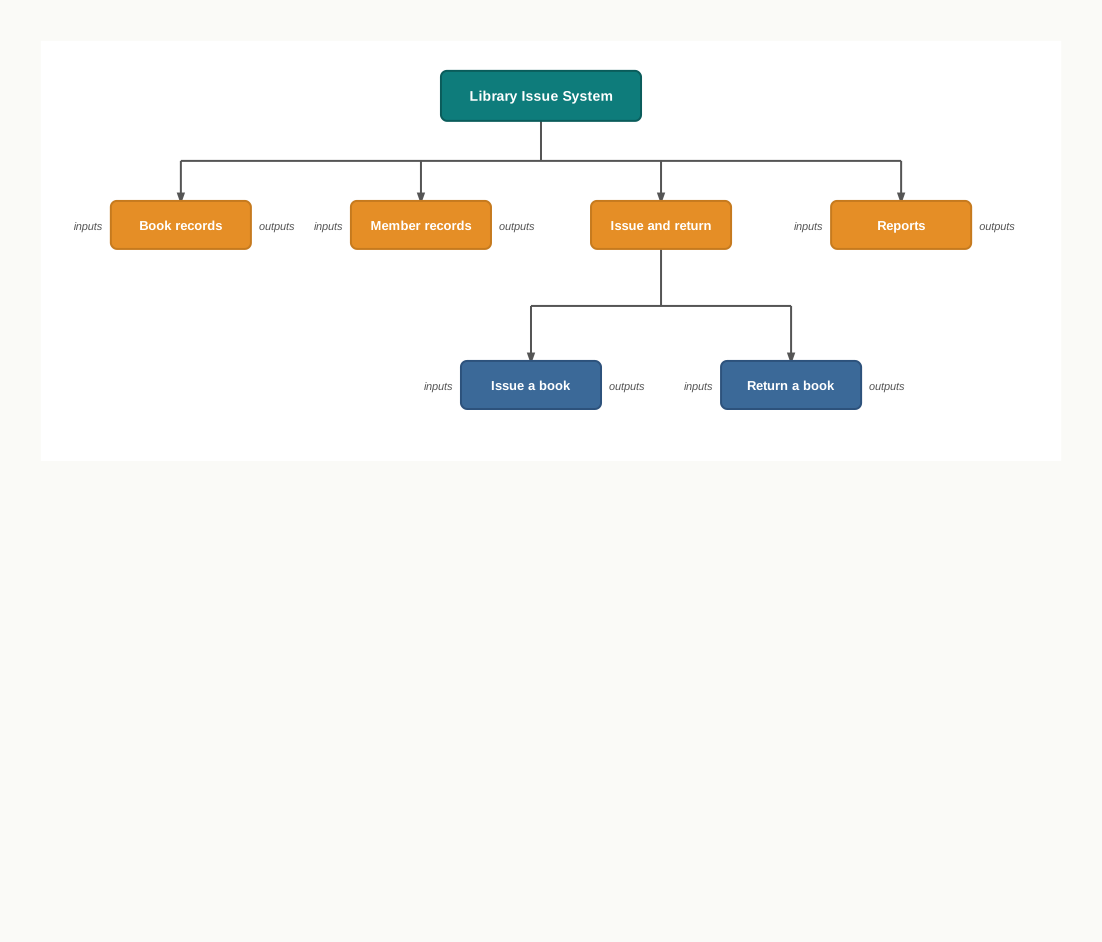
Fig. 13.2 – Modular division of a library issue system.
Four gains follow from this division, and they are worth stating separately because students often see only the first.
The work can be shared. Four members can build four modules at the same time instead of queueing behind one keyboard.
Each module can be tested alone, on data invented for the purpose. If the report module is wrong you know it is wrong before it is ever joined to anything else, and you know exactly where to look.
A module can be replaced without disturbing the rest. If the team decides later to keep book records in a table instead of a file, only the book-records module changes — provided the other modules were written against what it produces, not against how it stores things.
And the whole thing becomes understandable. You can hold “issue a book” in your head. You cannot hold the entire system in your head, and neither can anyone else.
Agreeing the hand-over
The gains above all depend on one discipline: before coding starts, the team writes down what each module accepts and what it returns. A convenient way to record this is to write the function headers first, with the bodies left empty, so that everyone is coding against the same agreement.
def find_book(book_code):
    pass

def issue_book(book_code, member_code, issue_date):
    pass

def overdue_list(today):
    pass
These three lines settle a great deal. Everyone now knows that a book is identified by its code and not by its title, that the issue module is told the date rather than working it out for itself, and that the overdue list is a function of today’s date. A team that has agreed this much can genuinely work in parallel.
13.2.2 Top Down and Bottom Up Approaches
Once the project is divided, the team still has to decide where to start building. Here the two directions differ.
In the top down approach, you begin at the whole and work downwards. You state the complete task, break it into its major parts, break each of those into smaller parts, and keep going until each remaining piece is small enough to code directly. The library system in Fig. 13.2 was described exactly this way — the root first, the leaves last.
In the bottom up approach, you begin with the small pieces you know you will need, build and test each one, and then assemble them into larger units until the whole system stands. A team that starts by writing and testing a reliable “read all records from the file” function, then a “search by code” function, then joins them into a working record manager, is working bottom up.
Fig. 13.3 shows the two directions on the same set of boxes.
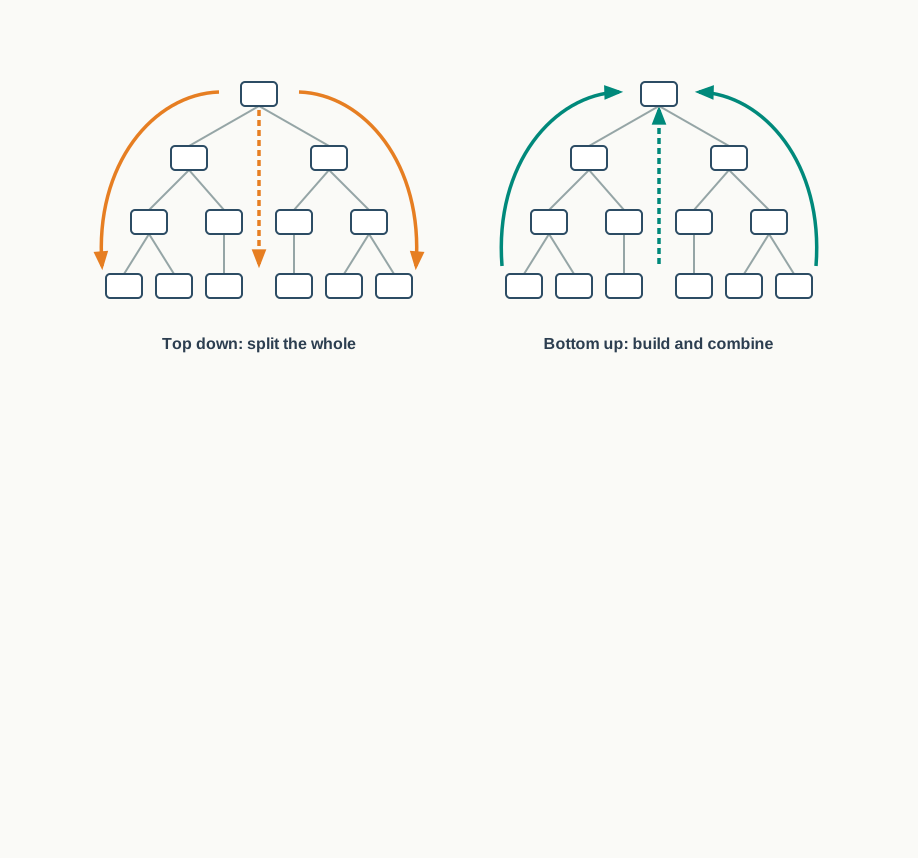
Fig. 13.3 – Top down and bottom up approaches.
The distinction is easiest to feel through what each one risks. A top down team always knows what the finished system is supposed to be, but may reach the end of the term with a beautiful plan and very little that runs. A bottom up team always has something that runs, but may find that its carefully built pieces do not add up to the system that was actually asked for.
In school practice, most successful teams use both. They settle the overall division top down, so that everyone knows what the system is; then they build bottom up, so that something runs from the first week. Choosing an approach is therefore not a loyalty test — it is a decision about which risk your particular project can least afford.
13.2.3 Steps in Project Based Learning
Approach settles how the work is cut and in which direction it is built. Beyond that, a project moves through five steps, shown in Fig. 13.4, and the arrow that returns from monitoring to processing is as important as the arrows that go forward.
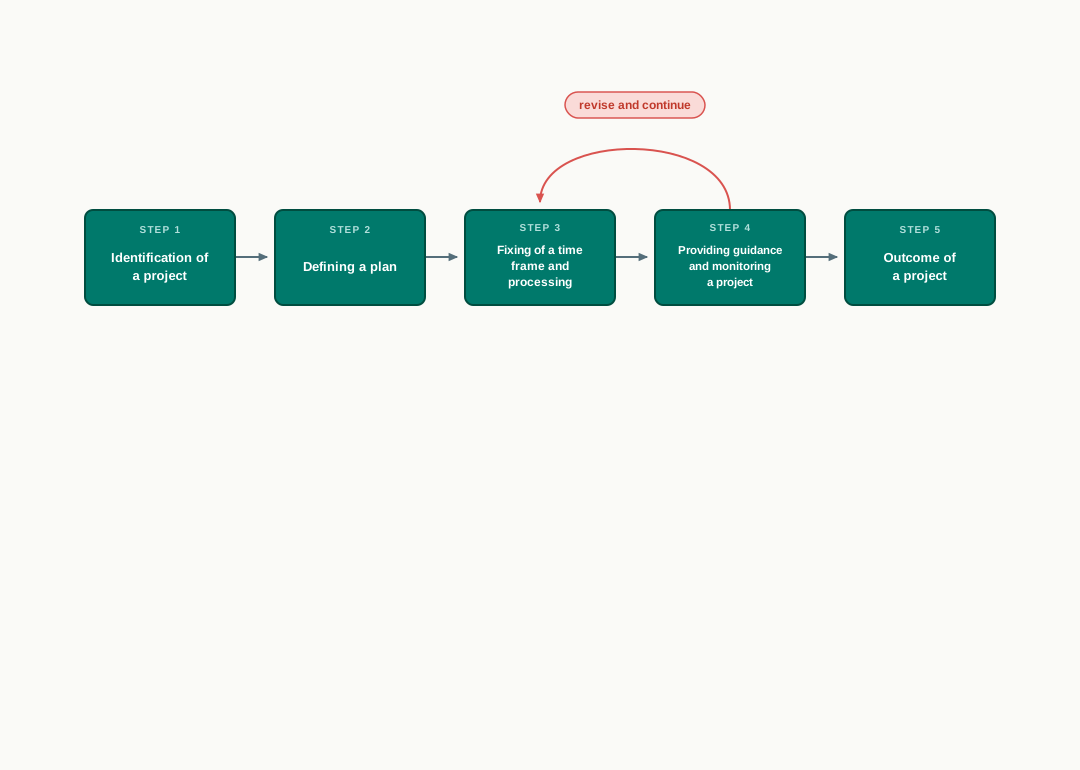
Fig. 13.4 – Steps in project based learning.
13.2.3.1 Identification of a Project
The idea for a project comes from a real-life situation, and the best ones come from a situation you have actually watched. Somebody in your school keeps a register by hand; somebody adds a column of figures twice because the first total looked wrong; somebody cannot answer a simple question because the answer is spread across four notebooks. Each of those is a project waiting to be identified.
Two questions decide whether the idea is worth taking up. Is it useful — would anyone actually be better off if it existed? And what is its impact — who uses it, how often, and what changes for them?
Projects that reach beyond Computer Science alone are worth preferring. A program that models the readings of a physics experiment, or that keeps and analyses the results of a school sports meet, makes you use the subject on somebody else’s material, which is exactly how the subject is used outside a classroom.
13.2.3.2 Defining a Plan
A project normally has several members, and the plan is the document that turns those members into a team.
One project leader is identified. The leader’s job is not to write the most code; it is to hold the whole picture, to keep the modules fitting together, to see that the agreed hand-overs are honoured, and to notice when a member is stuck before the deadline notices it.
Every member’s role is then defined, and every member is assigned specific activities — not “help with the file part”, but “write and test the module that appends an issue record and returns the new record count”. A role stated that precisely can be finished, checked and reported on. A role stated vaguely usually turns out at the end to have been nobody’s.
The plan also settles the tools the work will use: the Python version, whether records will be kept in text, binary or CSV files or in a MySQL database, and where the shared copy of the code will live. A team that has not agreed on the tools finds out during integration that it has effectively built two different systems.
Finally, a good plan thinks about the extreme situations from the beginning, not at the end. What should the issue module do when the book code does not exist? What should the report show on a day with no transactions at all? What happens if the data file has been deleted? Deciding these while the design is still on paper is cheap; discovering them during the demonstration is not.
13.2.3.3 Fixing of a Time Frame and Processing
Every project is bound to time. Every activity in it — collecting the data, writing a module, testing it, integrating, preparing the report — takes a certain amount of time, and the sum of those amounts has to fit inside the term.
The practical way to fix a time frame is to list the activities, give each one a planned finish date, and name the member responsible, as in Table 13.3.
Two properties make this table work. It is well structured — each activity is a real, finishable piece of work with one name against it. And it is flexible — the dates are planned, not sacred. Some estimate on this table will be wrong, because you are estimating work you have never done before. What must not slip is the last row.
Processing runs alongside the time frame. This is the stage where the collected data is actually read, checked and computed on by the modules, and where you find out whether the format agreed in Section 13.1 survives contact with real records.
13.2.3.4 Providing Guidance and Monitoring a Project
Sooner or later a team gets stuck on one process and cannot move. This is normal and it is not a verdict on the team. What matters is how quickly the stuck member says so.
Guidance is the help that unsticks it, and it comes from several places: books, reliable websites and documentation, and people who know the field — your guide teacher above all. A team that spends four days on a problem that a five-minute question would have settled has lost four days for no gain.
Monitoring is different from guidance. It is the regular check that the project is where the plan says it should be. The project leader monitors from inside the team, activity by activity; the guide teacher monitors from outside, and sees the things a team stops noticing about itself. Monitoring works only if it is frequent and honest — a short weekly check against Table 13.3, in which “not started” is an acceptable answer, tells you far more than a confident report a week before submission.
13.2.3.5 Outcome of a Project
The outcome is what the project actually produces, and it must be understood thoroughly by the team — including its limits. An outcome may be single, such as one working application; or multiple, such as an application together with the analysed data it produced and a report of what the analysis showed.
Two things happen to a good outcome. It is peer reviewed — read, run and questioned by people other than its authors, who will try inputs you never thought of and ask why a design choice was made. And it is modified in the light of that feedback and of the guide teacher’s comments. A project that has never been shown to anybody outside the team has not really been tested, because the team has only ever used it in the way it was built to be used.
It is worth being clear that a modest outcome, honestly reported, is a good outcome. A program that manages issues and returns correctly, and says plainly that it does not yet handle fines, is a better project than one that claims everything and collapses on the second input.
13.3 Teamwork
Some tasks are simply too large for one person. Not too hard — too large. One student could, given enough months, write every module of a library system alone. Nobody has enough months. So the work is shared, and the moment it is shared a new problem appears that did not exist before: the pieces have to fit, and the people have to fit.
Teamwork is the name for effort made by individuals collectively to accomplish a task. It is not the same as several people being busy in the same room. It is several people working towards one goal, each knowing what the others are doing and depending on them.
Think of the stall your class puts up at a school science exhibition. One group builds the working model, one prepares the charts, one writes the explanation the visitors will hear, one manages the table and the timing on the day. If the model works but nobody can explain it, visitors walk away puzzled. If the explanation is excellent but the model was never tested on the exhibition table, it fails at the worst moment. No single group’s good work is enough by itself, and none of it counts unless the pieces meet.
This is exactly the situation in a software project. Your issue module may be flawless, but if the member writing the records module hands you a date in a form you cannot read, your flawless module produces nothing.
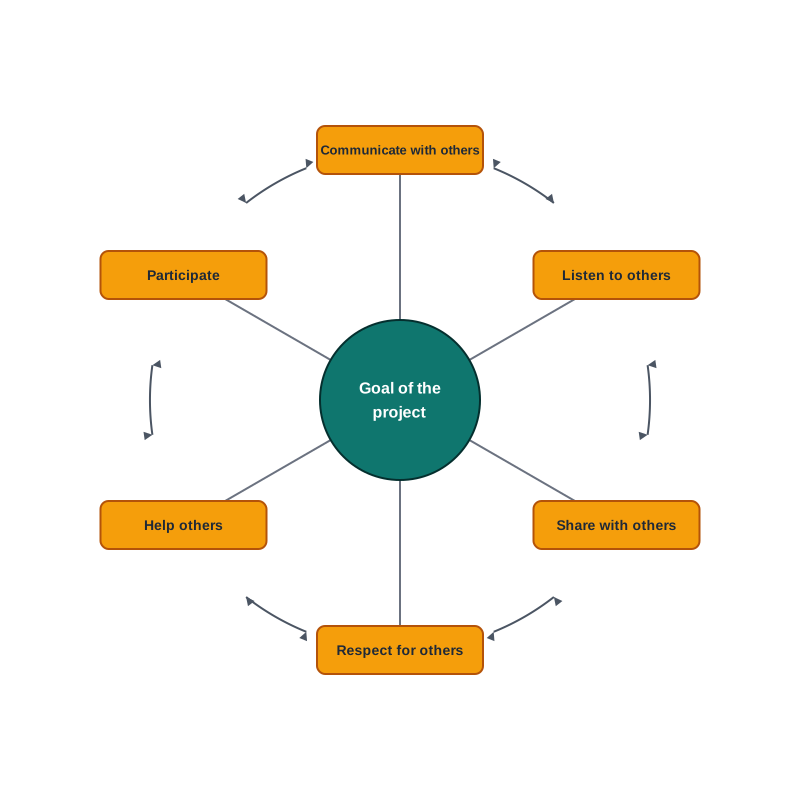
Fig. 13.5 – Components of teamwork.
A group is not yet a team
The difference matters, because most project teams begin life as a group and have to become something more. Table 13.4 sets the two side by side.
The last row is the one that changes behaviour. In a team, being able to say “my module was correct” is not a defence, because the outcome is what is being judged.
13.3.1 Components of Teamwork
Technical proficiency is necessary and is not sufficient. Beyond it, a successful team is made of skilled members holding specific roles, and of a set of habits that keep those roles working together. Six such components are set out below. They read like ordinary courtesy, and it is worth noticing, as you read, that each one prevents a specific, familiar way in which projects go wrong.
Communicate with Others
When several people perform one job, effective communication between the members is necessary. It can be through e-mails, telephones, or group meetings arranged for the purpose — the channel matters less than the habit.
What communication prevents is the silent divergence: two members quietly building to two different assumptions for a fortnight. The most valuable thing a member can communicate is not progress but change. If you alter what your module returns, everyone who reads that return has to be told the same day.
A short weekly meeting, with the plan of Section 13.2 open in front of the team, is usually enough. What was finished, what is stuck, what changed — three questions, honestly answered.
Listen to Others
Communication only counts if it is received. Understanding the ideas of others while executing a job together is achieved when members actually listen to one another in group meetings, and then follow the steps that were agreed upon.
Listening in a project has a precise value. The member who queries your design is running a test on it that you cannot run yourself, because you already believe your design is right. An objection heard properly at the planning stage costs an hour. The same objection discovered during integration costs a week.
The second half matters as much as the first: following what was agreed. A decision that half the team quietly ignores is worse than no decision, because the rest of the team is still relying on it.
Respect for Others
Every member of the team is treated respectfully. The thoughts and ideas put forward in group meetings are heard and duly considered, whether or not they are finally adopted.
The practical reason is straightforward. A member whose views are dismissed stops offering them, and what the team loses is not that member’s feelings but that member’s contribution — including the objection that would have saved the integration. Teams that are hard on ideas and easy on people find their faults early. Teams that are hard on people find their faults in the demonstration.
Respect also means separating the idea from its author. “This design will not handle an empty file” is criticism of a design. Said as a comment about the person who wrote it, the same sentence stops being useful.
Help Others
A helping hand from every member is a key to success. Sometimes help is also taken from people outside the team — a guide teacher, a senior student, a laboratory assistant — in order to accomplish a job.
Helping is best understood as protecting the shared deadline. If one module falls behind, the whole outcome falls behind, whoever’s module it was. So a member who finishes early has not finished; the sensible next step is to ask who is stuck. And a member who is stuck helps the team most by saying so on the second day rather than the tenth.
Participate
All members are encouraged by each other to take part, both in completing the project and in the discussions in group meetings. Active participation matters for a reason beyond the work itself: a member who contributes feels their importance in the team, and a member who feels unimportant contributes less. It is a loop, and it turns in whichever direction the team starts it in.
Participation is also the fairest protection against the commonest complaint about group projects — that two people did everything. Specific activities assigned to named members, checked at a weekly meeting against the agreed time frame, leave very little room for a member to disappear and very little excuse for another to take over the whole project.
13.4 Project Descriptions
Everything so far has been method. This section is material: three project descriptions of the kind a team can take up in a group, written out the way such a description usually arrives — a situation, and then a list of things the finished software must do.
They are examples, not a menu you must choose from. A group may take up any other project it likes in consultation with the guide teacher, and a project drawn from something you have actually watched going wrong in your own school is usually the better choice. What these three do show is the shape of a description, and how much is left for the team to decide.
13.4.1 Reading and Writing a Project Description
A project description has two parts, and they do different jobs.
The description sets the situation. It tells you who wants the software, what they do now, and what they are hoping for. It is written in ordinary language and it is deliberately incomplete, because the person asking for software rarely knows what a program can and cannot do.
The specifications are the list of things the finished software must do. This is the part you will be judged against, and it is the part you must be able to read carefully. Every specification should be a statement that can be checked — something you can sit down at a machine and demonstrate, or fail to demonstrate.
The difference between a wish and a specification is worth seeing side by side, because your first draft of your own project will be full of the left-hand column.
What the description leaves to you
Notice what a description does not say. It does not say whether the records live in a text file, a binary file, a comma separated file or a MySQL table. It does not say which module does what, whether you search a list or run a SELECT, or how the screens are laid out. Those are design decisions, and making them — and being able to give reasons for them — is the actual work of the project.
Two habits help here. First, before writing any code, restate the description in your own words as a numbered list of testable specifications, and take that list to your guide teacher. Disagreements surface immediately, which is exactly when you want them. Second, for every specification, write down the extreme case beside it: the event with no entrants, the search that finds nothing, the file that does not exist yet, the day on which no transaction happened. A team that has listed its extreme cases at the start writes very different code from a team that meets them for the first time during the demonstration.
13.4.2 Project 1: Automation of a School Sports Meet Results System
Description
Your school holds an annual athletics meet spread over three days, with students competing for four houses. At present the results are kept on paper: each event’s result sheet is filled in at the ground, the sheets are carried to the staff room in the evening, and one teacher adds up the house points by hand. Sheets go missing, the points table is announced late, and nobody can answer a question such as “which house is leading after day two?” until the addition has been redone.
The school has asked your team to build an application that records the events and results of the meet and produces the reports the announcer and the staff need.
Specifications
The application must provide at least the following.
- Two kinds of user: an organiser, who can enter and change data, and a viewer, who can only see reports. The application decides which screens are available from the kind of user.
- Stored records of three kinds — the participants, the events, and the results of each event — with the structure shown in Table 13.6. Each participant belongs to exactly one house, and each result belongs to exactly one event and one participant.
- Entry of a result for a given event code and participant number, recording the performance (a timing in seconds for track events, a distance in metres for field events) and the position obtained.
- Automatic award of points on position — for instance 5, 3 and 1 for the first three positions — with the rule stated in one place in the program so that it can be changed without hunting through the code.
- A report showing the full result of one event, entrants listed in order of position, produced for an event code the user supplies.
- A report showing the house-wise points table as it stands at the end of a day, the day being supplied by the user, with the houses listed in decreasing order of points.
- At least one more report of your team’s choice — for example, the participants of one house with the events each has entered, or the list of events for which no result has yet been recorded.
- Every report is written to a file as well as displayed, so that the day’s reports survive the program being closed.
The team decides how these are stored. A file-based solution and a database solution are both acceptable; what the guide teacher will ask for is the reason behind your choice.
Fig. 13.6 shows one reasonable division into modules. It is not the only one, and your team should be able to defend whatever division it adopts.
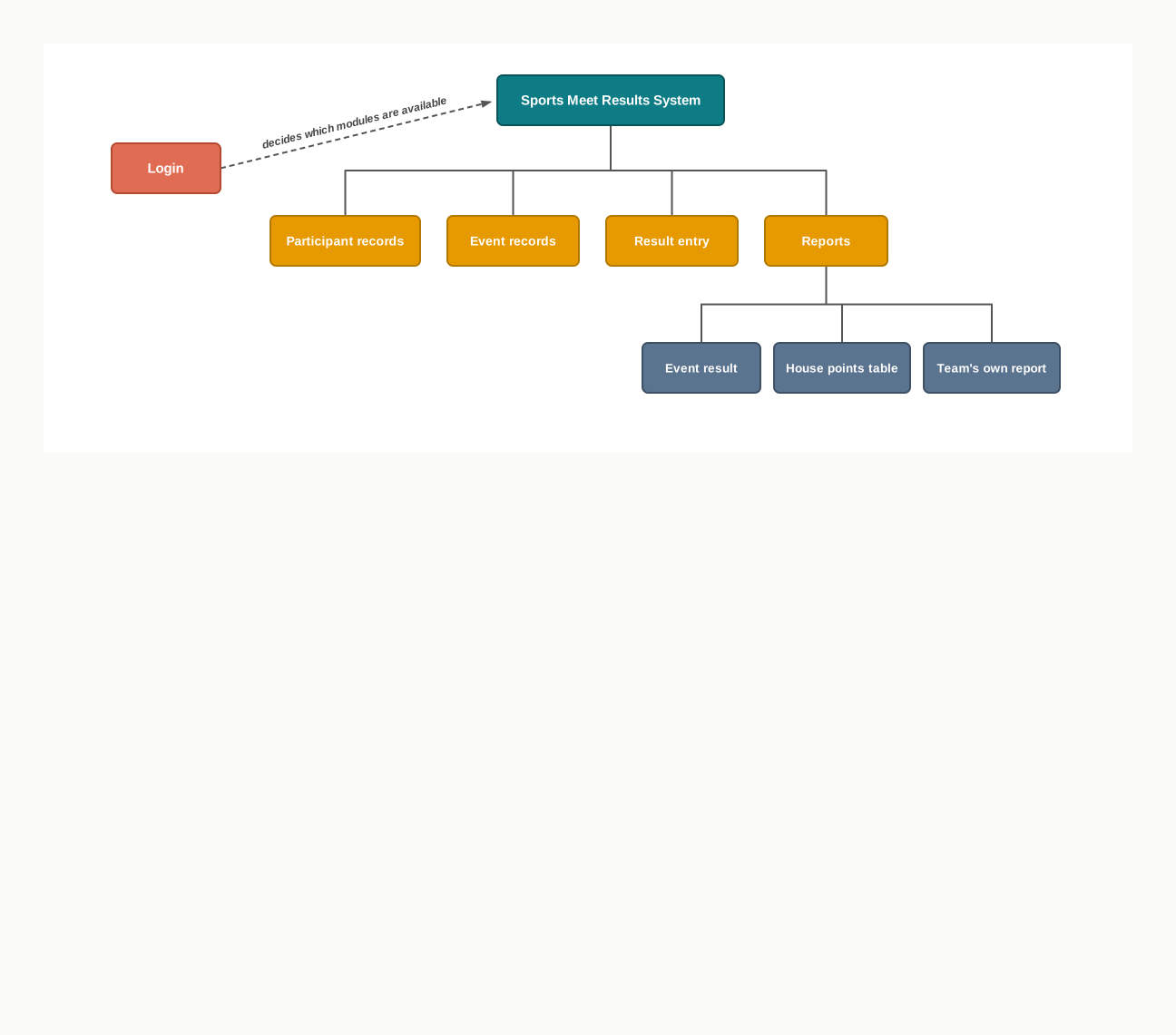
Fig. 13.6 – Modular division of the sports meet system.
Note: decide early what the program should do when a result is entered for an event that does not exist, when the same participant is entered twice in one event, and when the points table is asked for on a day with no completed events. These three cases are where most marks are lost at the demonstration.
13.4.3 Project 2: Development of a Word Grid Puzzle
Description
Implement a word grid puzzle in Python. The player is shown a rectangular grid of letters in which several words have been hidden, each word written along a straight line of cells — left to right, or top to bottom. The player’s task is to find the hidden words. When a word is found, the grid is redisplayed with that word marked, and the game ends when every hidden word has been found.
Fig. 13.7 shows a small grid with two words already located, so that you can see what the display must produce.
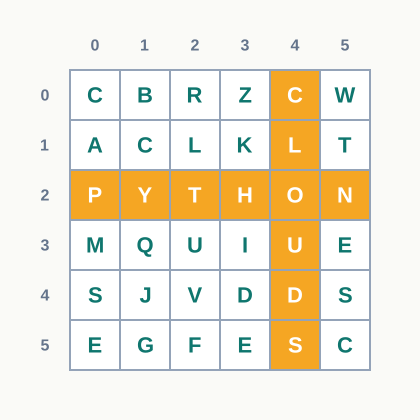
Fig. 13.7 – A 6x6 word grid puzzle.
Specifications
- Fix the grid at 6 rows by 6 columns and hide five words in it, to keep the program within reach. Take the words from a list stored in a file, so that the puzzle can be changed without changing the program.
- Place each word either horizontally, left to right, or vertically, top to bottom, at a position chosen at random. A placement is accepted only if the word fits within the grid and does not disagree with any letter already placed.
- Fill the remaining cells with random letters.
- Display the grid with row and column numbers, and below it the number of words still to be found.
- Let the player enter a guess as a word together with the row and column at which it begins and the direction it runs. Check the guess against the grid and against the hidden list, and report clearly whether it is correct, already found, or wrong.
- Keep and display the number of guesses made, and end the game when all five words have been found.
- Before coding, work one such puzzle by hand on paper. Doing so will tell you far more about what the checking function must do than any amount of planning at the keyboard.
Note: think about how the grid will be represented before you write anything — a list of lists, with the cell at row r and column c reached as grid[r][c], is the natural choice, and every module in the project will depend on that decision.
13.4.4 Project 3: Development of an Educational Game
Description
You are a member of the computer club of your school. The primary section has asked the club for something that will give its students, aged about eight to ten years, useful practice in multiplication tables. A club member has suggested a game called “Table Climb”, in which the player answers multiplication questions and climbs a ladder of levels, the questions getting harder as the player climbs and easier if the player slips.
Specifications
- Present one question at a time in the form
7 x 8 = ?and accept the player’s answer from the keyboard. - Work in levels. At level 1 the questions come from the tables of 2 to 5; at level 2 from the tables of 2 to 10; at level 3 from the tables of 2 to 12. The player begins at level 1.
- Move the player up one level after three consecutive correct answers, and down one level after two consecutive wrong answers. The player never falls below level 1 and never rises above level 3.
- Show the correct answer whenever the player is wrong, and repeat that same question later in the session, so that the game teaches rather than only tests.
- End the session after a fixed number of questions — twenty is reasonable — and show a summary: questions attempted, answers correct, highest level reached, and the three tables that produced the most mistakes.
- Store each session’s summary in a file under the player’s chosen name, and offer a report showing that player’s last five sessions, so that improvement over time can be seen.
Note: handle the case where the player types something that is not a number. A game meant for eight-year-olds that stops with an error message the first time a key is mistyped has failed its users, and the exception handling you already know is enough to prevent it.
Choosing between them
If your team is stronger on data and reports, the first project will suit it. If it is stronger on logic and lists, the second will. The third sits between the two and has the advantage that its users are real and close at hand — you can put a working version in front of a primary class and find out in ten minutes what your specifications missed. Whichever you take, the method of this chapter does not change: analyse, divide into modules, agree the hand-overs, fix a time frame, build and test the pieces, integrate, and report the result in a form somebody else can read.
13.5 Summary
A project is a piece of work with a stated purpose, a beginning, an end, and something to show at the end. Project based learning is learning that happens through building such a thing: the topics come up because the problem needs them, not before it.
A project differs from an ordinary assignment in that the input, the output and the method are not given. Deciding them, and being able to give reasons for the decision, is the real work; the coding is often the smaller part.
Projects are normally done in groups, and by working on one a student practises working together, problem solving, decision making and investigating, besides the technical content of the subject.
The path from a situation to a finished result runs through analysing the problem, formulating it into modules, applying a method to each module, integrating the module solutions, and reporting the result.
A module is a self-contained part of a solution with one well-defined task, a defined set of inputs and a defined set of outputs, which can be built and tested on its own.
Data for a project must be collected in a format agreed in advance and used by every member, then processed, and the results reported in a predetermined format so that one run can be compared with another.
Three approaches are used to execute a project: the modular approach, the top down approach and the bottom up approach. The first says how the work is divided; the other two say in which direction the divided work is built.
A modular, or structured, approach divides the project into manageable modules that are integrated to give the complete solution. It lets the work be shared, lets each part be tested alone, confines the effect of a later change to one module, and keeps the system understandable.
The gains of modularity depend on the team agreeing, before coding begins, exactly what each module accepts and what it returns. Modules proved correct individually can still fail on integration if two members held different assumptions about the data passed between them.
The top down approach begins with the complete problem and splits it repeatedly until each piece is simple enough to code directly. It risks reaching the end with a clear design and little running code.
The bottom up approach begins with the smallest usable components, tests each, and combines them into larger units until the system stands. It risks producing well-built pieces that do not add up to the system that was asked for.
The steps involved in project based learning are: identification of a project, defining a plan, fixing of a time frame and processing, providing guidance and monitoring a project, and outcome of a project.
A project is identified from a real-life situation, and is judged by its usefulness and its impact. Interdisciplinary projects are worth preferring.
A plan identifies one project leader, defines the role of the leader and of each member, assigns specific activities, settles the tools to be used, and considers the extreme situations before any code is written.
A time frame lists each activity with a planned finish and the member responsible. It must be well structured and at the same time flexible, since estimates made for unfamiliar work will not all be correct; what does not move is the final date.
Guidance is the help that unsticks a stalled team, obtained from books, websites and experts in the field, the guide teacher above all. Monitoring is the regular check that the project stands where the plan says it should; the project leader monitors from inside the team and the guide teacher from outside.
The outcome of a project may be single or multiple. It should be peer reviewed and modified in the light of the feedback received from the guide teacher or other users. A modest outcome, honestly reported, is a good outcome.
Teamwork is effort made by individuals collectively to accomplish a task. A group becomes a team when the members share one goal, depend on each other’s work, and are judged by whether the joined outcome works rather than by their separate outputs.
The components of teamwork are: communicate with others, listen to others, share with others, respect for others, help others, and participate. Each reads like ordinary courtesy and each prevents a specific way in which projects fail — silent divergence, faults found late, a single point of failure, withheld contributions, a missed shared deadline, and members quietly dropping out.
A project description has two parts: a description that sets the situation in ordinary language, and specifications that state what the finished software must do. A specification is written precisely enough that anyone can check by running the software whether it has been done.
A description deliberately leaves the design open — where the records are stored, how the modules are divided, how the screens look. Restating the description as a numbered list of testable specifications, with the extreme case written beside each, is the safest way to begin.
13.6 Key Terms
Bottom up approach — a way of building a project that starts with the smallest usable components, tests each one, and combines them step by step into the complete system.
Data collection format — the form agreed in advance in which every member of the team records each field of the project’s data, so that the collected records can be merged and processed without repair.
Description — the part of a project description that sets the situation in ordinary language: who wants the software, what they do now, and what they hope for.
Extreme situation — an unusual input or condition a project must still behave sensibly on, such as an empty file, a code that does not exist, or a day with no transactions.
Guidance — the help that unsticks a team stalled on a process, obtained from books, websites, and experts in the field such as the guide teacher.
Integration — the joining of finished modules so that the output of one becomes the input of the next, producing the complete solution.
Modular approach — a way of dividing a project into manageable modules, each with a well-defined task and defined inputs and outputs, which are then integrated; also called a structured approach.
Module — a self-contained part of a solution that performs one well-defined task on a defined set of inputs, produces a defined set of outputs, and can be built and tested on its own.
Monitoring — the regular check that a project stands where its plan says it should, carried out by the project leader from within the team and by the guide teacher from outside.
Outcome of a project — what the project finally produces, which may be single, such as one working application, or multiple, such as an application together with its analysed results.
Peer review — the reading, running and questioning of a project’s outcome by people other than its authors, whose feedback is used to modify it.
Processing — the stage in which the collected data is read, checked and computed on by the modules of the project.
Project — a piece of work with a stated purpose, a beginning and an end, which produces something that can be shown and used at the end of it.
Project based learning — a way of learning in which understanding is gained by working through a real problem — analysing it, planning, building and presenting the solution — rather than by studying a topic in isolation.
Project leader — the member who holds the overall picture of a project, keeps the agreed hand-overs between modules honoured, and monitors progress against the plan.
Reporting format — the fixed, predetermined layout in which a project’s results are presented, so that the results of one run can be compared with those of another.
Specification — a statement of something the finished software must do, written precisely enough that anyone can check by running the software whether it has been done.
Structured approach — another name for the modular approach.
Team — a set of members who share one goal, depend on one another’s work, and are judged by whether the joined outcome works.
Teamwork — the effort made by individuals collectively, with a shared understanding of the goal and of each other’s roles, to accomplish a task.
Time frame — the list of a project’s activities with a planned finish date and a responsible member for each, kept well structured and yet flexible about individual dates.
Top down approach — a way of building a project that starts with the complete problem and splits it repeatedly into smaller sub-problems until each is simple enough to solve directly.
13.7 Points to Ponder
If dividing a project into modules only ever helped, every program would be split as finely as possible. What does a team lose when the modules become very small and very numerous, and where would you say the sensible stopping point lies?
A team finishes its project a week early and every module works. Would you call the project well planned, or would you want to know something more before deciding — and if so, what?
Two members build modules that are each correct against their own assumptions, and the system still fails when they are joined. Whose fault is that failure, and what does your answer say about how a team should be judged?
A specification is meant to be checkable by running the software. Are there qualities you would genuinely want in a project — that it is easy to use, that it can be changed later, that another student could read the code — which resist being written that way? How would you handle them?
The bottom up approach always has something running, and the top down approach always knows what it is building. If you could only keep one of those two comforts for your own project, which would you keep, and what would you do to protect yourself from the danger of the one you gave up?
A project outcome is expected to be peer reviewed. Why should a reviewer who did not build the system be able to find faults the builders could not, when the builders understand it far better?
13.8 Objective Questions
- Dividing a project into manageable parts, each with a well-defined task, a defined set of inputs and a defined set of outputs, is known as the
- bottom up approach
- modular approach
- peer review
- monitoring [1 mark]
- An approach that begins with the complete problem and splits it repeatedly into smaller sub-problems until each one is simple enough to be coded directly is the
- bottom up approach
- top down approach
- modular approach
- interdisciplinary approach [1 mark]
- Which of the following is written as a testable specification?
- The program should manage the stock properly.
- The program should be fast and user friendly.
- Given an item code, the program displays the item name, rate and quantity in stock.
- The program should handle all situations that may arise. [1 mark]
- Assertion (A): A module can be tested before the rest of the system has been built. Reason (R): A module has a defined set of inputs and a defined set of outputs.
- Both A and R are true, and R is the correct explanation of A.
- Both A and R are true, but R is not the correct explanation of A.
- A is true, but R is false.
- A is false, but R is true. [1 mark]
- Assertion (A): The time frame of a project should be flexible. Reason (R): The date on which the project is finally submitted can be shifted whenever the team needs more time.
- Both A and R are true, and R is the correct explanation of A.
- Both A and R are true, but R is not the correct explanation of A.
- A is true, but R is false.
- A is false, but R is true. [1 mark]
- Match each step of project based learning in Column I with what happens in it in Column II.
| Column I | Column II |
|---|---|
| a. Identification of a project | i. The roles of the leader and of each member are fixed and specific activities are assigned |
| b. Defining a plan | ii. The output is peer reviewed and modified after feedback |
| c. Providing guidance and monitoring | iii. An idea is taken from a real-life situation and judged for usefulness and impact |
| d. Outcome of a project | iv. A stuck team is helped, and progress is checked against the plan |
[1 mark]
Fill in the blank: The effort made by individuals collectively to accomplish a task is called ____________. [1 mark]
State whether the following statement is true or false: The outcome of a project must always be a single item, and a project producing more than one outcome is badly defined. [1 mark]
13.9 Check Your Concepts
Define project based learning, and state one way in which a project differs from an ordinary programming assignment. [2 marks]
What is a module? State the one thing a team must agree about every module before any coding begins, and say why. [2 marks]
Two members of a team collect data for the same project without agreeing a format first. Give one example of the trouble this causes, and state how it could have been prevented. [2 marks]
Differentiate between the top down approach and the bottom up approach, giving one example of a project situation that suits each. [3 marks]
Name, in order, the five steps involved in project based learning, and explain any one of them in two or three sentences. [3 marks]
A team argues that a modular approach only slows the work down, since time is spent on planning instead of coding. Give four reasons, with brief explanation, why the modular approach is worth that time. [4 marks]
Distinguish between guidance and monitoring in a project. State who provides each, and explain why a project needs both. [4 marks]
Name the six components of teamwork. Choosing any three of them, explain the specific way in which a project fails when that component is missing. [5 marks]
13.10 Output & Debugging
- Before coding began, a team wrote down the interface of three modules of a bus route enquiry system as follows.
def find_route(route_code):
    pass

def fare_between(route_code, from_stop, to_stop):
    pass

def stops_on_route(route_code):
    pass
*a. State what each module is given and what a caller would expect it to return.*
*b. A member decides to change `fare_between` so that it takes the stop numbers instead of the stop names. Name the members' work this change affects, and state what the member must do before making it.*[3 marks]
- A team plans its work as shown below.
Identify three faults in this plan, and state the trouble each one would cause. [3 marks]
- A team submits the following four statements as the specifications of a canteen stock program.
- The program should keep the stock records safely.
- Given an item code, the program displays the item name and the quantity in stock.
- The program should be easy for anyone to use.
- At the end of the day, the program writes to a file the list of items whose quantity has fallen below ten. State which of these are testable specifications. Rewrite the remaining ones so that they can be checked by running the program. [3 marks]
- Copy the table below and complete the empty cells.
[2 marks]
- A team divides a school transport project into four modules: student records, route records, allotment of a student to a route, and reports. During integration, the reports module produces nothing, although it was tested and found correct a week earlier. The allotment module was changed twice in that week. State the most likely cause, and state the one practice that would have prevented it. [2 marks]
13.11 Case-Based Questions
- The science laboratory of a school keeps its apparatus register on paper. The laboratory assistant records what is issued to a class, what is returned, and what is found damaged. When the annual stock check comes, the totals never agree. Your team is asked to build a program for this register, and begins by fixing the fields shown below.
*a. Divide this project into three modules. For each, state its task, its inputs and its outputs.* [3 marks]
*b. State two extreme situations this program must be designed to handle, and say what it should do in each.* [2 marks]
*c. Suggest one report the assistant would find useful, and state its predetermined format — the columns it carries and the order the rows appear in.* [2 marks]
[7 marks]
A five-member team is building a project. Member A finishes an assigned module early and waits for the next instruction. Member B is stuck on reading a file and says nothing about it for eight days. Member C changes what one module returns and tells nobody. Member D’s suggestion is dismissed in a meeting, and after that D stops speaking in meetings. The leader last checked progress three weeks ago.
a. For each of the four members, name the component of teamwork that has been neglected, and state the consequence for the project. [4 marks] b. State two things the project leader should have been doing, and explain how each would have caught one of these problems earlier. [2 marks] c. The team now has one week left. Suggest a plan of action for the week, in three or four points, saying what is to be done first and why. [2 marks] [8 marks]
13.12 Programming Practice
In a sports meet, points are awarded on position: 5 points for the first position, 3 for the second, 1 for the third, and none for any other position. Write a function that is given a position and returns the points earned for it, and a second function that is given a list of positions obtained by one house and returns the total points of that house. Submit both functions, an identifier description table, and the output of your functions for the list of positions
[1, 3, 4, 2, 1]. [4 marks]A team has collected records for a project in a text file, one record to a line, each line holding an item code, an item name and a quantity separated by commas. The item code must be two letters followed by three digits, and the quantity must be a whole number. Write a complete program that reads such a file and writes to the screen the line number and contents of every line that does not follow the agreed format, ending with a count of the faulty lines. Show the contents of the file you tested with, including at least two faulty lines, and the output your program produced. Submit the program, the test file contents and the output. [5 marks]
In the educational game described in this chapter, the player moves up one level after three consecutive correct answers and down one level after two consecutive wrong answers, staying between level 1 and level 3. Write a function that is given the current level, the number of consecutive correct answers, the number of consecutive wrong answers, and returns the new level. Submit the function, an identifier description table, and a short table of your own showing the value returned for at least four different combinations of arguments, including one that would take the level below 1 and one that would take it above 3. [4 marks]