Chapter 10: Computer Networks
In the early 1970s, if you wanted your computer to reach another computer on the young ARPANET, you did not look the machine up anywhere. You already had the list. A single file named HOSTS.TXT held the name of every host on the network beside the number that identified it, and that file was maintained by hand at the Network Information Center at the Stanford Research Institute, under Elizabeth Feinler. Whenever a machine joined or left, somebody edited the file. Every other site then had to fetch a fresh copy.
For a few dozen machines this worked. As the network grew into hundreds and then thousands of hosts, it stopped working. The file was always slightly out of date somewhere, two sites could not agree on who owned a name, and the traffic generated by everyone downloading the same growing file became a burden in itself. A system that assumed one central list simply could not be stretched.
The answer, designed by Paul Mockapetris in 1983, was to stop keeping one list at all and to distribute the job across many servers, each responsible for a part of the naming space. That design is still in use every time you type a web address. Fig. 10.0 shows the two arrangements side by side.
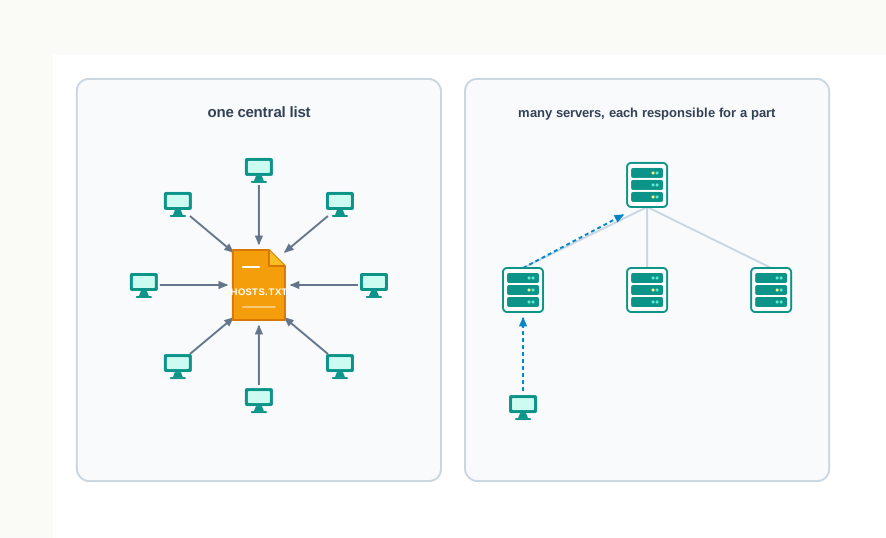
Fig. 10.0 – Central list vs. distributed naming system.
This chapter is about the ideas that let a network keep working as it grows — how devices are joined, how they are named and numbered, and how a message finds its way.
The chapter that follows will answer each of these questions.
10.1 Introduction to Computer Networks
You send a message from a phone in Jaipur and it appears on a screen in Kochi a moment later. You press print on a laptop and a machine on the other side of the staff room begins to hum. You open a page and text stored on a computer you will never see arrives in front of you. None of this involves any single wire running from your device to the other one. It works because your device is part of a network.
The word itself is older than computing. A railway network, a network of roads, a network of friends — in each case the useful idea is the same: a set of things joined to one another in such a way that something can travel between them.
The Everyday Sense of the Word
A network is a group of two or more similar things or people interconnected with one another. Once the connections exist, the group can do something that no single member could do alone. A railway network moves a passenger from one town to another town it has never directly been joined to, because the two towns share a system of links.
You already live inside several networks. A mobile network carries your calls. A social network connects people who have never met. Airlines, railways, banks and hospitals each run networks so that a booking made at one counter is known at every other. In every one of these, the value lies not in any single node but in the connections.
10.1.1 What Makes a Collection of Devices a Network
Two computers standing side by side on a table are not a network. Put a cable between them, or let them find each other over the air, and they become one. The connection is what matters, and it must be a connection over which data can actually be exchanged.
A computer network is an interconnection among two or more computers or computing devices, which allows them to share data and resources with one another. The definition sets a floor of two, and no ceiling. A basic network may join a few computers placed in one room. The largest one joins billions of devices spread across every continent.
Notice that two conditions are packed into that sentence, and both must hold. There must be an interconnection, and it must be usable — the devices must be able to send data to each other along it. A printer sitting unplugged beside a computer is connected to nothing, and a computer that can see a network but is not permitted to exchange anything with it is, for practical purposes, outside it.
The size of a network varies enormously with the number of computers it connects, and, as you will see in section 10.3, that size is one of the things we use to classify networks in the first place. What does not vary is the basic idea: devices, links between them, and data moving over those links.
10.1.2 Nodes, Hosts and Networking Devices
Look closely at any working network and you will find that not everything in it is a computer in the ordinary sense. The arrangement in Fig. 10.1 is typical of a small network: a few computers, a phone, a tablet and a printer, all reaching one another through a device in the middle whose only job is to join them.
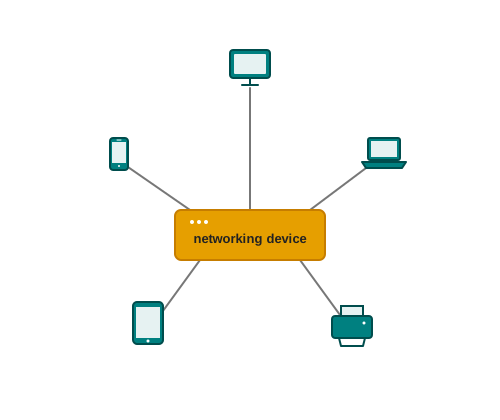
Fig. 10.1 – A small computer network with a central device.
A computer network can include different types of hosts, also called nodes — a server, a desktop, a laptop, a cellular phone. Alongside these sit the networking devices: a switch, a router, a modem and others you will meet in section 10.4. Networking devices are used to connect multiple computers in different settings, and they are members of the network in their own right, not accessories to it.
The word node is used in a precise sense here, and it is worth reading slowly. In a communication network, each device that is a part of a network and that can receive, create, store or send data to different network routes is called a node. That is a wider set than “the computers”. A node can be a modem, a hub, a bridge, a switch, a router, a digital telephone handset, a printer, a computer or a server.
Students often assume, reasonably enough, that a node must be something a person sits at. The definition says otherwise. A router that no one ever touches is a node, because data arrives at it and leaves it along different routes. A printer is a node, because it receives data. The test is participation in the movement of data, not the presence of a keyboard.
How Data Actually Travels
Data does not cross a network as one long, unbroken stream. For communication, data in a network is divided into smaller chunks called packets, and these packets are then carried over the network. A file of a few megabytes leaves your machine as thousands of separate pieces, each carrying a portion of the data along with information about where it is going.
This is one of the quiet design decisions that makes large networks possible at all, and Fig. 10.2 shows why it is worth the trouble. If a single long message had to travel as one piece, one damaged stretch of cable would ruin the whole of it, and one large transfer would occupy a link completely while everyone else waited. Broken into packets, the same message shares the link with other traffic, and only the damaged pieces need to be sent again.
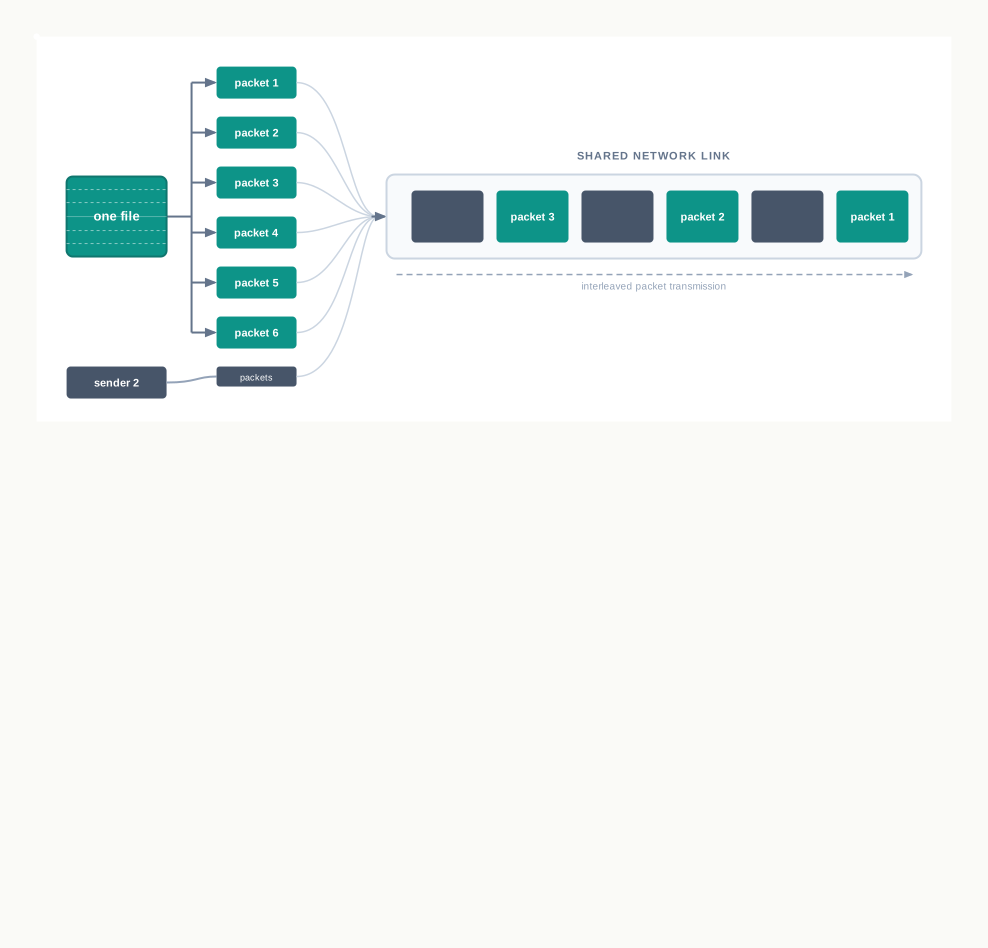
Fig. 10.2 – Packets from different senders sharing a link.
Devices in a network can be connected either through wired media like cables or wireless media like air. Both carry the same packets; they differ only in what the signal travels through. Chapter coverage of the media themselves belongs elsewhere, but the distinction matters here because it explains why a network need not be visible. Two smartphones exchanging a photograph across a table are as genuinely networked as two computers joined by a cable under the floor.
10.1.3 What a Network Makes Possible
A network is built for a reason, and the reasons fall into two broad groups.
The first is communication. Interconnectivity of computing devices in a network allows us to exchange information simultaneously with many parties — through email, websites, audio and video calls. The word simultaneously is doing real work in that sentence. A letter goes to one address; a message on a network can reach fifty recipients at once without being written fifty times, because the network, not the sender, does the copying.
The second is resource sharing. A printer can be made available to many computers through a network, so that a school with forty machines does not need forty printers. A networked storage device can be accessed by multiple computers, so that a file has one home rather than forty slightly different copies. Fig. 10.3 shows the arrangement in a school computer laboratory.
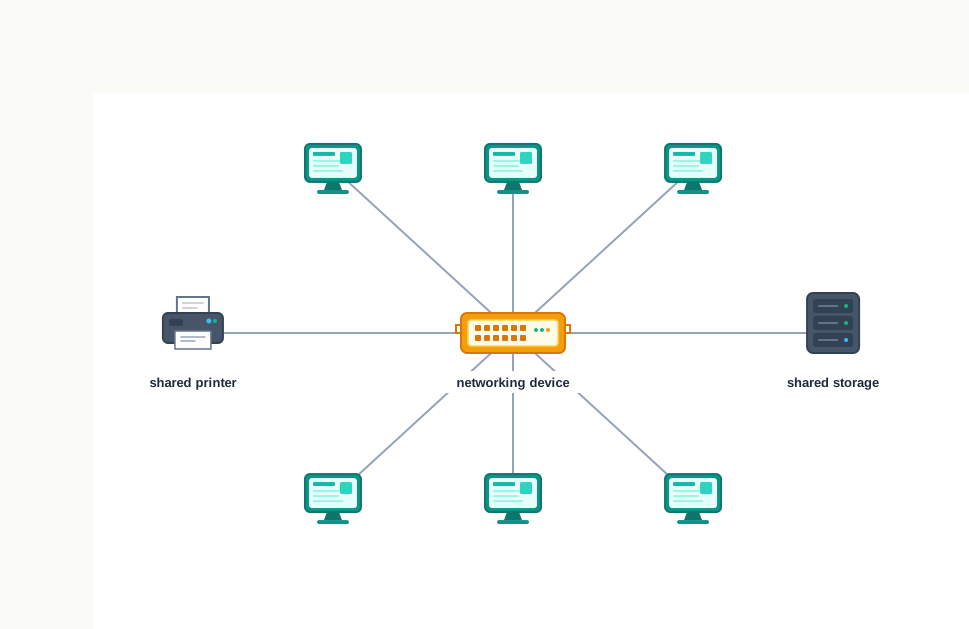
Fig. 10.3 – Resource sharing in a school laboratory.
Sharing is not only about saving money. A single shared store of files is easier to keep correct and easier to keep safe than the same data scattered across many machines, because there is only one copy to update and only one copy to protect.
Networks also form far more casually than most students expect. People often connect their devices through a hotspot, thus forming a small personal network — a phone offering a connection, a laptop and a tablet joining it. Nothing has been installed and no cable has been laid, yet every element of the definition is satisfied: two or more computing devices, interconnected, sharing data.
10.2 Evolution of Networking
Nothing about today’s networks was inevitable. Every idea in this chapter — dividing data into packets, giving machines addresses, agreeing on a common set of rules, naming servers so that people need not remember numbers — was worked out by somebody who had a specific problem in front of them. Reading the history is not an exercise in memorising dates. It is the quickest way to see which problem each idea was invented to solve.
10.2.1 From ARPANET to the Internet
In the 1960s, computers were large, scarce and expensive, and each one stood alone. A researcher in one university could not use a machine in another university, however idle it happened to be, and could not read data held on it without physically travelling there or posting a tape.
In that decade, a research project was commissioned by the Advanced Research Projects Agency in the U.S. Department of Defense to connect academic and research institutions located at different places, so that they could collaborate scientifically. The network that the project built was called advanced research projects agency network (ARPANET).
The first message was communicated between the University of California, Los Angeles and the Stanford Research Institute. Two machines, hundreds of kilometres apart, built by different people for different purposes, exchanged data. Everything in this chapter descends from that link.
Slowly but gradually, more and more organisations joined ARPANET, and many independent smaller networks were formed alongside it. This is the point at which the story stops being about one network and starts being about the problem that defines modern networking: how do you join networks that were never designed for each other?
Fig. 10.4 shows why the question is hard. Each of those smaller networks had its own equipment, its own conventions and its own idea of how data should be packaged. Joining them physically is easy; making them understand one another is not.
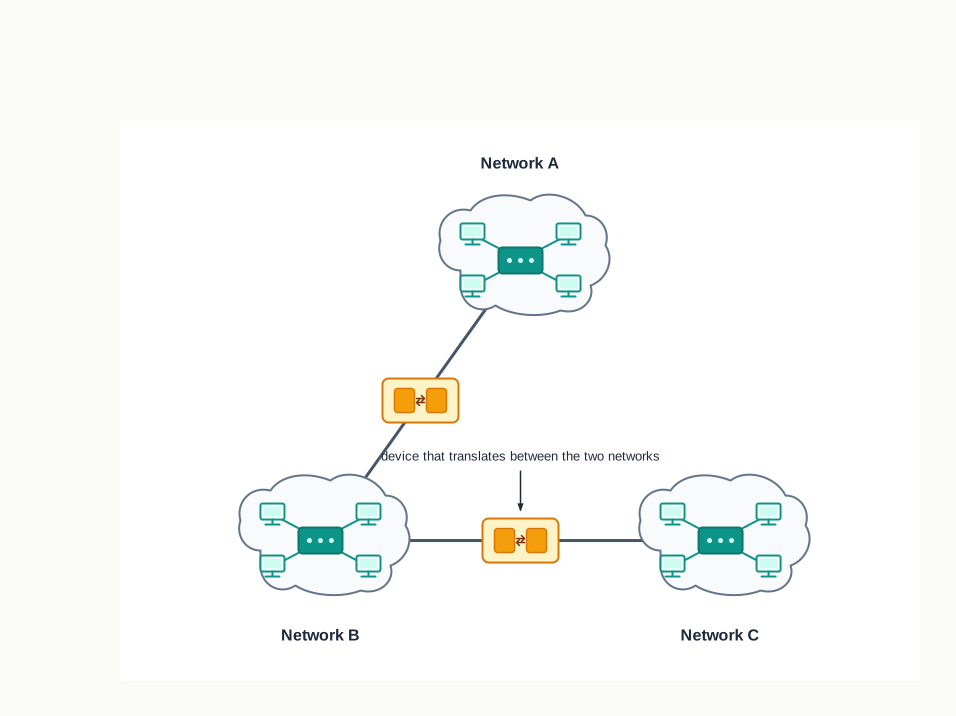
Fig. 10.4 – A network of networks.
The answer was to agree on a common set of rules that every network would follow when handing data to another network. A set of rules of this kind is called a protocol, and it is one of the load-bearing ideas of the whole subject. Two machines can differ in every other respect and still communicate, provided they follow the same protocol.
The rules adopted for this purpose were transmission control protocol / internet protocol (TCP/IP), settled on as the standard for ARPANET in 1982. Once every joining network spoke the same language at the boundary, the collection of interconnected networks could be treated as one enormous network. That network of networks is the Internet.
Read the word literally and the design becomes clear. The Internet is not a network of computers; it is a network of networks. Your school laboratory does not join the Internet as forty separate machines. It joins as one network, connected onward to another, and so on outward.
10.2.2 Milestones in the Growth of Networking
The journey from one experimental link to a global system took about thirty years, and a few dates mark the turning points. Table 10.1 lists them in order.
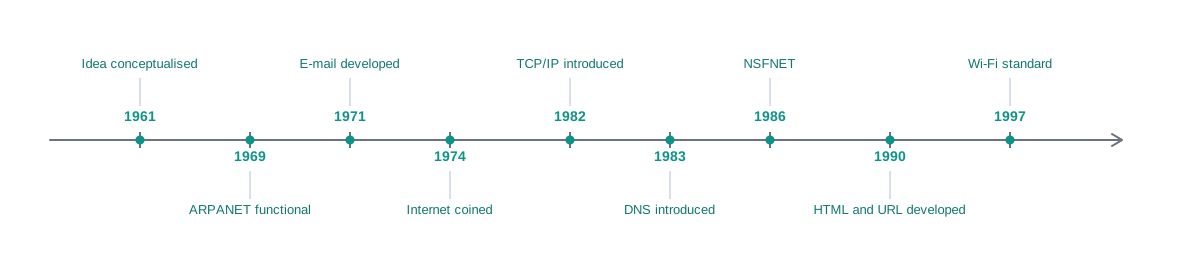
Fig. 10.5 – Milestones in the evolution of networking.
What the Dates Are Telling You
Read down Table 10.1 and a pattern appears. The early entries are about connection: getting two machines to talk at all, then getting many to talk. The middle entries are about agreement — a standard protocol in 1982, a naming system in 1983 — because once the network was large, the difficulty was no longer wiring but consistency. The later entries are about reach: NSFNET taking connectivity beyond a handful of institutions, the web making the content usable by people who were not engineers, and Wi-Fi removing the cable altogether.
Two of these milestones need a word of explanation now, because you will meet them again in this chapter.
The domain name system (DNS), introduced in 1983, is the arrangement that lets a person type a name while the network works with a number. How it does that is the subject of section 10.8.
The developments at CERN in 1990 produced the web — the vast collection of interlinked pages that most people, wrongly, take to be the Internet. Section 10.7 separates the two carefully.
10.3 Types of Networks
Networks come in every size. At one end is a phone talking to a pair of earphones across a desk. At the other are the millions of computers spread across the globe that between them carry the world’s traffic. Some are joined by wires and some through the air, and it would be useless to describe both with the same word and leave it there.
So networks are classified. Based on the geographical area covered and the data transfer rate, computer networks are broadly categorised as:
- PAN (personal area network)
- LAN (local area network)
- MAN (metropolitan area network)
- WAN (wide area network)
Notice that the classification rests on two things together, not one. Area alone would not be enough, because a network’s usefulness depends on how fast data moves through it as much as on how far it reaches — and, as you are about to see, the two tend to pull against each other.
Reading a Data Transfer Rate
The data transfer rate of a network is the amount of data it can carry past a point in one second. It is measured in bits per second, and for the networks in this chapter the convenient unit is megabits per second, written Mbps, where \(1\ \text{Mbps} = 10^6\) bits per second. A thousand of these is a gigabit per second, written Gbps.
The unit is bits, not bytes, and this trips up more students than any other detail in the chapter. A byte is \(8\) bits, so a link rated at \(8\) Mbps delivers about \(1\) megabyte of data per second, not \(8\).
10.3.1 Personal Area Network (PAN)
The smallest kind of network is the one gathered around a single person. A personal area network (PAN) is formed by connecting a few personal devices such as computers, laptops, mobile phones, smart phones and printers, as shown in Fig. 10.6. All these devices lie within an approximate range of \(10\) metres.
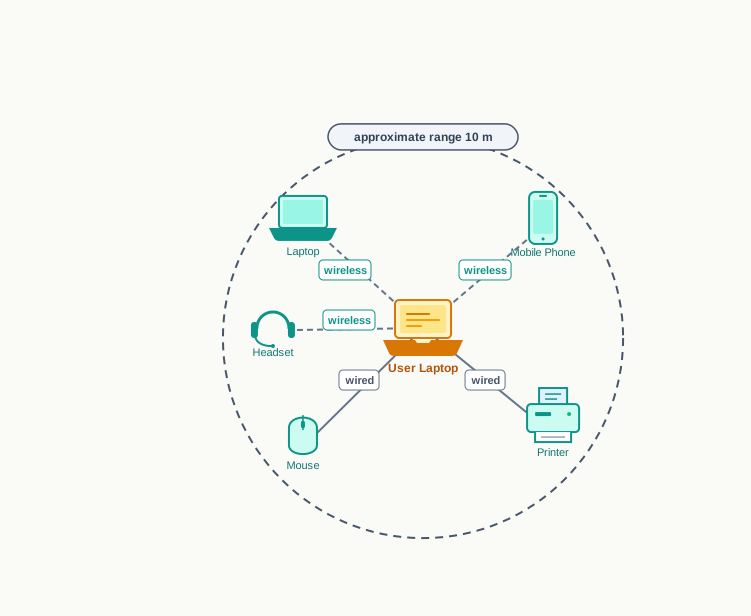
Fig. 10.6 – A personal area network.
A personal area network may be wired or wireless. A mobile phone connected to a laptop through a USB cable forms a wired PAN. Two smartphones communicating with each other through Bluetooth technology form a wireless PAN, also called a WPAN.
The hotspot you met in section 10.1 is a personal area network of exactly this kind. Nothing about it looks like networking equipment, and yet the phone is doing the job that a networking device does in a larger arrangement.
10.3.2 Local Area Network (LAN)
Step up from a desk to a building and you have a local area network (LAN). It is a network that connects computers, mobile phones, tablets, mice, printers and similar devices placed at a limited distance from one another. Fig. 10.7 shows a typical one.
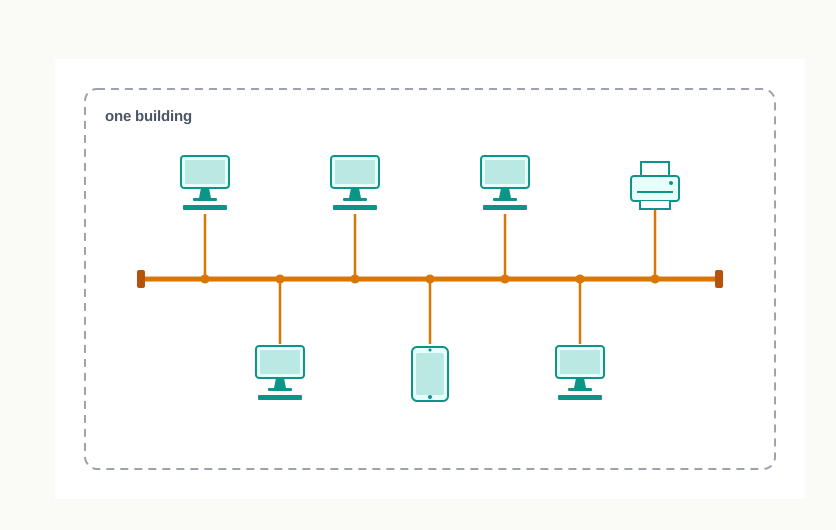
Fig. 10.7 – A local area network in one building.
The geographical area covered by a LAN can range from a single room, a floor, or an office having one or more buildings in the same premises, to a laboratory, a school, a college or a university campus. The connectivity is done by means of wires, Ethernet cables, fibre optics or Wi-Fi. These networks can be extended up to \(1\) km.
Two properties of a LAN follow directly from its small size, and both matter.
The first is speed. Data transfer in a LAN is quite high, and usually varies from \(10\) Mbps, called Ethernet, to \(1000\) Mbps, called Gigabit Ethernet. Short cables lose less signal and need less handling along the way, so more data gets through per second.
The second is security. A LAN is comparatively secure, because only authentic users in the network can access the other computers or the shared resources. Users can print documents on a connected printer, and upload or download documents and software to and from the local server. The boundary of the network is the boundary of a building you control, and that is a real protection that a larger network cannot offer as easily.
The word Ethernet appears twice above, and it names something specific. Ethernet is a set of rules that decides how computers and other devices connect with each other through cables in a local area network.
10.3.3 Metropolitan Area Network (MAN)
A metropolitan area network (MAN) is an extended form of LAN which covers a larger geographical area, such as a city or a town. This kind of network can be extended up to \(30\)–\(40\) km. Cable TV networks and cable-based broadband internet services are examples of a MAN.
The data transfer rate in a MAN also ranges in Mbps, but it is considerably less than in a LAN. This is the first appearance of the trade-off that runs through the whole classification: as a network reaches further, its data transfer rate falls. Signals weaken over distance and must be regenerated, more devices sit in the path, and more users share the same links.
Sometimes many LANs are connected together to form a MAN, as shown in Fig. 10.8. This is worth pausing on, because it shows how the categories nest. The individual LANs do not stop being LANs when they are joined. A larger network has simply been built out of them.
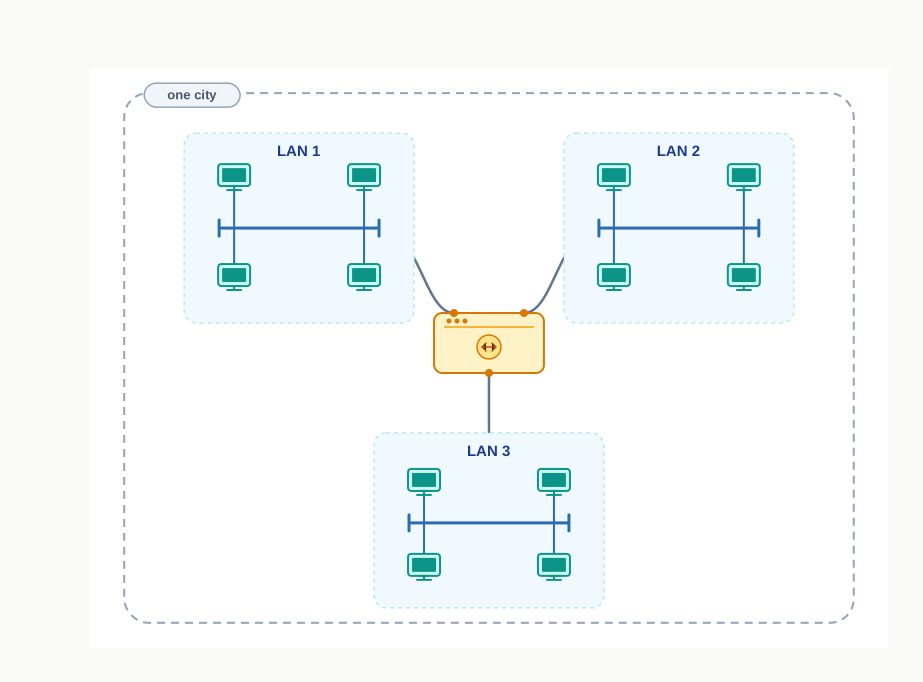
Fig. 10.8 – A metropolitan area network built from LANs.
10.3.4 Wide Area Network (WAN)
A wide area network (WAN) connects computers and other LANs and MANs which are spread across different geographical locations of a country, or in different countries or continents. A WAN could be formed by connecting a LAN to other LANs, as in Fig. 10.9, using wired or wireless media.
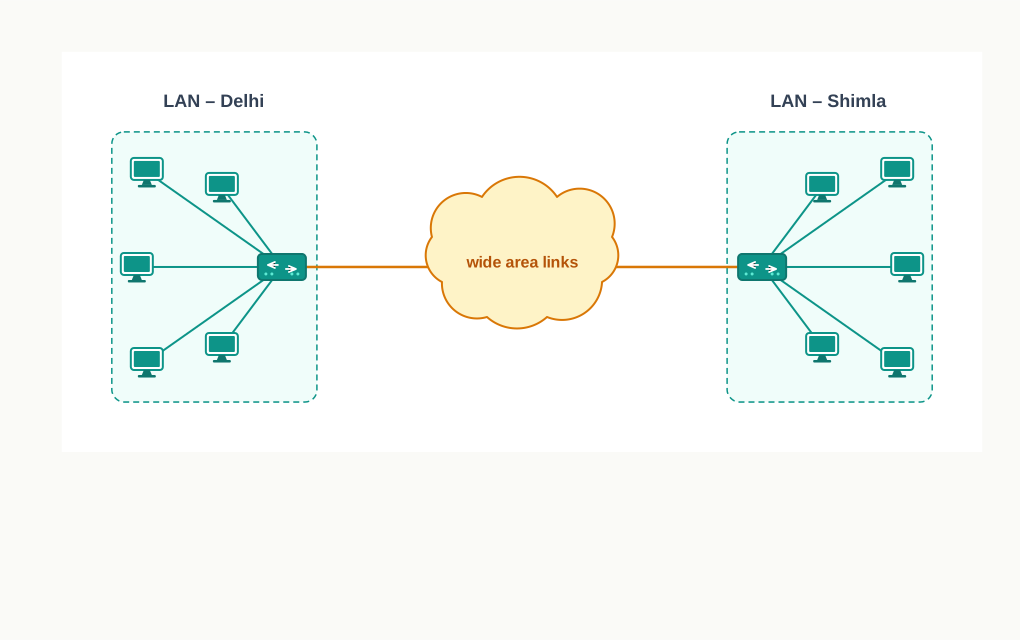
Fig. 10.9 – A wide area network connecting distant LANs.
Large business, educational and government organisations connect their different branches in different locations across the world through a WAN. A bank is the standard example: an account opened at one branch must be visible at every other branch and at every cash machine, which is possible only if all of them are nodes of one wide area network.
The Internet is the largest WAN. It connects billions of computers and smartphones, and millions of LANs, from different continents. That single sentence ties this section back to section 10.2 — a network of networks is, by construction, a wide area network on the largest possible scale.
Comparing the Four
Table 10.2 sets the four types against one another. Read the third and fourth rows together: as the area grows, the data transfer rate falls. That is the whole shape of the classification in two lines.
10.4 Network Devices
Nodes at the two ends of a conversation get all the attention, but very little of the work of a network happens at the ends. Between a computer in one town and a server in another sit devices whose whole purpose is to keep the data moving: converting it into a form the medium can carry, strengthening it when it fades, deciding which cable it should leave by, and handing it across the boundary into a different network altogether.
To communicate data through different transmission media, and to configure networks with different functionality, we require different devices — a modem, an Ethernet card, an RJ45 connector, a repeater, a hub, a switch, a router and a gateway. Each solves one specific problem, and the quickest way to keep them apart is to remember which problem each was invented for.
10.4.1 Modem
A computer stores and processes data in terms of 0s and 1s. A signal of that kind — one that takes distinct, separate values — is a digital signal. Many of the media that carry data over a distance, including an ordinary telephone line, do not carry sharp steps well; they carry a smoothly varying wave, called an analog signal.
So something has to translate. A modem is a device used for conversion between analog signals and digital bits. The name is built from the two halves of its job: MOdulator DEModulator.
There are modems connected at both the source and the destination nodes, as Fig. 10.10 shows. The modem at the sender’s end acts as a modulator, converting the digital data into analog signals. The medium — free space, or a physical cable — carries the signal to the receiver. The modem at the receiver’s end acts as a demodulator, converting the analog signals back into digital data that the destination node can understand.
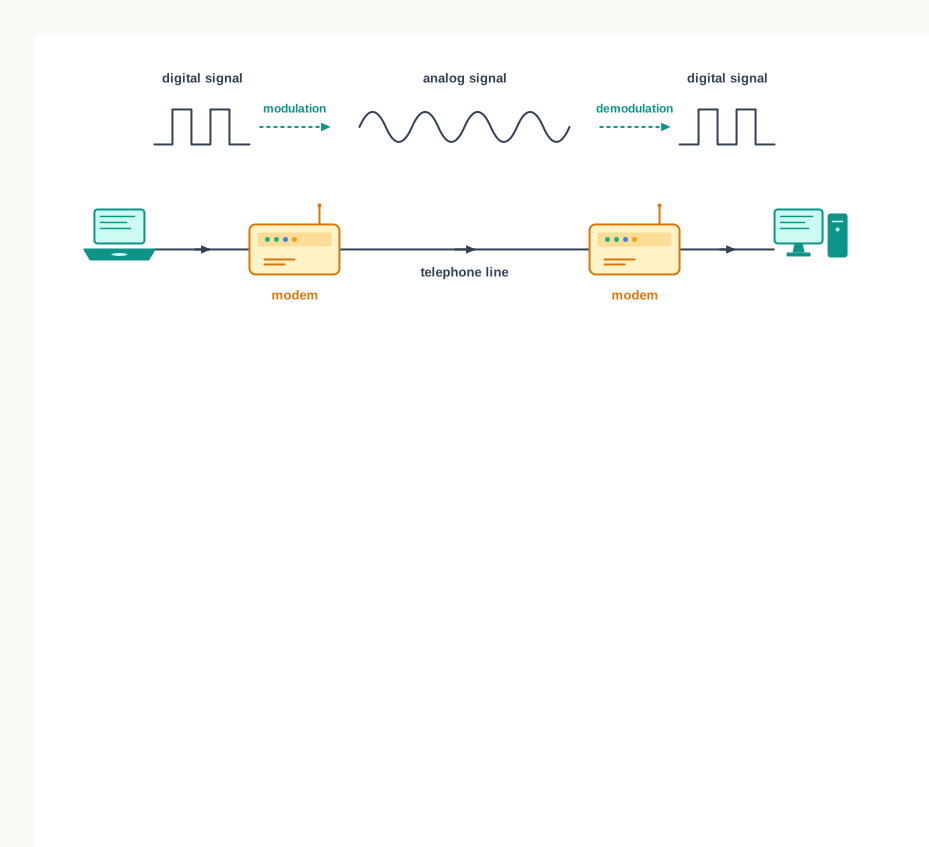
Fig. 10.10 – Modems converting signals across a telephone line.
Notice that a modem is needed in pairs, and that it changes nothing about the data itself. The same bits leave the sender and arrive at the receiver; only the form in which they travel is different in the middle.
10.4.2 Ethernet Card
Before a computer can send anything at all, it needs hardware that understands how to put data onto a network. An Ethernet card, also known as a network interface card (NIC), is a network adapter used to set up a wired network. It acts as the interface between the computer and the network.
It is a circuit board mounted on the motherboard of a computer, as shown in Fig. 10.11. The Ethernet cable connects the computer to the network through the NIC. Ethernet cards can support data transfer between \(10\) Mbps and \(1\) Gbps, which is \(1000\) Mbps — the same range you met for a LAN in section 10.3, and for the same reason: the card is one of the things that fixes it.
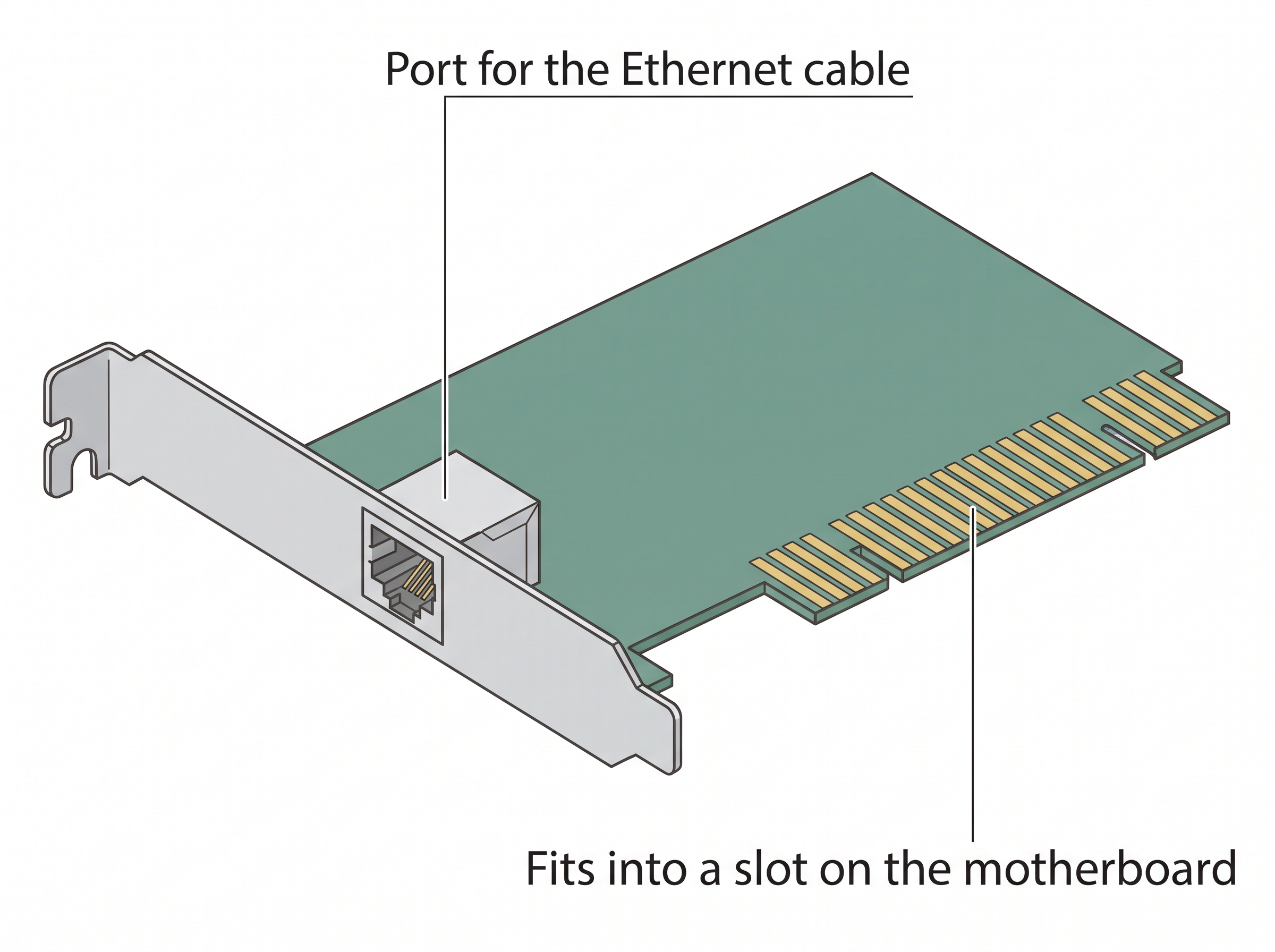
Fig. 10.11 – A network interface card.
Each NIC also carries a permanent hardware address, fixed at the time of manufacture, which uniquely identifies that computer on the network. That address, and the very different kind of address that sits alongside it, are the subject of section 10.6.
10.4.3 RJ45
The cable has to end somewhere, and it ends in a plug. RJ45, or Registered Jack-45, is an eight-pin connector that is used exclusively with Ethernet cables for networking. It is the standard networking interface that can be seen at the end of all network cables.
Physically it is a small plastic plug that fits into the RJ45 jacks of the Ethernet cards present in various computing devices, as in Fig. 10.12. It is the least glamorous item in this section and one of the most important, because a standard connector is what allows a cable bought anywhere to fit a card made by anyone.
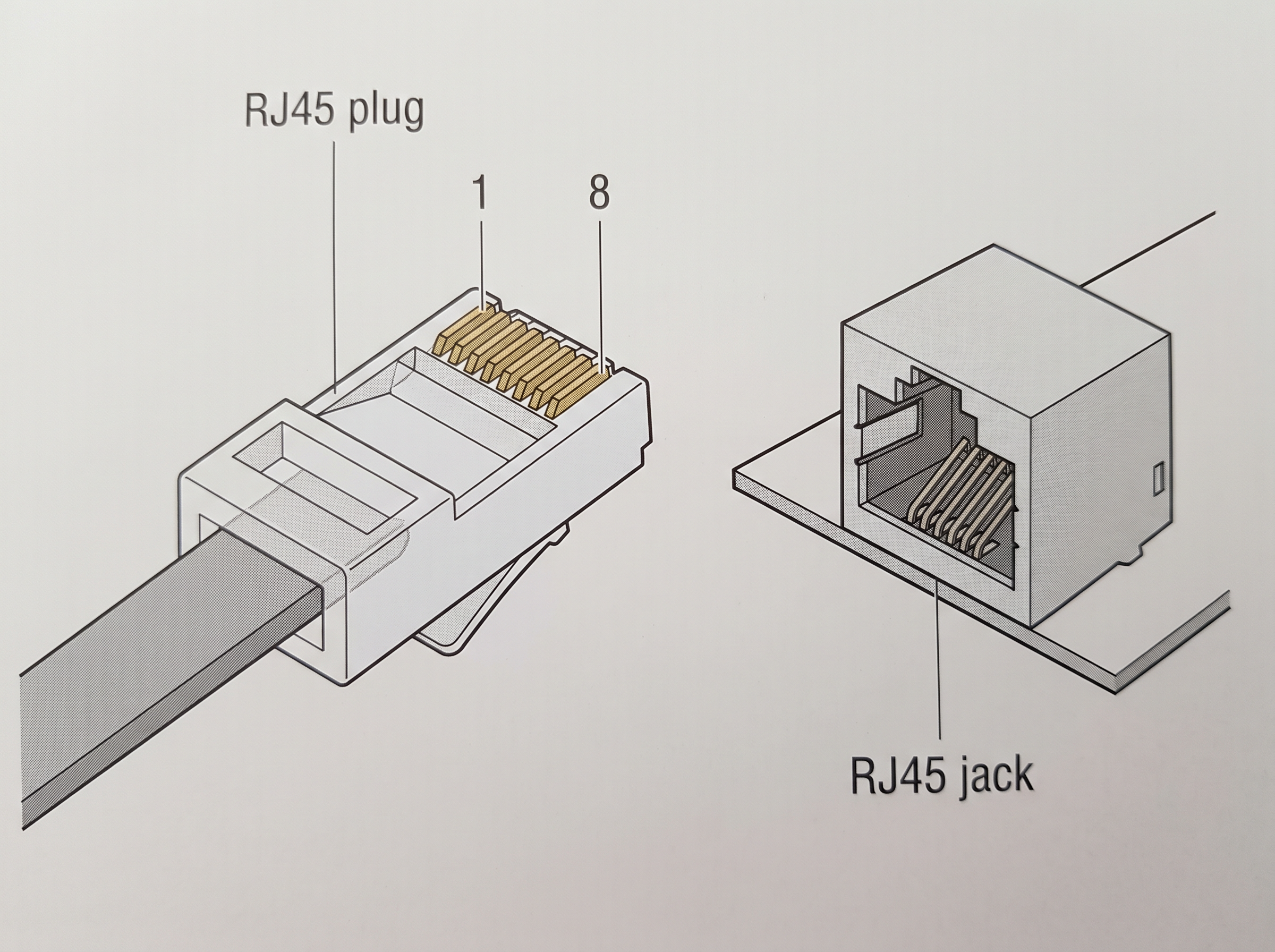
Fig. 10.12 – An RJ45 connector and jack.
10.4.4 Repeater
Data are carried in the form of signals over the cable, and a signal does not travel indefinitely. These signals can travel a specified distance, usually about \(100\) m. Beyond this limit they lose their strength and become weak, and a weak signal is eventually indistinguishable from noise. In such conditions, the original signal needs to be regenerated.
A repeater is an analog device that works with the signals on the cables to which it is connected. The weakened signal appearing on the cable is regenerated by the repeater and put back on the cable, as Fig. 10.13 shows.
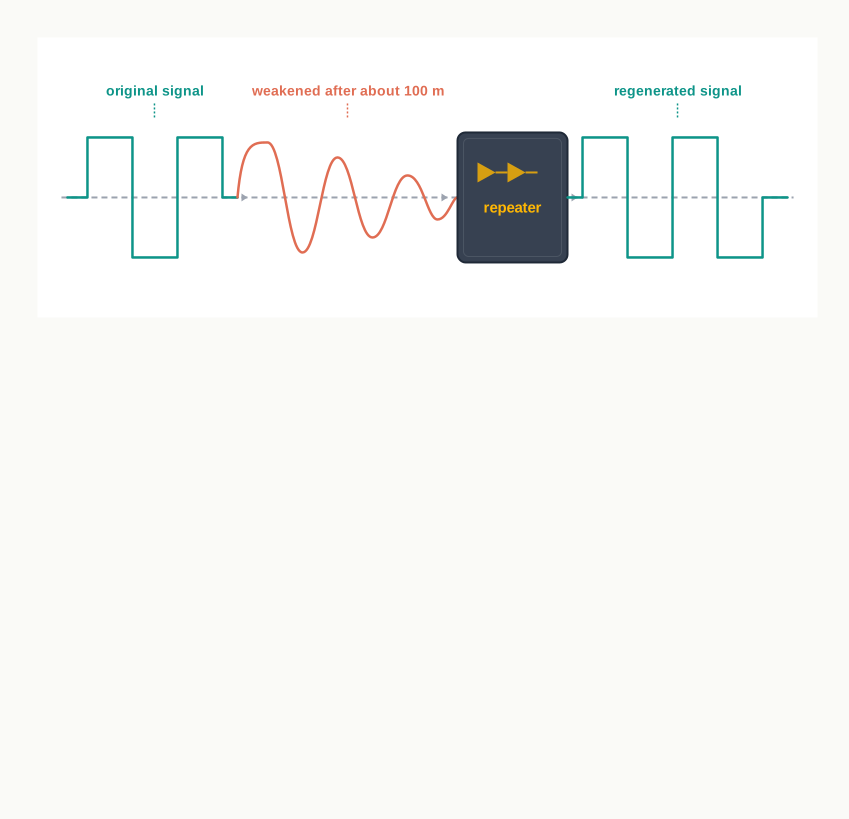
Fig. 10.13 – A repeater regenerating a weakened signal.
The word analog in that description is worth noticing. A repeater does not read the data, does not know where it is going and cannot make any decision about it. It works on the signal, not on the message. That is the whole of its job, and it is why a repeater cannot help you when the problem is congestion rather than distance.
10.4.5 Hub
Once you have more than two devices, you need something to join them. An Ethernet hub is a network device used to connect different devices through wires. Data arriving on any of its lines are sent out on all the others.
Fig. 10.14 shows what that means in practice. A hub with eight ports, given a packet on port 3 that is meant for the machine on port 6, sends it to ports 1, 2, 4, 5, 7 and 8 as well. Seven machines receive data intended for one, and six of them discard it.
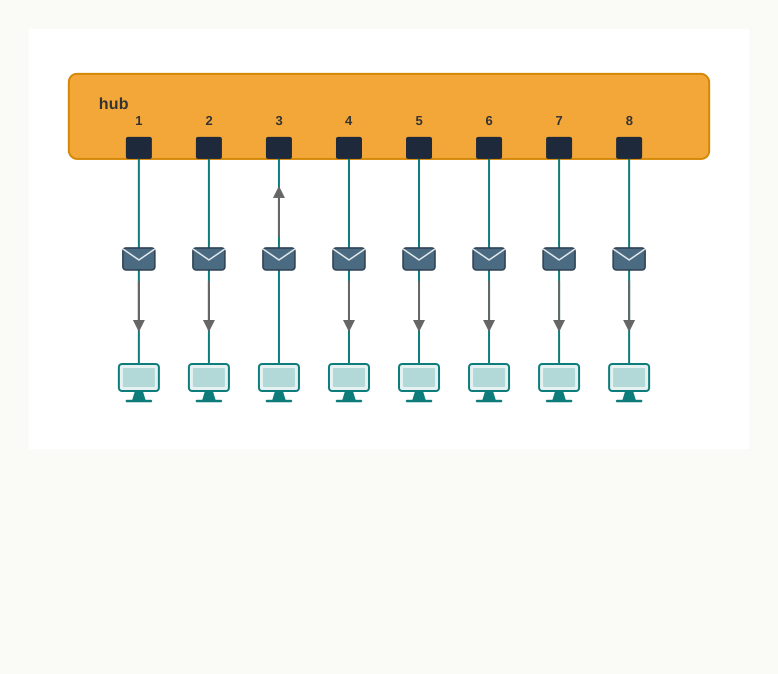
Fig. 10.14 – A hub broadcasting a packet to all ports.
The limitation of a hub follows from this design: if data from two devices come at the same time, they will collide. Since everything a hub receives goes everywhere, two simultaneous transmissions meet on the shared wiring, both are corrupted, and both must be sent again. The busier the hub, the more often this happens, and the busier it gets.
10.4.6 Switch
A switch is a networking device that plays a central role in a local area network. Like a hub, a network switch is used to connect multiple computers or communicating devices. Unlike a hub, it pays attention to what it is carrying.
When data arrives, the switch extracts the destination address from the data packet and looks it up in a table to see where to send the packet. Thus, it sends signals only to selected devices instead of sending them to all, as Fig. 10.15 shows. It can forward multiple packets at the same time. It also does not forward signals that are noisy or corrupted; it drops such signals and asks the sender to resend them.
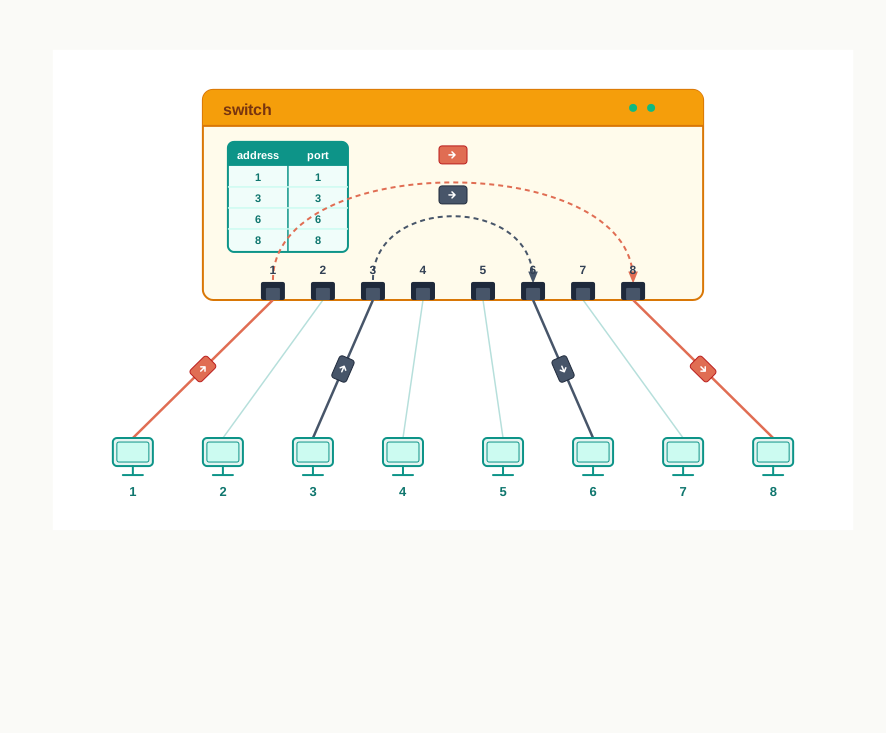
Fig. 10.15 – A switch forwarding packets to specific ports.
Everything a switch does better than a hub follows from that one difference — it reads the destination address before it acts. Table 10.3 sets the two side by side.
Ethernet switches are common in homes and offices to connect multiple devices, thus creating LANs or providing access to the Internet.
10.4.7 Router
A hub and a switch work inside one network. A router is the device that gets data out of it. A router is a network device that can receive the data, analyse it and transmit it to other networks; it is what connects a local area network to the Internet.
Compared to a hub or a switch, a router has advanced capabilities, because it can analyse the data being carried over a network, decide or alter how that data is packaged, and send it on to another network of a different type. Fig. 10.16 shows the situation that makes this necessary.
Suppose data has been divided into packets of a certain size, and these packets are to be carried over a different type of network that cannot handle packets that big. The data must then be repackaged as smaller packets before being sent on, and the router is what does the repackaging.
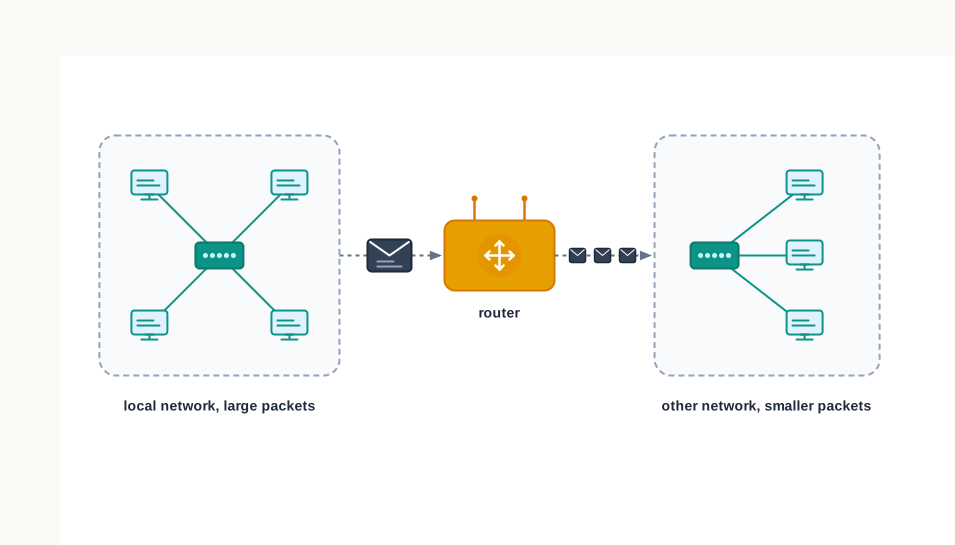
Fig. 10.16 – A router repackaging data between networks.
A router can be wired or wireless. A wireless router can provide Wi-Fi access to smartphones and other devices, and such routers usually also contain some ports to provide wired access. These days, home Wi-Fi routers perform the dual task of a router and a modem or switch: they connect to the incoming broadband lines from an internet service provider (ISP), and convert them to digital data for computing devices to process.
10.4.8 Gateway
As the term suggests, a gateway is a key access point that acts as a gate between an organisation’s network and the outside world of the Internet. It serves as the entry and exit point of a network, since all data coming into or going out of the network must first pass through the gateway in order to use routing paths.
Besides routing data packets, gateways also maintain information about the host network’s internal connection paths and about the identified paths of other remote networks. That stored knowledge is what makes the next step possible: if a node from one network wants to communicate with a node of a foreign network, it passes the data packet to the gateway, which then routes it to the destination using the best possible route. Fig. 10.17 shows two networks communicating in exactly this way.
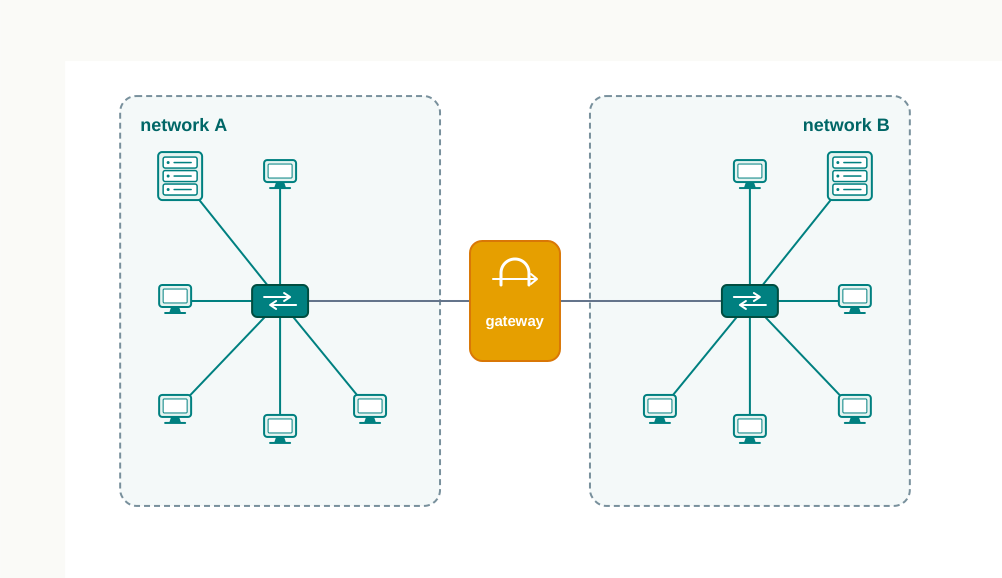
Fig. 10.17 – A gateway joining two networks.
For simple Internet connectivity at homes, the gateway is usually the Internet service provider that provides access to the entire Internet. Generally, a router is configured to work as a gateway device in computer networks, but a gateway can be implemented completely in software, in hardware, or in a combination of both. Because a network gateway is placed at the edge of a network, the firewall — the arrangement that inspects traffic and blocks what is not permitted — is usually integrated with it.
That last point is not an accident of convenience. If every packet in and out must cross one point, that point is the natural place to check them, and defending one gate is a great deal easier than defending a boundary with many openings.
10.5 Networking Topologies
Sections 10.3 and 10.4 have given you the pieces: nodes of various kinds, and devices that join them. What remains is the question of arrangement. Given ten computers and a room, in what pattern should the cables run?
The question is not decorative. The pattern decides how much cable you must buy, how much traffic the network can carry at once, and — most importantly — what happens on the day something breaks. Two networks built from identical equipment can behave completely differently under a single cable fault, purely because of how they are laid out.
The arrangement of computers and other peripherals in a network is called its topology. Common network topologies are mesh, ring, bus, star and tree.
10.5.1 Mesh Topology
Start with the arrangement that holds nothing back. In a mesh topology, each communicating device is connected with every other device in the network, as shown in Fig. 10.18.
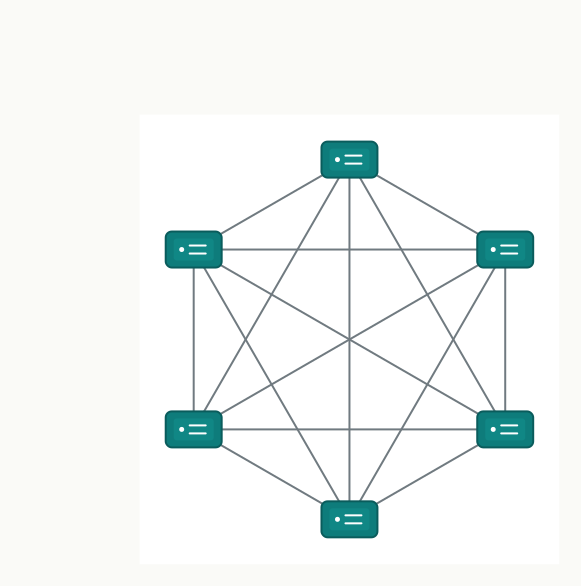
Fig. 10.18 – Mesh topology.
Three advantages follow from this at once.
Such a network can handle large amounts of traffic, since multiple nodes can transmit data simultaneously and each pair has a link of its own to do it on. It is more reliable, in the sense that even if a node goes down, it does not cause any break in the transmission of data between the other nodes. And it is more secure than the other topologies, because each cable between two nodes carries different data — a node cannot see traffic that was not addressed to it, simply because that traffic never touches its cables.
The cost of all this is the wiring. To build a fully connected mesh topology of \(n\) nodes requires
\[\frac{n(n-1)}{2}\]
wires. Each of the \(n\) nodes needs a link to the other \(n-1\) nodes, which counts every link twice, so the product is halved.
Put numbers to it. For \(n = 5\) that is \(10\) wires; for \(n = 10\) it is \(45\); for \(n = 50\) it is \(1225\). The number of nodes has grown ten times and the cabling has grown more than a hundred times. Wiring is complex and cabling cost is high, and many of those connections are redundant or unutilised — a link between two machines that never exchange anything still had to be laid and still has to be maintained.
10.5.2 Ring Topology
At the other extreme of thrift, give every node exactly two links. In a ring topology, each node is connected to two other devices, one on either side, as shown in Fig. 10.19. The nodes connected with each other thus form a ring.
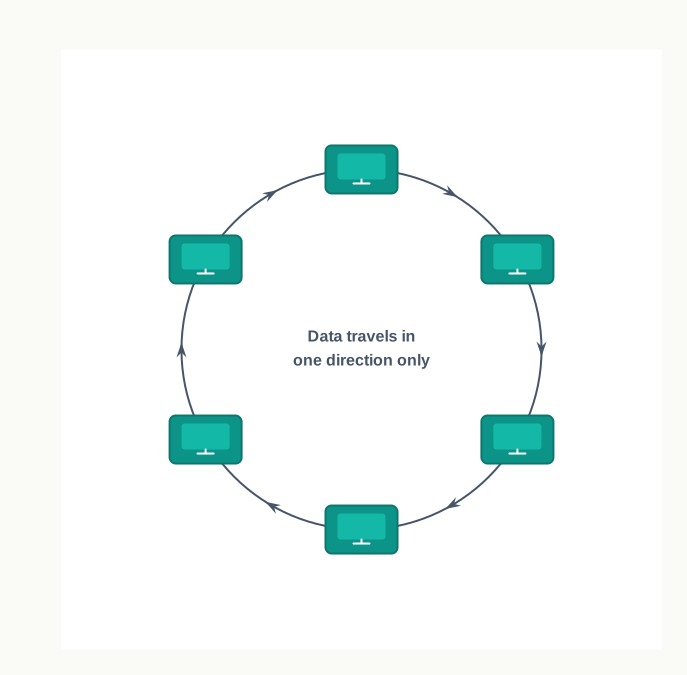
Fig. 10.19 – Ring topology.
The link in a ring topology is unidirectional. Data can therefore be transmitted in one direction only — clockwise or counterclockwise, but not both. A message from a node to its neighbour on the wrong side does not take one step backwards; it travels the whole way round.
This is economical, and it has a clear weakness that follows from the definition rather than from any particular equipment. Every node lies on the only path its neighbours have.
10.5.3 Bus Topology
A bus topology replaces the loop with a single line. Each communicating device connects to a transmission medium known as the bus, as shown in Fig. 10.20. Data sent from a node are passed on to the bus, and hence are transmitted along the length of the bus in both directions. That means the data can be received by any of the nodes connected to the bus.
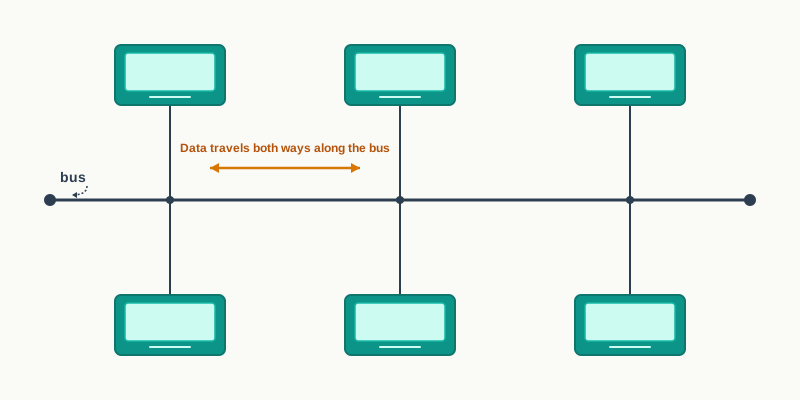
Fig. 10.20 – Bus topology.
In this topology, a single backbone wire called the bus is shared among the nodes, which makes the network cheaper and easier to maintain. There is one length of cable to lay and one length to inspect, and adding a node means dropping one more short cable onto the line.
Both ring and bus topologies are considered to be less secure and less reliable. Less secure, because every node on the bus can receive data that was placed on it, whichever node it was meant for. Less reliable, because both arrangements share a single path: a break in the bus, or a break in the ring, cuts the network rather than one machine.
10.5.4 Star Topology
In a star topology, each communicating device is connected to a central node, which is a networking device like a hub or a switch, as shown in Fig. 10.21. No two end devices are joined directly to each other; everything passes through the middle.
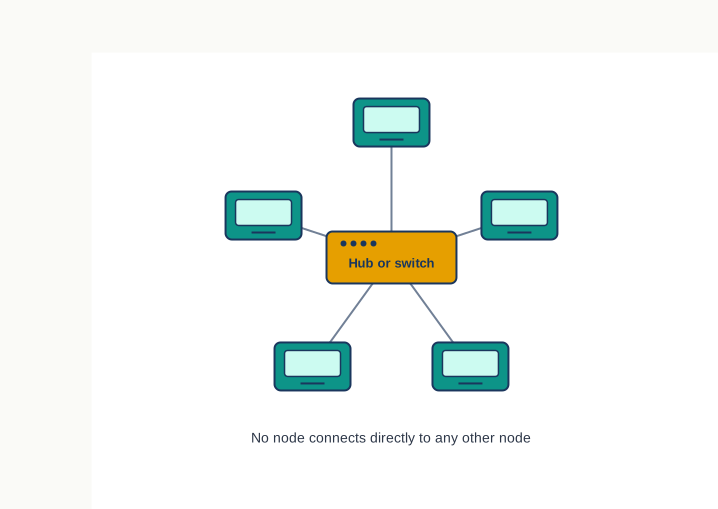
Fig. 10.21 – Star topology.
Star topology is considered very effective, efficient and fast, as each device is directly connected with the central device. A fault in one cable affects one machine, because no other machine’s traffic uses that cable. Although disturbance in one device will not affect the rest of the network, any failure in the central networking device may lead to the failure of the complete network.
That pair of sentences is the honest summary of the star. It converts many possible points of failure into one — which is a real improvement for the ordinary faults, a cut cable or a failed machine, and a real risk for the one fault it cannot absorb.
What the network does with a message depends on what sits in the middle, and you already know both possibilities from section 10.4. The central node can be either a broadcasting device, meaning data will be transmitted to all the nodes in the network, or a unicast device, meaning the node can identify the destination and forward data to that node only.
10.5.5 Tree or Hybrid Topology
Real networks of any size are rarely one pattern throughout. A tree topology, also called a hybrid topology, is a hierarchical topology in which there are multiple branches, and each branch can have one or more of the basic topologies like star, ring and bus.
Such topologies are usually realised in WANs where multiple LANs are connected, and those LANs may be in the form of a ring, a bus or a star. Fig. 10.22 shows four star topologies connected along a bus.
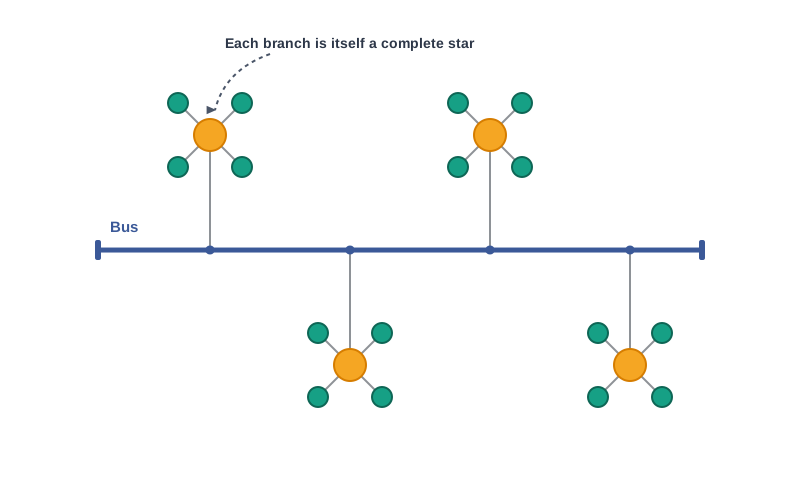
Fig. 10.22 – Tree or hybrid topology.
In this type of network, data transmitted from a source first reaches the centralised device of its own branch, and from there the data passes through the branches, each of which can have links for further nodes. Reading the figure from the bottom up shows why the arrangement is called hierarchical: a node belongs to a star, the star belongs to the bus, and the bus may itself be one branch of something larger.
This is also how the categories of section 10.3 fit together physically. A campus builds each laboratory as a star, joins the stars along a backbone, and connects that backbone onward — and the result is a tree, whether or not anyone planned it as one.
Choosing Between Them
Table 10.5 puts the five arrangements side by side. Read the row for a single link failure alongside the row for cabling cost, and the trade-off that governs the whole section becomes visible: the arrangements that survive faults best are the ones that cost the most to build.
10.6 Identifying Nodes in a Networked Communication
Section 10.4 said that a switch extracts the destination address from a packet and looks it up in a table, and that a gateway routes a packet to its destination by the best available path. Both statements quietly assumed something large: that every node has an address, that no two nodes share it, and that a device examining a packet can tell from the address alone where the packet should go.
Each node in a network should therefore be uniquely identified, so that a network device can identify the sender and the receiver and decide a routing path along which to transmit the data. Two different addressing schemes are used for this, and a single computer carries both at once.
10.6.1 MAC Address
The first address belongs to the hardware. MAC stands for media access control. The MAC address, also known as the physical address or hardware address, is a unique value associated with a network adapter called a NIC — the Ethernet card you met in section 10.4.
The MAC address is engraved on the NIC at the time of manufacturing. It is therefore a permanent address: it is fixed when the card is made and stays with that card wherever the machine is carried. The machine on which the NIC is attached can be physically identified on the network using its MAC address.
How a MAC Address Is Built
Each MAC address is a 12-digit hexadecimal number, \(48\) bits in length. Recall from Class XI that hexadecimal is base 16, so each hexadecimal digit stands for exactly \(4\) bits, and \(12 \times 4 = 48\).
The 12 digits divide into two halves, as Fig. 10.23 shows. The first six digits, that is \(24\) bits, contain the manufacturer’s identification, called the organisational unique identifier (OUI). The later six digits, another \(24\) bits, represent the serial number assigned to the card by that manufacturer.
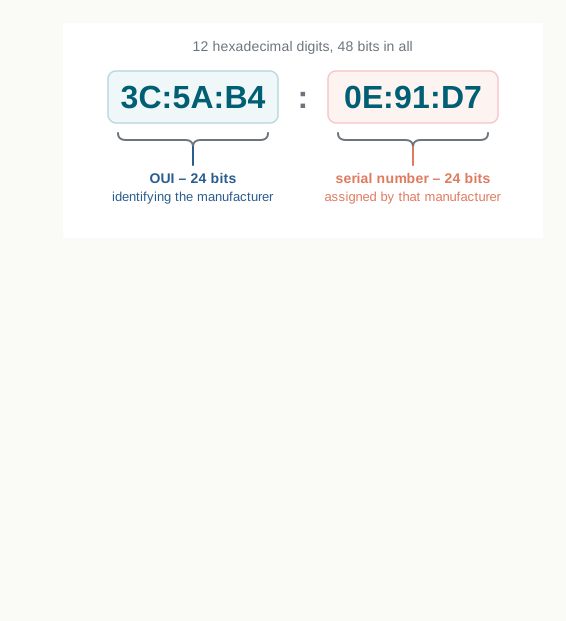
Fig. 10.23 – Structure of a MAC address.
The split is what makes the scheme work without any central office issuing every address one by one. Each manufacturer is given its own OUI and then numbers its own cards within it, and no two manufacturers can collide because their first halves differ. With \(48\) bits available, the scheme allows \(2^{48}\), or roughly \(2.8 \times 10^{14}\), distinct addresses — enough that a card need never reuse one.
10.6.2 IP Address
The second address belongs to the network. An IP address, also known as an internet protocol address, is a unique address that can be used to identify each node in a network. IP addresses are assigned to each node in a network that uses the Internet Protocol for communication.
If we know a computer’s IP address, we can communicate with that computer from anywhere in the world. But unlike a MAC address, an IP address can change: if a node is removed from one network and connected to another network, it is given a different IP address.
That single difference is the heart of this section, and Fig. 10.24 makes it visible. The same laptop, carried from a school laboratory to a home, keeps the address engraved on its card and is given a new address by each network it joins.
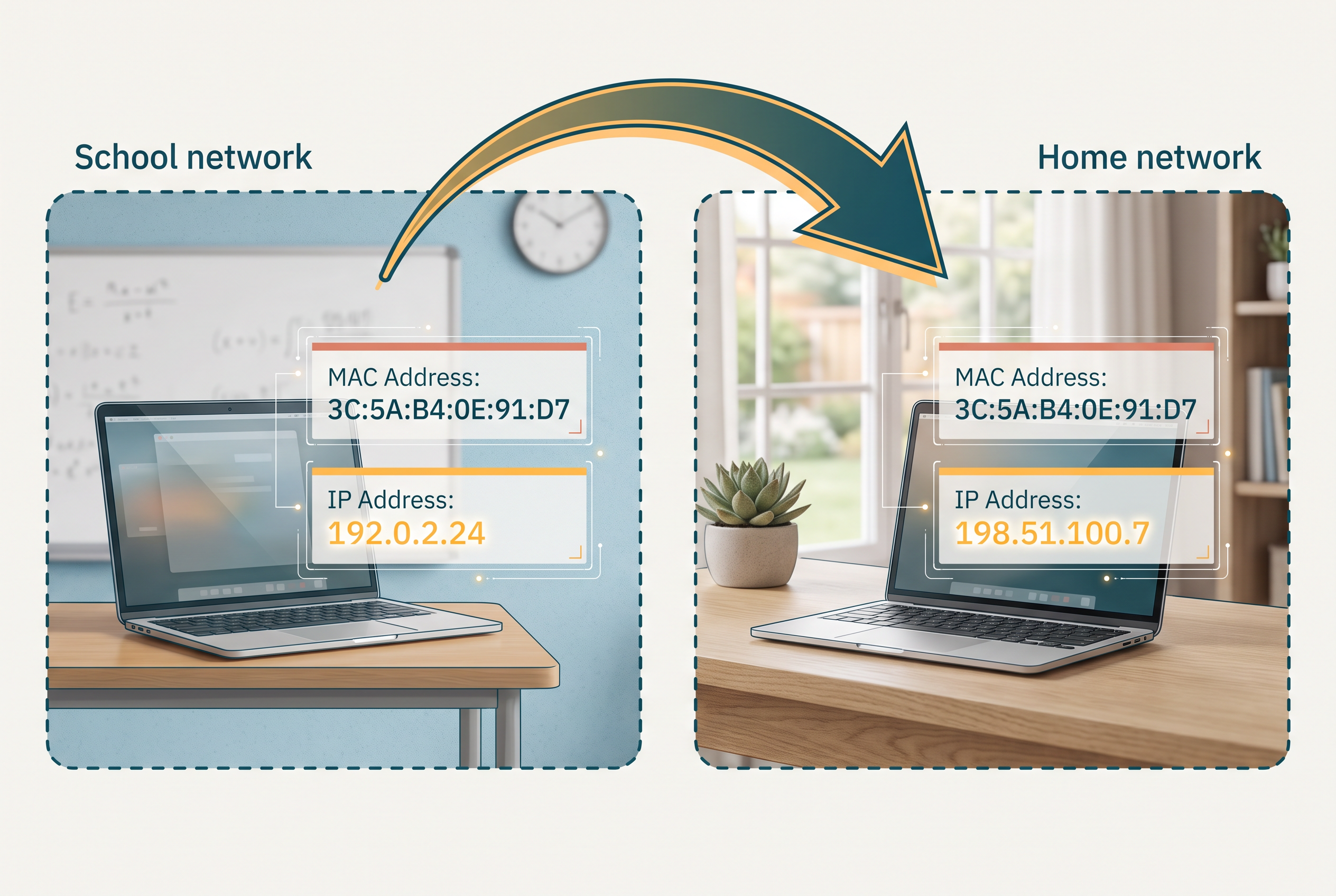
Fig. 10.24 – MAC and IP addresses when moving networks.
Both addresses are needed, and neither replaces the other. A MAC address says which piece of hardware this is, and it never tells you where that hardware currently sits. An IP address says where on the network this node currently is, which is exactly what a router or gateway needs in order to choose a path — and it is precisely because it describes a position rather than an object that it must change when the position changes.
IPv4 and IPv6
The initial IP address scheme, called version 4 or IPv4 in short, is a \(32\)-bit numeric address. It is written as four numbers separated by periods, where each number is the decimal representation of an \(8\)-bit binary number and can therefore take any value from \(0\) to \(255\). A sample IPv4 address looks like:
192.0.2.178
Fig. 10.25 shows how the written form relates to the bits underneath.
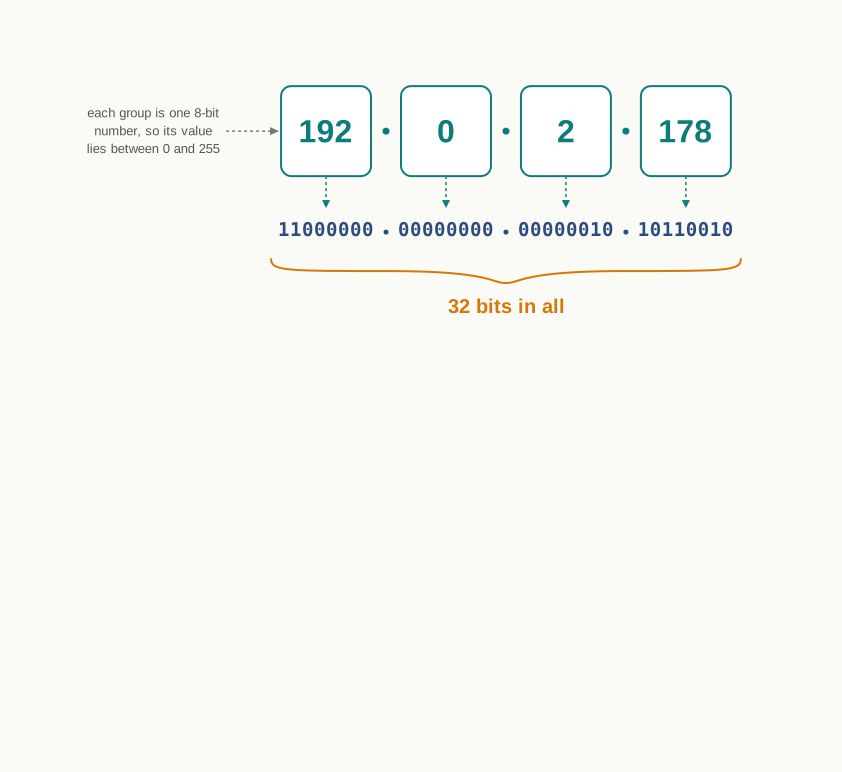
Fig. 10.25 – Structure of an IPv4 address.
With more and more devices getting connected, it was realised that a \(32\)-bit address would not be sufficient, as it offers just under \(4.3\) billion unique addresses. The arithmetic is worth doing once: \(2^{32} = 4{,}294{,}967{,}296\), and the world now holds far more connectable devices than that.
Thus a \(128\)-bit IP address, called IP version 6 or IPv6 in short, was proposed. An IPv6 address is represented by eight groups of hexadecimal numbers separated by colons. A sample IPv6 address looks like:
2001:0DB8:0000:0000:0000:0000:3257:9652
Eight groups of four hexadecimal digits is \(8 \times 4 \times 4 = 128\) bits, giving about \(3.4 \times 10^{38}\) addresses — a supply that will not run out in any circumstance worth planning for.
10.7 Internet, Web and the Internet of Things
Section 10.2 defined the Internet as the global network formed by interconnecting networks of computing devices worldwide, all communicating through a common protocol suite. This section looks at what is actually connected to it, how the connection is arranged, and what sits on top of it — because the thing most people call “the Internet” in everyday speech is not the Internet at all.
What Is Connected
The Internet is the global network of computing devices, and the word computing is doing more work every year. It includes desktops, laptops, servers, tablets, mobile phones and other handheld devices, and also printers, scanners, routers, switches and gateways.
Beyond these, smart electronic appliances such as televisions, air conditioners, refrigerators, fans and lights can also communicate through a network, and the list of such smart devices is always increasing — drones, vehicles, door locks, security cameras. You met this idea in Class XI as the internet of things (IoT): everyday objects given the ability to sense, communicate and be controlled over a network, so that they can act on information rather than wait for a person to act on it.
The point to carry forward from that earlier study is that nothing in this chapter has to change to accommodate them. A refrigerator on a network is a node exactly as section 10.1 defined a node. It has a network interface, it is given an address, it sends and receives packets, and a switch treats its traffic no differently from a laptop’s.
How the Connection Is Arranged
The Internet is evolving every day, and it is difficult to visualise or describe every aspect of its architecture. The general shape, however, is a hierarchy, and Fig. 10.26 shows it.
Computers are connected to a modem, either through a cable or wirelessly using Wi-Fi. That modem, wired or wireless, is connected to a local internet service provider, which in turn connects to a national network. Many such ISPs connect together forming a regional network; regional networks connect together forming a national network; and such country-wise networks form the Internet backbone.
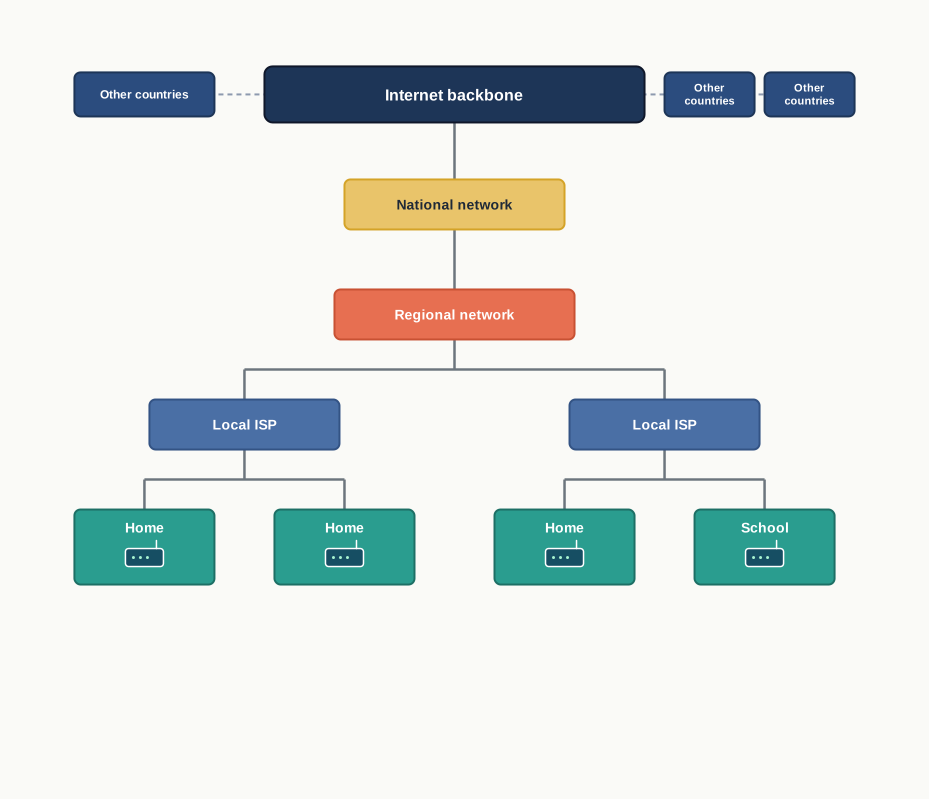
Fig. 10.26 – The hierarchy of Internet connectivity.
Read the figure from the bottom upward and you are watching section 10.3 in action. A home network joins a larger network, which joins a larger one still, and at no level does anyone build a single enormous network — they build a network of networks, each level owned and run by different people.
The influence of all this is no longer limited to the technical field of computer communications. It is used by everyone in society, as is evident from the increasing use of online tools for education, creativity, entertainment, socialisation and e-commerce.
10.7.1 The World Wide Web (WWW)
The world wide web (WWW), or web in short, is an ocean of information stored in the form of trillions of interlinked web pages and web resources. The resources on the web can be shared or accessed through the Internet.
To see what problem it solved, picture the situation before it. To access files residing in different computers, one had to log in individually to each computer through the Internet. Besides, files in different computers were sometimes in different formats, and it was difficult to understand each other’s files and documents. The connection existed; the convenience did not. You could reach a machine, and then you had to negotiate with it separately about who you were and what its files meant.
Sir Tim Berners-Lee, a British computer scientist, invented the World Wide Web in 1990 by defining three fundamental technologies that led to the creation of the web. Each one removes a specific part of that difficulty.
HTML
HTML — hypertext markup language — is a language which is used to design standardised web pages, so that the web contents can be read and understood from any computer. The basic structure of every webpage is designed using HTML.
This is the answer to the problem of formats. If every page is described in the same agreed language, then any program that understands that language can display any page, and the question of whether your machine understands my documents disappears.
URI
URI — uniform resource identifier — is a unique address or path for each resource located on the web. It is also known as URL, uniform resource locator, and every page on the web has a unique URL. A URL is sometimes also called a web address.
A URL is not only the domain name; it contains other information that completes a web address, as Fig. 10.27 shows. The domain name identifies the server that holds the resource — it is the name given to a server in place of the numeric address you met in section 10.6 — and the rest of the URL identifies which resource on that server is wanted.
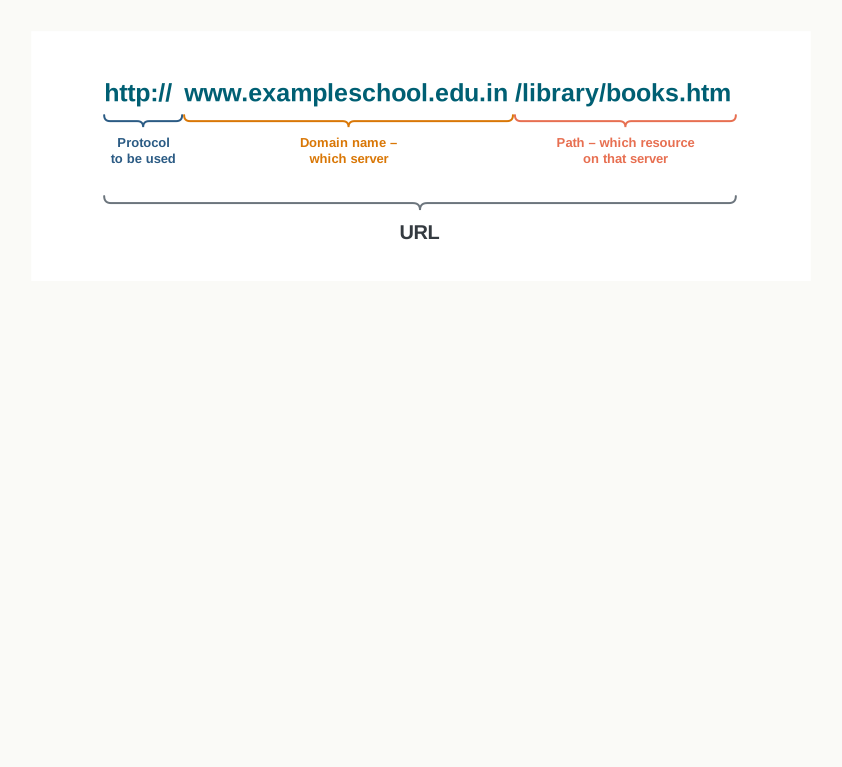
Fig. 10.27 – Anatomy of a URL.
HTTP
HTTP — hypertext transfer protocol — is a set of rules which is used to retrieve linked web pages across the web. Its more secure and advanced version is HTTPS, in which the data exchanged between the browser and the server is encrypted so that anyone able to observe the traffic in between cannot read it.
This is a protocol in exactly the sense defined in section 10.2. It settles how a browser asks for a page and how a server answers, so that a browser written by one group and a server written by another can work together without ever having been introduced.
10.7.2 The Web and the Internet Compared
Many people confuse the web with the Internet, and the confusion is worth clearing carefully, because the two words are not two names for one thing.
The Internet, as you know from section 10.2, is the huge global network of interconnected computers — computers which may or may not have any file or webpage to share with the world. The web, on the other hand, is the interlinking of a collection of web pages on these computers, which are accessible over the Internet. Fig. 10.28 shows the relationship.
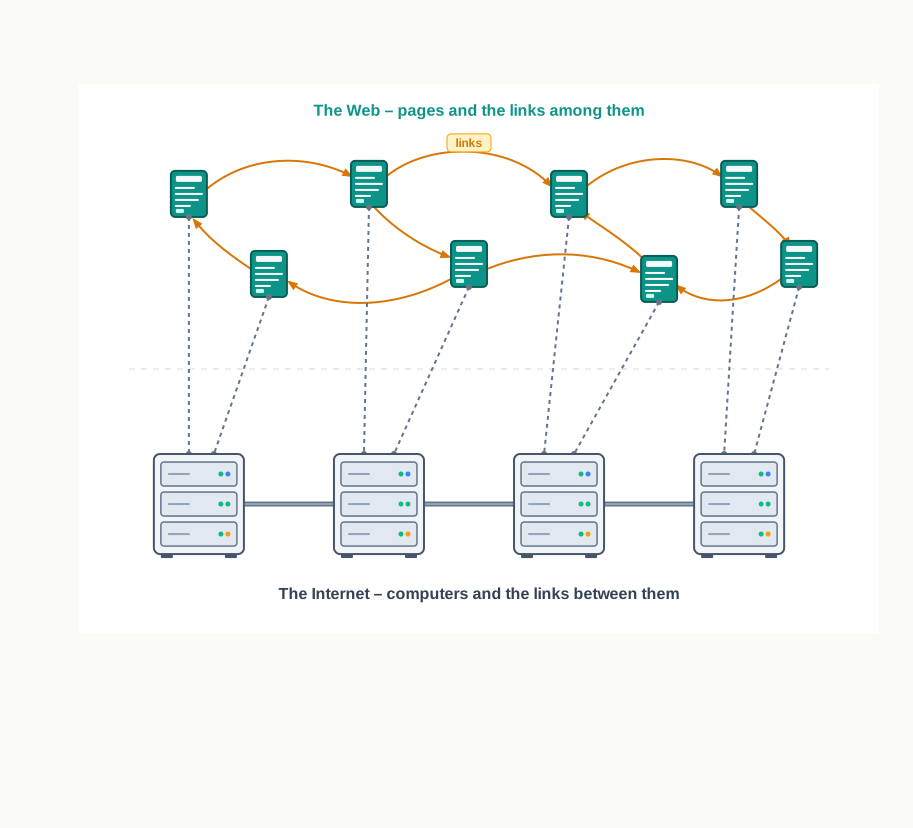
Fig. 10.28 – The World Wide Web on the Internet.
The test is simple. A machine on a network that shares no pages at all — a database server inside a bank, a networked printer in an office — is on the Internet and is not part of the web. Every page you read, on the other hand, needed the Internet to reach you.
The web today gives users access to a vast collection of information created and shared by people across the world, and it is the most popular information retrieval system in use.
10.8 Domain Name System
The Internet holds information in the form of millions of websites. Each website is stored on a server which is connected to the Internet, which means, by section 10.6, that each such server has an IP address. Every device connected to the Internet has one.
That is the whole difficulty in a sentence. Delivery works on numbers. A router choosing a path, a gateway routing a packet outward, a switch looking up a destination — none of them can act on anything but an address of the kind you met in section 10.6. But a person cannot be expected to remember that a school’s library server is at 192.0.2.41, and to remember a different string of numbers for every site they ever visit.
Names are easy for people and useless to routers. Numbers are the reverse. Rather than force either side to give way, the network keeps both and puts a translation service between them.
10.8.1 Domain Names
Because it is easier to remember names, each computer server hosting a website or a web resource is given a name against its IP address. These names are called domain names, or hostnames, corresponding to the unique IP addresses assigned to each server.
You have already seen a domain name in section 10.7, as the part of a URL that says which server is wanted. What section 10.7 did not say is that the server itself never uses it. The name exists for the human being typing it.
Table 10.9 shows a few examples of the mapping.
The arrangement is the same one you use every day without noticing. The contacts list on a phone lets you tap a name; the telephone network still places the call using the number stored behind it. Nobody argues that the number should be abolished, and nobody proposes memorising it either.
10.8.2 DNS Server and Domain Name Resolution
Assigning a name solves half the problem. The other half is that a browser handed a name still needs a number before it can ask anyone for anything.
The conversion of the domain name of each web server into its corresponding IP address is called domain name resolution. It is done through a server called a DNS server.
Thus, when we enter a URL in a web browser, the HTTP protocol approaches a computer server called a DNS server to obtain the IP address corresponding to that domain name. After getting the IP address, HTTP retrieves the information and loads it in our browser. Fig. 10.29 shows the exchange.
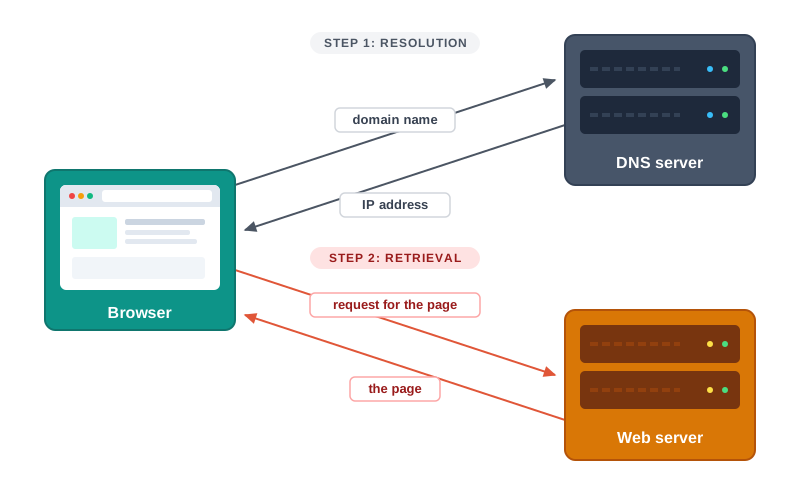
Fig. 10.29 – Domain name resolution and page request.
Read the figure carefully, because the order matters. Two separate conversations take place, with two different machines. The DNS server is asked a question about a name and answers with a number; it holds no web pages and knows nothing about the site’s contents. Only after that answer arrives can the browser approach the actual web server.
Where the Answers Are Kept
A DNS server maintains a database of domain names and their corresponding IP addresses. But no single machine could hold every name on the Internet, keep it current, and answer the world’s questions about it. So the DNS servers are placed in hierarchical order, as Fig. 10.30 shows.
At the top level there are 13 root servers. Below the root servers there are other DNS servers at different levels. A DNS server may contain the IP address corresponding to a domain, or it will contain the IP address of other DNS servers where that domain entry can be searched.
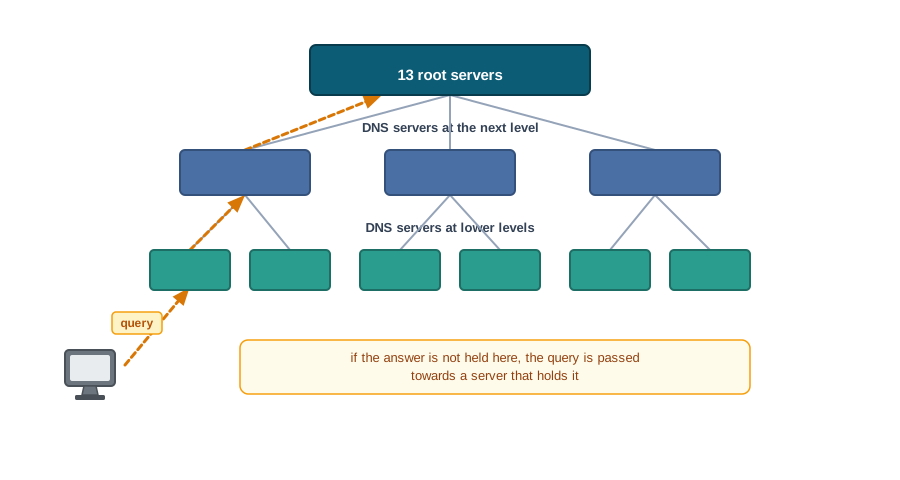
Fig. 10.30 – Hierarchy of DNS servers.
That last sentence of the description is the design in miniature. A server that does not know an answer is not a dead end, because it knows which server to ask. No machine has to hold everything, and no query has to visit more than a few servers.
10.9 Summary
Networks and Nodes
A network is a group of two or more similar things, people or devices interconnected with one another. A computer network is an interconnection among two or more computers or computing devices that allows them to share data and resources with each other.
A node is any device that is part of a network and that can receive, create, store or send data to different network routes. A node need not be a computer: a modem, a hub, a bridge, a switch, a router, a digital telephone handset, a printer, a computer and a server are all nodes.
For communication, data in a network is divided into smaller chunks called packets, which are then carried over the network. Devices may be connected through wired media such as cables, or wireless media such as air.
A network exists for two reasons: to exchange information with many parties at once, and to share resources such as a printer or networked storage, so that one resource serves many machines.
How Networking Grew
A research project commissioned in the 1960s by the Advanced Research Projects Agency in the U.S. Department of Defense produced ARPANET, built to connect academic and research institutions for scientific collaboration. Its first message passed between the University of California, Los Angeles and the Stanford Research Institute.
As more organisations joined and independent smaller networks formed, the problem became joining networks that were never designed for each other. The answer was a protocol — an agreed set of rules governing how data is formatted, addressed, transmitted and received.
TCP/IP was adopted as the standard protocol on ARPANET, and the network of networks that resulted is the Internet. The milestones of this growth run from the conception of ARPANET in 1961 through e-mail in 1971, the coining of the term Internet in 1974, TCP/IP in 1982, the Domain Name System in 1983, NSFNET in 1986, the birth of the web in 1990, and the first Wi-Fi standard in 1997.
Types of Networks
Based on the geographical area covered and the data transfer rate, computer networks are broadly categorised as PAN (personal area network), LAN (local area network), MAN (metropolitan area network) and WAN (wide area network).
A PAN connects a few personal devices lying within an approximate range of 10 metres, and may be wired or wireless. A LAN connects nodes at a limited distance — a room, a floor, a laboratory or a campus — extends up to about 1 km, and carries data at 10 Mbps to 1000 Mbps. A MAN is an extended form of LAN covering a city or town, reaching 30–40 km at rates lower than a LAN. A WAN spans a country, or several countries and continents; the Internet is the largest WAN.
Across these four types, reach and speed pull against each other: the further a network extends, the lower its data transfer rate. Data transfer rate is measured in bits per second, not bytes per second.
Ethernet is a set of rules that decides how computers and other devices connect with each other through cables in a local area network.
Network Devices
A modem converts digital data into analog signals for transmission and converts received analog signals back into digital data; modulation happens at the sender and demodulation at the receiver.
An Ethernet card, or network interface card, is the adapter that acts as the interface between a computer and the network, and it carries a permanent hardware address fixed at manufacture. RJ45 is the eight-pin connector used exclusively with Ethernet cables.
A repeater is an analog device that regenerates a weakened signal and puts it back on the cable; it works on the signal, not on the message, and makes no decisions about the data.
A hub sends data arriving on any line out on all the other lines, so simultaneous transmissions collide. A switch extracts the destination address from the packet, looks it up in a table and forwards the packet only to the port where its destination lies; it can forward several packets at once and drops noisy or corrupted signals.
A router receives data, analyses it and transmits it to other networks, repackaging it where the next network cannot carry packets of the size it arrived in. A gateway is the entry and exit point of a network, through which all data entering or leaving must pass, and it keeps information about the host network’s internal paths and the identified paths of remote networks. Because it stands at the edge, the firewall is usually integrated with it.
Topologies
The arrangement of computers and other peripherals in a network is called its topology. Common network topologies are mesh, ring, bus, star and tree.
In a mesh topology every device is connected to every other device, which gives high capacity, reliability and security at the cost of complex wiring — a fully connected mesh of \(n\) nodes needs \(n(n-1)/2\) wires, many of them unused.
In a ring topology each node is connected to two neighbours, forming a loop in which data travels in one direction only. In a bus topology all nodes share a single backbone wire along which data travels in both directions, which makes it cheap and easy to maintain. Both are considered less secure and less reliable.
In a star topology each device has its own link to a central node, which is a networking device such as a hub or a switch. A fault in one link affects one machine, but a failure of the central device can bring down the whole network. The central node may be a broadcasting device or a unicast device.
A tree or hybrid topology is hierarchical, with multiple branches, each of which may itself be a star, ring or bus. It is the arrangement usually found in WANs where many LANs are connected.
Identifying Nodes
Every node must be uniquely identified so that devices can recognise the sender and the receiver and decide a routing path.
A MAC address is the physical or hardware address engraved on a network interface card at manufacture. It is 48 bits long, written as 12 hexadecimal digits, of which the first six digits are the organisational unique identifier naming the manufacturer and the last six are the card’s serial number.
An IP address identifies a node on a network using the Internet Protocol. Unlike a MAC address it can change when a node is moved to another network, because it records a position rather than a piece of hardware.
IPv4 is a 32-bit address written as four decimal numbers separated by periods, each between 0 and 255, offering just under 4.3 billion addresses. IPv6 is a 128-bit address written as eight groups of hexadecimal numbers separated by colons.
The Internet, the Web and Names
Computers connect to a modem, the modem to a local internet service provider, ISPs join into regional networks, regional networks into national networks, and country-wise networks form the Internet backbone. Smart appliances joining this network are the internet of things.
The World Wide Web is the collection of interlinked web pages and web resources stored on computers across the world and accessed through the Internet. Sir Tim Berners-Lee invented it in 1990 by defining three technologies: HTML for writing standardised pages, URI or URL for naming each resource uniquely, and HTTP for retrieving linked pages, whose more secure version is HTTPS.
The Internet and the web are not the same. The Internet is the network of interconnected computers, which may or may not share any page; the web is the interlinking of pages held on those computers. The web depends on the Internet, and not the other way round.
Each server hosting a website is given a domain name, or hostname, against its IP address, because names are easier for people to remember while routers work only with numbers.
The conversion of a domain name into its corresponding IP address is called domain name resolution, and it is carried out by a DNS server. A browser resolves the name first and only then requests the page from the web server.
DNS servers are arranged in hierarchical order, with 13 root servers at the top level and further DNS servers below them. A DNS server either holds the IP address for a domain, or holds the address of another DNS server where that entry can be searched.
10.10 Key Terms
Analog signal: a signal that varies smoothly and continuously, of the kind carried by media such as a telephone line.
ARPANET — advanced research projects agency network: the network built in the 1960s to connect academic and research institutions, from which the Internet grew.
Bus topology: an arrangement in which every node connects to a single shared transmission medium, along which data travels in both directions.
Computer network: an interconnection among two or more computers or computing devices that lets them share data and resources.
Data transfer rate: the quantity of data a network can carry in one second, measured in bits per second.
Demodulator: the role played by the modem at the receiving end, converting analog signals back into digital data.
Digital signal: a signal that takes distinct, separate values, of the kind a computer uses to store and process data.
DNS — domain name system: the hierarchical system of servers that maps domain names to IP addresses.
DNS server: a server that holds a database of domain names and their IP addresses and performs domain name resolution.
Domain name: the name given to a server in place of its IP address, corresponding to that server’s unique address.
Domain name resolution: the conversion of a domain name into the IP address that corresponds to it.
Ethernet: the set of rules that decides how computers and other devices connect to one another through cables in a LAN.
Ethernet card: the network adapter that acts as the interface between a computer and the network; also called a network interface card.
Firewall: the arrangement that inspects traffic entering or leaving a network and blocks what is not permitted; usually integrated with the gateway.
Gateway: the entry and exit point of a network, through which all data entering or leaving that network must pass.
Gigabit Ethernet: Ethernet operating at 1000 Mbps.
Host: a device that is part of a network; also called a node.
Hostname: another name for a domain name — the name assigned to a server against its IP address.
Hotspot: a connection offered by one device, usually a phone, through which nearby devices join to form a small personal network.
HTML — hypertext markup language: the language used to design standardised web pages so that their contents can be read from any computer.
HTTP — hypertext transfer protocol: the set of rules used to retrieve linked web pages across the web.
HTTPS: the more secure and advanced version of HTTP, in which data exchanged between browser and server is encrypted.
Hub: a network device that sends data arriving on any one of its lines out on all the other lines.
Internet: the global network formed by interconnecting networks of computing devices worldwide, all using a common protocol suite.
Internet backbone: the country-wise networks, joined together, that carry traffic between regions of the Internet.
IoT — internet of things: the extension of network connectivity to ordinary physical objects so that they can send and receive data.
IP address — internet protocol address: the unique address assigned to a node on a network that uses the Internet Protocol.
IPv4: the 32-bit IP address scheme, written as four decimal numbers separated by periods, each from 0 to 255.
IPv6: the 128-bit IP address scheme, written as eight groups of hexadecimal numbers separated by colons.
ISP — internet service provider: any organisation that provides services for accessing the Internet.
LAN — local area network: a network connecting nodes placed at a limited distance, such as within a room, a building or a campus.
MAC address — media access control address: the permanent hardware address engraved on a network interface card at the time of manufacture.
MAN — metropolitan area network: an extended form of LAN covering a larger area such as a city or a town.
Mesh topology: an arrangement in which every communicating device is connected directly to every other device.
Modem: a device that converts digital data into analog signals for transmission and converts received analog signals back into digital data.
Modulator: the role played by the modem at the sending end, converting digital data into analog signals.
Network: a group of two or more similar things, people or devices interconnected so that something can pass between them.
Networking device: a device such as a modem, hub, switch, router or gateway, whose purpose is to connect other devices into a network.
NIC — network interface card: another name for the Ethernet card, the adapter through which a computer joins a wired network.
Node: any device that is part of a network and can receive, create, store or send data to different network routes.
OUI — organisational unique identifier: the first 24 bits of a MAC address, identifying the manufacturer of the card.
Packet: a small chunk into which data is divided before being carried across a network.
PAN — personal area network: a network formed by connecting a few personal devices lying within about 10 metres of one another.
Protocol: an agreed set of rules governing how data is formatted, addressed, transmitted and received between devices.
Repeater: an analog device that regenerates a weakened signal on a cable and puts the restored signal back on it.
Resource sharing: the use of one resource, such as a printer or a storage device, by many computers over a network.
Ring topology: an arrangement in which each node is connected to two neighbours, forming a closed loop in which data travels one way.
RJ45: the eight-pin connector used exclusively with Ethernet cables for networking.
Root server: one of the 13 DNS servers at the top level of the DNS hierarchy.
Router: a network device that receives data, analyses it and transmits it onward to other networks.
Server: a host on a network that provides data, resources or services to other nodes.
Star topology: an arrangement in which every device has its own link to a central networking device such as a hub or a switch.
Switch: a networking device that forwards each incoming packet only to the port on which its destination lies.
TCP/IP — transmission control protocol / internet protocol: the protocol suite adopted as the standard for ARPANET and used across the Internet.
Topology: the arrangement in which the computers and other peripherals of a network are connected to one another.
Tree or hybrid topology: a hierarchical arrangement of multiple branches, each of which may itself be a star, ring or bus topology.
URI — uniform resource identifier: the unique address or path of a resource located on the web; also known as a URL.
URL — uniform resource locator: the complete web address of a resource, naming the protocol, the server and the path to the resource.
WAN — wide area network: a network connecting computers, LANs and MANs spread across a country, or across countries and continents.
Web page: a document written in HTML that forms part of the World Wide Web.
Wired media: cables and other physical media through which network signals are carried.
Wireless media: air and other free space through which network signals are carried without cables.
WPAN: a personal area network whose devices are connected wirelessly.
WWW — world wide web: the collection of interlinked web pages and web resources stored on computers worldwide and accessed through the Internet.
10.11 Points to Ponder
A mesh topology is the most reliable and the most secure arrangement in this chapter, and it is almost never used for an ordinary network. What would have to be true of a network — its size, its purpose, the cost of an hour of failure — before the wiring of a mesh became worth paying for?
A switch does everything a hub does and does it better. Why, then, did hubs ever exist? What capability does a switch need in order to forward a packet to one port instead of all of them, and why was that capability once more expensive than sending copies everywhere?
Suppose the design had been reversed: the address burnt into the card could change, while the address given by the network was permanent for the life of the machine. Which parts of a network would stop working, and which parts would not notice?
Resolving a domain name adds a step before any page can be fetched, and a failure at that step makes a perfectly healthy server unreachable. What is gained in exchange for that extra step and that extra point of failure — and would the answer change if servers never moved and never changed their addresses?
The exhaustion of IPv4 addresses was foreseen long before it became urgent, and IPv6 has still taken decades to spread. What is it about an addressing standard, as against a piece of equipment, that makes it so hard to replace even when everyone agrees on the replacement?
The web depends on the Internet, and the Internet does not depend on the web. Does the same one-way dependence hold for e-mail, and for a chat application? Judging from your answer, what exactly is it that the Internet supplies to everything built on top of it?
10.12 Objective Questions
Which of the following is measured in bits per second?
- The number of nodes in a network
- The data transfer rate of a network
- The length of a MAC address
- The range of a personal area network [1 mark]
A device that regenerates a weakened signal on a cable and puts it back on the same cable is a:
- switch
- gateway
- repeater
- router [1 mark]
In which topology does a single break in the shared backbone wire cut the network into two parts?
- Star
- Mesh
- Bus
- Tree [1 mark]
How many bits are there in an IPv6 address?
- 32
- 48
- 64
- 128 [1 mark]
A fully connected mesh topology of 6 nodes requires how many wires?
- 6
- 12
- 15
- 30 [1 mark]
Fill in the blank: The conversion of a domain name into its corresponding IP address is called __________. [1 mark]
State whether the following statement is true or false: A computer that is connected to the Internet but hosts no web page is not part of the Internet. [1 mark]
Write the full form of each of the following: (i) ARPANET (ii) NIC (iii) OUI (iv) HTTPS. [1 mark]
Match each device in Column A with what it does in Column B.
| Column A | Column B |
|---|---|
| a. Modem | i. Forwards a packet only to the port where its destination lies |
| b. Hub | ii. Acts as the single entry and exit point of a network |
| c. Switch | iii. Converts between digital data and analog signals |
| d. Gateway | iv. Sends data arriving on one line out on all the other lines |
[1 mark]
- Assertion (A): A MAC address does not change when a laptop is carried from a school network to a home network. Reason (R): A MAC address records the position of a node on the network it has joined.
- Both A and R are true and R is the correct explanation of A.
- Both A and R are true but R is not the correct explanation of A.
- A is true but R is false.
- A is false but R is true. [1 mark]
- Assertion (A): In a star topology, a fault in one cable does not stop the other nodes from communicating. Reason (R): In a star topology every node has its own separate link to the central networking device.
- Both A and R are true and R is the correct explanation of A.
- Both A and R are true but R is not the correct explanation of A.
- A is true but R is false.
- A is false but R is true. [1 mark]
10.13 Check Your Concepts
Define a node. Give one example of a node that is not a computer. [2 marks]
Why is data divided into packets before it is carried over a network? State any two reasons. [2 marks]
What is a protocol? Name any one protocol studied in this chapter and state what it is used for. [2 marks]
A network in a single school building carries data at 100 Mbps, while a network covering the whole city carries data at a lower rate. Give reasons for this difference. [2 marks]
Differentiate between a hub and a switch, with one example of a situation in which the difference matters. [3 marks]
Differentiate between a MAC address and an IP address on any three points. [3 marks]
Explain, with the help of an example, why a URL contains more than the domain name of a server. [3 marks]
A fully connected mesh topology is described as the most reliable arrangement, yet it is rarely built. Calculate the number of wires needed for 8 nodes and for 40 nodes, and use your answer to explain why. [4 marks]
Explain the role of a gateway in a network. Why is a firewall usually integrated with it? [4 marks]
Describe, step by step, what happens from the moment a student types a web address into a browser to the moment the page is displayed. Name the servers involved at each step and state what each one supplies. [5 marks]
Compare bus, star and tree topologies on the basis of cabling required, the effect of a single link failure, and the effect of the failure of a central device. Support each point with a reason. [5 marks]
10.14 Output & Debugging
A network is described as follows: six computers, each joined by its own separate cable to one central device, and no computer joined directly to any other. Name the topology, and state what will happen to the network if (i) one of the six cables is cut, and (ii) the central device fails. [3 marks]
Classify each of the following as a PAN, a LAN, a MAN or a WAN, and give a one-line reason for each: (i) a phone connected to a printer by Bluetooth across a desk; (ii) all the computers of a college campus; (iii) a cable-based broadband service covering a town; (iv) the network joining a company’s offices in four countries. [4 marks]
A student writes the following as an IPv4 address:
192.0.2.300. Identify the error in it and correct it, giving the reason for your correction. [2 marks]Complete the missing entries (i) to (iv) in the comparison below.
| Feature | Hub | Switch |
|---|---|---|
| Where data is sent | (i) | (ii) |
| Behaviour when two devices transmit at the same moment | (iii) | (iv) |
[2 marks]
- In each situation below, name the single most suitable device from this chapter and give one line of reasoning: (i) a signal has faded after a run of about 100 m of cable; (ii) data must be sent from a school’s local network to a network in another state; (iii) a desktop computer has no way of accepting a network cable at all. [3 marks]
10.15 Case-Based Questions
- A school is setting up a network across four blocks in one campus. The number of computers in each block is:
| Block | Number of computers |
|---|---|
| Administrative | 25 |
| Academic | 60 |
| Library | 30 |
| Hostel | 15 |
The Academic block is roughly 40 m from the Administrative block, the Library is 35 m from the Academic block, and the Hostel is about 250 m from the Academic block. The school also wishes to connect to the Internet.
a. Name the type of network the school is building across the campus, and give one reason for your answer. [1 mark]

b. Suggest a suitable topology for the network inside the Academic block, and justify your choice against one other topology you rejected. [2 marks]

c. Name the device the school should place on the link to the Hostel block, and the device it needs in order to reach the Internet, giving a reason for each. [2 marks]
[5 marks]
A bus depot office has eight computers joined through a single hub. As bookings have increased, the staff report that transfers frequently fail and have to be repeated, and that the network slows badly when several people work at once. The depot manager also wants a printer in the office to be usable from all eight machines.
Explain, in terms of how a hub works, why transfers fail when several machines are busy. [2 marks]
Name the device that should replace the hub, and explain the two things it does differently that would solve the problem. [2 marks]
State what the depot gains by sharing one printer over the network rather than buying eight, apart from the saving in cost. [1 mark]
[5 marks]
A student opens a browser and types the address
http://www.example.org/library/catalogue.htm. The page fails to open, and the browser reports that the address could not be found. A friend on the same network is able to open other websites at the same moment.Name the three parts of the address the student typed, and state what each part specifies. [2 marks]
Two separate exchanges normally take place before such a page is displayed. Name both, and state which one has failed here, giving a reason. [2 marks]
The student concludes, “the Internet is not working”. Give one reason why this conclusion may be wrong. [1 mark]
[5 marks]