Chapter 11: Data Communication
In August 1858, after several failed attempts and two ships paying out cable from the middle of the Atlantic, a telegraph line finally joined Ireland to Newfoundland. Cannons were fired and cities were lit up. Queen Victoria and President Buchanan exchanged greetings across the ocean, and for the first time a message did not have to travel by ship.
Then people looked at the clock. The ceremonial message, fewer than a hundred words, had taken about sixteen hours to get through. Every letter arrived as a faint twitch of a needle, and an operator had to sit and read those twitches one at a time. Within a few weeks the cable stopped working altogether. In an attempt to push the signals through faster, far higher voltages had been applied to the line than its insulation could survive.
The line worked, and yet almost everything about it was a lesson. A physical link between two points is only the beginning. How fast can this medium actually carry bits? Can both ends talk at once, or must they take turns? If one end sends faster than the other can listen, who tells it to slow down? And is a single reserved wire between two people really the sensible way to connect millions of them?
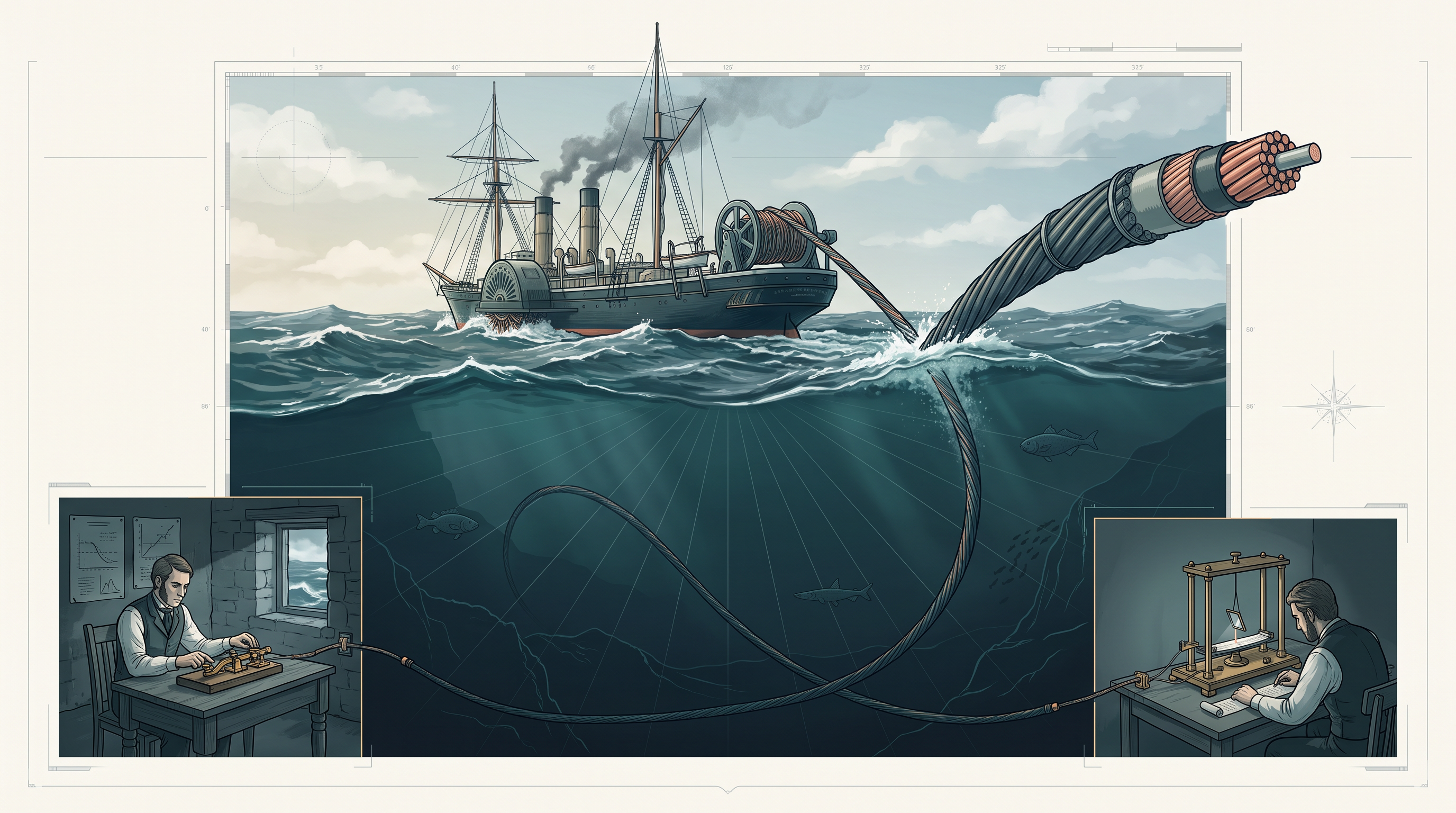
Fig. 11.0 – The 1858 transatlantic telegraph cable.
This chapter takes up each of these questions in turn, and by the end of it you will be able to answer all five.
11.1 Concept of Communication
Think of the last thing you did on a computer or a phone that involved someone else. You may have sent a photograph to a cousin, opened a web page, printed a worksheet from a laboratory computer on a printer in the corner of the room, or checked your result on a school portal. In every one of these, something you were holding had to hand something over to a machine somewhere else. That handing over is what this chapter is about.
The term “data communication” is made of two ordinary words, and it is worth taking them one at a time.
What “data” means here
Data is whatever is being carried. It may be a paragraph of text, a photograph, a song, a video clip, a spreadsheet of marks, or a mixture of these in one multimedia file. A machine does not treat these as pictures or songs. Whatever the file looks like to you, it is stored and moved as a long sequence of bits, where a bit is a single 0 or 1. This matters more than it first appears: because everything reduces to bits, one channel can carry a message, a photograph and a video with no change in the nature of what it is doing. Only the number of bits differs.
What “communication” means here
Communication is the act of sending or receiving data. Notice that both halves are needed. A device that can only produce data and never pass it on is not communicating, and neither is a device with nothing arriving at it.
Putting the two together, data communication is the exchange of data between two or more devices that are networked or connected. Each of those devices must be capable of sending data over a communication medium, receiving data from it, or both. A personal computer, a laptop, a mobile phone, a network printer and a server are all such devices.
Two conditions in that definition are easy to read past. The devices must be connected — by cable or wirelessly — and each must be capable of sending or receiving over that connection. A calculator and a wall clock sitting on the same table are not communicating; they are merely in the same room.
A small network, looked at closely
Fig. 11.1 shows an arrangement you have almost certainly used without examining it: a few computers in a laboratory, a shared printer, and a server holding common files, all joined through a switch. The switch is not the source of any data of its own. It exists so that anything sent by one device can reach the device it is meant for.
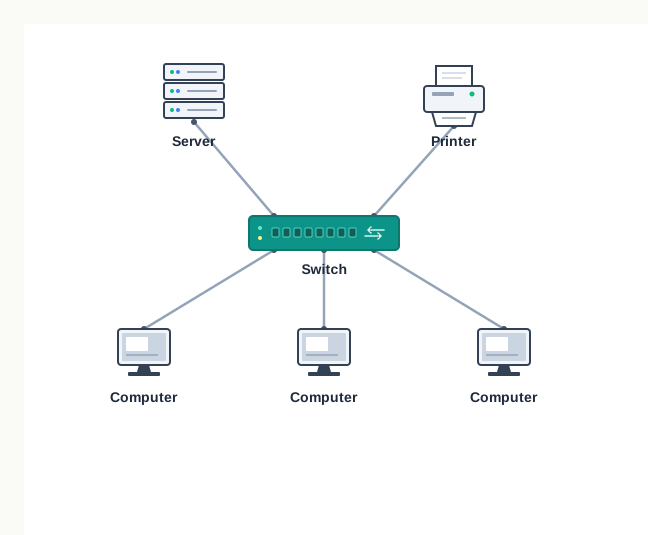
Fig. 11.1 – A simple computer network.
Look at what travels along those cables. When a student sends a worksheet to the shared printer, the file leaves the computer as bits, crosses the cable, passes through the switch, and arrives at the printer, which turns those bits back into marks on paper. The paper is the point of the exercise, but the communication was over before the printing began.
This gives us the shape of the chapter. If data is to travel between two connected devices, we need to know who is at each end, what the data travels through, how much that path can carry, in which directions it may flow, how a path is chosen when many devices share a network, and what rules both ends must obey. Each of these is taken up in turn, beginning with the parties involved.
11.2 Components of Data Communication
Any act of communication, even between two people in a room, has parts that can be named separately. Somebody speaks, somebody listens, something is said, the sound travels through air, and both people follow an understood convention — you wait for the other person to finish. Data communication between two machines has exactly the same five parts, and naming them is the first step to reasoning about what can go wrong.
Whenever two computing devices communicate over a network, five things are involved: the sender, the receiver, the message, the communication medium, and the protocols. Fig. 11.2 shows how they fit together.
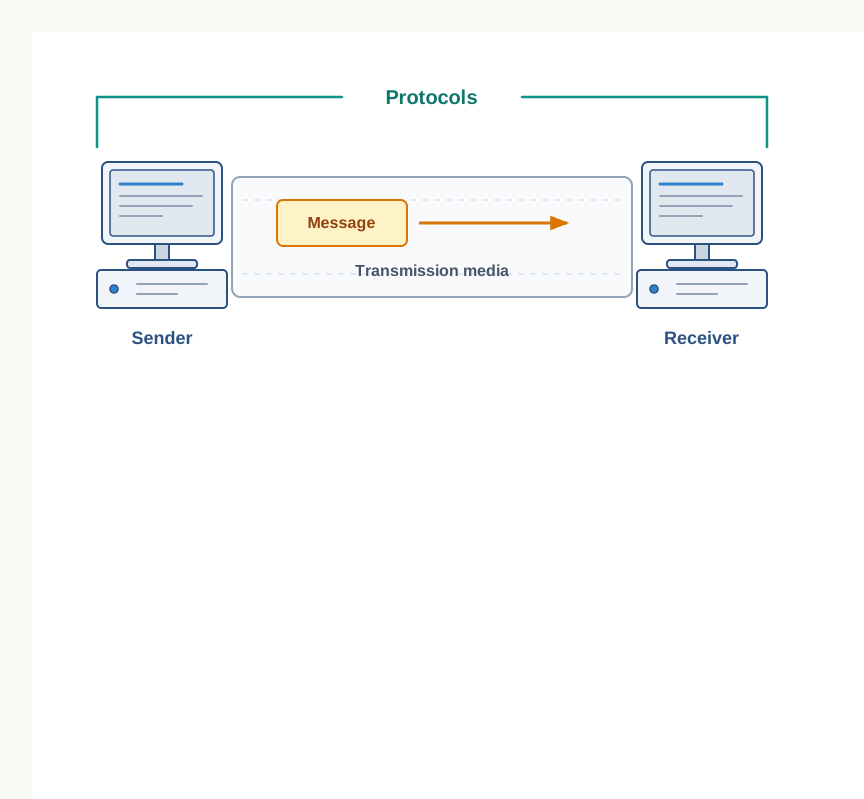
Fig. 11.2 – Five components of data communication.
The two ends
A sender is a computer or any similar device capable of sending data over a network. It need not be a computer in the ordinary sense — a mobile phone, a smartwatch, a walkie-talkie and a video recording device are all senders when they push data onto a network.
A receiver is a computer or any similar device capable of receiving data from the network. A desktop computer, a laptop, a network printer, a mobile phone and a television can all act as receivers.
The two roles are roles, not fixed labels. Your phone is a sender while a photograph is going out and a receiver while a reply is coming in, and often it is both within the same second. In computer communication, the sender and the receiver are together known as nodes in a network.
What travels, and what it travels through
The message is the data or information to be exchanged between the sender and the receiver. It may be text, a number, an image, an audio clip, a video, or a multimedia file. Whatever its type, on the medium it is a sequence of bits; the type matters to the two ends, not to the path between them.
The communication media is the path along which the message travels from source to destination. It is also called the medium or the link, and it may be wired — a television cable, a telephone cable, an Ethernet cable — or wireless, such as a satellite link or microwaves. Because the media carries a transmission from one end to the other, it is equally called transmission media, and that is the name used when the different kinds are studied in detail in section 11.6.
The word “media” is plural in ordinary English but is used as a collective term here; a single such path is a medium. Both forms appear in the sections that follow, and they refer to the same thing.
The rules that make it work
The fifth component is the least visible and the most easily forgotten. Protocols are the rules that the communicating parties agree to follow so that data communication is successful and reliable. You have already met some by name — Ethernet, and the protocol that carries web pages to your browser.
Why should rules be needed at all, if a cable physically joins two machines? Because a cable carries voltages, not meaning. Someone has to fix how a machine announces which device the data is meant for, how it marks where one message ends and the next begins, what the receiver does when part of the data is damaged, and what happens when the sender is faster than the receiver. None of this is decided by the wire. Protocols are taken up properly in section 11.8, once the physical side of communication has been studied.
With the parties, the content and the path named, one question follows immediately. A path exists — but how much can it actually carry, and how fast? That is the subject of the next section.
11.3 Measuring Capacity of Communication Media
Two cables can look identical and behave very differently. A road makes the comparison easy to picture: two roads of the same length may carry very different amounts of traffic, because one is a narrow lane and the other has six lanes. What we want is a way of saying, in numbers, how much a communication path can carry.
In data communication, the transmission medium is also called a channel. The capacity of a channel is the maximum amount of signals or traffic that the channel can carry. Capacity is measured in two ways, and students routinely confuse them: bandwidth, and data transfer rate.
11.3.1 Bandwidth
Signals travel along a channel as waves, and a wave has a frequency — the number of oscillations it makes in one second, measured in hertz (Hz). No real channel carries every frequency equally well. Each one passes a certain band of frequencies and weakens or blocks the rest, and that band is a physical property of the medium.
The bandwidth of a channel is the range of frequencies available for the transmission of data through that channel. A real signal sent on a channel is usually a composite signal — several frequencies together — and bandwidth is normally taken as the difference between the maximum and the minimum frequency contained in that composite signal. Bandwidth is measured in hertz.
The higher units follow the ordinary decimal pattern:
\[1\ \text{KHz} = 1000\ \text{Hz}\]
\[1\ \text{MHz} = 1000\ \text{KHz} = 1000000\ \text{Hz}\]
Fig. 11.3 shows what the definition is describing. If a composite signal on a link contains frequencies from 700 KHz up to 1.2 MHz, its bandwidth is not 1.2 MHz — it is the width of that band:
\[\text{Bandwidth} = 1.2\ \text{MHz} - 700\ \text{KHz} = 1200\ \text{KHz} - 700\ \text{KHz} = 500\ \text{KHz}\]
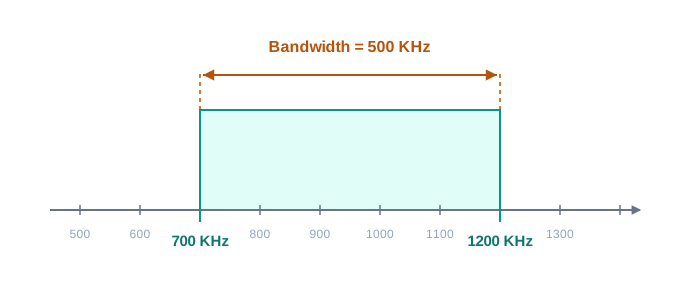
Fig. 11.3 – Bandwidth of a composite signal.
Bandwidth matters because it sets a ceiling. The wider the band of frequencies a channel offers, the more signal changes per second it can carry without them blurring into one another — and each signal change carries bits. That is the reason for the plain rule you will meet again and again in this chapter: the higher the bandwidth, the higher the data transfer rate a channel can support.
11.3.2 Data Transfer Rate
Bandwidth describes the channel. What a user actually notices is something else: how many bits get across in a second.
Data travels over a channel in the form of signals, and one signal carries one or more bits. The data transfer rate is the number of bits transmitted between the source and the destination in one second. It is also known as the bit rate, and it is measured in bits per second (bps).
Because a modern link moves millions of bits a second, larger units are used. Each is a power of two times the one below it.
So a link advertised at 3 Gbps carries, at most,
\[3 \times 2^{30} = 3 \times 1073741824 = 3221225472 \text{ bits per second}\]
Bandwidth and data transfer rate compared
The two quantities are related but they are not interchangeable, and they are not even measured in the same unit. Bandwidth is a property of the channel — a range of frequencies, fixed by the physical medium. Data transfer rate is a property of the transmission taking place on it — bits per second, which may be lower than the channel could manage if the sender is slow, the link is shared, or conditions are poor. Bandwidth sets the ceiling; the data transfer rate is what is actually achieved under that ceiling.
Working out the rate a task demands
The definition is also a formula you can use in reverse. If you know how many bits must be sent and how long you have, you know the rate the channel must provide.
Suppose a school office has to upload a scanned circular of 12 pages in 5 seconds. Each page holds about 2000 characters, and each character is stored in 8 bits. The total number of bits is
\[12 \times 2000 \times 8 = 192000 \text{ bits}\]
and the required data transfer rate is
\[\frac{192000}{5} = 38400 \text{ bps} = \frac{38400}{1024} = 37.5\ \text{Kbps}\]
The method is worth stating separately from the arithmetic, because every question of this kind uses it: convert the whole quantity of data into bits, divide by the time in seconds, then express the answer in a convenient higher unit. Notice that the answer says nothing about whether such a channel is available — it only says what would be needed.
Two conventions are worth a final word. Bandwidth uses decimal multiples, so 1 KHz is 1000 Hz, while the units of data transfer rate given in Table 11.2 use powers of two, so 1 Kbps is 1024 bps. You will also meet the decimal convention used for bit rates in the telecommunications industry, where 1 Kbps is taken as 1000 bps. This book follows the powers-of-two form given above; when you solve a numerical problem, state which convention you are using.
11.4 Types of Data Communication
We now know what is carried and how much a channel can carry. A third question remains, and it is about direction: which way may the data flow, and may both ends do it at once?
Data communication happens in the form of signals between two or more computing devices, or nodes. The transfer takes place over a point-to-point channel, where the link joins exactly two devices, or a multipoint channel, where a single link is shared by more than two. Whichever it is, data communication between devices is broadly categorised into three types: simplex communication, half-duplex communication and full-duplex communication.
11.4.1 Simplex Communication
Simplex communication is one-way or unidirectional communication between two devices, in which one device is always the sender and the other is always the receiver. The roles never swap. Because nothing ever travels the other way, the devices use the entire capacity of the link to transmit data in that single direction.
A one-way street is the closest everyday picture: vehicles move along it in one direction only, and no arrangement of traffic lights will let a vehicle come the other way. Data typed on a keyboard travels to the computer and never back to the keys; audio sent to a speaker travels out and the speaker sends nothing in return. Fig. 11.4 shows a broadcast arrangement, where a transmitting station sends a television signal to receivers that have no way of replying.
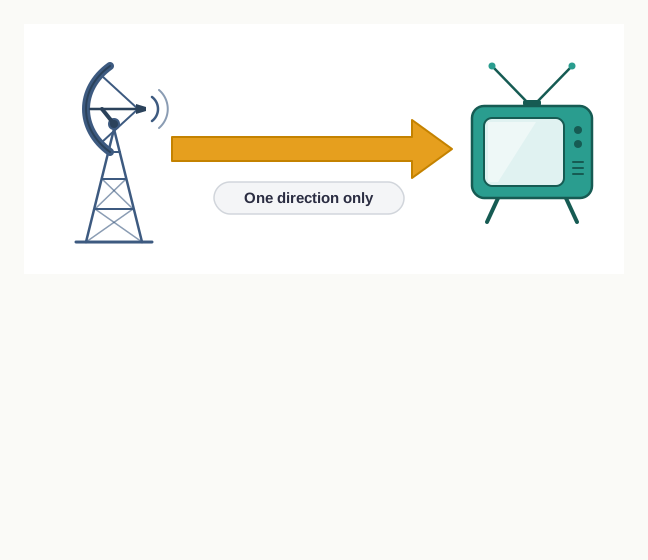
Fig. 11.4 – Simplex communication.
11.4.2 Half-duplex Communication
Half-duplex communication is two-way or bidirectional communication between two devices in which both devices can send and receive data or control signals in both directions, but not at the same time. While one device is sending, the other can only receive, and then the direction is switched.
Think of a single-track section of railway line between two stations. Trains can travel in either direction along it, but never in both directions at once — the section is cleared for one train, and only when it is out does a train enter from the other end. In the same way, a half-duplex channel is essentially a simplex channel in which the direction of transmission can be switched.
The walkie-talkie is the standard example. Pressing the push-to-talk button enables the transmitter in that device and turns off its receiver, so that person talks and everyone else can only listen. Release the button, and the device goes back to listening. Fig. 11.5 shows the two moments.
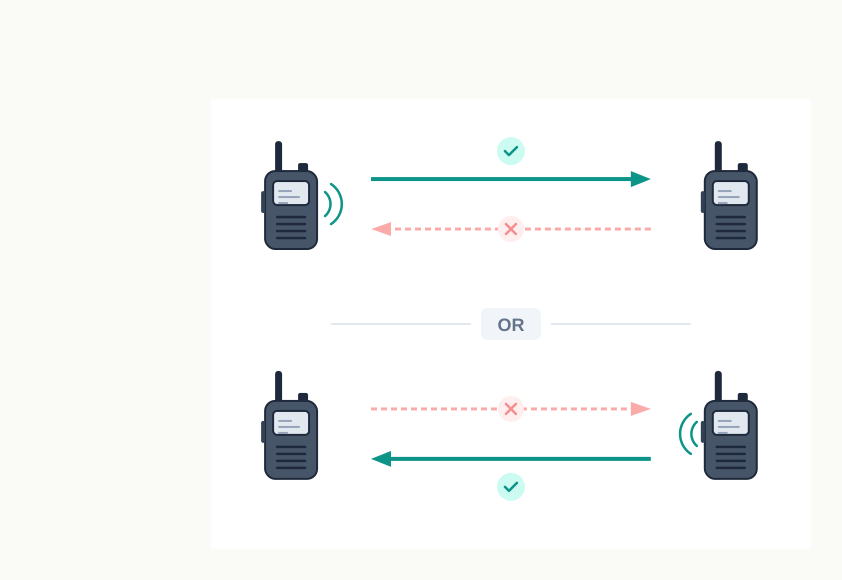
Fig. 11.5 – Half-duplex communication.
Because only one direction is active at a time, the whole capacity of the link is available to whichever device is transmitting — but each device gets it only for part of the time.
11.4.3 Full-duplex Communication
Full-duplex communication is two-way or bidirectional communication in which both devices can send and receive data simultaneously. Neither end has to wait for the other to finish.
Here the picture is a two-way road on which vehicles travel in both directions at once. A telephone conversation works this way: both people can speak and be heard at the same instant, which is exactly why a phone call feels different from a walkie-talkie exchange.
Being able to carry both directions at once has a cost, and it is worth seeing where the cost falls. The capacity of the transmission link must be shared between the signals going in the two directions. This is achieved either by using two physically separate simplex lines — one for sending and one for receiving — or by sharing the capacity of a single channel between the signals travelling in different directions. Fig. 11.6 shows the second arrangement.
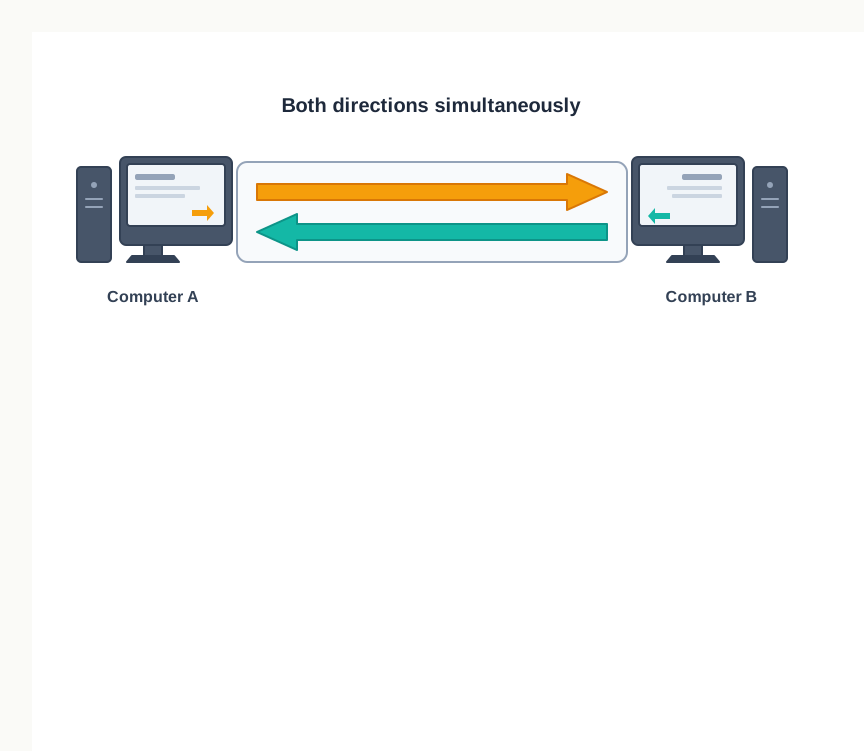
Fig. 11.6 – Full-duplex communication.
11.5 Switching Techniques
So far we have looked at two devices and the link between them. A real network has many devices, and a new question appears: when one of them wants to communicate with one particular other, how is a path between those two arranged?
One answer is to give every pair of devices a dedicated connection of its own, so that no path ever has to be worked out. Another is to join every device to one central device, and let everything pass through the centre. Both arrangements exist and you will meet them again as network topologies, but for a large network both are costly — the first because the number of separate links grows alarmingly as devices are added, the second because every link and the central device must be paid for and maintained.
The alternative is switching, in which data is routed through various nodes in the network, and the switching process forms a temporary route for the data to be transmitted. The word is worth pausing on: nothing is permanently wired from your machine to the one you are communicating with. A route is put together when it is needed, and taken apart afterwards. Two switching techniques are commonly used — circuit switching and packet switching.
11.5.1 Circuit Switching
In circuit switching, a dedicated path is identified between the sender and the receiver before the communication starts. This path is a connected sequence of links between network nodes, and once it is established, all the data of that communication follows the same path from beginning to end.
The older telephone system is the standard example. When a call was placed, the switching equipment inside the telephone system found a physical path or channel running all the way from the caller’s telephone to the receiver’s telephone. That path was held for the whole call, whether or not anyone was speaking, and it was released only when the call ended.
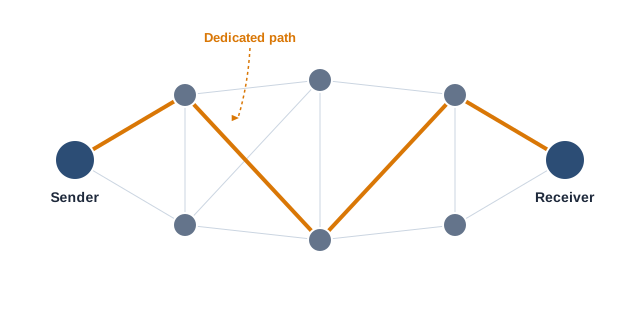
Fig. 11.7 – Dedicated path in circuit switching.
Two consequences follow directly from holding a path. The first is good: once the path exists, the data has an assured route, arrives in the order it was sent, and needs no decision at each node. The second is wasteful: the path is occupied even during the silences, and no other pair of users can use those links meanwhile, however idle they are.
11.5.2 Packet Switching
In packet switching, each message to be transmitted between sender and receiver is first broken down into smaller pieces called packets. These packets are then transmitted independently through the network, and different packets of the same message may take different routes depending on availability.
If the packets travel separately, two problems arise at once. How does a packet know where it is going, and how does the receiver put the pieces back in order? The structure of a packet answers both. Each packet has two parts — a header, containing the address of the destination and other information, and the main message part, which is the slice of data it carries. Fig. 11.8 shows this.
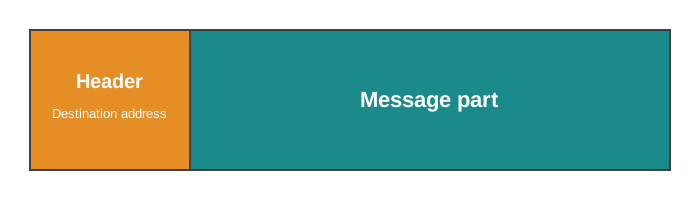
Fig. 11.8 – Structure of a packet.
Because each packet carries the destination address, every node it reaches can decide where to pass it on next, without knowing anything about the rest of the message. When all the packets of a message reach the destination, they are reassembled and the complete message is received by the receiver.
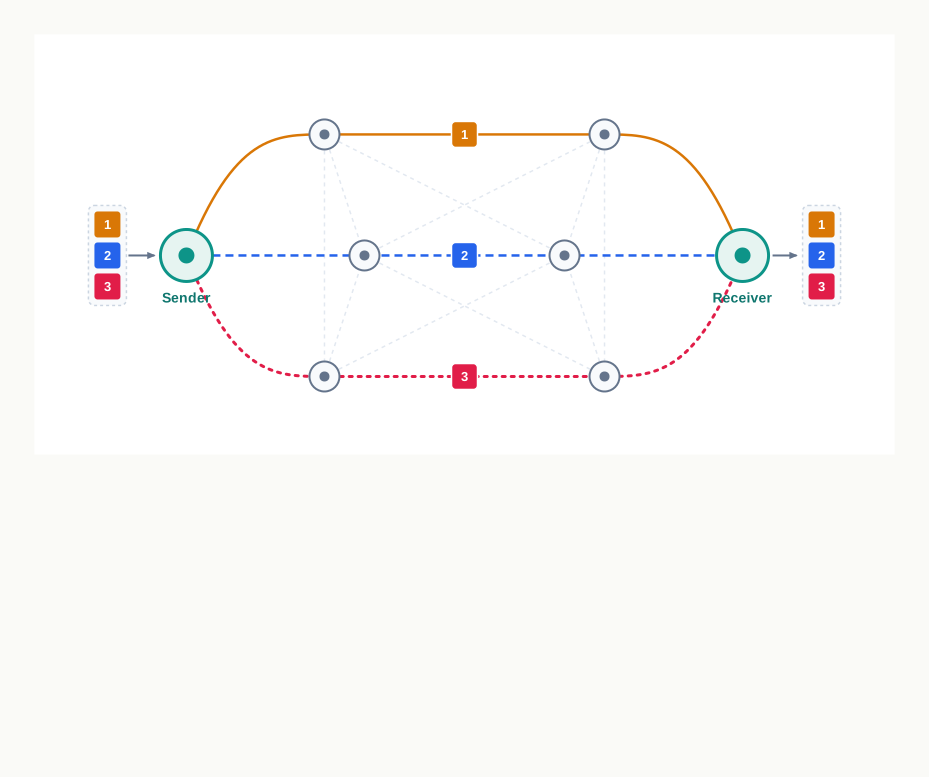
Fig. 11.9 – Independent routing in packet switching.
The difference this makes to the network is best seen in what happens to the channel. Unlike circuit switching, a channel is occupied in packet switching only during the transmission of the packet. As soon as that packet has gone through, the channel is free to carry packets belonging to entirely different communicating parties. The same links can therefore serve many conversations at once, filling the gaps that a held-open circuit would waste.
11.6 Transmission Media
A transmission medium can be anything that carries signals or data between the source, which transmits, and the destination, which receives. The idea is more ordinary than it sounds. When you switch on a ceiling fan, the electric wire is the medium that carries current from the switch to the fan. When two people stand talking in a corridor, the medium is the air between them, and the message is sound.
In data communication, transmission media are the links that carry messages between two or more communicating devices. They are broadly classified as guided or unguided, and Fig. 11.10 sets out the classification you will be working with for the rest of this section.
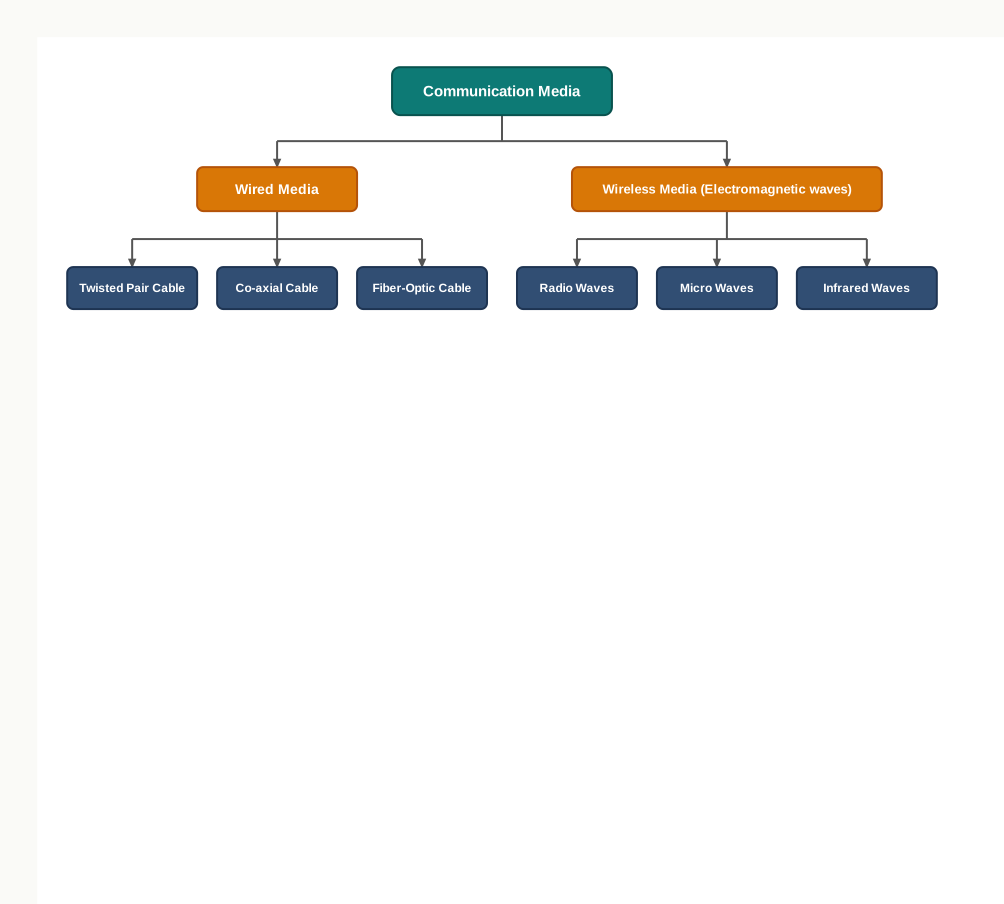
Fig. 11.10 – Classification of communication media.
In guided transmission, there is a physical link made of wire or cable through which data, in the form of signals, is propagated between the nodes. These links are usually metallic cable or fibre-optic cable, and they are also known as wired media. In unguided transmission, data travels through air in the form of electromagnetic waves, radiated and picked up by antennas. These are also known as wireless media.
The word “guided” is doing real work here. In a cable the signal has nowhere else to go — it is guided from one end to the other. In air it spreads out, weakens with distance and is shared with everything else radiating nearby, which is why unguided transmission needs more care to work reliably.
For longer distances, dish-shaped antennas are used to send and receive data. They are mounted on taller buildings so that the sending and receiving antennas remain in line-of-sight of each other. Waves become weaker and weaker after travelling a certain distance through air, so repeaters are installed along the way to regenerate the signals with the same energy as before.
11.6.1 Wired Transmission Media
Any physical link that can carry data in the form of signals belongs to the category of wired transmission media. Three are commonly used for data transmission: twisted pair, co-axial cable and fibre-optic cable. The first two carry electrical signals along copper; the third carries light along glass, and almost every difference between them follows from that one fact.
11.6.1.1 Twisted Pair Cable
A twisted pair cable consists of two copper wires twisted around each other in a helical form, each wire insulated with its own plastic cover. Usually a number of such pairs are bundled together and covered with a protective outer wrapping, as shown in Fig. 11.11. Each twisted pair acts as a single communication link.
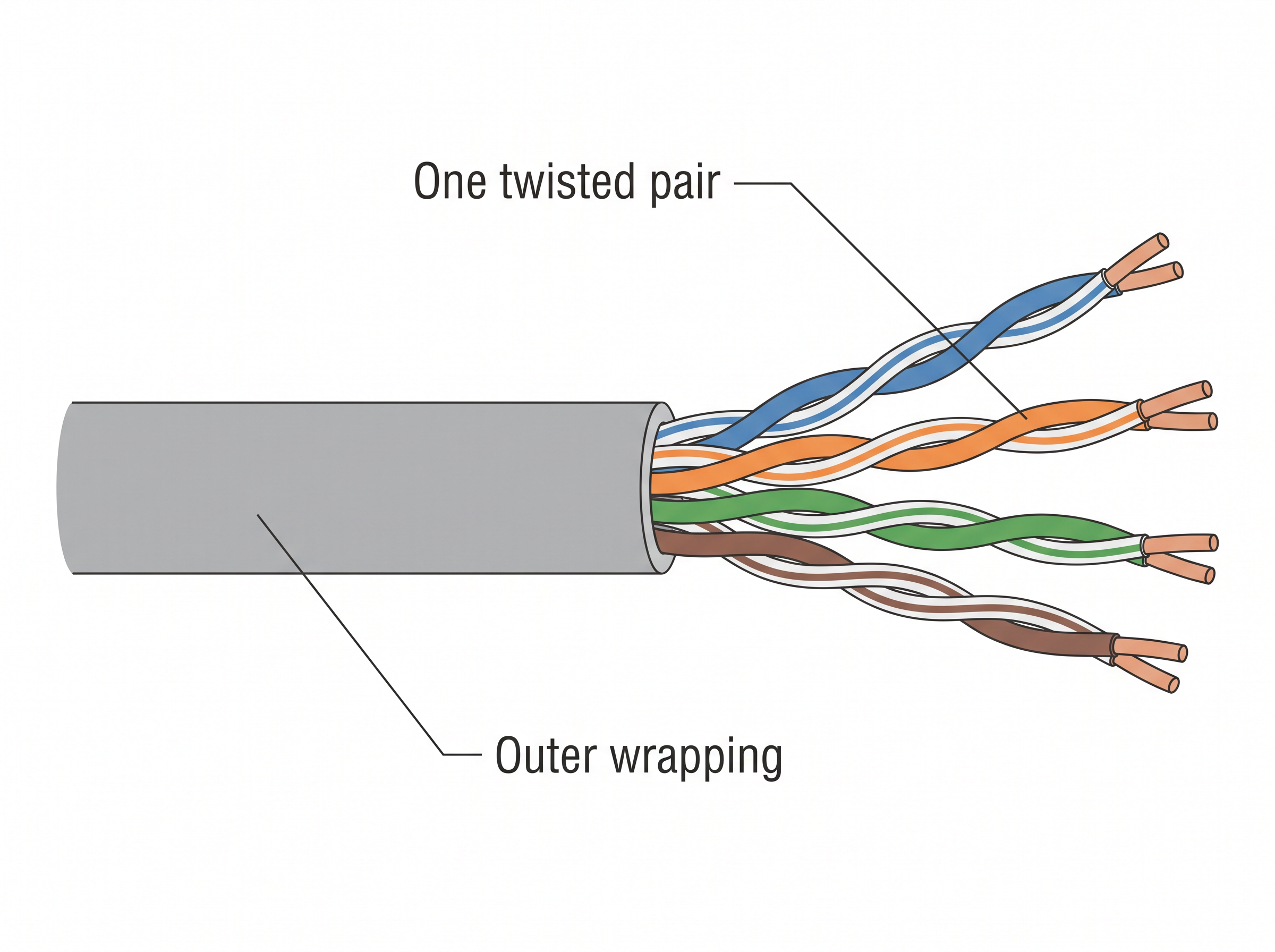
Fig. 11.11 – A twisted pair cable.
Why twist the wires at all? A current flowing in a wire produces a field that interferes with neighbouring wires, and a straight pair lying beside another straight pair would pick up a steady disturbance from it. Twisting the two wires of a pair together means that each of them is exposed to that interference almost equally and for equal lengths, so the unwanted effect largely cancels out. The twisted configuration therefore minimises the effect of electrical interference from similar pairs close by.
Twisted pairs are less expensive than the other two wired media and are the most commonly used, in telephone lines and in local area networks. They are of two types, shown in Fig. 11.12: unshielded twisted-pair (UTP), in which the pairs have only their plastic covers, and shielded twisted-pair (STP), in which a metal shield is wrapped around the pair to keep external interference out.
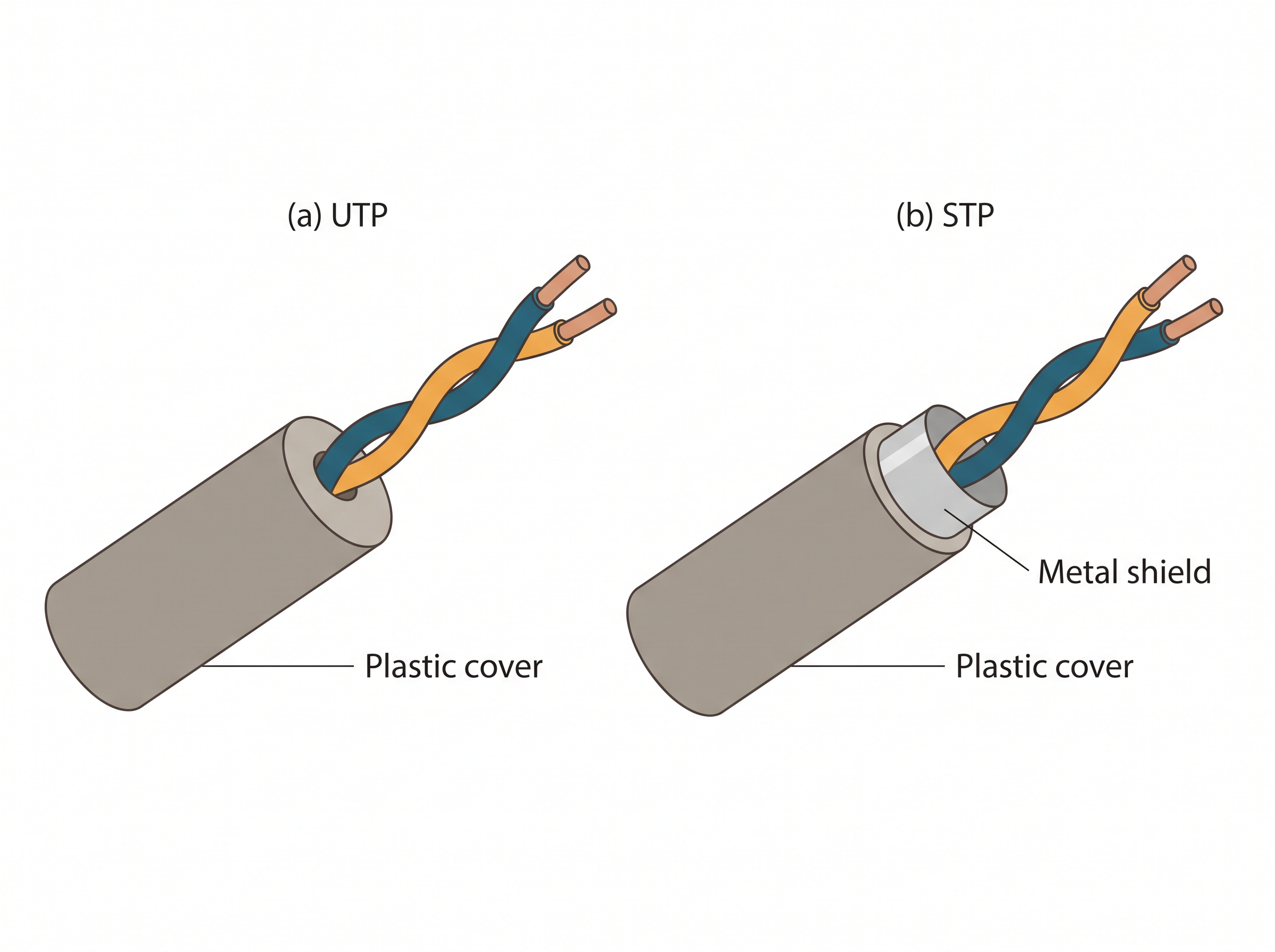
Fig. 11.12 – (a) Unshielded and (b) shielded twisted pair.
11.6.1.2 Co-axial Cable
A co-axial cable is better shielded than a twisted pair and offers more bandwidth. Its construction, shown in Fig. 11.13, explains the name: everything shares one axis. At the core is a copper wire, surrounded by an insulating material. The insulator is in turn surrounded by an outer conductor, usually a copper mesh, and this outer conductor is wrapped in a protective plastic cover.
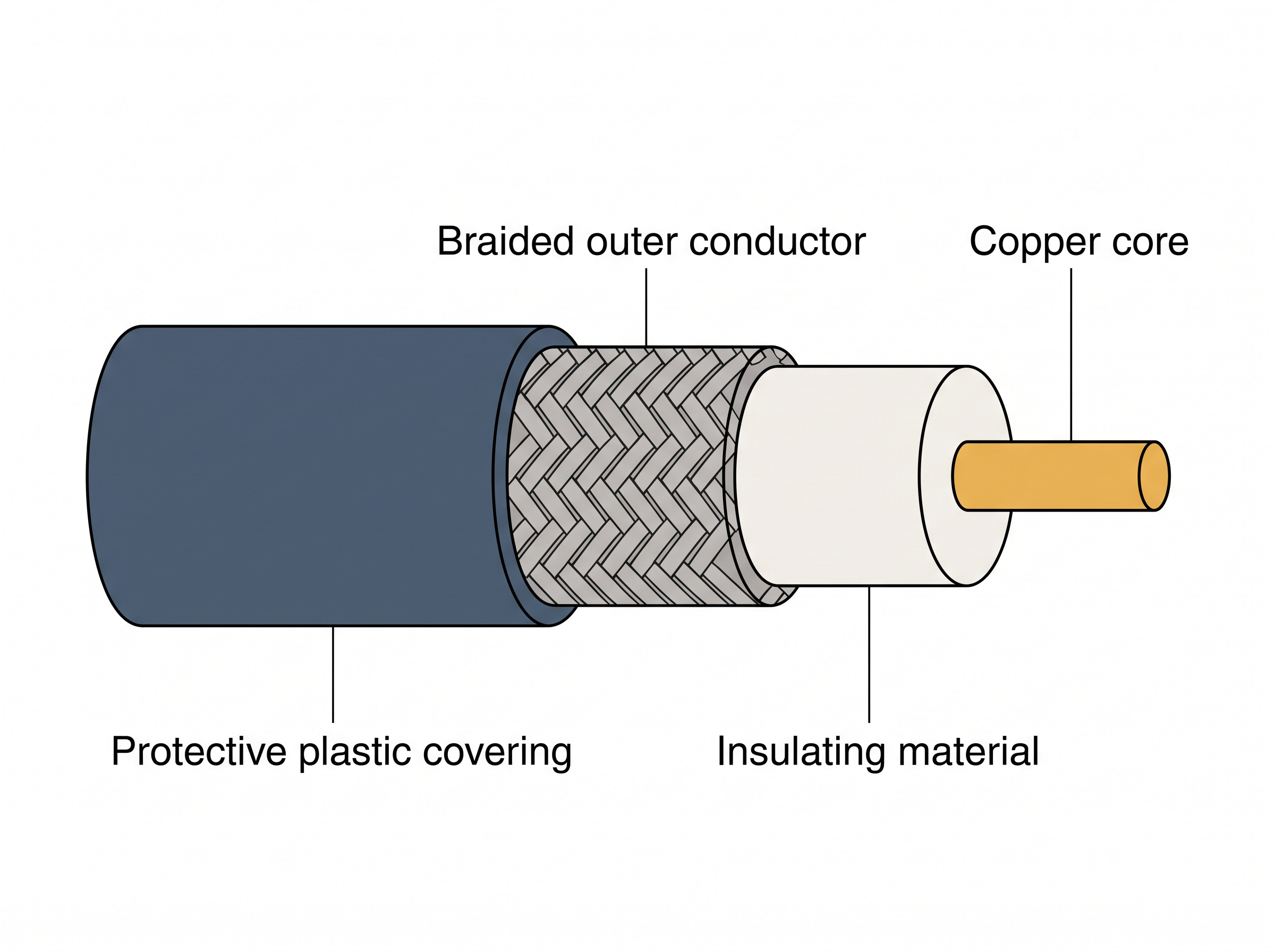
Fig. 11.13 – Layers of a co-axial cable.
The key to the success of this design is the shielding. The braided outer conductor surrounds the core along its whole length, so environmental electrical interference reaches the outer layer rather than the signal, and the copper core can carry data quickly without being disturbed. This is why co-axial cables are used to carry signals of higher frequencies over longer distances than a twisted pair manages.
11.6.1.3 Optical Fibre
An optical fibre cable carries data as light, travelling inside a thin fibre of glass. At the centre is a thin transparent strand of glass, covered with a layer of less dense glass called cladding, and the whole arrangement is covered with an outer jacket made of PVC or Teflon.
The mechanism is worth understanding rather than memorising. When light travelling in the denser glass core strikes the boundary with the less dense cladding at a shallow angle, it does not pass out into the cladding; it is reflected entirely back into the core. This is total internal reflection, and because it happens again and again along the length of the cable, the light follows the fibre in a zig-zag path even when the cable bends, as Fig. 11.14 shows.
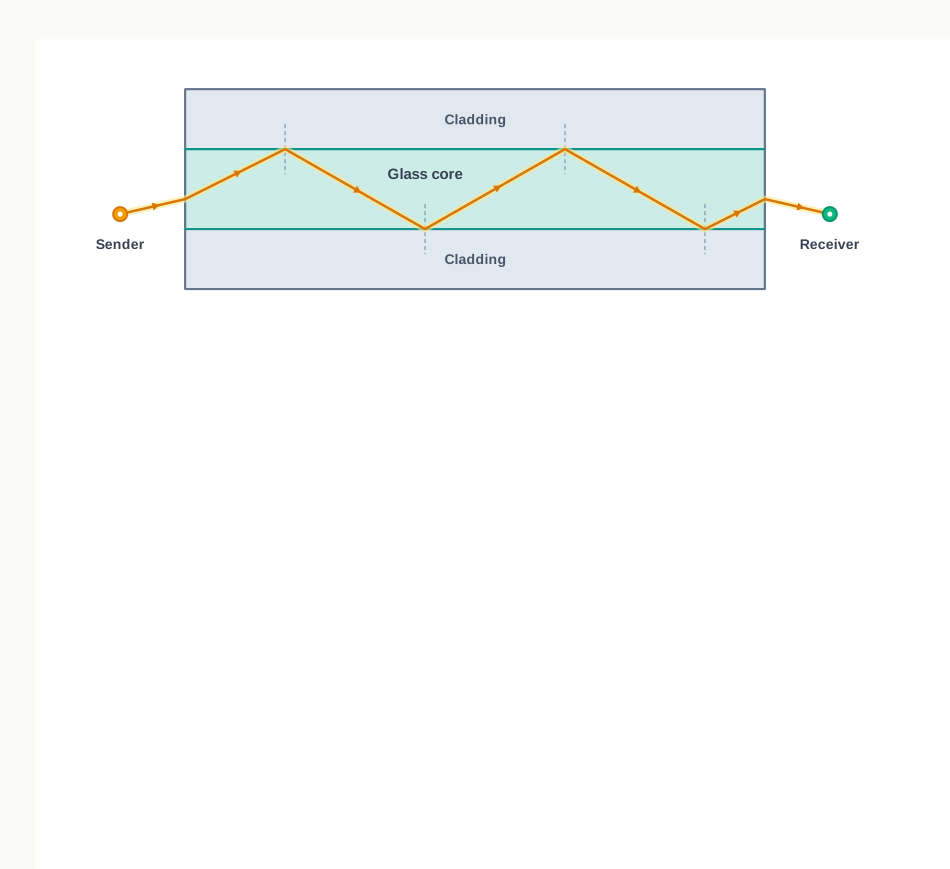
Fig. 11.14 – Total internal reflection in an optical fibre.
Such cables are usually used in backbone networks — the high-capacity links that join different segments of a network together. They are light in weight and have much higher bandwidth, which means a much higher data transfer rate. Signals can travel longer distances, and because the signal is light rather than current, electromagnetic noise cannot affect the cable at all.
There are two costs. Optical fibre is expensive, and it is unidirectional: light is sent in one direction only, so two cables are required for full-duplex communication. That last point connects directly to section 11.4 — a medium that can physically carry only one direction cannot by itself give you simultaneous two-way communication.
11.6.2 Wireless Transmission Media
In wireless communication technology, information travels in the form of electromagnetic signals through air. An electromagnetic spectrum of frequency ranging from 3 KHz to 900 THz is available for wireless communication. Wireless technologies allow communication between two or more devices over short to long distances without requiring any physical media, and there are several such technologies in daily use, including Bluetooth, Wi-Fi and WiMax.
The spectrum range from 3 KHz to 900 THz is divided into four categories according to frequency, shown in Fig. 11.15: radio waves, microwaves, infrared waves, and visible or light waves. Of these four, three are used for wireless communication, and those three are the ones taken up below.
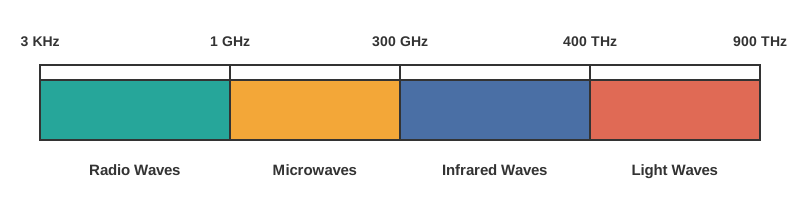
Fig. 11.15 – The electromagnetic wave spectrum.
11.6.2.1 Radio Waves
Radio waves occupy the frequency range from 3 KHz to 1 GHz. They are omni-directional, which means they spread out in all directions from the antenna rather than travelling as a beam. This has a practical consequence you rely on daily: the sending and receiving antennas do not have to be aligned, which is why a radio in a moving vehicle keeps working.
Radio waves of frequency 300 KHz to 30 MHz can travel long distances, and those of frequency 3 KHz to 300 KHz can penetrate walls. Because they spread in all directions and are shared by everyone in range, they are susceptible to interference from other signals in the same band. They are used in AM and FM radio, in television and in cordless phones.
11.6.2.2 Micro Waves
Micro waves are electromagnetic waves in the frequency range 1 GHz to 300 GHz. Unlike radio waves they are unidirectional — they travel in one direction as a narrow beam. They cannot penetrate solid objects such as walls, hills or mountains, and they need line-of-sight propagation, meaning that the two communicating antennas must face each other with nothing in between. That requirement is exactly why the dish antennas mentioned earlier are placed on tall buildings and towers.
Microwaves are used for point-to-point or unicast communication, such as radar and satellite links, and they provide a very large information-carrying capacity.
11.6.2.3 Infrared Waves
Infrared waves are electromagnetic waves in the frequency range 300 GHz to 400 THz. These are very high frequency waves and cannot penetrate solid objects such as walls — a limitation that turns out to be useful, because it keeps one room’s infrared traffic from disturbing the next room’s.
They are used for short-distance, point-to-point communication: mobile-to-mobile, mobile-to-printer, remote-control-to-television, and Bluetooth-enabled devices communicating with a mouse, a keyboard and similar accessories.
Reading down the table, one pattern stands out. As the frequency rises, the waves become more directional and less able to pass through obstacles, but carry more information. That single trade-off explains why a radio station reaches a whole city while a television remote must be pointed at the set from a few metres away.
11.6.3 Wireless Technologies
Knowing which waves exist is not the same as knowing how devices actually use them. Two arrangements are worth studying in detail, because you meet both every day.
11.6.3.1 Bluetooth
Bluetooth is a short-range wireless technology used to connect mobile phones, a mouse, headphones, keyboards, computers and similar devices over a short distance. It is what lets you print a document on a Bluetooth-enabled printer with no physical connection.
Every such device carries a low-cost transceiver chip — a single chip that both transmits and receives. The chip uses the unlicensed frequency band of 2.4 GHz, and the devices can send data within a range of 10 metres at a speed of 1 to 2 Mbps. “Unlicensed” means no permission or fee is required to use that band, which is a large part of why the technology became cheap enough to put in ordinary accessories.
Devices communicating within that range of 10 metres build a small network of their own, a personal area network (PAN) called a piconet. The devices in a piconet work in a master–slave configuration, in which one device directs the exchange and the others respond to it. A master device can communicate with up to 7 active slave devices at the same time.
Bluetooth technology allows up to 255 devices to build a network. Out of them, 8 devices can communicate at the same time — the master together with its 7 active slaves — and the remaining devices stay inactive, waiting for a response command from the master device.
11.6.3.2 Wireless LAN
A wireless local area network (LAN) is another way of communicating without cable, and it is the popular way of connecting to the Internet. The Institute of Electrical and Electronics Engineers (IEEE) assigns numbers to the different standards of LAN. The wireless LAN is numbered 802.11, and it is popularly known as Wi-Fi.
Such a network consists of communicating devices such as laptops and mobile phones, together with a network device called an access point (AP), which is installed in a building or on a floor. An access point is a device used to create a wireless local area network by connecting to a wired router, switch or hub. The access points are connected to the wired network, and all the wireless devices communicate, or reach the Internet, through an access point. Fig. 11.16 shows the arrangement.
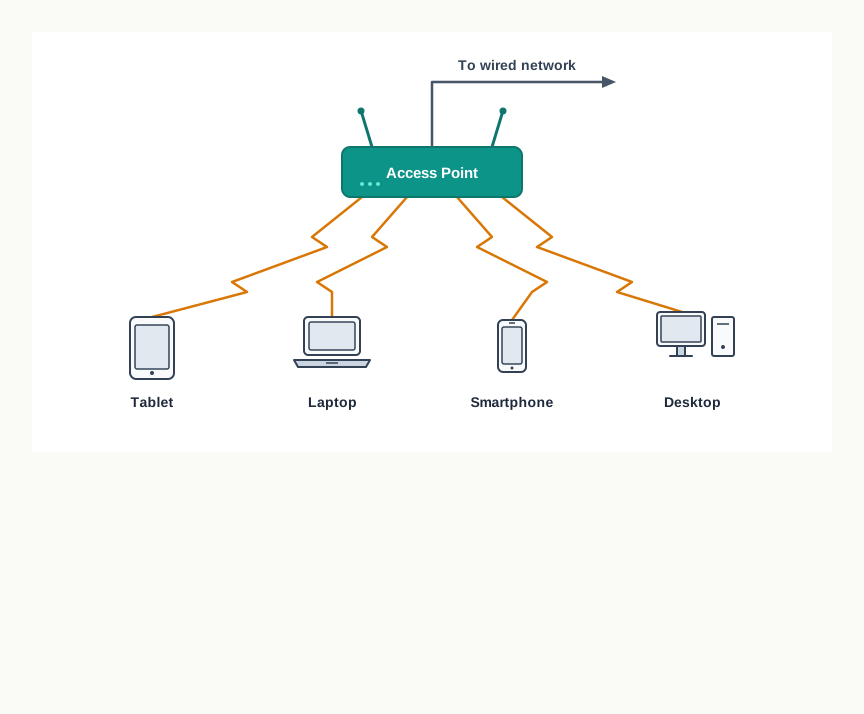
Fig. 11.16 – A wireless local area network.
This gives users the flexibility to move around within the network area while remaining connected. Three benefits of a wireless LAN (WLAN) are usually listed:
- Wireless connections can be used to extend or replace an existing wired infrastructure.
- They have resulted in increased access for mobile devices.
- They provide easy access to the Internet in public places.
11.7 Mobile Telecommunication Technologies
Today the mobile phone network is the most used network in the world. Being connected while on the move makes it convenient to reach people by call or instant message, and the same network is a handy way to use the Internet without any wired connection at all. Besides people, the Internet of Things (IoT) — everyday objects given the ability to communicate over a network — now lets us control and exchange data with smart devices through the same infrastructure.
That infrastructure did not arrive complete. The architecture of the mobile network has evolved rapidly over the last few decades, and the landmark achievements along the way are classified as generations, identified as 1G, 2G, 3G, 4G and 5G. Each generation is not merely a faster version of the last; each one changed what the network was fundamentally carrying.
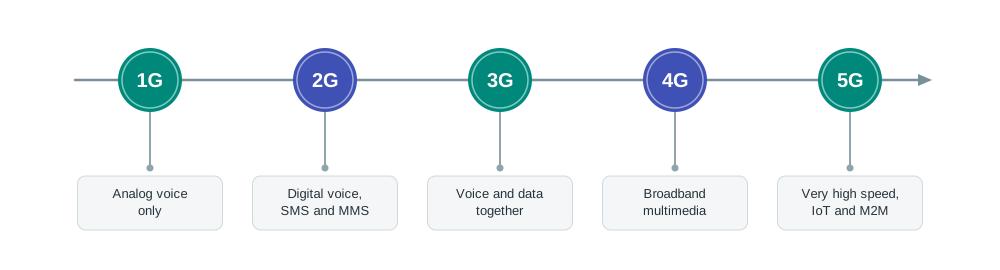
Fig. 11.17 – Evolution of mobile telecommunication generations.
From analog voice to digital voice
The first generation (1G) mobile network system came around 1982. It was used to transmit only voice calls, and analog signals were used to carry the voices between the caller and the receiver. There was no provision for data of any kind — the network was a telephone system that happened to be wireless.
The second generation (2G) mobile network system came around 1991. Instead of analog signals, voice calls were transmitted in digital form, which gave improved call quality. The increased capacity allowed more people to talk simultaneously, and security improved as well, because signals in digital form could be encrypted. Digital transmission also made an additional service possible: sending SMS and MMS, that is, text messages and multimedia messages.
The step from 1G to 2G is worth dwelling on, because it is the same step this whole chapter turns on. Once a voice is a stream of bits rather than a wave shaped like the speaker’s voice, the network stops caring what the bits mean. Text and pictures can then travel on a system built for speech, which is precisely how messaging appeared.
From voice to data
The third generation (3G) mobile network technology was developed during the late 1990s but was introduced commercially around 2001. It offered both digital voice and data services, providing Internet access through the same radio towers that provide voice service to the mobile phone. It allowed greater voice and data capacity, so more simultaneous calls could be handled within the same frequency range, along with a significantly faster data transfer speed.
Demand for faster data kept increasing, and 4G mobile networks were developed in response. 4G is much faster than 3G and has changed telecommunication considerably by taking the wireless experience to a different level. 4G systems support interactive multimedia, voice, video, wireless Internet and other broadband services, and technologically 4G is very different from 3G rather than being a refinement of it.
The fifth generation
The fifth generation, or 5G, allows data transfer in Gbps, which is far faster than 4G. It was designed as a milestone development for the success of IoT and machine to machine (M2M) communication — direct communication between devices, wired and wireless, with no person involved at either end. It is intended to support the connected devices of the future, such as connected vehicles and the many objects that make up the Internet of Things. Commercial 5G services began to be introduced from around 2019, and in India they were launched in October 2022.
11.8 Protocol
The last of the five components named in section 11.2 is the one that cannot be photographed. A cable can be held in the hand and an antenna can be pointed at; the rules that make an exchange work exist only as an agreement between the machines at either end.
In communication, a protocol is a set of standard rules that the communicating parties — the sender, the receiver, and all the intermediate devices along the way — need to follow. Notice that the intermediate devices are included. A rule obeyed by the two ends alone would not be enough, because the data passes through machines belonging to neither of them.
Rules are needed because the two ends are rarely alike. The sender and the receiver can belong to different networks, placed at different geographic locations. The data transfer rates of those networks can differ, and the data may have to be sent in different formats along the way. Without an agreement, each machine would make its own reasonable assumptions, and reasonable assumptions that differ produce nothing but noise.
11.8.1 Need for Protocols
Protocols are needed for several distinct reasons — flow control, access control, addressing, and others. It is worth seeing at least two of them concretely, because each names a failure that would otherwise be unavoidable.
Flow control
Flow control is required when the sender and the receiver work at different speeds of sending and receiving data. Suppose computer A sends data at 100 Mbps while computer B can take it in only at 10 Mbps, as in Fig. 11.18. Nothing in the cable prevents A from transmitting at its own comfortable rate, and nothing warns it that B is falling behind. The bits that B cannot accept in time are simply lost.
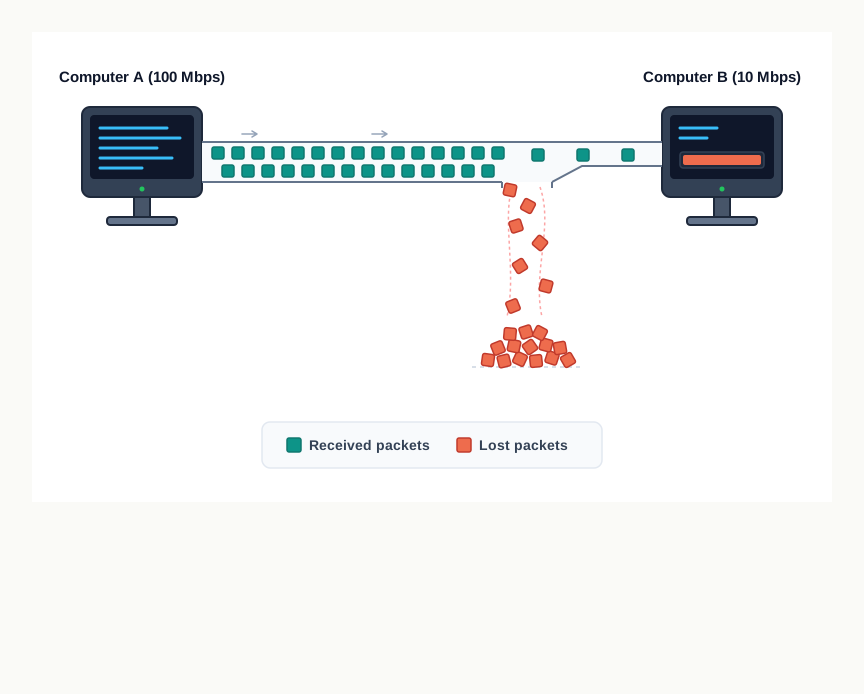
Fig. 11.18 – Packet loss due to speed mismatch.
The remedy is a rule: computer B must be able to inform computer A about the speed mismatch, so that A can adjust its rate of transmission. The important point is that the correction has to be built into the rules of the exchange. Nothing in the medium can do it.
Access control
Access control is required to decide which nodes on a shared communication channel may use the link at a particular instant of time. Where several computers share one link, and two of them transmit at the same moment, their data packets collide on the medium, and the result is loss or corruption of the data of both. A protocol decides whose turn it is, and so prevents the collision rather than repairing it afterwards.
What else protocols settle
Beyond these two, protocols also define:
- how computers identify one another on a network.
- the form to which the data should be converted for transit.
- how a node decides whether data that has arrived is meant for it or is to be forwarded to another node.
- how it is ensured that all the data has reached the destination without any loss.
- how the packets are rearranged and processed at the destination.
That is a long list, and it hints at why there is no single grand protocol for a network. If all the rules of a communication network were defined in one place, it would become complex to ensure that every communicating party followed all of them. The work is therefore divided among several protocols, each with a defined job, and the sections that follow take up the ones you meet most often.
11.8.2 HyperText Transfer Protocol (HTTP)
HyperText Transfer Protocol (HTTP) is the primary protocol used to access the World Wide Web (WWW). Its development was led by Tim Berners-Lee at CERN in 1989, and it was later standardised in collaboration with the Internet Engineering Task Force (IETF) and the World Wide Web Consortium (W3C).
HTTP is a request–response protocol, also called a client–server protocol, and it runs over TCP. Its common use is between a web browser, which is the client, and a web server, which is the server. It facilitates access to hypertext from the World Wide Web by defining how information is formatted and transmitted, and how web servers and browsers should respond to the various commands. Hypertext here means a document containing text or images that can be linked to another document or piece of text.
A web page is written using a markup language such as HyperText Markup Language (HTML) and stored on a web server, from where it is reached by its uniform resource locator (URL). When a user opens a browser and types the URL of the intended page, a logical communication link between the user’s machine and the web server is created using HTTP, as Fig. 11.19 shows. The browser sends an HTTP request to the server on which that site is hosted; the HTTP response from the server fetches and sends back the requested web page, which the browser then displays.
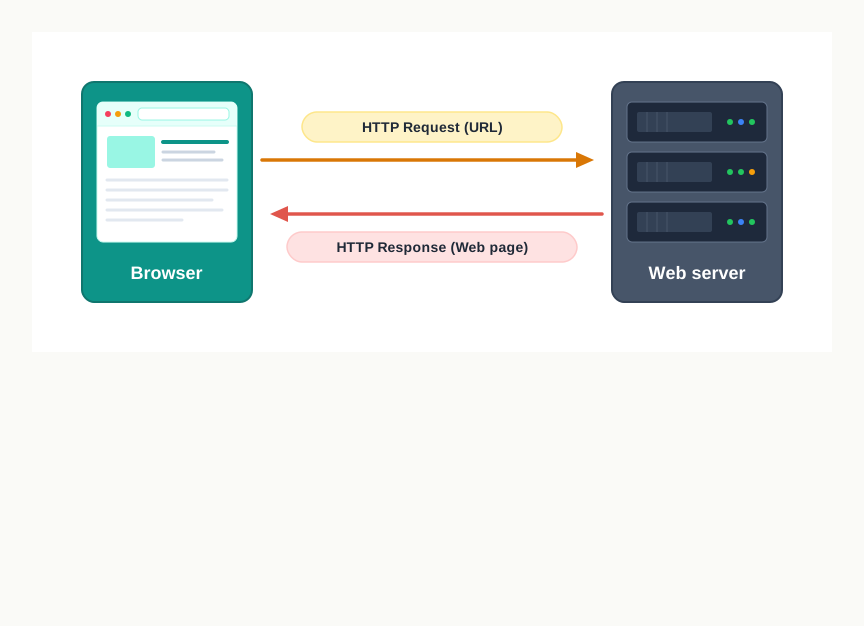
Fig. 11.19 – The HTTP request–response cycle.
11.8.3 File Transfer Protocol (FTP)
File Transfer Protocol (FTP) is the protocol used for transferring files from one machine to another. Like HTTP, it works on a client–server model.
When a user requests a file transfer with another system, FTP sets up a connection between the two nodes for accessing the file. The user may optionally authenticate with a user ID and a password, and then specifies the name and the location of the desired file. After that, another connection is set up, and the file transfer happens directly between the two machines. Some servers provide FTP logins without authentication, for files that are meant to be openly available.
Transferring a file between two systems looks simple only because FTP is quietly settling differences between the two machines, such as:
- their use of different conventions while naming files.
- their different ways of representing text and data.
- their different directory structures.
Each of these would otherwise stop a transfer, or complete it and leave the file unusable at the far end.
11.8.4 Point to Point Protocol (PPP)
Point to Point Protocol (PPP) is a communication protocol that establishes a dedicated and direct connection between two communicating devices. It defines how the two devices will authenticate each other and set up a direct link between them to exchange data. Two routers with a direct connection communicate using PPP, and so do Internet users who connect their home computers to the server of an Internet service provider (ISP) through a modem.
The communicating devices should have duplex modes for using this protocol — a requirement that follows from what the protocol does, since each end must be able to reply about what it received. PPP maintains data integrity by ensuring that the packets arrive in order, and it intimates the sender about damaged or lost packets and asks for them to be sent again.
11.8.5 Simple Mail Transfer Protocol (SMTP)
Simple Mail Transfer Protocol (SMTP) is the protocol used for email services. It works from the information written on the message header, in the way a postal service works from the envelope, and is not concerned with the content of the message inside. Each email header contains the email addresses of the recipients. The email, header and body together, is entered into a queue of outgoing mails.
The SMTP sender program takes mails from the outgoing queue and transmits them to their destinations. When it successfully delivers a particular mail to one or more destinations, it removes the corresponding receiver’s email address from that mail’s destination list. When the mail has been delivered to all its recipients, it is removed from the outgoing queue altogether. At the other end, the SMTP receiver program accepts each mail that arrives and places it in the appropriate user mailbox.
That business of striking addresses off a list is worth noticing. It is how the protocol keeps track of partial delivery: a mail addressed to four people and delivered to three is not finished, and the queue remembers exactly which one is still owed.
11.8.6 Transmission Control Protocol (TCP)/Internet Protocol (IP)
Transmission Control Protocol (TCP)/Internet Protocol (IP) is a set of standardised rules that uses a client–server model of communication, in which a user or machine acting as a client requests a service from a server on the network. The two halves have separate jobs, and keeping them apart is the whole point of the design.
The IP part ensures that each computer or node connected to the Internet is assigned an IP address, which is used to identify that node independently of every other. Without this there would be no way to say where data is going; it can fairly be described as the adhesive that holds the whole Internet together.
The TCP part ensures that the message or data is broken into smaller chunks, called IP packets. Each of these packets is routed through the Internet along a path from one router to the next, until it reaches the specified destination. TCP guarantees the delivery of the packets to the designated IP address, and it is also responsible for ordering the packets so that they are delivered in sequence.
Ordering is necessary because of how the Internet is built. There are many redundant connection paths in it, with backbones and ISPs connecting to each other at multiple locations, so there are many possible paths between two hosts. Two packets of the same message can therefore take two different routes, depending on congestion and other conditions along those routes. When all the packets finally reach the destination machine, they are reassembled into the original message at the receiver’s end.
11.9 Summary
Data communication is the exchange of data between two or more networked or connected devices, each capable of sending or receiving data over a communication medium. Whatever the data is — text, image, audio, video or multimedia — it travels as a sequence of bits, so one channel can carry any of them.
Data communication has five components: sender, receiver, message, communication media and protocols. The sender and the receiver are together called nodes. The communication media, also called transmission media, is the wired or wireless path along which the message travels.
The transmission medium is also called a channel, and its capacity is the maximum amount of signals or traffic it can carry. Capacity is measured in two ways — bandwidth and data transfer rate.
Bandwidth is the range of frequencies available for transmission through a channel, normally the difference between the maximum and the minimum frequency in the composite signal. It is measured in hertz, with 1 KHz = 1000 Hz and 1 MHz = 1000 KHz = 1000000 Hz.
Data transfer rate, also called bit rate, is the number of bits transmitted between source and destination in one second, measured in bits per second (bps). Its higher units are 1 Kbps = 2^10 bps = 1024 bps, 1 Mbps = 2^20 bps = 1024 Kbps, 1 Gbps = 2^30 bps = 1024 Mbps, and 1 Tbps = 2^40 bps = 1024 Gbps.
Bandwidth and data transfer rate are not the same measurement. Bandwidth is a property of the channel and sets the upper limit; the data transfer rate is what a transmission actually achieves under that limit. A higher bandwidth allows a higher data transfer rate.
Data transfer takes place over a point-to-point or a multipoint communication channel, and communication is of three types — simplex, half-duplex and full-duplex.
In simplex communication the flow is one way, with one device always sending and the other always receiving, and the entire capacity of the link is used for that direction. In half-duplex communication both devices can send and receive, but not at the same time. In full-duplex communication both devices send and receive simultaneously, with the capacity of the link shared between the two directions, or with two separate simplex lines used.
Giving every pair of devices a dedicated connection is costly in a large network. Switching is the alternative, in which data is routed through various nodes so that a temporary route is formed for the transmission. Two switching techniques are commonly used — circuit switching and packet switching.
In circuit switching a dedicated path is identified between sender and receiver before communication begins, and all the data follows that path, which stays occupied for the whole communication. In packet switching the message is broken into packets that travel independently and may take different routes; each packet has a header carrying the destination address and other information, and a message part. The packets are reassembled at the destination, and a channel is occupied only while a packet is passing over it.
Transmission media are classified as guided or unguided. In guided transmission there is a physical link of wire or cable, and these are known as wired media. In unguided transmission data travels through air as electromagnetic waves using antennas, and these are known as wireless media. Waves weaken with distance, so repeaters are installed to regenerate them.
Three wired media are commonly used: twisted pair cable, co-axial cable and fibre-optic cable. Twisted pair and co-axial carry electrical signals; optical fibre carries light. A twisted pair is two insulated copper wires twisted together, and the twisting reduces interference from nearby pairs; it is of two types, unshielded twisted-pair (UTP) and shielded twisted-pair (STP). A co-axial cable has a copper core, an insulator, a braided outer conductor and a plastic cover, and its shielding lets it carry higher frequencies over longer distances. An optical fibre has a glass core surrounded by less dense cladding and an outer jacket of PVC or Teflon; light stays in the core by total internal reflection. Fibre offers the highest bandwidth, is unaffected by electromagnetic noise and is used in backbone networks, but it is expensive and unidirectional, so two cables are needed for full-duplex communication.
An electromagnetic spectrum from 3 KHz to 900 THz is available for wireless communication, and it is divided into four categories according to frequency — radio waves, microwaves, infrared waves, and visible or light waves. Three of these are used for wireless communication: radio waves (3 KHz to 1 GHz, omni-directional, susceptible to interference, used in AM and FM radio, television and cordless phones); micro waves (1 GHz to 300 GHz, unidirectional, needing line-of-sight, used in radar and satellite links); and infrared waves (300 GHz to 400 THz, unable to pass through walls, used for short-distance point-to-point links).
Bluetooth is a short-range wireless technology using the unlicensed 2.4 GHz band, with a range of 10 metres and a speed of 1 to 2 Mbps. Devices within range form a personal area network called a piconet, working in a master–slave configuration in which a master can communicate with up to 7 active slaves; up to 255 devices may build such a network, of which 8 can communicate at a time.
A wireless LAN is the IEEE standard numbered 802.11, popularly known as Wi-Fi. Devices connect through an access point (AP), which is joined to the wired network by a router, switch or hub, and all wireless devices reach the network through it.
Mobile communication technologies are classified into generations identified as 1G, 2G, 3G, 4G and 5G. 1G carried only analog voice; 2G made voice digital and added SMS and MMS; 3G brought voice and Internet data together; 4G added interactive multimedia and broadband services; 5G offers data transfer in Gbps and supports IoT and machine to machine (M2M) communication.
A protocol is a set of standard rules that the sender, the receiver and all intermediate devices must follow. Protocols are needed for flow control, access control and addressing, among other things, and they also define how computers identify one another, the form data takes in transit, how a node decides whether data is for it or is to be forwarded, how loss is detected, and how packets are rearranged at the destination.
HyperText Transfer Protocol (HTTP) is the primary protocol used to access the World Wide Web; it is a request–response protocol running over TCP, between a browser and a web server. File Transfer Protocol (FTP) transfers files between machines on a client–server model. Point to Point Protocol (PPP) establishes a dedicated, direct, authenticated link between two devices and asks for lost or damaged packets again. Simple Mail Transfer Protocol (SMTP) works from the email header to move mail from the outgoing queue to the recipients’ mailboxes. Transmission Control Protocol (TCP)/Internet Protocol (IP) uses a client–server model in which IP assigns every node an address and TCP breaks the message into packets, guarantees their delivery to that address and restores their order at the destination.
11.10 Key Terms
Access point (AP) — a network device that creates a wireless local area network by connecting to a wired router, switch or hub, through which all the wireless devices reach the network.
Bandwidth — the range of frequencies available for transmitting data through a channel, taken as the difference between the highest and lowest frequency in the composite signal, and measured in hertz.
Bit — the smallest unit of data, holding either 0 or 1; all text, images, audio and video are represented as sequences of bits.
Bit rate — another name for data transfer rate.
Bluetooth — a short-range wireless technology working in the unlicensed 2.4 GHz band, used to connect devices such as phones, keyboards, headphones and printers over about 10 metres.
bps — bits per second, the unit in which data transfer rate is measured.
Capacity — the maximum amount of signals or traffic that a channel can carry.
Channel — a transmission medium regarded as a carrier of signals between two points.
Circuit switching — a switching technique in which a dedicated path is established between sender and receiver before communication begins, and all the data follows that path.
Cladding — the layer of less dense glass surrounding the core of an optical fibre, which keeps the light inside the core.
Co-axial cable — a wired medium with a copper core, an insulator, a braided outer conductor and a plastic cover, all sharing one axis.
Communication — the act of sending or receiving data.
Communication media — the wired or wireless path along which a message travels from source to destination; also called transmission media.
Data — the text, numbers, images, audio, video or multimedia content that is to be communicated.
Data communication — the exchange of data between two or more networked or connected devices over a communication medium.
Data transfer rate — the number of bits transmitted between source and destination in one second.
FTP — File Transfer Protocol; the protocol used for transferring files from one machine to another on a client–server model.
Full-duplex communication — bidirectional communication in which both devices can send and receive at the same time.
Guided transmission — transmission along a physical wire or cable; the signals of wired media.
Half-duplex communication — bidirectional communication in which both devices can send and receive, but only one of them at any moment.
HTML — HyperText Markup Language; the markup language in which a web page is written.
HTTP — HyperText Transfer Protocol; the request–response protocol used to access the World Wide Web, running over TCP.
IEEE — Institute of Electrical and Electronics Engineers; the international organisation that assigns numbers to the different standards of LAN.
Infrared waves — electromagnetic waves of frequency 300 GHz to 400 THz, unable to pass through solid objects, used for short-distance point-to-point communication.
IoT — Internet of Things; everyday objects given the ability to communicate and be controlled over a network.
IP — Internet Protocol; the part of TCP/IP that assigns each node an address and routes packets towards it.
IP address — the address assigned to a node connected to the Internet, by which it is identified independently of every other node.
ISP — Internet service provider; the organisation whose server a home computer connects to in order to reach the Internet.
LAN — local area network; a network covering a small area such as a building.
M2M — machine to machine; direct communication between devices, wired or wireless, with no person at either end.
Message — the data or information that is exchanged between the sender and the receiver.
Micro waves — electromagnetic waves of frequency 1 GHz to 300 GHz, unidirectional, needing line-of-sight propagation.
MMS — multimedia messaging service; the service introduced with 2G for sending multimedia messages.
Multipoint channel — a communication channel shared by more than two devices.
Node — any device on a network that can send data, receive data, or both.
Optical fibre — a wired medium that carries data as light along a glass core, retained by total internal reflection at the cladding.
Packet — a smaller piece into which a message is divided, made of a header carrying the destination address and other information, and a message part.
Packet switching — a switching technique in which packets travel independently through the network, possibly by different routes, and are reassembled at the destination.
PAN — personal area network; a small network formed by devices communicating over a very short range.
Piconet — the personal area network formed by Bluetooth devices within range, working in a master–slave configuration.
Point-to-point channel — a communication channel joining exactly two devices.
PPP — Point to Point Protocol; the protocol that establishes a dedicated, direct, authenticated link between two communicating devices.
Protocol — a set of standard rules that the sender, the receiver and all intermediate devices follow so that communication is successful and reliable.
Radio waves — electromagnetic waves of frequency 3 KHz to 1 GHz, omni-directional and susceptible to interference.
Receiver — a device capable of receiving data from a network.
Repeater — a device installed along a path to regenerate weakening signals with the same energy as before.
Sender — a device capable of sending data over a network.
Simplex communication — unidirectional communication in which one device only sends and the other only receives.
SMS — short message service; the text-messaging service introduced with 2G.
SMTP — Simple Mail Transfer Protocol; the protocol used for email services, working from the message header.
STP — shielded twisted-pair; a twisted pair cable with a metal shield around the pair.
Switching — routing data through intermediate nodes so that a temporary route is formed between sender and receiver.
TCP — Transmission Control Protocol; the part of TCP/IP that divides a message into packets, guarantees their delivery and restores their order.
TCP/IP — Transmission Control Protocol/Internet Protocol; the standardised set of rules, on a client–server model, by which data is addressed and delivered across the Internet.
Transmission media — the links that carry messages between communicating devices; another name for communication media.
Twisted pair cable — a wired medium of two insulated copper wires twisted together, bundled in a protective wrapping.
Unguided transmission — transmission through air as electromagnetic waves using antennas; the signals of wireless media.
URL — uniform resource locator; the address by which a web page stored on a web server is reached.
UTP — unshielded twisted-pair; a twisted pair cable in which the pairs have only their plastic covers.
VoIP — Voice over Internet Protocol; a communication methodology for delivering voice and multimedia communication over Internet protocol.
VoLTE — Voice over Long-Term Evolution; a standard for high-speed wireless communication for mobile phones, including IoT devices and wearables.
Wi-Fi — the popular name for the wireless LAN standard numbered 802.11.
WiMax — Worldwide Interoperability for Microwave Access; a wireless technology using a larger spectrum than Wi-Fi, giving a higher data transfer rate over a larger area.
Wired media — transmission media in which a physical wire or cable carries the signals.
Wireless LAN (WLAN) — wireless local area network; a local area network in which devices connect without cable, through an access point.
Wireless media — transmission media in which electromagnetic waves carry the signals through air.
WWW — World Wide Web; the collection of linked hypertext documents reached over the Internet, accessed primarily using HTTP.
11.11 Points to Ponder
Circuit switching wastes a held path during every pause in a conversation, yet the telephone system used it for a century and worked well. What did the reserved path buy that packet switching has to work hard to provide?
Packet switching lets packets of one message arrive out of order, and then spends effort putting them back in order at the destination. Why is it sensible to create a problem at one end of a network in order to solve a different problem in the middle of it?
A channel’s bandwidth is fixed by the physical medium, but the data transfer rate achieved on it varies from moment to moment. If you were asked to judge whether a link is “good”, which of the two would you ask for, and what would the other number still fail to tell you?
Radio waves spread in every direction, which is what makes a radio in a moving bus work. The same property is the reason wireless media are more exposed than a cable. Can a medium’s greatest convenience and its greatest weakness ever be separated, or are they always the same fact seen twice?
Optical fibre is faster, carries more and is immune to electrical noise, yet most rooms are still wired with twisted pair. What would have to change — in cost, in distance, or in what we ask of a network — before that stopped being the sensible choice?
The rules of a network are deliberately split among many protocols rather than gathered into one. What is gained by dividing them, and what does a machine at one end have to assume about a machine at the other for such a division to work at all?
11.12 Objective Questions
The unit in which the bandwidth of a channel is measured is:
- bits per second
- hertz
- bytes per second
- metres [1 mark]
Which transmission medium carries data in the form of light?
- Twisted pair cable
- Co-axial cable
- Optical fibre
- Radio waves [1 mark]
Electromagnetic waves in the frequency range 1 GHz to 300 GHz are called:
- Radio waves
- Micro waves
- Infrared waves
- Light waves [1 mark]
In packet switching, the header of a packet carries:
- only the message part of the data
- the destination address and other information
- the bandwidth of the channel
- the complete message being sent [1 mark]
In a piconet, the number of active slave devices with which a master device can communicate at the same time is:
- 2
- 7
- 8
- 255 [1 mark]
Assertion (A): Two optical fibre cables are needed for full-duplex communication between two devices. Reason (R): An optical fibre is unidirectional, carrying light in one direction only.
- Both A and R are true, and R is the correct explanation of A.
- Both A and R are true, but R is not the correct explanation of A.
- A is true but R is false.
- A is false but R is true. [1 mark]
Assertion (A): A walkie-talkie exchange is an example of half-duplex communication. Reason (R): In half-duplex communication both devices can transmit and receive at the same instant.
- Both A and R are true, and R is the correct explanation of A.
- Both A and R are true, but R is not the correct explanation of A.
- A is true but R is false.
- A is false but R is true. [1 mark]
Match each protocol in Column I with the work it does in Column II. | Column I | Column II | |—|—| | a. HTTP | i. Moves mail from the outgoing queue to the recipients’ mailboxes | | b. FTP | ii. Establishes a dedicated, direct, authenticated link between two devices | | c. SMTP | iii. Carries web pages between a browser and a web server | | d. PPP | iv. Transfers files from one machine to another | [1 mark]
Fill in the blank: The small personal area network formed by Bluetooth devices lying within range of one another is called a ____________. [1 mark]
State whether true or false: Bandwidth and data transfer rate are two names for the same quantity and are measured in the same unit. [1 mark]
Write the full form of each of the following: UTP, STP, WLAN, SMTP, IoT. [1 mark]
11.13 Check Your Concepts
Define bandwidth and state the unit in which it is measured. [2 marks]
What is a node in a network? Name one device that can act as both a sender and a receiver, and say when it does each. [2 marks]
Express 5 Mbps in bits per second, showing your working. [2 marks]
Name the two wired media that carry electrical signals, and state one way in which the second is better than the first. [2 marks]
Differentiate between simplex and half-duplex communication, giving one everyday example of each. [3 marks]
Why are the two wires of a twisted pair twisted around each other? Explain what would happen if they were laid straight and parallel beside other pairs. [3 marks]
Draw the structure of a packet and use it to explain how a packet reaches the correct destination and how the original message is restored there. [3 marks]
Explain the three commonly used wired transmission media, comparing them on construction, bandwidth and typical use. [4 marks]
What is meant by flow control and by access control? Explain, with one example each, what goes wrong when a protocol does not provide them. [4 marks]
Compare circuit switching and packet switching on four points, and give reasons for the technique you would choose for a large network shared by many users. [5 marks]
Explain the working of TCP/IP. State separately what IP does and what TCP does, and explain why the packets of one message may reach the destination out of order. [5 marks]
11.14 Output & Debugging
A user has to upload a scanned notice of 8 pages in 4 seconds. Each page holds 1500 characters and each character is stored in 8 bits. Calculate the data transfer rate the channel must provide, in bps and then in Kbps, showing every step. [3 marks]
A student writes: “A composite signal on a channel contains frequencies between 200 KHz and 1 MHz. Therefore the bandwidth of the channel is 1 MHz.” Identify the single error in this reasoning and give the correct bandwidth in KHz. [2 marks]
Complete the classification of communication media below by supplying the four missing entries in their correct places. Communication media → Wired media: twisted pair cable, ____________, ____________ ; Wireless media: ____________, micro waves, ____________ . [2 marks]
For each situation, name the transmission medium or wireless technology you would use, and give one line of justification.
- Connecting a wireless mouse to a laptop on the same table.
- Linking two towers on opposite hilltops that are in clear view of each other.
- Carrying the backbone link between two segments of a large network across a campus. [3 marks]
Copy the table below and fill in the four blank cells. | Feature | Bandwidth | Data transfer rate | |—|—|—| | What it measures | ____________ | The number of bits actually carried per second | | Unit | Hertz | ____________ | | Belongs to | ____________ | The transmission taking place on the channel | | Relationship between the two | ____________ | — | [3 marks]
11.15 Case-Based Questions
- A school is setting up its network. Thirty computers stand in one laboratory hall. The office block is 1.5 kilometres away across open ground, with a clear line of sight from the roof of one building to the roof of the other. Teachers also want to use laptops anywhere inside the laboratory block without trailing cables.
- Name the transmission medium you would use to join the thirty computers inside the hall, and give one reason. [1 mark]
- Name a suitable wireless medium for the link between the two buildings, and state the one condition the school must keep satisfied for it to work. [2 marks]
- Name the device that must be installed so that the teachers’ laptops can join the network, and state what it must itself be connected to. [1 mark] [4 marks]
- At a bus depot, three arrangements are in use. A control room sends the day’s timetable to electronic display boards at every platform; the boards never send anything back. Depot staff on the platforms speak to the control room on handsets, pressing a button to talk and releasing it to listen. The depot manager also has an ordinary telephone line on which both parties can speak at once.
- Classify each of the three arrangements as simplex, half-duplex or full-duplex, with one line of reasoning for each. [3 marks]
- The timetable updates travel to the display boards over a network shared with other traffic. State which switching technique is suitable here and give two reasons. [2 marks] [5 marks]
- A shop uploads its day’s sales record to a head office server every evening. The record holds 2,00,000 characters, each stored in 8 bits, and the upload must finish within 40 seconds. The shop’s connection provides a data transfer rate of 32 Kbps.
- Calculate the data transfer rate required for the upload, in bps. [2 marks]
- State, with working, whether the shop’s present connection is sufficient. [1 mark]
- Name the protocol used for transferring such a file from one machine to another, and state one difference between two machines that this protocol settles on the shop’s behalf. [2 marks] [5 marks]